
How to Build an Inbound Meeting Workflow That Identifies the Buying Committee and Helps You Close the Deal (with Cal.com, Clay, HeyReach, and Instantly)

In this post:
The window between the booking and the call is where deals are actually won. Your marketing got the meeting booked; most teams then waste it. The rep walks in unprepared, the rest of the buying committee never hears from you, the interest goes cold, and revenue that should have closed doesn't.
You can't fix that with effort. Nobody has time to research every company, find the decision makers, route inbound leads to the right rep, and warm up a buying committee by hand. It only works when a system does it.
This post is for B2B founders, sales leaders, and small business owners whose pipeline lives on inbound bookings. Here is what we will cover: the scheduling process and booking basics that help you book meetings at a higher rate and turn the same website traffic into more meetings, the tech stack, and the step-by-step flow that turns every booking into a researched, multi-threaded opportunity so you convert leads instead of just meeting them. Build it from this walkthrough, or have us build it for you.
TL;DR
Every inbound booking should trigger an automated workflow: enrich the lead, map the buying committee, brief your rep, and launch conversations with the other stakeholders, all before the first call.
That's how qualified leads become customers instead of calendar entries. An effective setup comes down to three things (speed, automation, and personalization), and every step below serves one of them.
Building and maintaining that workflow is a service we provide at Nebor. We wire it together in your accounts, so your inbound meetings arrive enriched and multi-threaded and your reps just show up to well-prepared meetings.
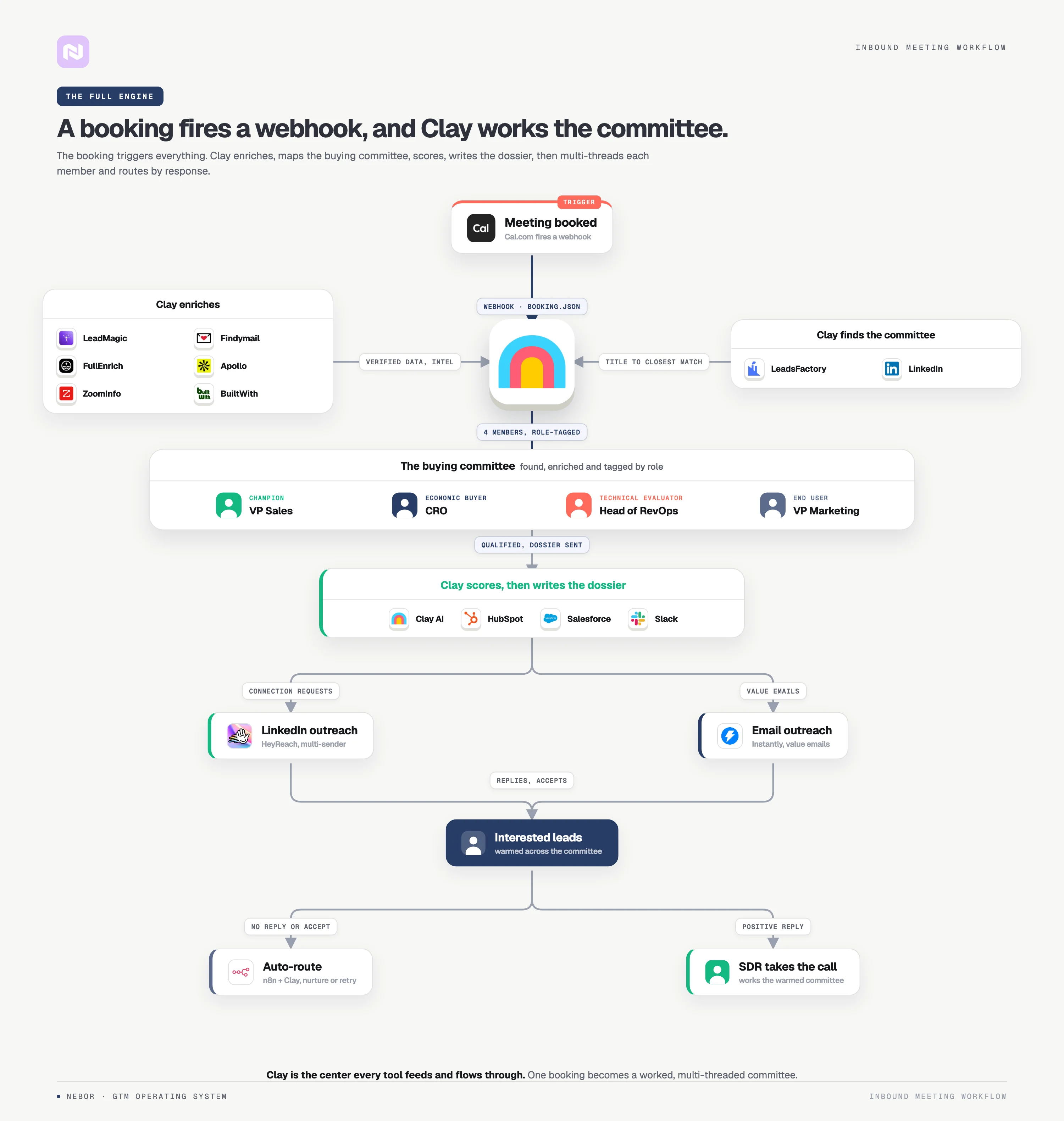
Here's the general shape (the final engine always depends on your business and ICP):
If you'd rather skip straight to having it built, book a 15-minute call and we'll scope the engine for your business.
How most teams waste their best inbound meetings by showing up to calls unprepared
What you do with the time between the booking and the actual call determines whether inbound meetings turn into pipeline or a polite "we'll think about it."
What you do with the other people at that company matters too: the ones who didn't book the meeting but will absolutely influence the buying decision. That determines whether pipeline turns into revenue.
Here's the thing that should bother you. Gong looked at 1.8 million opportunities and found that won deals had twice as many buyer contacts as lost ones. In deals over $50K, multi-threading raised win rates by 130% on average. The single-threaded deal, where your rep only talks to one person, is the risky one.
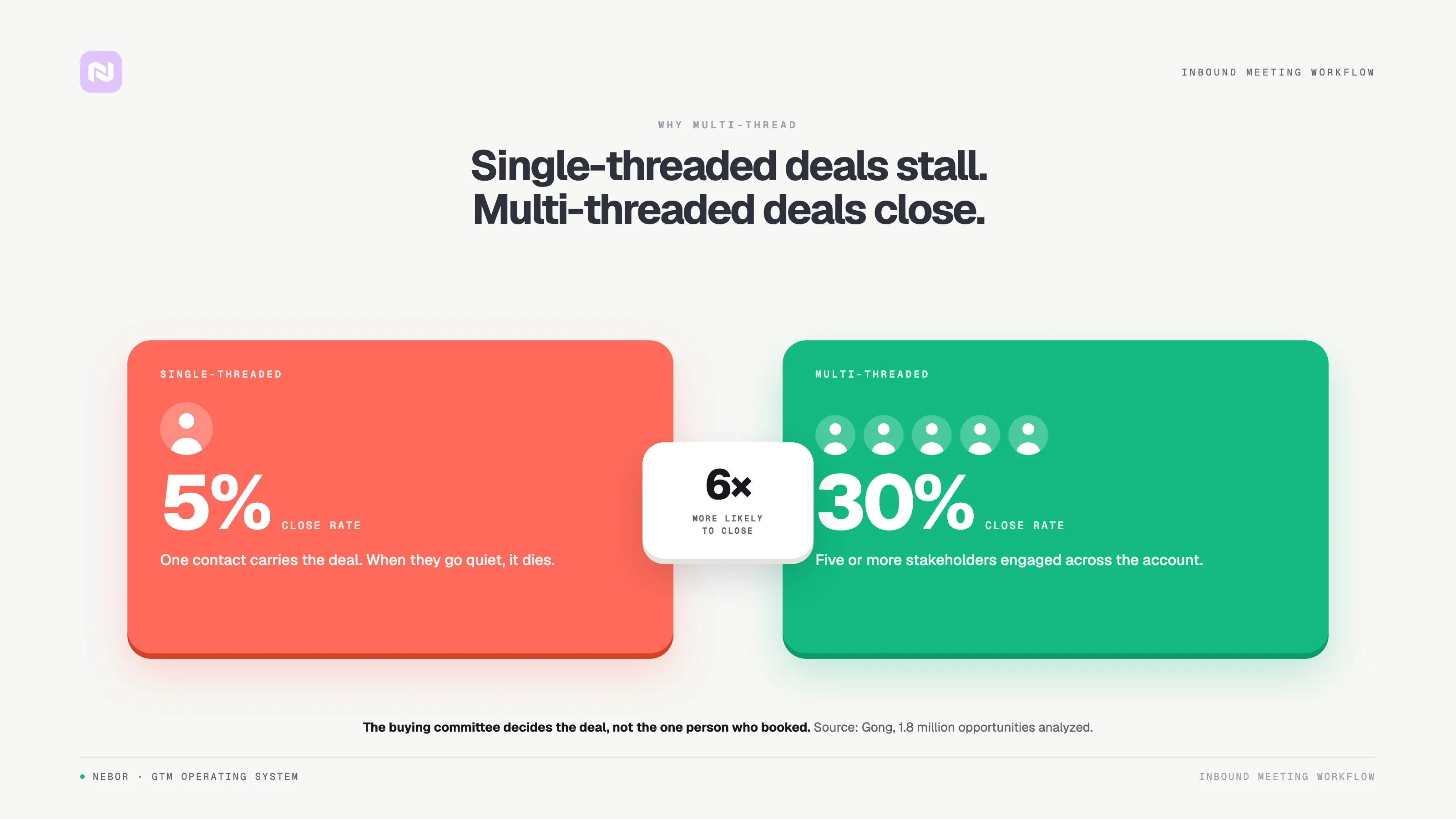
So the question isn't whether to multi-thread. It's whether you can afford not to. And "we'll do it manually" fails because reps don't have the time, which is exactly why we automate it.
That's where our engine comes in: every inbound booking goes from form fill to a fully enriched, multi-threaded opportunity automatically. By the time your rep walks into the call, they know everything about the lead's company, other stakeholders already know your name, and the path to a closed deal is dramatically shorter.
The rest of this piece shows how we build sales automation systems like this from the ground up.
Before the automation: get the booking experience right so inbound leads book more meetings
The engine only works if inbound leads actually reach your calendar, so the scheduling software and experience come first. Here are a few best practices that we see consistently lift conversions from our website to booked inbound meetings and capture more of the customers you actually want, whatever scheduling tools you use.
Keep the web form short so leads book meetings in one click
Every extra field on a web form costs you conversions. Keep forms to 3 to 5 fields; completion rates rise noticeably when leads can book meetings that fast. Ask for name, work email, company, and one qualifying question that helps you qualify leads before the call, and let enrichment fill in the rest of the form data.
Let leads book instantly, too. When a visitor fills out the form on your landing pages or web page and can pick a slot in one click right there on the website, you capture the interest while it's hot, and potential customers book meetings on the spot instead of filing demo requests that go stale. A "we'll get back to you to schedule" email is where demo requests go to die.
Design your event types in Cal (or any other tool of course) around what the lead wants: a 15-minute intro, a 30-minute demo, a 45-minute working session. Make sure each event type has its own scheduling web page with the time zone and location handled automatically, so your website, marketing ads, and email signatures all route inbound leads to the right meeting length.
Respond fast, because speed decides who wins the lead
The classic lead response studies are brutal on this point: responding to inbound leads within 5 minutes makes you up to 100 times more likely to reach them than waiting half an hour, and companies that respond within 30 minutes are still 21 times more likely to qualify the lead than slower competitors.
The fastest teams convert leads to meetings in under 60 seconds: a demo booked before the coffee cools. That's the speed an automated scheduling flow gives you by default, because there's no human in the loop between interest and a booked slot. Speed is the cheapest lead conversion lever your marketing budget will ever buy: faster responses, more conversions.
Confirm with automated reminders and a clear meeting invitation
No-shows kill inbound pipeline quietly. Send automated reminders by email to confirm the meeting and keep leads engaged before the call. Auto-generated reminders cost nothing and save meetings that would otherwise evaporate.
And write meeting invitations with a clear purpose and, when it helps, short pre-reading. Attendees who know what to expect show up prepared, attendees who don't show up late, and the location or video link should be one click away instead of buried in a thread.
Track the lead conversion metrics that show whether you convert leads
You can't fix what you don't measure. Track your visitor-to-appointment rate to see how well your website converts interest into bookings, your no-show rate to see whether reminders work, and meeting show rates plus time-to-book to see which lead sources drive qualified leads, solid inbound meetings, and more conversions at every stage of the process.
These few numbers tell you where the scheduling funnel leaks: before the form, between form and booking, or between booking and the call. And the success metrics scale with you: the dashboard that shows 10 meetings a month works at 100.
From the meeting booking platform to a fully researched, multi-threaded sales opportunity
Now the automation: the workflows that turn a booking into a researched, multi-threaded opportunity. We'll walk through each step, including which tools we use and why, so you can understand the logic well enough to build this yourself or adapt it to your scheduling solutions and stack.
Step 1: Understand and be clear on the information you are going to need to close
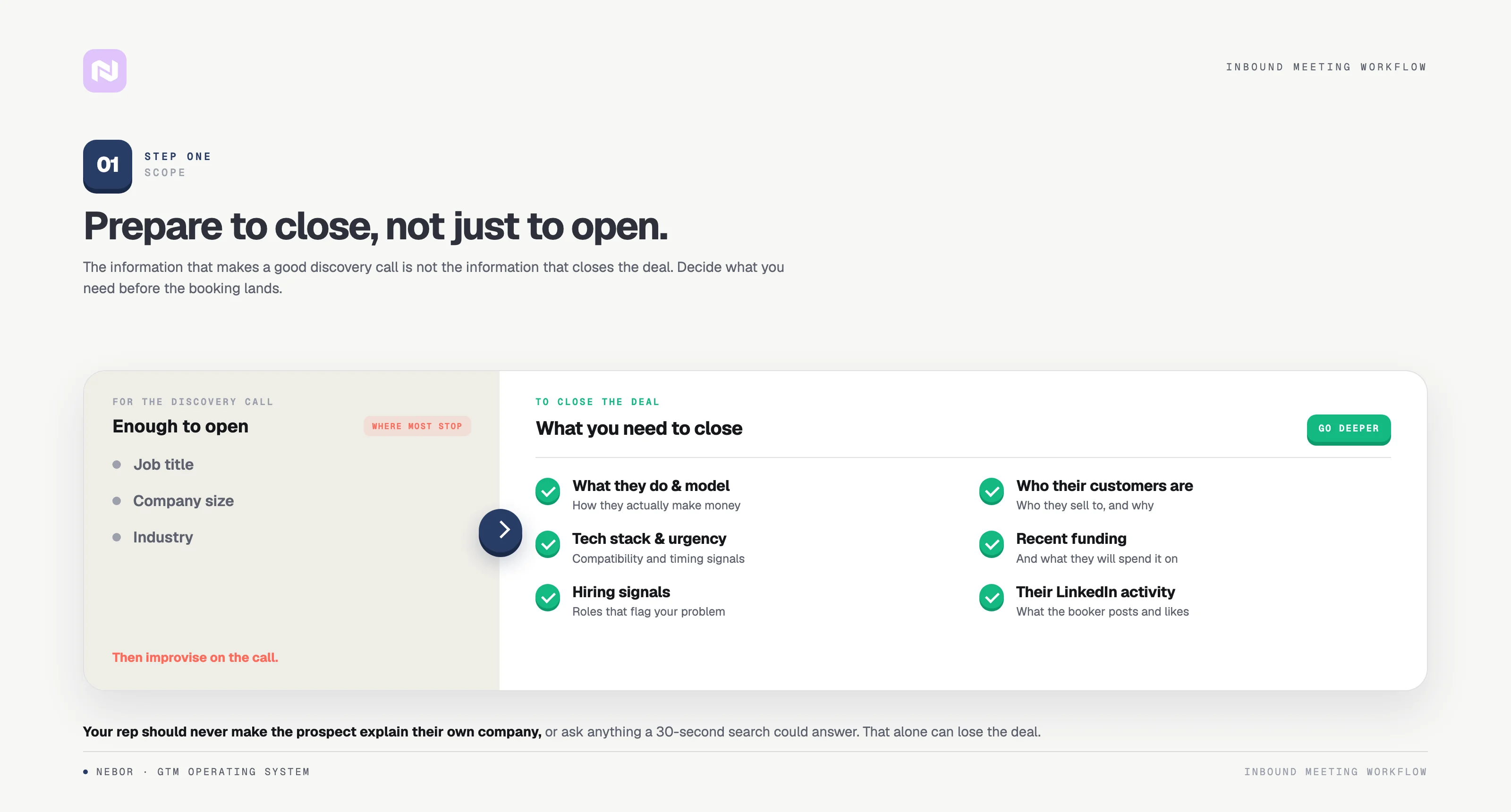
Before we touch any tools, we get clear on what your rep needs to know to close. Most teams skip this and end up with surface-level enrichment that doesn't change the conversation.
For a discovery call, knowing the lead's title, company size, and industry is enough to ask the right opening questions. To walk in ready to close, you need more:
What does the company actually do, and what's their business model?
Who are their customers, and what do those customers buy from them?
What's their tech stack, and does it create any natural urgency or compatibility for your product?
Have they raised funding recently, and what are they likely spending it on?
Are they hiring for roles that signal a problem your product solves?
What has the person who booked been posting about or engaging with on LinkedIn? Their recent posts often hand you the opening question.
The goal is simple. Your rep should never ask a lead to tell them about their company. That question says you didn't do your homework, and it can easily be a dealbreaker.
Step 2: Someone books a meeting through Cal and their data automatically lands in Clay
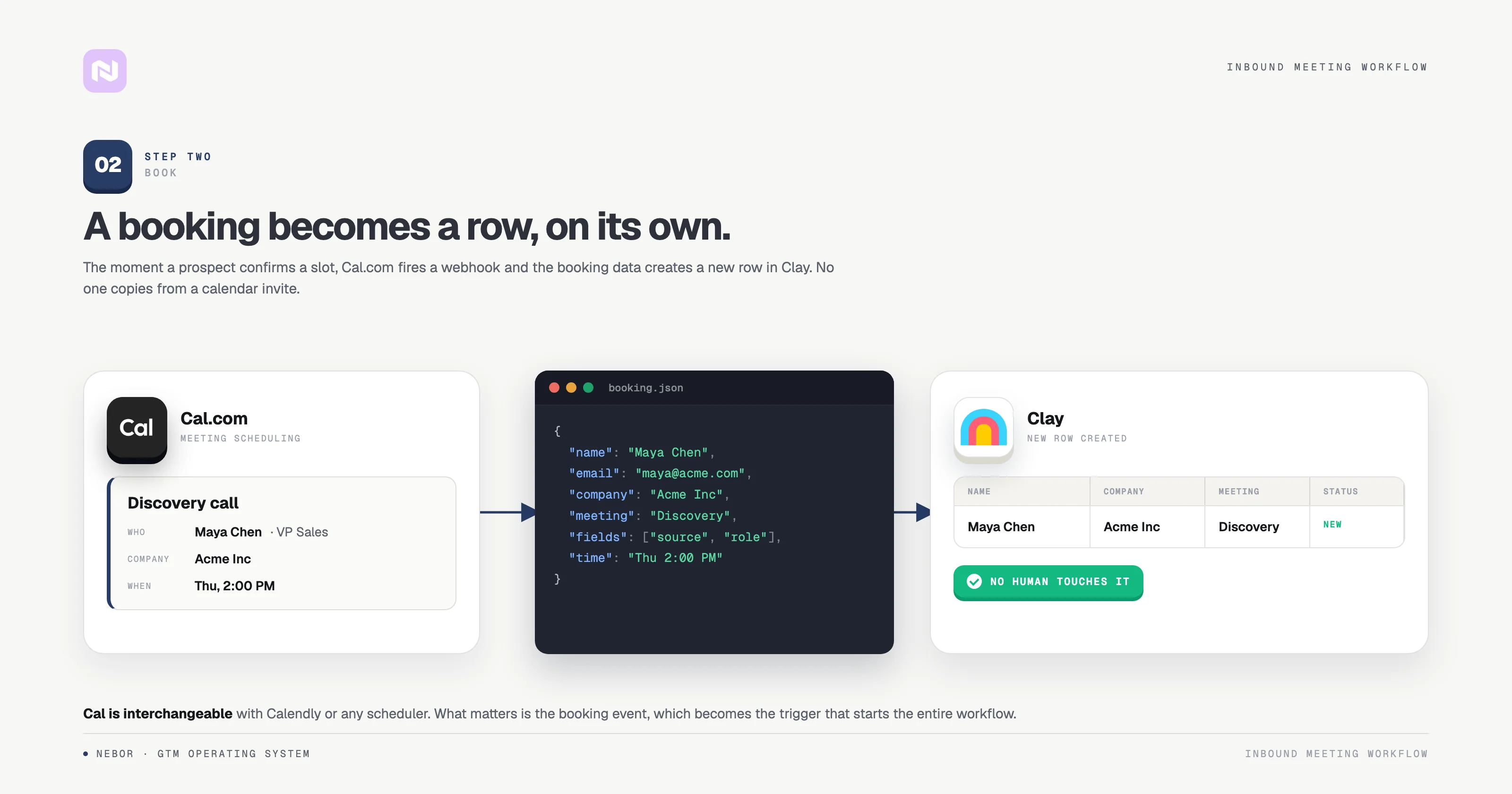
The first thing we do after setting up the Cal booking interface is connect it to Clay through webhooks.
When an inbound lead books through your scheduling link, Cal sends a webhook carrying all the booking details: name, email, company, the event type they selected, any custom fields from your booking form, and the meeting time. That captures the booking as a new row in a Clay table automatically. No human touches it, and the engine starts working the moment the meeting is confirmed.
We like Cal because it's open-source, highly customizable, and its webhook support is rock-solid. Custom fields on your form (company name, role, how they heard about you) all flow through to Clay.
Most setups stop here with a quick enrichment and a Slack notification. That's fine for a start. You can go much further.
Step 3: Clay enriches the lead with everything your rep needs to know (and more)
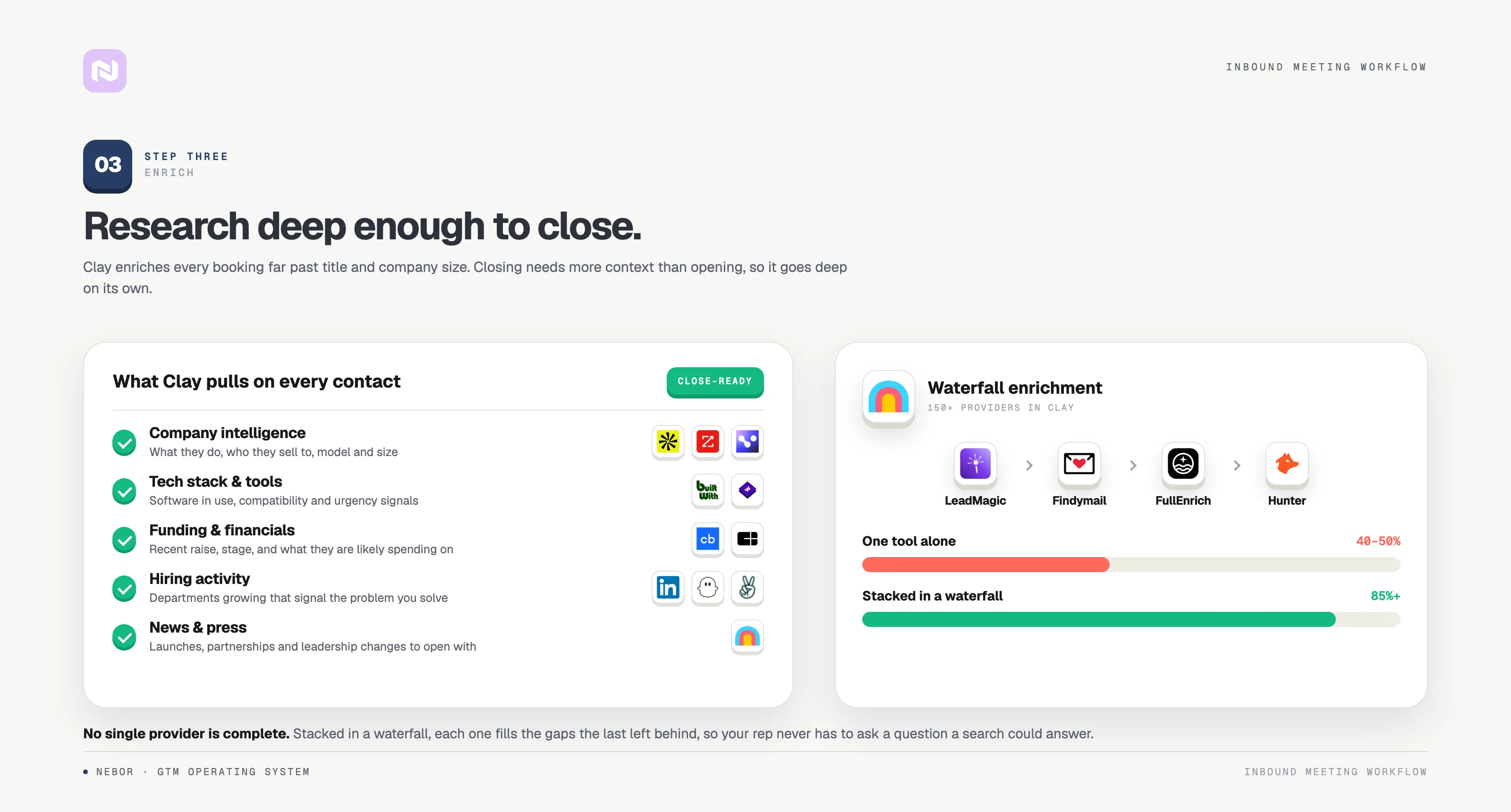
This is where we set Clay up to collect every data point your rep will need before the meeting, automatically and with AI agents doing the reading.
We layer enrichment providers in a waterfall so that if one source misses, the next tries. For verified emails, phone numbers, and LinkedIn URLs: LeadMagic, Findymail, FullEnrich, and Hunter. For company information (size, industry, tech stack, funding, recent news): Apollo, BuiltWith, and Clay's native integrations, plus Clay's LinkedIn scrapers for the lead's activity.
The waterfall approach is the only way to get consistent 85%+ enrichment rates instead of the 40-50% you'd get from any single tool.
Step 4: Clay + LeadsFactory identifies the buying committee so you can multi-thread from day one
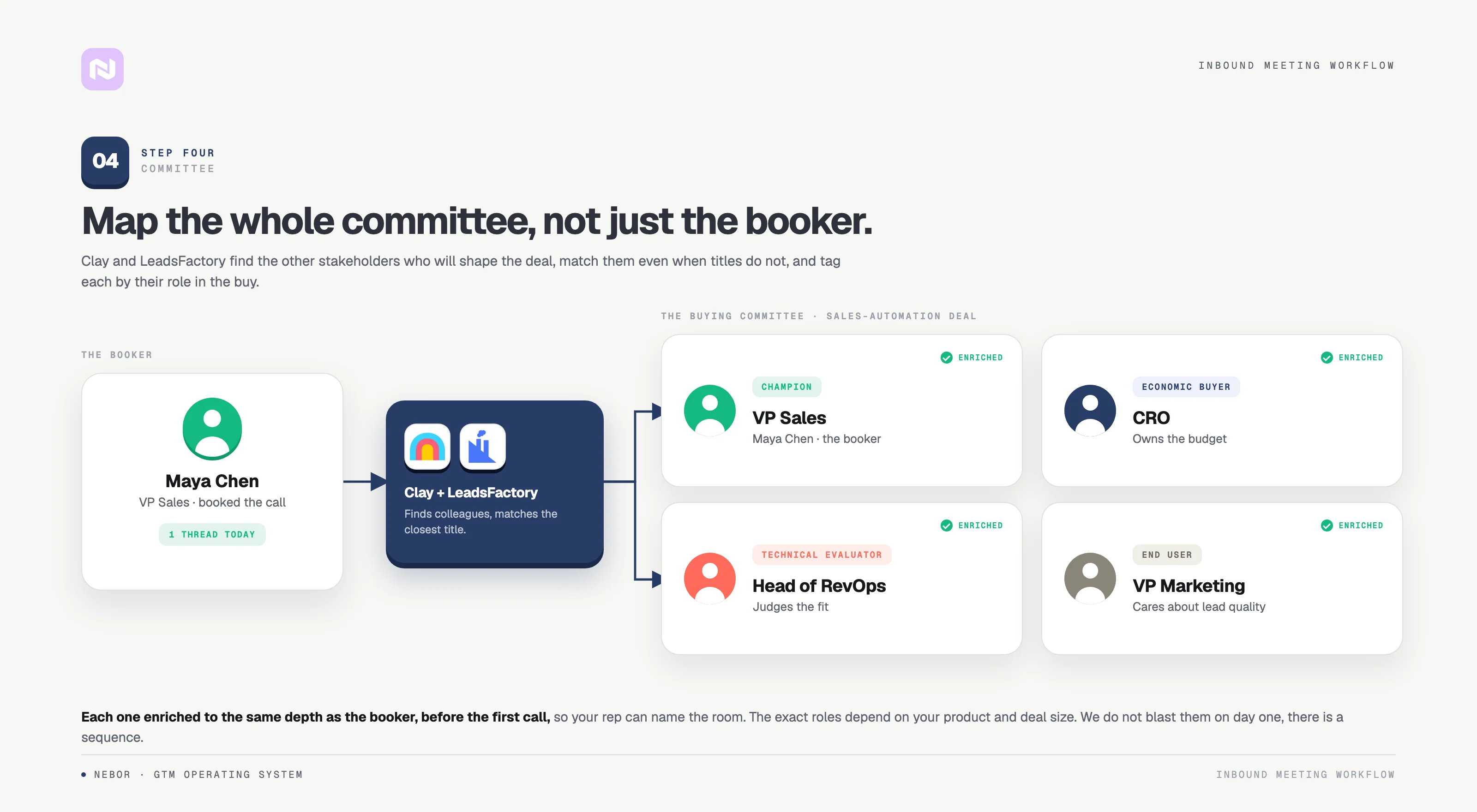
Immediately after enriching the booker, Clay identifies the other prospects at the company who are likely part of the buying committee, using its people search combined with LeadsFactory, which uses LinkedIn data to find colleagues in roles that typically influence purchase decisions.
LeadsFactory is AI powered and understands context, so titles don't have to match exactly for it to find the right people.
For example, if your product is a sales automation tool and the booker is a VP of Sales, we'd also identify the Head of RevOps, the CRO, the VP of Marketing (they care about pipeline), and possibly the CFO (they care about cost-per-lead).
We don't reach out to everyone on day one; there's a sequence to this. But having these prospects identified and enriched before the first call means your rep can reference specific stakeholders during the conversation.
Step 5: Clay generates a sales dossier and pushes it to your sales team before the meeting
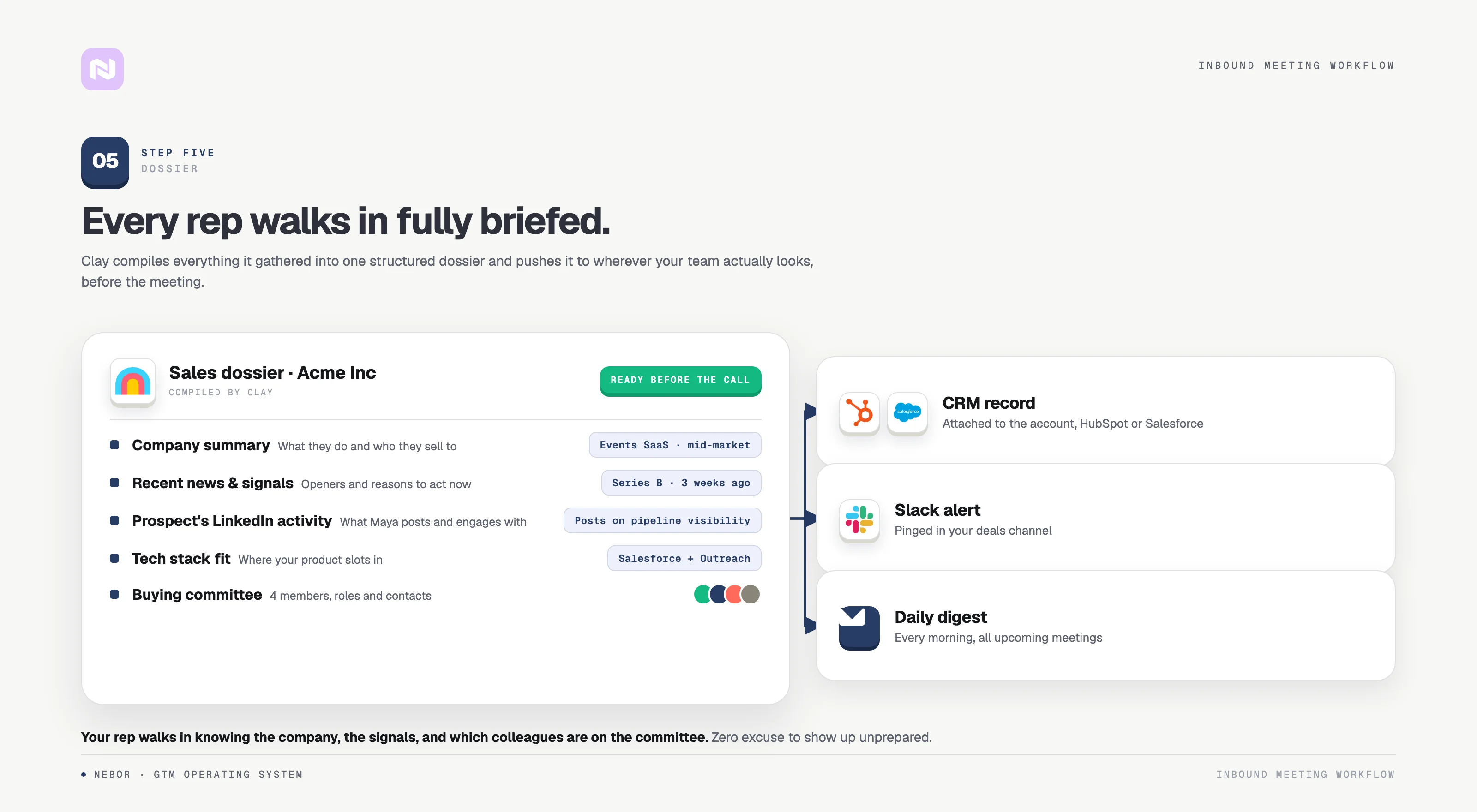
While the multi-threading campaigns get ready to launch, Clay generates a structured sales dossier: what the company does and who they sell to, recent news and signals, the lead's LinkedIn activity, tech stack details relevant to your product, and the buying committee members with their roles and contact details.
That last part matters most. Your rep walks in knowing the person they're meeting and the broader org they'll need to sell to.
We push the dossier through Slack, your CRM, or as a PDF on the calendar event, depending on how your sales team works. Everyone who needs access has it before the call, so the rep can focus on the conversation with zero excuse to show up unprepared.
Step 6: HeyReach sends LinkedIn connection requests to buying committee members
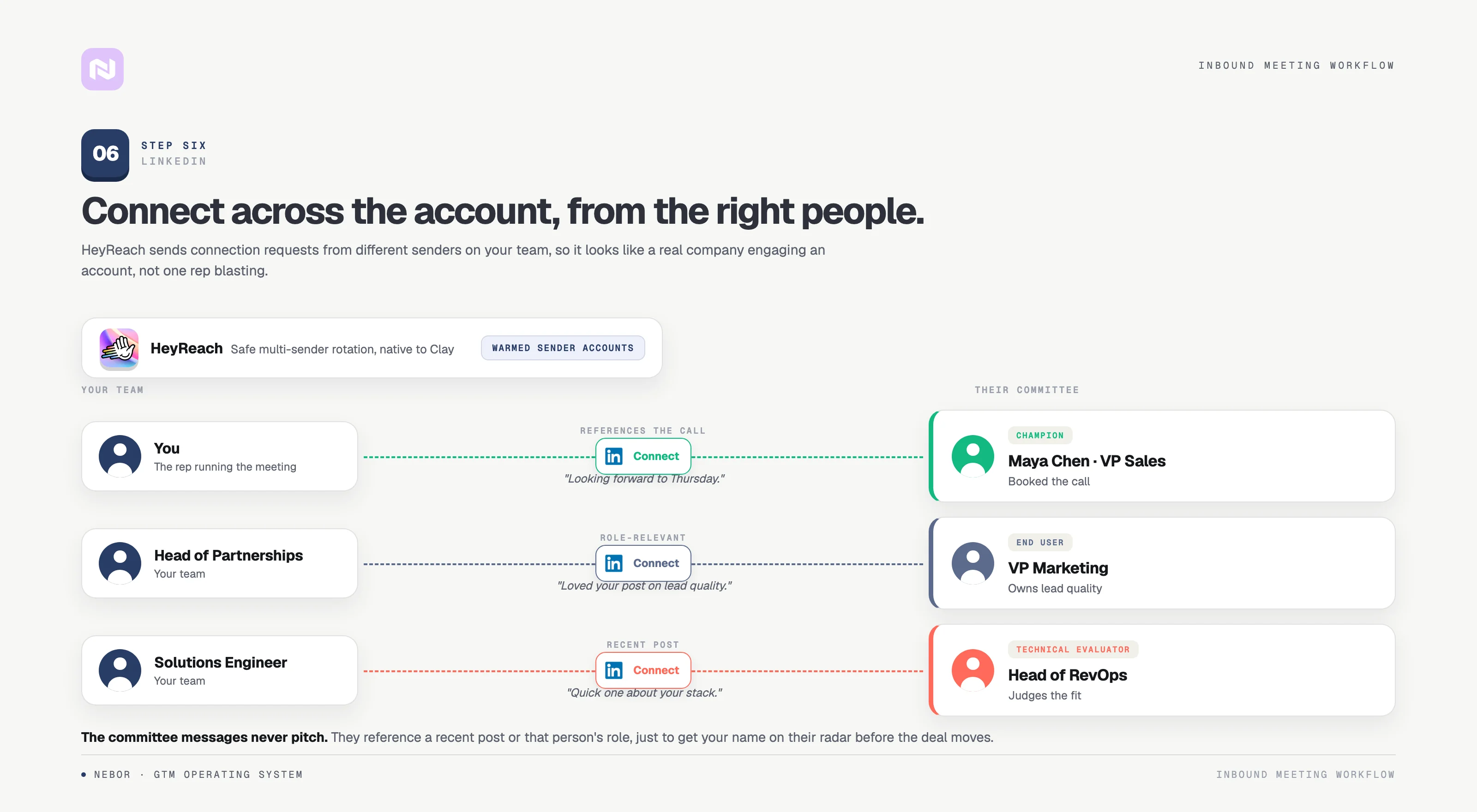
Now the multi-threading execution. Once the buying committee is identified and enriched, it's time to start building relationships, and LinkedIn is the natural starting point.
We use HeyReach because it's built for scaled, multi-sender automation and integrates natively with Clay, so leads flow straight from your table into campaigns without CSV exports.
Here's how it works in practice. The booker gets a connection request and follow ups from the rep taking the meeting, personalized and referencing the upcoming call, which drives a higher acceptance rate. The other prospects on the committee get requests from other team members: a VP sends to VPs, an AE to peers. Spreading senders mirrors how a real network grows.
By the time your rep is on the call, two or three additional stakeholders have already accepted connections. When the booker loops them in later, those people already have context.
Step 7: Instantly sends a short follow up email sequence to buying committee members
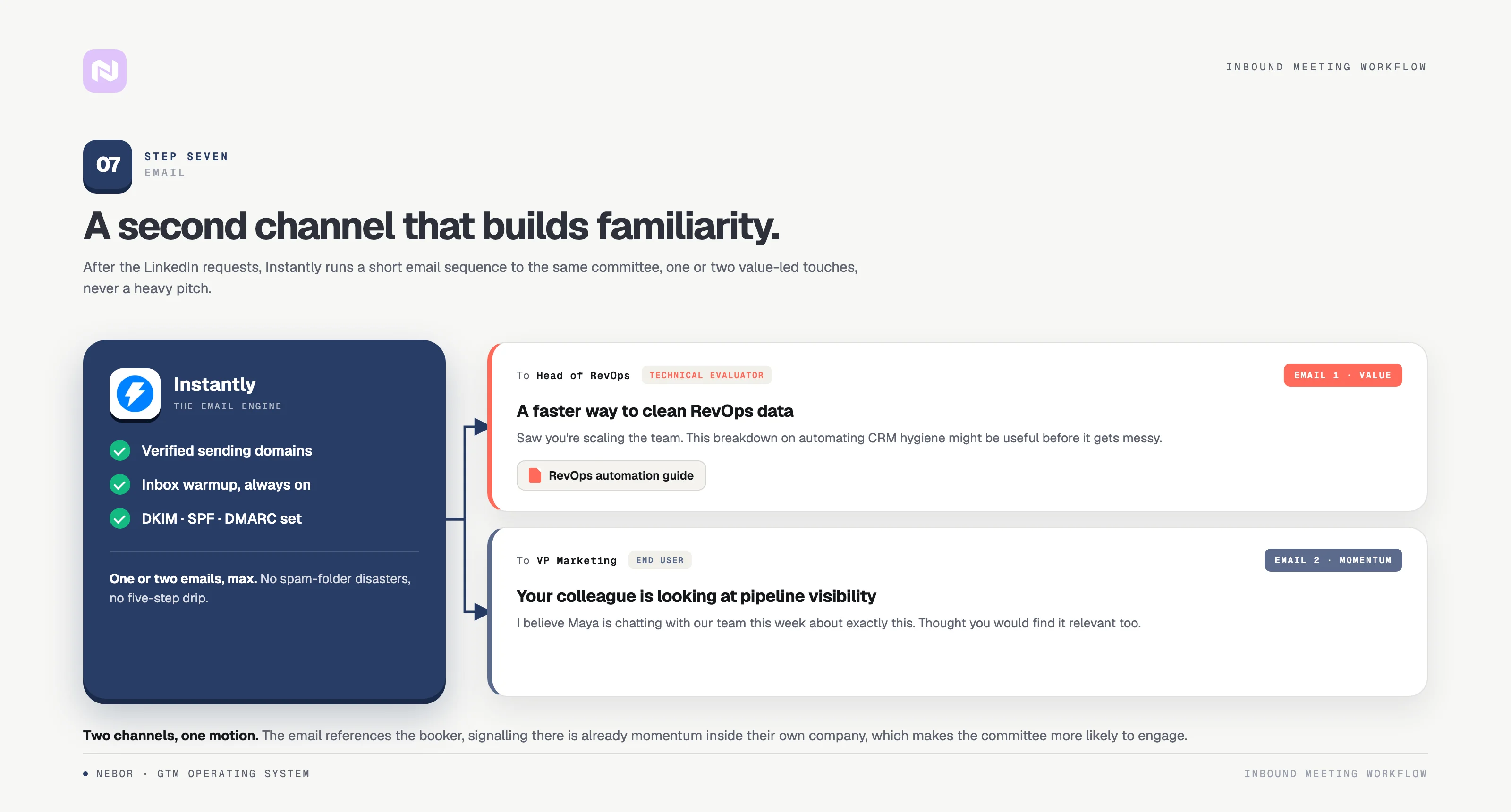
LinkedIn is one channel; email is another. Using both creates the kind of multi-touch presence that makes your company feel bigger than a single cold email ever could.
After the connection requests go out, we launch a short sequence through Instantly to the same committee members. Not a five-email drip: one or two automated emails, designed to add value and build familiarity.
The first is a soft touchpoint with personalized content matched to the role: insights on CRM automation for the Head of RevOps, something on outbound ROI for the CFO. The messaging goes for awareness. There's no pitch in it.
Instantly handles deliverability, inbox warming, and rotation, so the campaign doesn't burn the domain you need for sales. We wrote a full breakdown on email deliverability if you want to go deep.
Step 8: Response-based routing to route leads to the right rep and the right next step
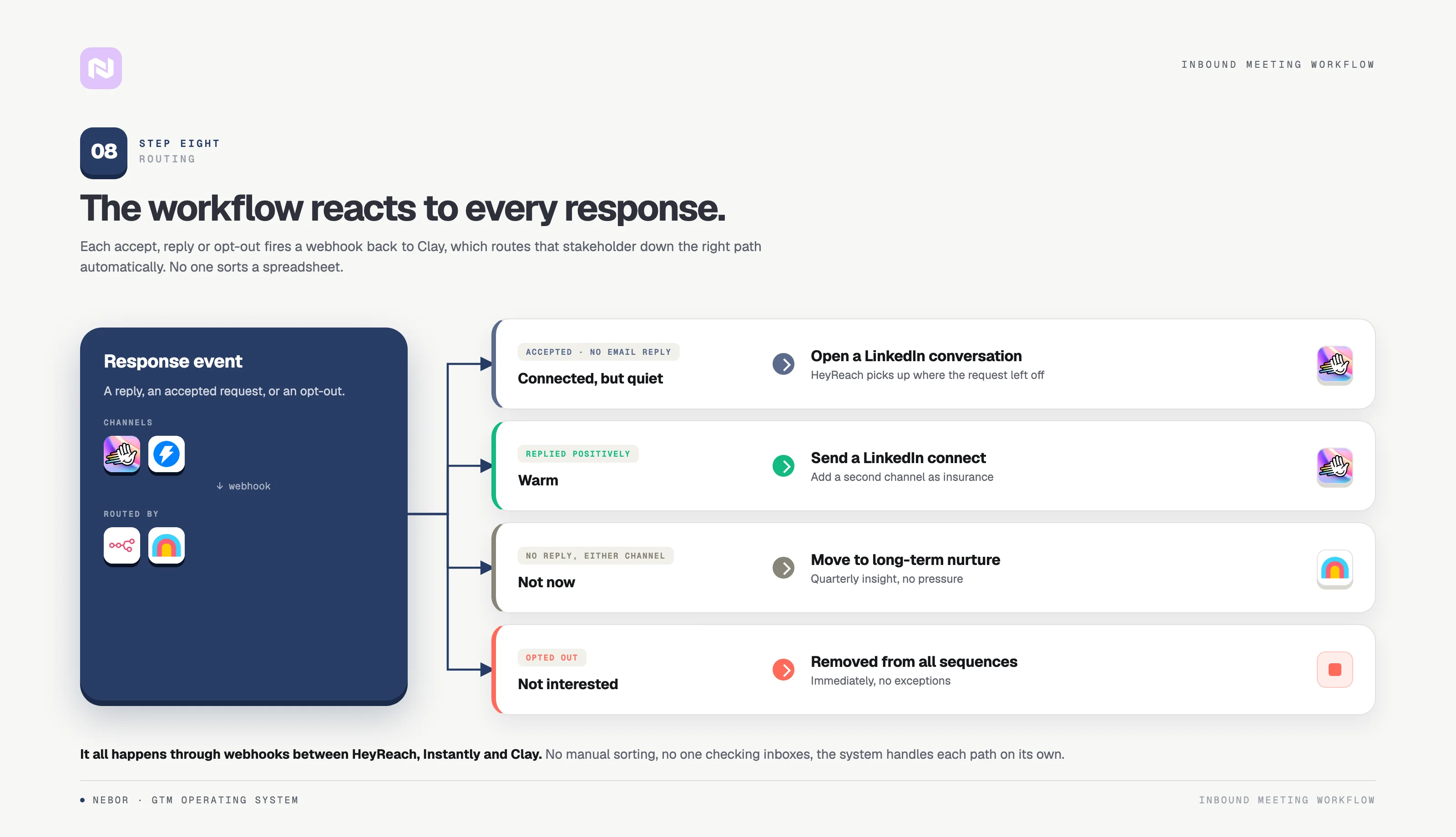
Most setups stop after sending the messages. We don't. Once outreach goes out, we build conditional routing based on how each person responds.
No email reply but an accepted connection? They go back to HeyReach for a LinkedIn conversation that picks up where the request left off, asking a question tied to their role or sharing something Clay surfaced. These chats convert better than email for warm outreach.
A positive email reply? We send a connection request too, so if your main point of contact goes dark later, you have an email thread and a LinkedIn connection with another stakeholder. That's insurance.
Automated scoring also prioritizes the prospects showing active buying signals, so follow up effort goes where the intent actually is. No reply on either channel? We don't push. They join a long-term nurture list: maybe they see your LinkedIn marketing later, maybe a quarterly insights email. The door stays open without being annoying, and some of these prospects become customers two quarters later.
A negative reply or opt-out? Removed from all sequences immediately, no exceptions. Burning a committee member kills deals as fast as losing your champion.
The whole process happens automatically: response events in HeyReach or Instantly push webhooks back to Clay or n8n, which update the lead's status, keep every new lead qualified and scored, and route leads to the right rep for the next step. Nobody checks spreadsheets.
Why multi-threading at the inbound stage creates new opportunities earlier
Most sales training teaches multi-threading midway through a deal: build a champion, then expand. That advice isn't wrong, but it's slow. Start the process at the booking and three things change for your inbound meetings.
First, you build familiarity before it matters. When your champion mentions you internally, the response isn't "who?" It's "yeah, they reached out to me too."
Second, you shorten the sales cycle. Deals die late when procurement or finance arrives without context; stakeholders who've already had touchpoints with your company add far less friction.
Third, you create resilience. Champions leave, get reassigned, go on leave. Single-threaded deals collapse when that happens; multi-threaded deals don't, because three or four other prospects at the account know your name. The benefits compound with every deal that stays alive, and with every account that turns from lead to customer.
Tech stack: Cal + Clay + HeyReach + Instantly (and how each tool plays its part)
A recap of each tool's role. The tools and scheduling solutions aren't set in stone; it depends on your business and what you already use.
Cal is the entry point: the booking form, the event types, the scheduling pages, and the webhook that goes out with each lead's details. Marketing routes traffic to it; sales gets the inbound meetings out of it.
Clay is the brain. It receives the webhook, does the enrichment, identifies the buying committee through LeadsFactory, compiles the dossier, and triggers the campaigns. The conditional routing logic lives here too.
HeyReach is the LinkedIn execution layer: connection requests, follow ups, and multi-sender campaigns, with native Clay integration.
Instantly handles email: deliverability infrastructure, inbox warming, sending throttles, response detection.
n8n is the glue: its workflows route webhook events between tools so information flows without anyone touching a spreadsheet.
Here's what the whole thing looks like:
Hire Nebor to build this inbound engine for you
If you're technical and have the time, you can build this yourself. Start with the Cal-to-Clay webhook, get the enrichment waterfall working, then add HeyReach and Instantly one at a time. Test each piece with 10 inbound meetings' worth of leads, verify the quality, then scale the process.
But most sales teams don't have the bandwidth to build, test, and maintain a system like this while handling their actual sales process. It touches multiple tools, API connections, and routing logic. It's not a weekend project.
That's what we do at Nebor with solutions like this one. We handle the Clay setup, the enrichment waterfall, the HeyReach and Instantly integrations, the response routing, and the ongoing optimization, so your reps focus on the calls and your customers get a sharper first meeting. You get sales infrastructure that works on autopilot and keeps getting better.
We don't rent you a service you can't control. We build it in your accounts. When we're done, the Clay tables, the automations, the integrations, everything is yours to use, modify, or expand.
If you want to skip the trial and error and save your team the grind, book a 15-minute call and we'll scope what it would take for your business specifically.


Related Articles


By clicking Sign Up you're confirming that you agree with our Terms and Conditions.








