
Clay + Leadinfo + Slack: How to Build a Website Visitor Tracking Workflow That Turns Anonymous Traffic Into Sales Pipeline


In this post:
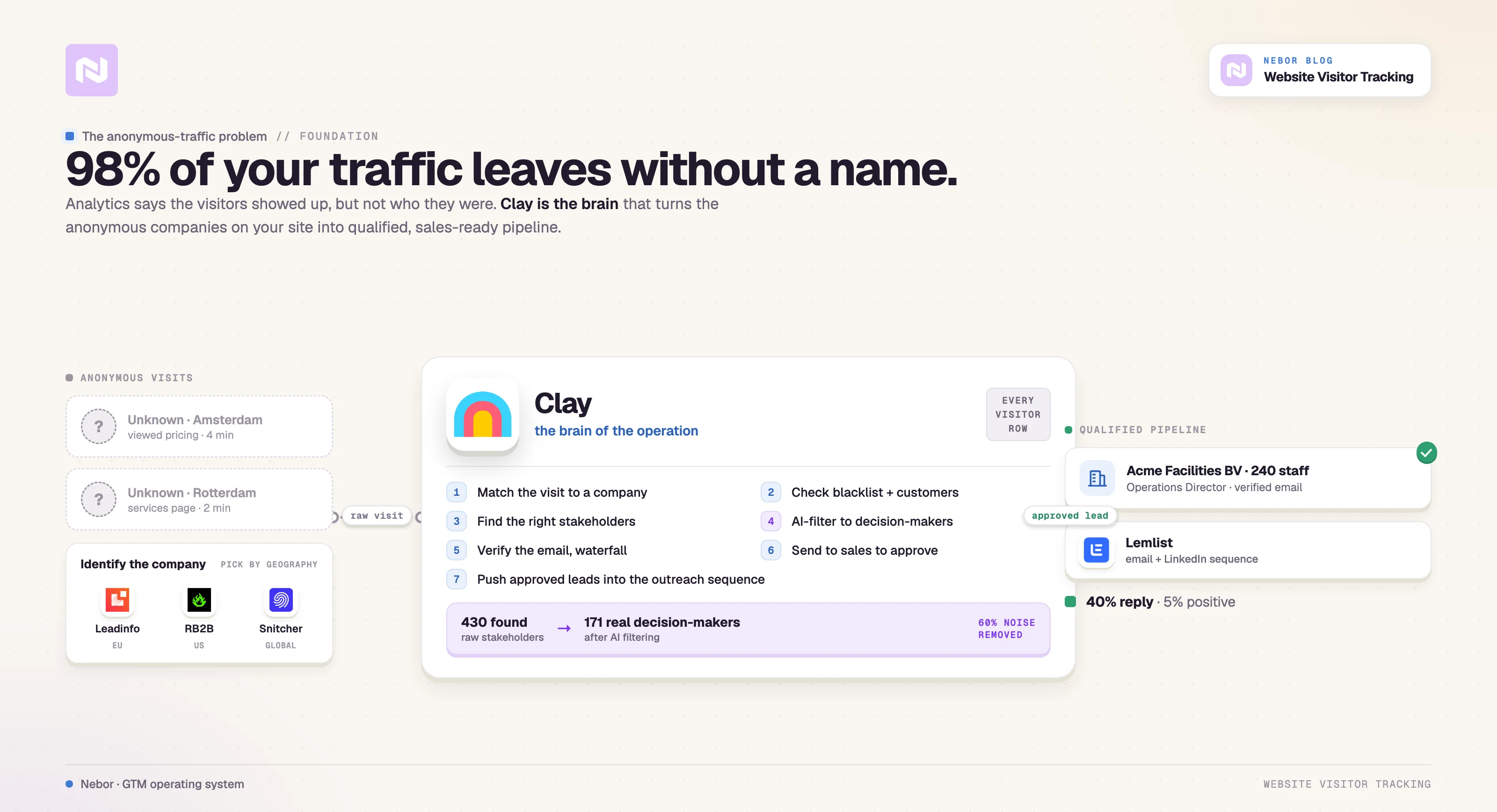
You paid for the design, the copy, the SEO, and probably some paid ads on top to drive traffic to your site. People are visiting it as you read this. About 98% of them leave without filling out a form, booking a call, or so much as sending an email.
They browse your pages, look at your services, and spend time on your pricing page before disappearing.
Google Analytics tells you they showed up, but it does not tell you who they were or whether they work at a company worth pursuing.
Without that, your sales team cannot do anything with the traffic your marketing team worked to generate.
That is the gap most B2B companies live with every day, and it is exactly the problem we solved for a Dutch contract dashboard client that offers facility services like cleaning, catering, and maintenance.
In this post we walk through the exact workflow we built for them using Leadinfo and Clay as the foundation.
You will see how we connected their visitor identification tool to Clay, filtered and enriched the data, found the right stakeholders at each company, added a human approval step, and pushed qualified leads into a multichannel outreach campaign in Lemlist.
By the end you will understand not just what we built but why each piece matters and how the system works together as a long-term asset the company owns.
Let’s get started.
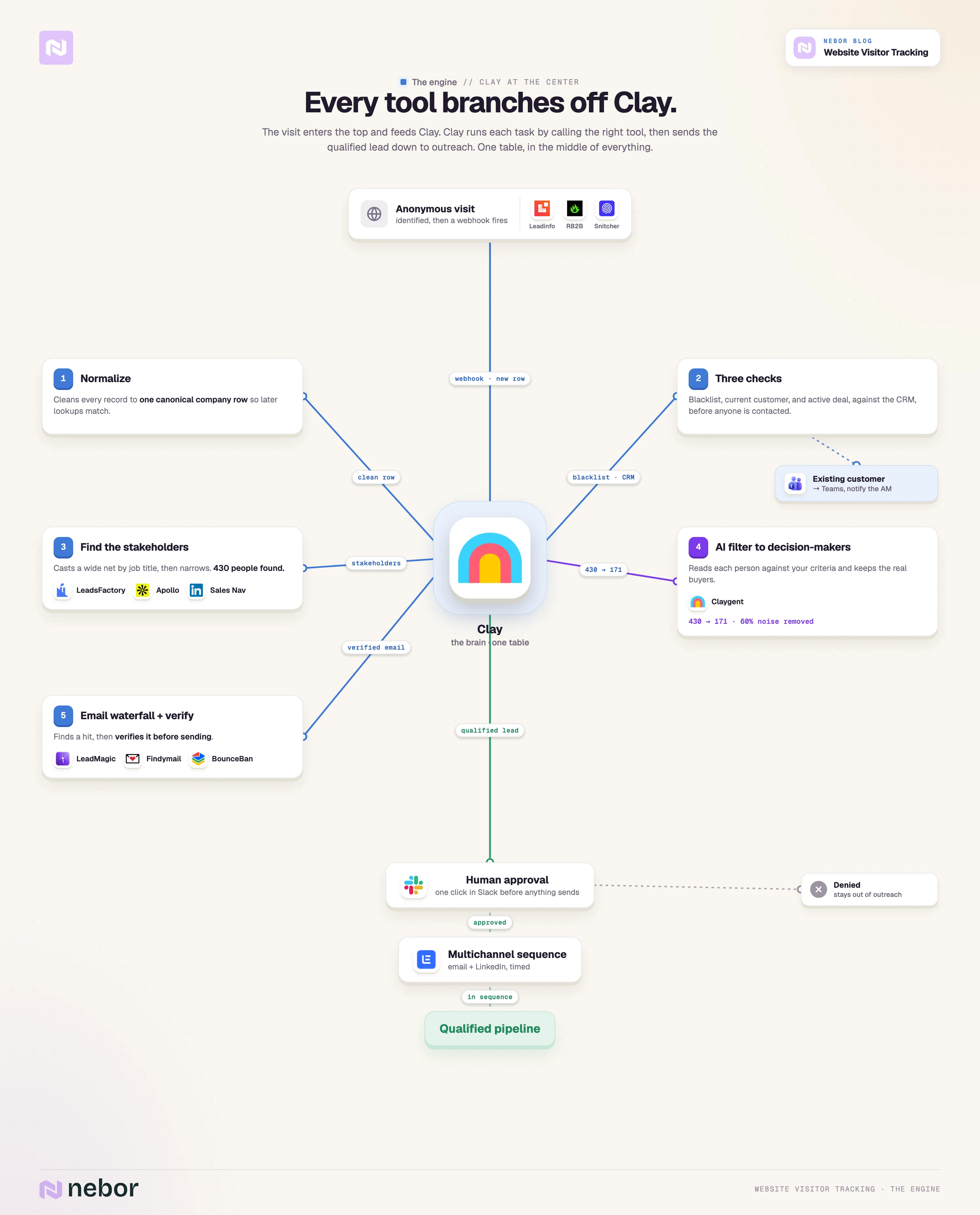
TL,DR: the website visitor tracking and identification workflow
Here’s what the actual workflow looks like.
The sales problem the company needed to solve before we built the workflow
Our client offers a contract dashboard for managing facility services. They had invested heavily in their site, but their call-to-action buttons were not converting at the rate they wanted. The traffic was there but the conversions were not following.
Without a system in place, here is what their sales team dealt with every day.
Invisible buying interest from qualified companies.
Companies were visiting the site and showing buying intent through their behavior, but nobody on the sales team could tell who they were.
The reps had no visibility into which potential customers were actively researching the product, which meant they could not prioritize their outreach based on real interest signals.
Manual research eating up selling time.
Even when the team did identify a potential lead through other channels, finding the right person to contact at that company took serious time.
Searching LinkedIn, guessing at job titles, and hunting for email addresses pulled reps away from actual selling. This is the same problem we see with almost every client we work with before they implement Clay automation.
Missed timing windows that handed deals to competitors.
When a company visits a key page on your site, that visit is a signal they are thinking about the problem you solve right now.
Without real-time awareness of that visit, the moment passes quickly. By the time you reach out weeks later through a generic cold campaign, they have already talked to your competitors or moved on to other priorities.
No systematic follow-up process for visitors.
The sales team was logging into the Leadinfo dashboard manually, checking for new visitors, and then deciding case by case who to pursue.
That inconsistency meant leads fell through the cracks regularly, and the team had no way to ensure every qualified visitor got appropriate follow-up.
They needed a system that captures website visitors automatically, filters out the noise, finds the right people at those companies, and routes qualified leads to sales in a way they can act on immediately. That is exactly what we built for them.
The tools we used and why each one earns its place in the stack
Before we get into the workflow, a quick word on the tools. None of them is in the stack for decoration, and after dozens of similar builds at Nebor we know that tool selection matters more than most people realize.
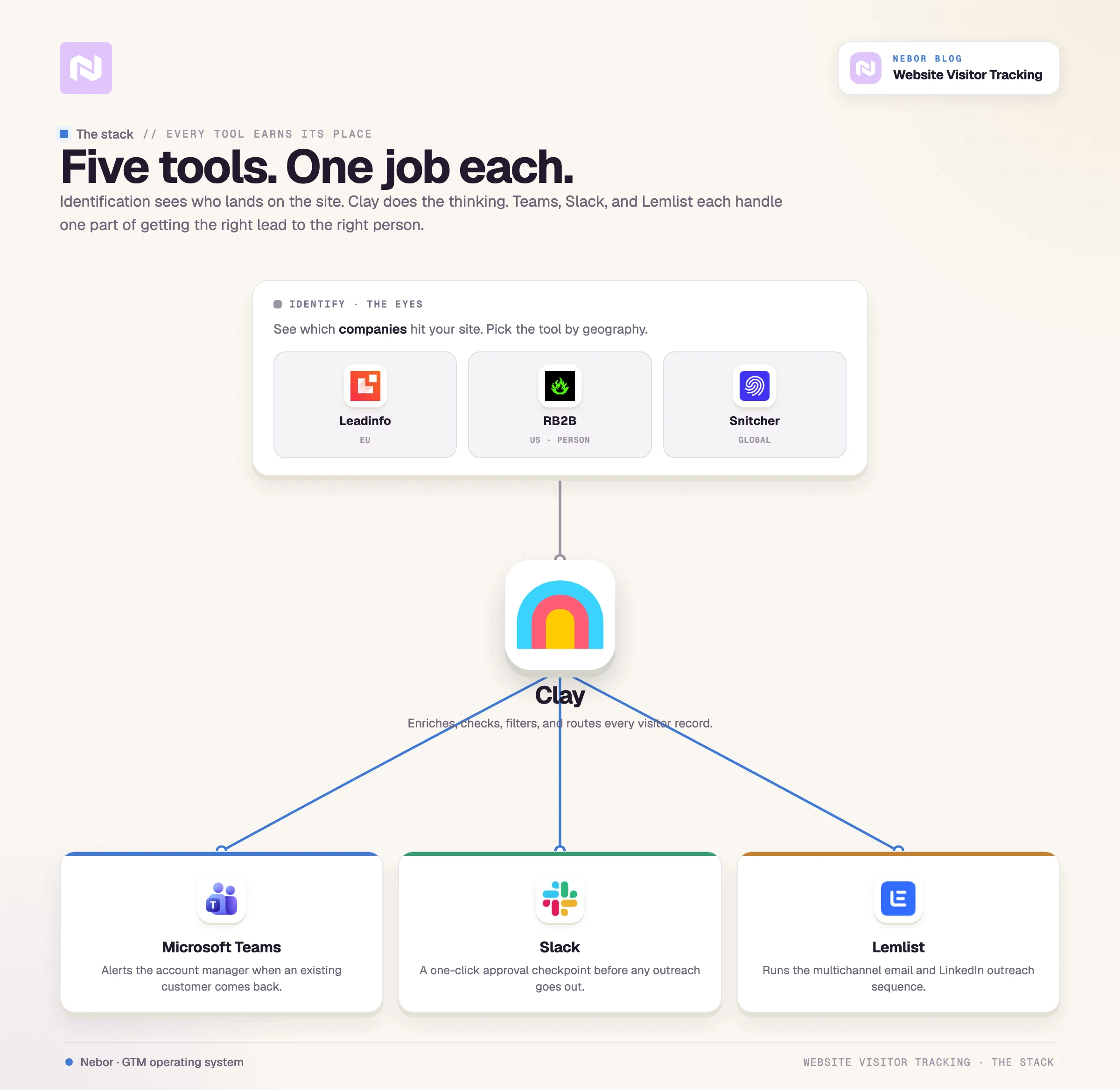
Leadinfo, RB2B, and Snitcher identify which companies hit your site
These tools are the eyes of the system. They watch who comes through the door so the rest of the workflow knows who to pursue.
For the client, we worked with Leadinfo because they were already using it and they are based in the Netherlands. There are other options worth looking at, though, depending on the geography you sell into.
Snitcher does the same job at the company level the way Leadinfo does. RB2B is the most popular of the three, but RB2B only works if you only care about US-based leads.
Leadinfo does one thing exceptionally well, and that one thing happens to be the entry point of this entire workflow. When a company visits your site, Leadinfo identifies who they are based on IP address and other signals.
In the Netherlands and across Europe, privacy regulations mean this identification happens at the company level rather than the individual level.
In the US, RB2B identifies down to the individual person, but for European businesses working within GDPR requirements, company-level identification through Leadinfo is the standard approach.
With Leadinfo tracking in place, we could see that Company X from Amsterdam visited the pricing page on Tuesday morning. That is actionable intelligence the sales team can use immediately.
Leadinfo also captures additional data points including employee count, general contact information, which pages the visitor viewed, and how much time they spent on site. Leadinfo packages all of it up and sends it on to Clay through webhooks.
Clay processes and enriches every visitor record as the brain of the operation
Clay is where everything comes together, and it is the tool we love most at Nebor because of its flexibility. If you want to dig deeper on this, we have a longer piece on the best Clay sales automation agencies.
Think of Clay as a smart spreadsheet that connects to dozens of data sources, performs enrichments automatically, filters on conditions you define, and pushes data to other tools when criteria are met.
For us, Clay is the central command of this entire visitor-tracking workflow.
Clay receives the webhook from Leadinfo every time a qualifying company visits a key page. From there, Clay handles several functions that would otherwise eat days of manual work from the sales team.
Checks the incoming company against blacklists and existing customer records to prevent embarrassing outreach mistakes
Finds people at those companies with relevant job titles using multiple data providers
Uses AI filtering to narrow the list down to actual decision-makers worth contacting
Finds verified email addresses for those people through enrichment waterfalls
Pushes approved leads to the outreach tool when someone on the sales team gives the green light
Without Clay automation, you do all of this by hand every single day. You log into Leadinfo, export the visitor list, cross-reference it with your CRM, search LinkedIn for contacts at each company, find email addresses through various tools, and then add qualified prospects to your outreach campaigns one row at a time.
Microsoft Teams keeps account managers informed when existing customers come back
Teams is not part of our default stack, but the company already used it so we made it part of theirs.
When an existing customer visits the site, you do not want to push them through a cold sequence because they are already paying you. But you absolutely want the sales team to know about the visit because it signals something worth investigating.
Maybe that customer is evaluating switching providers, maybe there is an upsell opportunity worth a call, or maybe they are just checking something routine.
For these cases, the workflow sends a notification to a dedicated Teams channel automatically. The rep assigned to the account gets the heads up without having to log into Leadinfo or any other tool throughout the day.
The information comes to them where they already work, which makes adoption easy on the sales side.
Slack adds a one-click approval checkpoint before any automated outreach goes out
This is where most automation workflows fall short.
Because the client uses Slack as the hub for their reps, we set things up so the workflow sends a message to Slack asking the sales team to approve or deny each lead before it enters the outreach sequence.
AI is good at pattern matching but not perfect at understanding context. The system could flag someone as a relevant stakeholder who actually is not a decision-maker for this particular purchase.
The sales team knows their market better than any algorithm ever will, and letting them make the final call prevents embarrassing mistakes that could damage your brand.
Business context matters in ways that data cannot capture. Maybe the rep knows that a particular company just signed with a competitor last month after a long sales process. Maybe there is a relationship history the system cannot see in the data.
That is exactly what the approval step is for. It gives reps the chance to inject that context before any automated outreach goes out.
Compliance and brand protection also need human oversight for outbound messaging. Having a human review what goes out gives you quality control over the wording, the timing, and the audience.
If the rep approves the lead, it moves forward to outreach. If they deny it, nothing happens and the lead stays out of the sequence.
Lemlist handles the multichannel outreach sequences
We use Lemlist often at Nebor because it handles the complexity of multichannel sequences better than most alternatives.
For our client, we built a sequence that includes two emails, a LinkedIn connection request, and a LinkedIn profile visit, all timed strategically. The power comes from the combination of channels and the timing between touchpoints.
Email alone often gets lost in crowded inboxes, especially for the busy executives who receive dozens of sales emails every day.
How the workflow moves from first visit to sales conversation
Now to how the workflow actually functions, from the moment someone hits the site to the moment they receive outreach from the sales team.
Step 1: Configure Leadinfo to send webhooks when qualifying companies visit
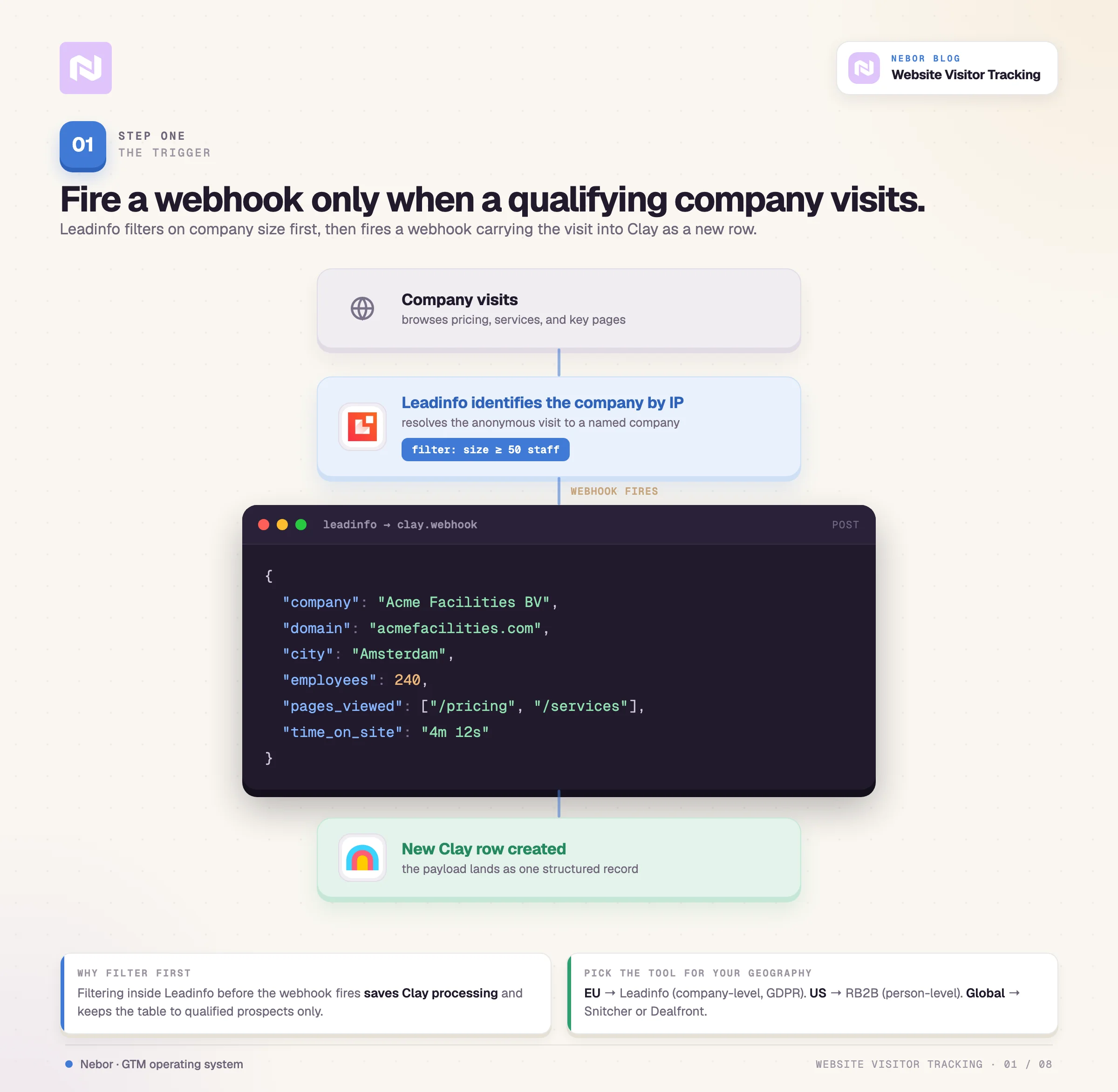
Their team had already set Leadinfo to filter on company size before any data gets sent to Clay. They only wanted companies above a certain employee count because smaller organizations typically are not a good fit for their contract management product.
That filtering happens inside Leadinfo before the webhook goes out. It saves processing resources in Clay and keeps the workflow focused on qualified prospects only. When a company meeting the size threshold visits the site, Leadinfo sends a webhook to Clay.
Step 2: Normalize and standardize the incoming data in your Clay table
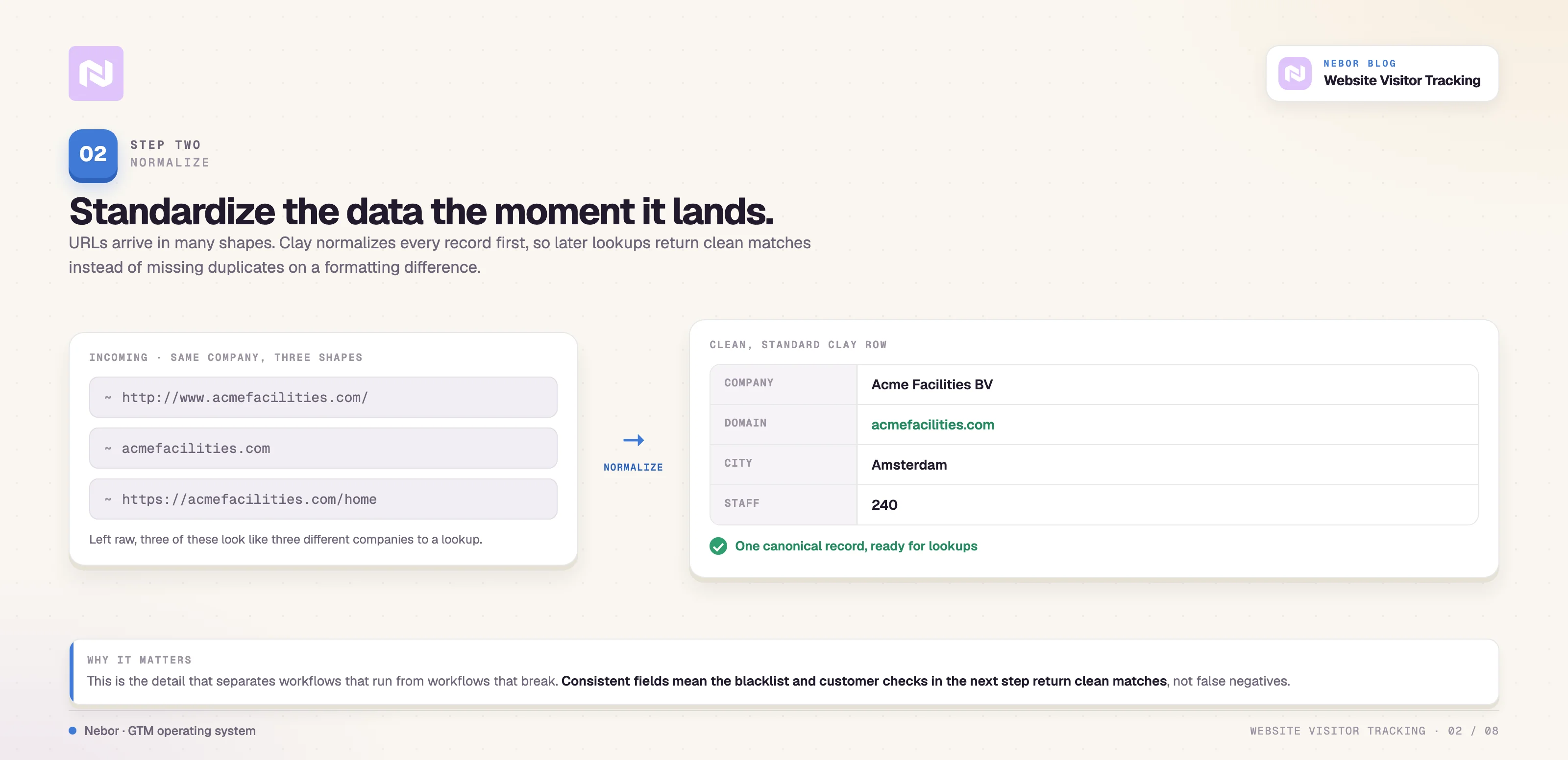
When the webhook arrives, Clay creates a new row with all the incoming data including company name, city, employee count, and the URL associated with that company.
The first thing the workflow does is normalize the URL to a standard format because URLs arrive in many different shapes. The www prefix can be there or not, the trailing slash can be there or not, and the protocol can be http or https.
You need consistency for later steps when Clay checks this company against other data sources. Normalizing the URL makes sure lookups return clean matches rather than missing duplicates because of formatting inconsistencies.
This is the kind of detail that separates workflows that actually work from workflows that break constantly with false negatives and missed matches.
Step 3: Apply blacklist and customer checks to prevent embarrassing outreach
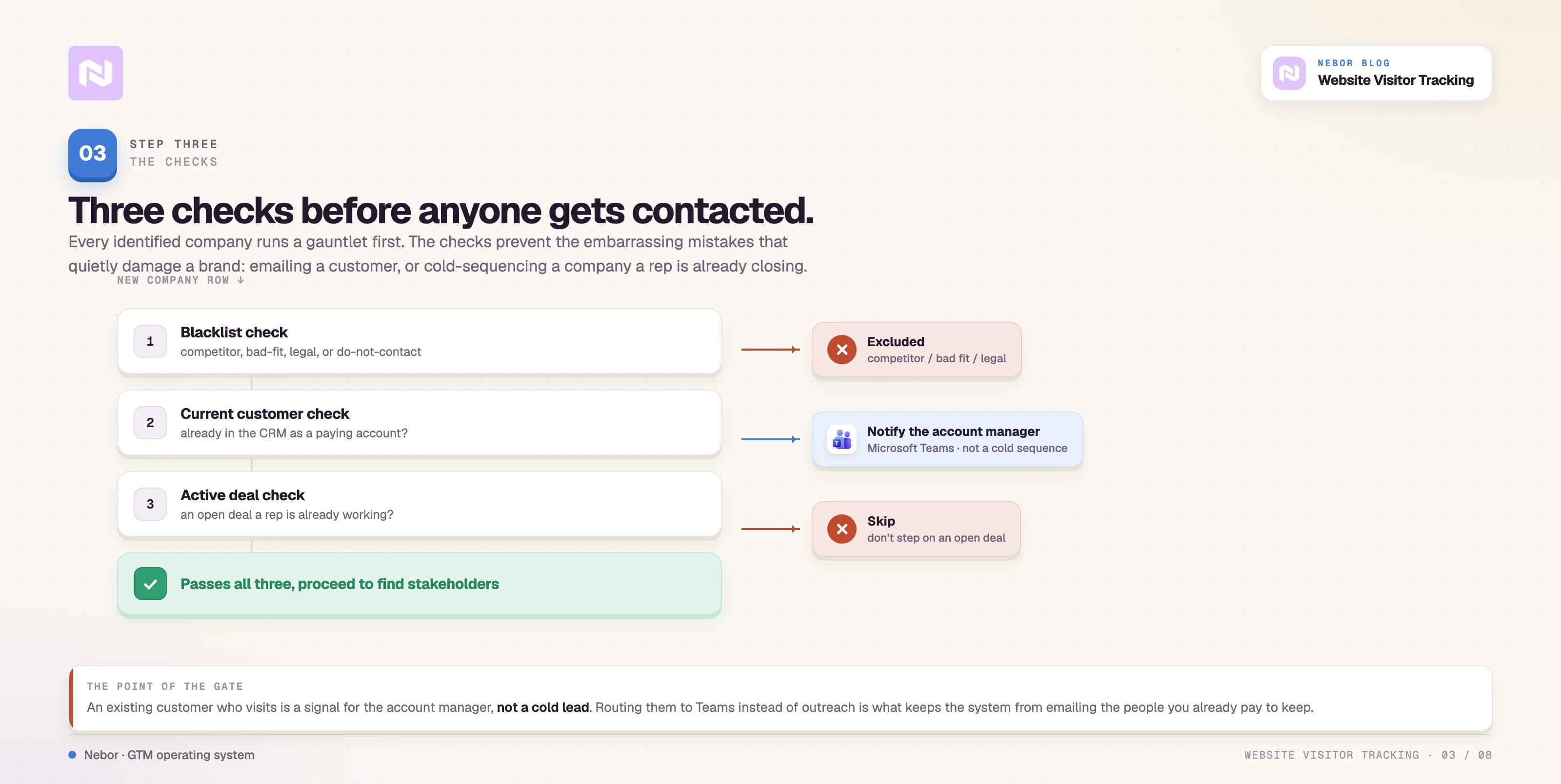
Before doing anything else with the lead, the workflow checks three things that determine whether this company should receive automated outreach.
Blacklist verification.
Is this a company our client explicitly said they never want to contact? Maybe a competitor, a previous bad experience, a company involved in ongoing legal issues, or just a known poor fit based on historical data. If the company appears on the blacklist, the workflow stops immediately and nothing further happens.
Current customer identification.
Is this company already in the customer database? If so, they skip the prospecting workflow entirely. The system sends a Teams notification to the relevant rep instead, so they know the customer was on the site recently. That intelligence matters for account-management conversations, not new business development.
Active deal detection.
Is this company already in an open deal in the CRM with conversations happening? If sales is already working them through a manual process, you do not want a cold sequence stepping on that relationship and confusing the prospect with mixed messages.
Without these checks, you risk awkward situations like emailing your own customers with prospecting copy or having automated emails cross paths with a relationship a rep is carefully building.
Step 4: Use data enrichment to find the right people at companies worth pursuing
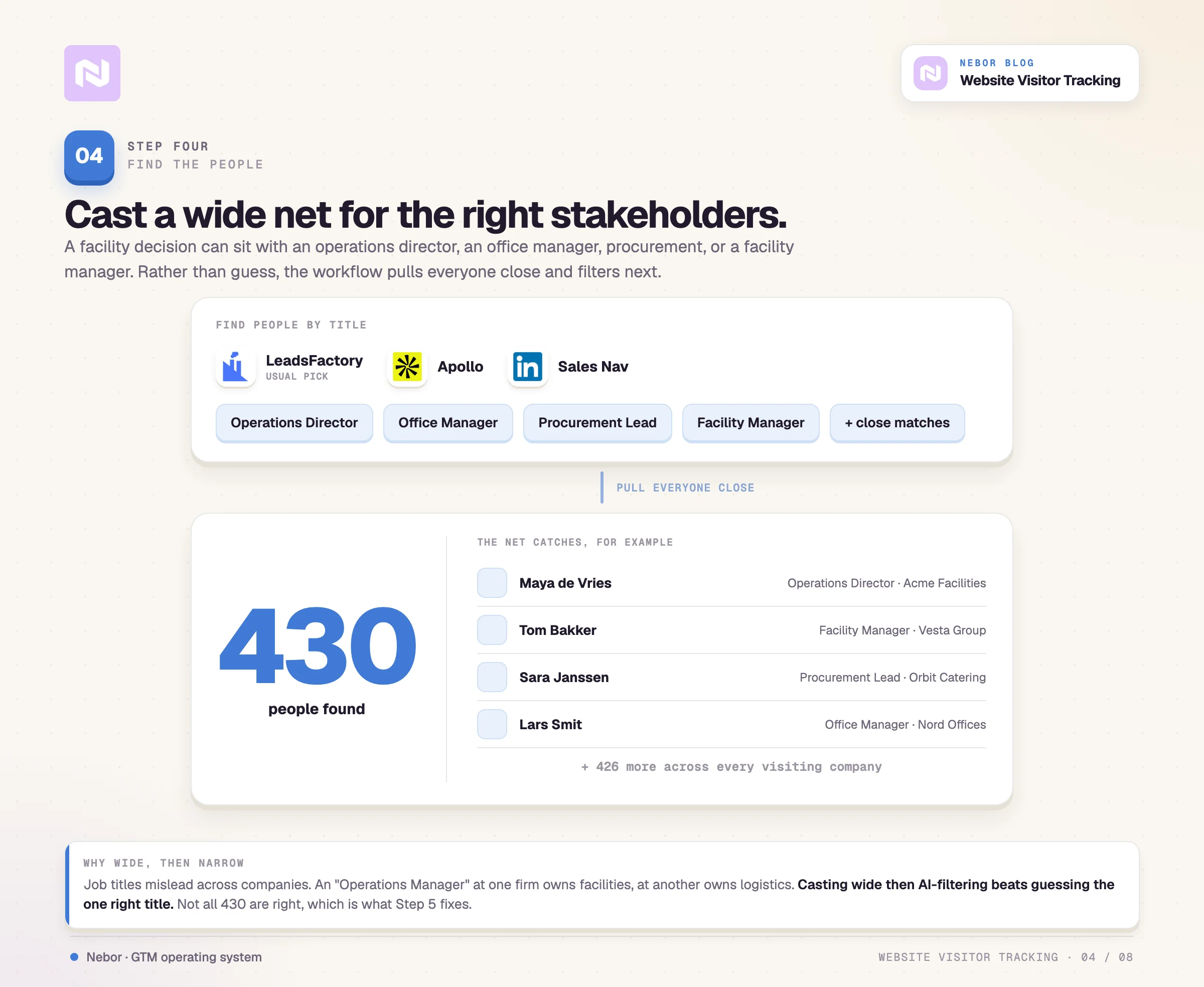
For companies that pass all the blacklist and customer checks, the next step is finding the right people to contact at each organization.
Clay connects to data providers like Apollo and LinkedIn Sales Navigator to search for people with relevant job titles, and our usual pick is LeadsFactory. For more on choosing the right partners and tools, see our piece on the top Clay agencies.
LeadsFactory lets us define job titles and find the people at the company matching those titles or the ones that come close.
The search starts broad because facility-management decisions can belong to operations directors, office managers, procurement leads, or facility managers depending on the company structure.
Rather than guessing which title is correct, the workflow casts a wide net initially and then uses AI filtering in the next step to narrow things down to actual decision-makers.
For our client, we found 430 people across all the visiting companies in the initial data pull. Not all 430 of those people were the right stakeholders worth contacting.
Job titles can be misleading across different companies and industries. Someone can be called Operations Manager but handle completely different responsibilities depending on the company and reporting structure they belong to.
Step 5: Apply AI filtering to identify actual decision-makers
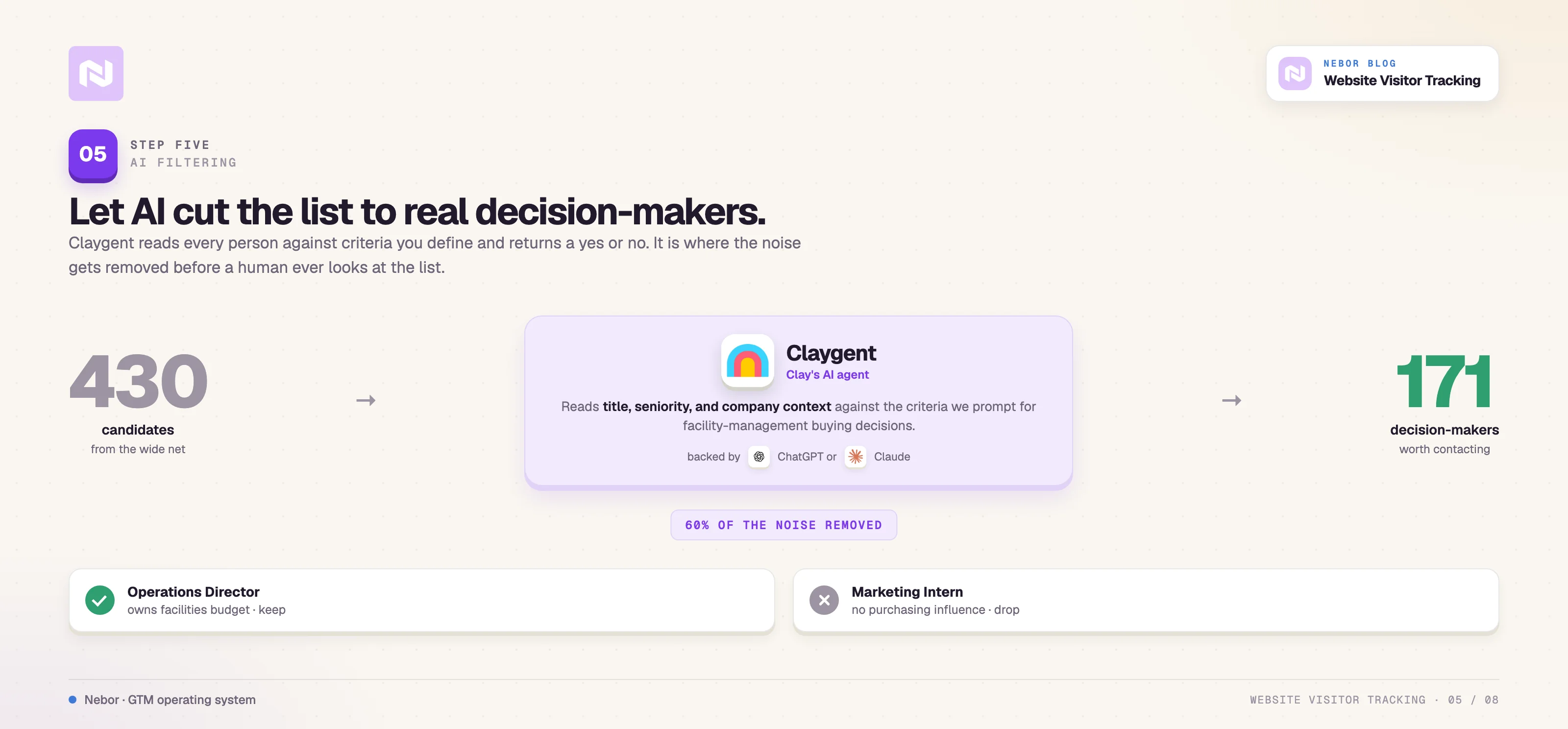
This is where Clay's AI capabilities create real value in the workflow.
The system uses AI through Claygent (or sometimes ChatGPT or Claude integrations) to analyze each person from the previous step and decide whether they are actually a relevant stakeholder for facility-management purchasing decisions.
The AI looks at job titles, company context, seniority signals, and any other available information to make that call.
We prompt the AI with specific criteria about what makes someone a decision-maker for this type of purchase, and it returns a yes-or-no assessment for each person in the table.
Out of the 430 people we found in the enrichment step, only 171 were identified as correct stakeholders after AI filtering.
That is a 60% reduction in noise, which means sales is not wasting time reviewing people who cannot actually make or influence a purchasing decision.
Step 6: Find verified email addresses through waterfall enrichment
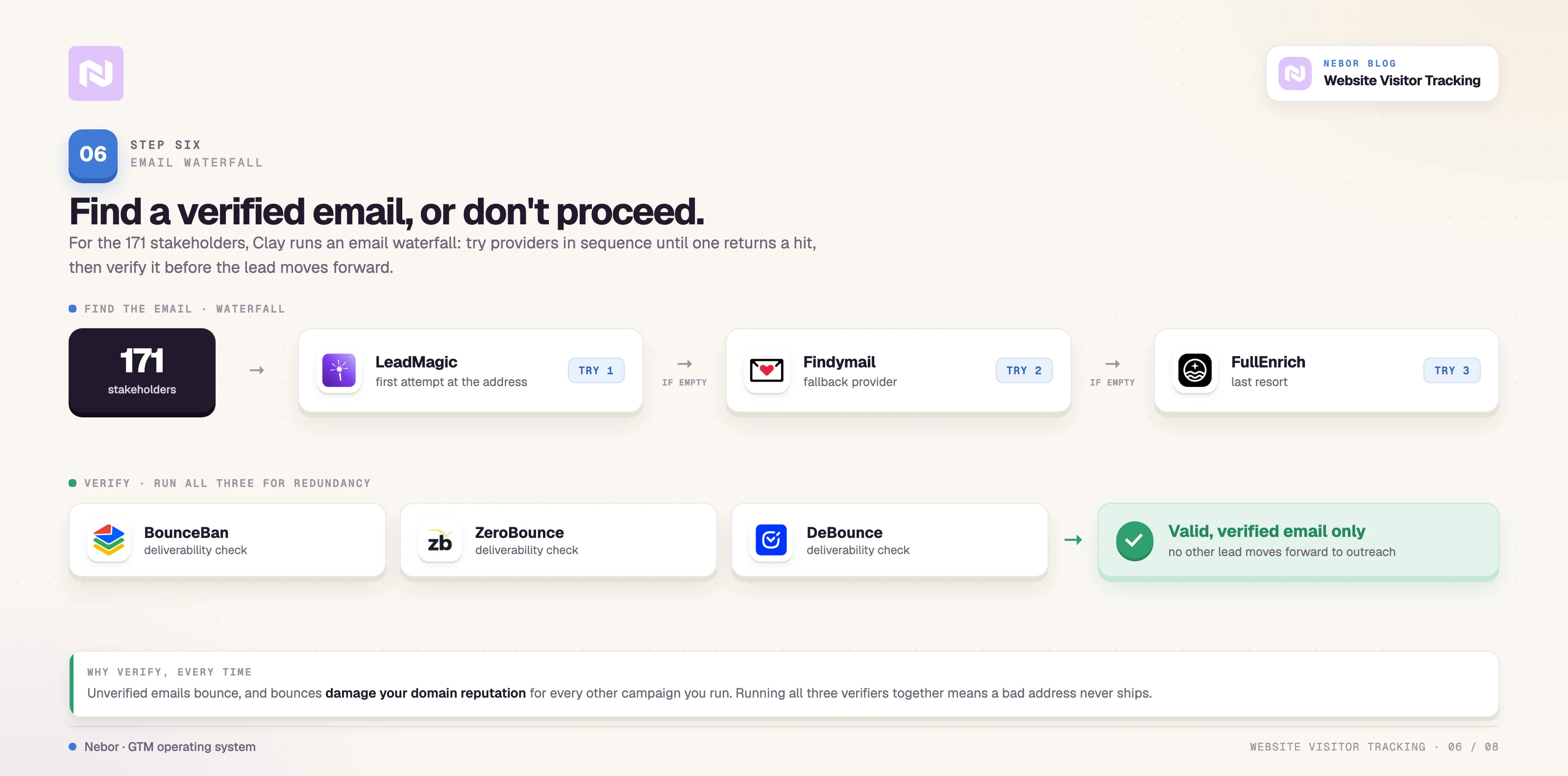
For the 171 stakeholders who passed AI filtering, the workflow then searches for professional email addresses.
Clay connects to email-finding and verification tools through what we call waterfall enrichment, where the system tries multiple data providers in sequence until it finds a valid email.
For this workflow we call on tools like LeadMagic, Findymail, and FullEnrich to generate the email addresses, and then pass them through verification tools like Bouncer, BounceBan, and ZeroBounce.
We use all of them together for redundancy and add layers to the workflow. The workflow only proceeds with leads where we can find a valid email address that passes verification checks. Unverified emails damage your domain reputation and reduce deliverability for every other campaign you send.
Step 7: Send approval requests to Slack so sales can review leads before outreach begins
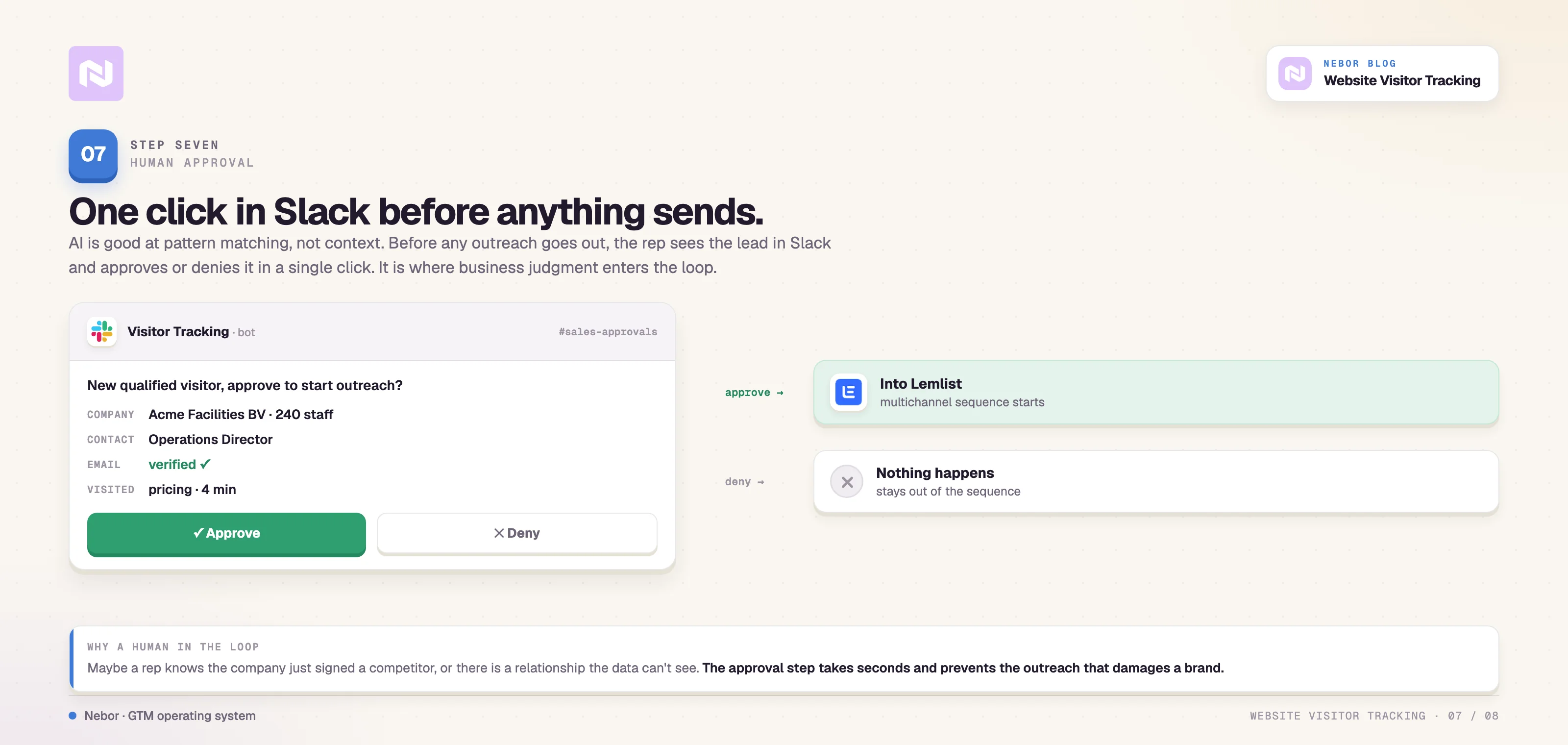
Before any outreach happens automatically, the system sends a message to Slack with all the relevant information about each lead.
The message includes company name, contact name, job title, verified email address, which pages they visited on the site, and any other context that helps the rep make a decision.
The sales team can then approve or deny each lead with a single click directly inside Slack without switching applications.
If approved, the lead moves to Lemlist for outreach automatically. If denied, nothing happens and the lead stays out of the sequence entirely.
This human-in-the-loop step takes seconds for the rep to execute but adds an important quality-control layer. It also keeps sales engaged with the pipeline they are receiving.
Step 8. Launch personalized multichannel outreach through Lemlist
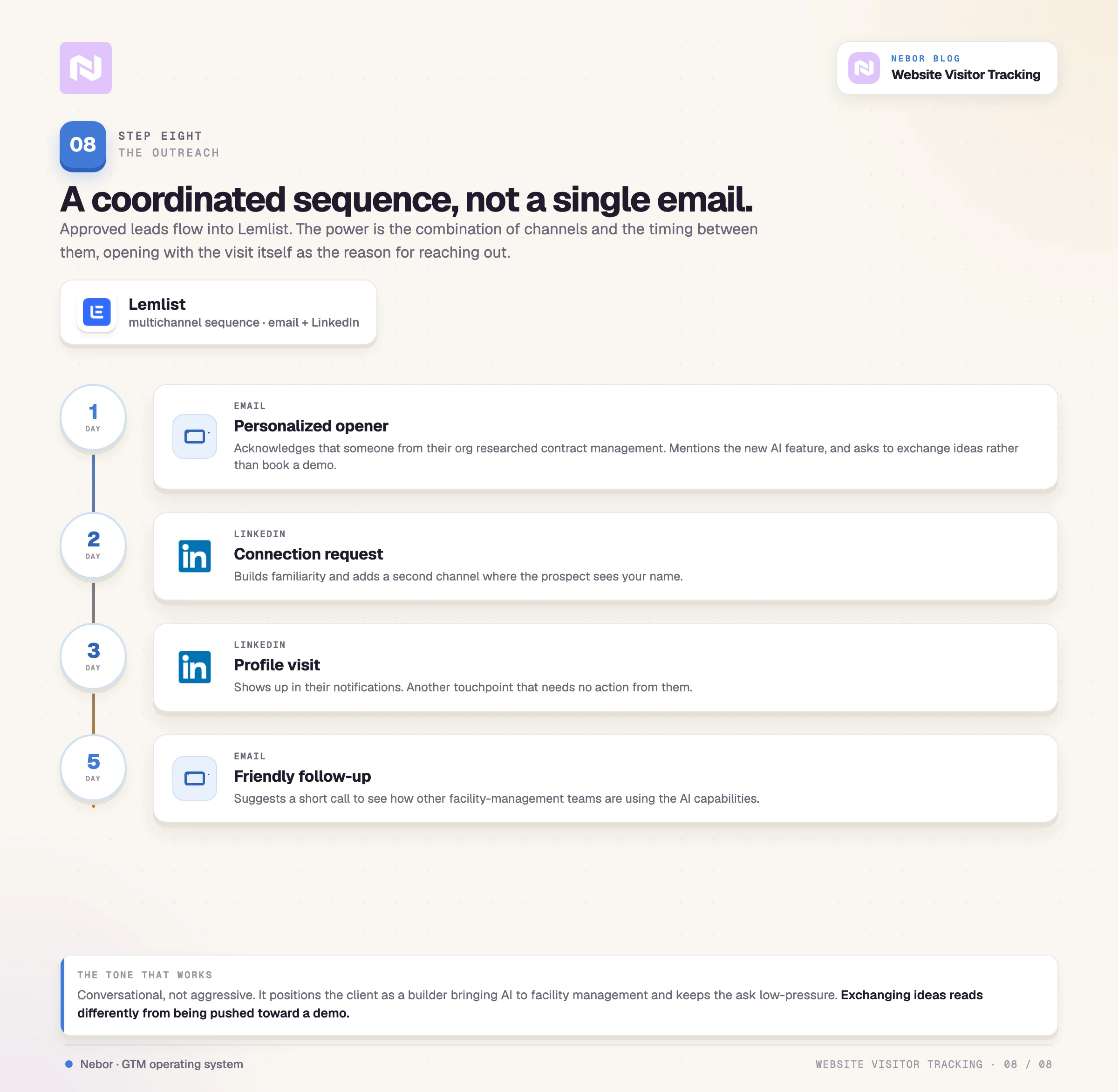
Approved leads flow directly into a Lemlist campaign through Clay's native integration. The sequence we built for our client includes multiple coordinated touchpoints.
The first email is a personalized opener that acknowledges someone from the prospect's organization was researching contract management on the client’s site recently.
(Imagine how precise this would be for US-based clients where we can use RB2B for person-level identification.)
The email mentions the new AI functionality the client has introduced to their platform, which is something unique in the facility-management space, and asks if the recipient would be open to exchanging ideas rather than pushing for an immediate demo.A LinkedIn connection request follows soon after, building familiarity and adding another channel where the prospect sees your name.
A LinkedIn profile visit lands next, showing up in the prospect's notifications and creating another touchpoint without requiring any action from them.
The second email is a friendly follow-up on the first. It suggests a short call if they want to learn more about the AI capabilities and how other facility-management companies are using them.
The messaging throughout is conversational rather than aggressive. It positions them as a builder bringing AI to facility management while keeping the ask low-pressure. Exchanging ideas feels different from being pushed toward a hard demo.
Why a visitor-tracking workflow is a long-term asset rather than a one-time campaign
Step back from the technical details for a moment. What we actually built for Grip is a piece of infrastructure they own and operate indefinitely.
It does not stop producing the day a campaign budget dries up, because it never was a campaign.
The workflow captures value from marketing investments you are already making.
Grip was already investing in marketing to drive site traffic through SEO, content, and other channels. Before this workflow, most of that traffic disappeared without any follow-up.
Now the workflow identifies, enriches, and follows up with every qualified visitor automatically. The same marketing spend produces meaningfully more pipeline because you are no longer losing 98% of your traffic to anonymity.
The system works without daily babysitting.
Once you set it up and test it, the workflow does not need daily management. Visitors flow through it, hit the blacklist and customer checks, pick up stakeholder data, pass by sales in seconds for approval, and land in the multichannel sequence on their own.
Reps check Slack for approvals throughout the day, but they are not doing manual research or data entry that used to consume their mornings.
The process is systematic so qualified visitors stop slipping through.
Every company that visits the site moves through the same rigorous workflow. There is no "we forgot to follow up" or "that lead slipped through the cracks" the way there was before.
The process repeats consistently every single day, which means results become predictable and manageable for sales leadership.
The workflow improves over time as you learn from response data.
As you see which messages get responses and which fall flat, you can refine the outreach copy in Lemlist.
As you learn which types of companies convert to customers, you can tighten the filters in Clay. The system gets smarter the more you use it because real performance data informs the optimization decisions.
You own the infrastructure.
This is the fundamental difference between working with Nebor and working with a traditional lead-generation agency.
We call this Owned GTM.
Grip owns the Clay tables, the Lemlist sequences, the Leadinfo configuration, and every integration connecting them.
We can train them to modify the workflow, expand it to new markets, or hand it off to internal teams to manage. The infrastructure stays with the business regardless of what happens with any vendor relationship.
Five tips for building your own visitor-tracking workflow with Leadinfo, Clay, and multichannel outreach
If you want to build a workflow like this for your own business, here are a few tips based on building similar systems for dozens of clients.
Tip 1: Pick a visitor identification tool that fits your geographic market
This is one of the calls that can make or break the workflow.
In Europe, Leadinfo is a strong choice because they have high identification rates for European traffic, reaching around 35 to 40% in the Benelux region.
They also have strong webhook capabilities for real-time data transfer and stay GDPR-compliant with cookieless tracking and EU-only data hosting.
In the US, we recommend RB2B for person-level identification that goes beyond company data. Dealfront, formerly known as Leadfeeder, also offers company-level tracking similar to Leadinfo if you prefer that approach.
The key requirements for any tool you pick are high identification rates for your target geography, webhook support for sending data to Clay in real time, and compliance with the privacy regulations that apply in your market.
Tip 2: Set Clay up as the central hub that processes all your lead data
Clay serves as the brain of the entire operation, where the automation logic lives. You need several components configured properly, including a proper sales tech stack underneath.
A webhook source in Clay to receive data from your visitor identification tool whenever someone visits your site
Integrations with your CRM for the blacklist checks and customer lookups that prevent embarrassing outreach
Integrations with people-finder tools and email-verification services to identify and validate contacts
A notification integration through Slack, Teams, or email for the approval step that keeps reps in the loop
An integration with your outreach tool so approved leads flow into sequences automatically
Clay's native integrations cover most of these directly. For systems that do not have direct Clay integrations, you can use n8n or Zapier to connect them through webhooks and API calls.
Tip 3: Get the qualification filters right so you only contact companies worth pursuing
Think carefully about which companies you actually want to contact through this workflow. Not every visitor is a prospect worth your sales team's time, and sending outreach to poor-fit companies damages your brand and wastes resources.
First, set things up so only a handful of key pages trigger the workflow at all. Then layer on filters for company size based on employee count, business vertical, region, or revenue, and define clear blacklist criteria so the workflow excludes competitors and other unwanted contacts automatically.
The more precisely you filter at this stage, the higher the quality of the leads downstream.
Tip 4: Design your approval flow so sales can review leads without breaking their day
Decide who needs to approve leads before they enter outreach and how they will receive the approval requests.
Slack is popular because most sales teams already live there throughout the day, but email or Teams work fine depending on the organization.
Make the approval process as frictionless as possible with one click to approve and one click to deny. If approving a lead requires multiple steps or context switching, your approval rate will drop and leads will languish in limbo while reps ignore their notifications.
Tip 5: Test your workflow thoroughly and iterate based on real performance data
Test the workflow with real data, watch what happens at each step, and adjust based on what you observe.
Expect to tweak things based on real-world results rather than assuming your first version will be perfect.
The workflows that perform best are the ones you refine continuously off real response data.
If you want to look at adjacent patterns, our writeup on RSS-feed monitoring workflows and our deeper collection of visitor-workflow examples cover how the same Clay-as-brain pattern adapts to other signals.
How visitor tracking fits into the rest of the GTM system we build with Nebor
Website visitor tracking is one piece of a complete sales system that generates pipeline consistently.
At Nebor, we build these systems as part of a larger approach that includes outbound prospecting from target account lists, intent data monitoring from multiple sources beyond your site, CRM automation that keeps the data clean and actionable, and multichannel outreach orchestration that coordinates every touchpoint.
Each piece connects to the others through Clay as the central hub.
The workflow we walked through here shows what becomes possible when you think about your sales process as one system rather than a stack of separate channels.
Instead of relying on manual effort and hoping leads do not fall through the cracks, you build infrastructure that identifies opportunities automatically and routes them to sales with all the context they need to have a real conversation.
Your site becomes a steady source of pipeline. Your sales team spends time on conversations rather than research. And every piece of the system above stays with you when the engagement ends.
These are your Clay tables, your integrations, your sequences. When you want to expand to new markets or add new signal sources, you modify the workflow yourself. When your team changes or grows, the system stays in place and keeps going.
If you are looking to build something like this for your business, whether it is visitor tracking, outbound prospecting from target account lists, intent monitoring, or a complete sales automation system, we can help you design and implement it.
We design and ship these workflows every week at Nebor, connecting tools like Clay, Leadinfo, Lemlist, Instantly, n8n, and dozens of others into systems that generate pipeline on autopilot.


Related Articles

By clicking Sign Up you're confirming that you agree with our Terms and Conditions.








