
The Ultimate Email Deliverability Guide: How We Get a Higher Inbox Placement Rate at Nebor


In this post:
Most heads of sales know they have an email deliverability problem. Reply rates dropped, the sequences that used to book meetings go quiet, and someone on the team finally says the word "spam" out loud. What almost nobody can tell you is what the problem is, what caused it, or what to build to fix it.
So they buy tools: a warm-up tool, a verification tool, an email deliverability dashboard. The inbox placement numbers stay the same, because email deliverability is a system with six connected layers, and a tool only patches one of them.
This is the email deliverability guide we built to keep our own cold campaigns out of the spam folder, and it's the same one we build for clients.
It covers what email deliverability is (and what it isn't), the four steps we take to build the sending infrastructure, and the four rules that keep it healthy as volume grows.
If you follow it as it is, your emails land in the primary inbox, and if you'd rather not do the work yourself, we'll build it in your accounts.
TL;DR: the email deliverability system
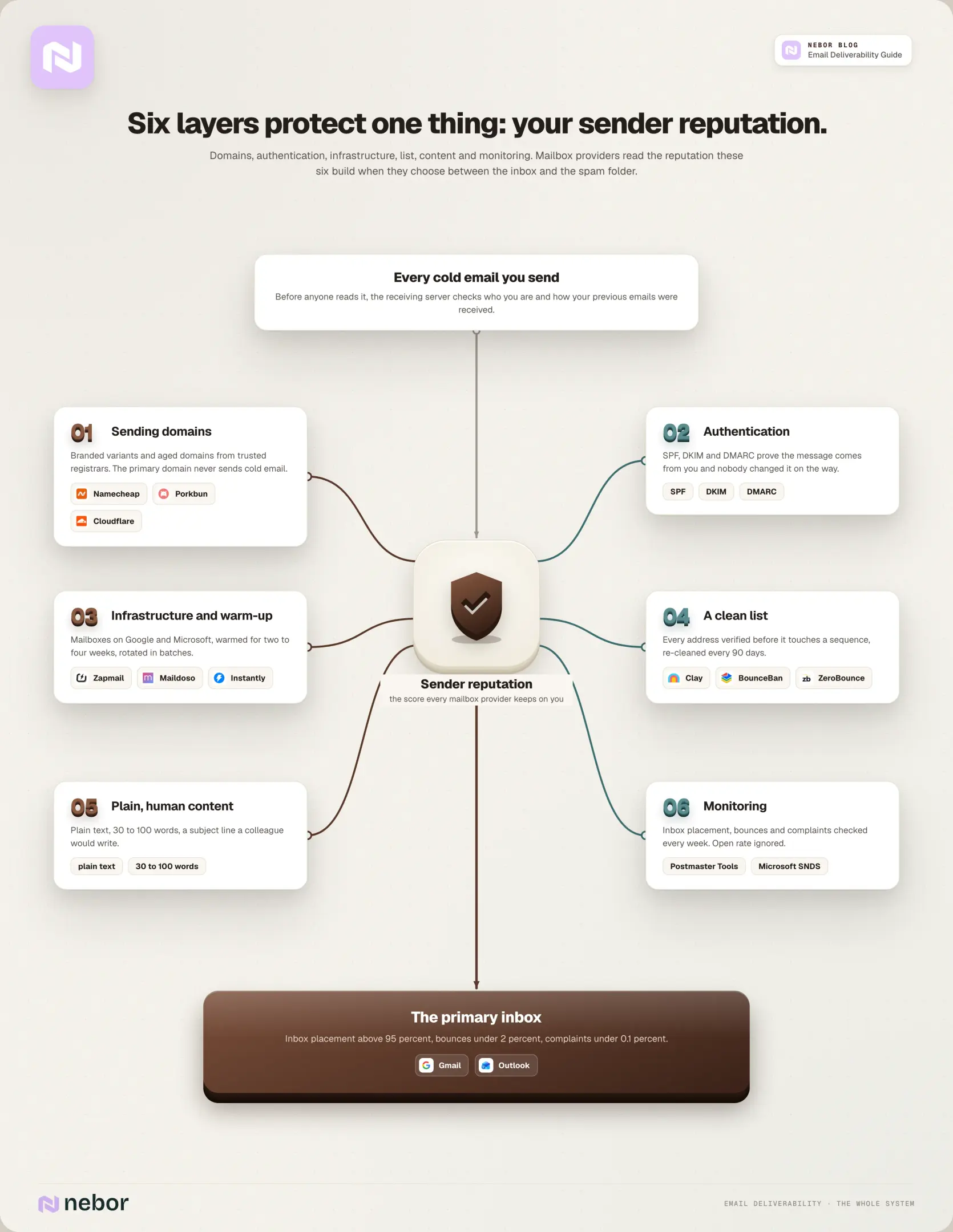
Email deliverability is where your message lands after the receiving server accepts it. Six layers decide that: the domains you send from, the authentication protocols on them, the sending infrastructure and warm-up, a clean list, plain human content, and monitoring.
All six protect one thing: your sender reputation, which is what mailbox providers read when they choose between the inbox and spam. Here's the whole system in one picture.
Understanding email deliverability, and why most companies get it wrong
When we get on calls with sales and RevOps teams, most of them can't tell us the difference between email deliverability and delivery rate. The two are different things, and mixing them up is what stops teams from finding the real cause of a dead email campaign.
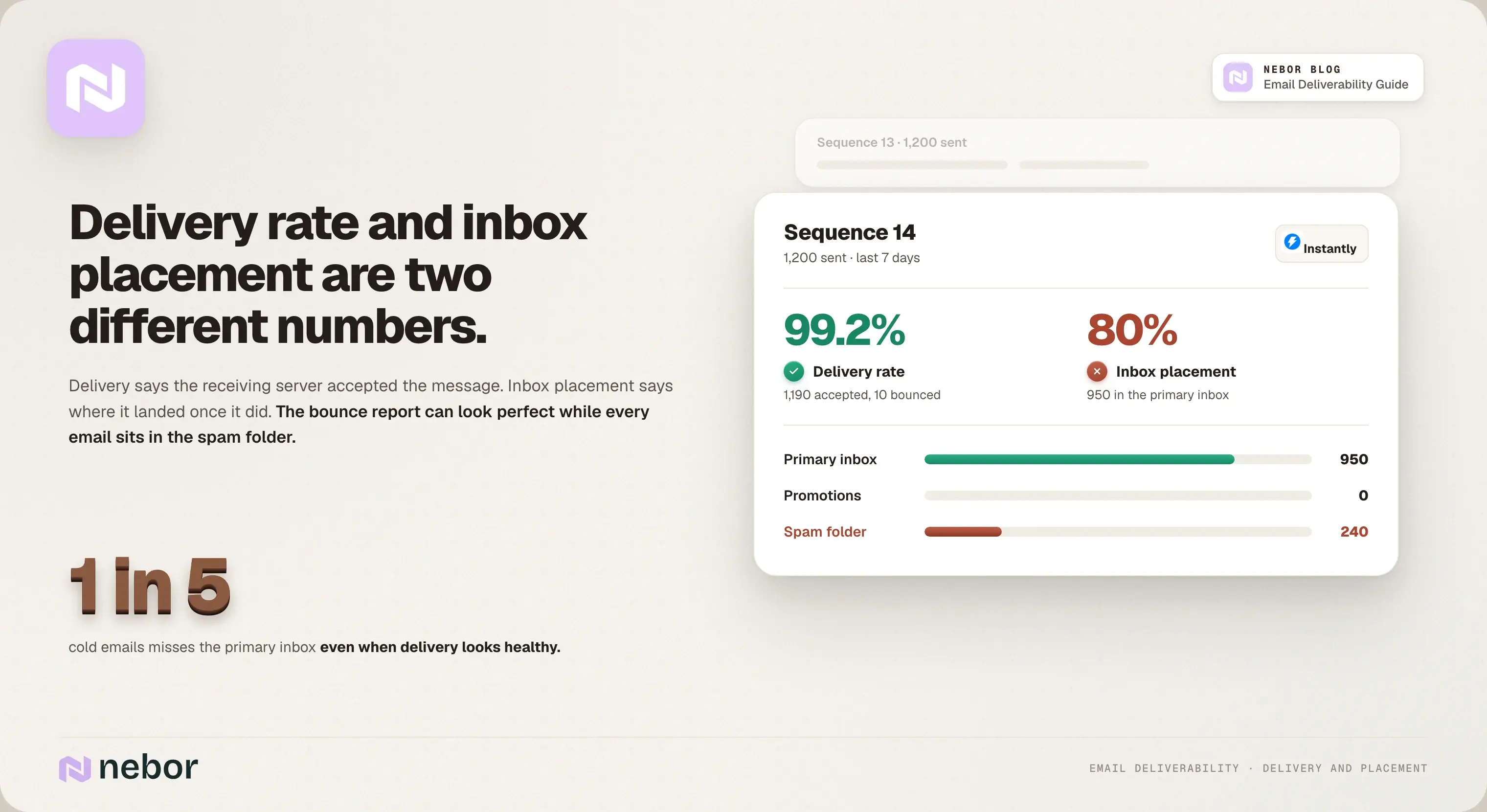
Email delivery refers to whether the message reached the recipient's mail server at all, or bounced. Email deliverability is where it lands in the recipient's inbox once that server accepts it: the primary inbox, the promotions tab, or the spam folder.
You can have a perfect delivery rate and a terrible email deliverability rate at the same time. The bounces look great, every email is in the spam folder, and the sales team celebrates a delivery number that means nothing.
Across the cold campaigns we audit, roughly one in five emails misses the primary inbox even when delivery looks healthy.
At Nebor we track both. Email delivery rate tells you whether the list is clean. Inbox placement rate tells you whether anyone will ever reply, and it's the number that decides your revenue.
Why your sender reputation and authentication protocols decide where your email lands
Most email marketers never think about what happens between hitting send and the message landing somewhere. That gap is where cold email campaigns die, and it's where several factors affect email deliverability at once.
Cold email works differently from a text message. The recipient doesn't know you and never opted in. So before the receiving server shows your message, it has to verify you are who you say you are, decide whether the recipient can trust you, and judge whether the email message is worth showing at all.
When you hit send, the email moves through three steps. It goes to an SMTP server, which asks DNS where the recipient's mail server lives, and then the receiving server makes a call before anything reaches the recipient's inbox: inbox, spam folder, or nowhere.
That last call leans on two things: your sender reputation and your email authentication. Gmail and Microsoft now use AI filters that score every part of the send, including the sender name, the subject lines, the body, and how previous recipients reacted.
Without a good reputation and proper email authentication, the message dies before anyone reads it.
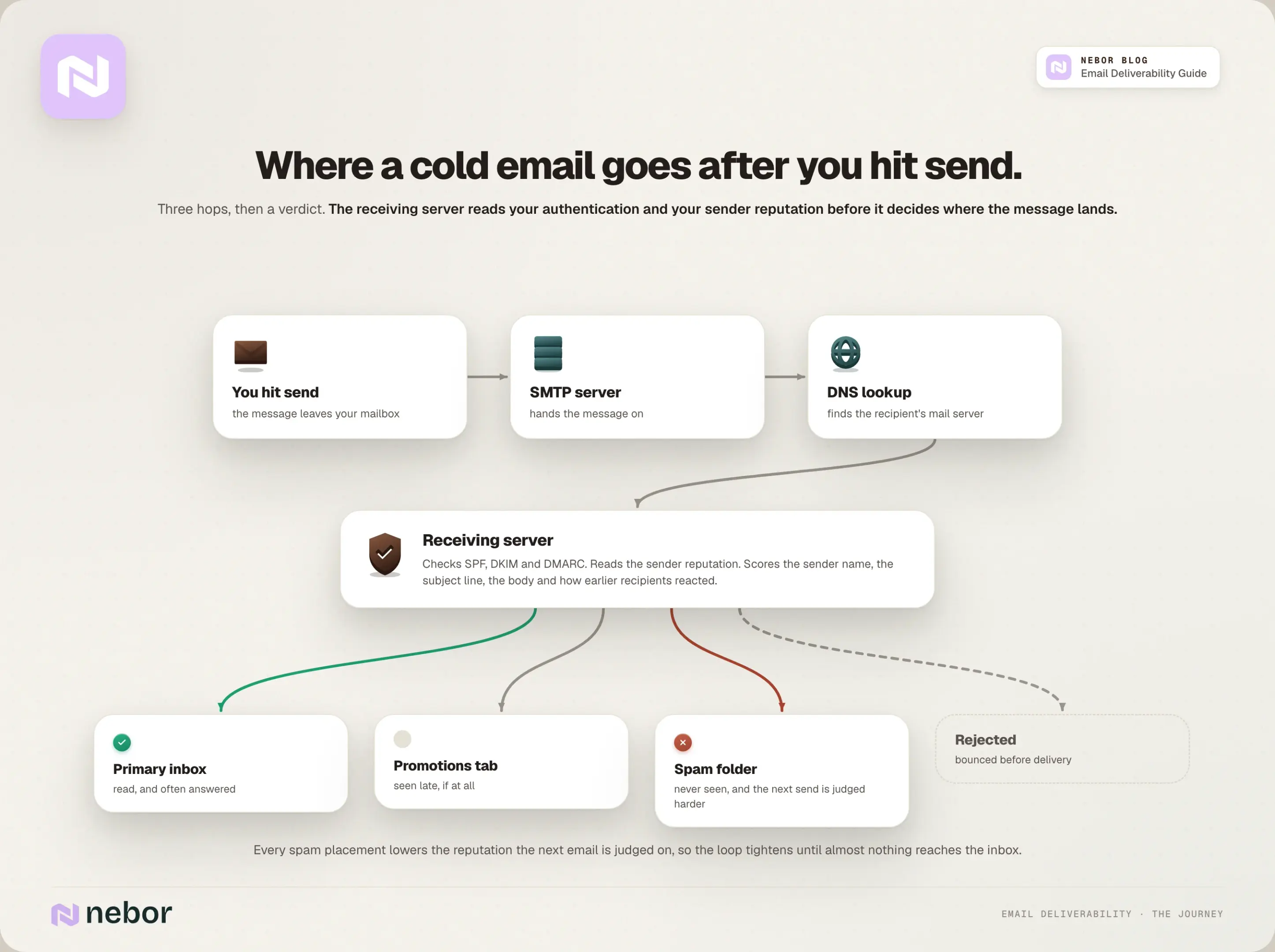
Worse, every spam placement makes the next send harder.
Low engagement damages your domain reputation and IP reputation, every internet service provider and mailbox provider keeps its own sender score for you and marks it down, the next batch goes deeper into the spam folder, and the loop keeps tightening until almost nothing reaches the inbox.
What poor email deliverability costs you
For sales teams, that loop hits revenue directly. Follow-ups after a demo stay unread in the spam folder while the buyer evaluates other vendors, and your email deliverability rate drops a little further with every unread send.
Launch sequences vanish into the promotions tab during the launch window. Each one is lost pipeline.
The harder cost is the work behind the campaigns. If your team spent weeks on the list, the copy, and the automation for an outbound campaign, poor email deliverability means all of it earns a fraction of what it should.
You pay full price for the stack and get a fraction of the return, and eventually mailbox providers blacklist the domain and you start over.
How to build an email deliverability infrastructure that works
One thing before the steps. Building email infrastructure for cold outreach is a system, and the pieces build on each other in a specific order.
If you get all six layers right, you maximize email deliverability without buying another tool. If you skip one, the rest works with a hole in it. Here are the four steps we walk through with every client.
Step 1. Build your technical foundation
We've learned that the technical foundation matters more than anything else. Teams that get it right consistently outperform the ones that only work on content or targeting. Here's the exact order we follow, and every step in it exists to protect email deliverability.
1. Choose your domain sources carefully
Domain reputation starts at the source. We avoid cheap resellers and domains registered from suspicious locations, because some registrars and countries start with a lower trust score before you've sent a single email. Two reasons matter here.
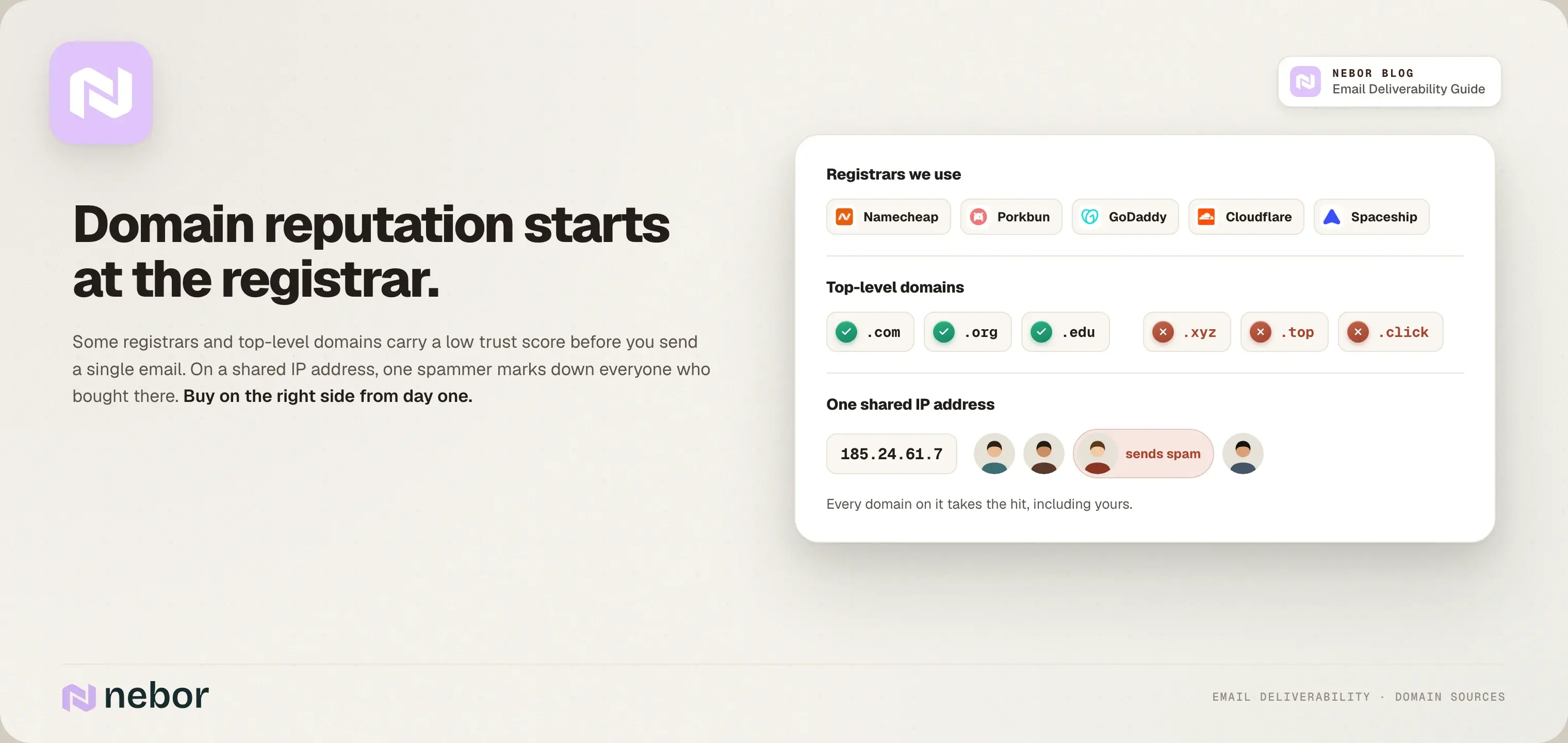
The first is shared IP addresses. When you buy a domain or hosting from a registrar, you sometimes share an IP address with everyone else who bought there. If those users send spam and the spam filters flag the shared IP, your sender reputation takes the hit even though your own sending is clean.
The same logic applies to the registrar itself: when security vendors see phishing at scale from one registrar, every domain on it gets treated with more suspicion.
The second is the top-level domain. The TLD is the last part of the domain name, and some of them (.xyz, .top, .click, and the more obscure ones) host so much spam that filters treat them as a risk on sight. The classics (.com, .org, .edu) carry a clean reputation.
So buy on the right side from day one. We stick to a few registrars: Namecheap, Porkbun, GoDaddy, Cloudflare, and Spaceship.
2. Select your inbox providers strategically
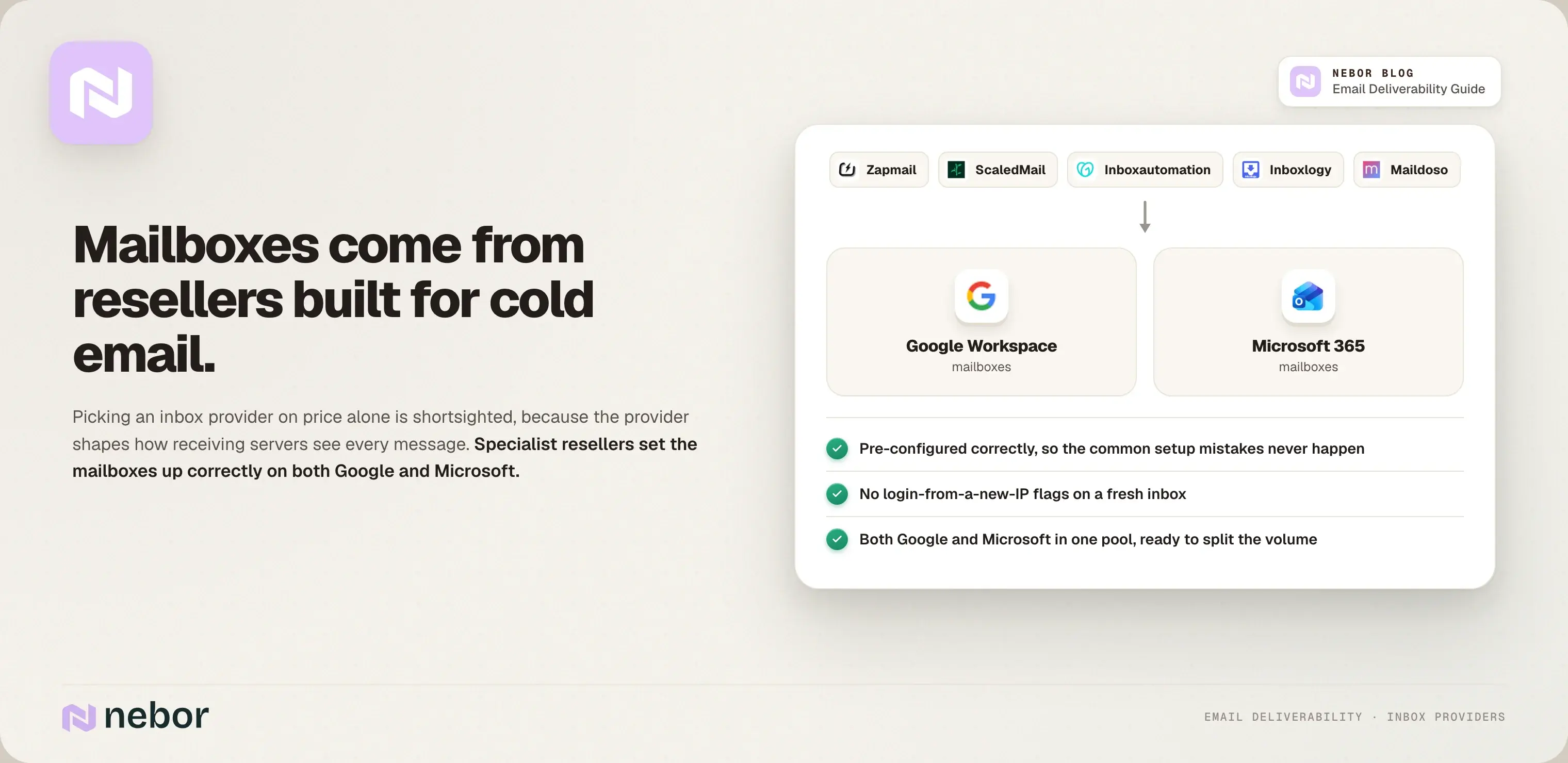
Most companies pick an email service provider on price alone. We think that's shortsighted, because the provider shapes how receiving servers see your messages, which means it affects email deliverability directly.
We use resellers that specialize in cold email infrastructure: Zapmail, ScaledMail, Inboxautomation, Inboxlogy, and Maildoso.
They provide mailboxes on both Google and Microsoft, they pre-configure them correctly so the common setup mistakes never happen, and they help avoid the login-from-a-new-IP-address flags that hurt a new inbox.
3. Create a domain strategy that works
Some sales reps assume you can send outbound from any domain. You can't, and three rules apply.
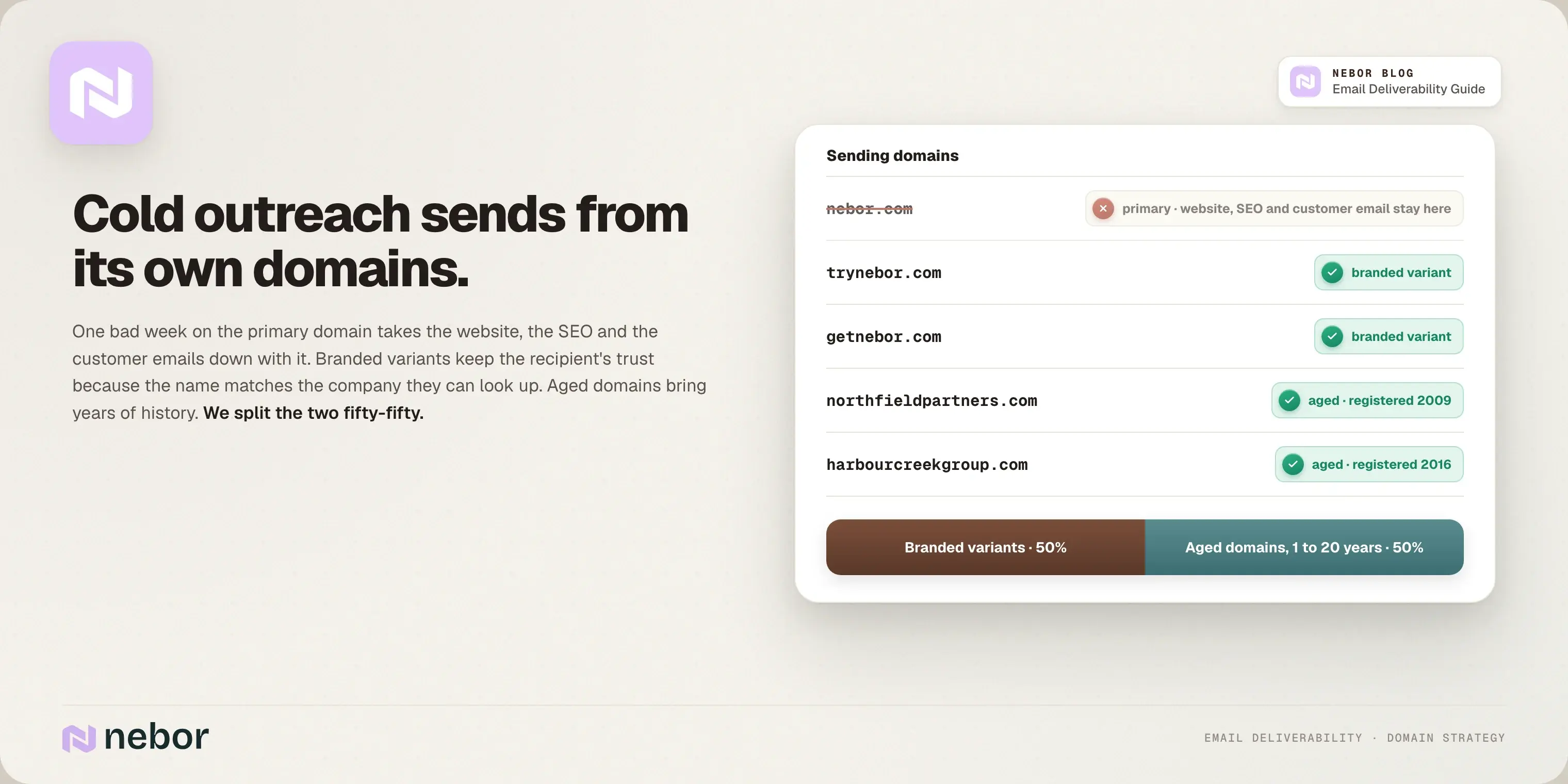
Rule one: never send cold outreach from your primary domain. One bad week can get your main domain flagged, and that takes your website, your SEO, and your customer emails down with it.
Rule two: buy sending domains that point back to your business. Branded variants like trynebor.comgetnebor.com keep the recipient's trust, because the name matches the company they can look up.
Rule three: use aged domains too. Receiving servers spot a freshly registered domain set up for outbound and flag it fast, while a domain with years of history gets the benefit of the doubt.
New branded domains are never aged, so we use a 50-50 split: branded variants for consistency, and aged domains that are one to twenty years old for their track record.
4. Configure authentication (SPF, DKIM, and DMARC) properly
Email authentication protocols are your digital business license. They tell receiving servers that your messages come from you and are safe to open. Three protocols make up the standard, Sender Policy Framework, DomainKeys Identified Mail, and DMARC, and you want all three.
SPF (Sender Policy Framework) is your domain's employee directory: it lists every server and IP address allowed to send email on your behalf. Include every sending service you use, and stay under the ten-lookup limit, because crossing it breaks authentication.
DKIM (DomainKeys Identified Mail) adds a digital signature to every message, so the receiving server can confirm nobody altered the email message in transit. We use 2048-bit keys rather than the older 1024-bit ones.
DMARC (Domain-based Message Authentication, Reporting, and Conformance) ties the two together. It checks that the domain your recipient sees in the From address lines up with the domain in your SPF record or your DKIM digital signature, and it tells receiving servers what to do when a message fails.
DMARC needs at least one of SPF or DKIM in place to work, and it's the piece that stops your domain being spoofed.
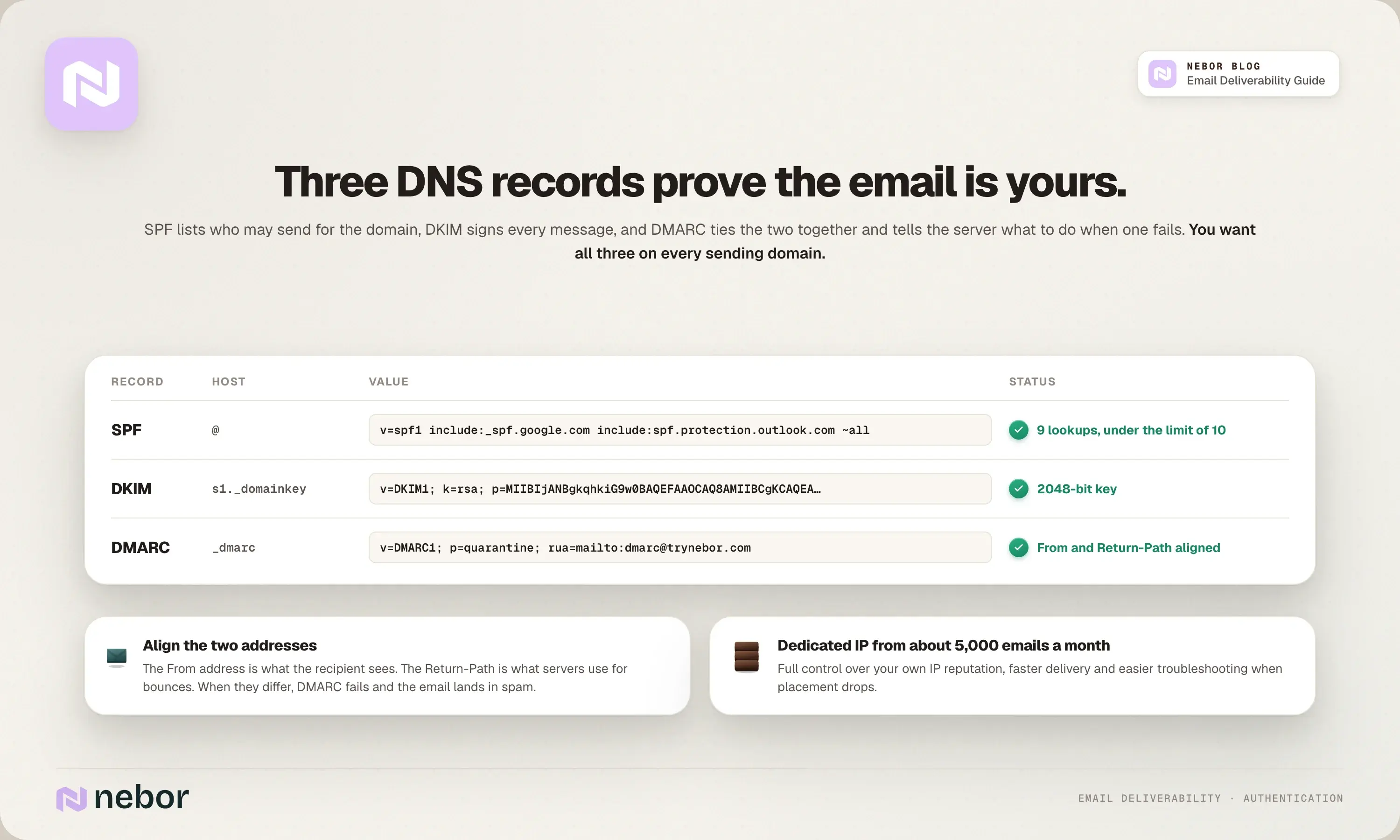
This is where third-party sending tools trip people up. The From address is what the recipient sees. The MAIL FROM, or Return-Path, is what mail servers use behind the scenes for bounces.
If those two don't align, the email fails DMARC and ends up rejected or in spam, so wire everything so the receiving server verifies your domain as the sender before the email reaches the recipient's inbox.
If you send high volumes (from about 5,000 emails a month), we also recommend a dedicated IP address. A dedicated IP address gives you full control over your own IP reputation, faster email delivery, easier troubleshooting when email deliverability issues show up, and better protection against spoofing.
5. Separate your email types
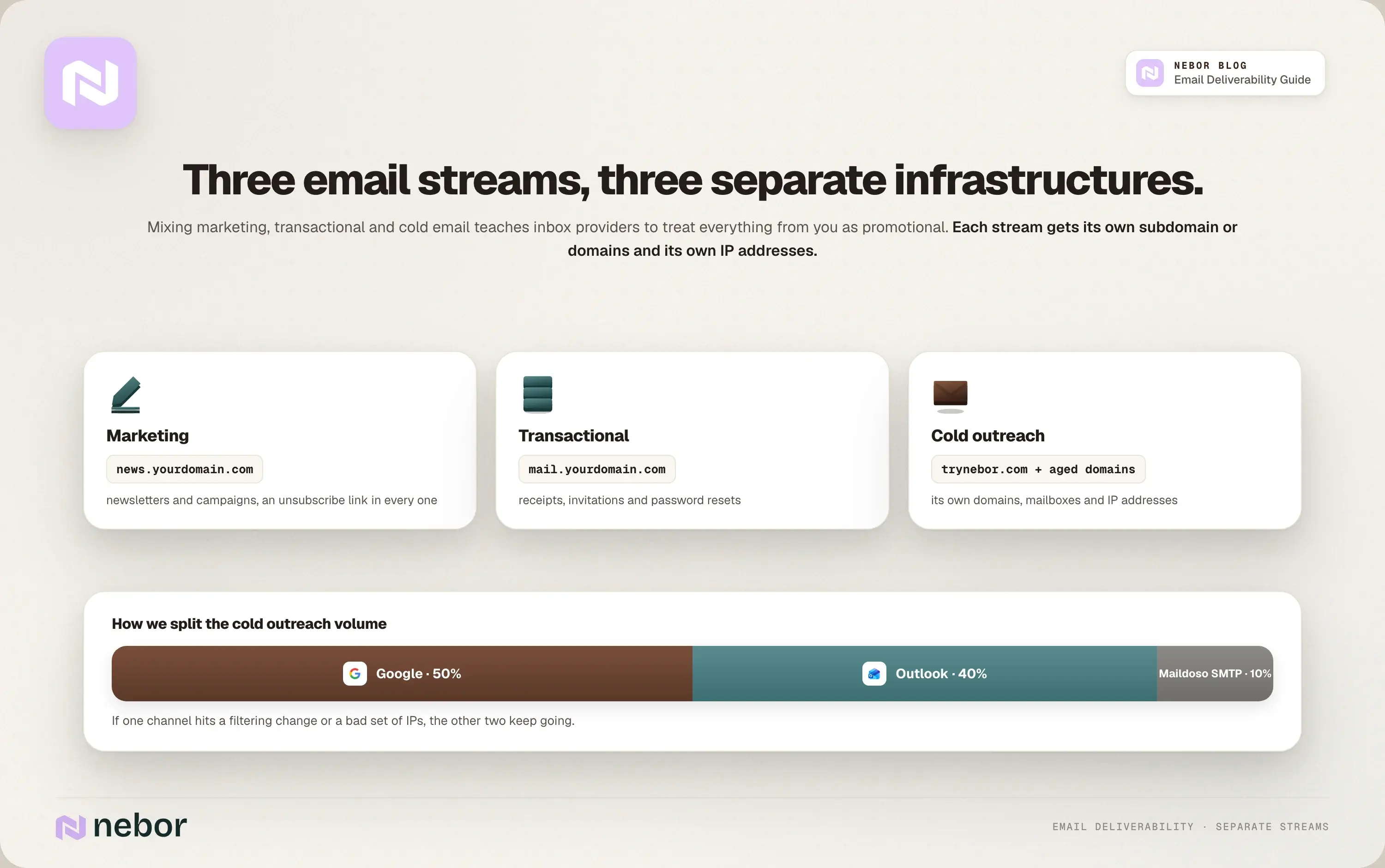
Most lead generation teams and email marketers never think about this. Mixing your email marketing program with transactional emails and cold outreach damages email deliverability for all three, because inbox providers start treating everything from you as promotional.
So keep them on separate email infrastructure, with their own subdomains and IP addresses. Marketing emails from news.yourdomain.com with an unsubscribe link in every one, transactional emails from another subdomain, cold outreach from its own domains.
Email marketing and cold email need different infrastructure because the receiving side judges them differently, and keeping them apart is how you get an email marketing campaign into subscribers' inboxes without it dragging your outbound down.
The separation helps you avoid spam traps and gives inbox providers a clear picture of what each stream is.
6. Keep a healthy ESP split
A healthy email service provider split stops you putting every send through one door. At Nebor we send about half of our emails through Google, 40 percent via Outlook, and 10 percent through a custom SMTP setup with Maildoso.
If one channel has trouble, whether a sudden filtering change or a poor sender reputation on one set of IP addresses, the others keep going. If you plan to scale cold outreach, this balance is the safer way to grow without giving up your email deliverability rate.
Step 2. Warm up your sending domains and rotate your inboxes
Warming up means starting slow and gradually increasing what you send from a new domain or inbox, and it's the single biggest email deliverability lever we see teams rush.
The ramp is the whole point: it builds a positive sender reputation with inbox providers like Gmail, Outlook, and Yahoo, so they don't flag you as a spammer. Jumping from zero to 100 emails a day guarantees email deliverability issues.
The warm-up process
Here's the sequence we follow:
Use a warm-up tool like Instantly to automate it.
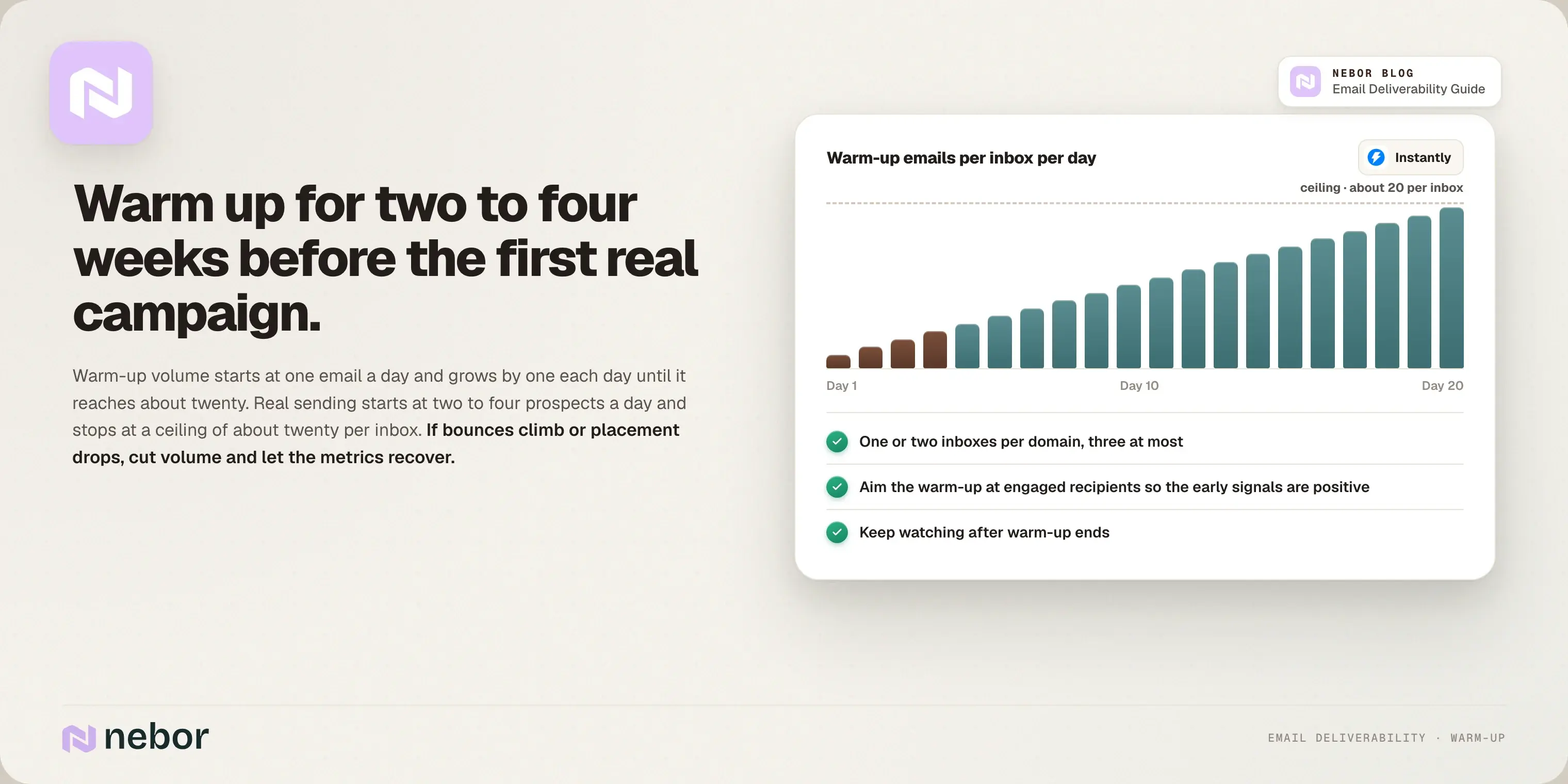
Let the warm-up go for two to four weeks minimum before real email campaigns.
Start with one or two inboxes per domain, and cap at three unless your setup is built for more.
Begin with two to four emails per inbox per day and grow from there.
Aim the warm-up at engaged recipients, so the early signals are positive.
The cadence in practice: warm-up volume starts at one email a day and grows by one each day until it reaches about twenty. Real sending starts at two to four prospects a day and ramps to a ceiling of about twenty per inbox, which keeps the email deliverability rate healthy through the first weeks.
Even after warm-up we keep watching, and if bounces climb or inbox placement drops, we cut volume and let the metrics recover before pushing again.
The inbox rotation strategy
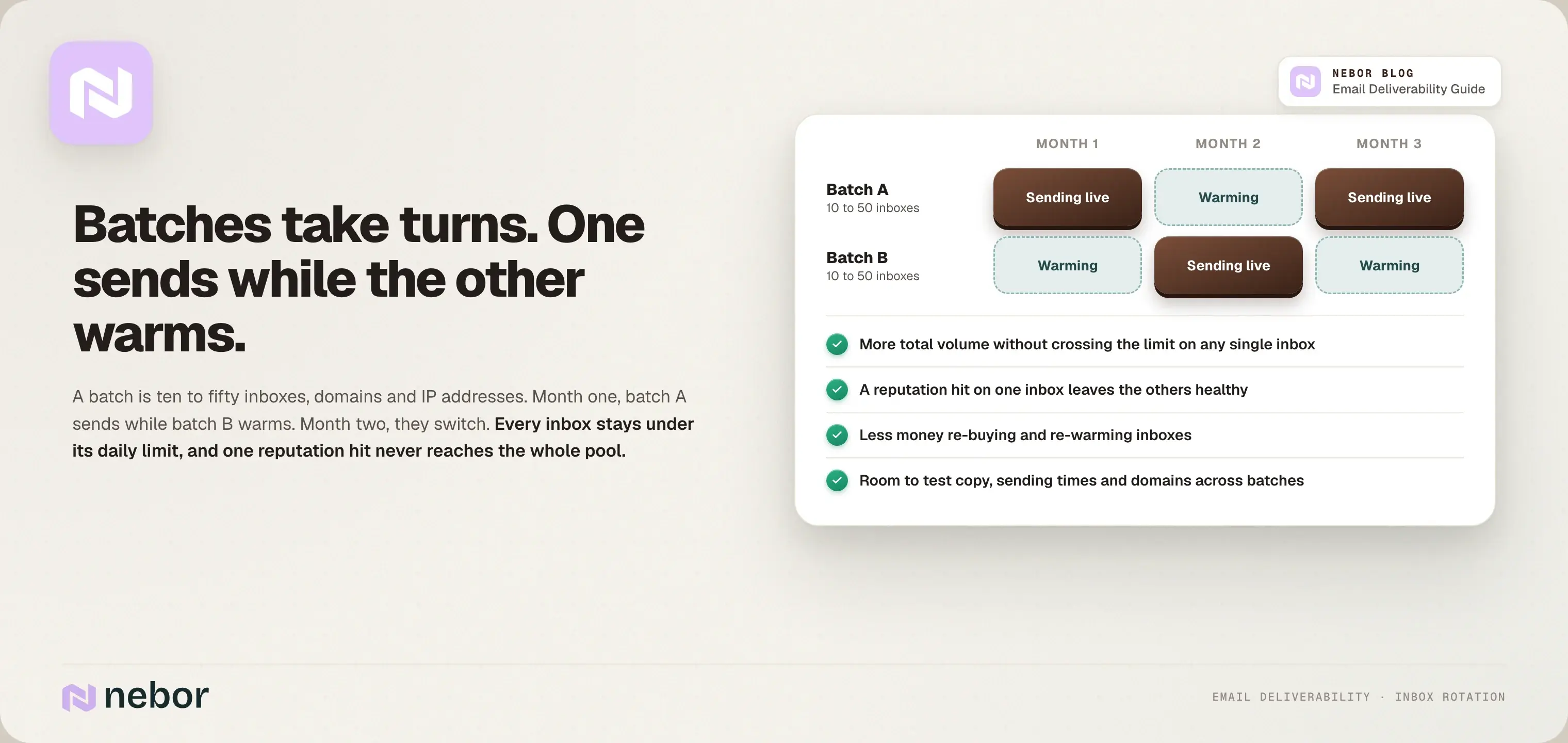
Inbox rotation protects your sender reputation while you scale. Instead of sending from the same inboxes forever, you cycle them. Month one, a batch of ten to fifty inboxes, domains, and IP addresses sends while another batch warms. Month two, you switch: the first batch rests or re-warms, and the second batch sends.
Four reasons this matters. Every inbox has a daily limit, so rotating lets you send more in total without crossing it on any single one. If one inbox takes a reputation hit, the others stay healthy.
You waste less money re-buying and re-warming inboxes. And sending from a pool looks more natural to inbox providers than hammering one address.
It also gives you room to test different copy, sending times, and domains across batches and see what performs.
Step 3. Build prospect lists that keep your domains clean
List quality is so central to email deliverability that we wrote a separate guide on building a prospect list. Here's the short version, focused on the parts that matter for email deliverability.
Never use purchased lists. Or maybe you should.
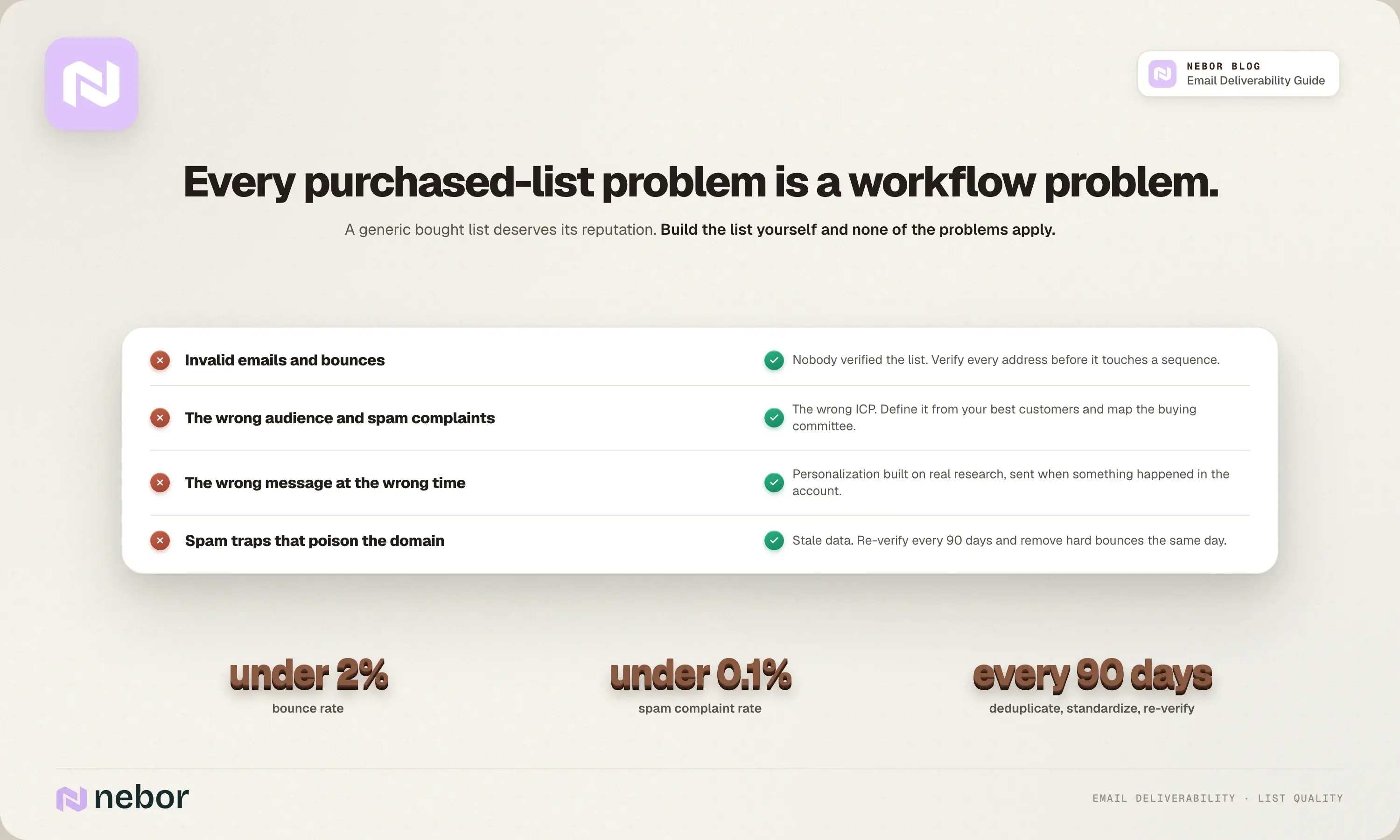
Buying lead lists has a bad reputation, and the traditional way deserves it. A generic purchased list is full of invalid emails, people who have no reason to hear from you, and spam traps waiting to catch you.
Bad addresses mean bounces, the wrong audience means spam complaints, and if you hit spam traps even once, the domain is poisoned.
But every one of those problems is a workflow problem. Invalid emails mean nobody verified the list. The wrong audience means you targeted the wrong ICP.
High spam complaint rates mean the wrong message reached the wrong person at the wrong time. If you build the list the way we build it, none of that applies, so we stop calling it a purchased list at all.
Build prospect lists with the right tools
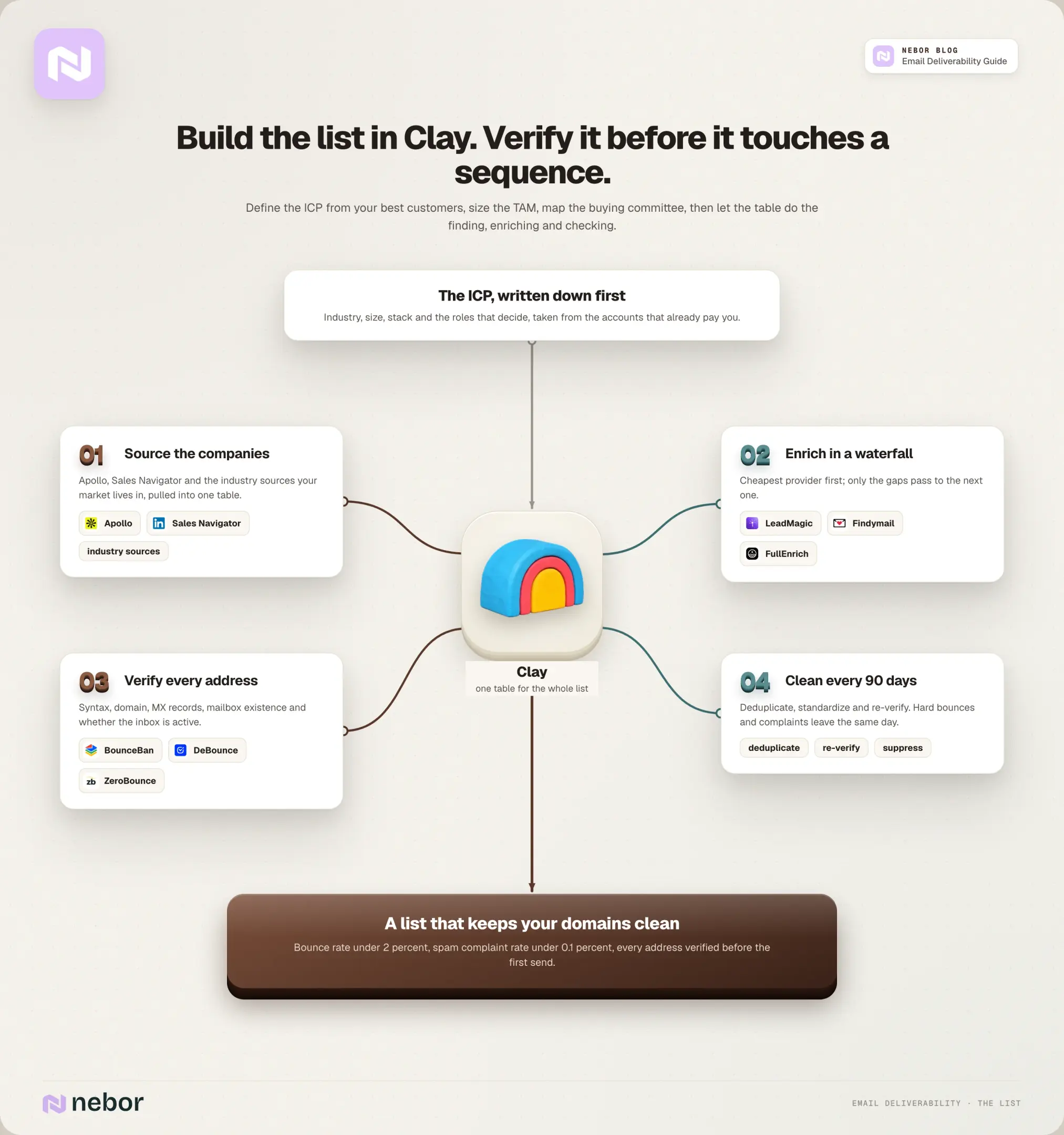
The short version of our workflow: define your ICP from your best customers, size your TAM, map the buying committee, and pull target companies from Apollo, LinkedIn Sales Navigator, and industry-specific sources into Clay.
Then find and verify the people. LeadMagic, Findymail, and FullEnrich work as a waterfall to enrich each contact, and BounceBan, DeBounce, and ZeroBounce verify every address before it touches a sequence.
Between them they check syntax, domain existence, mailbox existence, MX records, and whether the inbox is even active.
Clean your lists religiously
Business information changes constantly and stale addresses turn into spam traps, so do a cleaning cycle every 90 days to keep the list up to date: deduplicate, standardize, and re-verify. Remove hard bounces immediately, and remove anyone who marked you as spam the same day.
For email marketing lists, send a re-engagement campaign for inactive subscribers, respect subscriber preferences on frequency, and purge the ones who stay quiet within six months, because sending to dead subscribers' inboxes drags your sender reputation down with every email campaign.
All of these affect email deliverability, so keep the cadence consistent.
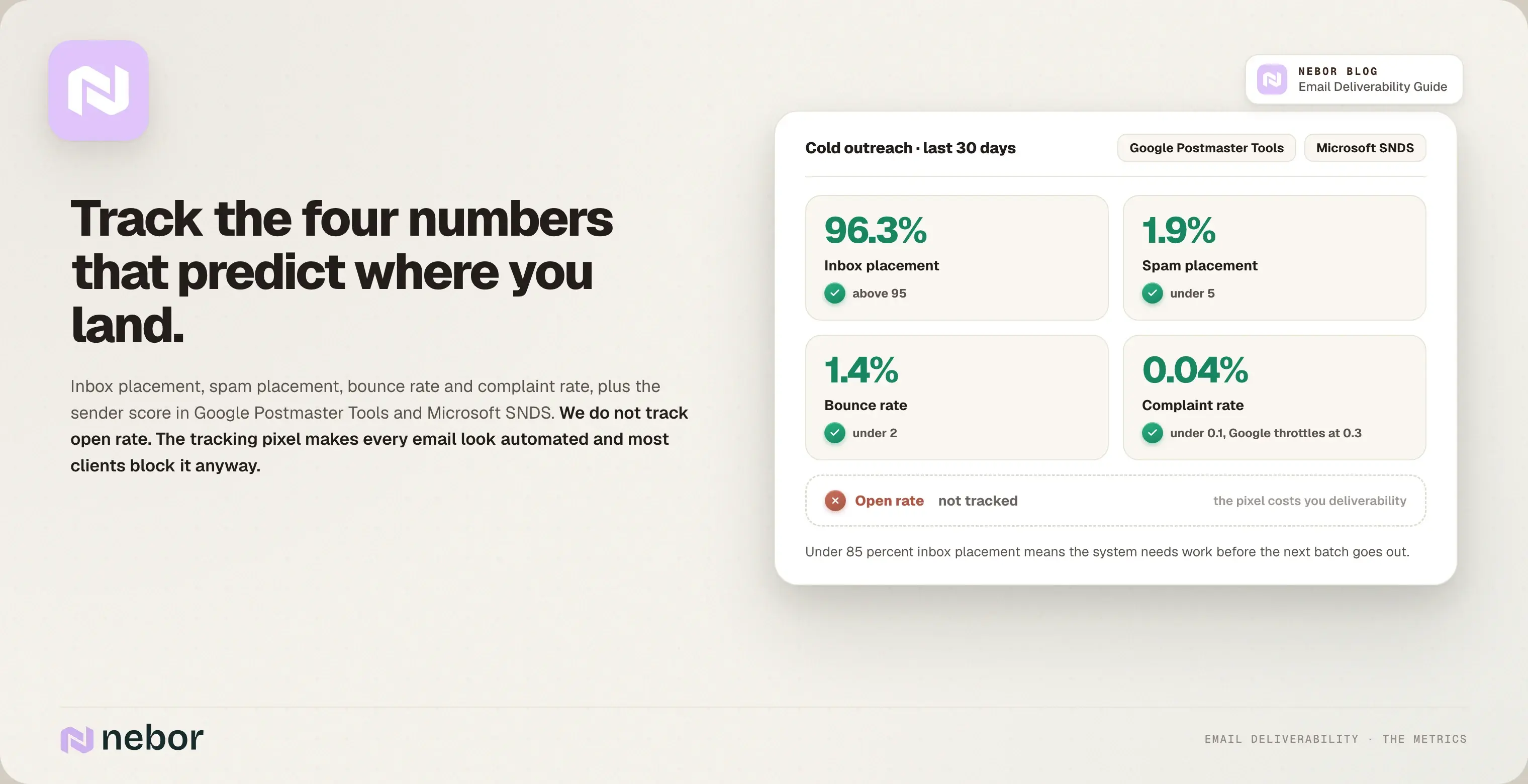
Two benchmarks we hold to across the board: keep the bounce rate under 2 percent and the spam complaint rate under 0.1 percent.
Above those lines, mailbox providers start filtering you, and above 0.3 percent complaints Google throttles you outright. CAN-SPAM also requires you to honor opt-outs within ten business days, so treat that as a floor.
Step 4. Write cold emails that get past spam filters
Even with a perfect technical setup, the wrong content can trigger spam filters. Here's how we write relevant content that reaches the inbox and earns a higher email deliverability rate.
Write like a human who wants a reply
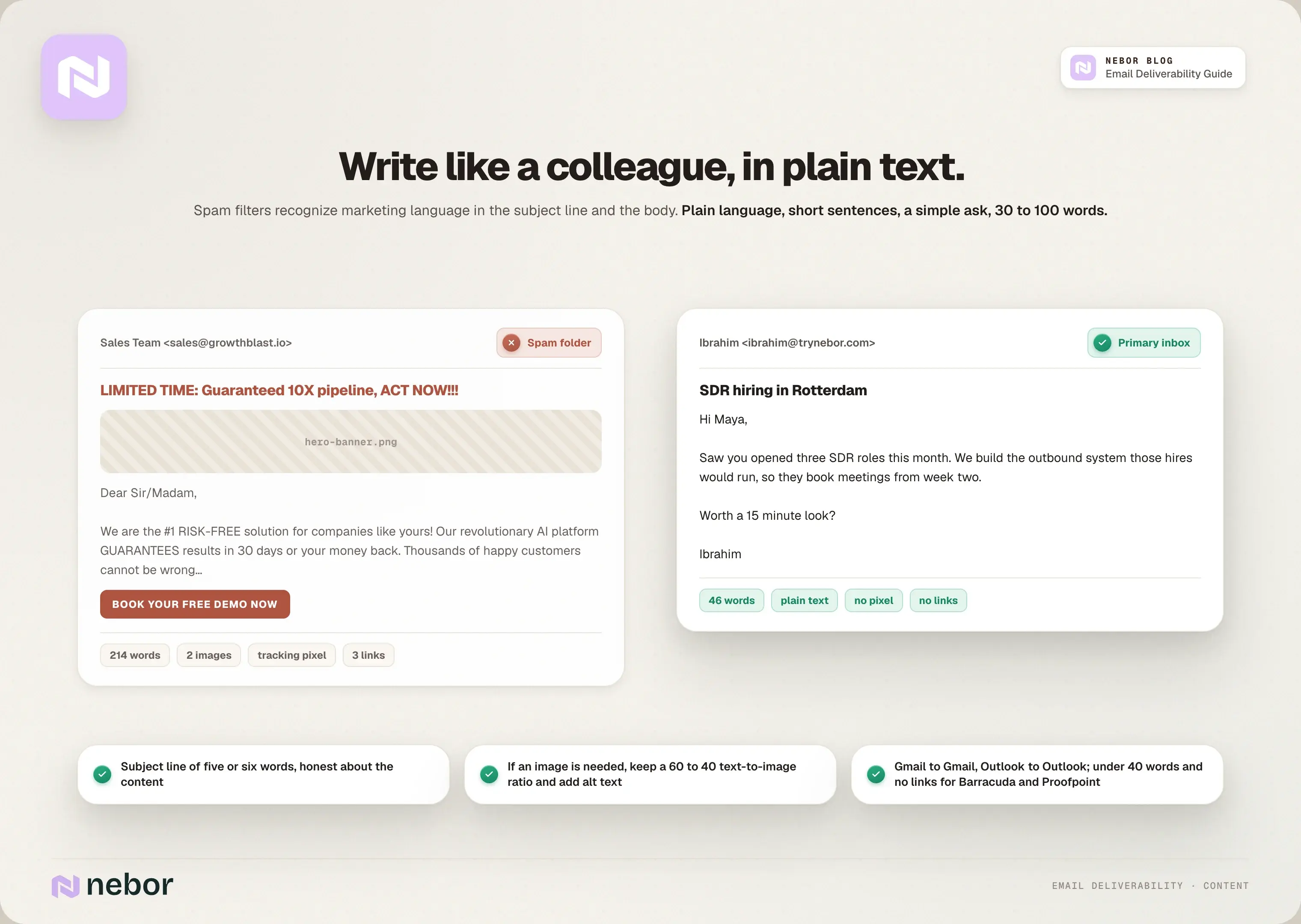
Spam filters recognize marketing language, in the body and in subject lines. We avoid the obvious spam trigger words: easy money, act now, limited time, guaranteed, risk-free, miracle. Instead we write the way one colleague writes to another.
Personalization built on real research and enrichment rather than mail merge, plain language, short sentences, a simple ask, and no all-caps or exclamation marks.
You're competing for attention in an inbox that already has a dozen cold emails in it. If the message doesn't read like a person wrote it for this person, it goes to the bottom of the pile or straight to the spam folder.
Keep it plain text, or watch the text-to-image ratio
Our cold emails are usually plain text, between 30 and 100 words. If you must add images, keep at least a 60 to 40 text-to-image ratio, give every image alt text, and never put critical information only in an image.
Know that rich content burns inboxes faster, and only take that trade when it clearly produces more leads.
Write subject lines that read like a colleague's
Subject lines decide whether recipients open the email or mark it as spam without reading a word. Ours preview the content honestly, stay short enough for a phone screen (five or six words), and avoid promotional language.
Our post on the best time to send cold emails covers the timing side.
Match email service providers when you can
We see better inbox placement when the sending and receiving environments match: Gmail to Gmail, Outlook to Outlook. For Microsoft recipients we often use Azure-based Outlook inboxes, because they perform better in our tests.
For hard filters like Barracuda and Proofpoint we go tighter still: under 40 words, plain subject lines, plain text, no links, no attachments.
Four rules for protecting email deliverability as you scale
As your outbound and email marketing program grow, a few new things come into play.
Track everything except open rate
When we take over a campaign, the first number we ask for is the inbox placement rate, and most teams can only show us an open rate.
Track the numbers that predict outcomes: inbox placement rate, spam placement rate, bounce rate, and complaint rate (the share of recipients who file spam complaintsspam reports).
A healthy cold program has an email deliverability rate above 95 percent with bounces under 2 percent, and an email deliverability rate under 85 percent needs work before you send another batch.
Check your sender score too, in Google Postmaster Tools and Microsoft SNDS, because that's the number the filters are reading.
We don't track open rates at all. Open tracking plants an invisible pixel in every email, which makes the message look automated to spam filters, and most email clients block the pixel anyway. You pay for the open rate in email deliverability, which is the opposite of what you want.
Test regularly, before problems show up
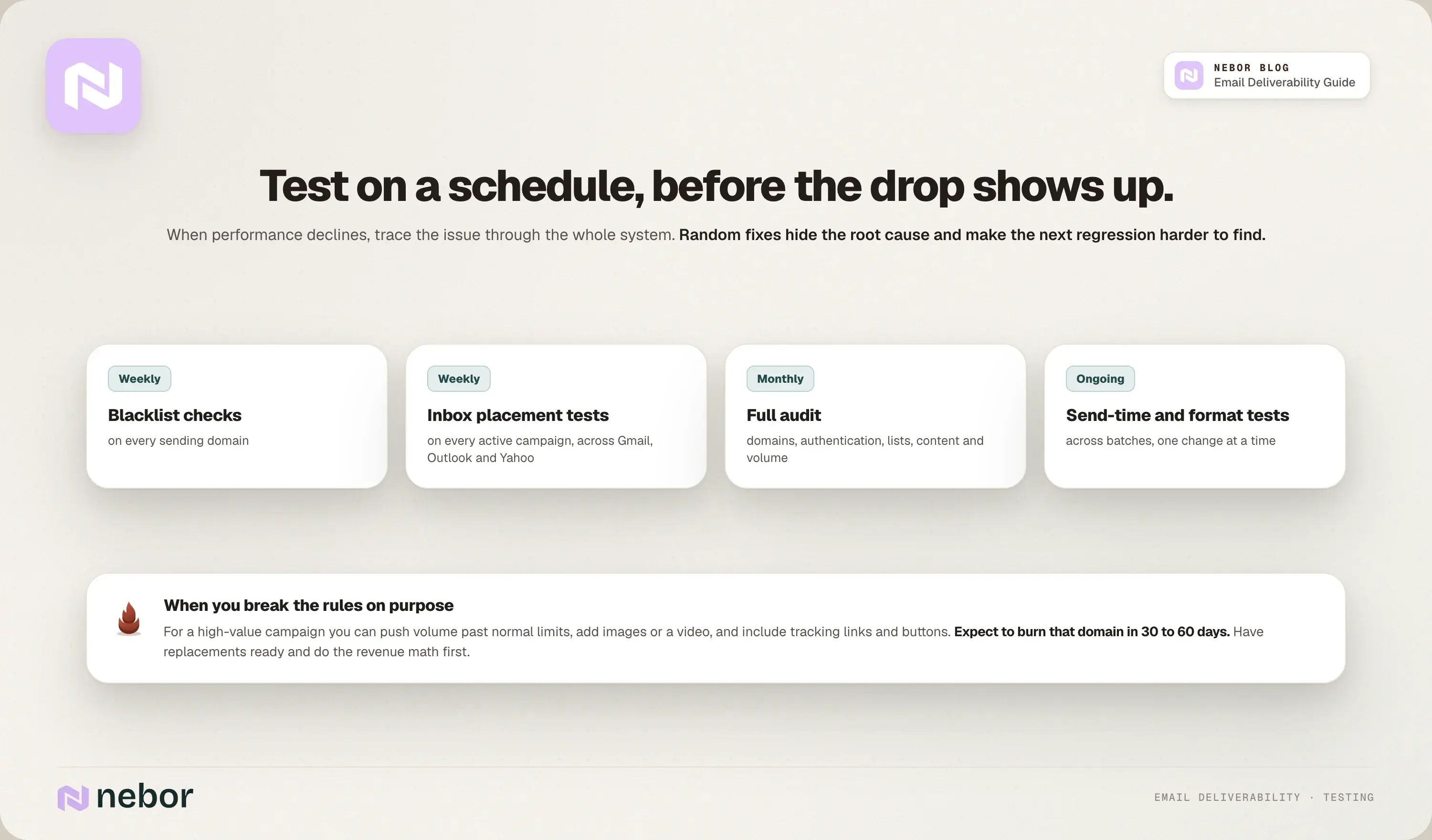
Keep a fixed schedule instead of waiting for a drop: weekly blacklist checks on every domain, weekly inbox placement tests on active email campaigns, a monthly full audit, and ongoing tests on sending times and formats.
Email deliverability tools like inbox placement testers tell you where your emails land across Gmail, Outlook, and Yahoo before your prospects do.
When performance declines, trace the issue through the whole system instead of making random changes. Random fixes hide the root cause and make the next regression harder to find.
Know when to break the rules
Sometimes aggressive sending makes business sense even at the cost of a domain, and we've made that trade ourselves on domains we set up knowing they were disposable. For a high-value campaign you can push volume past normal limits, add images or a video, or include tracking links and buttons.
Just go in knowing you may burn that domain in 30 to 60 days, have replacements ready, and do the math on whether the revenue justifies it. Sometimes it does. Most of the time it doesn't.
Take recipient feedback seriously
Recipient feedback feeds straight into your sender reputation. Watch spam complaints and the spam complaint rate, honor unsubscribe requests immediately, and always include an unsubscribe link so people can opt out cleanly.
Stay aligned with CAN-SPAM and the equivalent regulations in every country you send into, and set up feedback loops with the big mailbox providers and internet service providers so you hear about spam complaints before the filters act on them.
Recap: Build your email deliverability as one system instead of a pile of tips
Everything in this email deliverability guide is one system, and each piece holds up the next. Domain quality sets the baseline trust, authentication proves who you are, and list hygiene protects the reputation you've built.
Content keeps you out of the filters, sending discipline shows providers you behave like a legitimate sender, and monitoring catches a problem before it spreads.
If one link breaks, the rest unravels, and your email deliverability rate tells you within a week. The teams that prioritize email deliverability as one system are the ones whose emails land, month after month.
That's what we mean by ownership over rental. The email deliverability stack we build for a client lives in the client's accounts. The sending domains, the warmed inboxes, the rotation logic, and the audit cadence all stay with you after the engagement ends, along with the operating manual.
We're salespeople first and automation people second, and the systems we build for clients are the ones we use for our own pipeline. If your reply rates have dropped and nobody can tell you why, book a 15-minute call and we'll find the hole in the system.


Related Articles

By clicking Sign Up you're confirming that you agree with our Terms and Conditions.