
How to Automate Sales Prospecting From Scratch (And Why You Probably Don’t Need to Hire More SDRs)

In this post:
Most sales teams still do sales prospecting the same way they did five years ago. Reps open LinkedIn Sales Navigator, scroll profiles for an hour, copy names into a spreadsheet, bounce between three tools for email addresses, write a semi-personalized message, and send it.
By the time they're through, half the day is gone and they've contacted maybe 30 people, most of whom were never going to buy anyway. The list was static, and nobody knew who was actually in a buying window.
That's what sales prospecting without automation looks like. It's slow, expensive, and inconsistent, because the output depends on how motivated or awake the person doing it happens to be.
Here's what more sales leaders are realizing: with today's AI tools, you can automate almost every function in your sales prospecting process and build a system that works 24/7 without burning out or forgetting to follow up. This guide is for B2B founders, sales leaders, and revenue teams who want that system without hiring more SDRs. We'll show you how, step by step.
Note: Are you looking to free your sales reps from top-of-funnel prospecting work?
At Nebor, we build the GTM engine that takes that work off them, plus the RevOps workflows that keep your CRM clean underneath it.
You'll get sourcing, waterfall enrichment, verification, qualification, and the first touch, with every result landing on the right record in your CRM.
We will do the strategy and design the workflows first, then build them into your own Clay and CRM accounts. We'll hand the whole thing over with documentation so your team owns it.
Book a 15-minute call and we'll look at where your reps' week is going and tell you what to hand over first.
TL;DR
Everything an outbound team used to do by hand can now happen on autopilot. If wired together properly, today's automation tools can build brand awareness with steady LinkedIn touches, test outbound offers on small segments before you scale them, catch buying signals as they happen, and turn the whole motion into booked meetings.
The full works, from first touch to a meeting on the calendar, automated end to end. Here's our prospecting automation workflow. It changes based on your business, your ICP, and your lead generation goals.
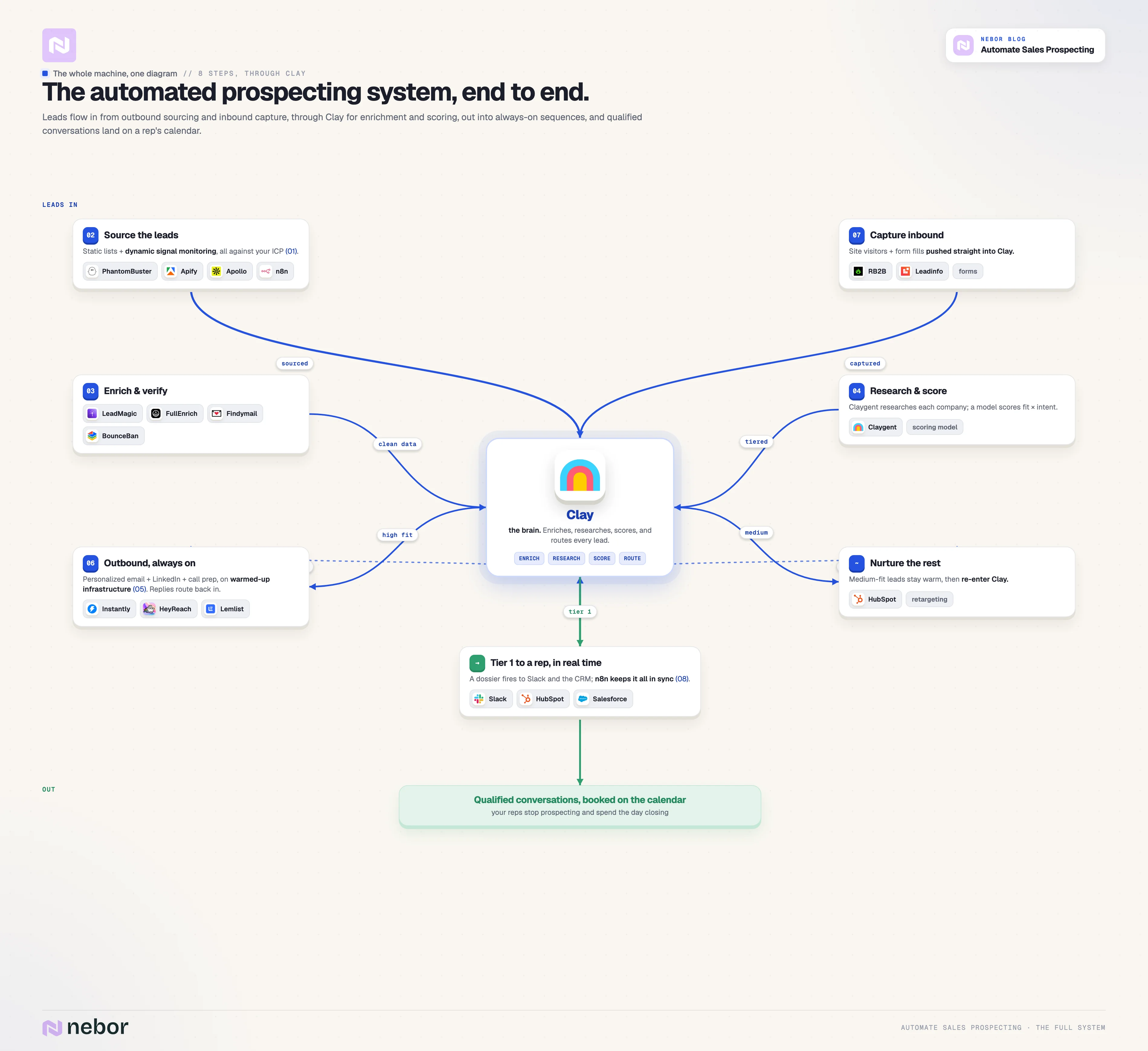
Building this is exactly what we do at Nebor. We set the system up in your accounts, hand it over, and you own it. Book a 15-minute call and we'll map the system to your business.
What does sales prospecting actually involve (and where does all the time go)?
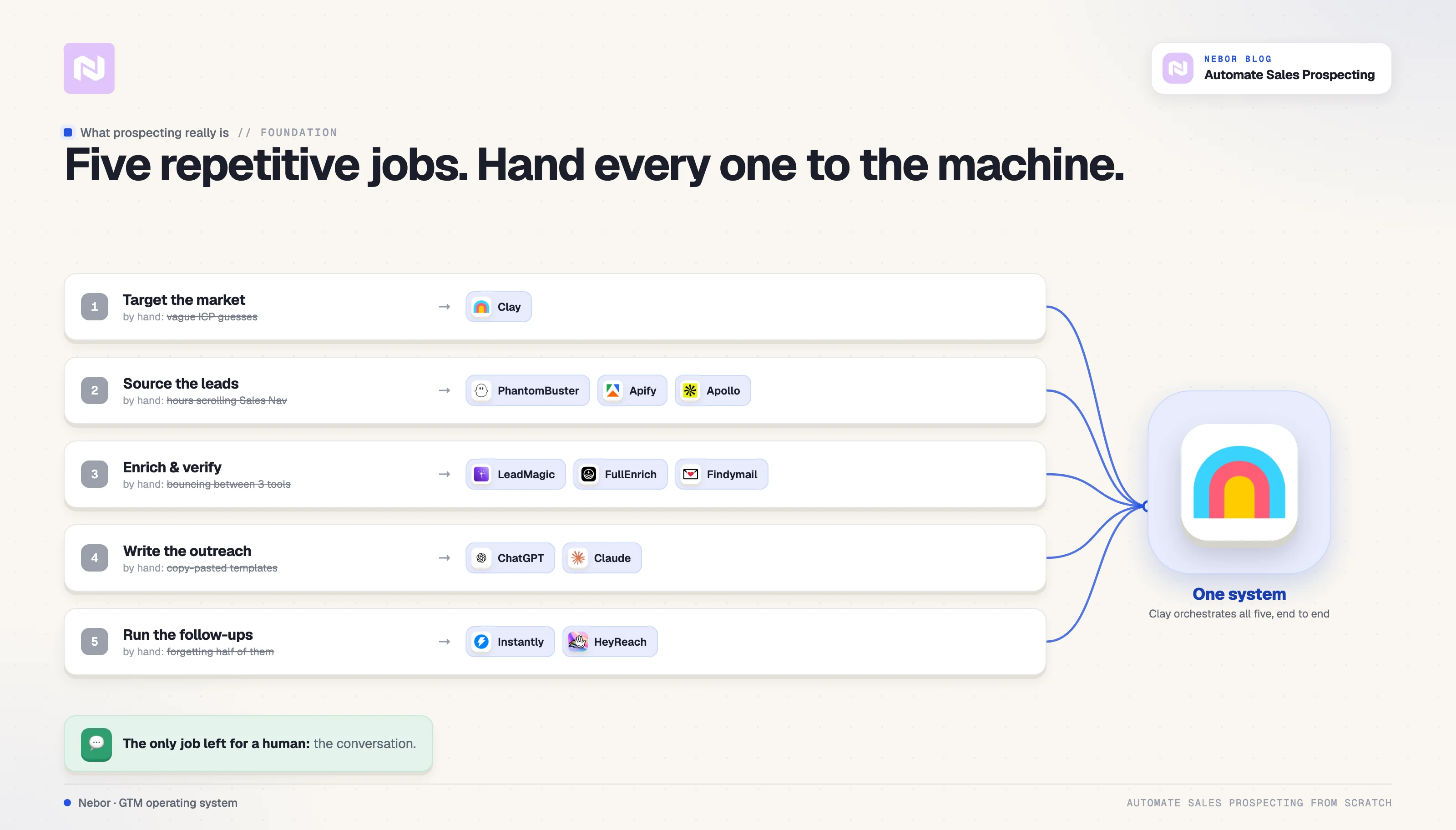
Before automating anything, break the sales prospecting process down. Five core activities eat up sales teams' time.
Identifying your target market
Figuring out who you should be selling to: the industries, company sizes, job titles, and geographies that make up your ideal customer profile. Most teams have a rough idea, but rarely one structured enough to target with.
Finding and sourcing leads
Once you know who you want to reach, your sales team needs to find those potential customers. That means scraping LinkedIn, searching databases, monitoring job boards, and tracking funding announcements. This data collection is where the bulk of an SDR's time goes.
Enriching and qualifying leads
A name and company aren't enough. You need contact data, revenue, tech stack, and hiring patterns, then you score each lead against your ICP. Most sales teams do this data entry manually or rely on a single provider that only covers 40-60% of their list.
Writing personalized outreach
Nobody responds to generic templates anymore. Every email and LinkedIn message needs personalization that shows you understand the prospect's situation. Writing these manually is painful at scale.
Managing sequences and follow ups
Sending one email isn't a strategy. You need multi-touch sequences across email, LinkedIn, and phone, plus lead tracking on who opened, clicked, and replied. Then you need to actually send the follow ups consistently.
Handled manually, these five jobs mean reps spend roughly 60-70% of their time on tasks that never involve talking to a prospect. The actual selling gets maybe 30% of the day.
That model is broken, and it's the one most companies still use.
Why manual sales prospecting is becoming a competitive disadvantage
The problem goes beyond inefficiency. In a competitive market, manual sales prospecting puts you behind the sales teams that already fixed it.
When your reps have to source leads by hand, they work off static lists: built Monday, worked for two weeks, stale by the bottom. The moment that made someone a great prospect has passed.
Manual prospecting efforts also miss buying signals entirely. A company raises money, a competitor gets acquired, a champion changes jobs. Each one means somebody entered a buying window, and if nobody monitors these events in real time, you never see them.
And then there's consistency. One rep qualifies leads one way, another differently. One follows up religiously, another lets leads slip. Your outbound efforts swing with whoever's doing the work that day.
This is a structural problem. The fix is sales prospecting automation, and more SDR headcount won't get you there.
Why AI tools mean you probably don't need more SDRs for prospecting
We're not saying SDRs are useless. We're saying the traditional SDR role, a full day of finding leads, researching companies, writing emails, and managing sequences, can be almost entirely automated with the right stack.
An SDR sources leads from databases and LinkedIn's professional network; automation does that faster and cheaper. They research companies to qualify them. AI does that at scale in seconds.
They write outreach messages. AI generates personalized emails from real account data. They send emails and manage follow ups. Sales engagement tools handle those repetitive tasks automatically.
The only part that genuinely needs a human is the conversation itself: replying, handling objections, holding sales calls and meetings. That's the part most SDRs want anyway.
This isn't about replacing people with robots. It's about automating tasks at the top of the funnel (ToFU) which keeps your sales teams focused on qualified conversations with interested potential buyers.
A system built with Clay, n8n, Instantly, and PhantomBuster does the sales prospecting work of three to five SDRs. It works around the clock, never misses follow ups, and costs a fraction of those salaries.
We've seen it as sales reps ourselves and now with our clients: sales prospecting automation generates more sales pipeline with fewer people, and the remaining team focuses entirely on closing. Industry studies point the same way: sales teams using AI driven prospecting tools can see around a 20% increase in pipeline volume, because these tools speed up outreach and improve lead qualification.
What sales prospecting tools you need for a fully automated system
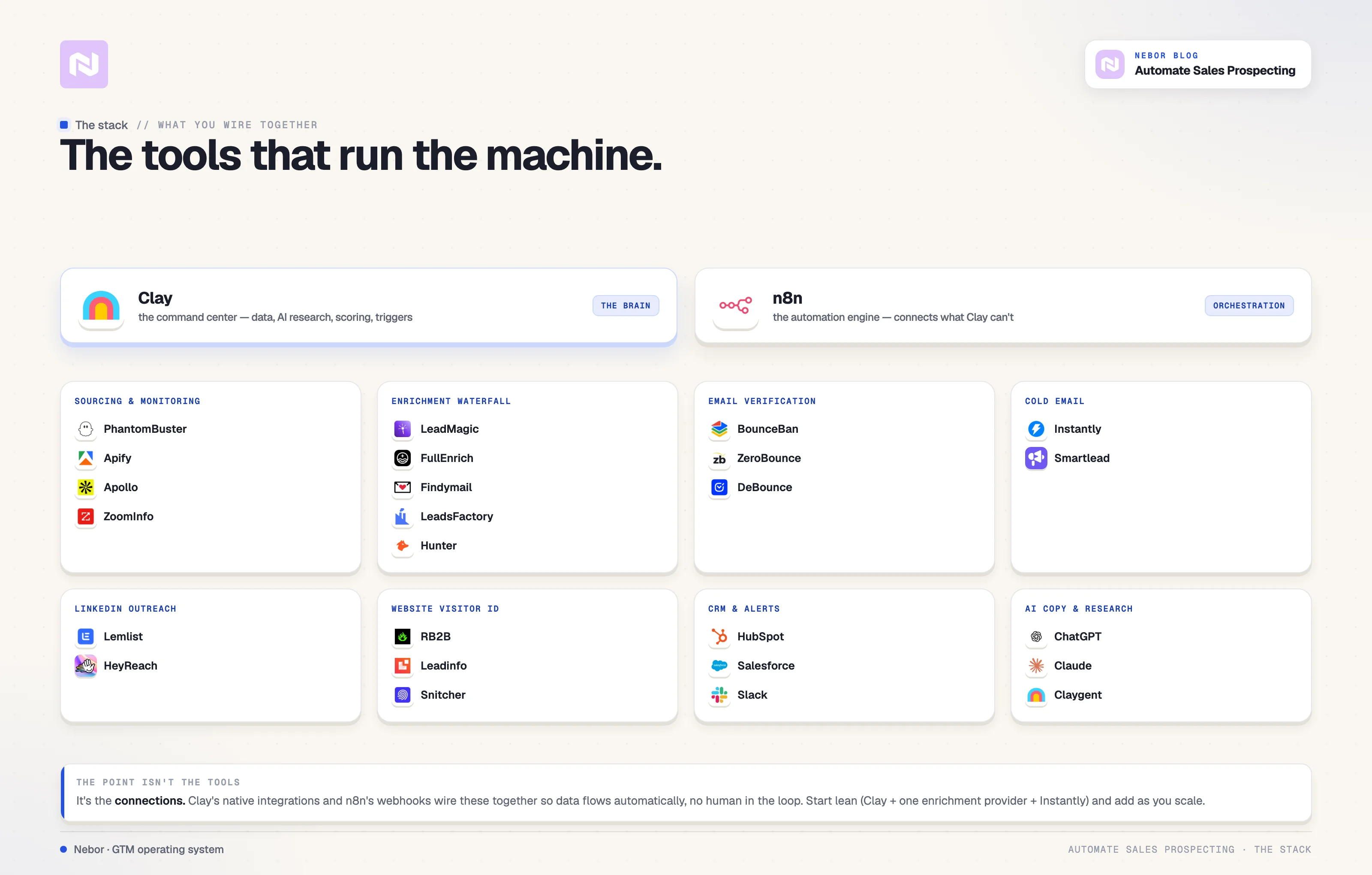
You don't need every tool below, but you need something covering each category. The goal is to map your sales process, then pick the automation tools and sales intelligence platform that cover each activity, from customer data enrichment and buyer intent data to account research.
Every daunting, repetitive task in your outbound prospecting workflow should be handled by tools with excellent data accuracy. The sales prospecting tools below are the ones we build with every week.
What are the best features to look for in AI sales prospecting tools for automating prospecting
Whatever you pick, three things should matter more: connection to your stack, data accuracy, and whether it automates a real activity instead of adding another dashboard. Here are our recommendation.
Clay as your command center
For us, Clay is where everything comes together. It's a data enrichment and workflow platform that acts as the brain of your sales prospecting system. You pull from 100+ data sources, do AI powered research on every lead, build scoring models, and trigger outreach, all from what looks like a spreadsheet.
Its key features (native integrations with almost every other tool here, plus AI powered enrichment) make it the most flexible platform for building these systems.
n8n and other automation tools for orchestration
n8n is an open-source workflow automation platform that connects tools never designed to work together. Where Clay handles data, n8n handles orchestration: triggering workflows on events and pushing data between existing systems.
We prefer it over Zapier or Make because it's self-hosted, more flexible, and cheaper at scale.
Instantly, Lemlist or Smartlead for cold email
You need a dedicated sales engagement platform for cold email rather than your regular Gmail. The key features that matter: inbox rotation, warm-up, send scheduling, and reply tracking. Instantly, Lemlist and Smartlead handle all four. They're purpose-built for outbound at scale while keeping deliverability intact.
PhantomBuster and Apify for scraping and intent signals
PhantomBuster and Apify automatically pull data from LinkedIn, websites, job boards, and news sources. These sales prospecting tools are your eyes on the market, feeding fresh intent signals into your system daily.
Lemlist or HeyReach for LinkedIn outreach
We connect Clay with Lemlist or HeyReach to send LinkedIn sequences that send connection requests and follow ups automatically from your Clay workflows. Outreach tools like these keep every touch consistent.
AI agents for account research
Clay's Claygent researches every company on your list automatically: does it have a sales team, what tools does it use, when did it last raise. What takes a human 15 minutes takes an AI agent seconds.
Note: Are you looking to free your sales reps from top-of-funnel prospecting work?
At Nebor, we build the GTM engine that takes that work off them, plus the RevOps workflows that keep your CRM clean underneath it.
You'll get sourcing, waterfall enrichment, verification, qualification, and the first touch, with every result landing on the right record in your CRM.
We will do the strategy and design the workflows first, then build them into your own Clay and CRM accounts. We'll hand the whole thing over with documentation so your team owns it.
Book a 15-minute call and we'll look at where your reps' week is going and tell you what to hand over first.
FullEnrich, LeadMagic, and Findymail for contact discovery
We use several providers because each has different coverage. Using a data enrichment waterfall (one provider, then the next) pushes contact discovery rates well above what any single tool delivers, pulling from multiple data sources instead of one database.
BounceBan, ZeroBounce, and DeBounce for data accuracy
Before any email goes out, it goes through verification to protect sender reputation. Accurate data is non-negotiable here: outreach built on bad emails fails before it starts, so verified contact data is the difference between a positive ROI and a burned domain.
RB2B, Snitcher, and Leadinfo for website visitor identification
RB2B, Snitcher, and Leadinfo are sales prospecting tools for a different channel: they identify anonymous website visitors and push their data into Clay or your CRM, turning your website into a lead generation source.
What makes these prospecting tools work as a system is the connections between the automation tools. Clay's integrations and n8n's webhooks tie everything together so data flows without human intervention, in your accounts the whole way.
8 steps to set your sales prospecting on autopilot
Here's how we build it for clients.
Step 1: Define your ICP with enough precision beyond data enrichment tool filters
Prospecting automation amplifies whatever you feed it. If your feed it a vague ICP, you get irrelevant leads processed at scale, which is worse than nothing because you burn domain reputation emailing people who were never going to buy.
So get specific.
Look at your best existing customers, the ones who close fastest, stay longest, and spend the most. What do they share? Industry, size, revenue, tech stack, and the job titles who made the buying decision.
Then build a structured ICP definition with firmographic, technographic, and behavioral criteria. The behavioral piece gets overlooked most. Knowing SaaS companies with 50-200 employees are your ICP is fine. Knowing they become buyers when they post their first SDR job? That's great targeting.
Document this before touching any tools; every workflow will reference it.
Step 2: Build a data sourcing engine that works on intent data
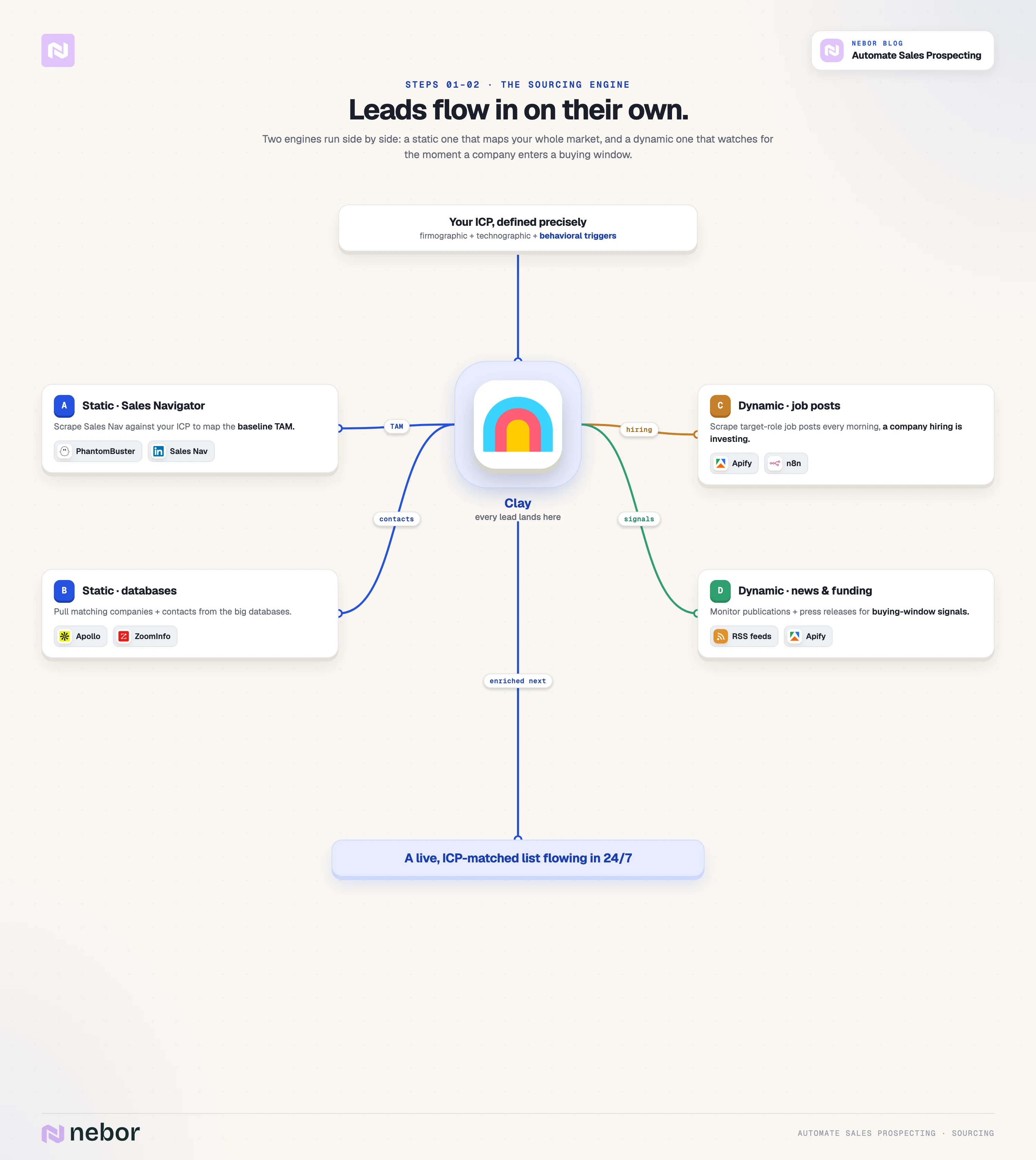
Instead of searching manually every day, the system continuously finds prospects matching your ICP and pushes them into Clay. In our experience, the best systems combine two approaches.
#1: Static sourcing. This approach pulls lists matching your ICP right now, through Clay's data providers, Sales Navigator scrapes (using its advanced search filters). That's your baseline: your total addressable market mapped and enriched.
#2: Dynamic sourcing. Here, you monitor the market for signals that someone just became a better prospect. It's the more powerful approach, and most companies ignore it.
In practice, we set Apify to scrape LinkedIn job posts daily for roles like SDRs and push new finds into Clay. The ideas are typically simple.
For a client selling AI-powered furnishing, we monitor publications that report new real estate projects. When one gets announced, Clay identifies the developer and triggers outreach right when furnishing is being planned.
The principle is the same for any business: find the buying signals for your specific product, then automate the monitoring. Job postings, funding rounds, acquisitions, executive changes, expansion news.
In Forrester's 2023 intent data study, 85% of companies using intent signals reported measurable benefits, from higher response rates to faster conversions.
Step 3: Enrich every lead with enough context that outreach resonates
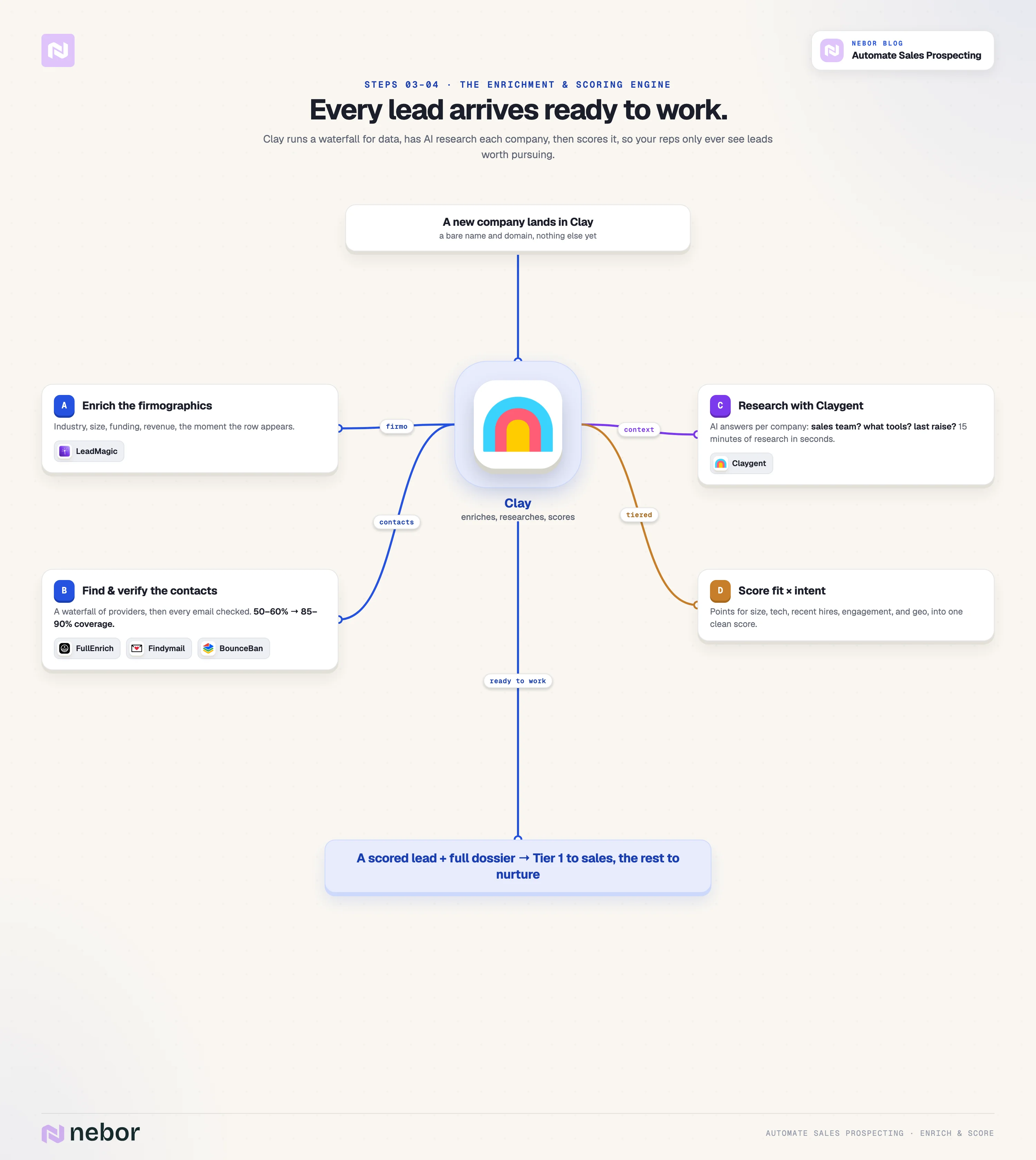
Once leads land in your Clay table, set data enrichment to happen automatically through the waterfall we mentioned. Here's how we do it.
First, Clay itself and LeadMagic for firmographic account data and customer data. Then contact records via FullEnrich, Findymail, and Hunter, with every email verified through BounceBan before it's flagged usable.
Then a Claygent does the AI-powered research we covered above across your entire list, and the answers feed back as structured data your scoring model and templates reference.
Chaining providers this way, you only pay for what the previous provider missed, and we regularly see email coverage jump from 50-60% with a single provider to 85-90% with a proper waterfall.
One more thing on data accuracy: good sales prospecting tools continuously update records and keep them fresh, flagging inactive or duplicate contact records so outreach stays relevant. Stale data is how sequences email people who left a year ago.
Step 4: Score and qualify automatically so reps only see leads worth pursuing
Some companies look right on paper but miss your ICP up close. Others match at the wrong time. You need to make sure the system sorts this automatically.
Build a scoring model in Clay that assigns points for what matters to your business:
Company size in the right range
Using a technology that integrates with your product
Recently hired for a relevant role
Engaged with your LinkedIn content
Located in a target geography
This is predictive lead scoring in practice: AI-driven scoring assigns values based on demographics, firmographics, and behavior. Set thresholds that route leads into buckets. High scores go straight to outreach or your reps' Slack. Medium scores, you can nurture. Low scores, drop.
By the time a lead reaches a rep, it's been sourced, enriched, qualified, and scored into a dossier with background, contacts, signals, and talking points. The system does the work. The human does the selling.
Step 5: Set up your outreach infrastructure before sending a single email
Most people skip this step. If you send cold email from your main domain without proper setup, you'll land in spam folders permanently.
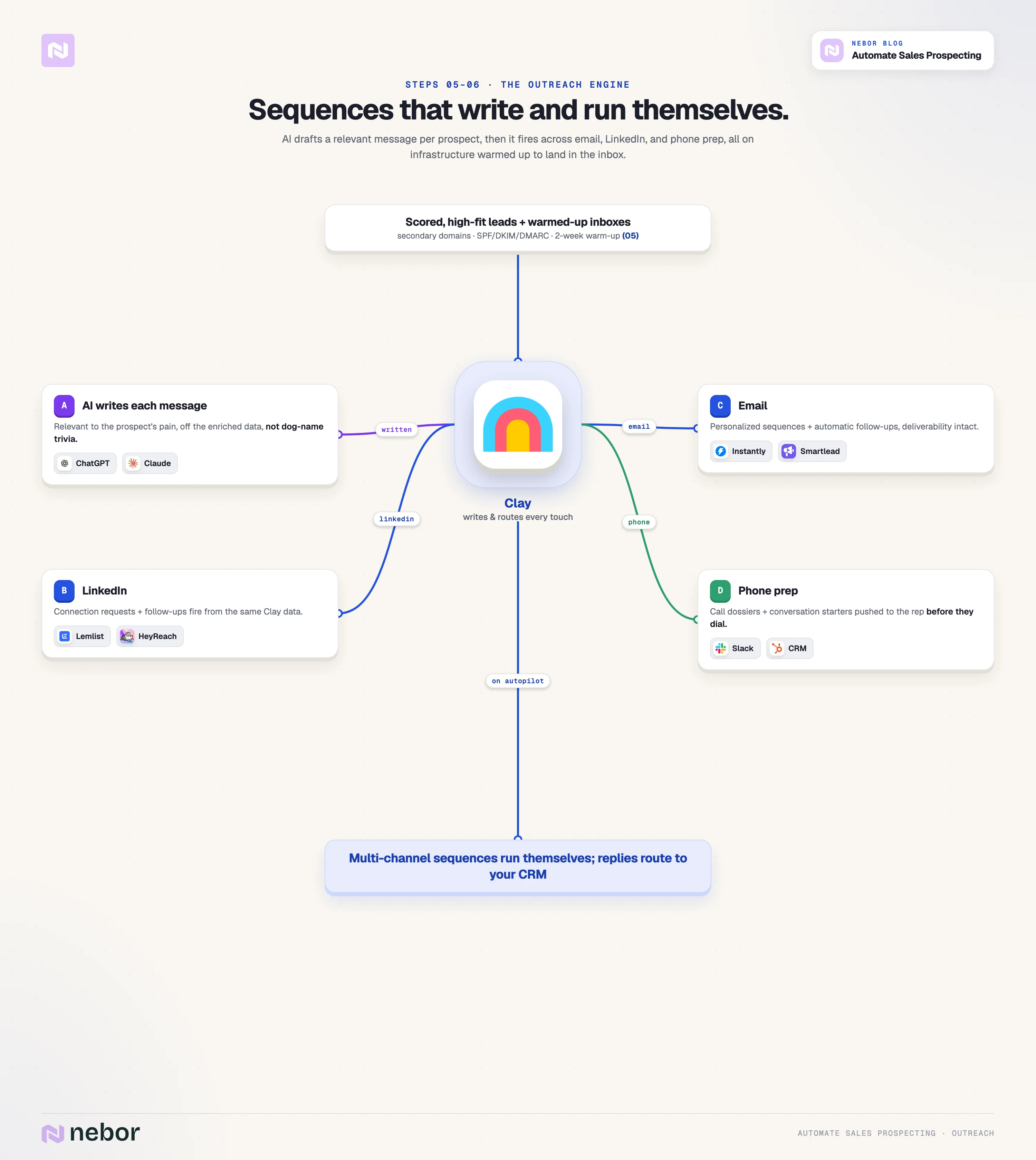
Before any campaign, build a deliverability system: secondary domains, mailboxes across them, SPF/DKIM/DMARC configured, and every inbox warmed up for at least two weeks. We wrote a full guide on email deliverability. Here's what you need to keep in mind:
3-5 secondary domains with 2-3 mailboxes each, sending no more than 30-40 emails per mailbox per day. Instantly or Smartlead handle rotation, warm-up, and send limits.
Reliable outreach tools also check email validity before each send and monitor domain health, so every campaign uses accurate, up-to-date information.
Step 6: Build AI powered, multi-channel sequences that work on their own
Now leads flow in enriched and qualified, and your infrastructure is warm. Time to build the outreach.
Most of what passes for "personalization" is trivia, the prospect's college or their dog's name pasted into an opener. What matters is relevance: the right ICP, contact, pain point, and offer.
In Clay, we use ChatGPT or Claude to generate messages from the enriched data: the company, the role, the intent signal that triggered the outreach, and the pain your product addresses. The result reads like it was written for them, because functionally it was. We still check every pitch before sending, of course.
So, we push the messages from Clay into your sales engagement tools: Instantly for email, HeyReach or Lemlist for LinkedIn. Generic messages resonate even less across channels, so multi-channel outreach needs the same personalization and targeting as email.
For sales calls, we set things up so that the system generates call prep dossiers instead, with conversation starters built on intent data and tracking engagement from email campaigns. That means the reps will step in at the initial contact moment that matters: when a prospect replies or picks up.
Step 7: Automate your inbound lead management too
Outbound gets the attention, but most companies leak sales pipeline on the inbound side. Someone fills out a form, the inquiry stays unassigned for two days, and by the time a rep reaches out, the prospect already talked to the competitor who responded in fifteen minutes (why we wrote our inbound meeting workflow post).
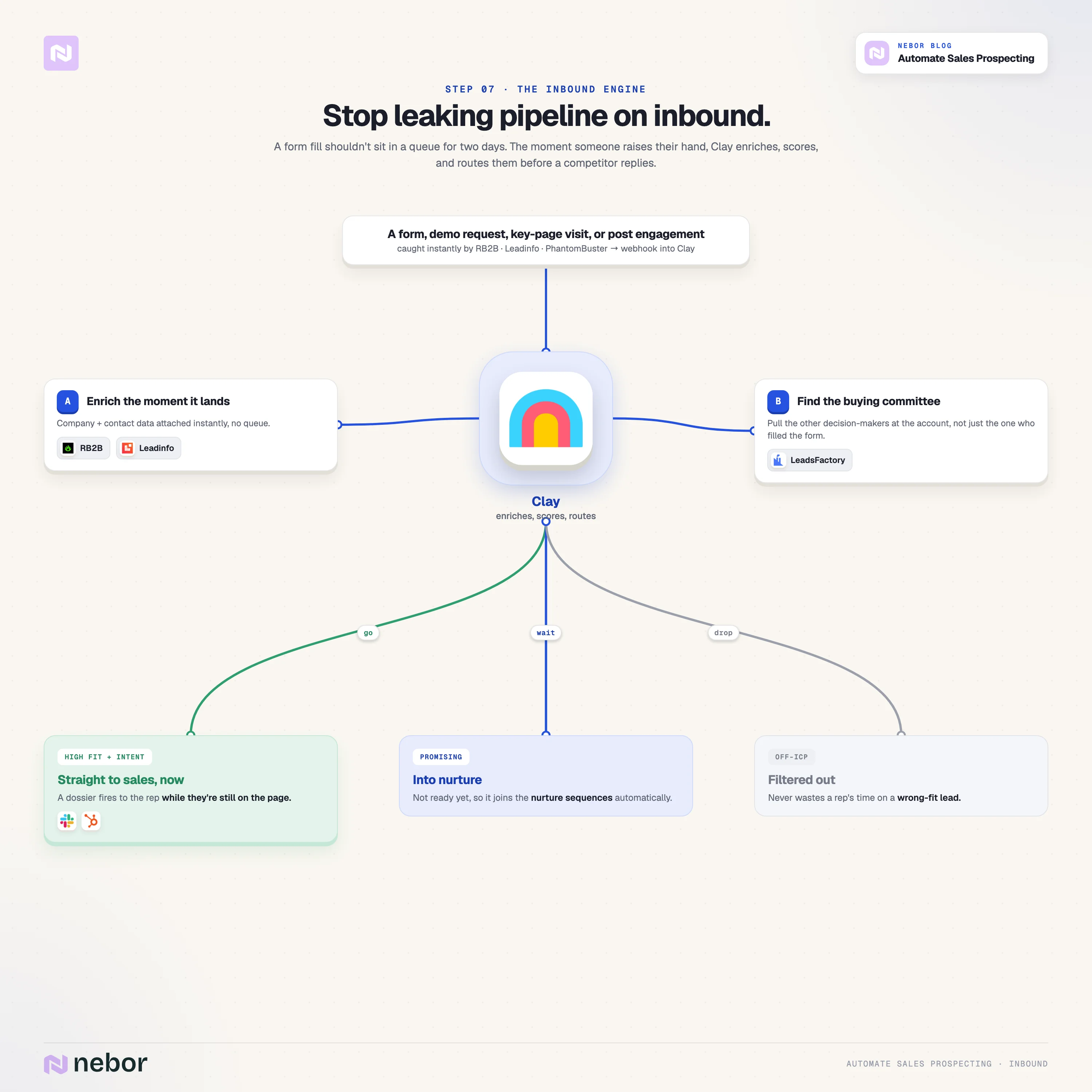
So build an inbound qualification system around Leadinfo or RB2B with the data falling back into Clay going through the same processing as your outbound. When someone fills a form, requests a demo, or engages with key sales pages, their data hits Clay instantly and the same enrichment and outreach kicks off.
Clay enriches the profile, identifies decision makers, scores the lead, and routes it with full context.
High scores trigger an immediate outreach or calling a rep in. Leads below the threshold can enter nurture sequences, while irrelevant ones get filtered out.
Extend this to social too: PhantomBuster can track who engages with your LinkedIn posts and push that activity tracking data into Clay for scoring, treating steady engagement like any other buying signal.
Step 8: Connect everything to your CRM and monitor the system
The final piece: connect your existing CRM and build the feedback loops that keep things healthy.
Push enriched data from Clay into CRM systems like HubSpot or Salesforce: lead data, engagement signals, and outreach history, synced automatically.
Data hygiene matters here. Your CRM is the source of truth for sales and customer success teams alike, and automation tools feeding it directly prevent the errors manual data entry introduces.
Set up dashboards for reply rates, meetings booked, and pipeline generated, and review them weekly. Watch for deliverability drops, low reply rates, or rising unsubscribes, and adjust targeting, messaging, or scoring when they appear. The system isn't set-and-forget. It just needs far less time than manual work ever did.
What the system looks like when it all comes together
Once every engine is live, your sales prospecting system works on its own. Monitoring tools (PhantomBuster, Apify, RSS feeds) scan for intent signals and target accounts around the clock.
Finds push through into Clay, which enriches, scores, and generates outreach thanks to all the other tools it natively integrates. High scorers enter multi-channel campaigns, and reps receive qualified leads with full context in Slack and the CRM.
If you do it right, your reps will only need to touch the process when a prospect responds, a meeting books, or it's time to optimize. The rest of the prospecting automation keeps going on autopilot.
The effect on your sales team is that your reps spend their day on conversations, task management shrinks to reviewing dashboards, and the rest of the sales process gets full attention. The operation increases productivity without adding headcount.
Match your prospecting automation to your size, though. A lean startup can start with a few automation tools (Clay, one enrichment provider, Instantly) and build as pipeline grows. Automate the manual work eating your team's time without building a system nobody can maintain.
Future trends in AI prospecting tools (how to ensure your succeed with it)
We see two shifts worth watching as you pick sales prospecting tools. First, AI prospecting tools keep absorbing the research work: AI agents now handle account research end to end, and that scope widens as sales cycles compress.
When you compare AI tools for your stack, weigh their key features against your actual workflow instead of the demo.
Second, consolidation. High-performing teams are moving toward unified sales platforms that combine data, enrichment, and outreach to cut what gets called the "fragmentation tax": the productivity lost to juggling too many disconnected tools.
Fewer, better-connected AI prospecting tools beat a sprawling stack of point solutions.
What are the limitations of automated prospecting?
We'd be doing you a disservice if we didn't cover what prospecting automation can't do.
It can't fix a bad offer
If your product doesn't solve a real problem for the potential customers you target, no amount of sophisticated outreach generates real pipeline. Get the ICP right and address genuine pain.
It can't replace building relationships
The system gets you in front of the right people at the right time with the right message. Closing deals, navigating buying committees, and building trust require a human who knows how to sell. Automation buys your closers time to engage potential buyers properly. It doesn't do the engaging for them.
It can't look after itself forever
Data quality degrades, markets shift, deliverability needs monitoring, and AI powered messages occasionally miss. Someone still reviews performance and adjusts.
What sales prospecting automation removes is the grunt work. Your team stops spending five hours a day finding leads and spends that time closing them. That's the real value.
Hire Nebor if you want this built and don't know where to start
We built Nebor to help B2B companies implement exactly this kind of sales prospecting automation. We use Clay as the brain and connect Instantly, PhantomBuster, n8n, Apify, Discolike, HeyReach, and more, fitted to your existing workflow.
When we're done, you own the sales prospecting tools and everything wired between them. We build the infrastructure, train your team, and hand it over. The Clay tables, the n8n workflows, the sequences, the waterfalls: all of it lives in your accounts.
If you're struggling to fill your pipeline, we're happy to chat. Book a 15-minute call to see what we can build for you.
Note: Are you looking to free your sales reps from top-of-funnel prospecting work?
At Nebor, we build the GTM engine that takes that work off them, plus the RevOps workflows that keep your CRM clean underneath it.
You'll get sourcing, waterfall enrichment, verification, qualification, and the first touch, with every result landing on the right record in your CRM.
We will do the strategy and design the workflows first, then build them into your own Clay and CRM accounts. We'll hand the whole thing over with documentation so your team owns it.
Book a 15-minute call and we'll look at where your reps' week is going and tell you what to hand over first.


Related Articles

By clicking Sign Up you're confirming that you agree with our Terms and Conditions.