
Clay + LeadsFactory + LinkedIn Sales Navigator: How to Find Decision Makers Automatically for Sales and Lead Generation

by

In this post:
Every result around the search term "how to find decision makers" gives the same advice: use LinkedIn, try a database, check the About Us page, attend a conference. What nobody says is that doing all of that manually, across disconnected tools, for every single target account is a massive time sink for your sales process, and at any real scale it's borderline impossible.
Your sales reps spend hours every week bouncing between Sales Navigator, Apollo, company websites, and spreadsheets: copying names, guessing titles, verifying contact information one at a time, and still ending up with lists that are outdated by the time the first email goes out.
We work with sales teams every day at Nebor, and this is one of the most common bottlenecks we see. The companies that come to us aren't lazy. They're stuck doing everything manually because nobody ever built them a system.
In this post, we discuss the traditional methods for finding decision makers, why those eat your team's time alive without a system behind them, and exactly how we automate the work for clients at Nebor.
TL;DR
Finding decision makers is exactly the kind of work that should happen as an automated workflow instead of a daily chore. That's the service we provide at Nebor: we build systems on Clay that source your target companies, find the right decision makers at each one, verify their contact information, and queue the outreach.
Your sales reps never touch the research. They walk into sales calls with a full dossier on every account while the workflow keeps the pipeline stocked in the background.
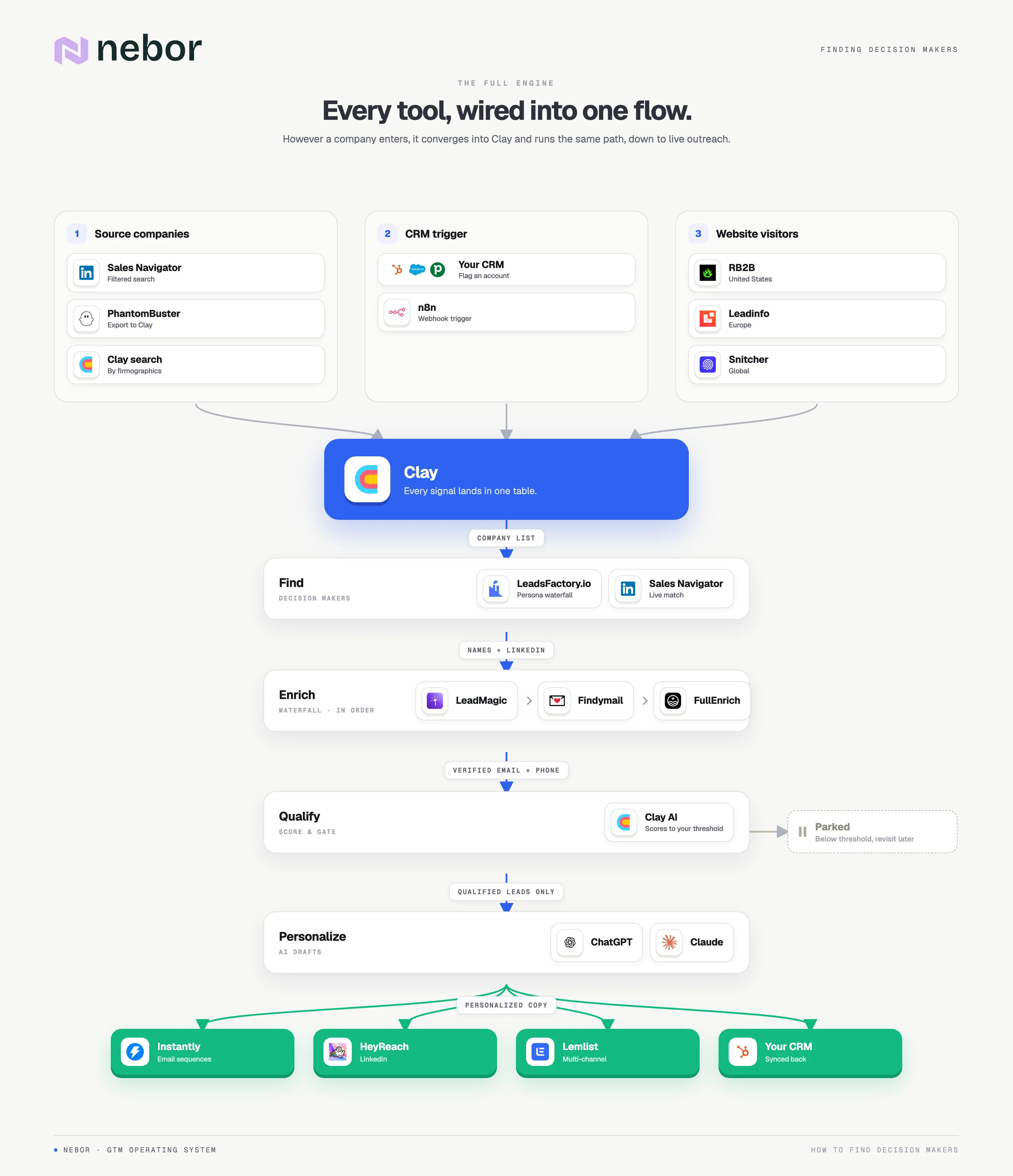
Here's what that looks like when fully built and operational.
The traditional approaches to finding decision makers (and why they fall apart without a system behind them)
Before we get to how we automate things, it's worth covering the standard methods because they form the building blocks of any good system. The issue is not the tactics themselves.
It's that most teams use them in isolation, manually, with no connective tissue between them. Here's what we mean.
Approach #1: LinkedIn and LinkedIn Sales Navigator are the go-to starting point that eats up your team's time
Sales Navigator is one of the best tools out there for identifying key decision makers: filter by job title, seniority, department, company size, industry, and geography, save leads, and build account lists. You probably don't need us to tell you it's powerful.
Here's where it breaks down in practice: your SDR does a search, scrolls profiles, clicks into each one to verify the fit, and copies the name and title into a spreadsheet.
Even with good filters, that's 30 to 60 seconds per lead just to capture the basics. Multiply it by hundreds of target accounts and it's a real problem at scale, and valuable time your reps could spend selling.
Approach #2: Prospecting databases like Apollo, Clearbit, and ZoomInfo give contact information, but never the full picture
Tools like Apollo, Clearbit, and ZoomInfo give you large databases of contacts with phone numbers, emails, LinkedIn profiles, and firmographic data for relevant decision makers.
A proper sales intelligence platform like these can seriously reduce research time and improve the quality of your contacts, pulling from multiple online sources with a single search query. Some also offer intent data, though as we've covered before, its quality is flat out poor.
The appeal is clear. You type in a company name, you get back a list of employees with their contact information, and start reaching out. For one-off research on a target company, this works fine.
But no single data provider has complete coverage. Apollo has the CMO's email at Company A but not Company B, Cognism finds one phone number and misses the next, and ZoomInfo shows someone who left the same company six months ago. That's why one tool for your contact data always leaves gaps in your pipeline.
They also operate as standalone databases: log in, search, export a CSV, clean it, upload it, start a campaign. Every step between "I found a contact" and "I've emailed them" adds delays, errors, and wasted time.
At Nebor, we use multiple data providers layered together in a sales automation waterfall enrichment setup in Clay. If Apollo misses the email, LeadMagic tries next, then Findymail, then FullEnrich. Coverage is consistently higher than any single tool, but setting this up manually every time you need to find decision makers is impractical.
Approach #3: Leveraging the company website and other resources: the "old school" approach that still has its place
Some guides tell you to check the About Us page, scan team members on the company website, review press releases, or browse conference speaker rosters. That's not bad advice.
It can uncover suitable contacts that don't show up in databases, especially at smaller companies or in industries where people are less active on LinkedIn.
It's just the most manual and least scalable way to conduct research: clicking through the company structure of individual websites, where every find still needs a verified email, a CRM entry, and a sequence.
That's why we don't recommend this as a primary method for finding decision makers. It's a complement to a more systemic approach rather than a replacement.
Approach #4: "Reverse" searching decision makers with AI tools like Clay and AI-Ark (it's powerful, but not meant to be a manual task)
This is where things get interesting. Clay lets you input a domain or company name and automatically find relevant contacts using its 100+ integrated data providers, pulling names, titles, LinkedIn URLs, and emails into one table. Its AI can even interpret titles and judge whether someone is a decision maker beyond the exact title match.
Looking for "the person who makes purchasing decisions for sales tools"? Clay's AI can judge whether "Head of Revenue Operations" fits. That's a massive step past the rigid title matching in Sales Navigator or Apollo.
Where teams get stuck is treating Clay as a lookup tool reps jump into per contact. You've just replaced the manual Google search with a manual Clay search, and your prospecting process is still reactive.
Clay is at its most powerful when it's at the center of an automated B2B lead generation workflow that finds decision makers without anyone needing to do anything. That's what we're going to talk about next.
How Nebor helps you find decision makers through workflow automation (so your team can focus on selling)
Everything above is ingredients: Sales Navigator brings the filters, data providers the contact details, AI the matching intelligence, company resources the context.
What most teams miss is the recipe: a system chaining it all into a workflow that keeps going continuously, finds the right decision makers at the right companies, enriches them with accurate contact data, and feeds your outreach pipeline. Here's how we build it at Nebor, in the following steps.
Start by defining your ICP and buyer persona so you know exactly who you want to reach
We start every engagement here, and it's the step most teams rush past. Creating an Ideal Customer Profile (ICP) identifies the accounts with the highest probability of buying, and a well-defined ICP significantly shortens the sales cycle because your reps only ever talk to the right decision makers. Without a precise ICP and buyer persona, everything downstream breaks.
Filters are too broad, enrichment returns irrelevant contacts, and outreach lands with people who have zero authority (or zero interest) in buying what you sell.
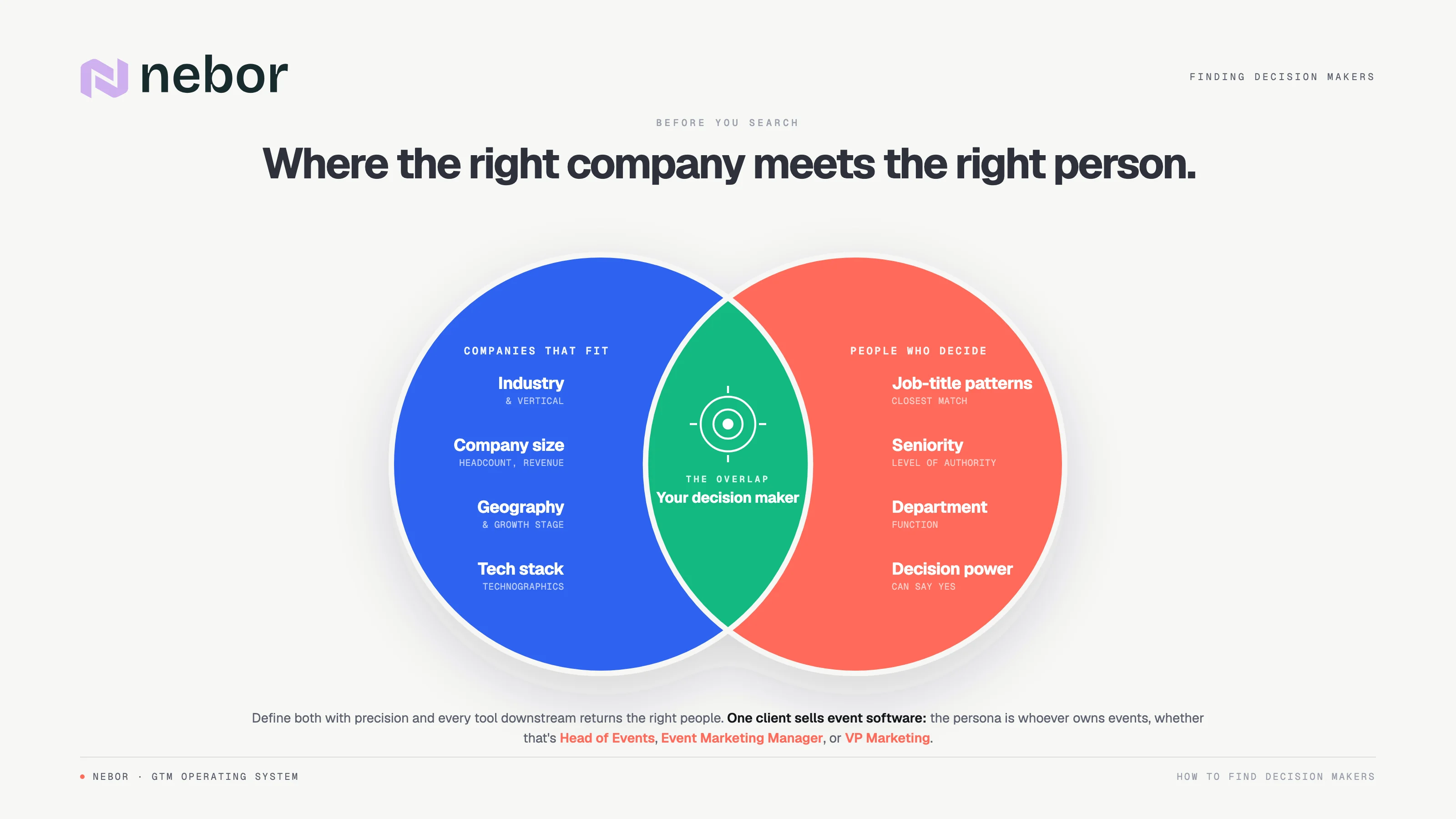
ICP means the company-level criteria: industry, company size, geography, tech stack, and growth stage. Buyer persona means the individual-level criteria: title patterns, seniority, department, and decision-making authority.
For example, one client sells event management software. Their ICP: mid-market European companies organizing 5+ events a year. Their buyer persona: whoever owns event operations, titled "Head of Events," "Event Marketing Manager," or "VP of Marketing" at a smaller company. Search one title and you miss a huge chunk of the market.
Getting this right determines everything downstream: sourcing tools, filters, your persona waterfall, and the signals worth acting on.
Most businesses struggle to define their ICP with the precision outbound needs, which is why many turn to specialist Clay agencies or in-house experts. We refine it as part of the process, from your existing customer data and the patterns in your best accounts.
Standardize your strategy for finding decision makers based on your ICP and the tools that work best
With ICP and persona defined, the next step is choosing how to find decision makers at the companies that match. Here are the strategies we use for tool selection at Nebor.
If your ICP lives on LinkedIn (most B2B SaaS, tech, consulting, and professional services companies), Sales Navigator combined with LeadsFactory is your best bet for identifying and matching decision makers.
LeadsFactory scrapes Sales Navigator in real time without your LinkedIn credentials and applies smart persona waterfall logic: you rank personas (1. CMO, 2. VP of Marketing, 3. Head of Growth) and it finds the closest match at each company, falling back automatically when a title doesn't exist. That solves the title inconsistency problem from earlier.
And because it integrates with Clay, the data can flow directly into your enrichment and outreach workflows.
For industries or roles less visible on LinkedIn, a layered approach with Apollo, Cognism, or ZoomInfo plus Clay's AI enrichment fills the gaps.
No single tool is the right answer; the right tools depend on who you're reaching and where they surface. It's exactly the thinking behind a sales tech stack that works on autopilot with Clay and n8n.
Finding decision makers as part of an automated outbound sales and lead generation workflow
Instead of your reps manually researching decision makers per target account, an automated workflow does it continuously. Here's how a typical Clay-based lead generation system and decision-maker workflow looks when we build it.
Step 1: Source your target companies.
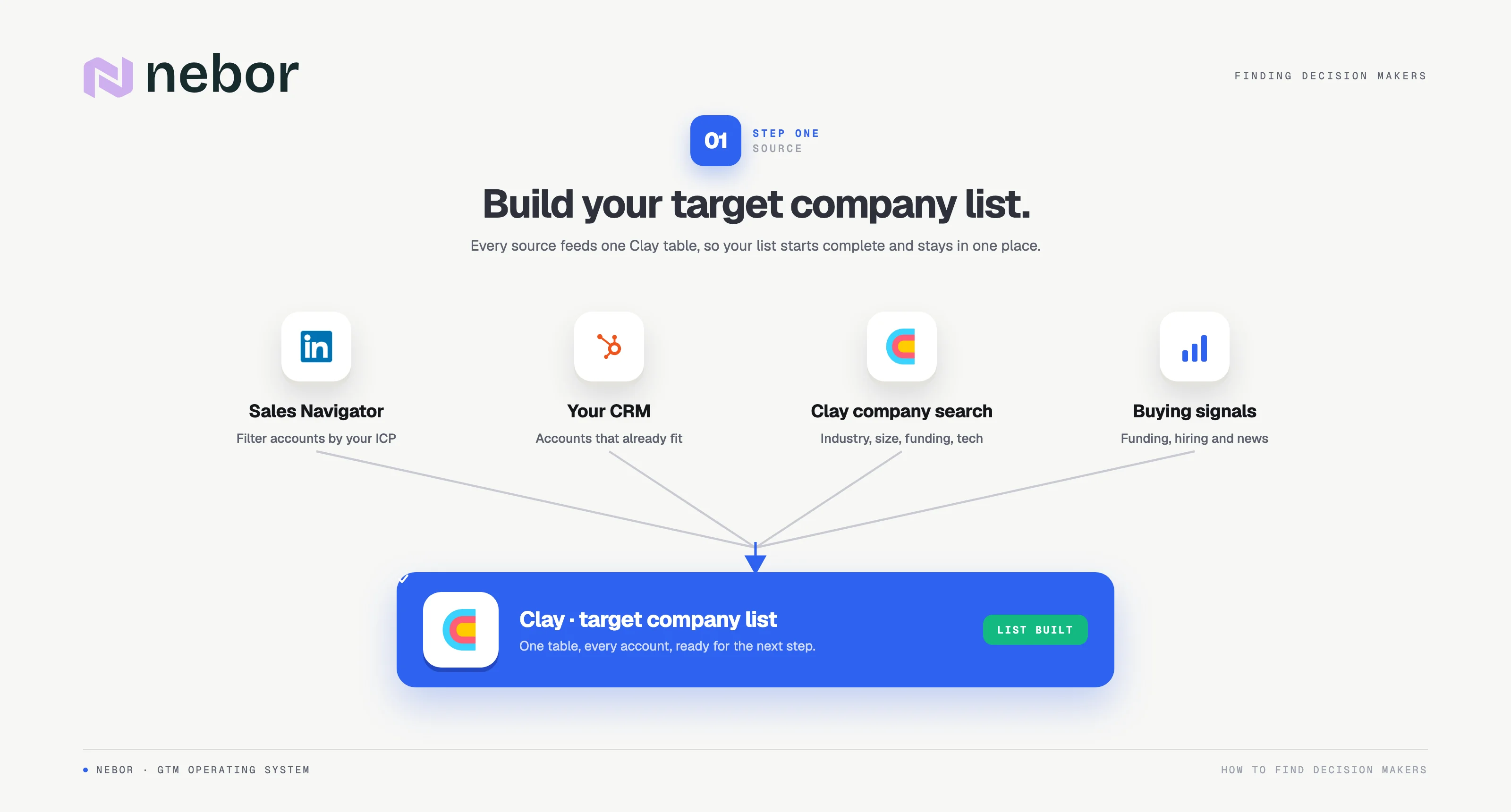
Sources vary: Sales Navigator filters scraped via PhantomBuster, CRM pulls by firmographic criteria, Clay's built-in company search, or a signal-based trigger. The company list lands in a Clay table as the starting point.
Step 2: Find the decision makers at each company using LeadsFactory
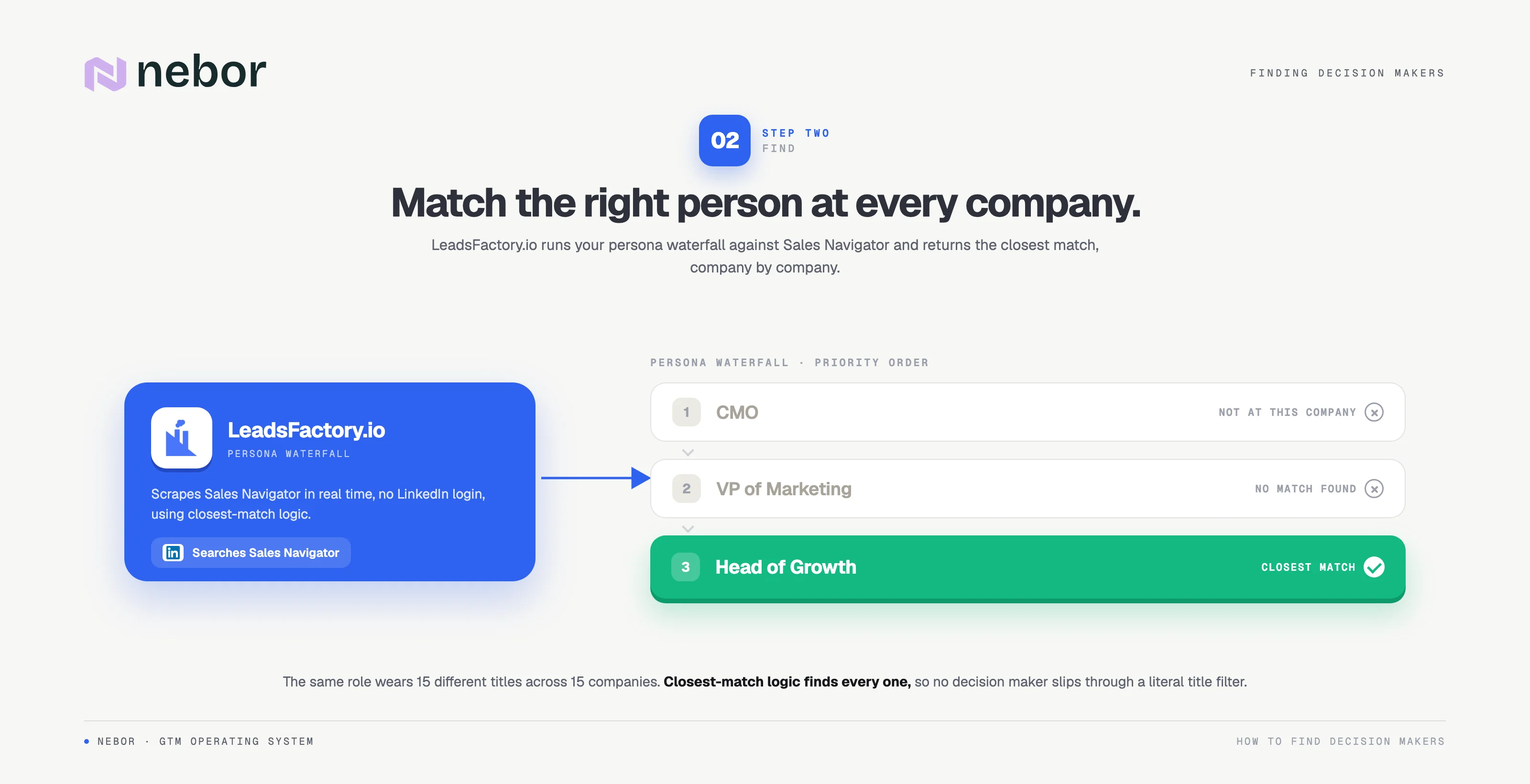
For each company in the Clay table, LeadsFactory applies your persona priority list against Sales Navigator and returns the best-fit decision makers: names, titles, and LinkedIn URLs. This step alone replaces hours of manual searching and matching.
Step 3: Enrich contacts with verified emails, phone numbers, and additional data.
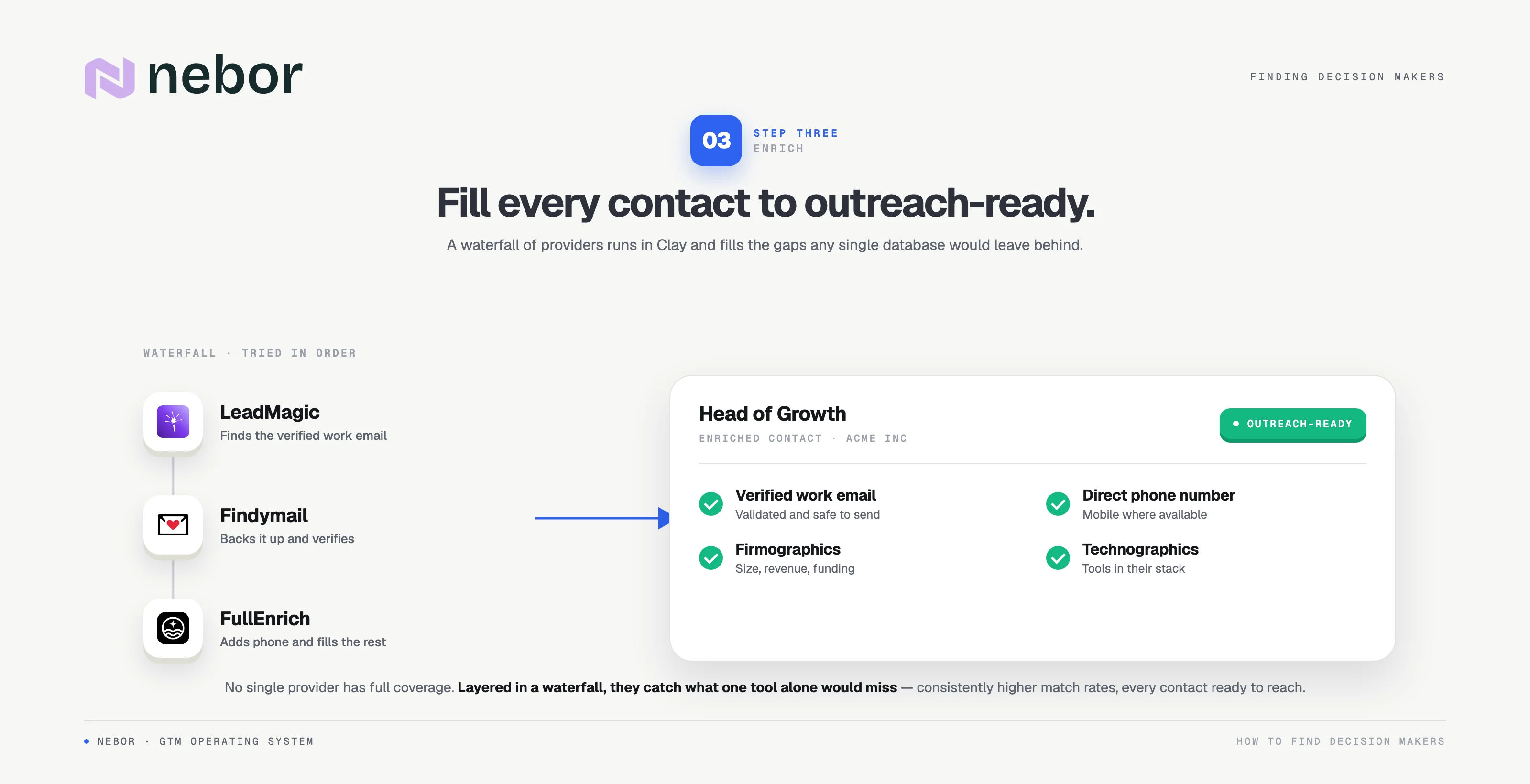
With the right contacts identified, a waterfall enrichment finds verified emails, phone numbers, firmographics, and the data points needed for personalization. If one provider misses, the next tries, which consistently beats any single tool on coverage.
Step 4: Qualify and score each lead.
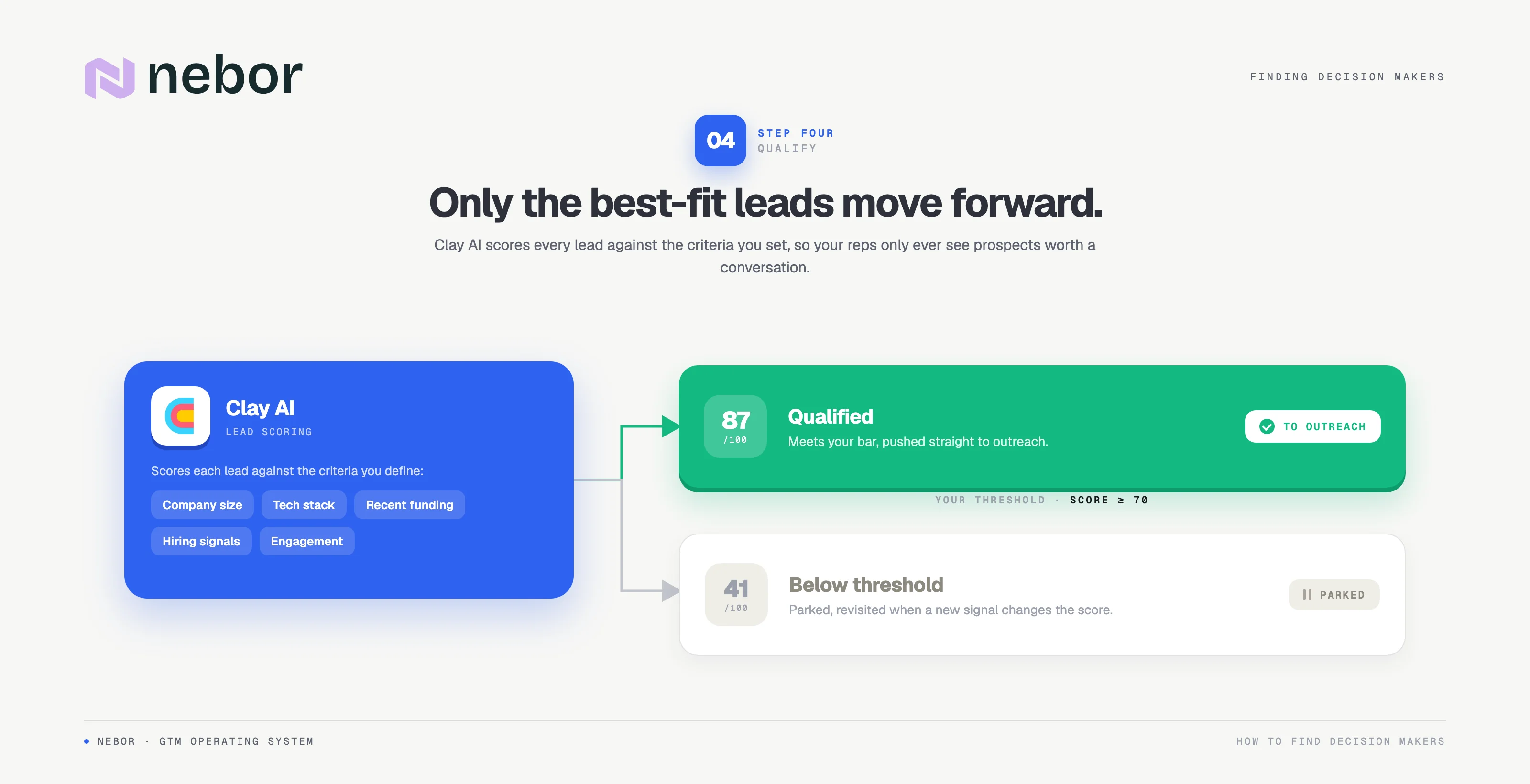
Not every decision maker is worth contacting right now. Clay's AI scores leads on criteria you define: company size, tech stack, recent funding, hiring signals, engagement history. Leads above your threshold move forward in the process; the rest get parked. Your reps only see best-fit prospects.
Step 5: Generate personalized outreach and push to your outreach platform.
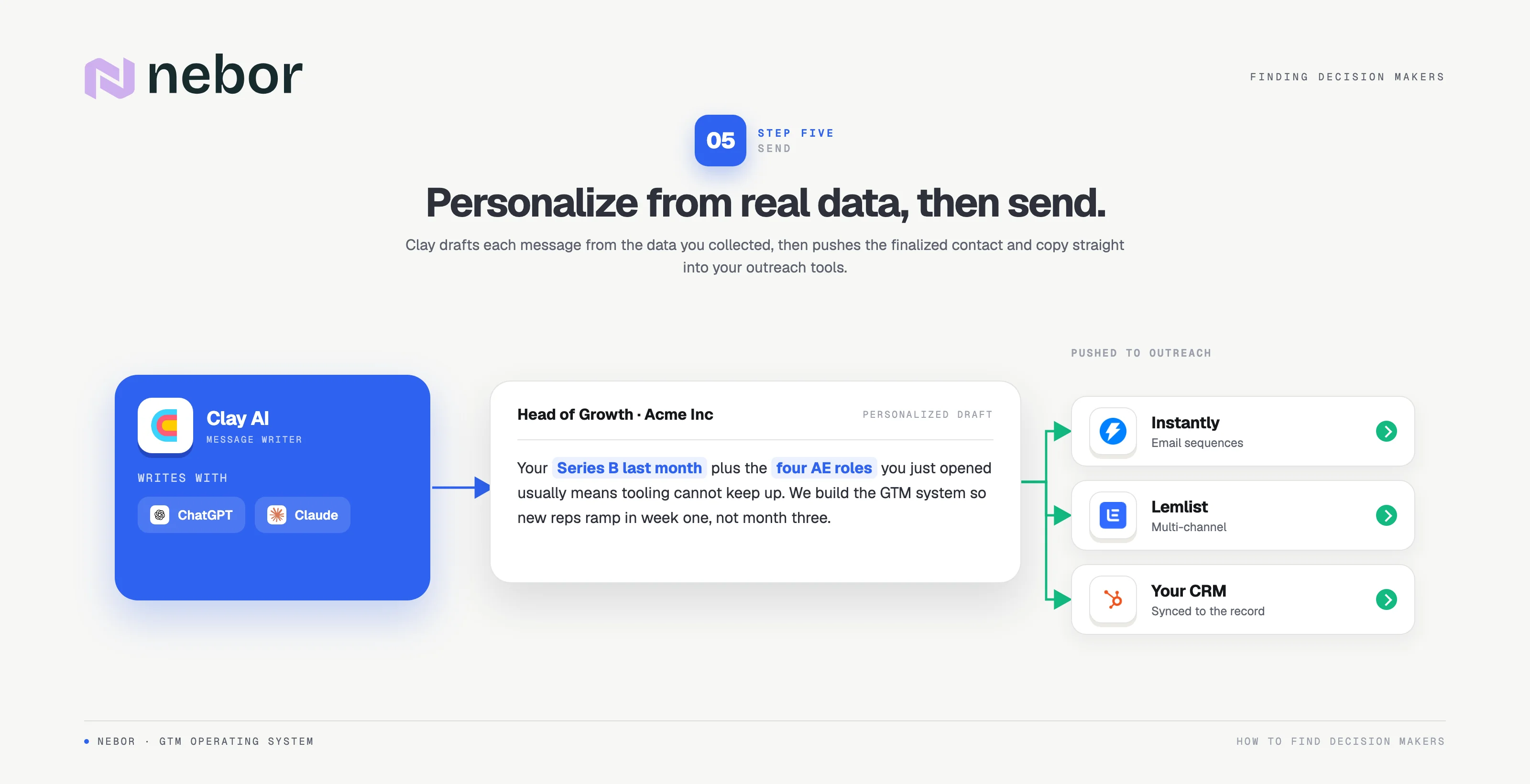
Using Clay's native AI integrations (ChatGPT or Claude), we generate personalized message drafts based on the enriched data we've collected.
This isn't "Hi {FirstName}, I noticed your company does X." It's contextual messaging built on real intelligence and pain points. Drafts push into Instantly, Smartlead, or Lemlist, and campaigns go out with proper deliverability protection. From sourcing to outreach, your reps do none of it. They show up to qualified meetings instead of a research pile.
A Manual Input Workflow that finds decision makers directly from your CRM
Not every team needs the full outbound engine on day one. Some just need faster research on accounts already in their CRM, so here's the simpler workflow we set up.
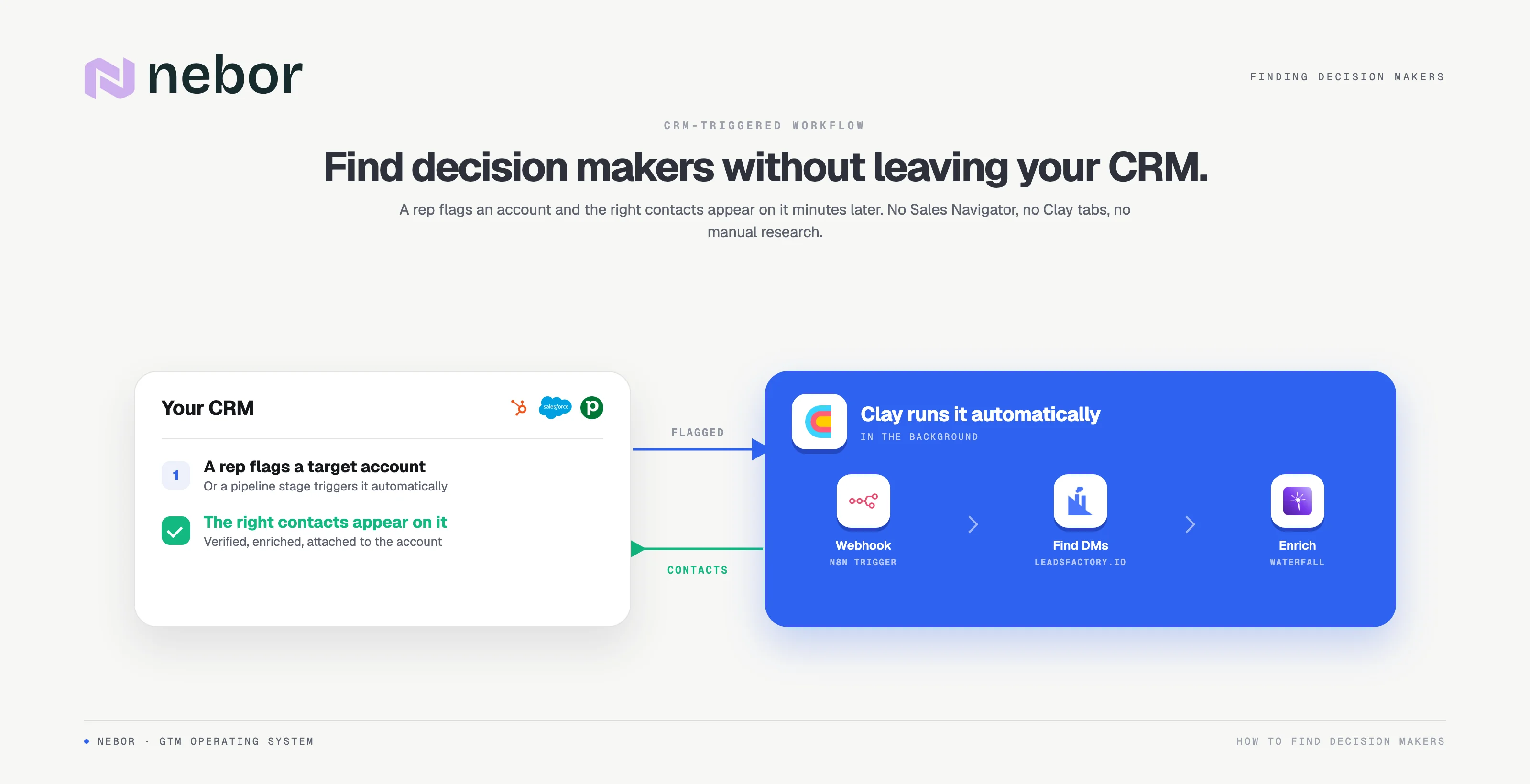
Your sales rep spots a target company in your CRM (HubSpot, Salesforce, or Pipedrive). CRM platforms manage your relationships and track engagement, so they're the natural home for enriched decision-maker data, and the rest of your marketing software plugs into them.
They flag the account (or a pipeline stage triggers it automatically), and the company data hits a Clay table via webhook or n8n.
Clay activates LeadsFactory to find the right decision makers via your persona waterfall, enriches them with verified emails, and pushes the finished contacts back onto the correct account.
From the rep's perspective: flag a company, and minutes later the right contacts appear in the CRM, outreach-ready. No Sales Navigator, no Clay, no manual research.
It's a great starting point for cutting research time without overhauling your outbound process, alongside specialized sales automation companies and tools. Once you see the speed, scaling to full automation with automated CRM hygiene and enrichment is an easy call.
How to find decision makers among people already visiting your website (through visitor identification)
There's another category of decision makers most teams ignore: people visiting your website who never fill out a form. They read your pricing page and case studies, match your ICP exactly, and leave without a trace. It's one of the highest-value opportunities companies leave on the table, and the kind of work top outbound experts now treat as table stakes.
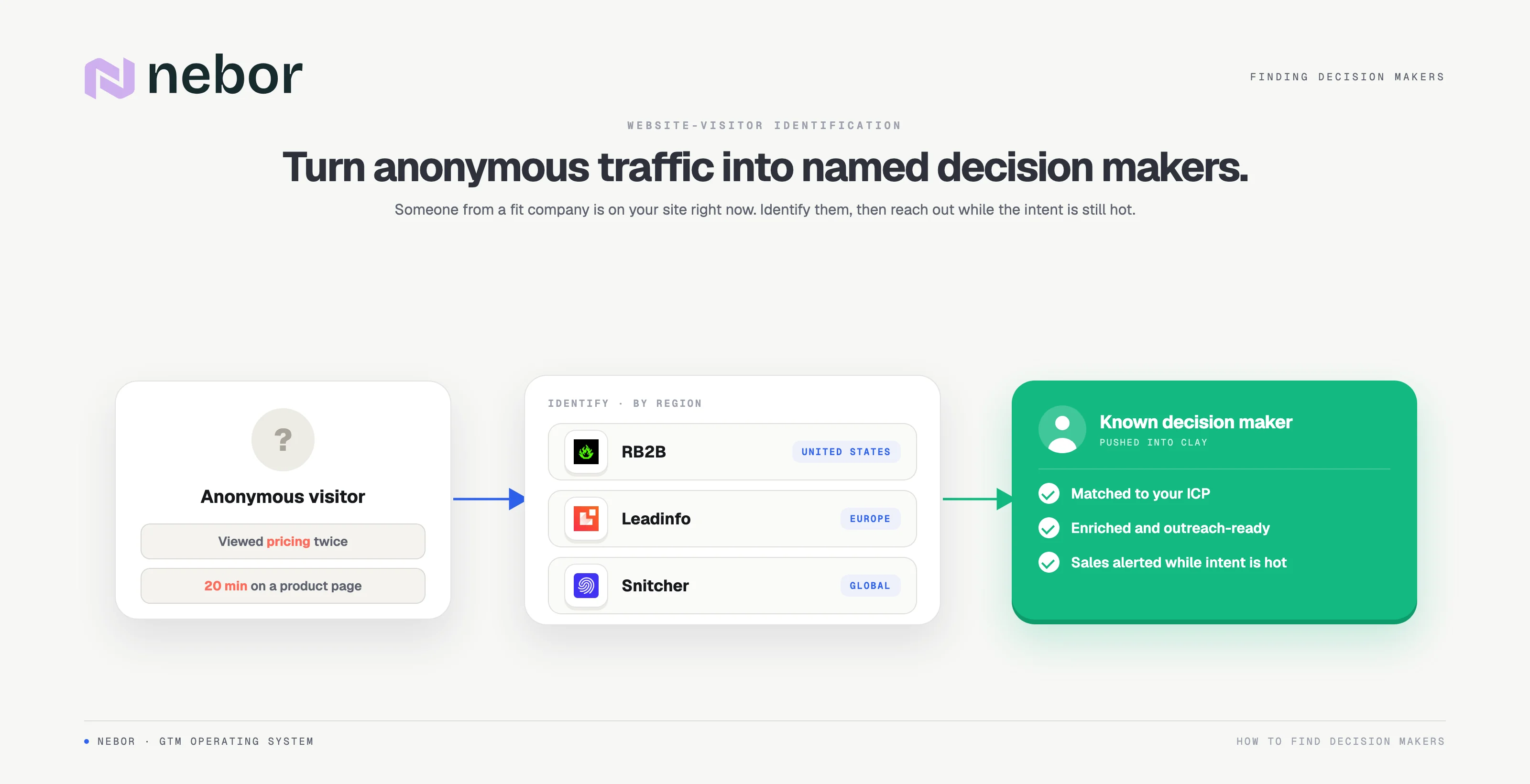
Visitor identification tools like RB2B (US visitors), Leadinfo (Europe), or Snitcher identify the people behind anonymous visits and push them into Clay or your CRM.
Our workflow: a visitor meets engagement criteria (the pricing page twice, or 20+ minutes on a product page), the tool de-anonymizes them into Clay, and Clay enriches the lead and qualifies it against your ICP. Then the rest unfolds automatically: find the decision maker, enrich, personalize, send. Your reps get notified when there's a warm lead. That's it.
The same logic extends to social engagement, content downloads, and webinar registrations, the modern motion top Clay sales automation agencies recommend. Any meaningful signal becomes a trigger that identifies the decision maker, enriches the lead, and sets up the outreach. Your reps just focus on the conversation.
How to reach decision makers once you've found them
Finding the right contact is half the job. A few outreach strategies make the initial contact land and keep your sales process moving.
Warm introductions and social selling beat cold everything
A warm introduction through a mutual connection significantly increases response rates, so before any cold touch, check who you both know. Research backs social selling too: professional networking sites like LinkedIn and XING show the titles and responsibilities of key personnel and let you engage decision makers directly before you ever pitch your solution.
Cold email and cold calling: match the channel to the person
Cold email scales and suits busy executives who answer on their own time. Cold calling works when decision makers spend their day on the phone anyway, common in logistics, construction, and recruiting. Either way, the goal is reaching the right person on the channel they actually use.
Watch market trends in your niche too: channels fatigue, and the strategies that booked meetings last year can underperform this year. Test both, track replies, and let the data pick.
Do the due diligence before you hit send
Effective research is short but specific: recent company news, the person's department and remit, one real pain point your solution addresses. Reps who use platforms like Clay get this automatically; everyone else should still spend the five minutes. It's how you achieve goals on the first touch instead of the fifth follow-up.
Who are the business decision makers in B2B sales?
Before you start searching, know who you're looking for. B2B purchase decisions rarely rest with one person. They're made by a decision making unit (DMU): the group of responsible employees who initiate, evaluate, and approve a purchase. Outreach succeeds when you identify who owns the budget and the outcomes for the problem your product or service solves; message the wrong person and even a perfect pitch dies in a forwarded email.
Decision makers are usually high-ranking employees: C-level executives, department heads, and managers with authority over budgets and purchase decisions.
But the authority will vary depending on company size. In large organizations, directors or managers often have the authority to initiate a purchase, while at a small business the CEO decides directly.
Here are the key people you'll meet in a typical DMU.
Initiators and deciders: who starts the purchase and who makes the final decision
Initiators take the initiative to solve problems or achieve goals, regardless of their title or department. For example, a sales manager drowning in manual work might initiate the search for automation without ever signing the contract. Deciders hold the final decision on large purchases and approve the budget. Your messaging eventually has to convince them, even when the initial contact happens lower in the organization.
Gatekeepers: the people who control access
Gatekeepers control access to decision makers and decide what information flows through: executive assistants, office managers, sometimes IT or procurement. Treat them well and they'll route you to the right department and the right decision makers.
The classic mistake is treating them as obstacles. Tricks and paltering backfire, and ignoring them gets you blocked. Befriend them, be straight about why you're reaching out, and involve the multiple stakeholders they point you to.
Evaluators, influencers, and the end user
Evaluators provide feedback on the product or service and influence purchase decisions through their assessments, even without formal authority: think of the RevOps lead asked to compare three tools. The end user lives with the solution daily and often shapes buying decisions more than the org chart suggests; win them over and they'll champion you internally.
Other employees, from finance to legal, join the process for due diligence on bigger deals. The selling process usually has to convince more than one of these key personnel.
Hire Nebor to build Clay workflows that find decision makers automatically (so your sales reps can sell)
By now you have a clear picture of what a modern, automated system for finding decision makers looks like, and why doing it manually doesn't scale. Here it is again in one view.
Building it yourself takes time and a lot of trial and error: Clay tables, waterfall enrichments, webhooks, n8n automations, data hygiene, and the sales strategy to aim it all at the right people with the right message at the right time.
That's what we do at Nebor. We're sales and lead generation specialists who use Clay as our core platform, with one goal: get your reps into qualified conversations that close deals.
If you're tired of your sales reps spending more time researching than selling, book a 15-minute call with us and we'll show you exactly how we'd build this solution for your business, or help you evaluate top Clay experts for outbound sales automation if you're comparing partners.
FAQ: finding decision makers in B2B sales, answered
What is a B2B decision maker?
B2B decision makers are the people with the authority to approve a purchase for their business: executives, department heads, or managers who own the budget for your product or service. Most purchase decisions involve several decision makers across the decision making unit covered above.
How do you conduct research on a target company before outreach?
Check the company's site and LinkedIn page for what the business sells and how it's structured, identify which department owns the problem you solve, and scan recent news for funding or leadership changes. Five minutes of this process per target company personalizes the first message; Clay does it automatically at scale.
How do you identify decision makers without LinkedIn?
Use the sources that don't depend on the platform: team pages, press releases, industry directories, conference speaker lists, and prospecting databases. You can still find contacts at scale once these sources feed one system, with the same enrichment workflow verifying details before outreach.
Which job titles should you start searching for?
It depends on your product or service and the company structure. Start with the department head whose employees feel the pain daily (they initiate), their director or VP (they evaluate), and the executive who owns the budget (they make the final decision). Build your persona waterfall in that order and let closest-match logic handle title variations across each company.


Related Articles

By clicking Sign Up you're confirming that you agree with our Terms and Conditions.








