
5 Signal-Based Outbound Campaigns You Should Be Using Right Now (With the Exact Workflows Behind Each One)


In this post:
As you opened this article we'd like you to forget about the vague intent scores you get from third-party intent data vendors like Bombora as well as their reports that say "someone from this IP address read an article about CRM." That's just noise.
In this post, we're going to show you five signal-based outbound campaigns we've actually built and used. You'll see the exact workflows behind them, the tools we use, and the results we get from them.
So, a signal is an event that indicates a company is entering or approaching a buying window for what you sell.
When we say signal-based outbound, we're talking about a specific, observable event that tells you this company needs your solution right now, or will need it very soon, and you can reach out with that exact context.
A new SDR job posting.
A funding announcement.
A new property acquisition.
A change in leadership.
An earnings call that mentions a specific challenge.
These are real events that happen in the world, and when you build systems to capture and act on them at scale, your outbound becomes timely, relevant, and dramatically more effective than anything that comes from a static prospect list.
We've been building automated workflows like this for our clients across multiple industries, and the patterns are remarkably consistent. The signal source changes. The tools change. But the framework stays the same.
So let’s get started.
TL,DR
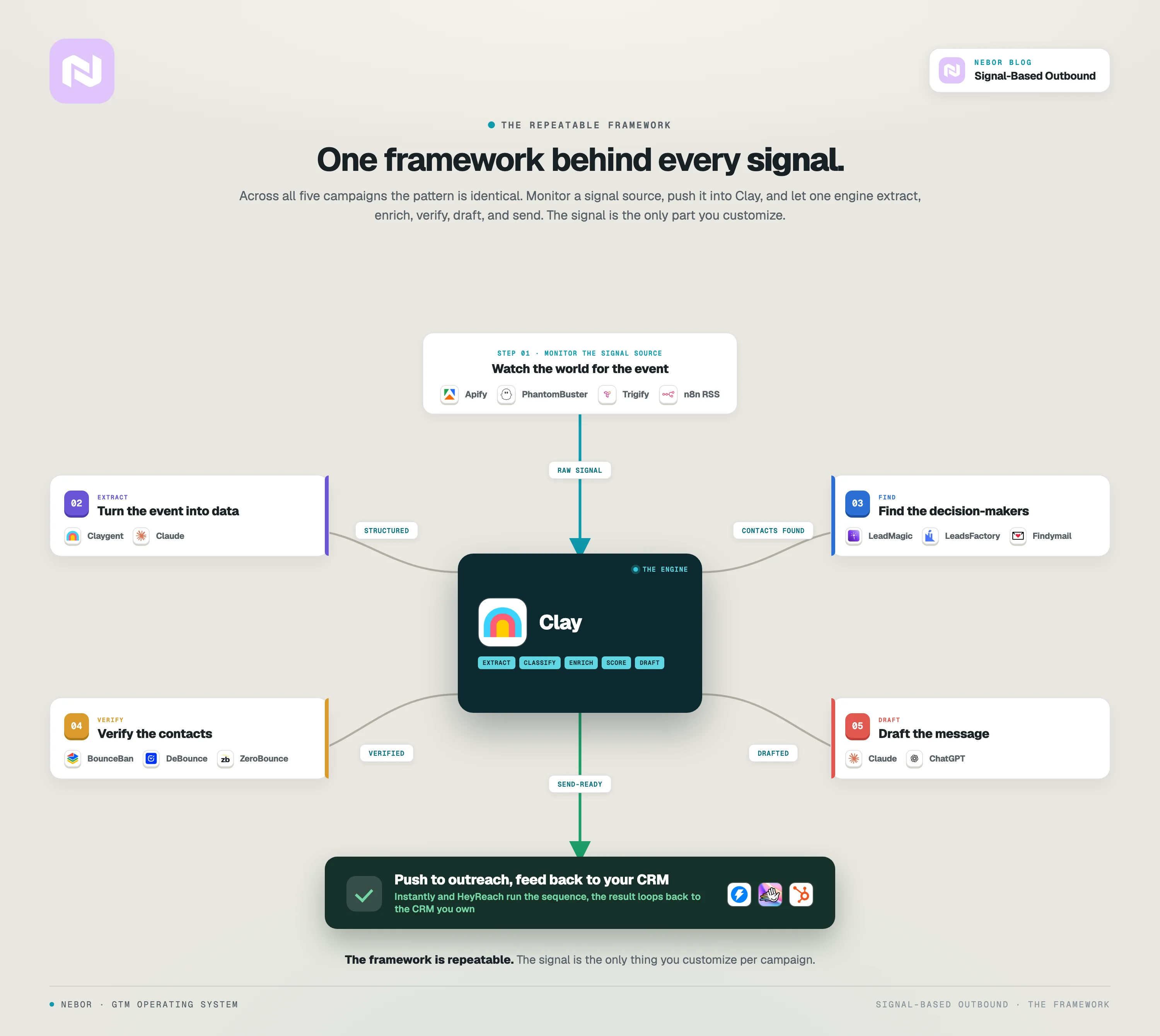
Here’s what the framework looks like for capturing signals and launching outbound campaigns off them. Keep in mind this is a snap view of the actual workflow. There’s usually more process and even workflows behind the engine.
Campaign 1: How we scrape LinkedIn job postings every day to identify companies that need help building pipeline
This is a campaign we use for ourselves at Nebor, and it's responsible for generating a significant number of our own clients. The logic is simple.
The signal and why it matters
When a company posts a job opening for an SDR, a BDR, or a Sales Development Manager, that tells you something very specific about their situation.
It means they're either struggling to build a pipeline with their current team and need more capacity, or they're scaling their sales organization and need infrastructure to support it.
Either way, they're a company that might need exactly what we offer. GTM systems, outbound automation, and revenue operations infrastructure.
This signal is strong because it's public, it's timely, and it directly correlates with the pain point we solve. The company is literally advertising that they need help with pipeline generation. They just don't know yet that there's a better answer than hiring more humans.
The exact workflow
Step 1: Configure PhantomBuster to scrape LinkedIn job postings.
We set up a PhantomBuster workflow that checks every morning, scraping LinkedIn job postings for specific keywords (SDR, BDR, Sales Development Representative, etc.) across our target geographies.
PhantomBuster pulls the company name, job title, location, and posting date for every match.
Step 2: Push results to Clay via n8n.
PhantomBuster's output feeds into n8n, which processes the data and pushes it into a Clay table via webhook. Each new job posting creates a new row with all the scraped information.
Step 3: Deduplicate and filter.
Clay checks the incoming companies against our existing client list and active deal pipeline to avoid contacting companies we're already working with or talking to.
We also filter by company size and geography to make sure the company matches our ICP.
Step 4: Enrich the company record.
Clay handles enrichment to pull firmographic data. Company size, industry, website, LinkedIn page, funding status. This helps us segment and personalize.
Step 5: Find the right contacts.
We use LeadMagic, LeadsFactory.io, and Findymail through Clay to find the hiring manager (usually the VP of Sales or Head of Revenue) and the department head (usually the CRO or CEO at smaller companies).
We verify every address with BounceBan and DeBounce in a waterfall, so nothing undeliverable gets through.
Step 6: Generate personalized messaging.
Using Clay's AI capabilities (Claude or ChatGPT), we generate a personalized email for each lead. The message references the specific job posting and connects it to the problem we solve. The AI handles the drafting. We handle the strategy, the segmentation, and the relevance.
Step 7: Push to outreach tool.
We push the qualified leads with verified emails into Instantly for automated email sequences.
We use a three-step sequence. The initial signal-based message, a follow-up that adds a case study or specific example, and a final touch that offers a low-commitment next step.
Why this works
This campaign goes out every single day without anyone pressing a button. New job postings get captured within hours of being published.
Our outreach lands in the hiring manager's inbox while they're actively thinking about their pipeline problem. The message is timely, relevant, and specific. It doesn't feel like a cold email because it's directly tied to something the company just publicly announced.
The conversion rate on this campaign is significantly higher than any list-based outbound we ran previously. The leads are warmer because the timing is right.
Campaign 2: How we monitor industry news via RSS feeds to reach property developers before their competitors do
This campaign was built for a client that sells AI-driven home and office furnishing solutions to property developers. Their challenge was finding companies right at the moment they were planning new properties.
The signal and why it matters
When a property developer announces a new acquisition or development project, that's a buying signal for furnishing solutions. The developer needs furniture, design, and fit-out for the new property. Generic prospecting tools couldn't capture this. There's no Apollo filter for "developers who just acquired a new property this week."
But the signal exists. Real estate publications report new development projects almost as soon as they're announced. We just had to capture the data and act on it faster than competitors.
The exact workflow
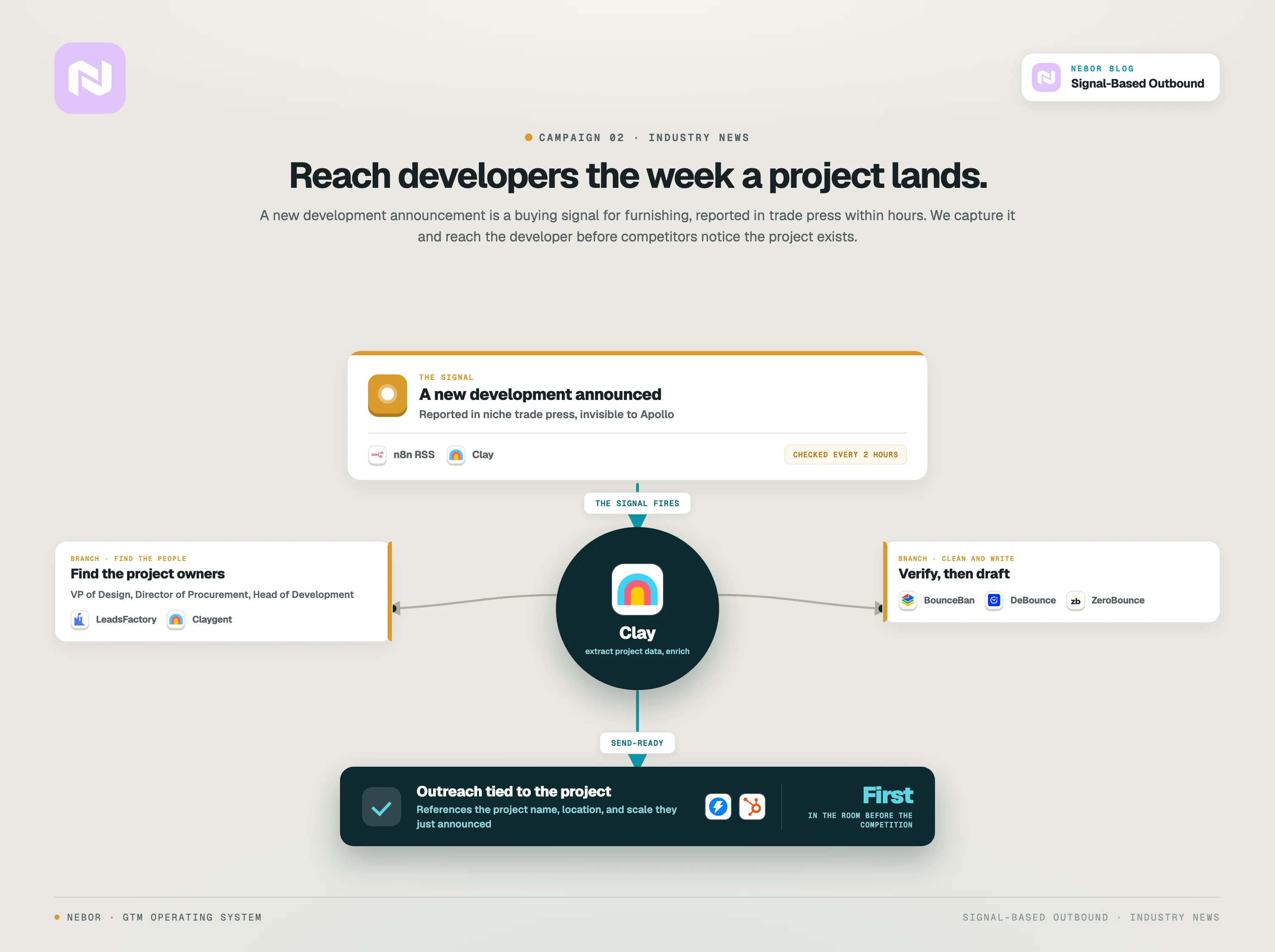
Step 1: Configure n8n.io or Clay to monitor RSS feeds from the target publications.
We identified the publications that cover new development projects in our client's target markets. Multi-Housing News, Chicago YIMBY, Property Week, and several other regional real estate journals.
We set up n8n with RSS feed readers to monitor the feeds from these publications, checking for new articles every 2 hours.
Step 2: Filter articles using keyword matching.
Not every article on these sites will be relevant. Our n8n workflow applies an initial keyword filter looking for terms like "new development," "mixed-use project," "residential construction," "ground-breaking," "lease signed," and similar phrases that indicate a new project announcement.
Only articles matching these criteria get forwarded.
Step 3: Push matching articles into Clay via webhook.
Articles that pass the filter land in a Clay table as new rows. Each row contains the article title, URL, publication source, and date.
Step 4: Use AI to extract structured data from each article.
Clay's native LLM integration parses each article and extracts the developer name, project name, project location, project type (residential, commercial, mixed-use), and project size if available.
This turns unstructured news content into structured data we can act on.
Step 5: Enrich the developer company.
Clay enriches the developer company with firmographic data. Other active projects, headquarters location, website, LinkedIn page.
Step 6: Find the right decision-makers.
We use LeadsFactory.io and Clay's enrichment integrations to find the people at the development company who handle procurement, design, or project management for furnishing and interior fit-out decisions.
We target roles like VP of Design, Director of Procurement, Head of Development, or Project Manager.
Step 7: Verify contacts and generate personalized outreach.
Email verification through waterfall enrichment (BounceBan, DeBounce, ZeroBounce). Then LLM-generated messaging through Clay that references the specific project. The project name, the location, the scale.
The message positions our client's AI furnishing solution as directly relevant to the project the developer just announced.
Step 8: Push to CRM and trigger outreach.
Hot leads go directly into the CRM with full context and into an outreach sequence. Cold leads enter a nurture track for monitoring.
Why this works
This is a perfect example of why niche industry sources beat generic databases. Property Week and Multi-Housing News are publications that real estate professionals read daily. The information they publish is timely, specific, and actionable.
Compare that to scraping Apollo for "real estate companies in the US." You'd get tens of thousands of companies, most of whom are not actively planning new properties. Our system captures only the ones that are, and reaches them within hours of the announcement. That's a personalized email rather than a cold blast.
Campaign 3: How we track Fortune 500 financial announcements to reach CFOs at exactly the right moment for a tax solutions client
This campaign is for a client that helps enterprise companies optimize their tax positions through incentive programs and strategic tax planning.
The signal and why it matters
When a Fortune 500 company reports a significant profit margin increase in their quarterly earnings, that's a buying signal for tax optimization services.
A company that just had a big quarter has more reason to invest in maximizing their tax position. They have the budget, the urgency, and the incentive to optimize.
This signal is powerful because it's public (earnings reports are filed with regulators and covered by financial media), it's quantifiable (you can see the actual numbers), and it directly correlates with the need for our client's service.
A CFO who just reported record profits is thinking about tax exposure. That's quite likely and it's the exact moment to reach out with a solution.
The exact workflow
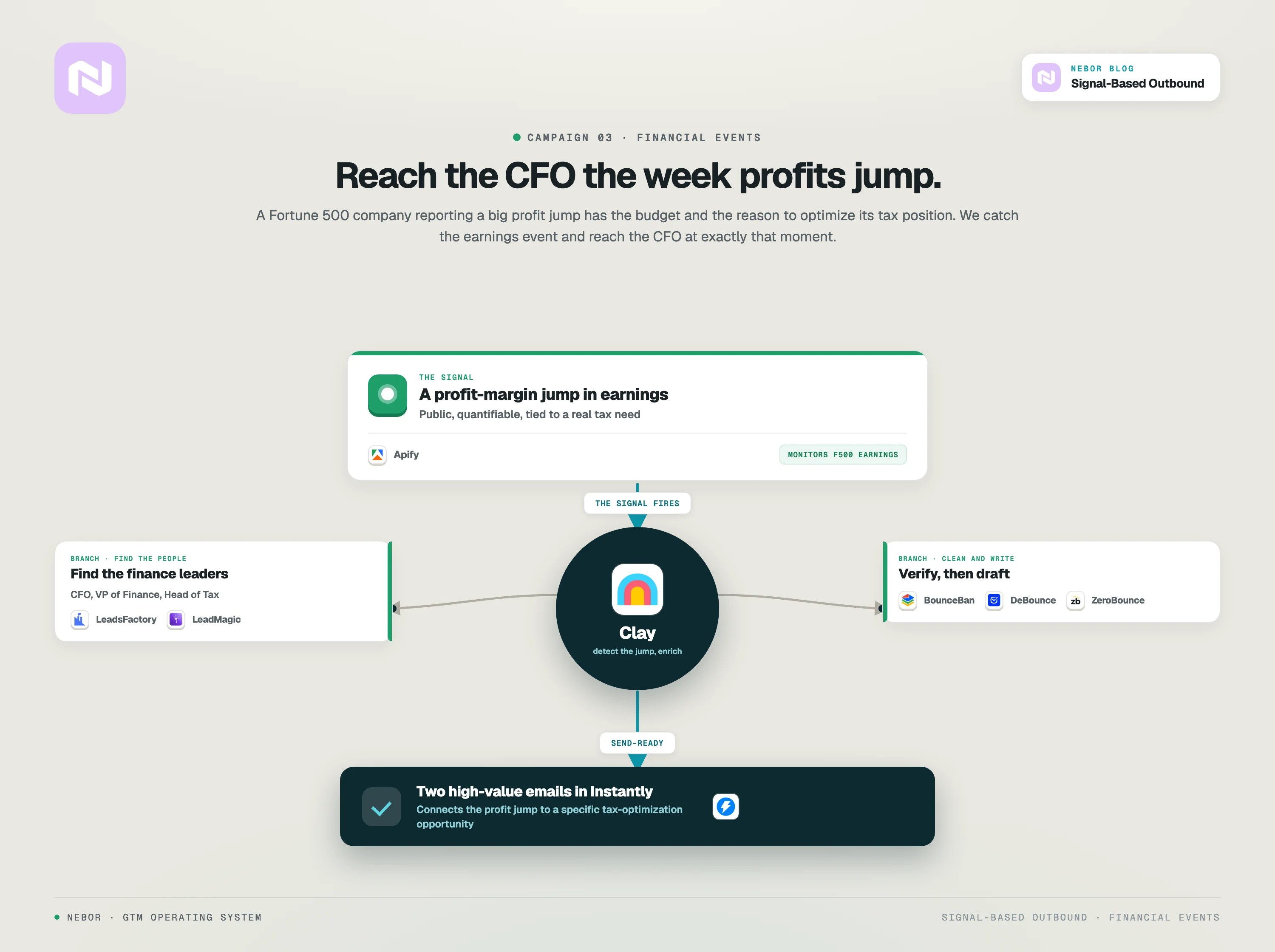
Step 1: Set up Apify to monitor Fortune 500 financial announcements.
Apify is a tool that tracks public company events and social media activity. We configure it to monitor Fortune 500 companies for earnings announcements, specifically looking for companies that report major profit margin increases compared to the previous quarter or year-over-year.
Step 2: Push triggers into Clay.
When Apify detects a matching event, the data flows into Clay automatically.
Step 3: Identify the right decision-makers.
For tax optimization solutions, we target CFOs, VPs of Finance, and Heads of Tax. Clay enriches the company and finds the right people through LeadsFactory.io and the same enrichment stack we use across other campaigns.
Step 4: Verify contacts.
Standard waterfall email verification through BounceBan, DeBounce, and ZeroBounce.
Step 5: Generate contextual outreach.
Using Clay's AI integration, we generate a message that references the specific earnings report. Of course we don't make this a mere generic congratulations.
We make it a message that connects the profit margin increase to a specific opportunity.
Step 6: Push to outreach tool.
Qualified leads with verified contacts go into an email sequence through Instantly. Given the enterprise nature of these prospects, we keep the sequence short and high-value. Two emails maximum, both heavy on relevance and light on pressure.
Why this works
Here again, the timing is perfect. The CFO just reported strong numbers. Tax optimization is top of mind. And the outreach arrives with specific context about their financial performance.
This doesn't feel like cold outreach. It feels like someone who pays attention to their business and has a relevant idea.
Campaign 4: How we monitor event platforms to find companies hosting events with exhibitors and sponsors for an event tech client
This campaign was built for ExpoGenie, a client that provides event sponsor and exhibitor management software.
The signal and why it matters
ExpoGenie's ICP is specific. Companies that host events with exhibitors and sponsors. That's a tiny fraction of the broader B2B universe, and standard databases like Apollo or ZoomInfo can't reliably identify these companies.
But the signal exists. Event platforms like 10times and Cvent literally show you who's hosting events right now. The problem isn't whether the data exists. The problem is that nobody was capturing it systematically.
The exact workflow
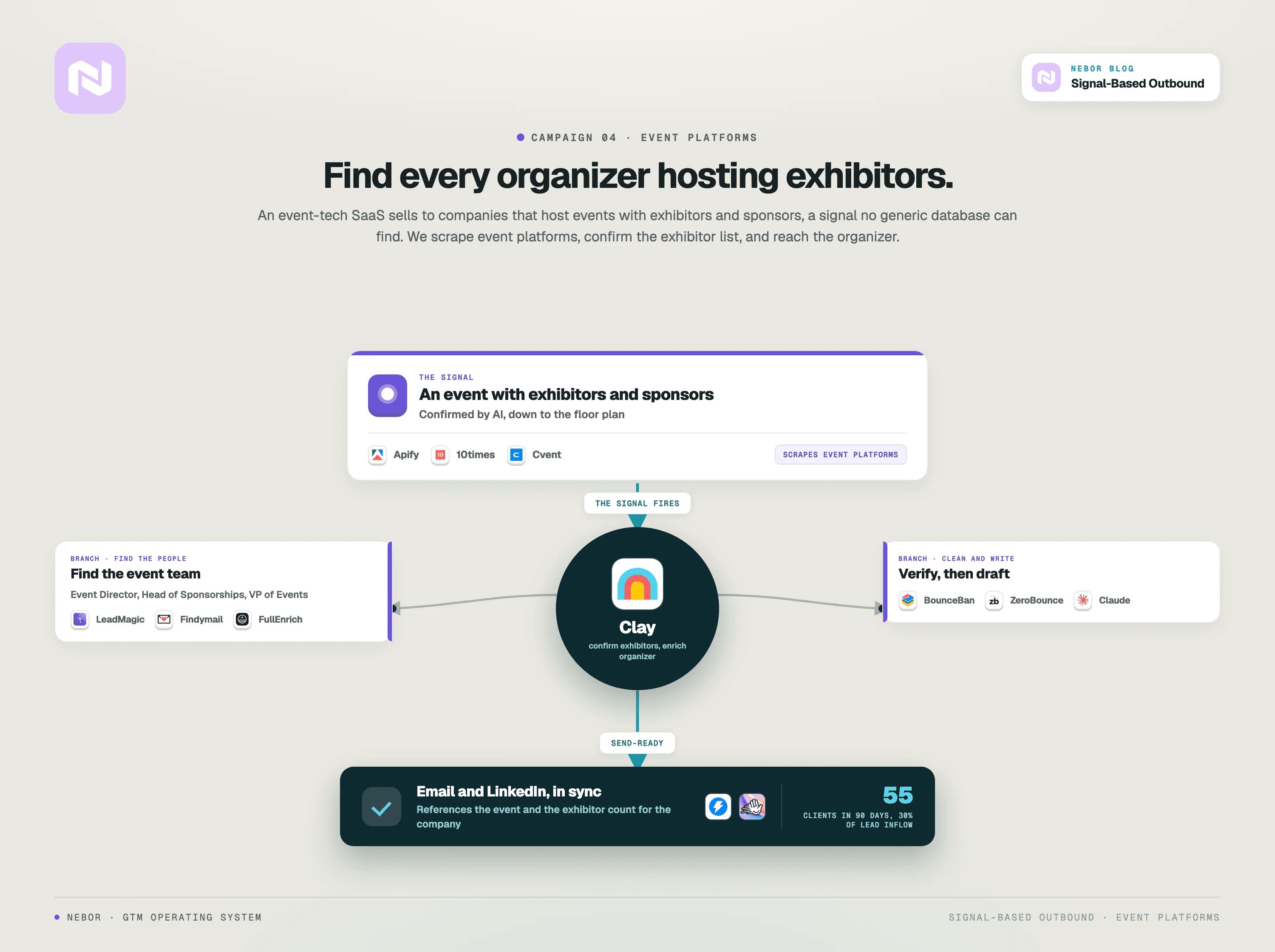
Step 1: Set up Apify to scrape event platforms.
We configured Apify to scrape event listings on platforms like 10times, Cvent, and other industry-specific event directories. The scraper captures event names, dates, organizer names, and basic event details.
Step 2: Push event data into Clay.
New events flow into a Clay table automatically. Each row represents one event with the organizer information attached.
Step 3: Filter for events that match the ICP.
Clay applies filters to keep only the events that match our client's target. Events of a certain size, in target geographies, and importantly, events that have exhibitors or sponsors.
For events that explicitly list their exhibitors or sponsors, we use additional Apify scrapers to extract that information. This tells us not just that the event exists, but that the organizer is actively managing exhibitors, which is the exact pain point our client solves.
This is the difference between a static event listing and a usable buying signal. A static listing tells us an event is happening. The exhibitor list tells us the organizer needs software to manage that complexity. That's not just a name on a list. That's a buyer ready to evaluate a solution.
This is way more valuable than just an event name in a static PDF. This single data point changes our entire outreach approach.
Step 4: Enrich the organizer company.
Clay enriches the event organizer with firmographic data. We pull company size, website, LinkedIn page, and other events they organize. If one organizer holds multiple events, that multiplies the opportunity.
Step 5: Find the right contacts.
We target roles like Event Director, Head of Sponsorships, VP of Events, or Exhibitor Sales Manager using our enrichment stack (LeadMagic, Findymail, LeadsFactory, FullEnrich) with email verification through BounceBan and ZeroBounce.
Step 6: Generate personalized messaging.
The outreach references the specific event, the number of exhibitors or sponsors, and the pain point. For events using competitor products, we take a different angle focused on switching costs and feature advantages.
Step 7: Push to outreach and start the sequence.
Qualified leads go into Instantly for email and HeyReach for LinkedIn outreach. The sequence goes out across both channels.
Why this works
Before this system existed, ExpoGenie's three-person team in Pakistan spent their days manually hunting through event websites and sending maybe 30 emails on a good day. Months of manual effort produced almost nothing.
After we deployed this system, the results were dramatic. 55 unique clients generated within 90 days. 30% of total lead inflow coming from the automated system. Complete coverage of their entire addressable market.
All of it on autopilot while their competitors were still manually browsing event directories one by one.
The key insight here is that the data source was never Apollo or ZoomInfo. It was a niche industry platform that nobody else was scraping. The signal (hosting events with exhibitors) was specific to this business and invisible to anyone using generic B2B databases.
That's what makes signal-based campaigns so powerful. The right signal for your business might come from a source your competitors haven't thought of looking at.
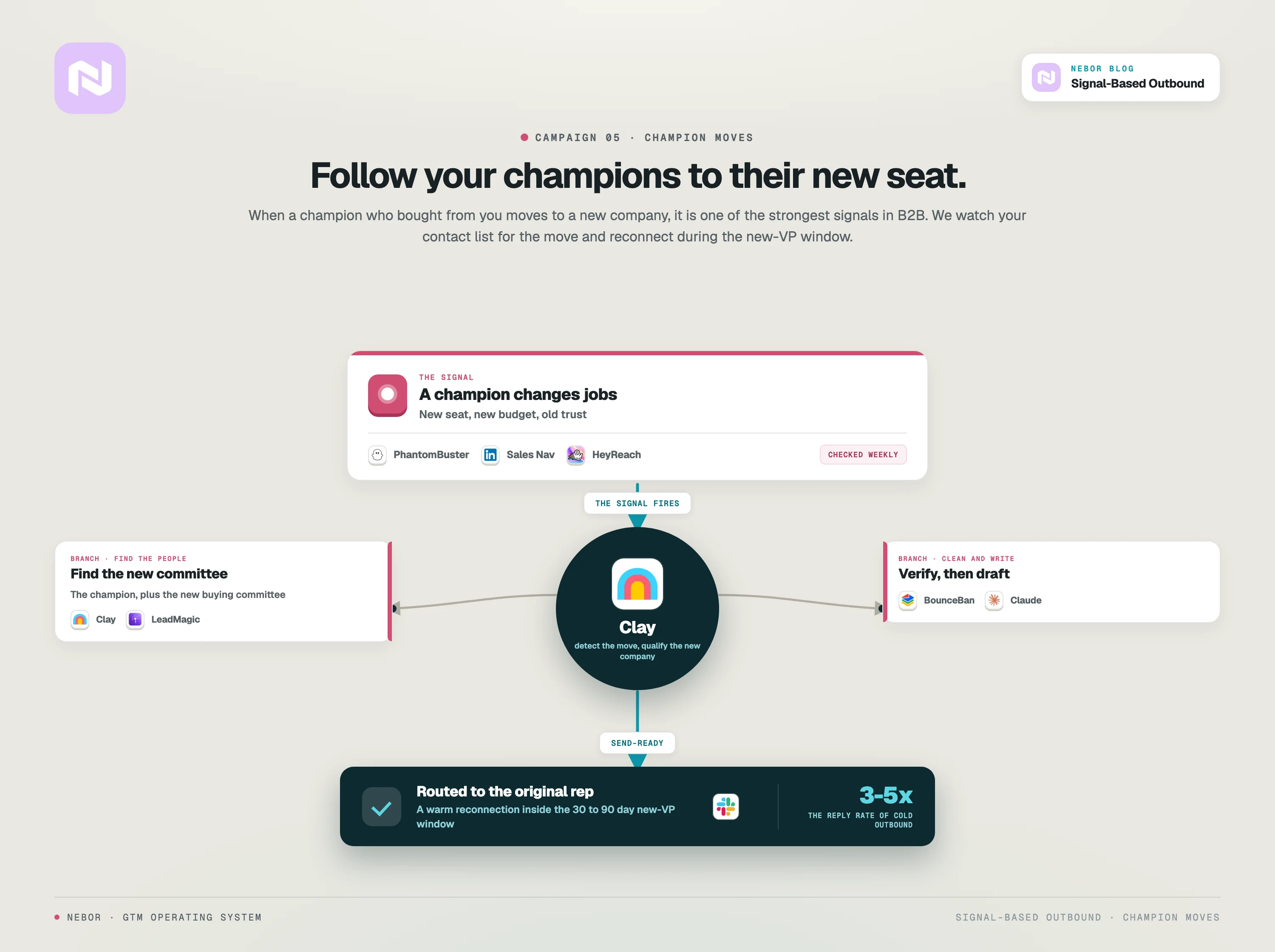
Campaign 5: How we track job changes and former champion movements to re-engage warm contacts at new companies
This is one of the most underrated signal-based campaigns, and it's one of the highest-converting workflows we build for clients.
The signal and why it matters
When someone who previously bought your product, championed your solution internally, or was a key contact at a client company moves to a new organization, that's one of the strongest buying signals in B2B.
That person already knows your product. They already trust your team. They experienced the value firsthand. And now they're at a new company that probably needs the same solution.
Research consistently shows that the new VP window (the first 30 to 90 days after a leader starts a new role) is one of the highest-converting moments in B2B sales.
New leaders bring new budgets, new priorities, and a mandate to make changes. If they had a positive experience with your product before, you're first in line.
This signal is gold, but most companies completely miss it because they don't have systems to track when their contacts change companies.
The exact workflow
Step 1: Build a list of monitored contacts.
Start with your existing customer list (champions, decision-makers, anyone who was involved in a positive purchase decision), former buyers from companies that churned, key contacts at your best accounts, and notable contacts from your CRM who fit your ICP.
Load this list into Clay with their LinkedIn URLs and current company information.
Step 2: Set up automated monitoring for job changes.
We use Clay combined with LinkedIn data providers like Sales Nav, HeyReach, or PhantomBuster to periodically check whether any of these contacts have changed companies.
Clay's enrichment tools can detect when a LinkedIn profile shows a new role at a different company. We repeat this check on a regular schedule (weekly or bi-weekly) across the entire monitored list.
Step 3: Trigger when a change is detected.
When the system detects that a monitored contact has moved to a new company, it triggers the workflow. The new row captures the contact's name, old company, new company, new title, and the date the change was detected.
Step 4: Qualify the new company.
Just because a champion moved doesn't automatically mean the new company is a fit. Clay enriches the new company with firmographic data and passes it through the ICP filter. If the new company doesn't match, the signal gets logged but no outreach is triggered.
Step 5: Generate personalized re-engagement outreach.
For matching new companies, Clay generates a personalized email that references the contact's previous experience with your product, congratulates them on the new role, and proposes a relevant next step at the new company.
Step 6: Push to outreach with priority routing.
Because these are warm contacts, the messages route to the rep who originally worked with them whenever possible. The rep follows up personally rather than letting the system handle it on autopilot.
Why this works
These are not cold outreach moments. These are warm reconnections with people who already know and trust your team. The reply rates are dramatically higher than any cold outbound, often 3 to 5 times higher.
The contacts are actively setting up their new role and evaluating tools and vendors. The timing is perfect, the relationship is warm, and the message is personal.
We build this into the CRM as dynamic signal tracking. When a champion at a client company leaves, the CRM picks it up and triggers the workflow automatically. Your team never has to manually check LinkedIn to see who moved. The system watches for you.
Why these signals work and generic intent data doesn't: the difference between noise and real buying signals
Before you go build these campaigns, let's talk about what makes these signals different from the intent data that companies like ZoomInfo and Cognism sell as a premium add-on.
Traditional intent data tells you that someone from a company's IP address visited an article about CRM software five times.
You don't know who specifically visited. You don't know why. You don't know if they're an intern doing a research project or a VP actively evaluating vendors. That's just noise.
A signal is different. A signal is a specific, observable event that you can tie directly to a buying motion. A new SDR job posting tells you the company is investing in pipeline. A funding announcement tells you the company is about to invest in growth. A profit margin increase tells you the CFO is thinking about tax optimization. A property acquisition tells you the developer needs furnishing.
These aren't probabilistic signals. They're specific, verifiable events that align with a real buying need. And because they're public events, you can capture them at scale and act on them in real time.
That's what makes signal-based outbound so much more effective than generic intent data. You're not guessing whether someone might be interested. You're acting on something they just publicly did.
How to find the right signals for your specific business and build your first campaign
Now that you've seen five campaigns we use for ourselves and our clients, let's talk about how to apply this to your business.
The first question to ask is, what events in the world correlate with someone needing my product? What public actions, announcements, or changes signal that a company is entering a buying window?
Some examples to get you thinking. What signals are specific to your business, your product, and your ICP?
If you sell HR software, companies announcing rapid hiring or opening new offices are your signals. If you sell cybersecurity solutions, companies that just experienced a data breach or those in industries facing new compliance requirements are your signals.
If you sell commercial cleaning services, companies signing new office leases are your signals. If you sell sales automation, companies hiring SDRs are your signals. If you sell event management software, companies hosting events with exhibitors and sponsors are your signals.
The more specific and non-obvious the signal, the less competition you face.
Everyone is scraping LinkedIn for hiring signals. Very few companies are monitoring niche industry publications or domain-specific platforms for the signals that matter to their specific business.
Once you've identified your signals, the technical framework is the same across all five campaigns we showed you.
Monitor the signal source using Apify, PhantomBuster, Trigify, n8n, or Clay's RSS reader depending on the source. Push the signal data into Clay. Use AI to analyze, classify, and extract structured data. Enrich the company record. Find the right decision-makers. Verify contact information. Generate personalized outreach that references the specific signal. Push to your outreach tool and start the sequence. Feed results back into your CRM.
The framework is repeatable. The signals are what you customize.
Hire Nebor to build your signal-based outbound system so your pipeline fills itself while your team focuses on closing
If you've read this far, you know what's possible. The question is whether you have the time, expertise, and tooling to build it yourself.
Some companies do. They have technical teams that understand Clay, n8n, and the broader sales tech stack. If that's you, take this guide as your blueprint and start with one signal that's most relevant to your business. Build that first campaign, measure the results, and expand from there.
Most companies don't have that internal capacity. The technical work to build, integrate, and maintain these systems is non-trivial, and the signal selection requires real sales experience to get right.
That's where we come in. At Nebor, we design and build signal-based outbound systems for B2B companies across industries. We help you identify the right signals for your business, build the tech stack to capture and act on them, and we hand the entire system over to your team when we're done.
Everything stays inside your accounts. The Clay tables, the n8n flows, the Instantly campaigns, the enrichment waterfalls. You operate the system after we wrap, and it keeps producing pipeline as long as you keep it going.
If you want a signal-based outbound system that fills your pipeline while your team focuses on closing, book a 15-minute call and we'll scope what it would take to build it for your specific business.


Related Articles


By clicking Sign Up you're confirming that you agree with our Terms and Conditions.