
Clay AI Claygent: How We Build Smart Workflows With It (Notes From a Clay Solutions Partner)


In this post:
We used to define the Clay AI Claygent as an AI research and scraper agent within Clay that can browse the web for you. But there's so much more to it that that definition doesn't do it justice.
The Clay AI Claygent is the layer that turns a Clay table from a static enrichment grid into a workflow with judgment, and treating it like Clay's ChatGPT is the reason most teams use it twice and abandon it.
It's more than a simple AI feature; it allows GTM teams to deploy a roster of AI-driven, small, and specialist workers they can call on on demand for jobs that no enrichment provider on earth can do.
The idea is that you can create several of them across your Clay tables for specific jobs.
You can have a Claygent that qualifies leads against your messy criteria that won't fit into an Apollo filter.
Another that goes hunting for buying triggers in press releases, careers pages, and customer logo walls.
You can even have another as a lookalike-finder that scrapes companies the enrichment providers don't catalog.
You get the idea.
So, this post is not a "what is Claygent" explainer. Clay’s docs handle that part well, and we will not waste your time covering ground they already cover. This post is how we use Claygent at Nebor.
So, let's get started.
Note: The research your reps do by hand every morning is exactly what a Clay AI agent should be doing overnight.
Checking whether a company fits your ICP, reading the site, working out who to contact and why now. Claygent can do all of it, and in most workspaces it is doing none of it, because nobody had time to design the chain.
We are a Clay Solutions Partner at Nebor, and Claygent is where most of our build time goes. We chain agents so one qualifies the account, another watches for a trigger worth acting on, and another drafts the opener, each writing back to the same table, so your rep opens a row that already has the answer.
Book a 15-minute call and let's talk about your Clay setup.
What Claygent actually is, and what makes it different from a chat AI with browsing
The cleanest way to describe Claygent is to start with the technical mechanics that truly live feature the tool instead of the marketing words.
Claygent is an agent, by which we mean a process with a goal, a browser, a set of tools, and a defined output shape.
It plans a research path through the web, navigates between pages, evaluates whether each page contains the data it needs, and decides whether to keep going.
The distinction worth nailing is that agent and LLM are not the same thing, even though most people use both terms interchangeably.
Claude and ChatGPT are language models, and the current flagships (GPT-5.5 and Claude Opus 4.7) both browse the web, use external tools, and carry multi-step research routines on their own. The latest versions handle a lot of what Claygent does inside a one-off chat session.
Where Claygent earns its place is that it is purpose-built for one specific job. The job is pointing an agent at every row of a Clay table at scale, returning structured outputs in typed columns, and feeding those outputs into the next step of a workflow.
That sounds narrow, but it is exactly the shape of nearly every real GTM data problem.
If you ask GPT-5.5 or Claude Opus 4.8 “find the pricing model for this company”, you get a paragraph of text. If you ask Claygent the same thing across 500 companies in a Clay table, you get 500 typed cells you can sort, filter, branch on, and pass downstream.
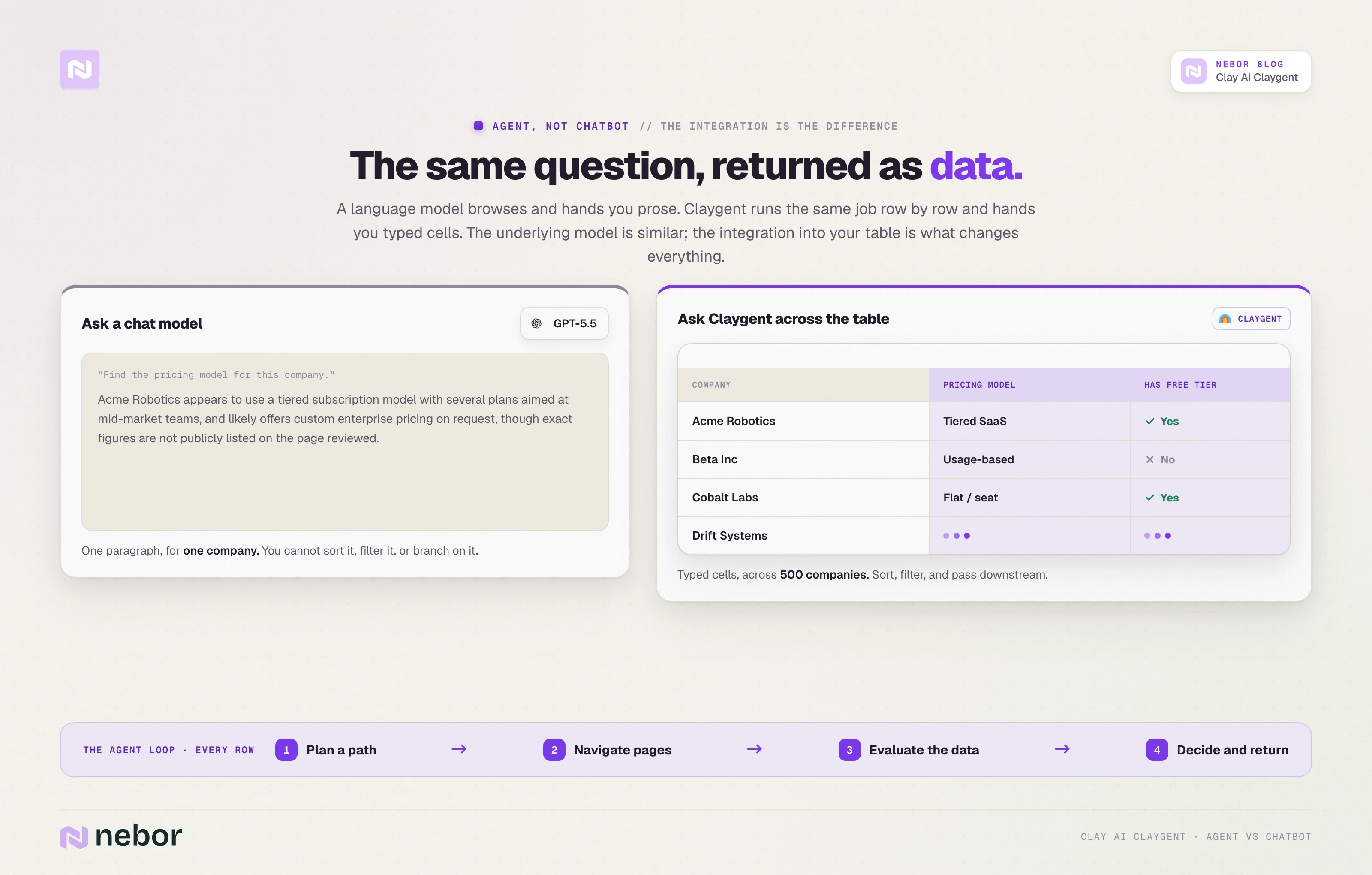
The underlying capability is similar across all three. The integration is what makes Claygent different. Claygent works row by row, returns typed cells, and feeds the next step automatically.
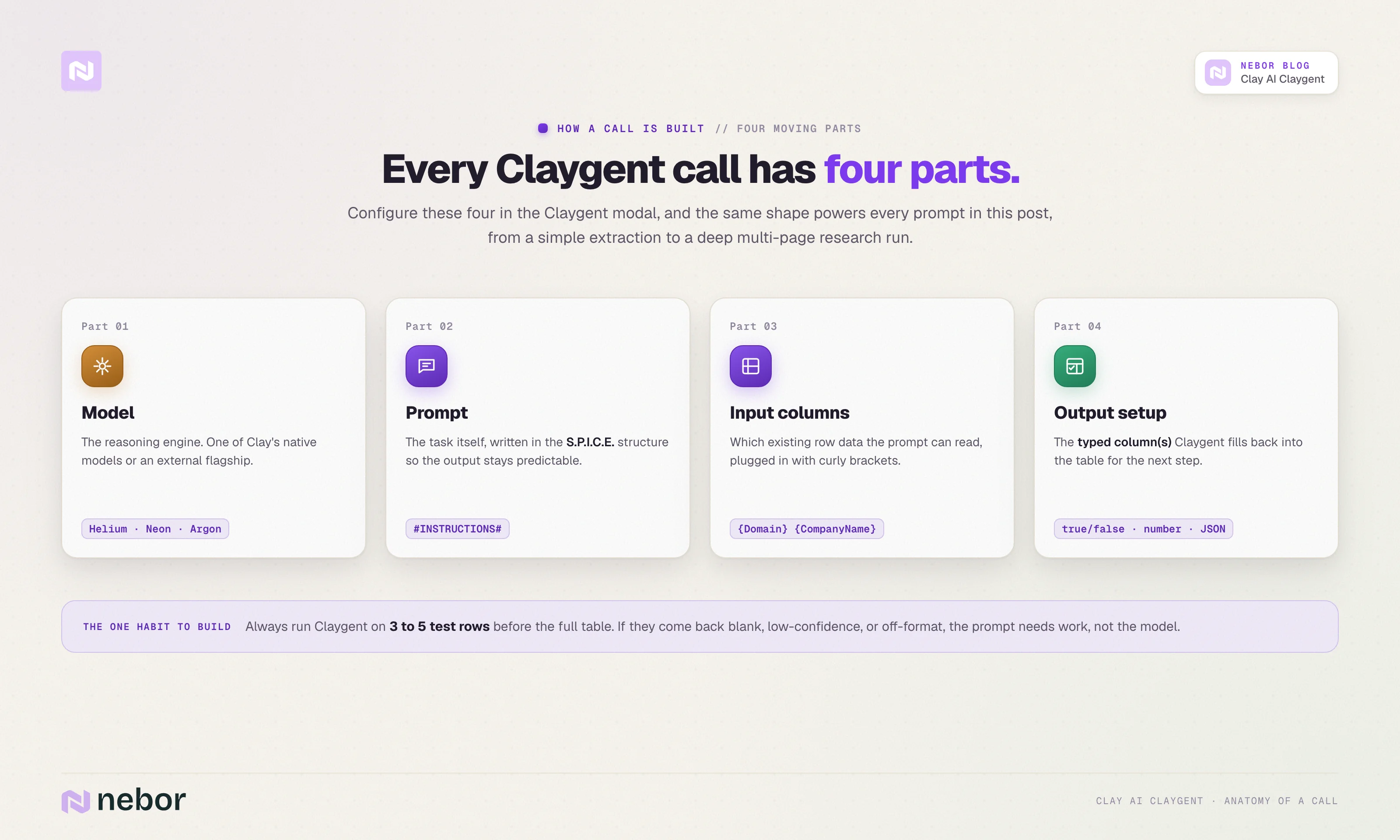
Practically, every Claygent call has four moving parts.
The first is the model that does the reasoning, which can be one of Clay’s three native options (Helium, Neon, or Argon) or an external model from OpenAI, Anthropic, or Google. At the time of writing, the flagship external choices are GPT-5.5 and Claude Opus 4.7.
The second is the prompt that defines the job. The third is the set of input columns the prompt can reference, which usually contain the row’s existing data.
The fourth is the typed output that flows back into one or more Clay columns, ready for the next step in the table to act on.
We come back to all four of those parts in the next sections. For now, the framing that matters is simple.
Claygent is an agent runner with a fixed integration into the place where your GTM data already lives, and that integration is what makes the rest of this post possible.
How to access and set up Claygent in Clay
Claygent lives in Clay’s enrichment panel, alongside every other connector. The fastest way to find it from a fresh table is to click “Add enrichment”, type “Web Research” in the search bar, and pick the Claygent option from the AI section.
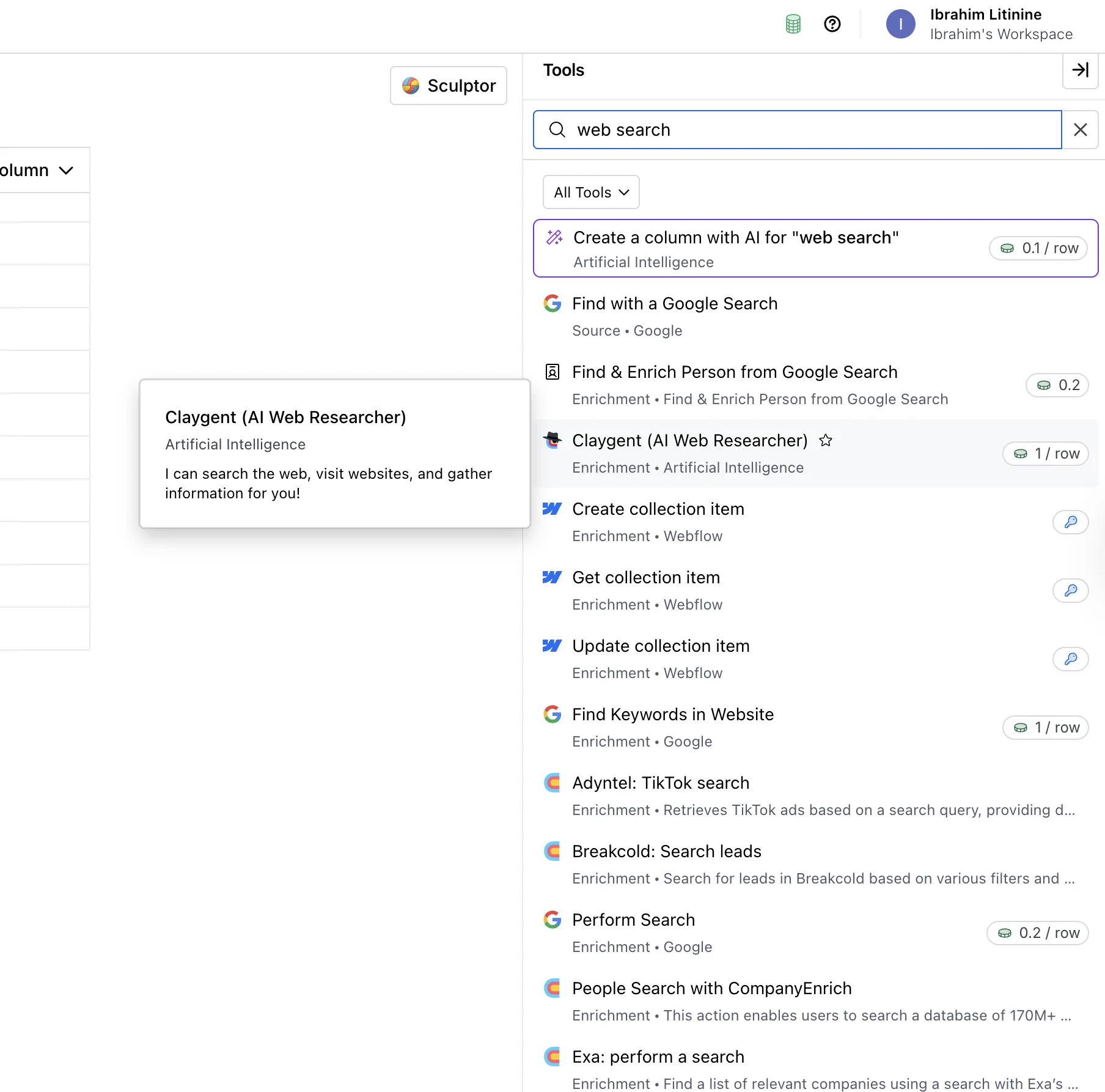
And here is what it looks like after you select it.
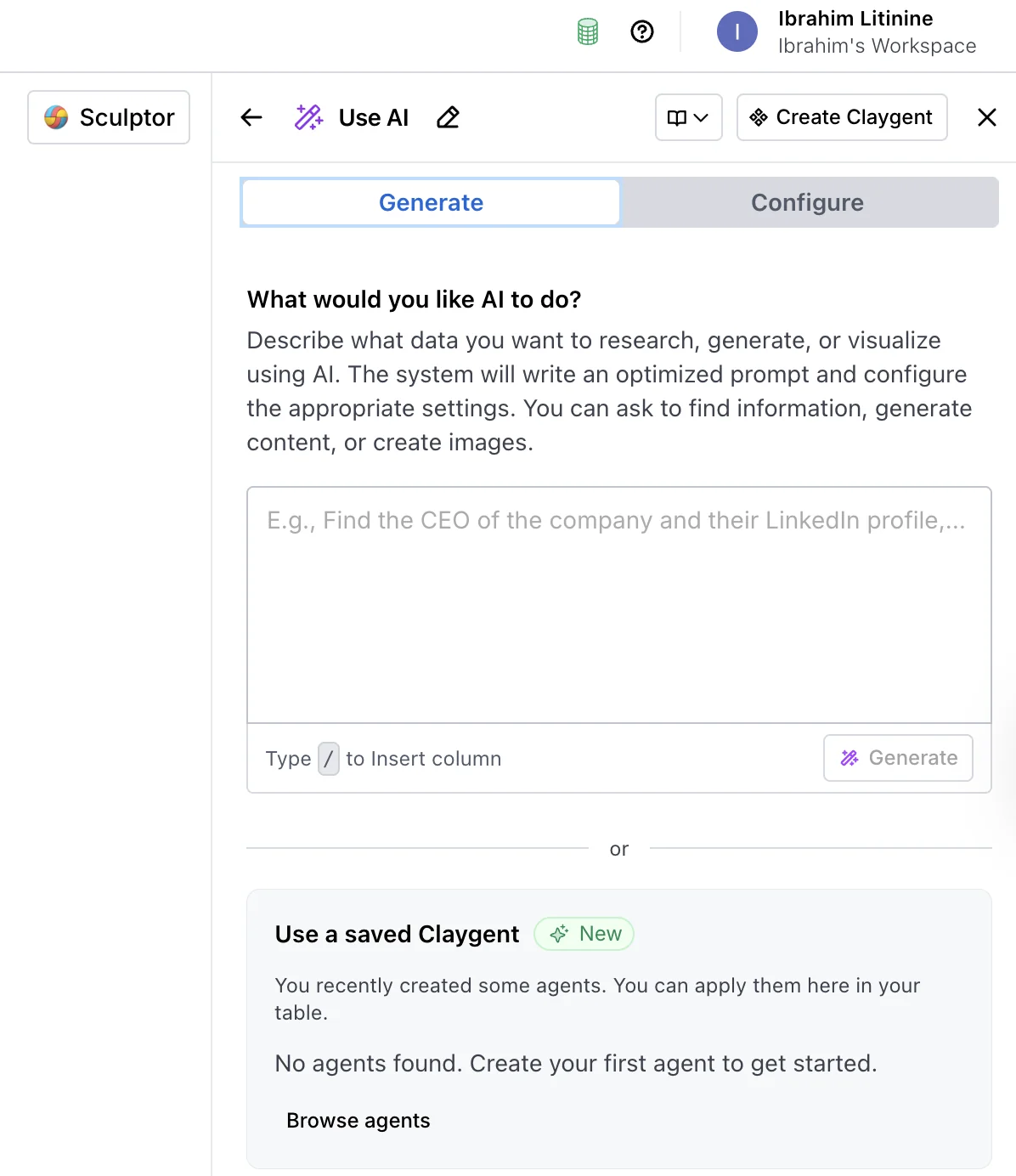
You need a table with rows to point Claygent at before any of this is useful. If you do not already have one, create a workbook, click “+ Add” inside it, and choose Company Table, People Table, or Custom Table depending on what you are researching.
Populate the table with at least a handful of rows you want enriched.
Once you pick Claygent, the modal opens with four configuration areas. The model picker is at the top, the prompt area in the middle, the input column selector underneath, and the output column setup at the bottom.
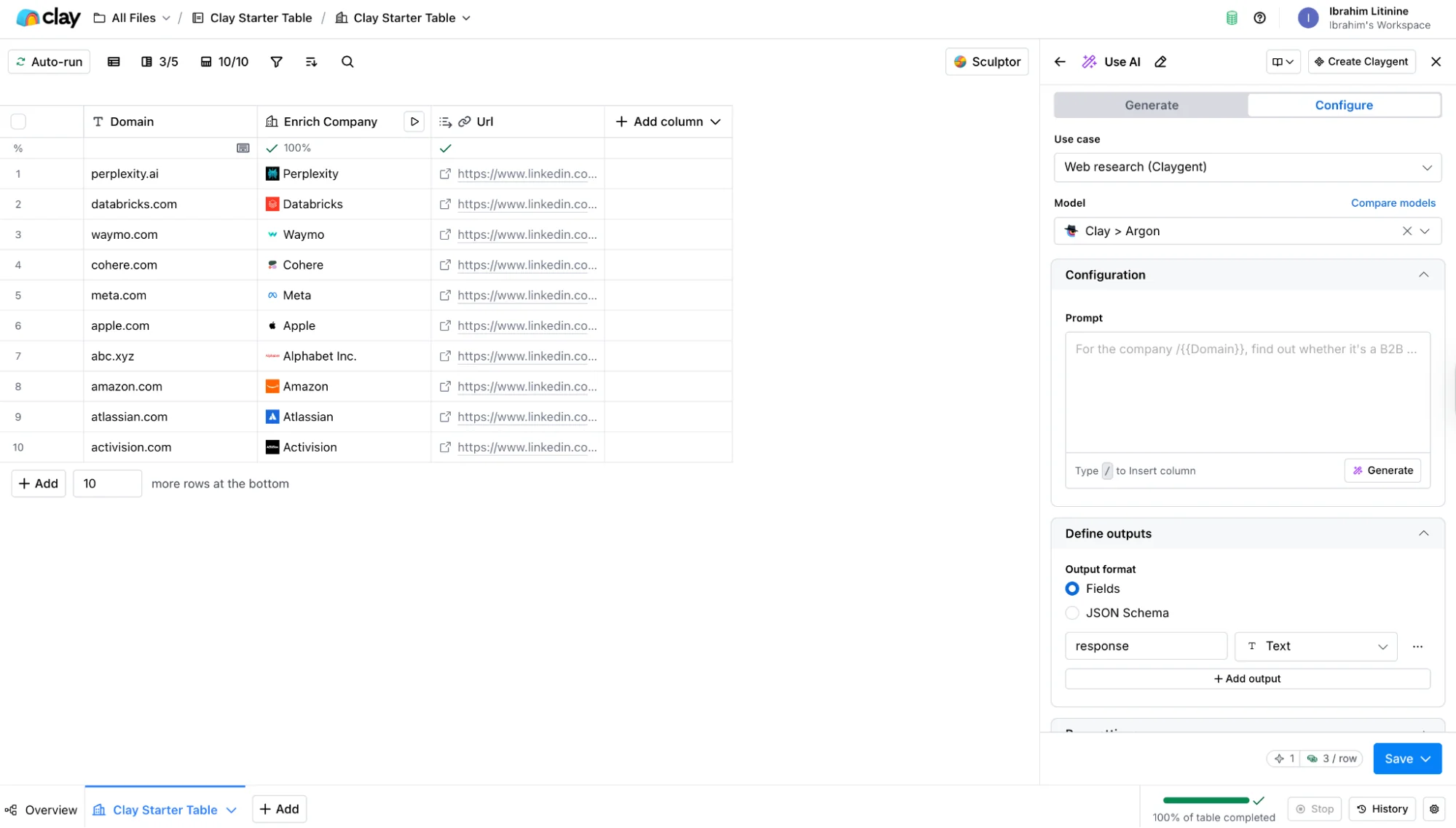
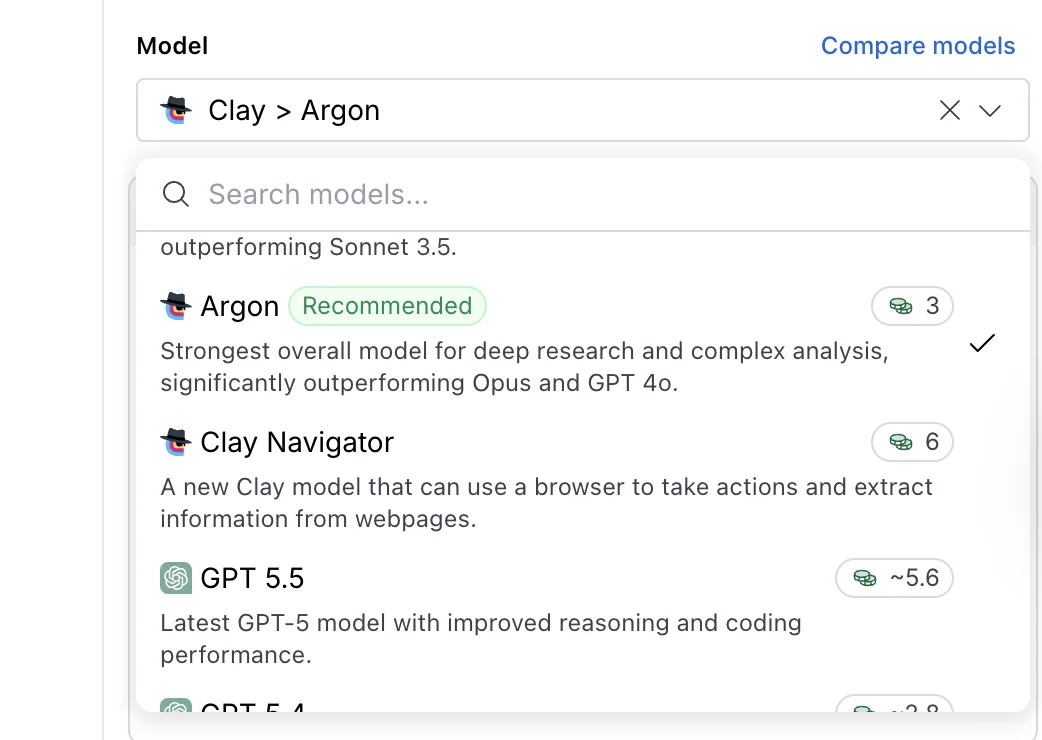
The model picker is where you choose Helium, Neon, Argon, or one of the external options (OpenAI, Anthropic, or Gemini). The prompt area is where you write the brief.
The input selector tells Claygent which existing columns in the row it can reference inside the prompt (typically Domain, Company Name, or LinkedIn URL). The output setup defines the column or columns Claygent fills back into the table.
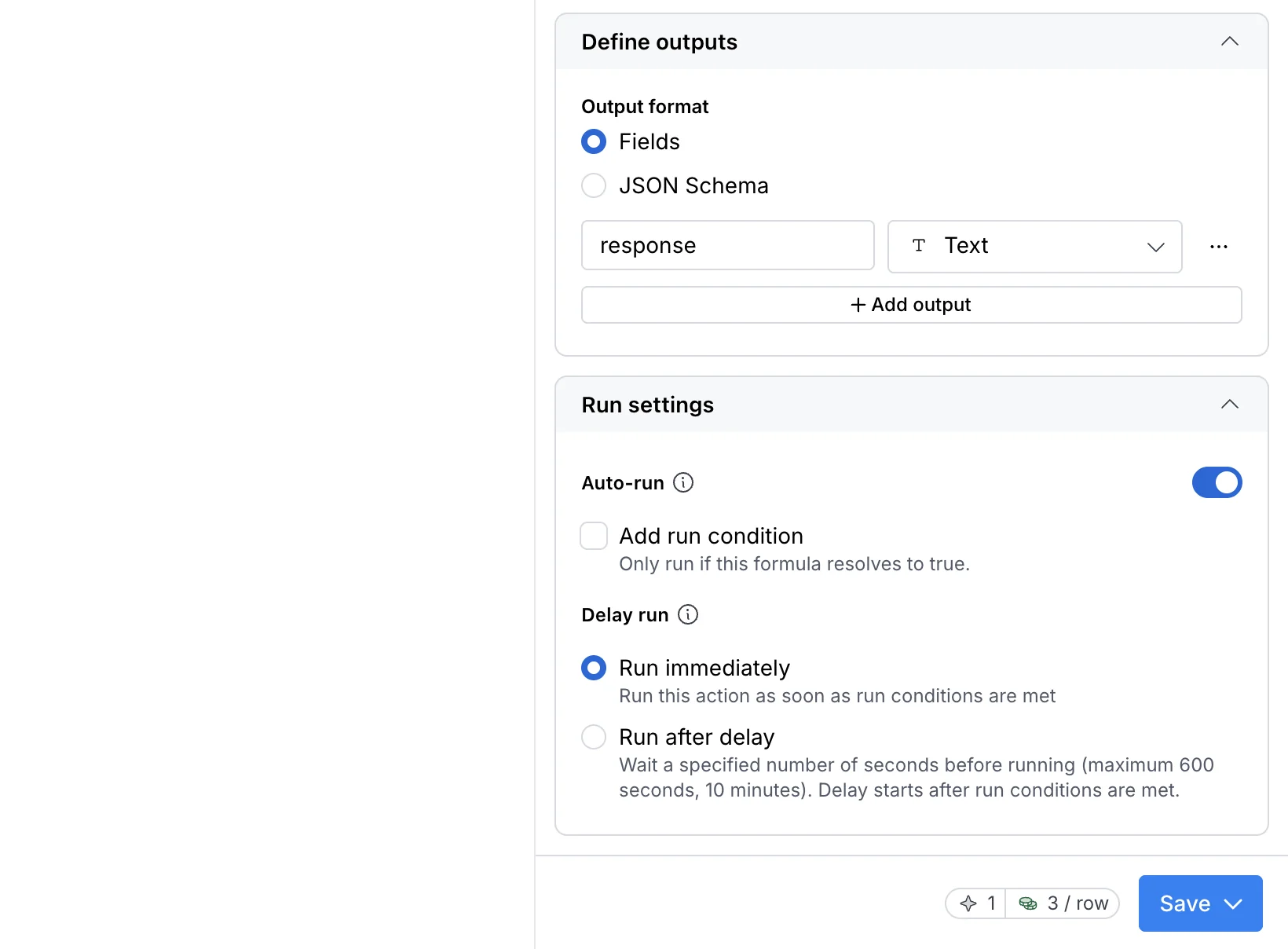
One operational habit worth building from day one is simple. Always test Claygent against three to five test rows before turning it loose on the full table.
The first pass shows you whether the prompt actually returns the structure you expected, and whether the model you picked is heavy enough for the question you are asking.
If the test rows come back blank, low confidence, or formatted differently than you expected, the prompt needs work. We come back to prompt structure in detail in two sections.
How to pick the right Clay AI Claygent model for the job you need done
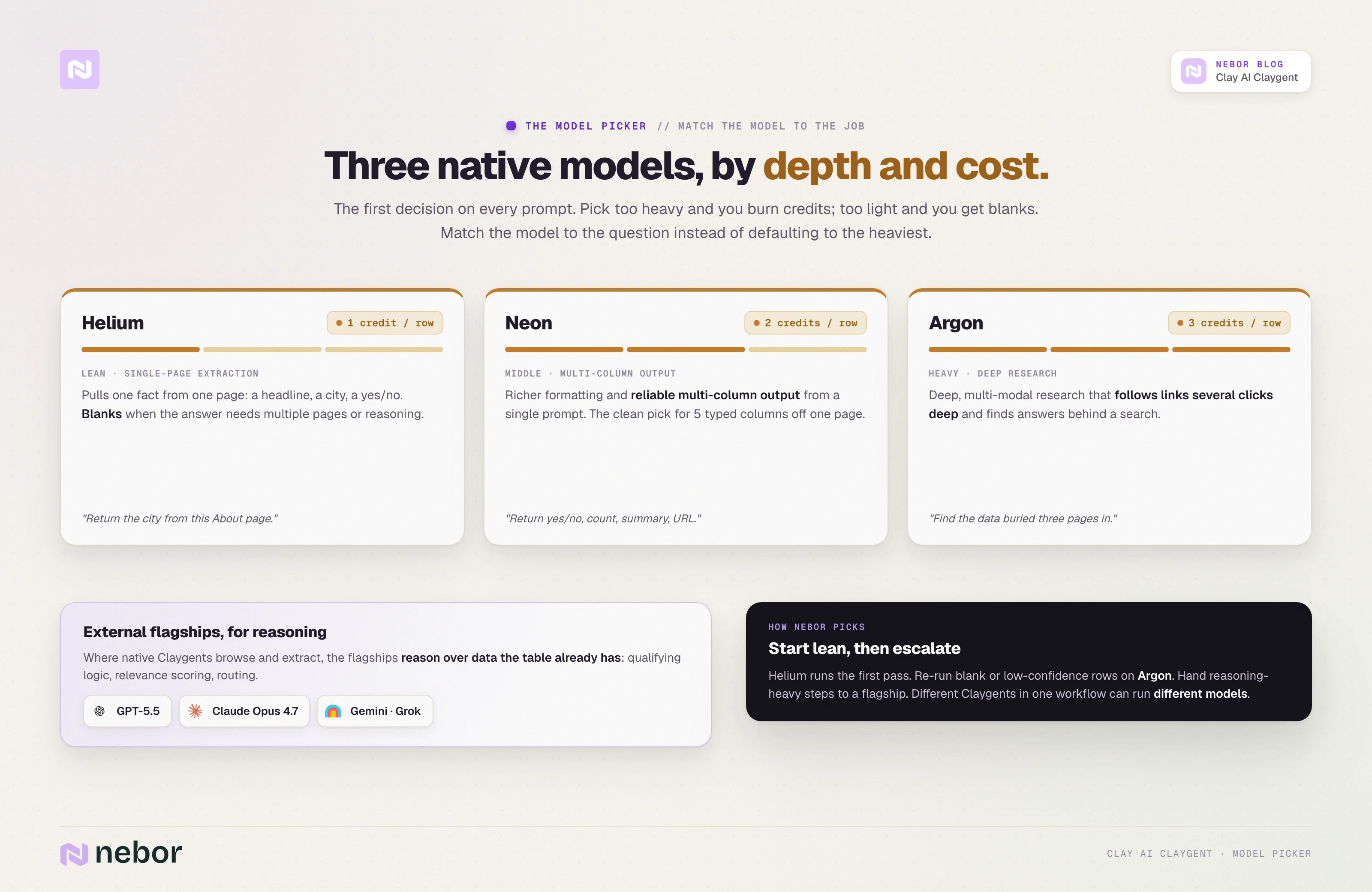
In the Claygent modal, the model picker is the first decision you make on every prompt. Picking poorly here either costs you credits you did not need to spend or returns an answer the cheaper model could have handled.
Clay ships three native Claygent models. We layer the external options on top when the job requires it.
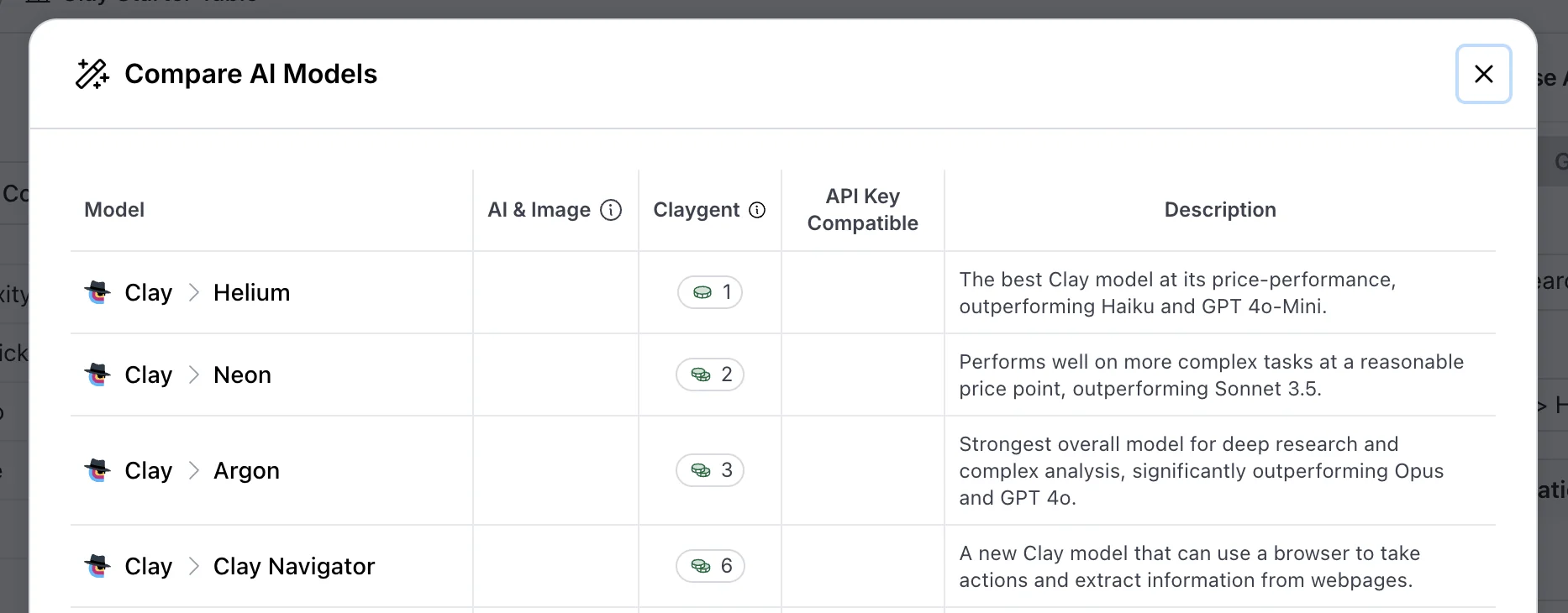
Claygent Helium
Helium is the cheap default at one credit per row. It moves fast, handles single-page lookups well, and is the right call for any prompt where the data lives on one page that does not require deep reasoning.
Think "find this company's LinkedIn URL," "extract the headline from this homepage," "return the city from this About page."
You will get blanks on Helium when the answer requires the model to read multiple linked pages, do multi-step reasoning, or interpret ambiguous content. That is where you escalate to a heavier model.
Claygent Neon
Neon lands in the middle tier at two credits per row. The two things it does that Helium does not are richer answer formatting and more reliable multi-column output from a single prompt.
If your prompt is asking for five typed columns from a single page (yes/no, number, text, URL, summary), Neon is the cleanest model for the job. It produces more consistent output structure than Helium when the prompt has multiple parallel asks.
Claygent Argon
Argon is the heavy lift at three credits per row. It handles deep research, multi-modal content, and prompts that require the agent to follow links several clicks deep into a site before finding the answer.
We reach for Argon when the answer lives behind a search step, when the page structure is unpredictable, or when an earlier-tier model returned ambiguous results on the test rows.
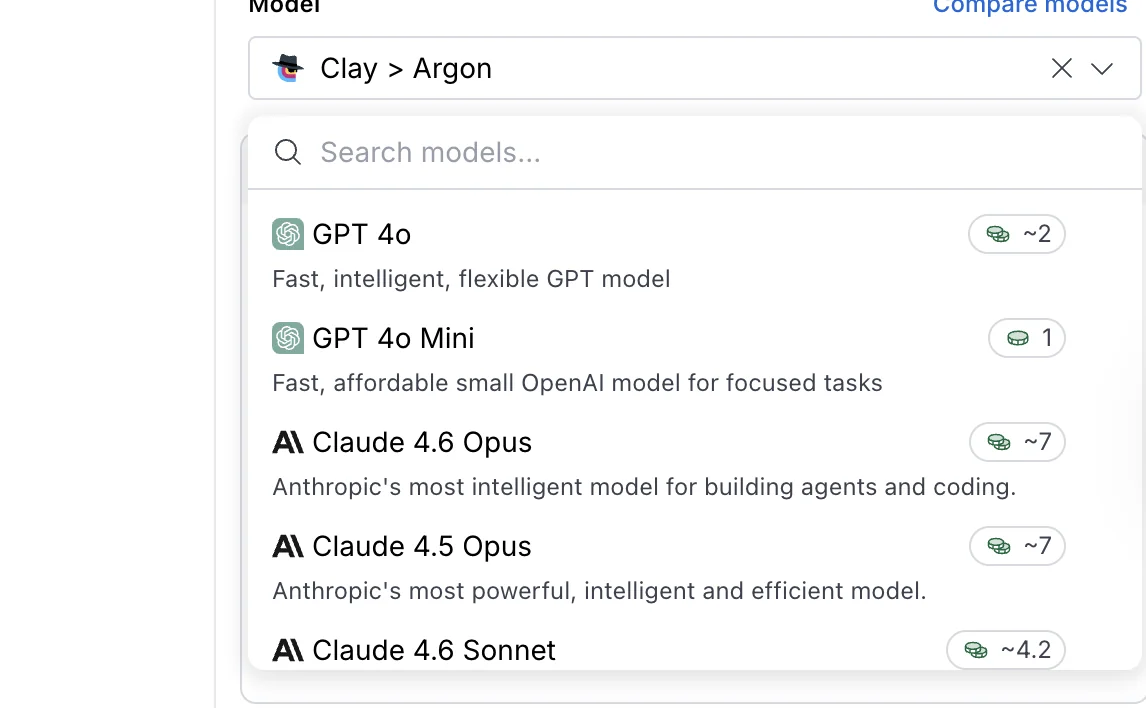
External models from OpenAI, Anthropic, Google, and Grok
The external models in Clay’s dropdown live alongside the native three and are useful for slightly different work.
Where the native Claygents are optimized for browsing and extraction, the external flagships shine at reasoning over data the workflow has already pulled into the table. Here are the open AI models you get:
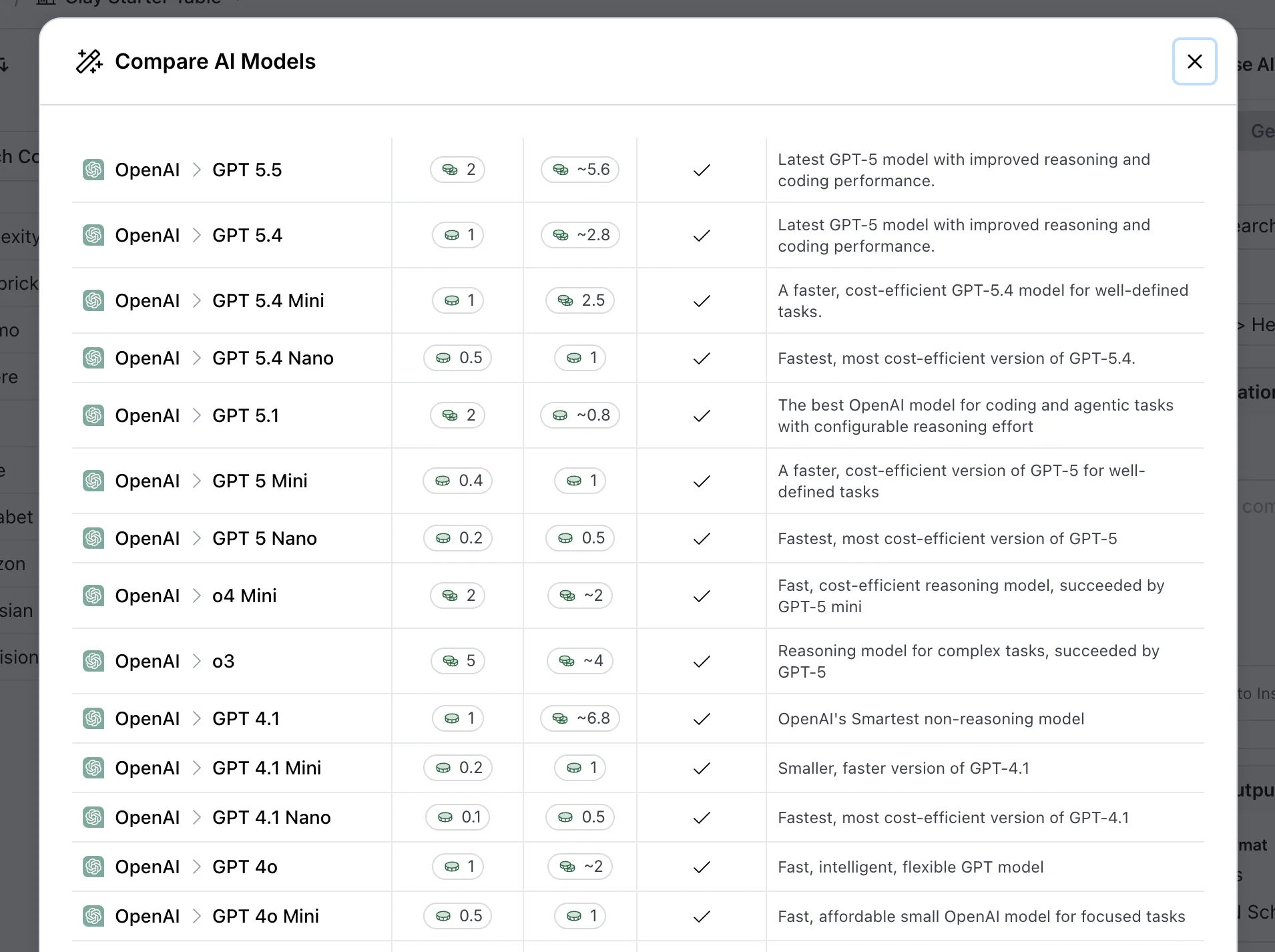
Here’s the rest. There’s even DeepSeek.
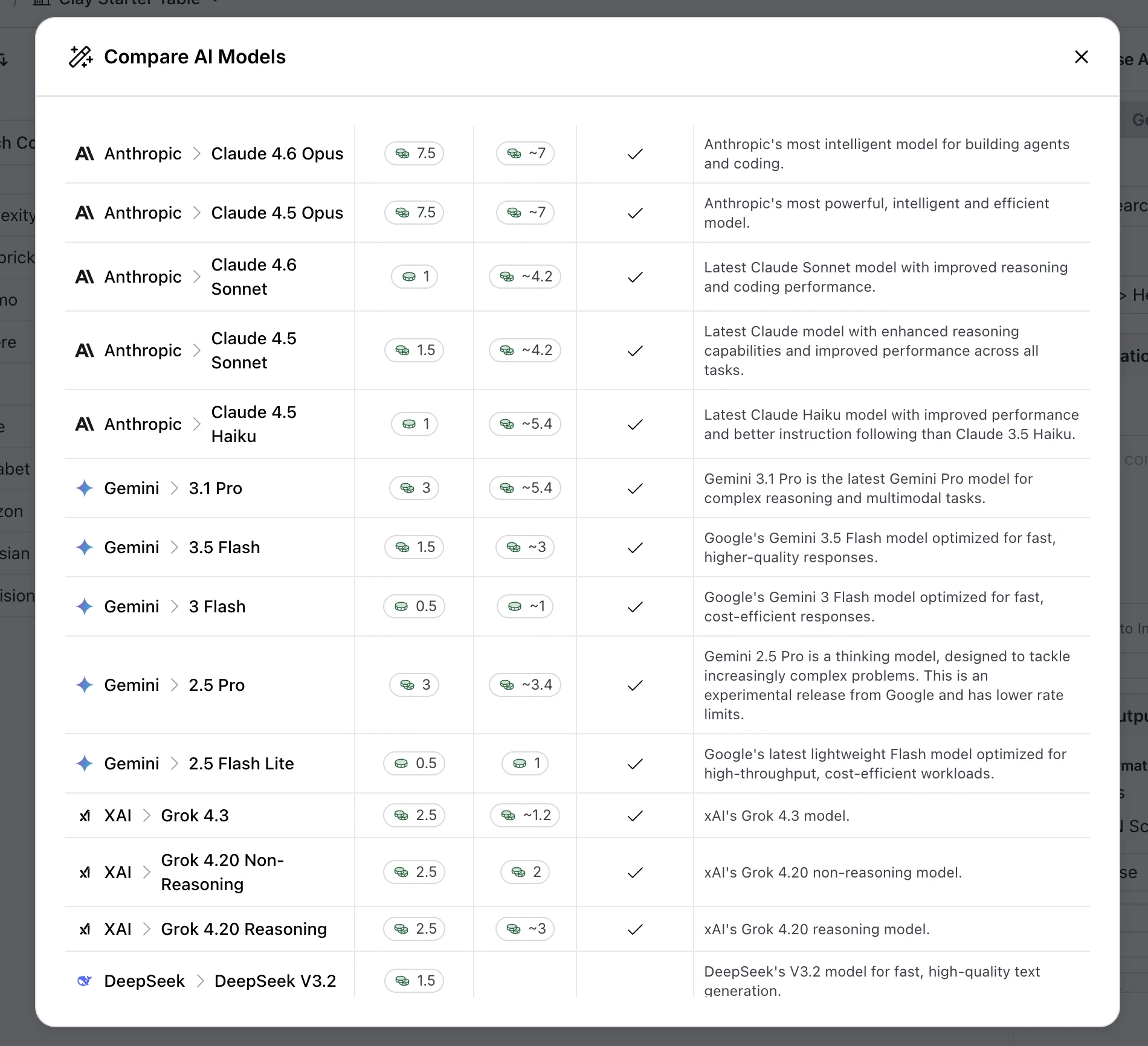
GPT-5.5 (released April 2026) and Claude Opus 4.7 (released April 2026) are the current flagship options on the OpenAI and Anthropic sides. Gemini 2.0 Flash is the Google option in the dropdown.
We use these for the qualifying logic, the relevance scoring, and any prompt where the work is reasoning over the row data we already have.
How we actually pick on a real workflow
The hybrid pattern we use on most client tables is to start lean and escalate.
Helium takes the first pass at one credit per row. We retry any row that comes back blank, low-confidence, or with an obvious format error on Argon.
We hand reasoning-heavy steps that do not need browsing (qualifying, scoring, routing) to GPT-5.5 or Claude Opus 4.7 instead of one of the Claygent natives.
Sam Holding ran a public comparison of the three native Claygents on a research task during one of Clay's earlier model cycles. Argon outperformed the other two on accuracy, and Helium proved the most cost-effective on simpler questions.
The relative shape of the result still holds even though Clay has updated the models since.
Argon is heavier, Helium is leaner, and the cost-versus-accuracy trade-off is the same trade-off you make every time you pick a model in any AI workflow.
The practical takeaway is that the model picker is not a “pick once and forget” decision. Different Claygents inside the same workflow can use different models, and the system gets cheaper and more accurate when you match the model to the job rather than defaulting to the heaviest option for everything.
How to write Claygent AI prompts that work: the S.P.I.C.E. framework
The biggest predictor of whether a Claygent returns useful data is the structure of the prompt, not the model you picked.
A heavy Argon pass on a vague prompt produces vague results. A clean Helium pass on a tightly structured prompt produces clean structured results.
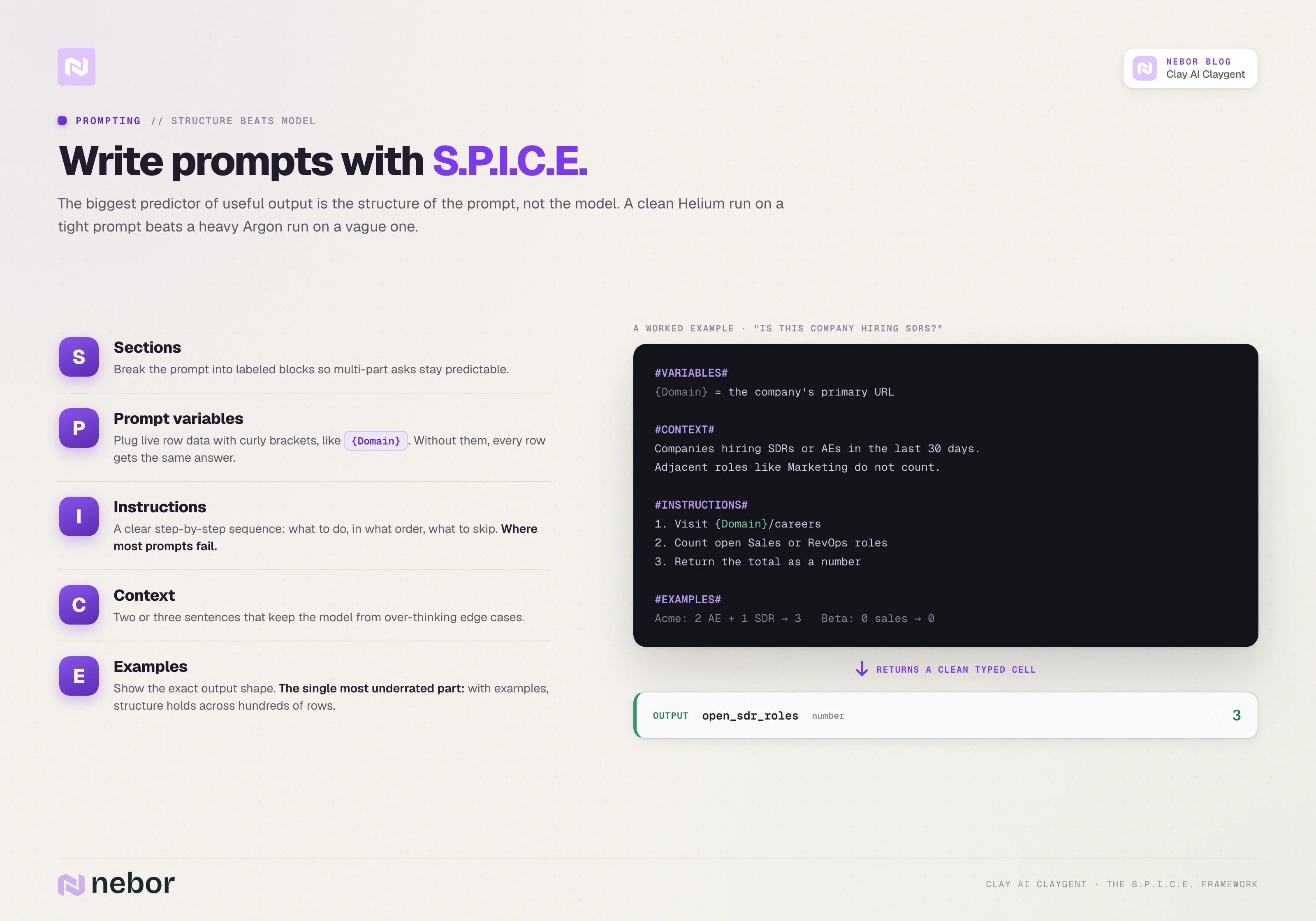
Clay's own S.P.I.C.E. framework is the cleanest scaffold we have found for writing Claygent prompts. The acronym covers the five parts every good Claygent prompt has, which are Sections, Prompt variables, Instructions, Context, and Examples.
Sections
Section the prompt with hash-tagged headers like #VARIABLES#, #CONTEXT#, #INSTRUCTIONS#, and #EXAMPLES#. The headers help the model parse the prompt into its functional parts and separate setup from the actual task.
Skipping this step does not always break the prompt, but it makes the output less predictable when the prompt has multiple parts.
Prompt variables
Reference your input columns inside curly brackets to plug live row data into the prompt. If the row contains a Domain column, the prompt uses {Domain}. If it has a Company Name column, the prompt uses {CompanyName}.
The variables are how Claygent knows what data the current row contains. Without them, the model fills in based on the prompt text alone, which produces the same answer for every row.
Instructions
Write the task out as a clear step-by-step sequence. Tell Claygent what to do, in what order, and what to skip. "Visit the company's careers page at {Domain}/careers. Count how many roles are open in Sales or Revenue Operations. Return the total as a number."
The instruction layer is where most prompts fail in our experience. Practitioners write the goal but skip the steps, and the model fills the steps in for itself with mixed results.
Context
Give the model a short statement about why this prompt matters and what good output looks like. "We are building a list of companies that are actively hiring sales reps so we can prioritize outreach. Open roles in adjacent functions like Marketing do not count."
The context paragraph is short, usually two or three sentences. It saves the model from over-thinking ambiguous edge cases.
Examples
Show two or three examples of the exact output shape you expect. Examples are the single most underrated part of Claygent prompting.
A prompt with examples returns consistently structured output across hundreds of rows. The same prompt without examples returns roughly one in three rows in a format that breaks the downstream column type. That gap is the difference between a workflow you can trust at scale and one that needs constant babysitting.
A worked example
Putting it together, a Claygent prompt for "is this company actively hiring SDRs" looks something like this.
#VARIABLES#
{Domain} = the company's primary URL
#CONTEXT#
We are building a list of companies actively hiring SDRs or Account Executives in the last 30 days. Open roles in adjacent functions like Marketing or Customer Success do not count.
#INSTRUCTIONS#
1. Visit {Domain}/careers or the company's job board if linked from the homepage.
2. Look for open roles where the title contains SDR, BDR, Account Executive, or Sales Development.
3. Return the count as a number. Return zero if the page has no listings or the page does not load.
#EXAMPLES#
Acme Corp careers page shows 2 open Account Executive roles and 1 SDR role. Output: 3.
Beta Inc careers page shows 0 open sales roles, 4 engineering roles. Output: 0.
That prompt returns clean numbers in a typed Number column. The same job written as "find their open sales roles" returns inconsistent text strings half the time.
The discipline of writing structured prompts is small. The compounding effect across a workflow with five or six Claygent prompts is large.
How to format your Claygent output so it flows downstream
Picking the right output format is what turns a useful Claygent into a useful workflow step.
The Claygent itself might return the perfect answer. If the column type is wrong, nothing downstream can use it cleanly.
Claygent gives you five output types to pick from in the column setup.
Text for names, descriptions, and anything that does not need to be sorted or calculated
Number for anything you will sum, count, average, or filter on a numeric threshold
URL for links that need to stay clickable in the downstream tool
True/false for binary qualifying questions
JSON for structured payloads that get passed to another step
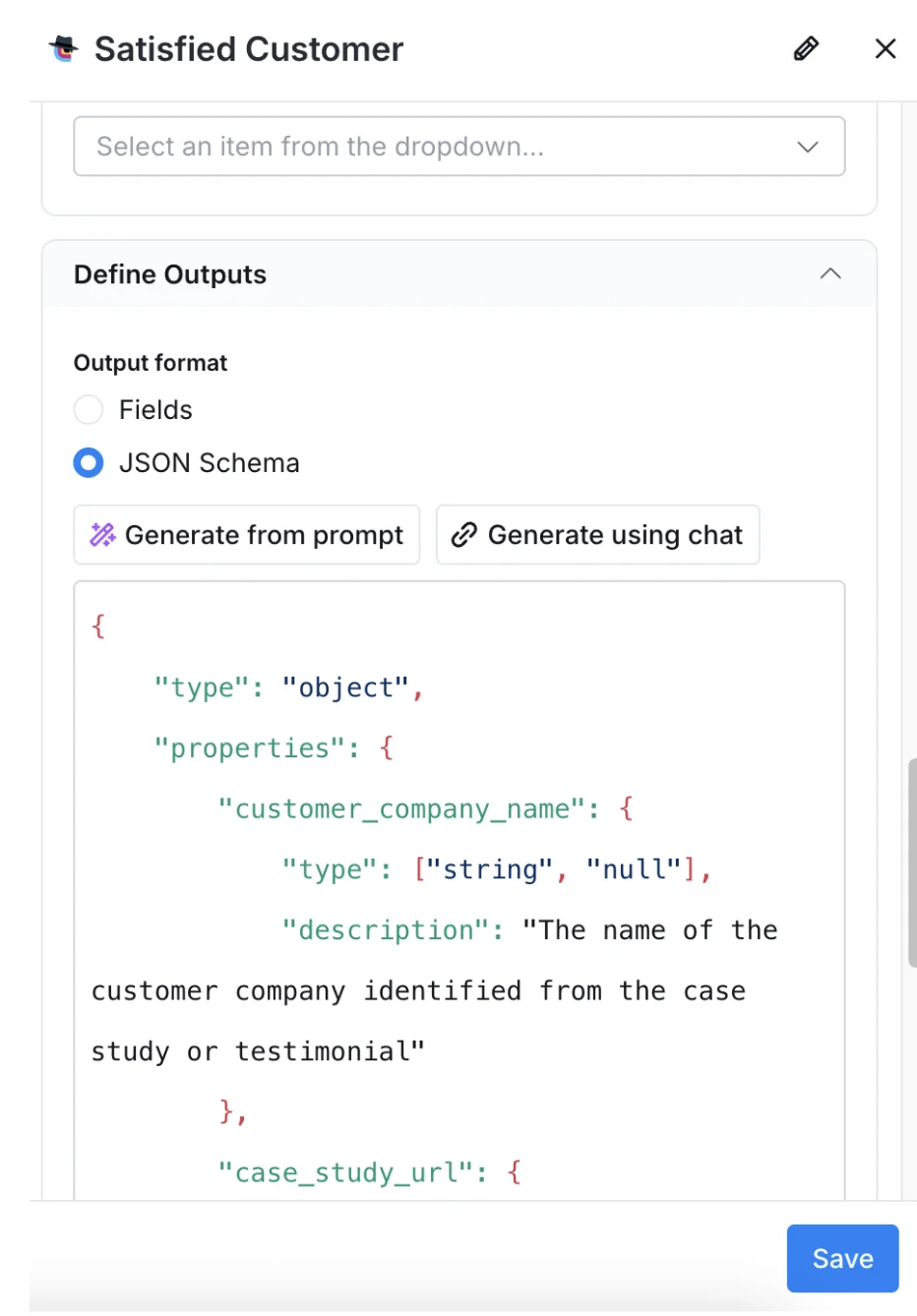
The typing decision matters because Clay treats typed columns differently. A number column filters on greater-than and less-than.
URL columns render as clickable links the rep can use. And a true/false column drives the conditional logic of the next step in the table.
If you set the output as text when the answer is a number, you lose all of that. The Claygent still returns “47”, but the next step cannot do math on it, cannot filter by it, and cannot pass it cleanly to the outbound platform.
Most Claygent prompts return one column to a single table. The more interesting prompts return three to five typed columns from the same model call, which is where Neon earns its credit cost.
A single qualifying Claygent can return a yes/no, a reason, a confidence score, and a citation URL inside one row, all populated from one page visit.
JSON output deserves a separate mention because it changes what the next step in the workflow can do.
A Claygent that returns its result as JSON can feed directly into a downstream Claygent’s input, into an n8n flow that branches on the structure, or into a CRM field that expects a structured payload. JSON is the move when one Claygent's output becomes another Claygent's input.
Check the typed output choice for every Claygent column before you turn the workflow loose on the full table. The test-rows habit from section three is when you check that the column type matches the data Claygent is actually returning.
How to build a Claygent for almost any function in sales, RevOps, marketing, and customer success (use cases)
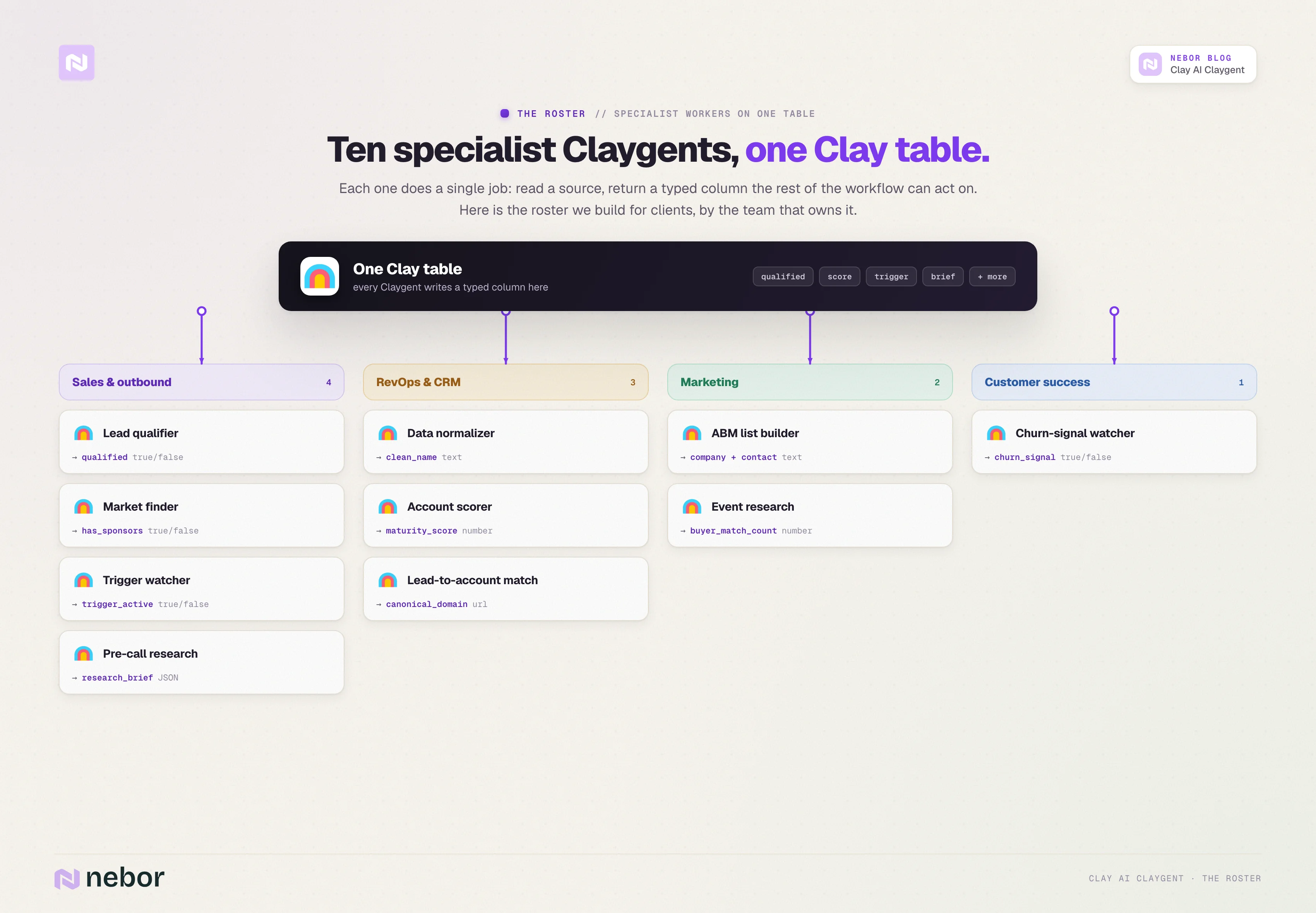
Our Utmost version of this post stayed in outbound sales for the use-case section. We are pushing wider here because the model picker, the prompt structure, and the output formatting from the previous sections all transfer cleanly to other GTM functions.
The use cases below are the patterns we have built for clients, organized by the team that owns the workflow. None of them require new Clay knowledge beyond what you already have.
The shape of each one is the same. Define a job, point a Claygent at the right source, return a typed output that another part of the workflow can act on.
For each use case below we include a representative prompt structure. The prompts are abbreviated to the parts that matter most (the instructions and the typed output), since you already saw the full S.P.I.C.E. format in section five.
4 Clay AI Claygent use cases for sales and outbound
The original Utmost piece covered five outbound use cases. This is where Claygent earns most of its airtime, and the use cases below are the ones we build for almost every outbound engagement.
Note: The research your reps do by hand every morning is exactly what a Clay AI agent should be doing overnight.
Checking whether a company fits your ICP, reading the site, working out who to contact and why now. Claygent can do all of it, and in most workspaces it is doing none of it, because nobody had time to design the chain.
We are a Clay Solutions Partner at Nebor, and Claygent is where most of our build time goes. We chain agents so one qualifies the account, another watches for a trigger worth acting on, and another drafts the opener, each writing back to the same table, so your rep opens a row that already has the answer.
Book a 15-minute call and let's talk about your Clay setup.
Qualifying companies on messy criteria your data provider cannot filter
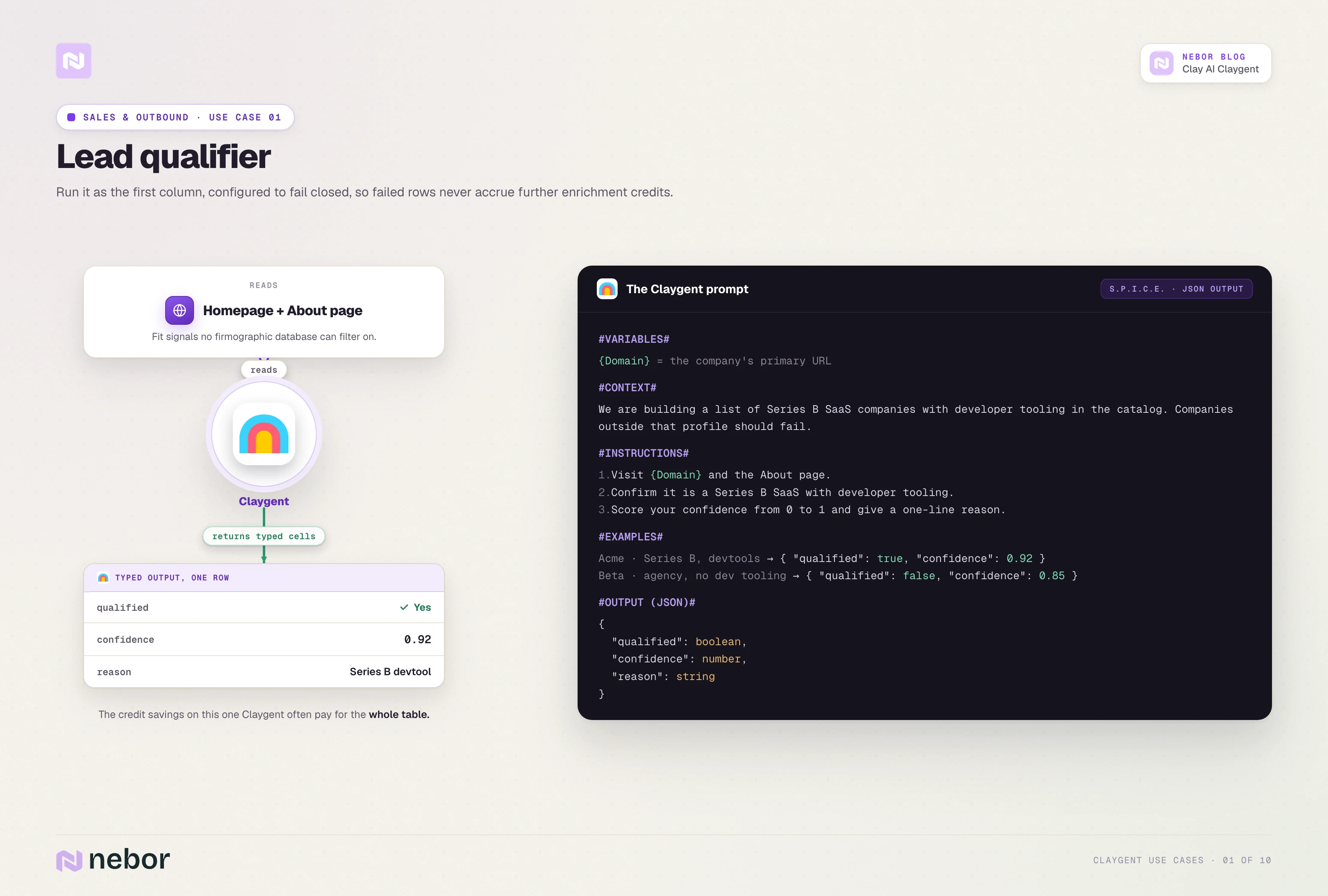
This is the first Claygent we build for any client because almost every outbound list has more than half its rows that should not be in it.
Apollo and Cognism filter on firmographic fields like industry, headcount, and revenue band. They cannot filter on whether a company is a Series B SaaS with developer-tooling in its catalog, or whether an agency has published three or more lifecycle marketing case studies.
The qualifier reads the company's homepage and About page, then returns a typed yes/no plus a confidence score and a short reason. We put it as the first column in the workflow, configured to fail closed. Rows that do not pass do not accrue any further enrichment credits.
The credit savings on this single Claygent often pay for the whole table. Most outbound lists qualify a minority of the rows on them, and skipping enrichment on the failed rows saves real money once you scale past a few thousand rows.
Here is what a representative prompt looks like.
#INSTRUCTIONS#
1. Visit {Domain} and the About page.
2. Confirm the company sells software, not services.
3. Confirm the product targets developers or engineering teams.
4. Confirm the company shipped a new product or major update in the last 12 months.
5. Return yes only if all three conditions hold.
#OUTPUT#
qualifies (true/false)
reason (text, one sentence)
confidence (number, 1-5)
Finding lookalike companies from sources your enrichment provider does not cover
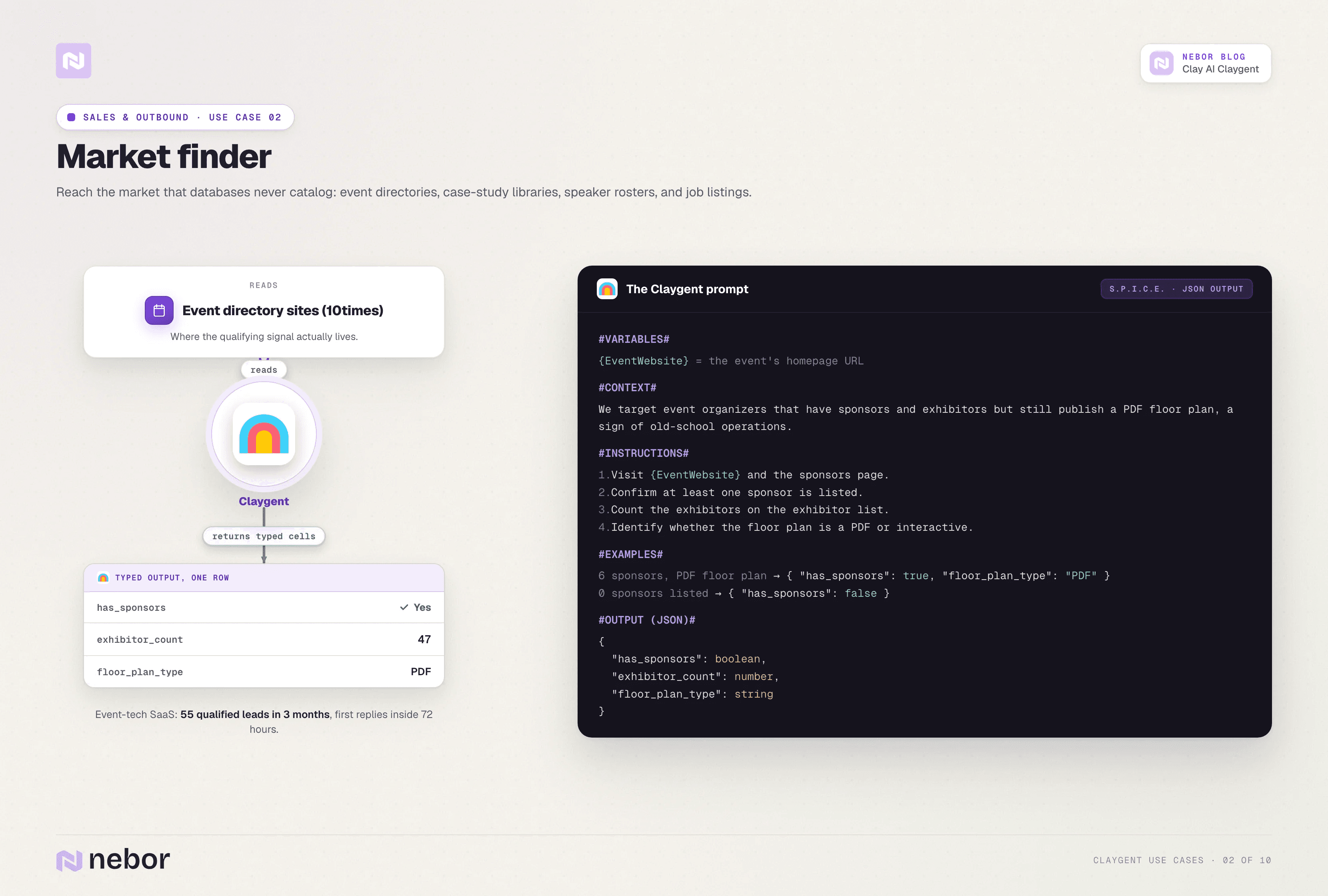
Your real ICP usually lives in attributes that no database catalogs. Customer logo walls on competitor sites, partner directories inside software ecosystems, case-study libraries, conference speaker rosters, event sponsor lists, and open job listings hiring for problems you solve all carry signal.
ExpoGenie is the example we keep coming back to. Their target market lived on event-directory sites like 10times, and the qualifying signal was specific in a way Apollo could not handle.
They were looking for events that had sponsors and exhibitors but were still using PDF floor plans, because PDF floor plans signaled old-school operations that ExpoGenie's platform could replace.
We built a Claygent that visited each event website and returned three typed columns covering sponsor presence as a boolean, exhibitor count as a number, and floor plan technology as text (PDF or interactive). The result was 55 qualified leads in three months and first responses inside 72 hours of campaign launch.
The pattern generalizes far beyond this single client. Almost every B2B company has an ICP attribute that lives on individual web pages rather than inside Apollo, and Claygent reads those pages at scale and returns them as typed rows for a TAM you could not have built any other way.
Here is what a representative prompt looks like.
#INSTRUCTIONS#
1. Visit {EventURL}.
2. Check the sponsors page and confirm at least one sponsor is listed.
3. Count the exhibitors visible on the exhibitor list page.
4. Identify whether the floor plan is a downloadable PDF or an interactive in-browser tool.
#OUTPUT#
has_sponsors (true/false)
exhibitor_count (number)
floor_plan_type (text, PDF or interactive)
Watching for buying triggers across your TAM
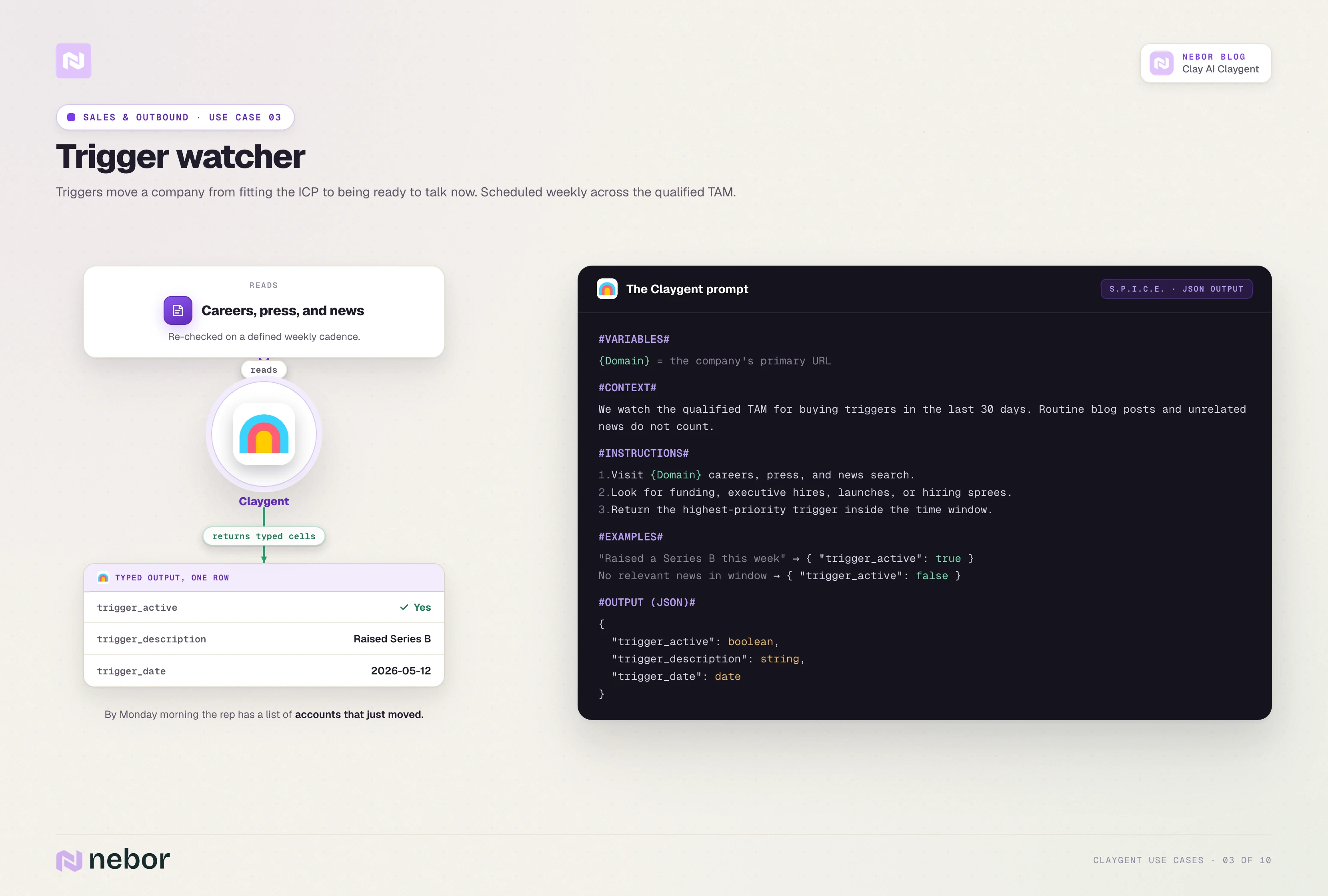
Triggers are the events that move a company from fitting the ICP to being ready to talk now. Triggers include funding rounds, executive hires, new product launches, public mentions of a problem you solve, and hiring sprees in adjacent roles.
The trigger watcher reads the company's careers page, press release page, and news search at a defined cadence. It returns a boolean for whether a trigger is active inside the time window, a one-line description of the trigger, and a date.
We schedule the trigger watcher to check weekly on the qualified TAM. By Monday morning the rep has a list of accounts that just had something happen at them, with the event already extracted.
This is the operational backbone of intent-driven outbound for clients whose third-party intent provider does not cover their niche.
Here is what a representative prompt looks like.
#INSTRUCTIONS#
1. Visit the press release section, careers page, and recent news search for {CompanyName}.
2. Look for events in the last 30 days that signal buying readiness, such as new funding, executive hires, hiring sprees for sales or RevOps roles, public product launches, or stated mentions of expanding the GTM team.
3. Return the highest-priority trigger if multiple are found.
#OUTPUT#
trigger_active (true/false)
trigger_description (text)
trigger_date (date)
Aggregating pre-call research and composing a relevance line
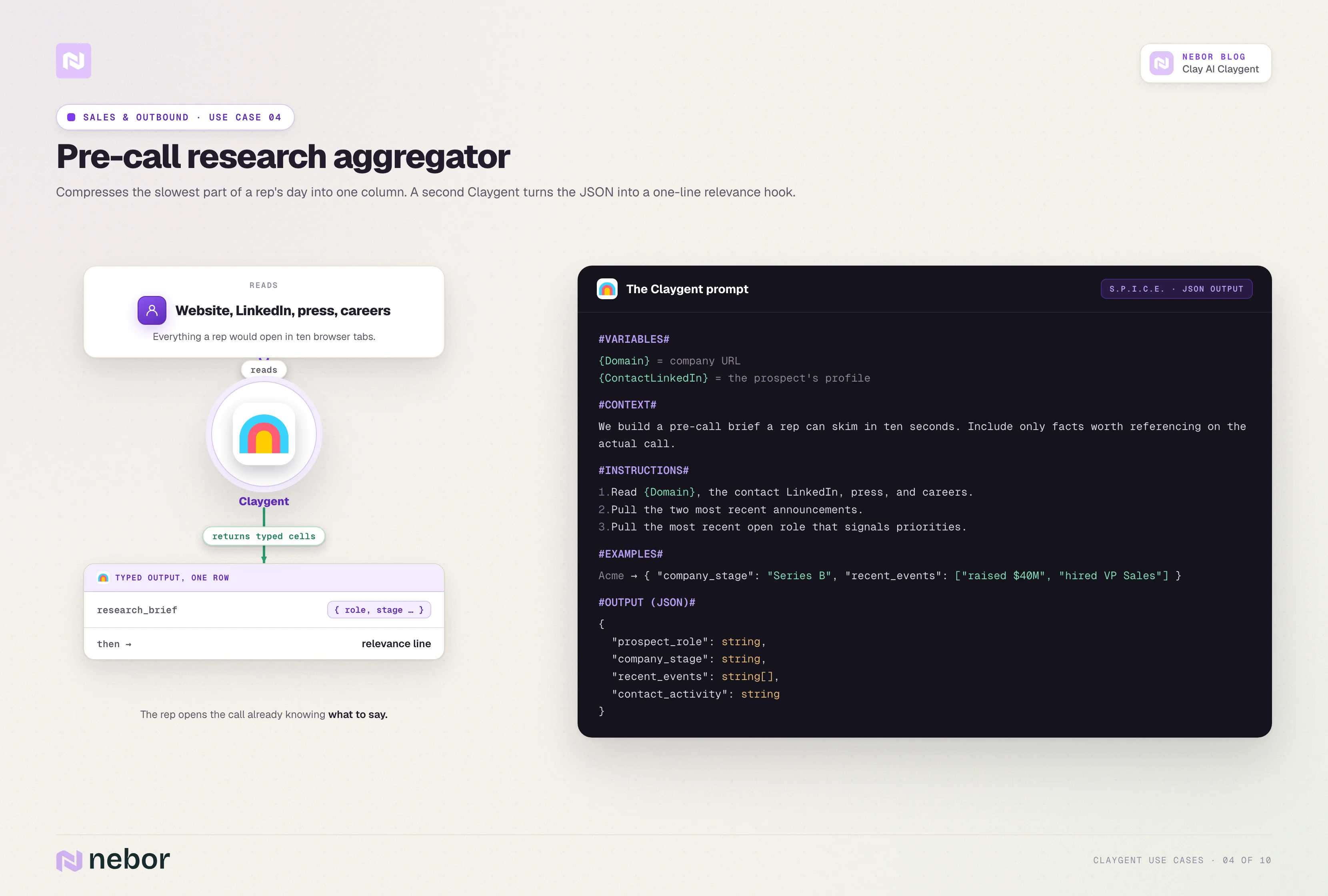
The slowest part of any rep's day is the research before each call. Claygent compresses that work into a single column that returns a structured pre-call brief.
A research-aggregator Claygent reads the company's website, the LinkedIn profile of the contact, the company's recent press releases, and the careers page.
It returns a JSON blob with the prospect's role, the company's stage, two or three recent events worth referencing, and the contact's pattern of public activity if any.
A second Claygent then reads that JSON and composes a one-line relevance hook the rep can drop into the email or the call opener.
That second Claygent is where GPT-5.5 or Claude Opus 4.7 earn their place, because the work is reasoning over data we already have rather than browsing for new data.
Here is what a representative prompt looks like.
#INSTRUCTIONS#
1. Visit {Domain} and read the homepage, About, and recent blog pages.
2. Visit {LinkedInURL} for the contact and pull the headline, recent activity, and any pinned posts.
3. Pull the two most recent announcements from {Domain}'s press release page.
4. Pull the most recent open role from the careers page that signals the team's current priorities.
#OUTPUT#
research_brief (JSON containing prospect_role, company_stage, recent_events, and contact_activity)
3 Clay AI Claygent use cases for revOps and CRM operations
RevOps teams often think Claygent is the sales team's thing inside Clay. The patterns below are why that read is incomplete.
Cleaning and normalizing CRM data at scale
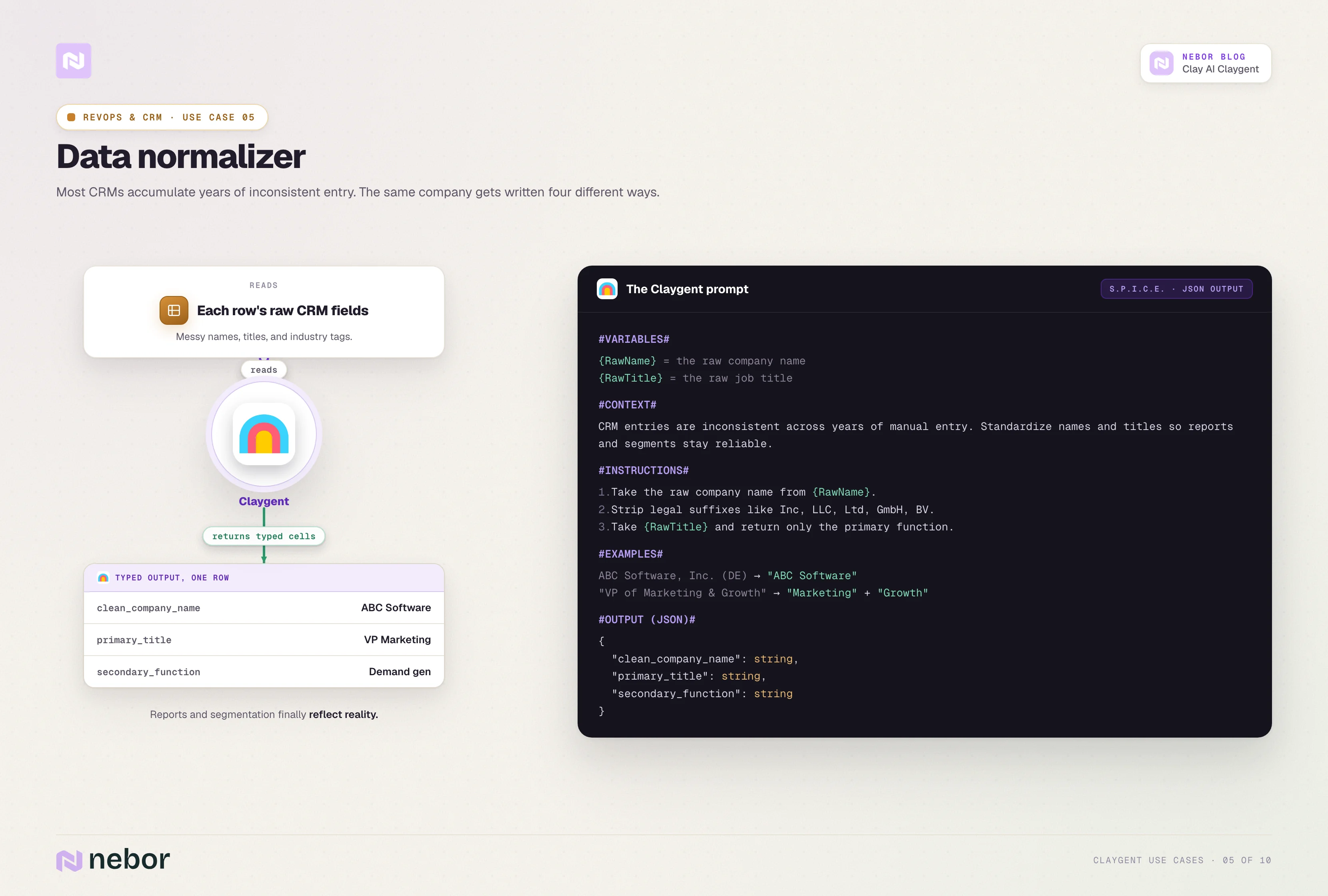
Most CRMs accumulate years of inconsistent data entry. Reps write the same company name four different ways.
They fill in job titles based on whatever the prospect's email signature says, and they tag industries with the dropdown value closest to whatever they guess.
A normalization Claygent reads each row's raw input field and returns the cleaned, standardized version.
For example, a raw entry like ABC Software, Inc. (DE) becomes ABC Software, and a title like VP of Marketing & Growth becomes VP of Marketing with growth tagged separately. The output is a clean column the CRM can sync against.
This is a one-off batch job most of the time, but the workflow can also keep going continuously against new records to keep the dataset clean as it grows. We have written about the Clay-to-CRM pattern in more detail elsewhere.
Here is what a representative prompt looks like.
#INSTRUCTIONS#
1. Take the raw company name from {RawName}.
2. Strip legal suffixes like Inc, LLC, Ltd, GmbH, BV.
3. Remove parenthetical regional codes.
4. Take the raw job title from {RawTitle} and return only the primary function, with any secondary functions tagged separately.
#OUTPUT#
clean_company_name (text)
primary_title (text)
secondary_function (text, can be blank)
Scoring accounts against custom criteria the CRM cannot calculate
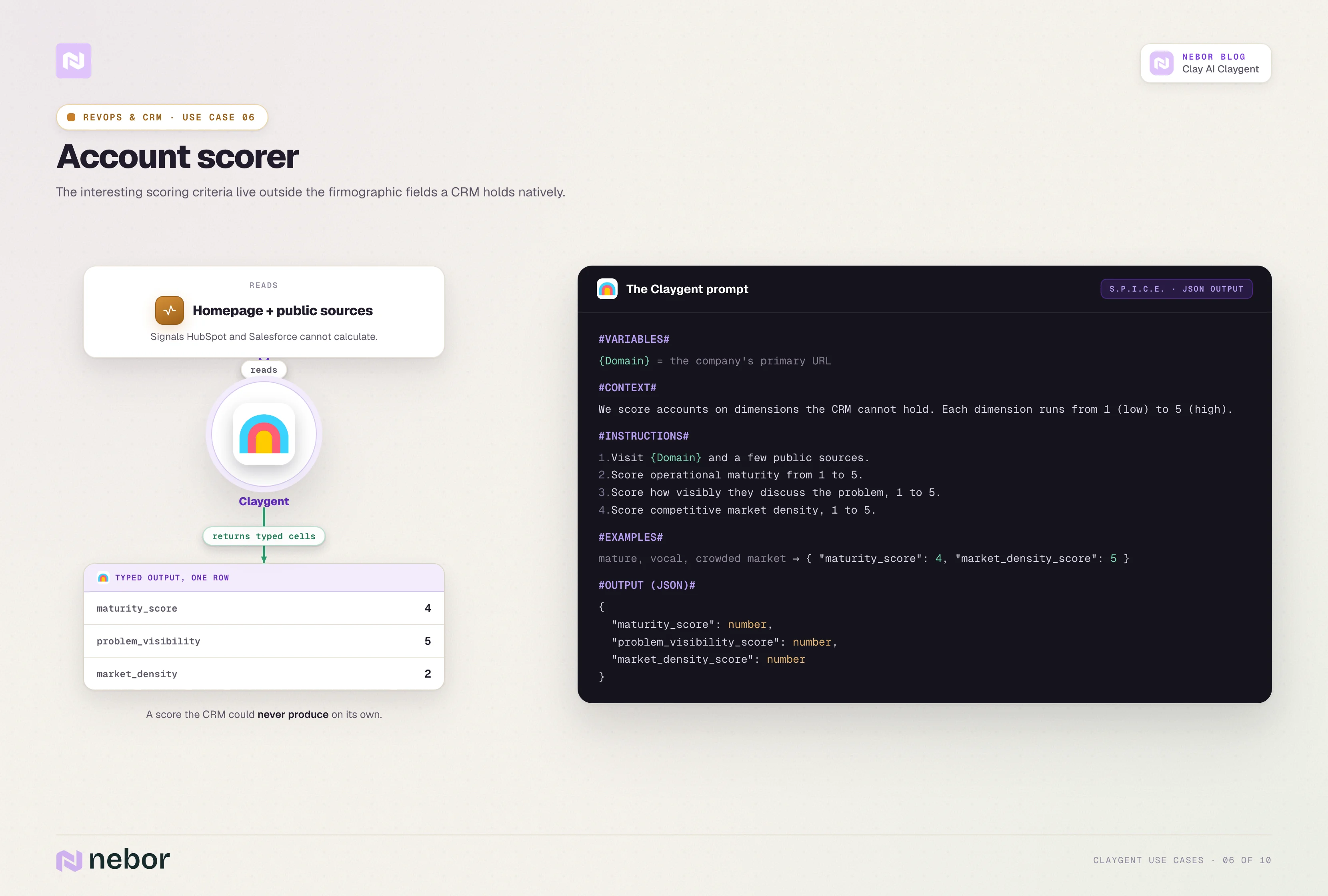
Account scoring inside HubSpot or Salesforce typically maxes out at the firmographic fields the CRM holds natively, which means headcount, industry, revenue band, and region. The interesting scoring criteria live outside those fields.
A scoring Claygent reads the company's homepage and a few public sources, then returns a numeric score across two or three custom dimensions.
Common dimensions include operational maturity on a 1-to-5 scale, how visibly the company talks about the problem we solve, and how crowded its competitive market is.
The output columns feed into the CRM's scoring layer and let RevOps build qualification logic that goes beyond firmographics.
Here is what a representative prompt looks like.
#INSTRUCTIONS#
1. Visit {Domain} and read the homepage, About, and Product pages.
2. Score operational maturity from 1 to 5, where 1 is bootstrap-stage and 5 is enterprise.
3. Score how visibly the company talks about the problem we solve, from 1 to 5.
4. Score how crowded the company's competitive market is, from 1 to 5.
#OUTPUT#
maturity_score (number)
problem_visibility_score (number)
market_density_score (number)
Resolving lead-to-account matches across messy data
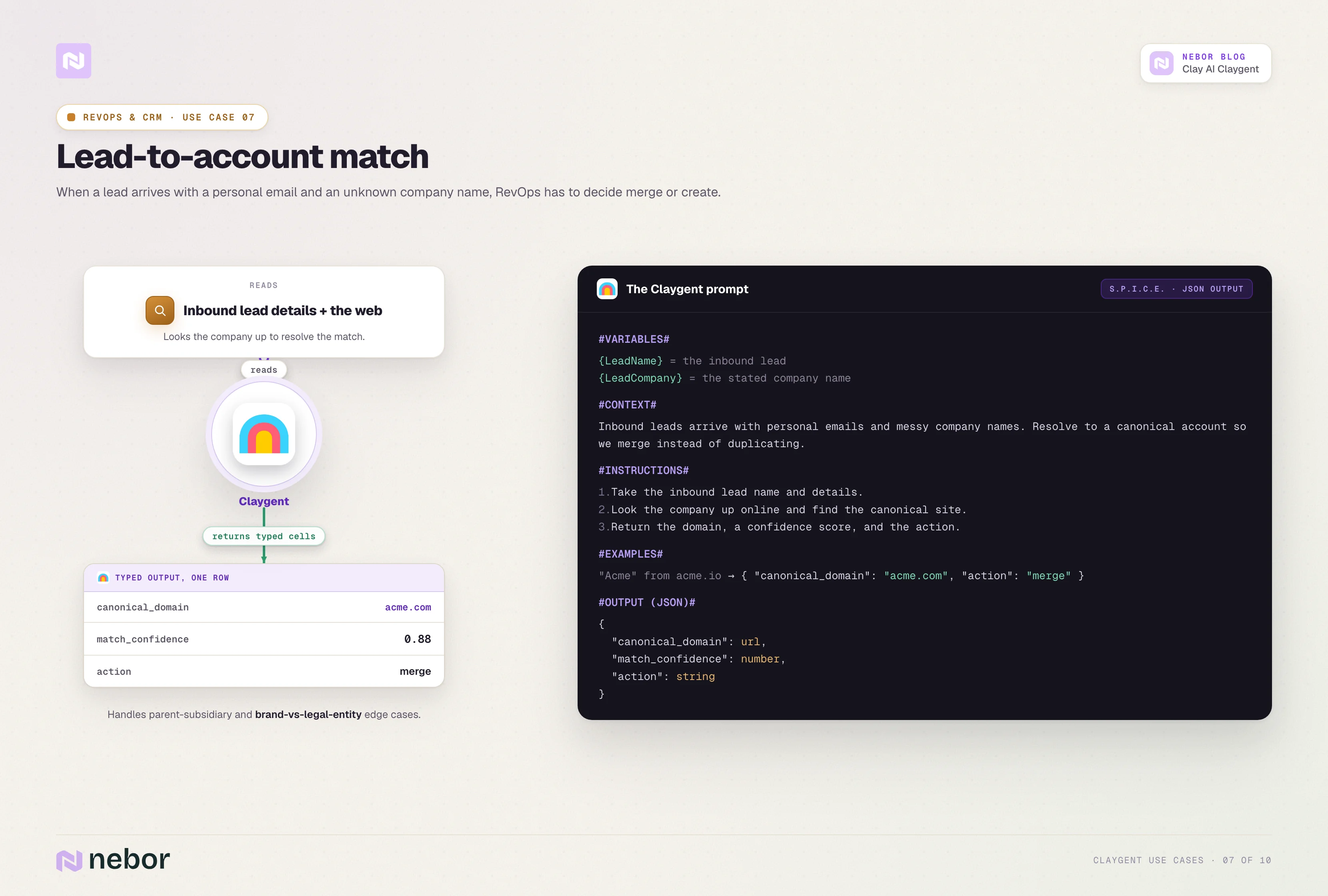
When a lead comes in with a personal email and a company name the CRM has never seen, RevOps needs to decide whether this lead matches an existing account or creates a new one.
A matching Claygent takes the lead's name and inbound details, looks up the company online, and returns the canonical company website and a confidence score.
Downstream logic decides whether to merge the lead into an existing account or create a new one based on the confidence score and a list of existing account domains.
The same Claygent handles parent-subsidiary relationships, brand-vs-legal-entity mismatches, and the messy edge cases where a CRM lookup alone would fail.
Here is what a representative prompt looks like.
#INSTRUCTIONS#
1. Take the inbound details from {LeadName}, {LeadEmail}, and {LeadCompanyText}.
2. Identify the canonical company website that best matches the inbound details.
3. Cross-check against the company name and the personal email domain if available.
4. Return the canonical domain and a confidence score.
#OUTPUT#
canonical_domain (URL)
confidence (number, 1-5)
match_notes (text)
2 Clay AI Claygent use cases for marketing and demand generation
Marketing teams use Claygent less than sales teams do, mostly because the use cases are less obvious. The two below are the ones we see clients return to.
Building ABM lists from non-traditional sources
ABM lists usually start with the same Apollo filter as outbound lists, which means they inherit the same blind spots. A Claygent-built ABM list can pull from places Apollo does not see.
A marketing Claygent can build a target list from podcast guest histories, conference speaker lineups, awards shortlists, recent funding announcements, or industry publication contributor pages.
The output is a typed list of companies and contacts that the ABM platform can target with ads, content, and direct mail.
Here is what a representative prompt looks like.
#INSTRUCTIONS#
1. Visit {SourceURL}, which is a podcast guest history, conference speaker roster, awards shortlist, or other unstructured list.
2. Extract every named company that appears on the page.
3. For each company, return the company name, the canonical domain, and the type of source that surfaced it.
#OUTPUT#
companies (JSON list of objects with name, domain, source_type)
Researching industry events where your ICP shows up as attendees, speakers, or sponsors
Most marketing teams pick which events to attend or sponsor based on gut feel, last year's invoices, or a sales rep's hunch. A Claygent can replace that guessing with a ranked list of events based on actual buyer presence.
The event-research Claygent visits each event website, pulls the speaker roster, sponsor list, and any visible exhibitor list, then checks which named entities match the buyer profile. The output is a count of matching buyers per event and a list of who shows up where.
For example, a B2B company selling to heads of RevOps could feed in twenty industry conferences and get back a ranked list of which ones had the most VPs and Directors of RevOps speaking, sponsoring, or visibly attending in the last two cycles.
Here is what a representative prompt looks like.
#INSTRUCTIONS#
1. Visit {EventWebsite}.
2. Pull the speaker roster, sponsor list, and exhibitor list if visible.
3. For each named entity, check whether the job title or company industry matches our buyer profile.
4. Return the count of matching buyers found and a list of named companies that show up.
#OUTPUT#
buyer_match_count (number)
matching_companies (JSON list)
event_score (number, 1-5 for relevance to our ICP)
Clay AI Claygent use cases for customer success and expansion
Customer success has the smallest set of use cases by volume, but the ones with the biggest payoff per Claygent built.
Detecting churn signals from public sources
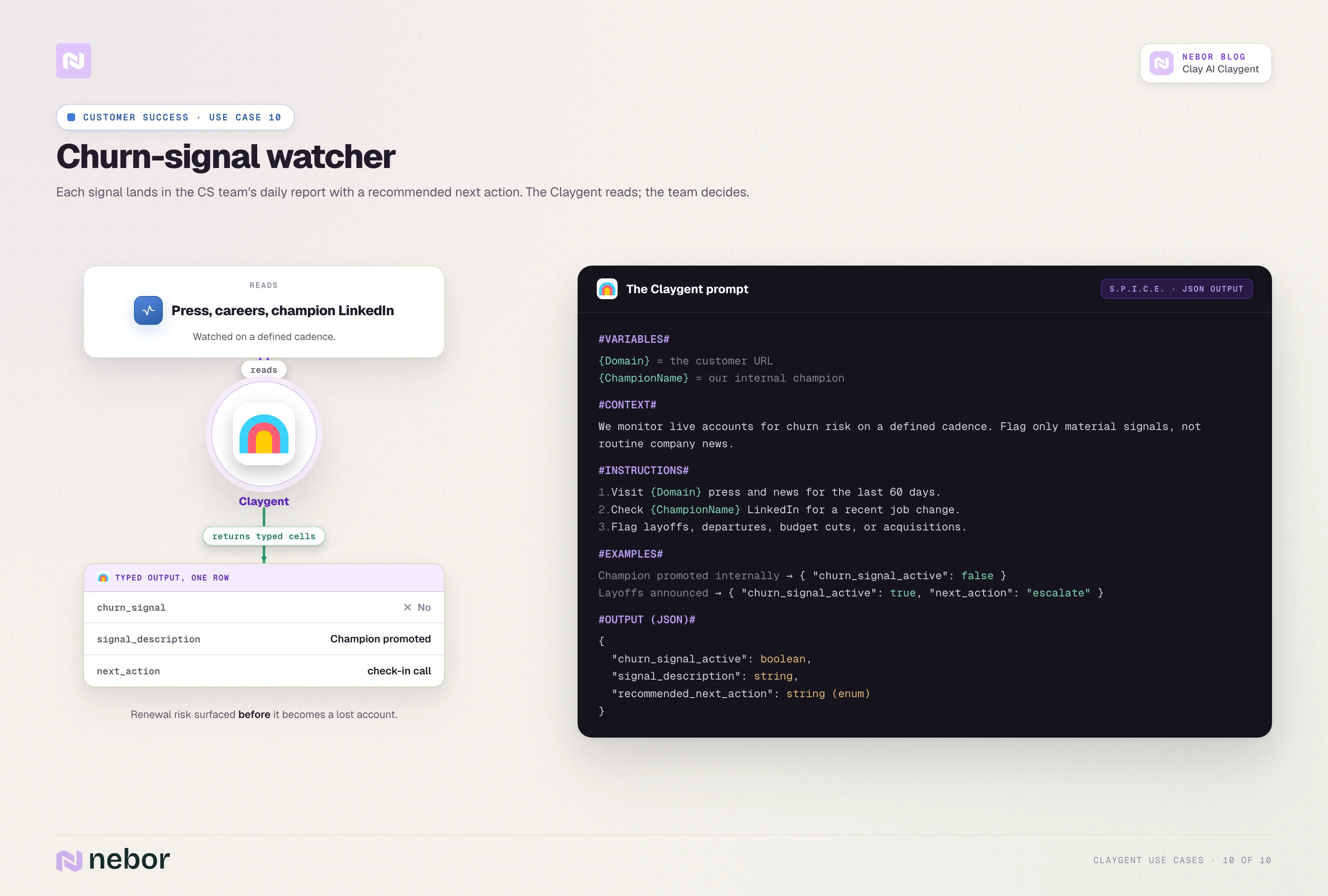
A churn-watcher Claygent reads each active customer's press release page, careers page, and key executive LinkedIn accounts on a defined cadence. It flags signals like layoffs, executive departures in your champion's function, public budget cuts, or acquisition announcements.
Each signal lands in the CS team's daily report with a recommended next action. The action could be a check-in call, a renewal team escalation, or a quiet monitor-only tag for two weeks. The Claygent does the reading, and the CS team makes the call.
Here is what a representative prompt looks like.
#INSTRUCTIONS#
1. Visit {Domain}'s press release page and news search results for the last 60 days.
2. Visit {Domain}'s careers page and count the open roles.
3. Check the LinkedIn profile of {ChampionName} and look for a recent job change.
4. Flag any layoff announcements, executive departures in the champion's function, public budget cuts, or acquisition news.
#OUTPUT#
churn_signal_active (true/false)
signal_description (text)
recommended_next_action (text, choose from check-in call, renewal escalation, or monitor only)
Surfacing expansion opportunities at the right moment
This is the reverse of the churn watcher. An expansion Claygent reads the customer's product launches, hiring activity in adjacent teams, and announcements about new initiatives. It flags accounts where the company is about to need more of what you sell.
For example, an expansion Claygent can flag every existing customer that hires a new VP of Marketing or Demand Gen. New leaders almost always reset the tooling stack inside their first 90 days, and a well-timed conversation in week two is worth far more than ten cold outreach attempts in month six.
Here is what a representative prompt looks like.
#INSTRUCTIONS#
1. Visit {Domain}'s press release page and product or feature announcement page.
2. Visit {Domain}'s careers page and look for new roles in adjacent functions to where we currently sell.
3. Look at the leadership team page for any new hires in the last 60 days.
4. Flag any signal that suggests the customer is about to need more of what we sell.
#OUTPUT#
expansion_signal_active (true/false)
signal_description (text)
suggested_play (text)
The pattern that makes all of this work
Every use case above has the same fundamental shape. Define a question that needs answering at scale, point a Claygent at the source where the answer actually lives, and return the answer as a typed output the next step can act on.
The functions change, but the shape does not.
How chaining the Claygents turns your Clay tables into workflows
A single Claygent on its own is just a column, but chained Claygents become a functioning workflow.
The shift happens when the output of one Claygent becomes the input of the next, and the result of the chain produces a row the next step in the workflow can act on.
The roster from the last section does nothing useful in isolation. The roster does real work when the Claygents talk to each other in the right order.
Most outbound workflows we build chain four or five Claygents together. The chain looks similar across clients because the underlying logic is similar.
The default chain shape
Step one is the source list at the top of the table.
The table starts with a fresh batch of rows pulled from somewhere, whether that is an Apollo search, a directory scrape via Claygent, a partner-page extraction, or an upload from the client’s existing TAM. Each row arrives with at least a name and a domain.
Step two is the ICP qualifier we covered in the last section. We configure the qualifier to go first and to fail closed. Any row that fails qualification drops out of the workflow and stops accruing further credits.
Step three is the trigger watcher working across the qualified rows. It adds a priority signal to each one.
Rows with a fresh trigger inside the time window jump to the front of the priority queue. Rows with no current trigger wait in a monitor-weekly queue without triggering further enrichment.
Step four is the buying-committee mapper and the relevance writer, working in parallel. Both depend on the qualifier and the trigger watcher, but they do not depend on each other, which means they can go at the same time and cut the time-to-outreach in half.
Step five is the signal router that closes the chain. It reads the outputs of the previous Claygents and decides what to do with the row.
The router sends a qualified row with a fresh trigger and a strong relevance line straight to the SDR for personal outreach. Qualified rows without a current trigger wait in the delay queue for the next signal, while rows that failed an earlier check drop out of the chain with the reason logged.
Conditional logic and fallbacks
Fallbacks are what make the chain trustworthy on the rows where one Claygent has nothing useful to say.
If the relevance writer returns a generic line, the chain falls back to a hand-curated template tied to the trigger type. When the buying-committee mapper finds zero contacts, the chain reroutes through LinkedIn Sales Navigator via Clay's people-find integration. A row where the qualifier returns ambiguous goes to a human reviewer instead of through the chain.
They let the chain rescue bad rows through a different path or escalate them to a queue for human review.
What happens when
The order matters as much as what each Claygent does.
The qualifier and the buying-committee mapper go on demand when new rows arrive. The trigger watcher checks on a weekly schedule across the qualified TAM.
The relevance writer kicks in only when a fresh trigger appears, and the router listens continuously, listening for any row that just completed the chain.
Mixing on-demand and scheduled work is what makes the chain feel alive rather than batch-driven. Triggers that landed Tuesday morning get into the outbound queue by Tuesday afternoon, not next Monday.
Where Clay stops and APIs or n8n webhooks pick up
Most of the orchestration happens inside Clay itself. The handoffs to external tools (the outbound platform, the CRM, the LinkedIn automation tool) go through APIs or n8n rather than Clay’s native integrations.
We default to API connections for two reasons. The first is cost, since Clay’s native integrations charge Clay credits on top of the underlying tool’s own subscription.
The second is design flexibility, since APIs let the workflow branch, retry, and conditionally call different external tools depending on what the upstream Claygents returned.
The same logic applies to inbound and intent chains. The same Claygent roster powers them all, the same n8n or API flows route data between tools, and the cadence varies based on what each chain is responding to.
The wiring is what turns a Clay table from a research tool into a system that produces meetings while your team is asleep.
Claygent vs Claude Code: when each one is the right tool
This is the section we promised at the start. We use both tools in our day-to-day, and the question of which one to reach for comes up every week. The point of this comparison is to give you a clean way to pick between the two tools, not to crown a winner.
What Claude Code is, for someone who has only heard of it in passing
Claude Code is Anthropic's agent for power users. It works in your terminal, your IDE, your desktop app, or your browser, and it does whatever a chat with Claude can do plus a lot more.
The headline feature is that Claude Code can read and write files on your computer, execute shell commands, browse the web, and chain multi-step tasks together autonomously.
The May 2026 release added an Agent View dashboard for managing parallel sessions and a /goal command for objective-driven sessions that loop until the goal is met.
Most of the early Claude Code adoption has been on the engineering side. The interesting move for a GTM team is that you do not need to be an engineer to use it.
If you can describe what you want done in plain English, Claude Code can read your local files, query your APIs, and produce the output you need.
What Claude Code does that Claygent does not
Three differences matter for a salesperson or a revenue team member.
The first is file access on your local machine. Claygent operates inside a Clay table and reads the web. Claude Code can read anything on your computer.
Examples include PDFs of contracts, CSV exports of CRM data, Slack archives, screenshots of competitor pricing pages, and transcripts of sales calls. If the file is on your machine, Claude Code can open it and reason over it.
The second is one-off depth on a single research task. Claygent makes the most sense when the same prompt applies across hundreds of rows. Claude Code makes the most sense when one task needs depth and thoroughness on its own.
When the job is to research a single strategic account before a Friday meeting and pull together everything available, Claude Code goes deeper than Claygent will because it does not have to fit the answer into a Clay column.
The third is tool integration through Model Context Protocol. Claude Code talks to any system that has an MCP server (your CRM, your data warehouse, your internal docs, your monitoring tools). Claude Code's integrations go beyond what Clay supports natively.
RevOps teams use this to wire Claude Code into HubSpot, Salesforce, BigQuery, or whatever else lives in their stack, and to query across all of them in one prompt.
What Claygent does that Claude Code does not
The shape of the work flips when you need scale and structure.
Claygent works at scale across hundreds of rows in a single workflow. Claude Code can do the same job for ten rows in a chat, but doing it for ten thousand is slow and expensive compared to a Claygent table that processes the same rows in minutes for a fraction of the cost.
Claygent returns typed columns that other steps in the workflow can act on without translation. A true/false output from a Claygent feeds directly into a downstream branching column.
A relevance line that a Claygent wrote drops into the outbound platform without anyone copying or formatting it. Claude Code returns text that you then have to parse and route.
Claygent works on a cadence inside a workflow without anyone watching it. Claude Code is interactive by default and requires a session.
You start a session, you describe the goal, you check the output. The new /goal command makes longer autonomous sessions possible, but the operational shape is still session-based rather than always-on.
How a salesperson actually picks between them
We ask two questions in order on every research task.
The first is whether the job needs to repeat at scale across many rows. If the answer is yes, the job belongs in Claygent.
Examples include qualifying 500 companies, enriching a lead list, scoring an entire TAM, or monitoring 200 accounts for triggers. Each of those is a Claygent job.
The second is whether the job needs files, depth, or system access beyond Clay. If the answer is yes, the job belongs in Claude Code.
Examples include reading a stack of PDFs, querying the CRM through an MCP server, doing a deep research session on one strategic account, or writing the Claygent prompt for a use case you have not built yet. Each of those is a Claude Code job.
The overlap zone is the place where both tools could work. When that happens we default to Claygent if the output needs to end up in a Clay table eventually, and to Claude Code if the output needs to end up in a Slack message, a Google Doc, or a presentation.
There is also a meta-move worth naming here. Some of the best Claygent prompts in our library came out of Claude Code sessions.
We hand Claude Code the source pages we want scraped, ask it to draft a S.P.I.C.E.-formatted prompt that will produce the typed output we need, and paste the result into Clay. The tool that builds the workflow does not have to be the tool that carries it.
They complement each other inside a real GTM stack
The honest read is that Claygent and Claude Code are not competing for the same job. They are two different tools that do two different kinds of work, and the teams getting the most out of either one are usually using both.
Most teams have a center of gravity that decides which tool gets opened more often. Heavy Clay users may rarely touch Claude Code, while heavy research teams may rarely build a Claygent. Both patterns are fine.
Most GTM teams have both kinds of work in any given week, so the practical question becomes when to pick which one rather than choosing one tool over the other.
The two tools fit comfortably next to the rest of your sales tech stack, each one doing the work it does best.
The bottom line
Claygent is the layer that turns a Clay table from a static enrichment grid into a workflow with judgment, and the teams that get the most out of it stopped thinking of it as a single column months ago.
The shape we keep coming back to is the same one we covered up top. Define a question that needs answering at scale, point a Claygent at the source where the answer actually lives, write the prompt with structure, and let the typed output feed whatever comes next.
The roster of Claygents you can build is much larger than the standard outbound playbook suggests. Sales, RevOps, marketing, and customer success all have Claygent shapes that produce real outputs you can act on without leaving the table.
If the job needs to repeat at scale, Claygent is the right tool. If the job needs file access, one-off depth, or system integration beyond Clay, Claude Code is the right tool. Most working weeks have both kinds of jobs in them.
That is what we wanted to put on the table. Build the roster, chain the steps, match the model to the job, and the workflow does the work.
Note: The research your reps do by hand every morning is exactly what a Clay AI agent should be doing overnight.
Checking whether a company fits your ICP, reading the site, working out who to contact and why now. Claygent can do all of it, and in most workspaces it is doing none of it, because nobody had time to design the chain.
We are a Clay Solutions Partner at Nebor, and Claygent is where most of our build time goes. We chain agents so one qualifies the account, another watches for a trigger worth acting on, and another drafts the opener, each writing back to the same table, so your rep opens a row that already has the answer.
Book a 15-minute call and let's talk about your Clay setup.


Related Articles


By clicking Sign Up you're confirming that you agree with our Terms and Conditions.