
Clay + n8n: How to Build a Modern Sales Tech Stack That Powers Your GTM and RevOps Functions

In this post:
A sales tech stack is the set of tools your workflows can move through without a human in the middle, and most companies don’t have one.
Walk into any series-A-and-up GTM team and the picture looks the same all the time. The prospecting layer leans on Apollo or Sales Navigator, the CRM is HubSpot or Salesforce, and an email outreach tool sends the sequences.
A LinkedIn automation tool lives next to it, Calendly handles booking, and a reporting dashboard nobody has touched in three quarters tracks whatever it still tracks.
The combined monthly bill comfortably clears five figures across vendors. And none of those tools talks to the other parts without a human copying data between tabs.
Most founders open the conversation with the same question, which is what tools they should buy first.
We’ve come to think the question starts somewhere else. What workflows does the revenue team need, and how much human babysitting can we tolerate inside each one?
You should always pick the tools that hold those workflows up, and pick them last. Doing it the other way around is how a five-figure monthly bill never adds up to a GTM system.
The fragmentation gets worse the more revenue functions show up in your organization. The SDR team builds its own outbound stack on the side, and Marketing keeps its own automation suite next door.
RevOps stands up its own reporting and forecasting layer inside whatever CRM view exists. Customer Success lives in a separate product-analytics tool that nobody else opens.
The result is four overlapping stacks that share no data and have no single operator who understands all four.
We’ve written before about why that pattern produces headcount instead of systems, and the tools-first reflex is the root cause every time.
We could rewrite this post every month and still not cover all the ground, which is part of the point. We believe a buyer’s guide of which tool wins which category misses what matters. We design the workflows first, and we pick the tools that hold each one up second.
The tools we reach for shift every quarter or two. The underlying workflow logic moves much more slowly, and that’s what the rest of this post is about.
We want to walk you through the GTM and RevOps stack we build for clients, layer by layer. We cover what goes inside each layer, why we reach for the tools we do, and what each one earns its keep doing.
If you came looking for a tool ranking, this isn’t that. If you want to see what a GTM operating system looks like at the workflow level, the next section is the place to start.
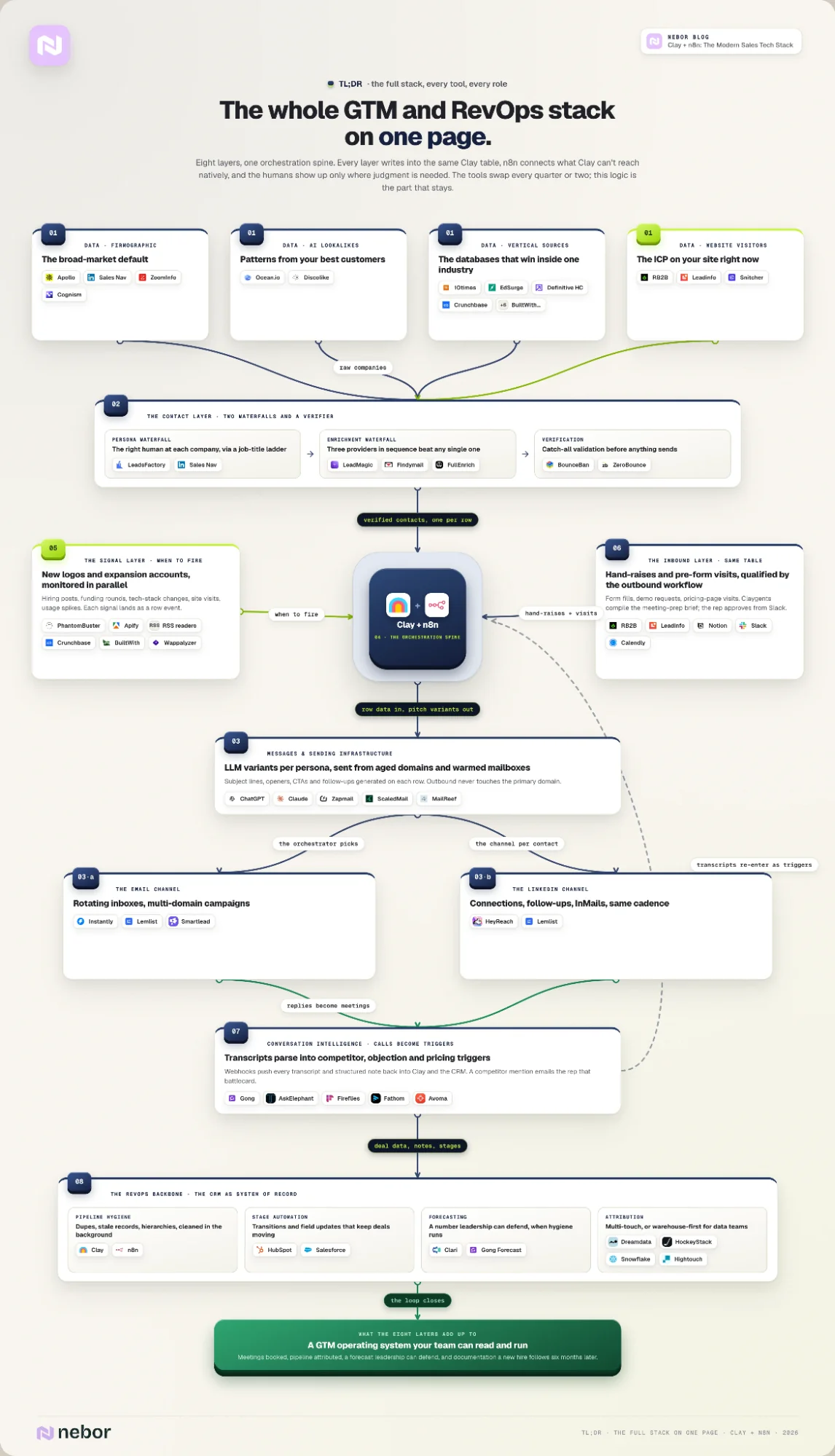
TL,DR: full tech stack of tools and their roles in your GTM motion
Here is what the entire tech stack looks like. Keep in mind that this is not the exact same build we have across every client. Tech stack building is always contextual and depends on the needs of the company. What they already have and their processes also play here.
What makes a stack a stack
Before we walk through what we put in the stack, we first need to agree on what a stack is. We shouldn’t measure a stack setup by individual tools, but by the complete workflows working inside them.
That means a stack is whatever set of tools can hold the workflows up without a human stitching them together by hand.
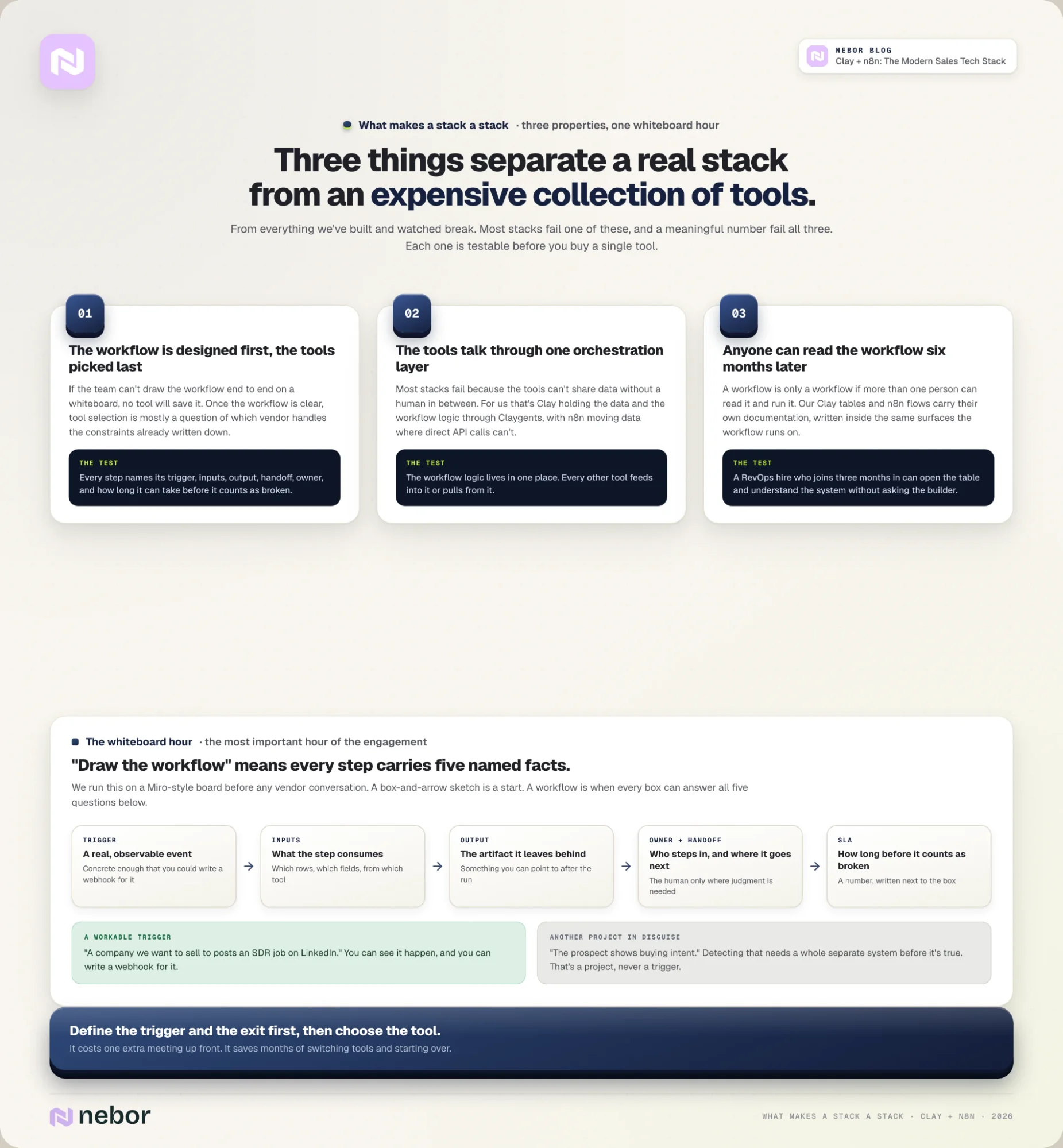
From everything we’ve built and watched break, three things separate a real stack from an expensive collection of tools.
1. We design the workflow first, and pick the tools last.
If a sales team can't draw the workflow end to end on a whiteboard, no tool will save it. The whiteboard exercise sounds basic but it's the most important hour we spend at the start of an engagement.
Once the workflow is clear, the tool selection is mostly a question of which vendor handles the constraints we already wrote down.
What we mean by “draw the workflow” is more specific than a box-and-arrow flowchart. Every step has to name its trigger, its inputs, what it produces, and its handoff to the next step.
Every step also has to name who owns it when a human steps in, and how long the step can take before it counts as broken.
Most teams who say they have a workflow only have the trigger and the exit. They can tell us that leads come from Apollo and meetings end up in the AE’s calendar, but the middle is mostly blurry. The middle is exactly where a tool is supposed to do the work.
In practice we do this exercise on a Miro-style board, and every step gets a name, an owner, a tool, and an SLA. A workable trigger is concrete enough that we could write a webhook for it. It has to be a real, observable event.
Something like “a company we want to sell to posts an SDR job on LinkedIn” works, because you can actually see it happen.
“The prospect shows buying intent” doesn”t work, because intent isn’t something you can detect on its own, you’d have to build a whole separate system just to figure out when it’s true. Then that’s not a trigger; it’s another project.
The exit condition needs the same treatment (level of scrutiny). You should be able to say, clearly: did the workflow finish, when did it finish, and what did it leave behind (like an artifact) that you can point to afterward?
It’s tempting to pick the tool first and figure out the workflow later, but it’s better to do the opposite. Define the trigger and the exit first, then choose the tool. It costs you one extra meeting up front, and it saves you months of switching tools and starting over.
2. The tools talk to each other through one orchestration layer.
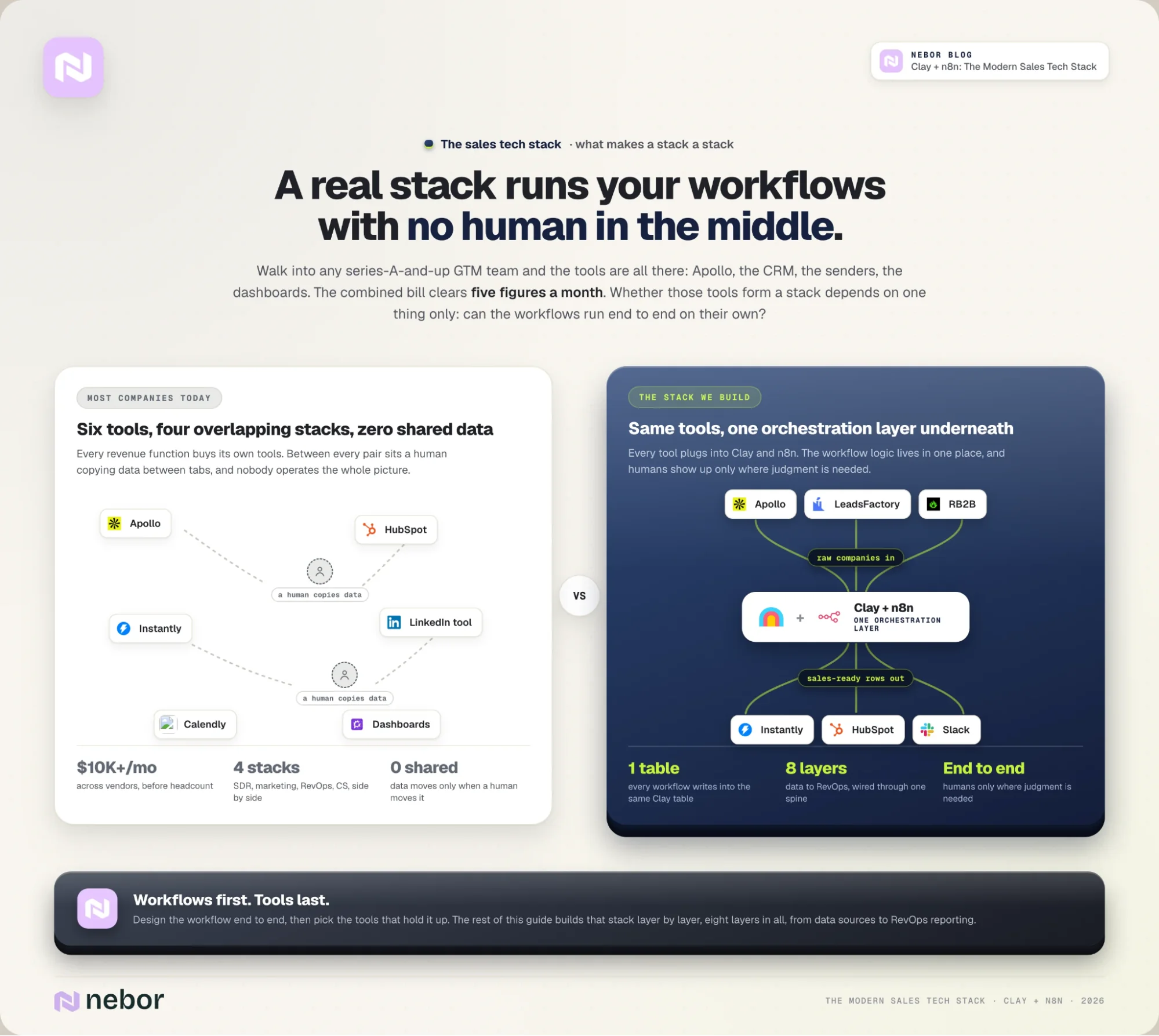
Most stacks fail not because of which tools they include, but because those tools don’t share data without a human in between. The fix is one orchestration layer that every other tool plugs into.
For us that’s Clay holding the data and the workflow logic through Claygents, with n8n sometimes called upon to move data between Clay, the CRM, the outreach tools, and the call recorders. You should only use a tool like n8n when you can’t make direct API calls.
It can be a different combination at a different agency. But the principle stays the same wherever you build it. The workflow logic lives in one place, and every other tool feeds into it or pulls from it.
3. Anyone on the team can read the workflow six months later and understand it.
A workflow is only a workflow if more than one person can read it and operate it. The Clay tables and n8n flows we build carry their own documentation, and we write that documentation inside the same surfaces the workflow lives on.
A new RevOps hire who joins three months in should be able to open the table, read the column logic, and understand what the system is doing without asking the person who built it.
If they can’t, the workflow has a bus factor of one and the system is more fragile than the dashboard suggests.
These three properties are easy to write down and rare to see in the field. Most stacks fail one of them, and a meaningful number fail all three.
The reason is the same wherever we look. Most stacks come out of teams that only know one half of the work.
On one side are the technically capable people. They write super-sophisticated n8n flows, set up Clay tables, integrate APIs, and produce elegant pipes.
Problem is, they don’t always know what a real outbound call sounds like or which moments in a deal cycle matter most. The workflows they build are clean but solve problems the sales team isn’t hitting.
On the other side are the operators with the right instincts. They’ve been on enough calls to know what matters, but they reach for off-the-shelf agencies and spreadsheets to handle the wiring because the technical layer feels out of reach.
The combination of the two is rarer than it should be. Our founders (Yannick and Andrew) built Nebor out of their own outbound work before they ever sold it to clients.
We operate as a GTM systems agency with 10+ years of sales experience. That overlap is what makes any of this work, and it's the reason the rest of this post walks through tools and workflows in the same breath.
Now, with that out of the way, here’s what we put in the stack and what each layer earns its keep doing.
How to build the full GTM tech stack layer by layer: from data sources to RevOps reporting
Step 1: Pick data sources from the ICP (never from the brand name)
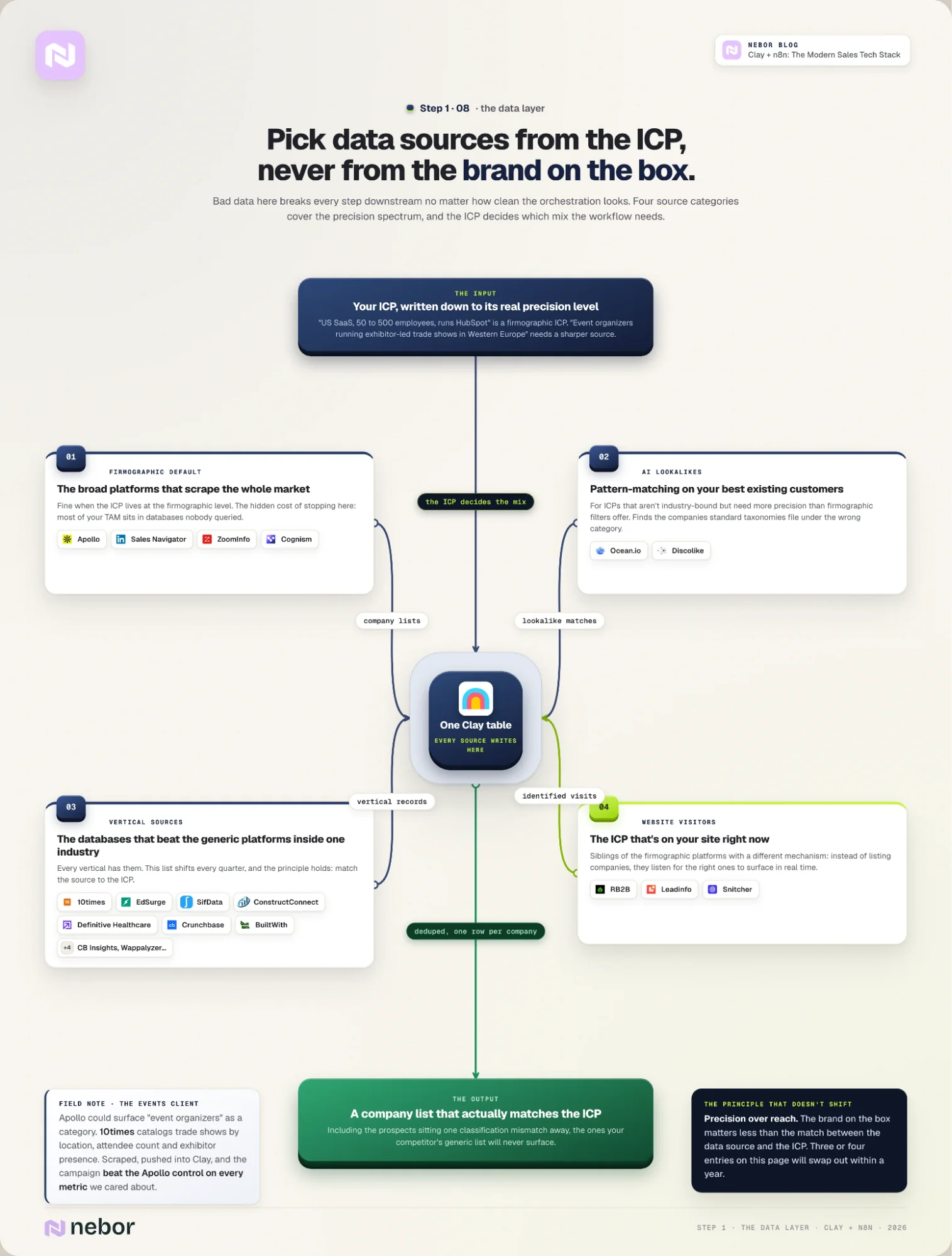
The data layer is where the workflow starts, and bad data here breaks every step downstream no matter how clean the orchestration looks.
Apollo, Sales Navigator, ZoomInfo, Cognism: the firmographic default
Most teams start the stack on autopilot by buying the most-talked-about platform, which is usually Apollo, LinkedIn Sales Navigator, ZoomInfo, or Cognism.
The cost of that default isn’t always obvious. But it’s typically most of your total addressable market (TAM) buried in databases nobody queried because they are not big or popular enough to make the conversations.
Those four are fine for what they do. They’re broad-firmographic platforms that scrape the addressable market at scale, and for an ICP that lives at the firmographic level (US-based SaaS companies between 50 and 500 employees who use HubSpot) they get the job done.
The trouble starts when the ICP needs precision the firmographic layer can’t provide. The wrong source doesn’t necessarily kill a campaign, and we’ve seen plenty of campaigns book a meeting or two off generic Apollo lists.
The real cost is the deals you don’t see leaving the table. The prospects you would have closed are one classification mismatch away in a database you didn’t know about, and your competitor is on a call with them.
We had a client whose ICP was event organizers holding exhibitor-led trade shows in Western Europe. Apollo could surface event organizers as a category but couldn’t reach the precision the client needed.
The right source for that ICP was 10times, which catalogs trade shows by location, attendee count, and exhibitor presence.
We pulled the list with a Chrome scraper, pushed it into Clay, and the campaign outperformed the Apollo control on every metric we cared about.
Ocean.io and Discolike: AI lookalikes for non-firmographic ICPs
For ICPs that aren’t industry-bound but still need more precision than firmographic filters offer, the AI-lookalike layer is the next one to reach for. Ocean.io and Discolike are the tools we use there.
They look at the patterns your best existing customers share and find companies that match those patterns, including the ones standard taxonomies from the popular data source tools file under the wrong category.
10times, SifData, ConstructConnect, Definitive Healthcare, BuiltWith and the vertical data sources we reach for
Beyond the AI-lookalike layer, every industry has data sources that beat the generic platforms inside that industry. The events example above is one of them, and there are dozens more depending on the vertical.
Here are some data sources we reach for regularly across our client base.
10times for trade shows and exhibitor data globally
EdSurge for EdTech companies and decision-makers
SifData and Clay for SaaS hiring and trigger events
ConstructConnect for construction projects and contractors
Definitive Healthcare for hospitals, payers, and provider networks
Data Axle for legacy B2B sectors like manufacturing and distribution
StoreLeads for Shopify, WooCommerce, and BigCommerce stores
Crunchbase and CB Insights for startup, venture, and private-company data
BuiltWith and Wappalyzer for tracking the tech stacks of target companies
There’s another category that lives alongside the firmographic and lookalike sources, which is the signal layer. Instead of listing companies, these tools listen for the right ones to surface based on real-time behavior.
Some listen for visitors to your own website who match your ICP. Others listen for behavioral signals across LinkedIn and the broader social web.
In this layer we name the website-visitor side, which is RB2B, Leadinfo, and Snitcher. The social and broader intent tools we cover in Step 5, where we go deeper on signal monitoring across new logo and expansion accounts.
We treat the web-visitor tools as siblings of the firmographic platforms in this layer because they answer the same question with a different mechanism.
This list of tools shifts noticeably every quarter or two. Acquisitions take tools off the market, new ones launch, and vendor pricing changes. The list above is what we reach for now, and we’d expect three or four entries to swap out over the next year.
The principle that doesn’t shift is precision over reach. The brand on the box matters less than the match between the data source and the ICP.
Step 2: Build the contact layer with two waterfalls
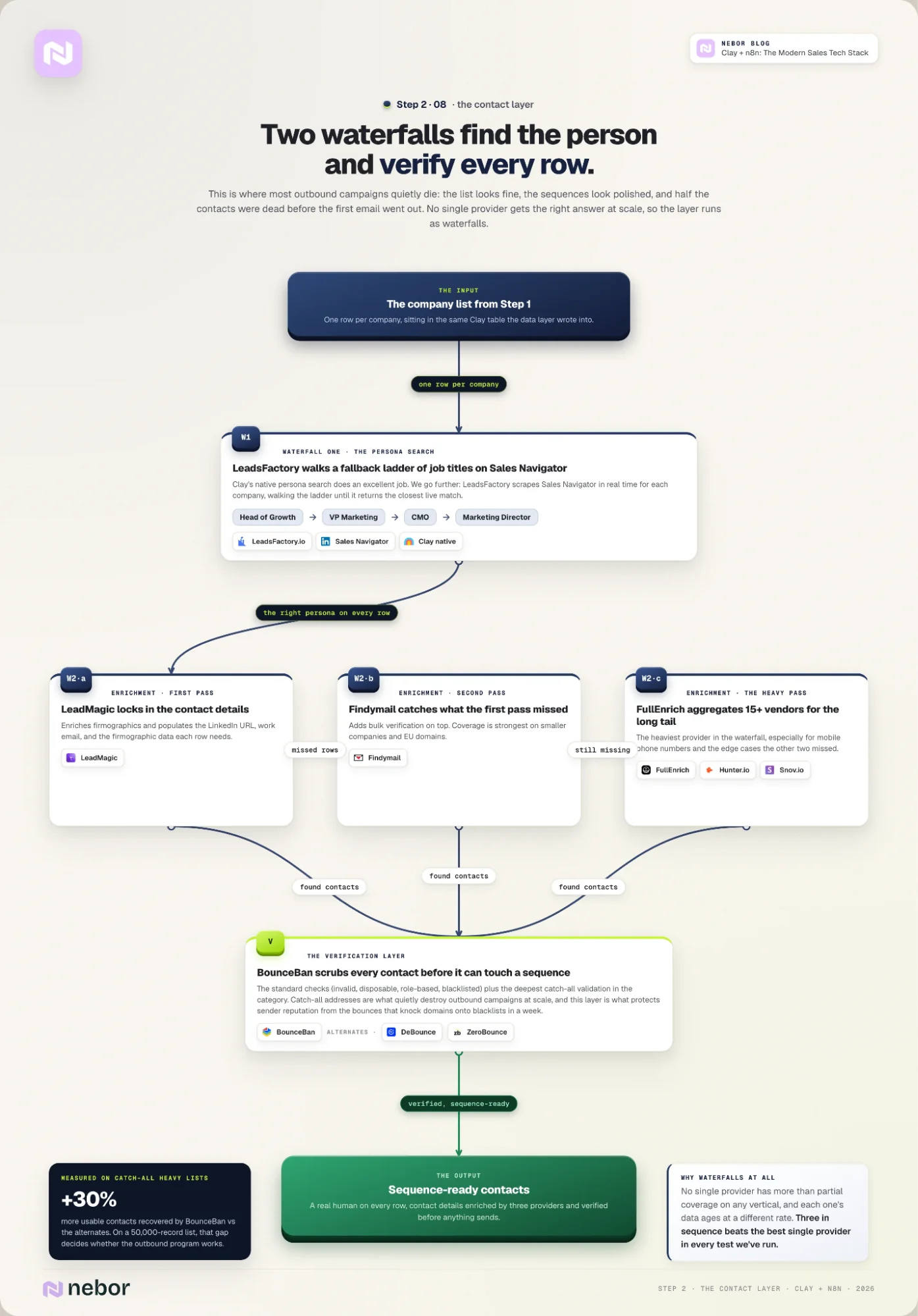
Once the data layer has surfaced the right companies, the next job is to find the right people at those companies and verify that the contact details still work. This is where most outbound campaigns quietly die.
The list looks fine and the sequences look polished. The meeting count never moves because half the contacts were already dead by the time the first email went out.
At Nebor, we build two separate waterfalls at the contact layer. The first finds the right person at each company. The second enriches that person’s contact details and verifies them before any of it goes into a sequence.
Each waterfall exists because no single attempt (with only one source) gets you the right answer at scale. Treating the layer as a one-shot lookup is what poisons every workflow downstream.
LeadsFactory.io: the persona waterfall on top of Sales Navigator
The first waterfall is the persona search at each company. Clay natively does an excellent job at that. But we don’t stop there. We use LeadsFactory.io to scrape Sales Navigator in real time for each company on the list, with a fallback ladder of job titles.
For an ICP that wants to reach the head of growth, the ladder might be: Head of Growth → VP Marketing → CMO → Marketing Director. If the first title doesn’t exist at a given company, LeadsFactory keeps walking the ladder and returns the closest live match.
LeadMagic, Findymail, FullEnrich (and Hunter.io, Snov.io): the enrichment waterfall
The output is a contact list with a real human on every row. Once the persona waterfall has done its work, the second waterfall enriches the contact details on each row. We don’t pick one enrichment tool and live with it here either.
We pass every contact through three providers in sequence. No single provider has more than partial coverage on any given vertical, and the data each one has ages at a different rate.
The combined hit rate from chaining three in sequence beats the best single provider in every test we’ve done.
The waterfall we default to is LeadMagic, Findymail, and FullEnrich. We also sometimes include Hunter.io and Snov.io, it’s mostly about which tool does the best job right now.
LeadMagic enriches firmographics and locks in the contact details, populating LinkedIn URL, work email, and the firmographic data each row needs.
Findymail catches the contacts LeadMagic missed and adds bulk verification on top. Its coverage is strongest on smaller companies and EU domains.
FullEnrich is the heaviest provider in the waterfall, especially for phone numbers. It aggregates from 15+ vendors to fill in mobile phone numbers and the long tail of edge cases the other two missed.
BounceBan, DeBounce, ZeroBounce: the email verification layer
Once the enrichment waterfall has done its work, the contacts go through verification before anyone puts them into a sequence. The verification layer protects sender reputation and saves the workflow from the bounces that knock domains onto blacklists in a week.
Our default in this layer is BounceBan, which we reach for ahead of the alternatives on every campaign. It does the standard checks (invalid, disposable, role-based, blacklisted) and goes further on catch-all validation than any of the alternatives.
Catch-all validation is the category that quietly destroys outbound campaigns at scale.
DeBounce and ZeroBounce are the alternates we reach for when BounceBan is unavailable, usually because of a vendor outage or a client mandate.
ZeroBounce adds an AI-based catch-all check that’s competitive with BounceBan’s. DeBounce is the cheapest of the three for high-volume one-time scrubs.
We’ve measured BounceBan recovering up to 30% more usable contacts than the alternatives on lists where catch-all addresses dominate. On a 50,000-record list, that gap is the difference between an outbound program that works and one that doesn’t.
LeadsFactory writes its persona output into the same Clay table that holds the company list from Step 1. The three enrichment providers work against each row from there, and the verifier checks the same row before the contact moves to the outreach step.
If you want a more elaborated read on this layer, jump to our writeup on data enrichment services and agencies, which goes deeper into the waterfall design.
Step 3: Send the outreach across email and LinkedIn
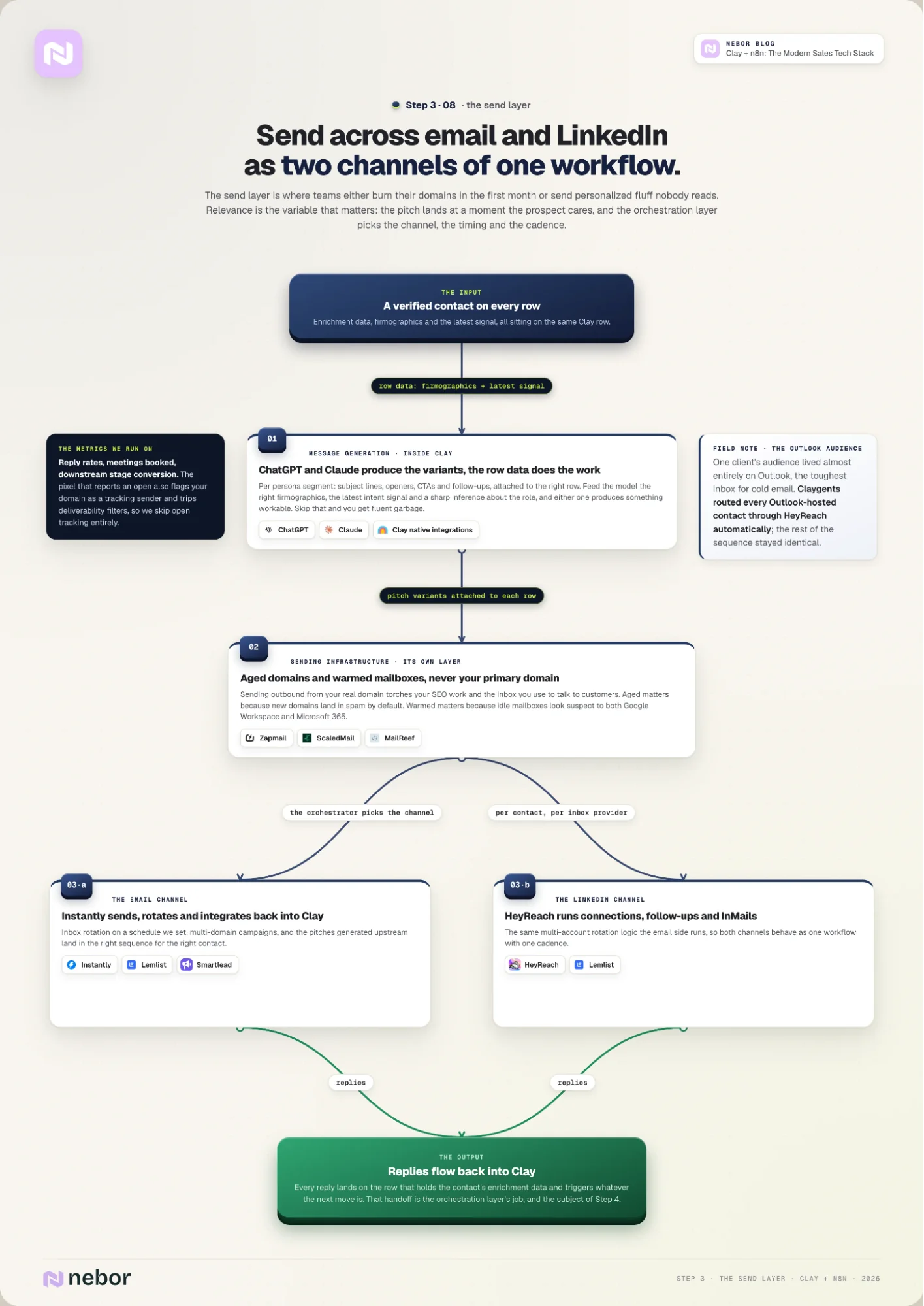
With the contact layer clean and verified, the next job is to send the outreach. The send layer is where most teams either burn their domains in the first month or send personalized fluff that nobody reads.
Most teams overinvest in personalization and underinvest in relevance, which is the most important variable in this layer.
Personalization makes you read three lines about a prospect’s recent post before pitching them. Relevance means the pitch lands at a moment when the prospect cares about what you’re selling, regardless of how many lines reference their LinkedIn activity.
ChatGPT and Claude: outreach messages or pitch variant generation in Clay
We use ChatGPT and Claude through native integrations to generate the pitch variants automatically in the Clay sheets. Both are fine for this work and we switch between them when one ships a model that pulls ahead.
What matters more than the model choice is the data we feed it.
If you pull the right firmographic data, the latest intent signal, and a sharp inference about what the prospect’s role cares about, either model produces something workable.
If you skip that, you’ll only get fluent garbage that reads exactly like everyone else’s fluent garbage.
From the same data on each row, we have the LLM produce variants per persona segment, including subject lines, openers, CTAs, and follow-ups.
We attach each variant to the right row in the Clay table, then push it through the orchestration layer to whichever sender the workflow chose for that contact.
Zapmail, ScaledMail, MailReef: aged domains and warmed mailboxes
None of this works if the sending infrastructure rests on the company’s primary domain. Sending outbound from your real domain is how you torch your SEO work, end up on spam blacklists, and lose the inbox you use to talk to customers.
We use Zapmail, ScaledMail, or MailReef to buy aged sending domains and warm mailboxes for both Google Workspace and Microsoft 365.
The aged part matters because new domains land in spam by default. The warmed part also matters because mailboxes that haven’t seen recent activity look suspect to both providers (Google Workspace and Microsoft 365).
We go deeper on this layer in our email deliverability guide, but the short version is that the sending infrastructure is its own layer of the stack and gets the same care as the contact layer above it.
Instantly, Lemlist, Smartlead: the email sending layer
On the email side we send through Instantly, with Lemlist and Smartlead as the alternatives when a client’s setup needs it.
They all rotate inboxes on a schedule we can set up, support multi-domain campaigns, and integrate with Clay so the pitches we generated upstream end up in the right sequence for the right contact.
On the metric side, we don’t track open rates and we recommend not tracking it. The pixel that reports an open is also the pixel that flags your sender domain as a tracking sender, which trips deliverability filters at most major inbox providers.
We optimize the outreach messages (pitches if you will) off of reply rates, meeting bookings, and downstream stage conversion, which are the metrics that matter anyway.
HeyReach and Lemlist: the LinkedIn sending layer
For LinkedIn, we send through HeyReach or Lemlist. Both tools handle connection requests, follow-up messages, and InMails, with the same multi-account rotation logic the email side uses on the email tools.
The idea here is for email and LinkedIn to work as two channels of the same workflow instead of separate sequences. The orchestration layer chooses which channel, when, and at what cadence.
The when matters more than most teams give it credit for, and we’ve explained our position on the outreach timing question in a separate piece.
We had a client whose target audience lived almost entirely on Outlook, which is the worst inbox provider for cold email deliverability. We routed every Outlook-hosted contact through HeyReach instead of Instantly, and the rest of the sequence was identical.
Without the orchestration layer (with Claygents in the middle) making that call automatically, an SDR would have had to build two parallel campaigns and remember which contact got which.
All of this lives inside the same Clay table the contact layer wrote into. The messages the LLM produced, the channel choice, the send timing, the inbox rotation, and the reply tracking all live on the row that holds the contact’s enrichment data and the company’s firmographics.
Reply data flows back into Clay and triggers whatever the next move is for that contact, which is the orchestration layer’s job and the subject of Step 4. The combined system is what automated sales prospecting looks like once you've built it end to end.
Step 4: Build the orchestration layer on Clay and n8n
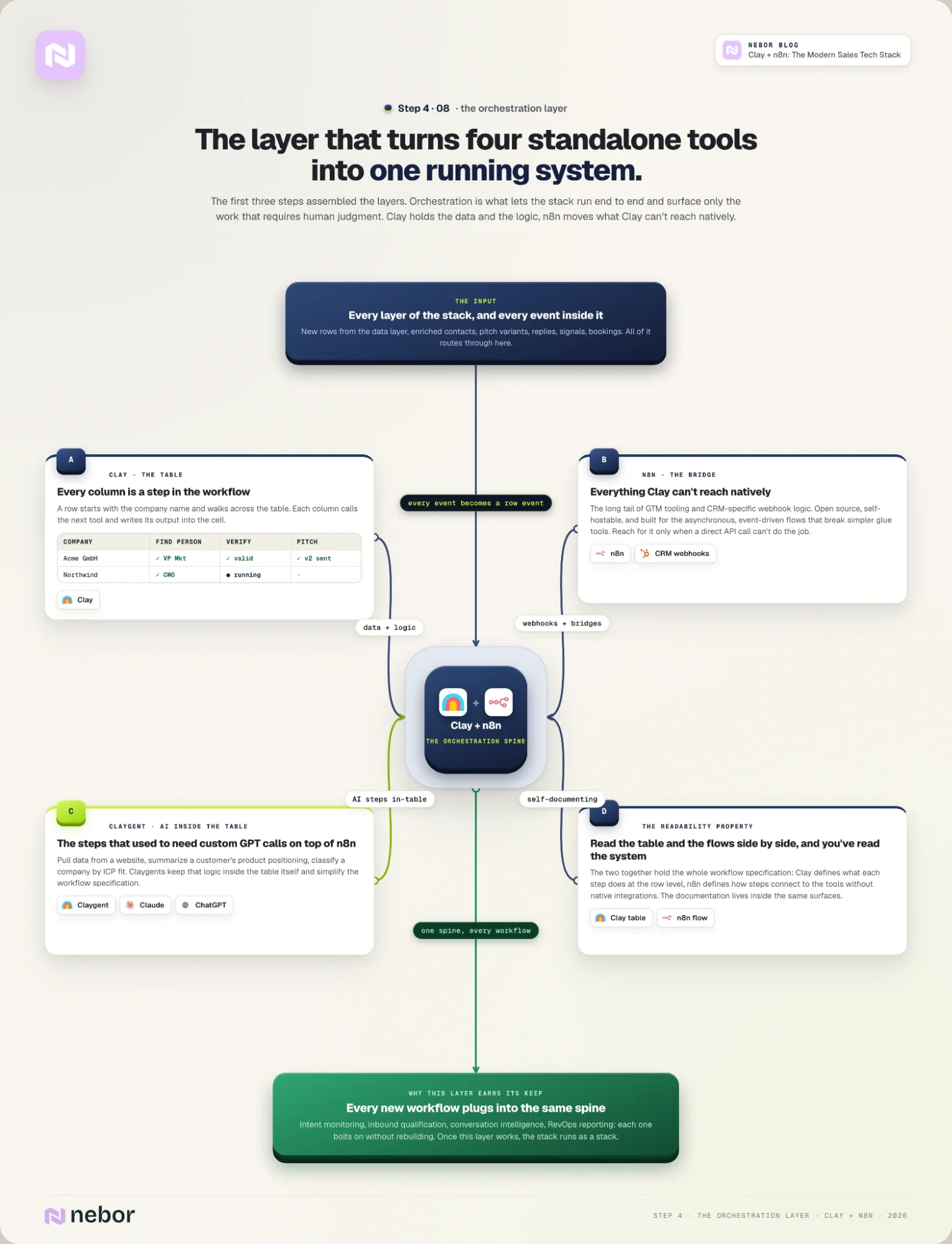
The first three steps assembled the layers of the stack. The orchestration layer is what turns those layers into a system rather than four standalone tools that need a human between every pair of them.
Clay holds the data and the workflow logic. n8n moves data between Clay and every other tool. Together they let the stack work end to end and surface only the work that requires human judgment.
Clay: the table that holds the data and the workflow logic
Clay is the table where the data lives and where we build the workflow logic. Every column on a Clay table is a step in the workflow.
A row starts with the company name from the data source and walks across the table. Each column calls the next tool (LeadMagic, BounceBan, the LLM, and so on) and writes its output into the cell.
n8n: the bridge for everything Clay can’t reach natively (vs. Zapier and Make)
n8n is the layer underneath that handles everything Clay can’t reach natively. Clay has good native integrations with most of the major tools in this stack, but the long tail of GTM tooling and CRM-specific webhook logic needs a more flexible bridge.
We use n8n because it’s open source, self-hostable, and handles the asynchronous and event-driven workflows that Zapier and Make handle poorly.
The two together hold the workflow specification. Clay defines what each step does at the row level. n8n defines how those steps connect to tools that don't have native Clay integrations.
Read the Clay table and the n8n workflow side by side, and you can read the entire system without asking the person who built it.
This is also where the hybrid we mentioned earlier pays off. A Clay table looks like a spreadsheet on the surface and behaves like a programmable workflow underneath, which means building one well takes someone who can think in both modes.
People with both skills are still rare, which is why Clay implementations break or stall at most agencies that try them. We’ve seen plenty of clients arrive after a previous Clay build that went sideways for exactly this reason.
Claygent: AI agents inside the Clay table
We’ve mentioned it a few times already but Clay has AI agents called Claygent that work inside the table itself.
Claygent agents can pull data from a website, summarize a customer's product positioning, or classify a company by ICP fit. All of that previously required hand-coded n8n logic.
We use Claygent for the steps that used to need a custom GPT call layered on top of n8n. It simplifies the workflow specification and keeps more of the logic inside one tool.
Together, Clay and n8n are why the rest of the stack behaves as a stack instead of as a list of tools. Once this layer works, every new workflow you bolt on plugs into the same orchestration spine without rebuilding.
That includes the intent monitoring in Step 5, the inbound qualification in Step 6, the conversation intelligence in Step 7, and the RevOps reporting in Step 8.
The same logic applies to automating the lead generation pipeline end to end, which is what most clients arrive looking for help with in the first place.
Step 5: Build intent monitoring across new logos (brand-new customer accounts) and expansion accounts
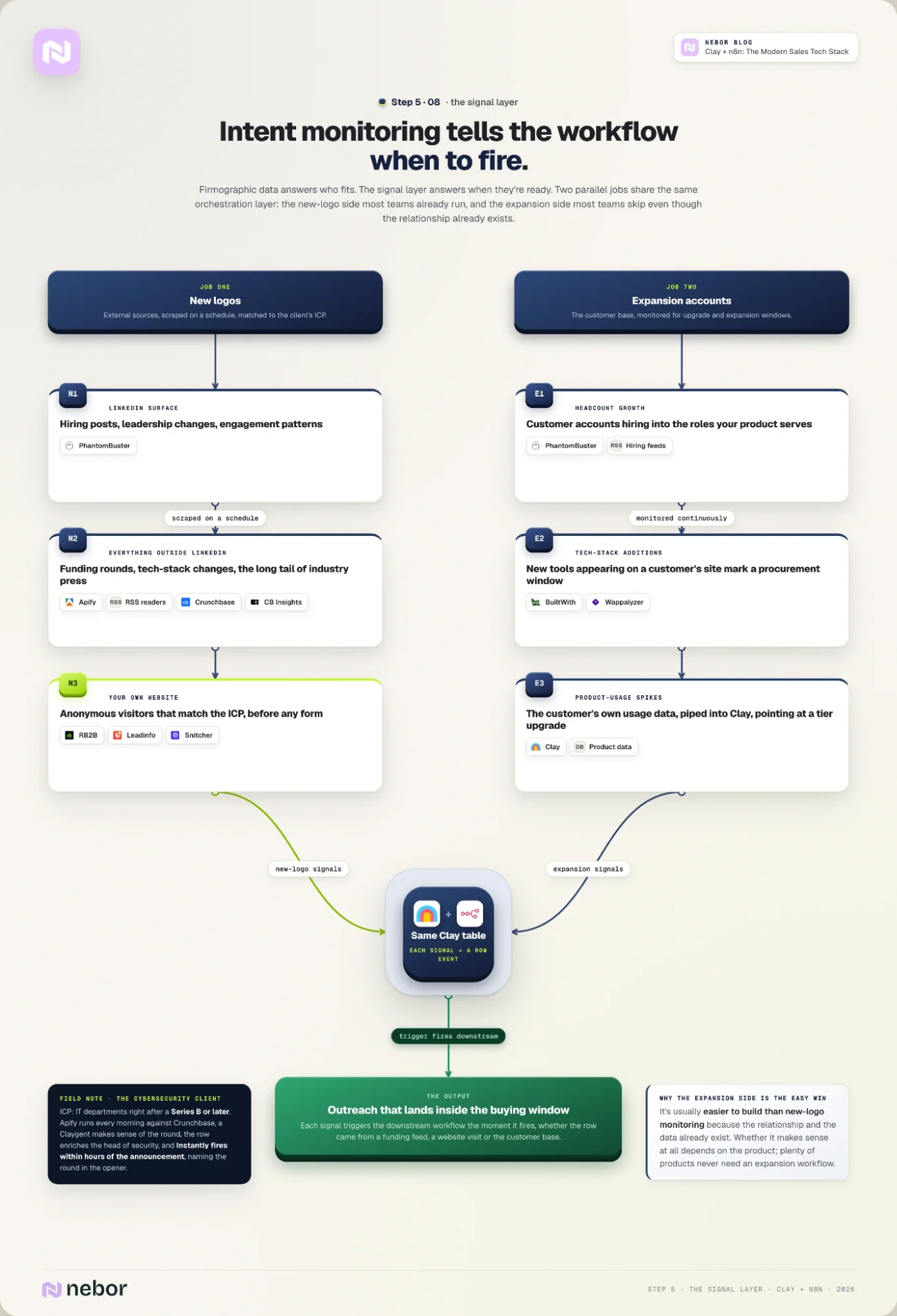
The signal layer is what tells the workflow when to act. Firmographic data answers the who-fits question, but it doesn't answer the when-they're-ready question.
The signal layer is the part of the stack that covers the second one. Without it, you're sending outreach to the right accounts at random moments and hoping a few of them happen to be in-market.
We treat the signal layer as two parallel jobs that share the same orchestration layer. The new-logo side is the version most teams already build, often as part of signal-based outbound campaigns.
The expansion side is the one most teams skip, even though it’s usually easier to build because the relationship with the account already exists.
The new-logo side: PhantomBuster, Apify, and RSS readers for external intent
On the new-logo side, the build is straightforward once Clay and n8n are in place. We pick the signal sources that match the client’s ICP, scrape them on a schedule, and write each new event into the Clay table that handles the rest of the workflow.
The sources are different per client, and that's the point of doing this work at all. PhantomBuster scrapes LinkedIn for hiring posts, leadership changes, or content engagement patterns at target accounts.
For everything outside LinkedIn, we lean on Apify and RSS feed readers. Both can pull funding announcements from Crunchbase or CB Insights, tech stack changes from BuiltWith or Wappalyzer, and anything else with a public web surface.
We use RSS feed readers to cover the long tail of industry publications that don’t have clean APIs. We’ve written about the RSS monitoring workflow in detail.
RB2B, Leadinfo, Snitcher: website-visitor identification
The website-visitor tools (RB2B, Leadinfo, Snitcher) live in this layer too. They identify anonymous visitors that match the ICP and push the visit event into Clay before the visitor even fills out a form.
We’ve covered this as well in our posts about website-visitor tracking workflow and a few examples of website visitor workflow builds.
Here’s a concrete example from the new-logo side. We had a cybersecurity client whose ICP was IT departments at companies that had just raised a Series B or later round, on the theory that funding events were the most reliable signal of incoming security spend.
We set up Apify to check every morning against Crunchbase and push each new round into Clay. There, we set up a claygent to make sense of the data and the workflow will then enrich the company and the head of security in the same column structure as Step 4.
Once that stage is passed with everything checked, we push that data into Instantly which then sends the sequence within just a few hours of the announcement going public, naming the new round and data we gather about them in Clay in the opener.
The expansion side: PhantomBuster, RSS, BuiltWith, Wappalyzer plus customer product-usage data
The expansion side uses the same orchestration layer with different inputs. You need to understand this only makes sense based on the product type. A lot of products won’t need us to work on a workflow for expansion or upsells.
That said, instead of monitoring external sources for new accounts that fit the ICP, we monitor the customer base for signals that an existing account is ready for an upgrade, an expansion, or a new product line.
The expansion signals worth monitoring vary by product, but a few patterns show up across most of our clients.
The most reliable ones are headcount growth at customer accounts, tech stack additions that mark a procurement window, and product usage spikes from the customer's own data that point to a tier upgrade.
For the headcount signal we use PhantomBuster on LinkedIn and RSS on hiring announcements. For tech stack additions we lean on BuiltWith and Wappalyzer. The usage signal comes from the customer's own product data, piped into Clay.
We’ve written about what counts as intent data and how to source it in its own piece, which goes deeper into the taxonomy than this section does.
Every signal source in this step writes into the same Clay table that Steps 1-3 wrote into. The orchestration layer treats each signal as a row event that triggers the workflow downstream.
That holds whether the row came from a firmographic data source, a website-visitor identification, or an expansion trigger inside the customer base. Step 6 picks up at the inbound side of the same orchestration layer.
Step 6: Plug inbound into the same workflow you built for outbound
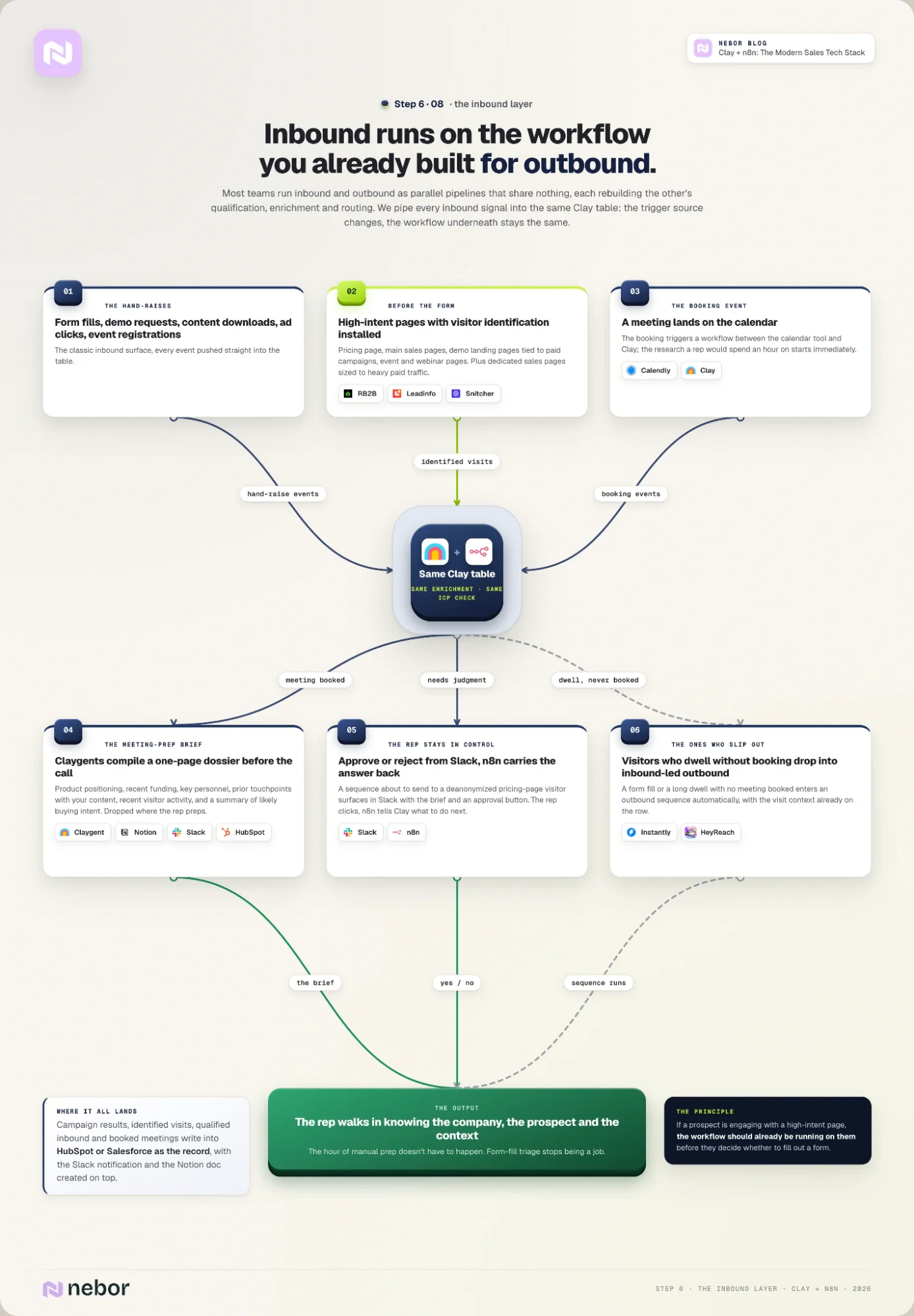
One Clay table for inbound and outbound qualification and routing
The inbound side of the stack uses the same orchestration layer as outbound, with different inputs.
Inbound starts with a prospect who has already raised their hand somehow, whether that's a form fill, a demo request, a pricing page visit, a content download, an ad click, or an event registration.
Most teams treat inbound and outbound as parallel pipelines that share nothing. The team handling inbound builds its own qualification logic, its own enrichment process, and its own routing rules.
The outbound team rebuilds the same things on its own side because the two systems can't talk to each other.
We pipe every inbound signal into the same Clay table that holds the outbound workflow. The trigger source changes, but the workflow underneath stays the same. The enrichment that Step 2 applies to outbound contacts applies to inbound ones too.
The ICP classification works the same way, and the workflow assembles the handoff brief the same way regardless of how the meeting came in. That setup is what lets the inbound team stop sorting form fills by hand.
RB2B, Leadinfo, Snitcher on the high-intent pages: capturing inbound before the form
A lot of high-intent inbound traffic never reaches a form in the first place. The buying-committee member who lands on your pricing page, reads it for four minutes, and closes the tab is exactly the prospect you want to be talking to, but a sign-up or form-gated workflow loses them most of the time.
The website-visitor identification tools from Step 5 (RB2B, Leadinfo, Snitcher) close that gap. We install them on the pages that signal intent, which usually means the pricing page, the main sales page, the demo landing pages tied to paid campaigns, and any event or webinar pages that drive concentrated bursts of traffic.
For clients pushing heavy paid traffic and demand generation, we sometimes create dedicated sales pages on top of the existing site, sized to the campaign’s intent profile, and install the identification tools there too.
Each identified visit becomes a row in the same Clay table. The workflow enriches the visitor’s company and the persona we’d care about there, applies the ICP check, and either drops the contact into the outreach sequence or surfaces them to the rep that owns that segment.
The principle is the same one behind Step 5. If a prospect is engaging with a high-intent page, the workflow should already be working on them before they decide whether to fill out a form.
Claygent, Notion, Slack, HubSpot: the meeting-prep brief and rep handoff
And when someone books a meeting with you, the workflow doesn't stop at the calendar notification. The booking event triggers a workflow we set up between your calendar tool and Clay, and the research the rep would otherwise spend an hour doing manually.
Clay looks up the prospect and the company. Claygent agents pull the company’s product positioning, recent funding, and key personnel.
The workflow also gathers the prospect’s prior touchpoints with the client’s content or recent website-visitor activity from the identification tools, and a Claygent summary of likely buying intent based on what’s public about the account.
What goes into the brief depends on the company and what each client deems necessary to close the deal. The workflow compiles all of it into a one-page brief and drops it in the rep’s preferred surface before the meeting starts.
For most clients that’s a Notion doc dropped into Slack, sometimes a HubSpot record with the brief attached, depending on where the rep does the bulk of their prep. It can even be as simple as a spreadsheet.
The rep walks into the call already knowing what the company does, what the prospect cares about, and what context the workflow has on the account. The hour of manual prep that would have happened doesn’t have to.
We’ve covered the inbound meeting workflow in a separate post, including the exact column structure of the brief and how the workflow assembles it.
Everything the workflow produces lands in the platforms the reps already use during the day. Clay writes campaign results, identified visits, qualified inbound, and booked meetings into HubSpot or Salesforce as the record, sends a Slack notification with the brief link, and creates the Notion doc when one is needed.
The rep can approve or reject the workflow’s call from the same surfaces. A campaign that’s about to send a sequence to a deanonymized pricing-page visitor surfaces in Slack with the brief and an approval button. The rep clicks yes or no, and n8n picks up the response and tells Clay what to do next.
The same logic catches prospects who slip out without booking. A visitor who fills out a form or dwells for a considerable amount of time but never books a meeting drops into an inbound-led outbound sequence without anyone touching the workflow.
That’s how the inbound side works end to end without forcing the team to switch tabs ten times a day.
The orchestration layer handles the bulk of the work, and the reps spend their time on the meetings instead of on the form-fill triage and manual prep that used to feed them.
The inbound and outbound workflows live on the same Clay table and pass through the same enrichment and handoff pipeline. The signals that hit the rep look different. The work the rep does after the call is the same, and that’s the territory of Step 7.
Step 7: Add conversation intelligence and turn calls into workflow triggers
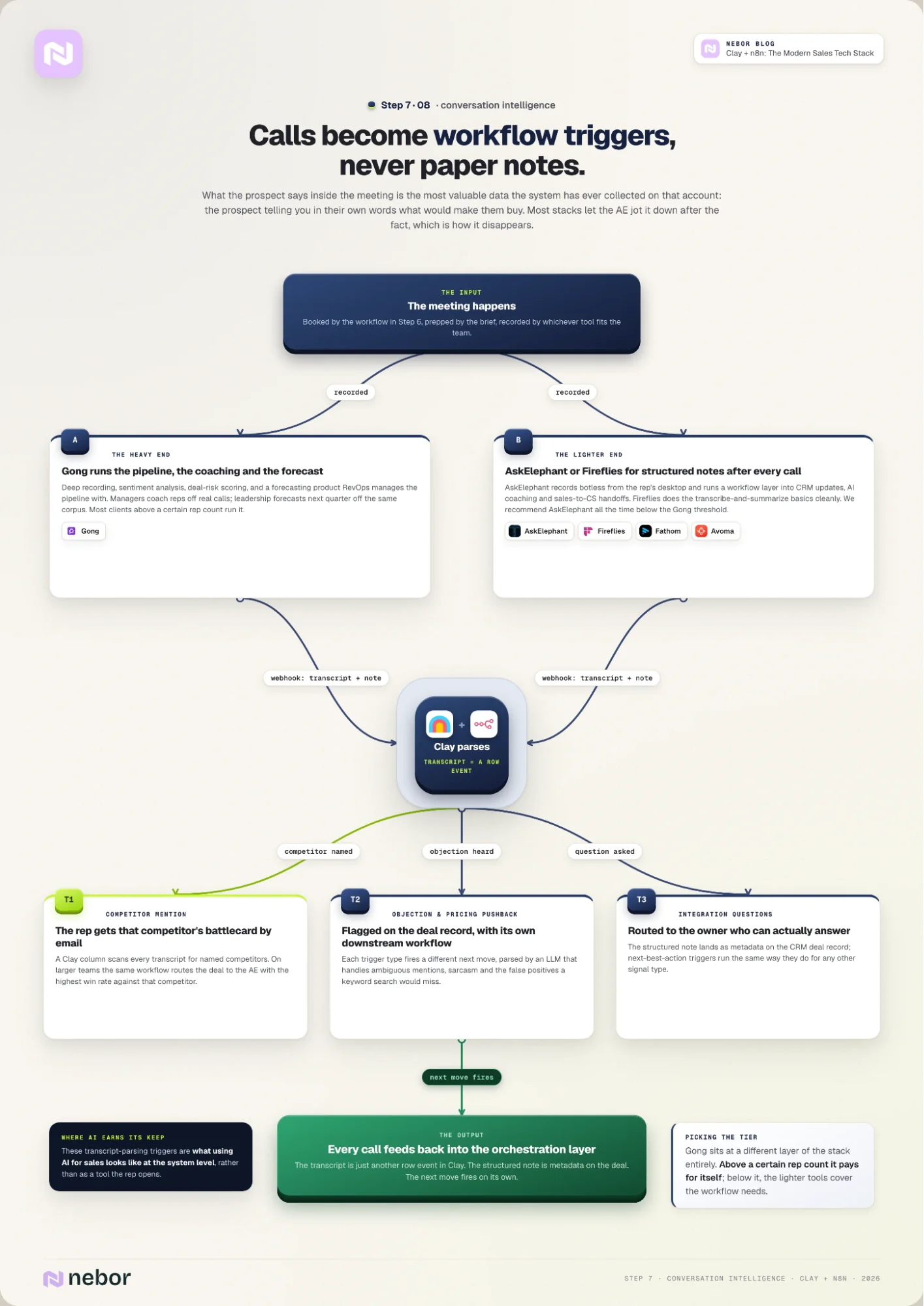
After the meeting happens, the workflow doesn’t end. What the prospect says inside the meeting is the most valuable data the system has ever collected on that account.
It’s the prospect telling you in their own words what they care about and what would make them buy. Most stacks treat that data as paper notes the AE jots down after the fact, which is how it disappears.
Conversation intelligence tools fall into two camps that solve different problems.
Gong: the heavy end of conversation intelligence
Gong is the heaviest of the bunch by some margin, with deep recording, sentiment analysis, deal-risk scoring, and a forecasting product that the RevOps team uses to manage the pipeline.
AskElephant, Fireflies, Fathom, Avoma: the lighter end of the market for conversation intelligence
AskElephant, Fireflies, Fathom, and Avoma are on the lighter end of the market. The rep gets a structured note set after every call, and the better-integrated tools push that data into the CRM and the workflow layer automatically.
For the lighter end of the market, we recommend AskElephant or Fireflies depending on your existing setup.
AskElephant offers botless desktop recording for the in-call experience. No bot joins the call; the rep’s machine listens to whatever audio is playing.
On top of that, AskElephant adds a workflow layer that ties call data into CRM updates, AI coaching, and sales-to-CS handoffs.
Fireflies is closer to the traditional transcribe-and-summarize bot. It does the basics well and integrates cleanly with most stacks we work in.
Gong occupies a different layer of the stack entirely. It’s what RevOps uses to manage the pipeline and what managers use to coach reps off real calls. Leadership uses the same recording corpus when they're forecasting next quarter's number.
Most of our clients above a certain rep count have Gong, and most below it use the lighter tools and we recommend AskElephant all the time.
Piping call data back into Clay as workflow triggers
The actual workflow lives downstream of whichever tool captured the call. After every meeting, our set webhooks push the transcript and the structured note back into Clay and the CRM, and the orchestration layer parses both for triggers we care about.
A common trigger we build is competitor mention detection. The Clay column scans every transcript for mentions of named competitors, and when it catches one, it triggers a workflow that emails the rep a battlecard for that specific competitor.
The same workflow can also route the deal to the AE on the team with the highest win rate against that competitor, when the team is large enough to have specialists.
The pattern extends to objection detection, pricing-pushback flags, and integration-question routing. Each trigger starts a different downstream workflow.
These transcript-parsing triggers are where AI sales tools start earning their keep, because the LLM doing the parsing has to handle ambiguous mentions, sarcasm, and false positives that a keyword search would miss.
Every conversation that happens inside the system feeds back into the orchestration layer the same way the inbound and outbound signals do. The transcript is just another row event in Clay.
The structured note is metadata on the deal record in the CRM. The next-best-action triggers work the same way they do for any other signal type.
This is most of what using AI for sales looks like at a system level rather than as a tool the rep opens. Step 8 closes the loop on the RevOps side, where all of this data finally pays off.
Step 8: Close the loop with pipeline hygiene, RevOps backbone, and reporting
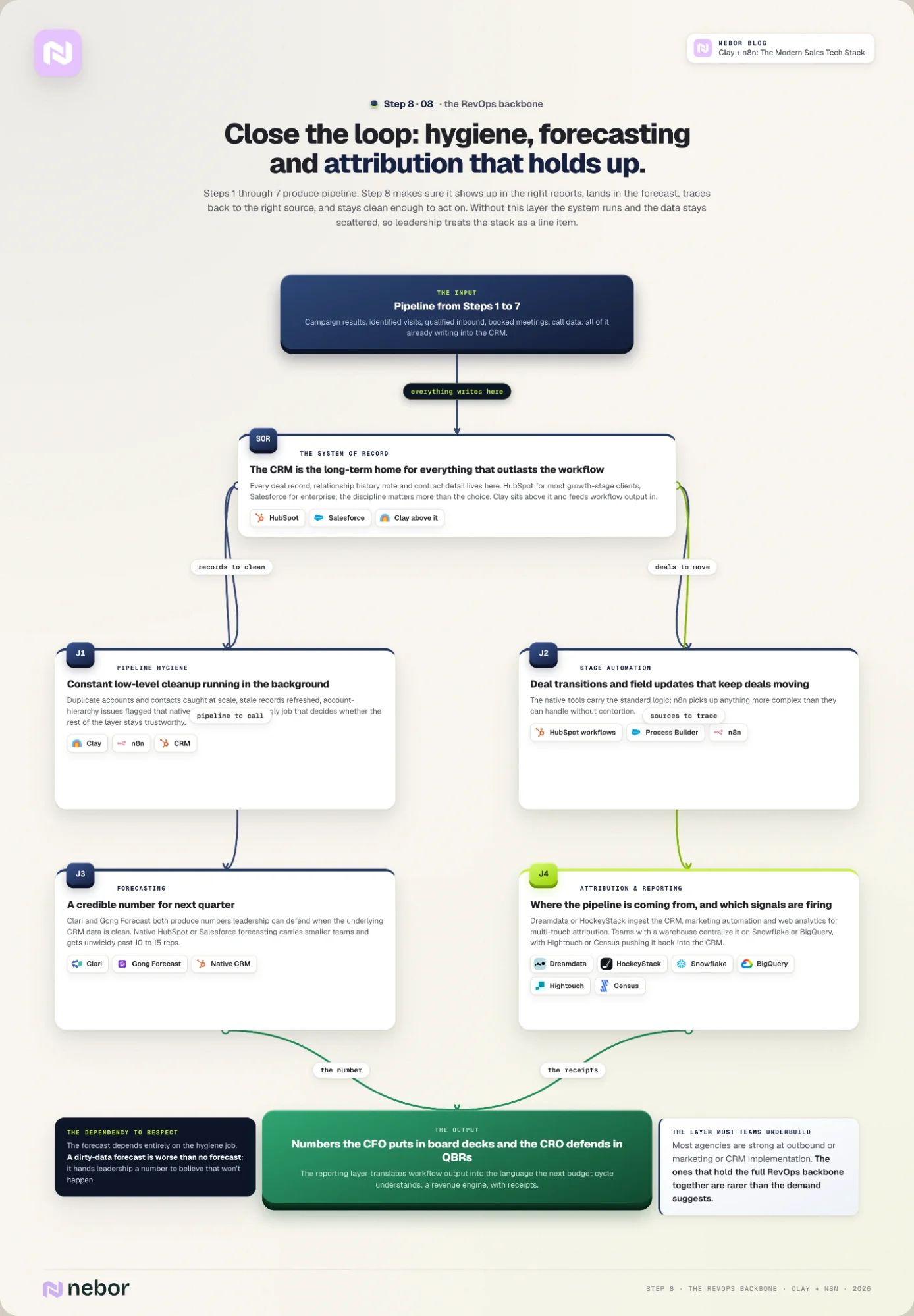
The seven steps above all build workflows that produce pipeline. Step 8 is what makes sure the pipeline those workflows produce shows up in the right reports, lands in the forecast, traces back to the right source, and stays clean enough that someone can act on it.
Without this layer, the system works but the data stays scattered. Leadership never sees the impact sources, and the next budget cycle treats the stack as a line item instead of the revenue engine it is.
Four jobs happen in this layer in parallel. You get:
pipeline hygiene that serves to keep the data clean and the records accurate
CRM stage automation that handles deal transitions and the field updates that keep deals moving forward
forecasting that gives your leadership team a credible number for next quarter
attribution and reporting that tell the team where the pipeline is coming from, which signals are landing, and what’s working
HubSpot and Salesforce: the CRM as system of record
The CRM is the system of record at this layer. Every deal record, every relationship history note, and every contract detail lives there long-term. We covered this in Step 4, where Clay stands above the CRM and feeds workflow output into it.
The choice of CRM (HubSpot for most growth-stage clients, Salesforce for enterprise) matters less than the discipline of treating it as the long-term home for everything that needs to outlast the workflow that produced it.
CRM + n8n + Clay: pipeline hygiene workflows
Pipeline hygiene is the ugly job that determines whether the rest of the stack stays trustworthy. Duplicate records, stale contacts, mismatched account hierarchies, and abandoned deal stages slowly poison the CRM until the dashboards stop matching reality.
The fix is constant low-level cleanup that happens in the background, not a quarterly cleanup project that the team always pushes to next quarter.
We build workflows between your CRM, n8n, and Clay that catch duplicate accounts and contacts at scale and flags account-hierarchy issues that the native CRM tools miss.
HubSpot workflows and Salesforce Process Builder (with n8n): stage automation and field updates
For the stage automation and field-update logic, we use HubSpot’s native workflows or Salesforce’s Process Builder. n8n picks up anything more complex than the native tools can handle without contortion.
Clari, Gong Forecast, and native CRM forecasting
The forecasting layer determines how seriously the rest of the company takes the sales team’s number. Tools like Clari and Gong Forecast both produce credible numbers when the underlying CRM data is clean (and both fall apart when it isn’t).
Native HubSpot or Salesforce forecasting works for smaller teams that haven’t outgrown the basic features, and gets unwieldy past 10-15 reps.
The forecasting layer depends entirely on the hygiene layer. A dirty-data forecast is worse than no forecast, because it gives leadership a number to believe that doesn't reflect what's going to happen.
Attribution is the job most teams quietly give up on. The traditional approach (UTM tags, last-touch attribution in Google Analytics, manual mapping back to deals in the CRM) breaks at scale and stays broken.
Dreamdata and HockeyStack: modern multi-touch attribution
The modern approach uses tools Dreamdata or HockeyStack to ingest data from the CRM, the marketing automation tool, and the website analytics. The platform then applies multi-touch attribution that reflects how deals close in practice.
Snowflake, BigQuery, Hightouch, Census: warehouse-first attribution for data teams
For businesses with a data team and an existing warehouse, the more flexible pattern is to centralize attribution in the warehouse itself, on Snowflake or BigQuery. Hightouch or Census then pushes the attribution data back into the CRM and the marketing tools.
That setup takes more upfront work, but it produces attribution the data team can trust and the leadership team can defend.
This is where the rest of the stack pays off. The work from Steps 1 through 7 produces pipeline, but pipeline that nobody can attribute, forecast, or report on credibly is invisible to leadership. The reporting layer is what translates the workflow output into the numbers the CFO puts in board decks and the CRO defends in QBRs.
This is also the layer most growth-stage teams underbuild. That's partly why we ended up writing a separate comparison of the best RevOps agencies in Europe.
Most agencies in that market are strong at outbound or marketing or CRM implementation. The ones that hold the full RevOps backbone together are rarer than the demand suggests.
We've now wired all eight steps into one system. The data from each step feeds the next, and the last step closes the loop by making the impact visible.
We've collected the sales automation statistics that quantify what well-built systems do to top-of-funnel and conversion in a separate piece. It's the closest thing we have to a benchmark for the work this post describes.
The synthesis section below pulls all eight steps together.
How the eight steps fit together to drive your revenue pipeline and make your team more efficient
The pattern across all eight steps is the same. Every step writes into the same Clay table, and the n8n flows underneath connect each step to the next.
The whole thing lives inside documentation a new hire can read six months later and follow without asking the person who built it. That's the test of whether the system is a real stack or just a list of tools that happens to share a logo screen.
We swap tools out of this stack regularly. The list of tools we recommended in this post in 2026 will read differently in 2027, and almost completely differently in 2028.
The reason we can swap any tool without breaking the system is that the workflow is the unit and the tool is replaceable. The Clay table doesn't care which provider fills the email-finding column, as long as something does.
And the only reason any of this works at the implementation level is that the people building it know both halves of the work.
Salespeople first, automation experts second.
The two skills together are what turn a tool collection into a system, and the people who can hold both at once are still rare enough that the rest of the agency market hasn't caught up.
The same logic applies regardless of company size. A one-BDR startup on Clay's free tier, a basic CRM, and LeadMagic gets the same workflow logic as a full revenue team using every layer above. The tools scale, but the workflow design doesn't change much.
If you read all eight steps and concluded that this is mostly about Clay and n8n with a bunch of other tools layered on top, that's accurate.
The longer answer is that the orchestration layer is what makes the rest a stack instead of a list. Building it well is the work that separates a Clay-based lead generation system from a Clay license that gathers dust.
We've covered the broader market for Clay sales automation agencies in its own piece, including how to evaluate one if you're not building this in-house.
There's no single right tech stack for a revenue team, and there's no version of this post that will be complete a year from now. The logic underneath stays the same regardless of which tools we use this quarter.
Design the workflows first, then pick the tools that hold them up. Glue everything together with one orchestration layer, and find people who can think in both modes to build it.


Related Articles

By clicking Sign Up you're confirming that you agree with our Terms and Conditions.