
Clay CRM Automation: Why It Is the Best Way to Clean and Revive Your CRM

by
In this post:
Effort is rarely the reason a CRM falls apart. The reason is that nobody built workflows around it that survive the first three months of real use. It’s that simple.
Your CRM is supposed to drive your sales process and all your different departments should collaborate and work from it.
I mean, that’s the promise you’re sold when you bought your seats and it’s not misleading at all. You’ve most likely heard the single source of truth for your organization argument and when you use the CRM right, it holds true.
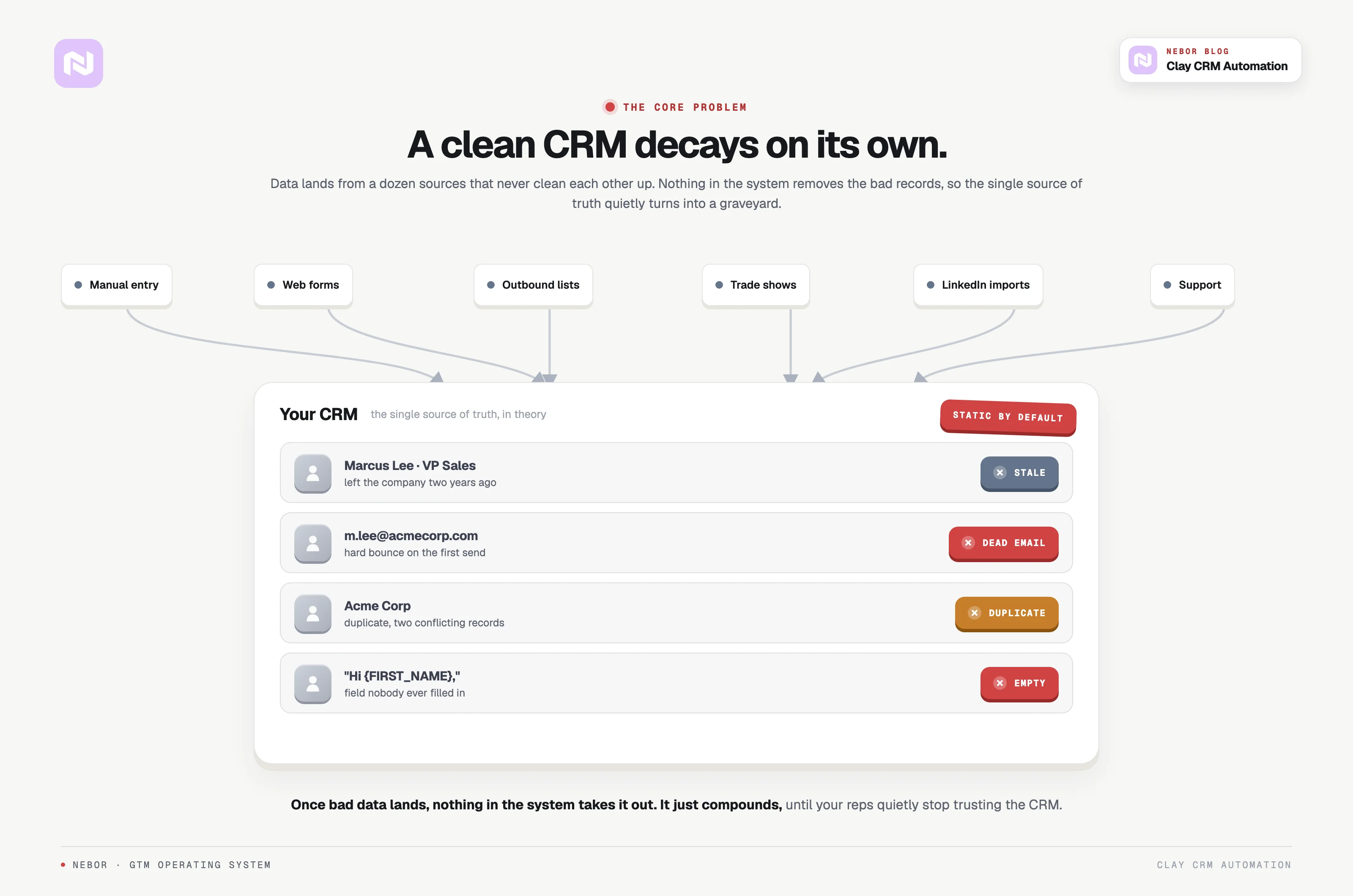
The reality, however, is that data lands in your CRM from a dozen sources that never clean each other up. Manual entry, website forms, outbound lists, trade shows, LinkedIn imports, customer support, etc.
And that’s how the CRM that started clean turns into a database your reps stop trusting.
The damage shows up the same way at almost every B2B company we look at.
Contacts who left their company three years ago.
Email addresses that bounce on the first send.
Duplicate records that show two versions of the same account.
Fields that are empty, mistyped, or just plain wrong.
Your sales team has quietly stopped trusting it. Your RevOps team (if you have one to begin with) hates cleaning it once a quarter. When the next campaign needs a list, nobody can say with a straight face whether the data inside is usable.
That is the state of most CRMs we look at when a new client comes to us. There is a fair chance you are reading this because that is exactly what your own CRM looks like right now.
The good news is that this is fixable. With the right sales automation workflows wired into the right tools, the same CRM that feels like a graveyard becomes a system that updates itself and gives your reps a list they actually want to work.
At Nebor, we build this kind of CRM rebuild for B2B companies regularly. And we’ll walk you through how we do the work, why most CRM automation efforts stall short of it, and what changes when the workflows actually live in your stack.
Let’s get started.
Note: A CRM is only as good as the workflows around it, and most CRMs have none.
At Nebor we build those workflows in Clay. A new record gets verified and enriched before a rep opens it, duplicates get merged before anyone sees them, and anything without an owner gets routed with a clock on it.
Book a 15-minute call and let's talk about your business.
TL,DR: the clay crm workflow at a glance
The broken CRM problems most sales teams face today
The thing most sales and RevOps leaders miss about a CRM is that it is not designed to stay clean on its own. It is static by default, and that is the source of every problem you’ll ever encounter with your CRM and its data quality.
So you have thousands of contacts in there, but how many of them are still at the same company they were when they were added? How many still use the same email address?
Meanwhile, data keeps pouring in from every direction. Different teams work the same CRM from their own corner of the org, with their own conventions, and the silos start showing up almost immediately.
So your reps end up reaching out to contacts who left their company two years ago. Or sending personalized emails that go out as “Hi {FIRST_NAME}” because nobody filled the field in.
Across the CRMs we audit when a new client comes to us, the same four problems show up.
Outdated data. Job changes, email switches, and company moves happen in real time. A static CRM has no way to keep up.
Manual entry errors. Reps forget to log notes, skip fields, mistype titles. The data quality silently degrades every quarter.
Disconnected tools. Marketing, sales, and customer success each hold data the other two would benefit from, and none of it crosses the gap.
Zero workflows for data hygiene. Once bad data lands in the CRM, nothing in the system removes it. It just compounds.
Traditional automated CRM systems and why they fall short
An automated CRM should make your life easier, not create new problems to solve. Most automated systems are just automating bad processes on top of bad data.
Stop and think about what that actually means. If you are automating outreach to the wrong people with bad data, you are just annoying the wrong people more efficiently and at a bigger scale.
Because most CRM systems were not built to be self-updating, they need constant maintenance. Your sales team did not sign up for data entry.
The second you ask them to fix the CRM by hand, you have lost their attention. They want to sell, and they will go quiet on the rest.
Plenty of sales teams have already given up on the CRM completely. They keep the real contact list in spreadsheets, in Notes, in Slack DMs, in Gmail folders. The CRM is the thing they fill in once a quarter to keep the boss off their back.
Also, most companies that try to automate the CRM stop at the surface. They set up a basic email sequence, import a list, and call it done. That misses the actual job.
A CRM-level automation system is supposed to keep the data alive, route signals to the right rep, and handle the workflows nobody on the team has time to do by hand.
Traditional CRM systems also operate inside their own silos, and that is the second part of the problem.
Customer success teams hold detail on accounts that are starting to wobble. The marketing team usually knows which inbound channel converted, which one didn’t, and why but doesn’t share it with sales.
Sales has a record of what got promised in the discovery call. None of those data points cross the silo wall, because no one wired the workflow that would move them across.
What makes Clay CRM automation different
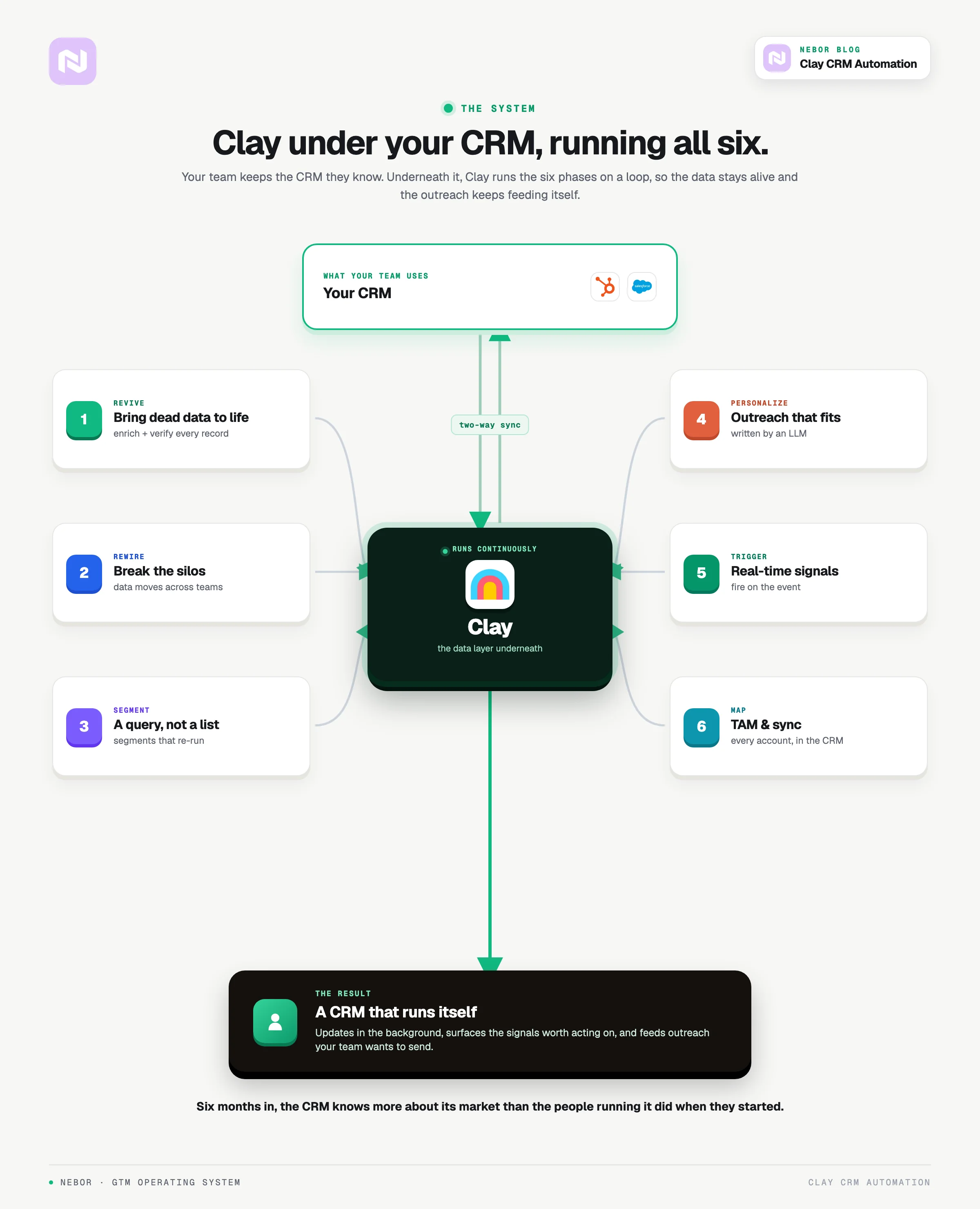
We use Clay as the central piece because it is the one tool we have found that turns a static CRM into something that reaches out to other systems, pulls in fresh data, and builds workflows on top of the records you already have.
Instead of just storing contact data, the CRM becomes the place where your sales automation actually lives. Workflows live on top of it without anyone on your team writing code.
Here is what Clay does that nothing else in our stack quite covers.
Complex workflow automation: This is where Clay earns the central role in the stack. We build multi-step sequences that change behavior based on what each prospect actually does. Reply, click, ignore, change roles, raise a round.
Multi-provider data enrichment: Clay does not depend on one source for any field. For a single record, we can pull from FullEnrich, Findymail, LeadMagic, ZoomInfo, and Apollo, then stitch the answers together with confidence scores so we trust the field that is most likely to be correct.
AI personalization that holds up at volume: Instead of dropping a generic template into a sequence, Clay uses AI to write a first line, a postscript, or a full message that references something real about the prospect. A new role, a recent funding round, a podcast they hosted last month.
Real-time data validation: Clay verifies email addresses, checks job changes, and updates records as the world moves. The CRM stops drifting from reality between quarterly cleanups.
Intent data integration: Used in tandem with the right intent stack, Clay watches for buying signals across multiple channels and triggers outreach the moment a prospect crosses a real threshold.
Our Clay CRM automation framework that we use to revive, clean, and maintain data hygiene for B2B sales teams
The Clay CRM automation work we do for clients follows the same shape almost all the time. It is the shape we keep coming back to because it is the only one that actually solves the problems above.
The point is to take the CRM you already have in place and turn it into a system that pulls fresh data, surfaces signals, and acts on the records you already own.
Phase 1: Bringing your dead data back to life
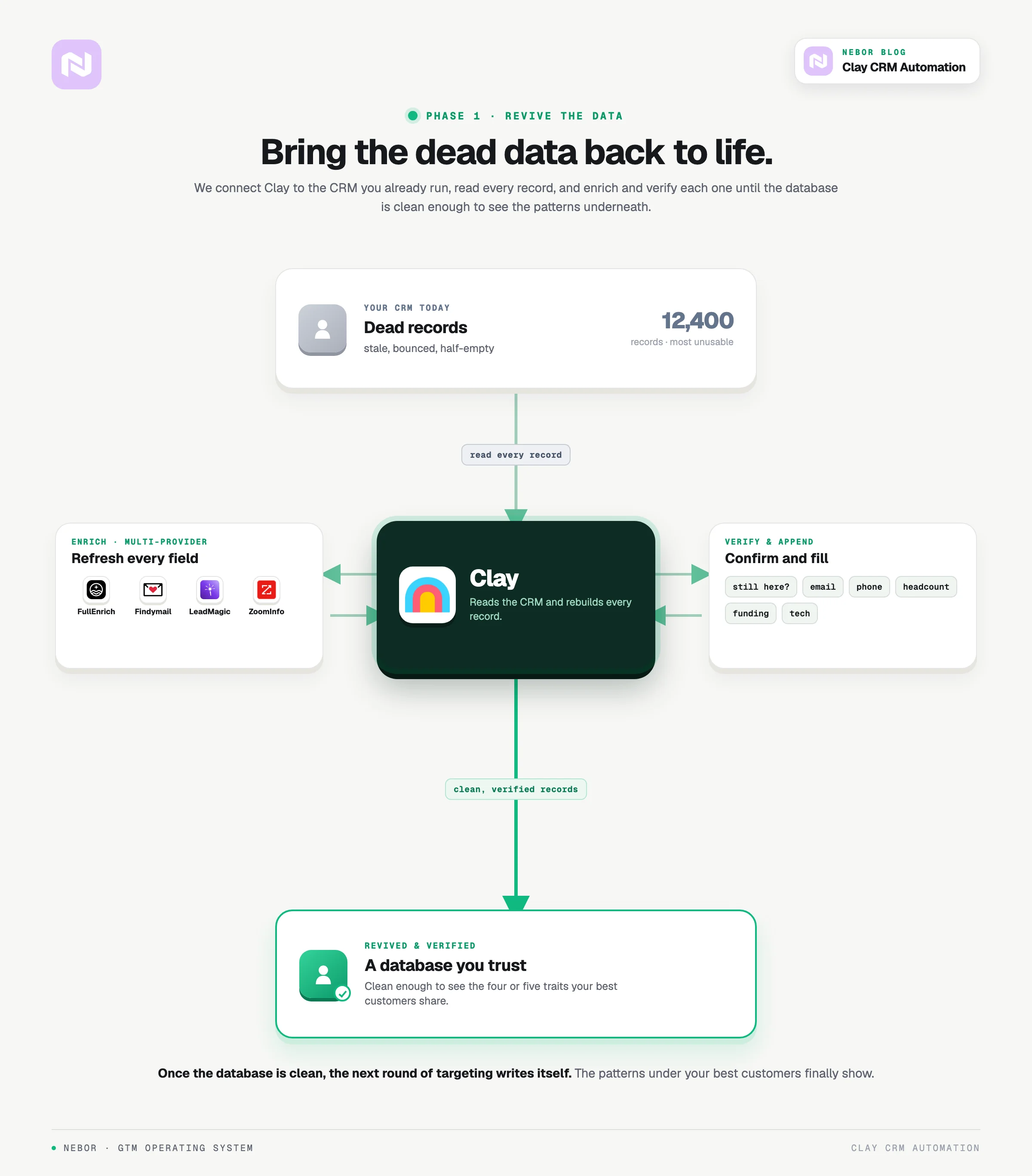
The first step is reviving the data that is already in your CRM. Most companies are holding a mountain of records that nobody trusts. The records are split across two or three systems, the contact details are years out of date, and half the fields were never filled in.
We start by connecting Clay to your existing CRM and reading what is already in it. Instead of just importing the contact list, we pass every record through enrichment from a handful of providers we pick based on your ICP and what you actually need to know about a buyer.
For every contact, we verify whether they are still at the company, refresh their email and phone, and append the fields you actually use for prioritization. Headcount, funding stage, tech stack, recent hires, LinkedIn URL.
Once the database is clean, you can finally see the patterns underneath it. Your best customers tend to share four or five concrete traits. A specific headcount band, a particular tool in the stack, a recent event that always seems to precede the deal closing.
From there, the rest of your TAM gets a lot easier to map, and the next round of targeting writes itself.
Phase 2: Fixing broken workflows and building dynamic ones
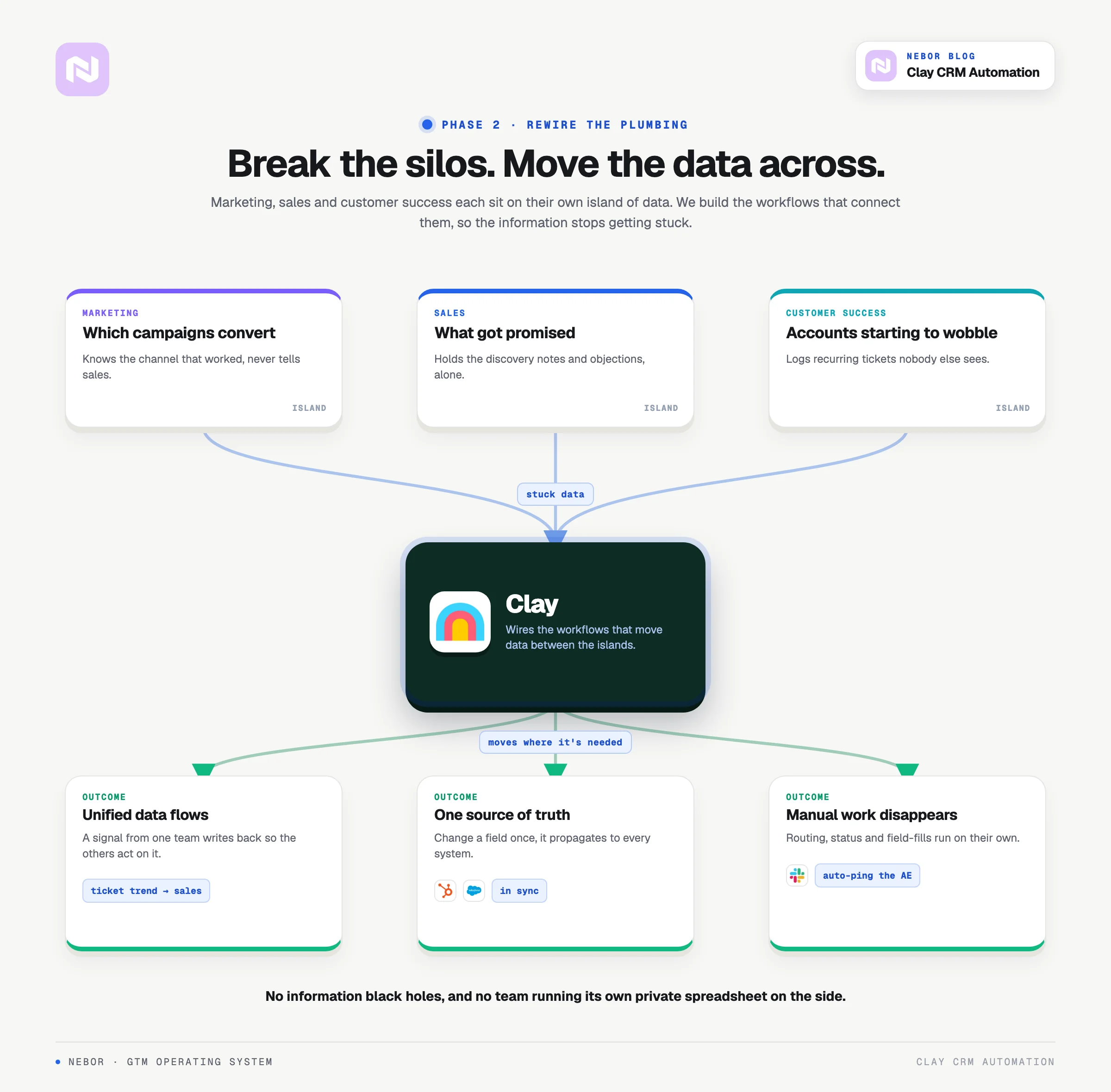
Cleaning the database is only half the work. The bigger issue is that most companies depend on workflows that were either never built or never updated.
The handoffs between teams are slow, the data lives in three different places, and the insights that should flow back from one team to another never arrive.
That is why phase 2 is not cleaning but rewiring the plumbing inside your CRM so the data moves where it needs to. Three changes drop out of this work for the team using the CRM every day.
You get unified data flows across teams
Most organizations live with three or four separate islands of information.
The customer support team logs every recurring complaint without telling sales or marketing.
The marketing team can see which campaigns generated which leads, but doesn’t tell sales.
Sales has a record of what got objected to and promised in the discovery call but doesn’t share with marketing.
None of that information moves between the islands without someone walking it across by hand. We build the workflows that connect those islands. Here is a scenario example to help you understand this.
A customer submits three support tickets about the same issue within two weeks. The workflow picks that up and writes it back to the CRM.
Marketing sees the trend on their dashboard and dials back the campaign that had been overselling that feature. Sales sees the same signal on the account record and reaches out before the renewal call.
The exact wiring will look different inside your stack. The pattern stays the same. No information black holes, and no team keeping its own private spreadsheet on the side.
Note: A CRM is only as good as the workflows around it, and most CRMs have none.
At Nebor we build those workflows in Clay. A new record gets verified and enriched before a rep opens it, duplicates get merged before anyone sees them, and anything without an owner gets routed with a clock on it.
Book a 15-minute call and let's talk about your business.
No more silos in your CRM
Here is a scenario we see at almost every B2B company that has been around long enough to accumulate two CRMs.
Marketing updates the industry tag on an account inside HubSpot. Sales is still working off outdated info in Salesforce. Two systems, two versions of the same record, and no one quite trusts either one.
Or customer success notes that a client just expanded to 200 seats. The detail lives in their tool of choice and never reaches sales, so the upsell opportunity quietly slips past.
We fix this by wiring updates to propagate. When a field changes in one system, it changes in every other system that needs the update. One source of truth, finally.
The manual work that drains your team disappears
Walk through the manual work your team does on the CRM in a normal week. Assigning leads to the right rep, updating account statuses by hand, chasing fields someone forgot to fill in. The work is tedious, and tedious work is exactly where human error creeps in.
The workflows we build take that work out of your team's hands.
A lead lands on your website form. The workflow enriches it, scores it, and routes it to the right rep before your AE even sees the notification.
A new account hits the high-value threshold. Slack pings the right AE with the enrichment data already attached, so they can respond inside the same hour.
A record is missing a field like company size or job title. Clay fills it in from a verified source without anyone on the team having to look anything up.
We also add a manual input flow that ensures that every time your members want information about an account or a lead, all they have to do is add their company name or whatever information they have about them to the CRM and our workflow will populate the remaining data points automatically in the background.
The CRM stops being a chore your team avoids. It stays fresh in the background, without anyone on your team having to do the chasing.
Phase 3: Intelligent segmentation and targeting
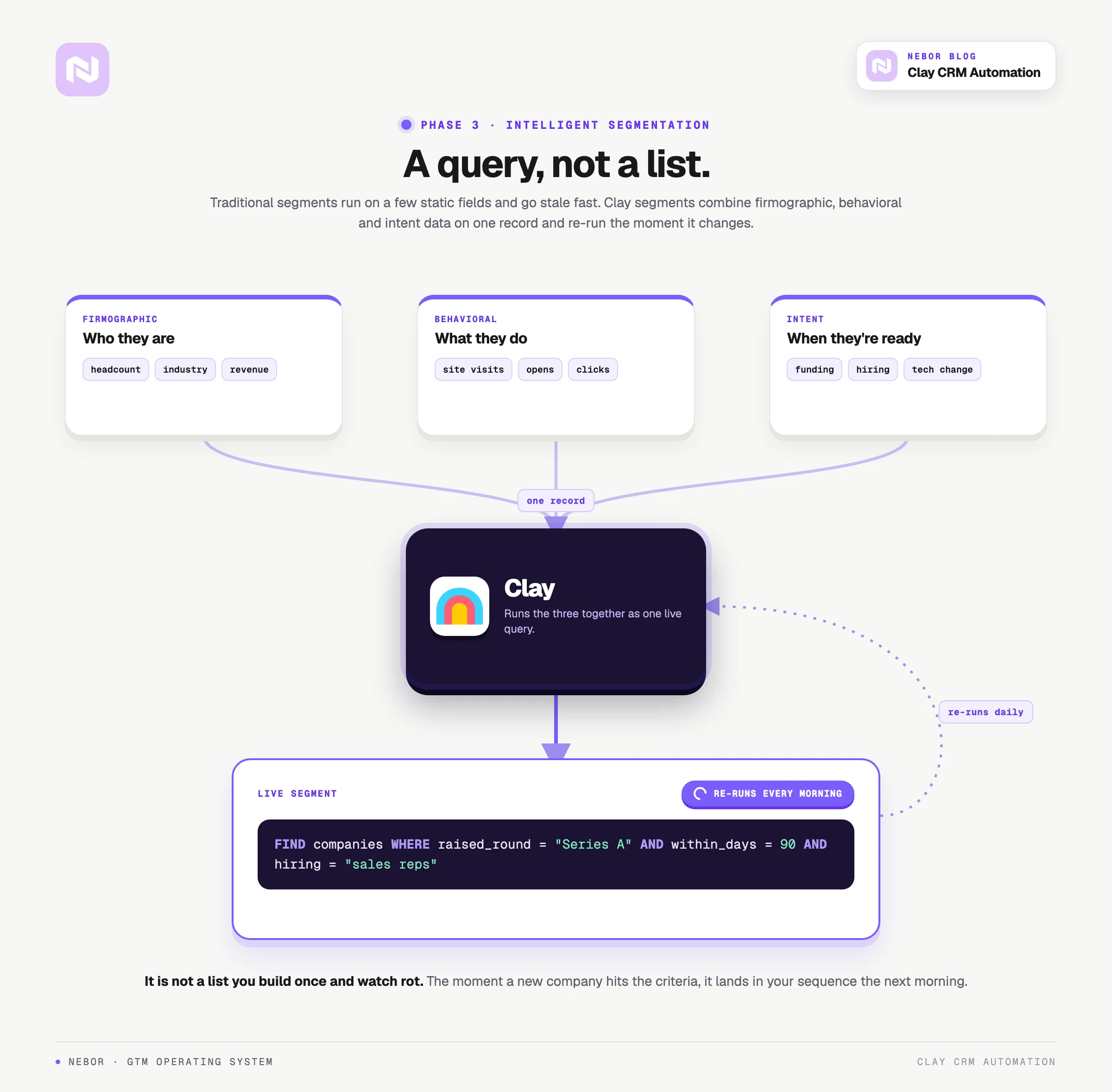
With phase 2 in place, the CRM is finally clean enough that we can start orchestrating outbound on top of it without waste.
Traditional CRM segmentation leans on the obvious fields. Headcount, industry, region. That is fine for static lists, but it is exactly why most lists go stale in two months.
Clay rebuilds segmentation as something dynamic, with the segments updating based on the kind of intent and behavioral data the CRM by itself never sees.
Instead of building one static list and watching it rot inside the quarter, we build segments that rebuild themselves every time the underlying data changes.
A real example. The segment “companies that raised Series A in the last 90 days and are actively hiring sales roles” is not a list.
It is a query that refreshes itself, and the moment a new company hits the criteria, it lands in your sequence the next morning.
The filtering goes deeper than that. You are not stuck with broad firmographic categories. You can target prospects based on a precise mix of firmographic data, behavioral signals, and recent intent triggers, all on the same record.
Phase 4: Personalization and outreach orchestration
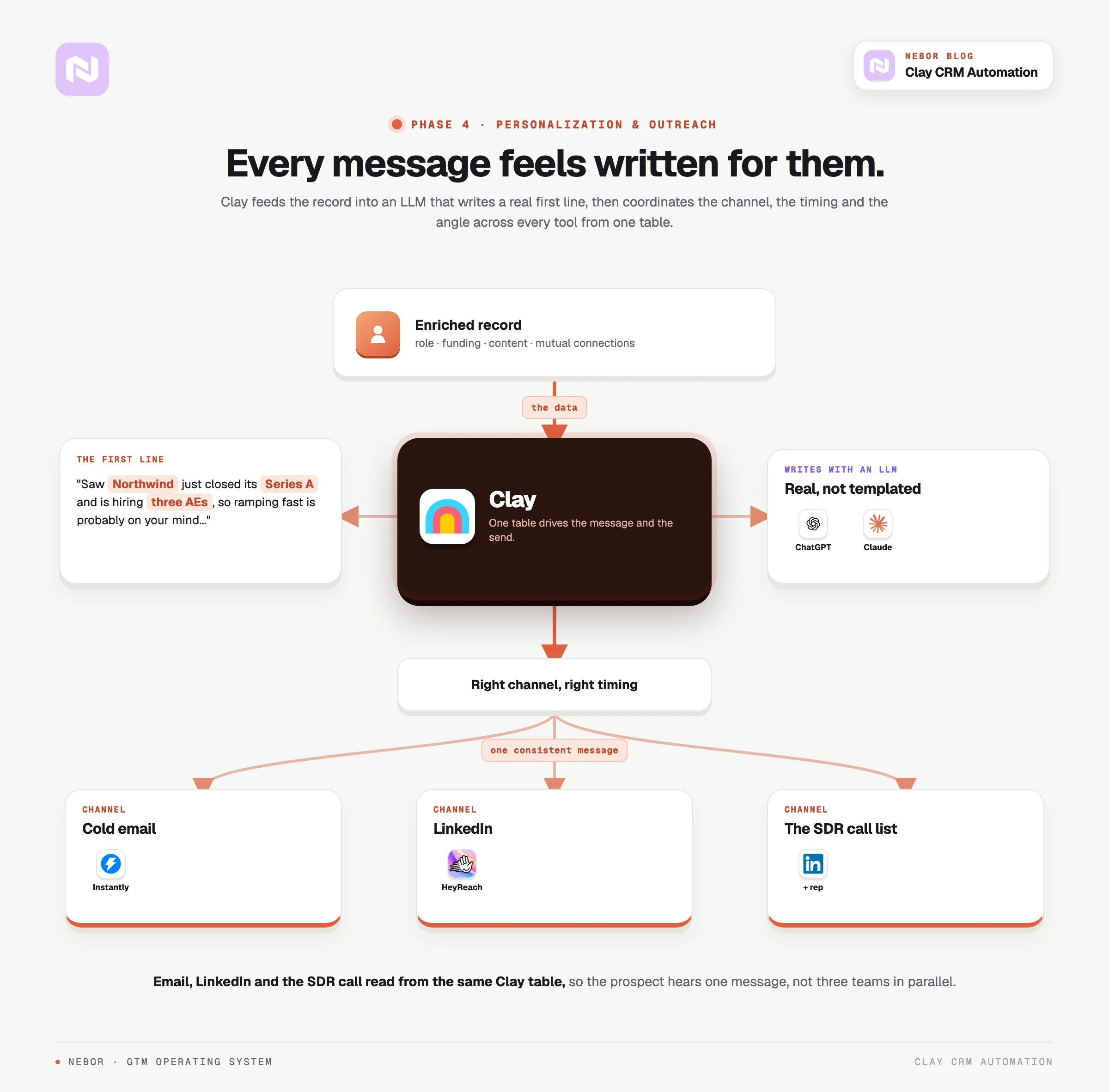
Phase 4 is where the work in phases 1 to 3 starts to pay off in actual outreach.
Instead of sending the same email to everyone in the segment, we use Clay to build outreach that points at something real about each prospect on the list.
Clay plugs into the LLMs that matter for sales writing. ChatGPT, Claude, sometimes a smaller model fine-tuned for our use case.
We prompt the model with the data already attached to the record, and it writes a first line that references a recent funding announcement, a mutual LinkedIn connection, or a piece of content the prospect put out last month.
Each prospect opens an email that feels written for them, not pulled from a template.
The personalization does not stop at the email body. It changes the channel, the timing, and the angle of every message that goes out.
Clay plugs straight into the outreach tools we use day to day. Instantly for cold email. HeyReach for LinkedIn.
Every layer in that stack reads from the same Clay table, which means the message engine and the sending tool are working off the same record the CRM does.
We can pick the right channel for each prospect based on what we know about them, time the send around their actual engagement pattern, and adjust the next message in the sequence based on how they responded to the last one.
The system can drive a multi-channel sequence that coordinates email, LinkedIn, and the SDR’s call list so the prospect hears one consistent message instead of three teams talking at them in parallel.
Phase 5: Real-time intelligence and trigger-based automation
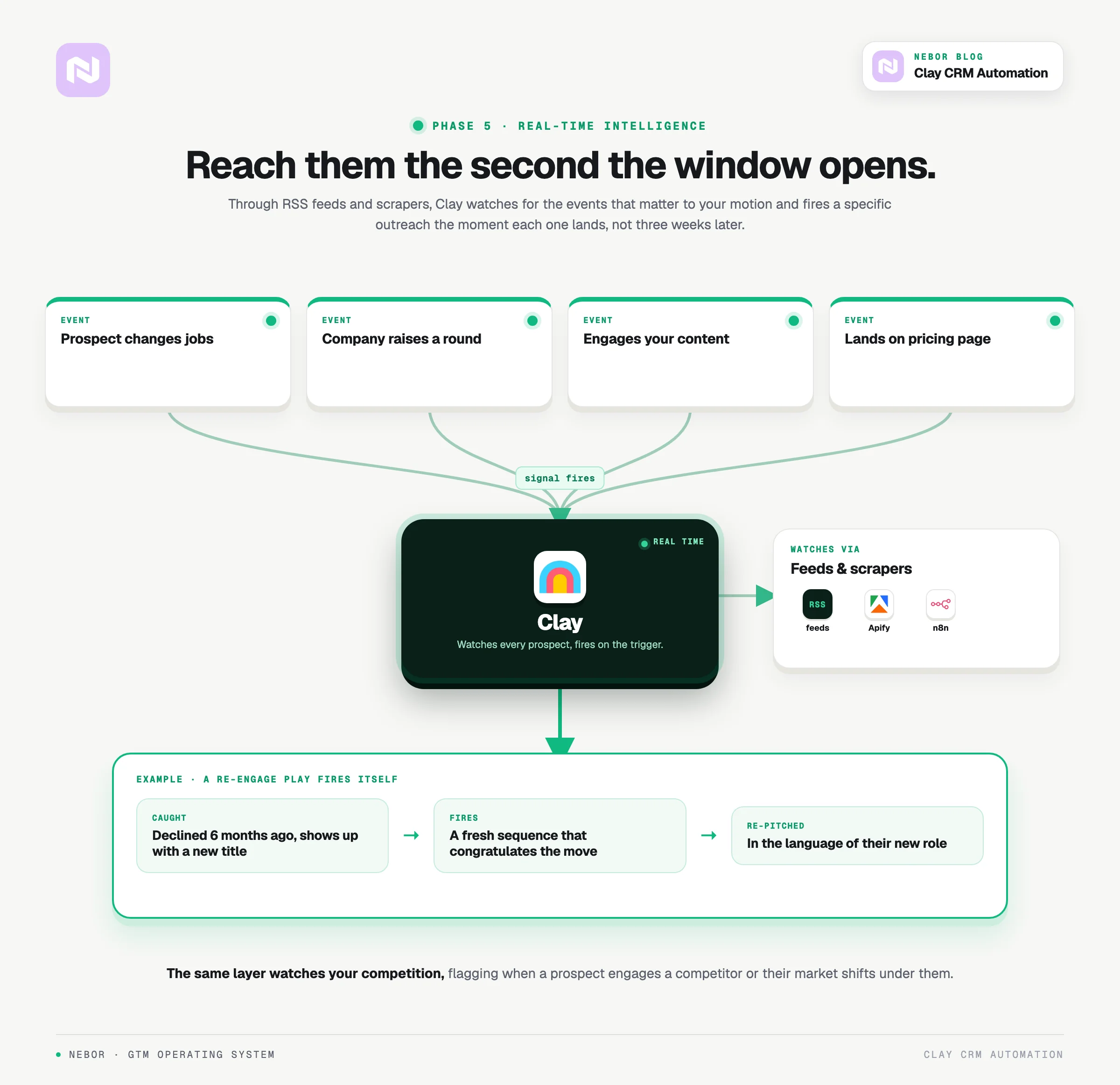
Phase 5 is where the system starts catching buying windows the second they open. Clay can watch a prospect in real time and trigger actions the moment something specific happens on their side.
Clay, through RSS, data scrapers and other tools we integrate watches for the events that matter to your motion. A prospect changes jobs. Their company raises a round. They engage with a piece of your content. They land on your pricing page.
Each event triggers a specific outreach the moment it lands. The prospect hears from you when the timing is actually right, not three weeks later when the window has closed.
A real example. A prospect declined your outreach six months ago. They show up on LinkedIn this week with a new title at a new company.
The Clay workflow catches the role change, starts a fresh sequence that congratulates them on the move, and re-pitches your solution in the language of their new responsibilities. Same person, different buying context, different reaction.
The same monitoring layer also covers your competition. Clay can flag when a prospect is engaging with a competitor's content or when their market shifts in a way that changes the conversation you should be having with them.
Phase 6: TAM mapping and CRM synchronization
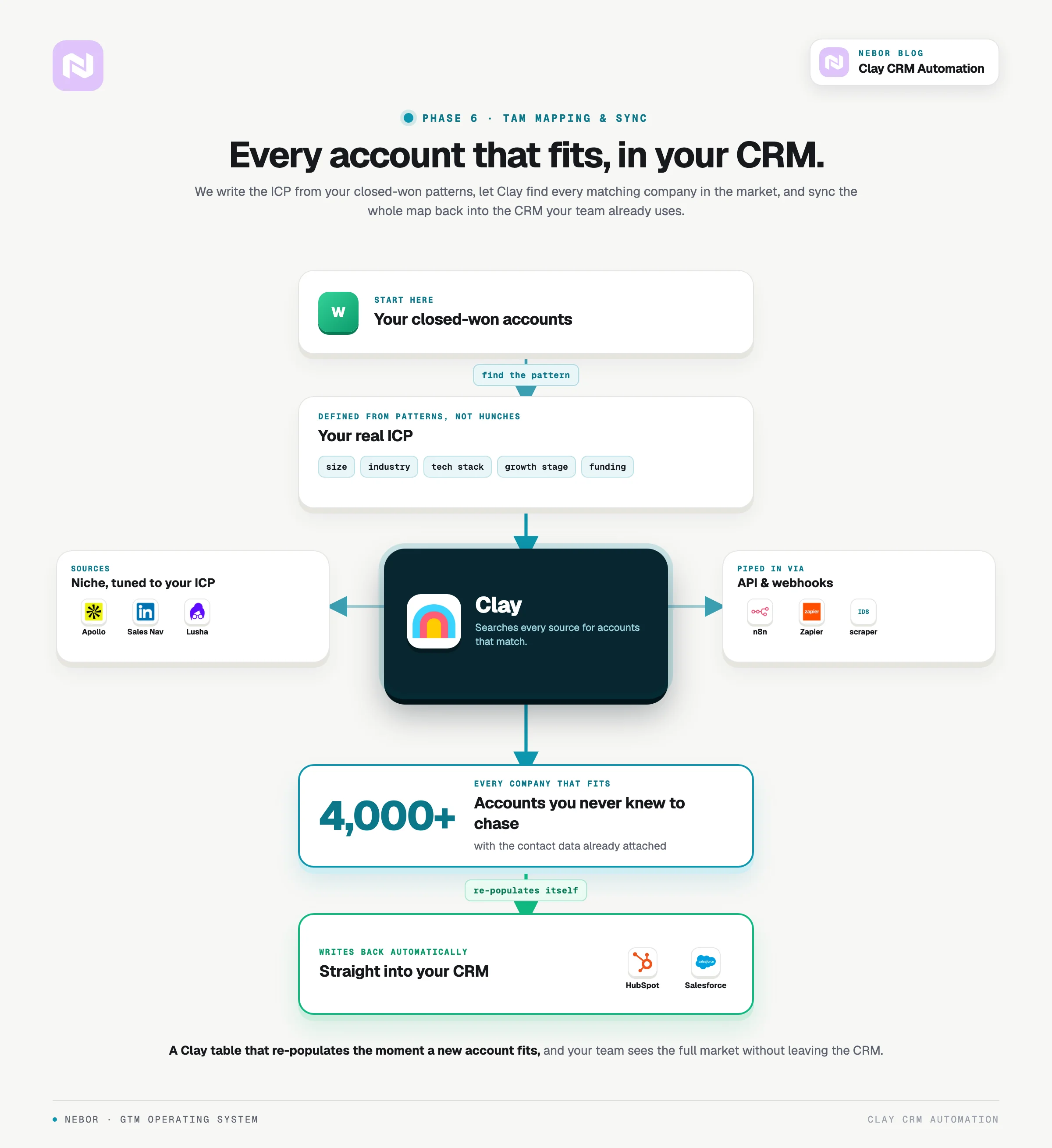
Once phases 1 through 5 are in place, you need to know where the rest of the opportunity actually lives.
Most companies work with a fuzzy version of their TAM. The fuzziness shows up as scattered effort and reps chasing accounts that were never going to convert anyway.
Phase 6 is where Clay maps your full TAM, account by account, with the same data discipline phases 1 to 5 already established. We have a deeper write-up on building a TAM the right way for the full method behind it.
Clay lets you define your ideal customer profile in real detail and then identify every company in the world that matches the definition. Not just the obvious 200 you already have. Every company that fits the shape of your best customer.
You stop relying on broad industry categories or guesswork. You start with a real database of every account that fits, and the database lives inside the CRM you already use.
The process starts inside your existing customer base. We pull every closed-won account, look at what those companies share, and write the definition from the patterns we find, not from the way the founder describes the ICP on a sales call.
From there, Clay examines patterns across company size, industry, tech stack, growth stage, funding history, and a dozen other fields. The output is a definition of your ideal prospect that holds up against real evidence, not a definition built on hunches.
Once the definition is locked, Clay searches through its data sources to identify every company that matches it.
The output is rarely a few hundred prospects. It is usually thousands of accounts you never knew you should be talking to, with the contact data already attached.
Depending on your ICP, you can plug in niche data sources we would never use for a general motion. Apollo, Sales Navigator, Lusha, and a handful of vertical-specific providers can all feed Clay, and the right combination depends on what you sell.
The integrations go either through direct API calls or through webhooks via n8n, Zapier, or Make. For a long-tail data source that does not have a clean API, we use the Instant Data Scraper Chrome extension to pull the data directly off the page and push it into Clay.
The result is a Clay table that re-populates itself the moment a new account meets the ICP definition. Your TAM is not a static spreadsheet anyone has to refresh by hand.
Every record from the Clay TAM also writes back to your CRM. The prospect data, the enrichment fields, and the latest signals show up directly inside HubSpot or Salesforce, so the team that uses the CRM every day sees the full market without leaving their tool.
Your sales team does not have to learn a new tool or work out of two different systems. They keep using the CRM they already know, and the difference is that the CRM is now backed by Clay's data layer underneath.
Every prospect record stays enriched in the background, with the latest contact info, company updates, and behavioral signals already attached when a rep opens it.
The result is a picture of your market your competitors are not currently looking at. While their reps work off a list of 300 names somebody pulled six months ago, your team is working off a database of every account in the market that fits, with the data refreshed last night.
What you can expect from Clay CRM automation as results
When the work above is done correctly, the changes show up across the team within the first quarter.
Reply rates climb compared to generic automation, because every message in the sequence is built around something real about the prospect, not a placeholder field.
The sales cycle shortens, because you are reaching prospects at the moment they are most likely to engage, not three months before or three months after.
The output of every rep on your team goes up, because the hours they used to spend on manual research and data entry now go into talking to qualified prospects instead.
The compound effect builds quietly. As the system keeps going, the data on which messages get replies and which segments convert feeds back into the next round of targeting and writing.
Six months in, the team has a CRM that knows more about its own market than the people operating it knew when they started.
Common Clay CRM automation mistakes to avoid
Clay is a serious tool, and we see most companies make the same handful of mistakes when they try to set it up themselves.
The biggest one is treating Clay like a traditional email marketing tool. They import a list, set up a basic sequence, and wait for magic to happen.
The actual value of Clay is in the workflows and the data layer underneath, not in the email it can send. Anyone with twenty dollars a month for an SMTP tool can send emails.
The second mistake is volume over quality. Reaching 100 well-researched prospects with a message that names something specific about them outperforms blasting 1,000 generic emails to a list nobody bothered to qualify.
The third mistake is treating Clay as a standalone island. Clay only earns its keep when it is connected to the CRM, the email and LinkedIn tools, and the rest of the stack the team already uses.
Otherwise the data ends up in another silo, and you have just built a new version of the problem you were trying to solve.
The fourth mistake is set-and-forget. Clay is not a tool you configure once and walk away from. The data sources change, the segments need re-tuning, and the sequences that worked last quarter usually need rewriting this quarter.
The teams that win with Clay treat it as a living system, not a one-off project.
How to build your Clay CRM automation strategy
Building a Clay CRM strategy is more important than the technical setup. It needs a clear view of every process in your org that touches the customer, sales included and not.
Start by laying out the processes you have today and naming the spots where automation would actually save your team hours, not just shift the work around.
Bring marketing, sales, customer success, and ops into the same conversation. Decide which signals should flow into the CRM, who should see them, and what the CRM should do automatically when each signal lands.
For outbound specifically, start by defining your ICP with more precision than the version on your sales deck. Clay performs in proportion to how specific your targeting criteria are. Vague ICP, vague results.
Next, map out the buying journey for your prospects and name the specific moments where they are most likely to take a meeting. New leadership hire, fresh funding, recent product launch, public hiring spree. Clay can spot any of these in real time and trigger the right outreach.
Build a content layer that holds up at each stage of the journey. Clay can deliver the asset that matches a prospect's specific stage at the moment they need it, but only if that asset exists in the first place. The system does not write your case studies for you.
Finally, build the human side of the workflow. The system can handle prospect identification and the first three sequence touches, but the moment a prospect replies, you need a human ready to close. Make sure that human exists, and that they know what to do with a warm reply when one lands.
Why the technical foundation under all of this matters
Clay is built to be operable by non-engineers. That does not mean it works on its own. The Clay implementations that produce real results are the ones connected to multiple data sources, multiple enrichment tools, and the actual execution layer the team uses. The shallow ones do not.
Data quality is the floor under everything. Without it, the new system performs the same as the old one, and you have spent six weeks rebuilding a graveyard.
The intelligence Clay produces is bounded by the data it pulls from. The investment in real data sources and verification tools (FullEnrich, Findymail, LeadMagic, BounceBan) is part of the system, not an optional add-on.
Integration is the part most teams underestimate when they price Clay out for the first time.
Clay has to connect cleanly with the CRM, the email and LinkedIn tools, and the rest of the stack the team already lives in. Bad integration means data silos and workflow bottlenecks, which is exactly the problem the system was supposed to solve.
Tracking and analytics matter as much as the workflows themselves. Clay generates a serious amount of data on prospect behavior and campaign performance, and most of it is useful.
You need a system in place to read that data and feed the insights back into the next round of targeting and messaging. Without that loop, the implementation plateaus around month three and never improves.
Bring Nebor in for your CRM rebuild, data hygiene and cross-department workflows
Clay is a seriously valuable tool, and a serious tool poorly implemented is just an expensive subscription. The teams that get real results out of it have either hired the right operator internally or brought in a partner that has used the same playbook before.
The learning curve is steep for any team coming from simpler automation tools. The integration depth and the workflow logic both take real time to master, and most companies do not have the months to spare.
The harder part is the strategic side. Figuring out which processes to automate, defining the targeting criteria, designing the workflows, writing the personalization.
All of that takes deep sales and marketing experience, and most teams do not have that experience waiting on the bench inside the org. We would know. We have spent the last few years specifically doing this for clients who tried it themselves first.
Hiring a team that has done this before cuts the time to result by months. It also keeps you from making the kind of mistakes that quietly damage your reputation with prospects you only get to email once.
At Nebor, we build Clay CRM automation systems for B2B companies whose CRM has stopped earning its keep. The work is the work above, applied to your specific motion, your specific stack, and your specific buying context.
The same framework has worked for dozens of clients now. The result we look for is always a CRM that updates itself, surfaces the buying signals worth acting on, and feeds outreach the team actually wants to send.
If you want to talk through what this would look like for your specific motion and your specific stack, find us on LinkedIn.
Note: A CRM is only as good as the workflows around it, and most CRMs have none.
At Nebor we build those workflows in Clay. A new record gets verified and enriched before a rep opens it, duplicates get merged before anyone sees them, and anything without an owner gets routed with a clock on it.
Book a 15-minute call and let's talk about your business.


Related Articles


By clicking Sign Up you're confirming that you agree with our Terms and Conditions.








