
Best Website Visitor Workflow Examples (with RB2B + Clay + Leadsfactory.io + HubSpot) To Turn Anonymous Visitors into Qualified Sales Conversations

by
In this post:
Your marketing team is driving traffic. Ads are live. Your content marketing efforts are excellent, and your content is ranking. Landing pages are getting an interesting amount of traffic, but not really converting.
Most of the people visiting your website leave without doing anything. No form filled out or demo booked. They browse your pricing page, read a case study, maybe check out your team page, and then disappear.
And at every turn it happens, your sales team has no idea this happened.
This is the gap we see constantly with enterprise and mid-market companies. Marketing is doing its job, generating attention and driving qualified inbound visitors.
But sales can’t act on it because they simply don’t know who’s there. The intent is real. The interest exists. But the connection between “someone visited our site” and “sales has a conversation” is completely broken.
At Nebor, we’ve built website visitor workflow examples that close this gap.
We turn anonymous website visits into real sales conversations with the right people at the right companies, contacted at the right time, with actual context about what they were looking at.
And we do website visitor tracking beyond the typical Google Tag Manager, burying random keys in your website’s HTML (website’s code) or forcing everyone through a form that most buyers don’t want to fill out anyway.
In this post, we’ll show you some of the ways we do it while designing a solid tracking setup or tracking method with effective data accuracy in data collection.
Let’s get started.
Why your highest-intent buyers never fill out a form
Most of your real buyers will never fill out a form, and most of inbound marketing depends on pretending otherwise.
Buyers with budget authority and active vendor research underway often prefer to browse anonymously, talk to colleagues, and only surface for a sales call once they have already shortlisted you.
You can see this in your own analytics. People come in quietly, look at your services, your pricing, your team, and a competitor case study or two, and then they leave.
They are gathering information for an internal conversation. The form is the last thing they want to fill out.
For your sales team, that creates a visibility problem. The most qualified inbound interest you get every week, target-account visitors doing exactly the kind of research that surfaces the strongest intent signals you can act on, lands and disappears without anyone on the AE or SDR bench knowing it happened.
Meanwhile your reps are calling MQLs that came in three weeks ago and burning the rest of their day on company research the system should be doing for them.
The handoff between marketing traffic and sales conversations is a leaky bucket, and the only thing holding it together is the form most of your buyers will never fill out.
We have written about this gap before in our piece on inbound-led outbound, where the core argument is that inbound and outbound become one motion the moment you build the system to treat them that way.
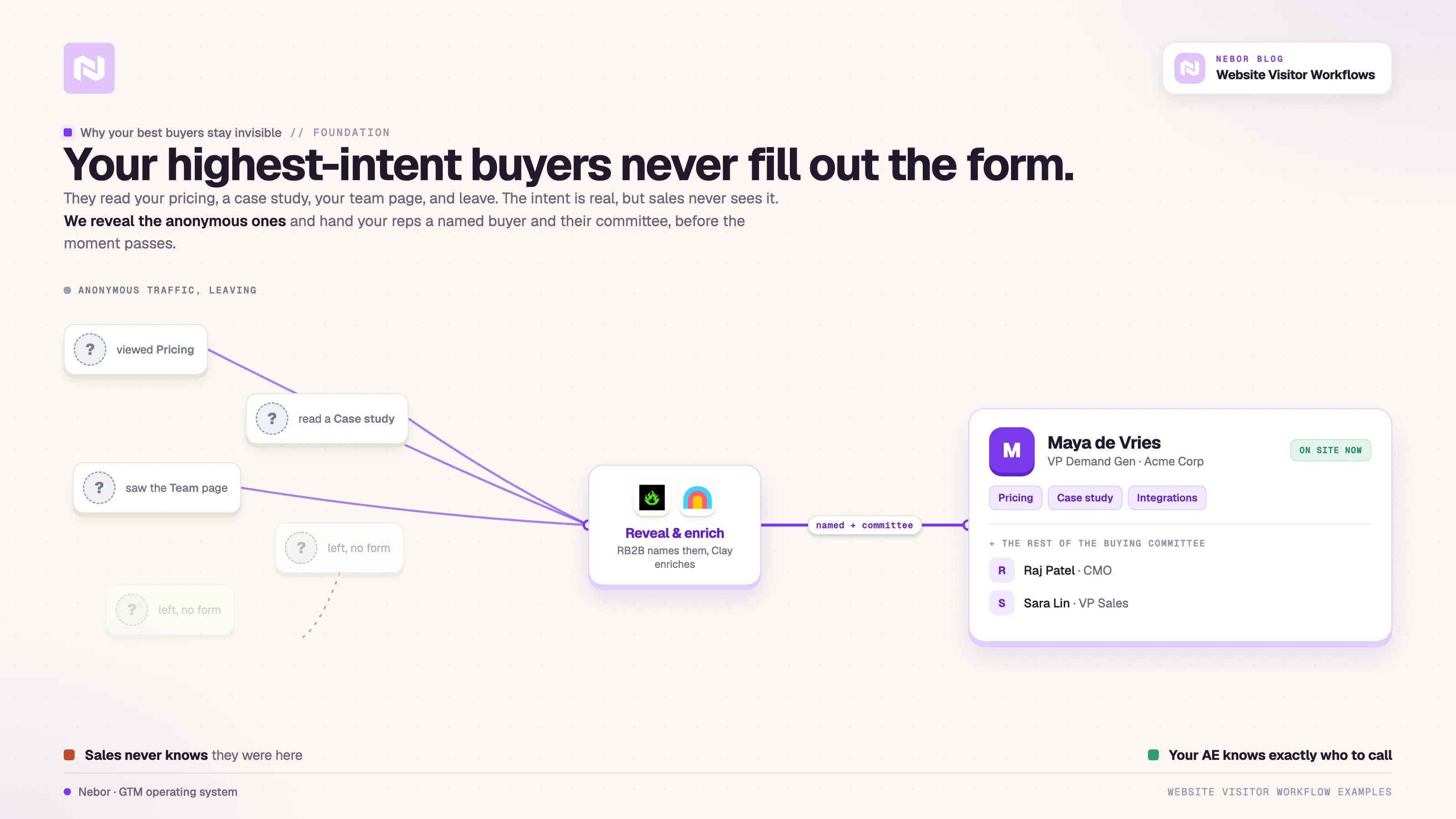
The fix lives upstream of the form, and it starts with knowing who is on your site whether they convert or not. Your sales team needs to be able to act on it before the moment passes, and that is what these two workflows do.
Two workflows that turn anonymous traffic into named, contactable buyers
This is about combining a handful of tools that already exist, RB2B or Leadinfo for visitor identification, Clay for orchestration and enrichment, and Leadsfactory.io for finding the right contacts at each visiting company, and connecting them so the system works without anyone touching it day to day.
The first workflow handles the inbound trigger. Someone hits your site, the system identifies them, your sales team gets a Slack alert with full context, and a human decides whether to act.
The second workflow goes the other way. It watches for buying signals on other sites and pulls those companies into the same enrichment-and-alert pipeline.
Both workflows pull weight, and most of our clients use them in parallel.
Workflow 1 catches every site visitor, finds their buying committee, and routes a human-approved Slack alert
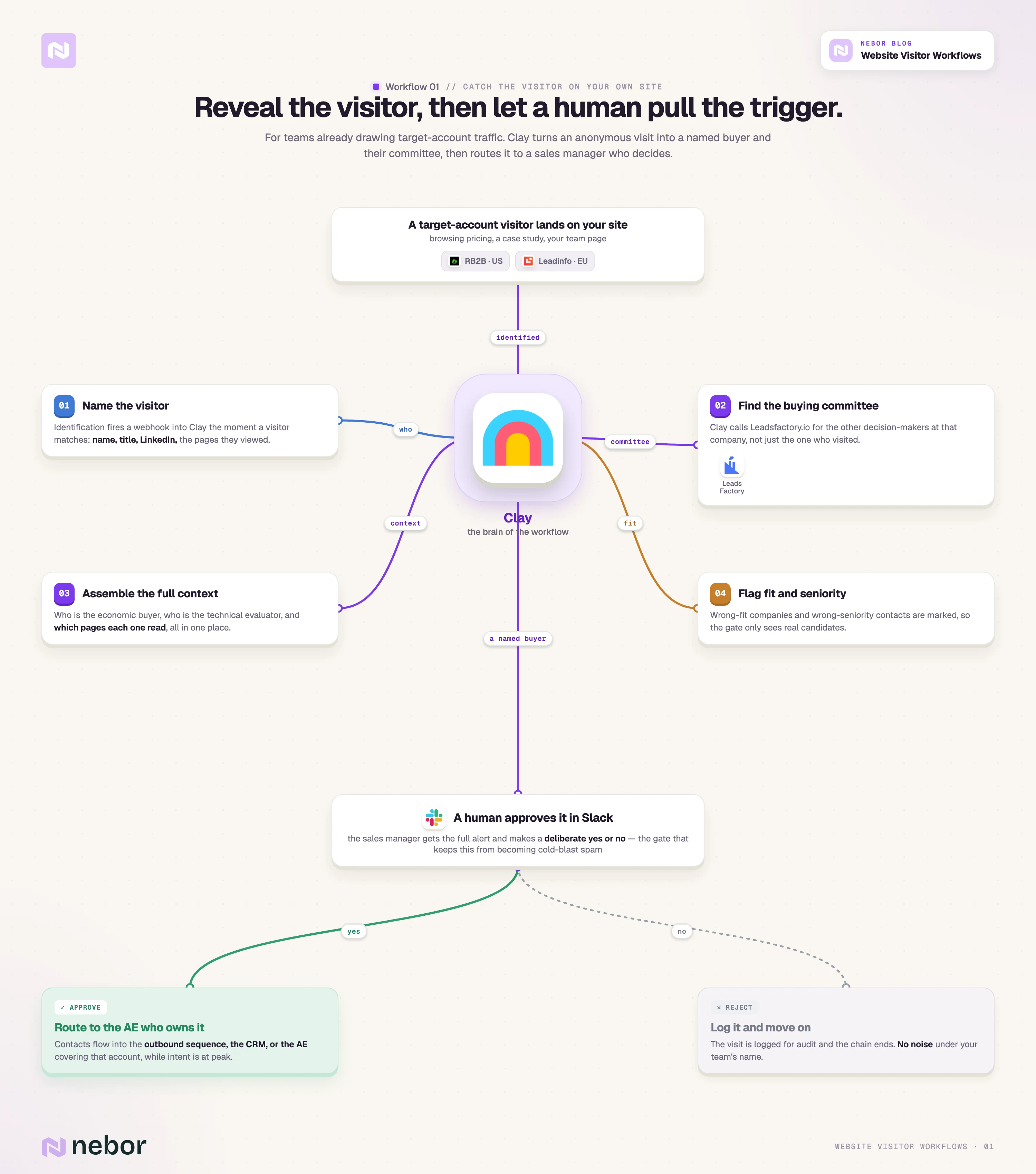
This is the workflow we build for clients who already have meaningful inbound traffic from target accounts and just need a way to act on it.
It identifies who is visiting, finds the rest of the buying committee at their company, and routes the alert to a sales manager who decides whether to pull the trigger.
Here is how each piece fits in the chain.
Visitor identification. We install RB2B for clients whose buyers are based in the US, where person-level identification is allowed.
RB2B sees the visitor, names them, and pulls their job title and LinkedIn profile, all without the visitor doing anything.
For clients whose buyers are based in Europe, we use Leadinfo or Snitcher instead, since GDPR rules mean European visitor identification works at the company level rather than the individual level.
We have written more about how this fork plays out in our deep dive on website visitor de-anonymization workflow.Webhook into Clay. Whichever identification tool we use, the moment a visitor matches, the tool sends a webhook into Clay, which creates a new row in the tracking table and starts the enrichment chain.
Clay is the brain of this workflow, a smart spreadsheet that connects to dozens of data providers, performs enrichments on conditions you define, and pushes data to other tools when criteria are met.Buying committee discovery. Once Clay knows which company the visitor came from, it calls Leadsfactory.io to find the other people at that company who match your target personas.
So if a Marketing Manager visits your site, Leadsfactory.io also pulls in the CMO, the VP of Demand Gen, and any other decision-makers worth reaching.
You move from “someone from Acme Corp visited” to “here are the three people at Acme Corp your AE should actually be talking to”.
We covered the full pattern of combining Clay, Leadsfactory.io, and LinkedIn Sales Navigator to find decision-makers automatically in an earlier piece.Slack alert to the sales manager. Clay packages the visitor, the buying committee, the pages they viewed, and any extra enrichment into a single Slack message that lands in front of your sales manager.
All the relevant context shows up in one place, so the manager does not have to hunt across LinkedIn or your CRM to make a decision.Human approval and routing. The sales manager reviews the alert and either approves or rejects it.
Approval routes the contacts into your outbound sequence, your CRM, or straight to the AE who covers that account, depending on how you have set the routing up. Rejection logs the visit for audit purposes and ends the chain.
We will not pretend every website visitor deserves an outbound sequence. Plenty of them are wrong-fit companies, wrong-seniority contacts, or right-company-wrong-timing situations a human can spot in five seconds and an algorithm cannot.
The approval gate is what keeps this workflow from turning into automated cold-blast spam under your sales team's name.
Why this workflow earns its place in the stack
Start with the obvious benefit, which is speed. When a target-account visitor is on your site right now, their interest is at peak height, and a Slack message in the next minute beats a follow-up email two days later.
By the time you would have reached out the slow way, they have already booked calls with two of your competitors.
The less obvious benefit is the account map. Leadsfactory.io turns one data point into a full picture of the buying committee, so your AE walks into the conversation already knowing who the economic buyer is, who the technical evaluator is, and which pages each of them has read.
That kind of context flips the conversation from cold to consultative.
The human gate is the third reason this works. Most automated visitor-tracking setups fail the same way. They send too many alerts, the team starts ignoring the channel, and within a month nobody looks at it.
Putting a sales manager in the loop forces a deliberate yes or no on every alert, and that discipline keeps the channel signal-rich. Your team trusts the alerts because someone has triaged them.
Workflow 2 watches buying signals on other sites and turns them into qualified HubSpot leads
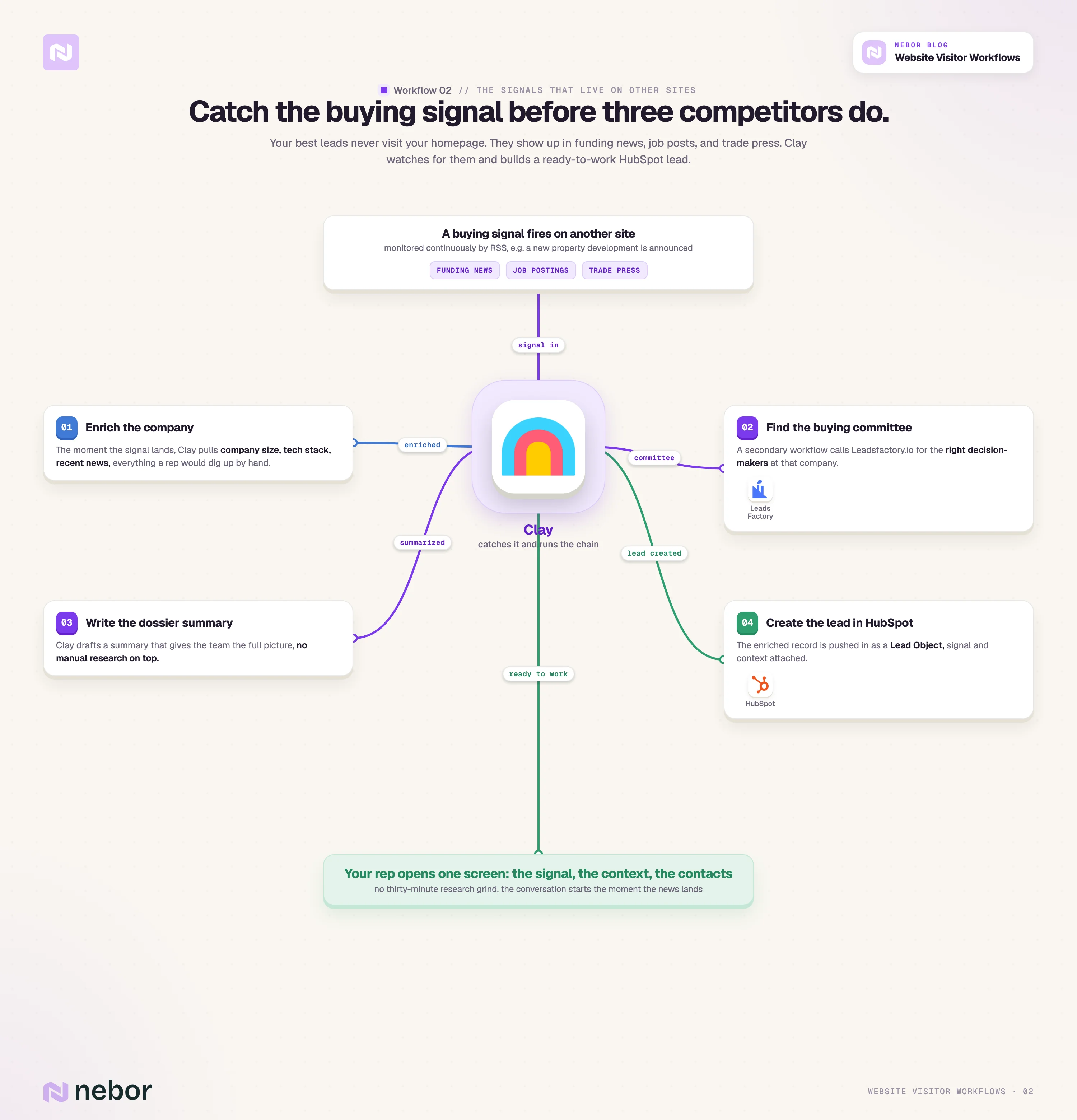
The second workflow handles the inverse of the first one, since the buying signals worth catching often live on other people's websites rather than yours.
Some of your highest-intent leads never visit your homepage. They appear in funding announcements, job postings for roles they need to fill, industry publications, and other intent signals scattered across the web.
Here is how each piece fits in the chain.
RSS feed monitoring tuned to your ICP. Depending on what you sell and who you sell to, we set up Clay's RSS feed readers to watch industry publications, job posting sites, funding announcement feeds, and specialized news sources in your target market.
We have a longer dive on the RSS-feeds monitoring workflow if you want the full setup walkthrough.Clay catches the signal and triggers the workflow. When the RSS feed detects a relevant signal, say a company in your target vertical posting for a Head of Operations, it triggers a Clay workflow.
Clay automatically gathers context about the lead, including company size, tech stack, recent news, and anything else your reps would otherwise dig up by hand. The enrichment passes through the data providers we connect to Clay.Lead created in HubSpot with full context attached. Clay pushes the enriched record into HubSpot as a Lead Object, complete with a summary that gives the sales team the full picture without any manual research on top.
Secondary workflow finds the buying committee. Once the Lead exists in HubSpot, a secondary workflow kicks in and calls Leadsfactory.io to find the specific people at that company who match your target personas, the VP of Sales, the CTO, the Head of Procurement, whoever is on your buying-committee map. Clay creates those contacts in HubSpot and associates them with the Lead record automatically.
Sales rep opens one record and sees the whole package. When your sales rep opens the Lead in HubSpot, the original signal that triggered the workflow, the enriched company context, and the specific contacts to reach out to are all on one screen.
For a real example, we have a client who offers AI-powered furnishing solutions for new property developments.
For them, we monitor RSS feeds from publications like Multi-Housing News, Chicago Yimby, and Property Week.
Every time one of those publications posts a new article about a property development project, the workflow identifies the developer, pulls their website and contact details, and calls Leadsfactory.io to find the right decision-maker.
A new property development means they will need furnishing solutions, and the moment the news lands is the moment our client wants the conversation to start, before three competitors have already pitched. That is what signal-based outbound looks like in practice.
Why intent signals beat waiting for someone to fill out a form
The signals worth acting on show up everywhere your buyers operate.
A new role hire often means a company is building out a function and might soon need what you sell, a funding round means the budget has just hit the bank, and an industry-publication mention tells you who is paying attention to your market right now.
Most of those signals never touch your own website, which is exactly why this workflow matters.
None of them matter, though, if your sales team does not see them in time, or if reps have to spend thirty minutes researching the company and finding the right contact before they can even send an email.
What this workflow does is collapse the gap between the signal showing up somewhere on the web and your sales rep having a fully enriched record on screen, with the right contact already attached.
Your reps stop spending the first hour of every prospect interaction on research, and the system does that work for them upstream.
That is what sales systems beating headcount actually looks like inside one workflow.
Why connecting RB2B, Clay, Leadsfactory.io, and HubSpot beats configuring any one of them alone
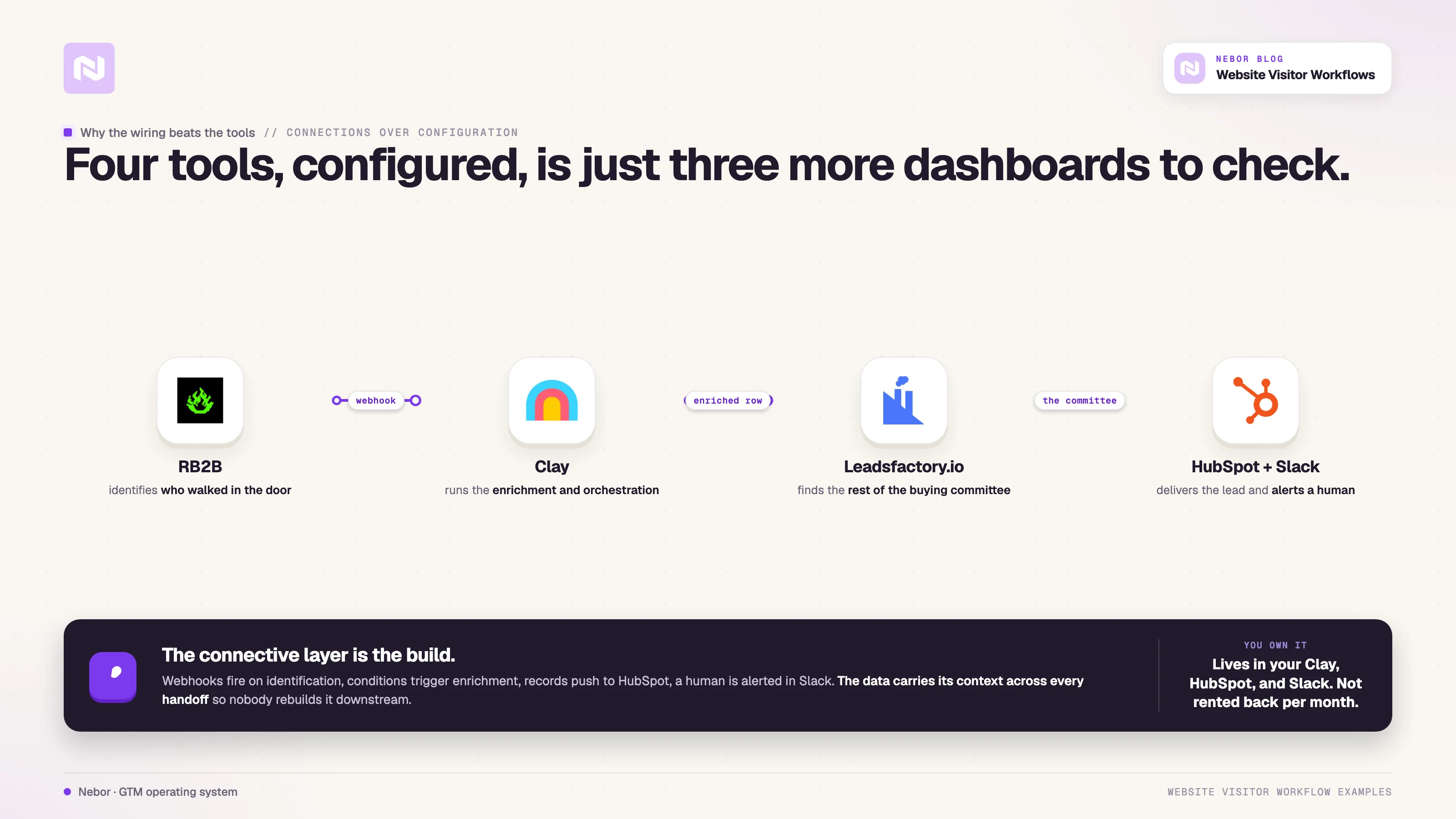
The lesson we keep learning across these builds is that the connections matter more than the tools.
RB2B identifies who walked in the door, Clay handles the enrichment and orchestration on the data, HubSpot holds the pipeline of record, and Leadsfactory.io fills in the rest of the buying committee.
None of those four, configured in isolation, gets you from a website visit to a sales conversation.
Plenty of teams buy Clay, RB2B, and Leadsfactory.io and end up with three separate dashboards that each show 70% of the picture.
We have written before about why most Clay implementations fail, and the pattern is almost always that nobody builds the wiring between the tools.
Configured tools without a system around them is just three more places to check at the start of a sales day.
What we build is the connective layer between them. Webhooks go out on identification and pass into Clay, where conditions trigger enrichments, push records into HubSpot, and alert a human in Slack when one needs to make a decision.
The data carries its context across every handoff so nobody has to rebuild it downstream.
This is the difference between renting an outbound system and owning one. After we finish building, the workflows live inside your accounts, including your Clay workspace, your HubSpot instance, and your Slack channel.
We do not hold them on our infrastructure and rent them back to you per month. That ownership is the whole point of how we work, and we have written about why we built Nebor that way rather than as a typical lead-generation agency.
This is why the clients we work with end up with more than visitor tracking or signal-based outbound. They walk away with a connected system where the website visit becomes a qualified conversation, and the system keeps going whether we are still on the engagement or not.
What changes in your sales reps’ working day once these workflows are live
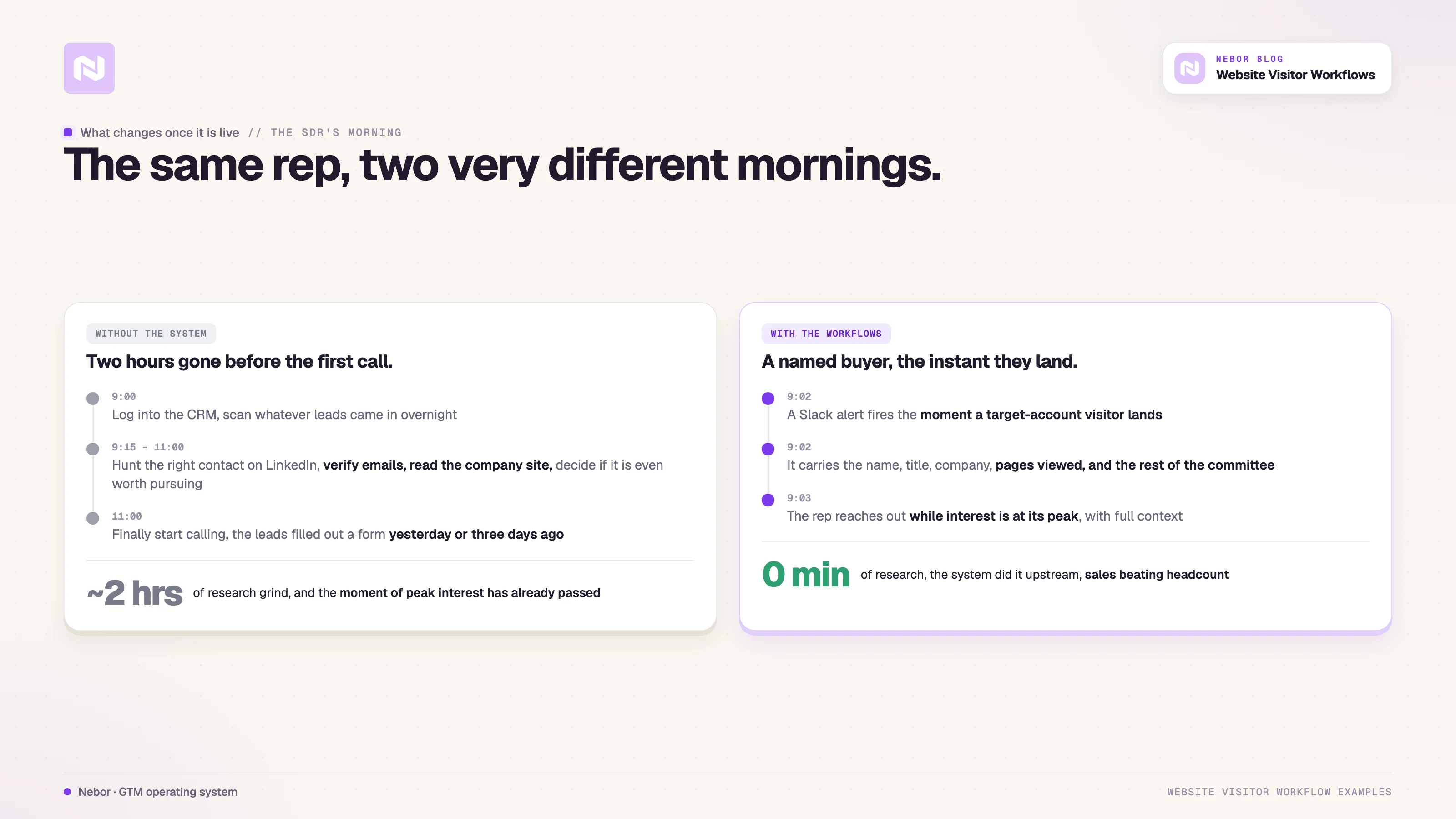
Without these workflows, a typical SDR starts the morning by logging into the CRM, looking at whatever leads came in overnight, and spending the next two hours researching each one before they can pick up the phone.
The research grind looks the same every time, with the SDR hunting for the right contact on LinkedIn, verifying email addresses, searching the company website to understand the business, and deciding whether the lead is even worth pursuing.
By the time those two hours end and the SDR starts making calls, the leads they are reaching filled out a form yesterday or three days ago, and the moment of peak interest has already passed.
With these workflows, the same SDR sees a Slack notification the moment a target-account visitor lands on the site.
The notification carries the visitor's name, title, company, the pages they viewed, and the rest of the buying committee that Leadsfactory.io has already pulled, all on a single screen.
The SDR can reach out within minutes, naming exactly what the visitor was just looking at, and the call opens with shared context already in place.
That is a different kind of conversation than the cold-call grind. The buyer is already thinking about the problem the SDR is calling about, and the call lands somewhere closer to a follow-up than a first reach.
The competitors who use this workflow reach prospects faster, with the right context already in hand, and they convert at higher rates than their counterparts who still rely on inbound forms and manual SDR research.
The advantage comes from better information landing in the rep's hands at the right moment.


Related Articles

By clicking Sign Up you're confirming that you agree with our Terms and Conditions.