

Writes personalised emails, sequences, LinkedIn messages and call scripts from 350-plus insight types, reachable through a Chrome extension, a campaign table or one API call.
What is
Autobound
Autobound reads 350-plus insight types before it writes a word, then picks up to eight of them for one message. You hand it an email address or a LinkedIn URL and it sends back a personalised opener, a full email, a call script or a multi-step sequence built out of what it found. Those insights come from hiring velocity, funding filings, 10-K and 8-K reports, earnings call transcripts, podcast appearances, LinkedIn posts and tech stack changes. Insight Control lets you switch any of them off and attach up to 2,000 characters of talking points, and Content Hub stores the value props and writing styles the copy has to follow. Two surfaces carry the writing, a Chrome extension that opens inside Gmail, LinkedIn, Outreach, Salesloft and Apollo, and AI Studio, a campaign table whose columns import prospects, pull insights, generate content and export it into Instantly, Outreach or HubSpot. The same campaign runs headless through a single POST request. Autobound earns a slot on one condition, that you want the research layer bought rather than built, because Insight Control and Content Hub deliver in an afternoon what a team would spend a week prompting into shape. Nebor writes personalisation inside Clay with Claude and ChatGPT, so AI Studio would rebuild a table we already run.
Integrations and the modern GTM stack
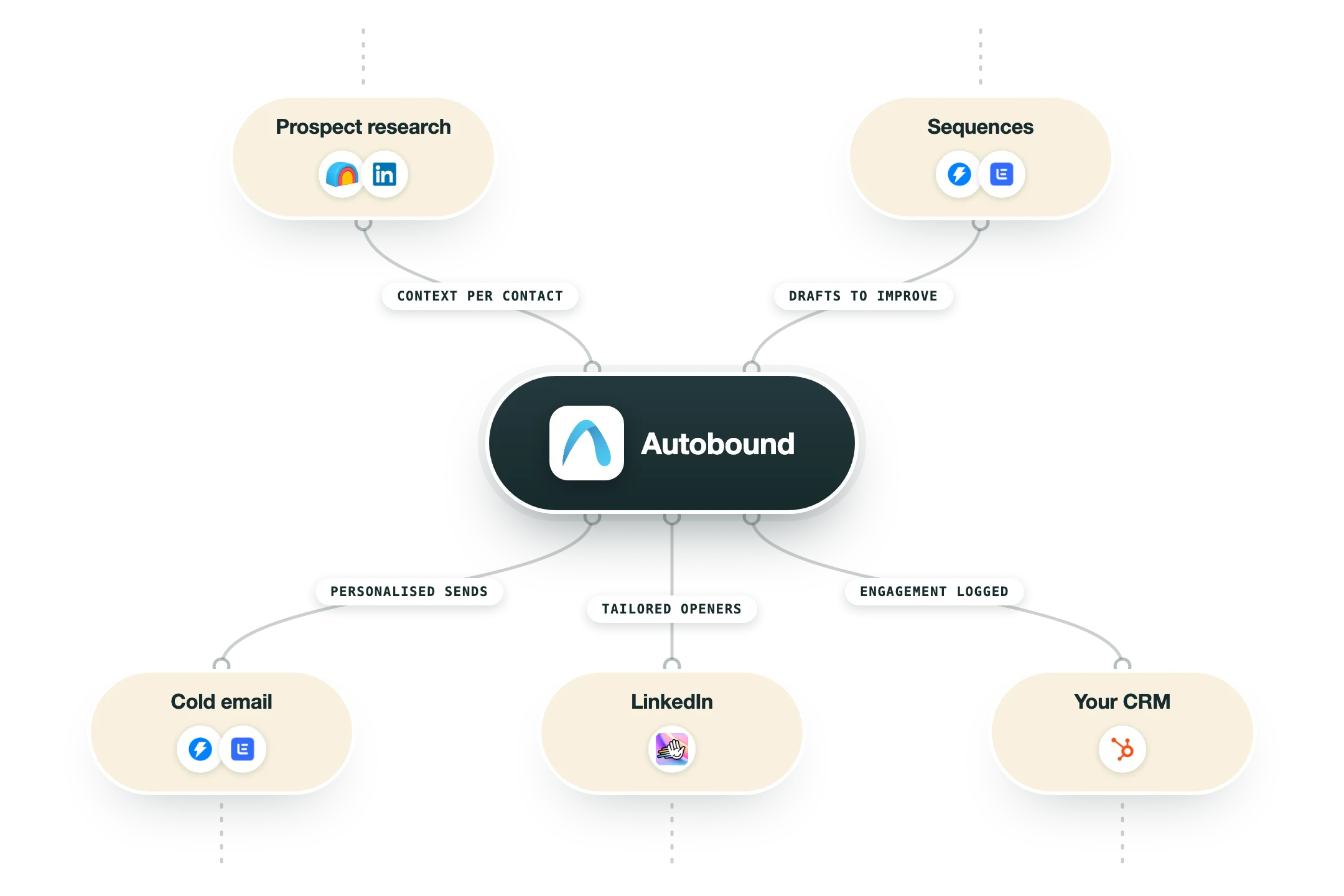
Autobound is built to sit in the middle of a stack rather than replace it, pulling prospects in from a CRM or a table and pushing finished copy out to whatever does the sending. The thing to check before you wire it is direction, because several of these connections only run one way.
Chrome extension | A blue icon appears next to any email address or LinkedIn URL on LinkedIn, Gmail, Salesforce, HubSpot, Apollo, Outreach, Salesloft and Groove. You pick up to eight insights, confirm the persona value prop, and generate. If several prospects are visible on the page you can select them all and add them to a sequence in bulk. |
AI Studio | The bulk surface, and it is a table. Each column runs a step, importing prospects, pulling insights, writing content or exporting the result, with auto-run and run conditions deciding when a step fires. Prospects arrive from HubSpot lists, Salesforce reports and campaigns, Google Sheets, CSV or a POST to the campaign execute endpoint. |
Instantly | Subject lines and bodies push straight into Instantly campaigns with merge variables mapped automatically, so nothing needs custom fields or middleware. Autobound supports bulk imports of 20,000-plus contacts per campaign and a continuous auto-export that fires as soon as generation finishes. |
Outreach and Salesloft | Outreach is the deeper of the two, with content written into its 35 built-in custom fields that sequences then reference as variable tokens, and prospects auto-enrolling when a field updates. Salesloft is CSV export only at the moment, with native support listed as coming soon, which is a step back for one of Autobound's oldest integrations. |
Gmail and Outlook | AI Studio treats both inboxes as first-class sending channels, building multi-step sequences with configurable follow-up delays and a choice between starting a new thread or replying in the existing one. Everything sends from your own inbox, signature and domain, so no third-party sending infrastructure is involved. |
HubSpot and Salesforce | Contacts come in from HubSpot lists or Salesforce campaigns and reports, and generated content goes back out into custom fields for downstream sequencing. Emails sent from Autobound can be logged to either CRM through BCC, which is the usual way teams keep activity history intact. |
Clay | Clay ships three native Autobound enrichments that generate content or return insights inside a table, billed against Clay credits or your own Autobound API key. Autobound recommends the HTTP POST and webhook route instead, since only that path reaches Content Hub, writing styles, sequence templates and multi-channel output. |
n8n and the API | There is no dedicated n8n node, so you call the API from an HTTP Request node and catch the result on a webhook. The signal API lives at signals.autobound.ai behind a single X-API-KEY header, rate limited to 300 requests a minute by default, with endpoints for company and contact enrichment, signal search, buyer intent across 38,000-plus topics and email verification up to 1,000 addresses a call. |
MCP and AI agents | An MCP server installs with npx @autobound-ai/mcp-server and exposes 14 tools to Claude Desktop, Claude Code, Cursor, Windsurf or any MCP client, covering signal search, company and contact enrichment and bulk lookups. OpenAI function calling is documented as well, and this is now the part of the product the company markets hardest. |
What is missing | No Zapier or Make app, no native n8n node, and no LinkedIn sending, since Autobound writes the InMail or connection request and you send it yourself. It also carries no sending infrastructure of its own beyond your Gmail or Outlook inbox, so cold email volume still needs Instantly, Smartlead or a sequencer underneath it. |
Pro’s
The research layer arrives prebuilt, with 10-K, 10-Q and 8-K filings parsed, earnings transcripts read, and hiring velocity, Glassdoor, Reddit and podcast mentions ranked before a single prompt is written.
Insight Control turns the AI into something you steer, because every insight can be switched off and each one carries up to 2,000 characters of your own talking points.
Autobound published a July 2026 coverage audit with record counts, refresh rates and key fill for all 34 signal types, and very few vendors in this category will show you their query output.
The floor to test it is close to nothing, with a free plan, $29 per user a month on annual billing, and 1,000 free API credits on signup.
It slots into an engine you already run, exporting into Instantly, Outreach, HubSpot and Salesforce, with native Clay enrichment actions and an MCP server for Claude Code.
Cons
That same audit counts 7,019,928 companies with at least one signal and 17,838,172 unique contacts, well short of the 50M companies and 250M contacts on the marketing pages, so a real slice of any list comes back thin.
The insights that sell the product are the rarest rows in the ledger, with podcast appearances covering 947 contacts and Form D funding rounds covering 1,730 companies at 35 percent key fill.
Credits drain faster than the sticker suggests, because every content item costs 2 credits, so the free plan writes 75 emails a month and a $29 Pro seat writes 500.
AppSumo buyers rate it 4.3 out of 5 across 50 reviews and the complaints repeat, with generated copy arriving as one unformatted block and bulk runs of 150 emails taking well over half an hour.
The company has moved its attention to selling signal data by the credit, and the writing product shows it, with seat pricing surviving only in the help centre and Salesloft downgraded to a CSV export while native support sits at coming soon.
Pricing
Basic
$0/month Free plan, credits shared across the org
150 shared credits a month
2 AI sequences and 1 custom writing style
90+ insights
Chrome extension
Outreach and Salesloft integrations
API access
Pro
$29/user/month Billed annually, $39 month to month
1,000 shared credits a month
10 AI sequences
10 custom writing styles
Priority AI generation
Beta feature access
Team
$69/user/month Billed annually, $89 month to month
2,000 shared credits a month for the first user
Unlimited sequences and writing styles
Enhanced analytics
Annual plans open with 24,000 credits plus 6,000 per extra user
Enterprise
Custom Quote only
Custom credit packages
Unlimited seats option from 1.8M credits
Premium support and implementation
Signal API credit packs
$19 to $4,999 One-time purchases, credits never expire
2,000 credits at $19 up to 1,249,750 credits at $4,999
Search 2 credits per result, enrich 2 credits per signal
Buyer intent 1 credit per contact
All 35+ signal sources, REST API and MCP server included
1,000 free credits on signup and zero-result searches are free
How it fits your stack
Alternatives


At a glance
350-plus insight types behind every message
Chrome extension for Gmail, LinkedIn and Outreach
AI Studio campaign tables with column steps
Emails, sequences, LinkedIn, SMS and call scripts
Exports to Instantly, Outreach, HubSpot, Salesforce
REST API and MCP server on every plan
Native Clay enrichment actions
Free plan with 150 credits a month
Read some of our client stories





GTM Workflows
Learn how to use GTM tools in workflows
Guides and tutorials to get the most from your workflows










Ready to get started?




By clicking Sign Up you're confirming that you agree with our Terms and Conditions.








