

A multichannel sales automation tool that sends LinkedIn, email, and phone sequences from one visual builder, with native enrichment and a unified reply inbox.
What is
La Growth Machine
La Growth Machine is a multichannel sales automation tool built to send outreach across LinkedIn, email, and phone from a single platform. Its core job is sequencing: it chains connection requests, messages, emails, voice notes, and calls into one campaign, with AI-assisted personalization and native lead enrichment built into the flow. You build campaigns in a visual drag-and-drop editor, mixing channel steps with delays and branching conditions. Each sender profile is an identity tied to its own LinkedIn and email account. Waterfall enrichment fills in verified emails and lead data, and a unified inbox pulls every reply into one shared view. In a GTM stack it lands at the sending and sequencing layer, the step that actually contacts people. You feed it a targeted, enriched list built upstream, then let it work the multichannel cadence and route replies to your team and CRM. It is a cold email tool extended to social and phone. It overlaps with the multichannel senders Nebor uses, Lemlist and HeyReach, so we treat it as a capable alternative in the same space rather than a default in our own stack. A team comparing sending tools could reasonably shortlist it alongside those, then pick on price and channel fit.
Integrations and the modern GTM stack
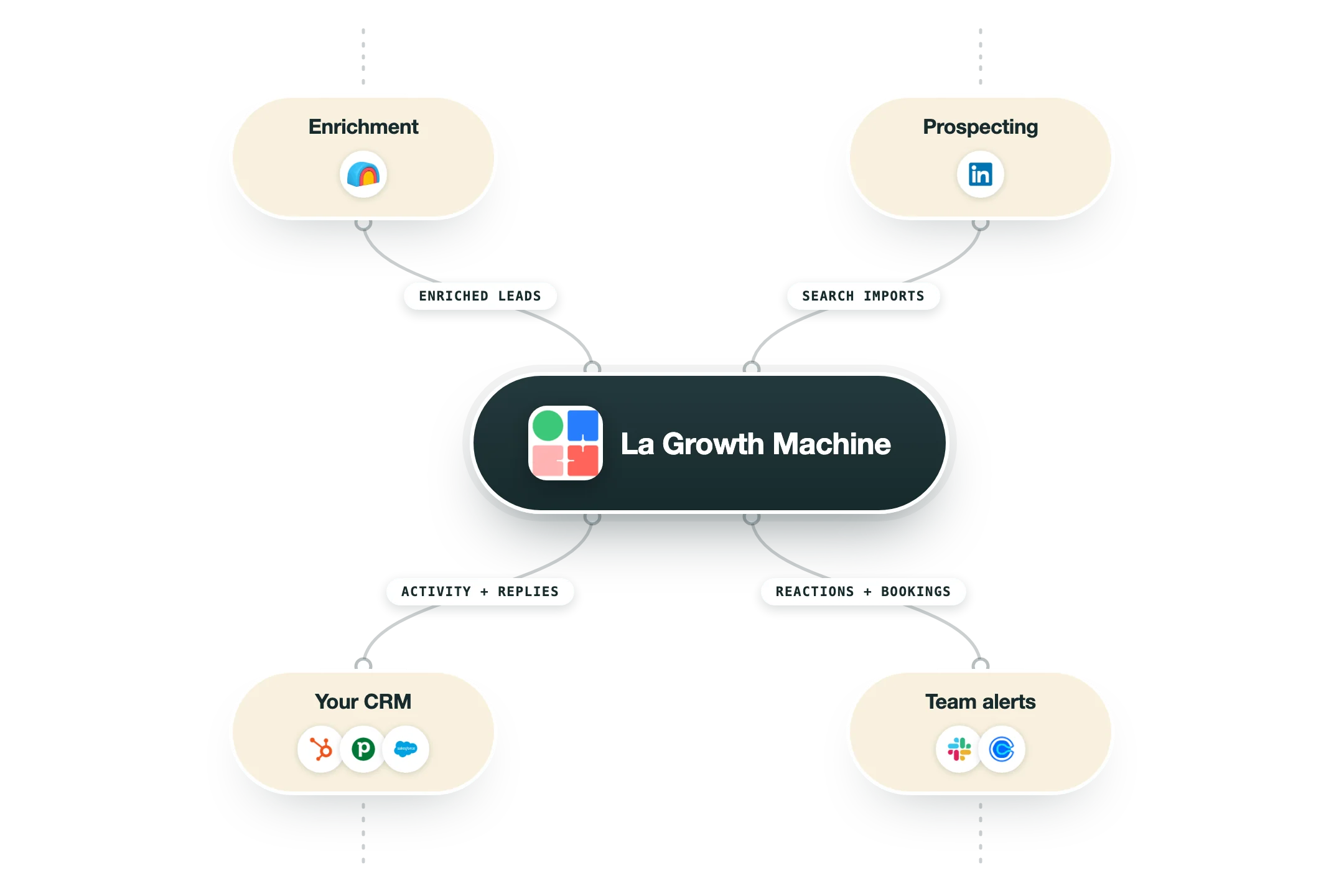
La Growth Machine combines LinkedIn, email and X in one sequence, with a more complete developer surface than most of its rivals:
LinkedIn and Sales Navigator | The core channel: automated connections, messages and even voice notes, importing straight from your Navigator searches. |
Clay | Works in both directions: find and enrich in Clay, sequence in LGM. |
HubSpot and Pipedrive | Native sync of prospect activity and history, and Salesforce gets contacts created automatically when leads reply. |
Slack and Calendly | The team hears when prospects react, and booking links live inside sequences. |
Zapier, Make, n8n | Standard bridges to everything else. |
API, webhooks and MCP | An open API, event notifications that work in both directions inside sequences, and an MCP server listed on its own integrations page so AI assistants can drive campaigns. |
Pro’s
The visual builder makes it easy to combine LinkedIn, email, and phone steps in one flexible sequence.
Native enrichment fills in verified emails and lead data without a separate tool in the loop.
The unified inbox collects LinkedIn, email, and X replies in one place for faster follow-up.
LinkedIn actions like voice notes, profile visits, and likes help warm leads before the first message.
Out-of-office detection pauses outreach until a lead is back, protecting deliverability and timing.
Cons
Per-identity pricing gets expensive fast as a team or agency adds more sender profiles.
There is no native LinkedIn account rotation, which caps how far volume can scale per identity.
API, Zapier, and full CRM sync are locked behind the higher-tier plans.
Users report bugs and sync errors as a recurring complaint, and email personalization stays shallow.
Pricing
Basic
EUR 60/mo per identity billed per identity, two months free on annual
LinkedIn and email channels
250 leads enriched per month
Verified emails and enriched lead data
Pro
EUR 120/mo per identity most popular, billed per identity
Adds phone calls and rotating inbox
400 leads enriched per month
Up to 6 active campaigns, A/B testing
Ultimate
EUR 120/mo per identity billed per identity
Adds X and unlimited campaigns
1,000 leads enriched per month
Native HubSpot and Pipedrive sync
Agency
Custom 6 identities minimum, for lead-gen agencies
Dedicated support and onboarding
Exclusive features and discounted rates
Custom
From EUR 150/mo six-month minimum
Pick only the features you need
Custom identity and campaign limits
How it fits your stack
Alternatives




At a glance
LinkedIn, email, and phone in one sequence
Visual drag-and-drop campaign builder
Native waterfall lead enrichment
Unified multichannel reply inbox
AI-assisted message personalization
LinkedIn voice notes and calls
A/B testing and campaign analytics
CRM sync on higher tiers
Read some of our client stories





GTM Workflows
Learn how to use GTM tools in workflows
Guides and tutorials to get the most from your workflows






Ready to get started?




By clicking Sign Up you're confirming that you agree with our Terms and Conditions.








