

Notion is a documentation and database workspace. In GTM stacks it works best as the surface automated briefs and playbooks get written into and read from.
What is
Notion
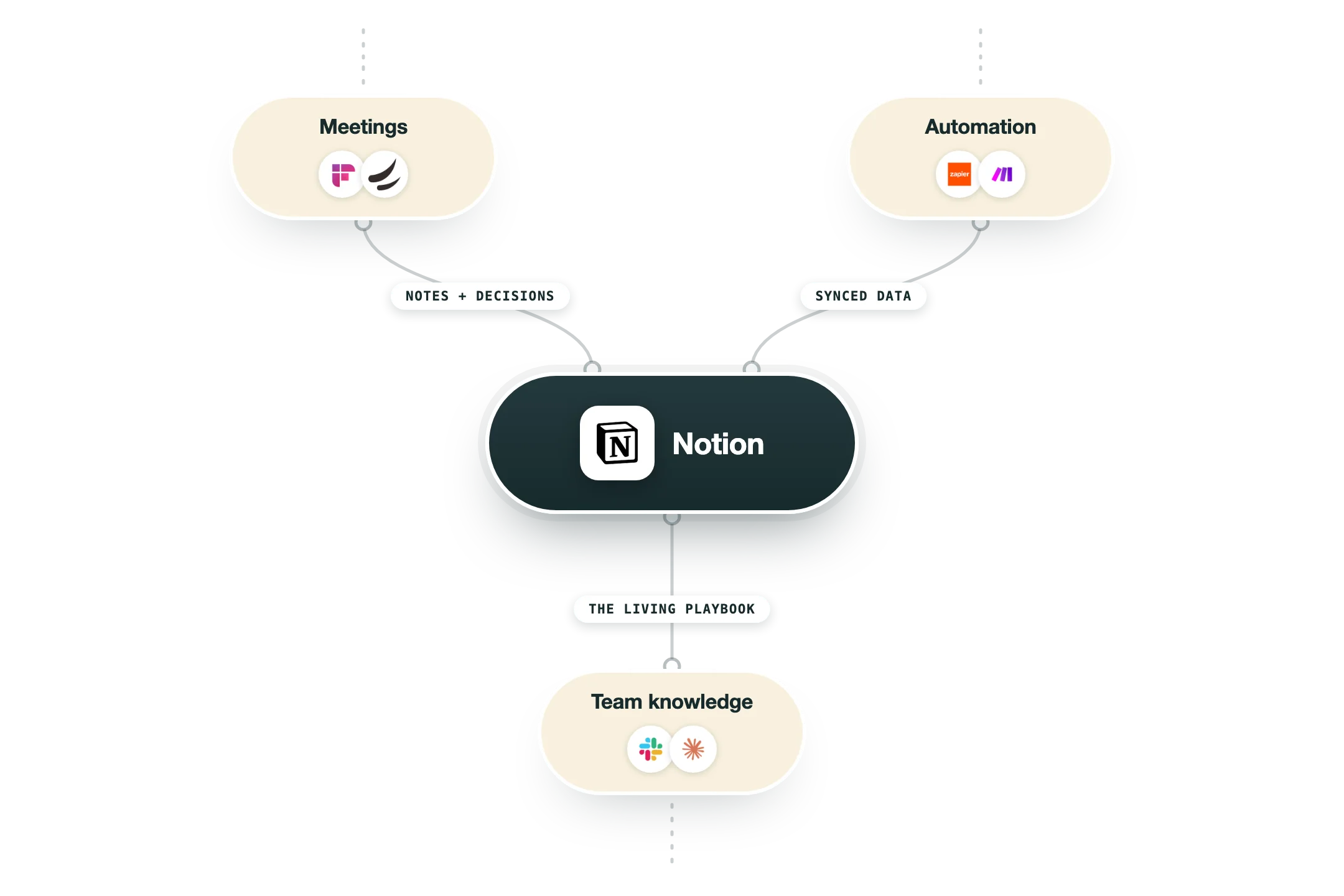
Notion is a workspace where documents, wikis, and structured databases live in one place. Its core job is holding the written knowledge a team actually needs day to day: process docs, account notes, campaign plans, onboarding guides. Pages are built from blocks, and any collection of pages can behave like a database. Those databases are the part that matters for GTM. A page can carry fields like owner, stage, or account, then be filtered into a board, table, or calendar view. A public API and native connectors let other tools create and update pages, so software can write into Notion, not only people. In a stack, Notion usually plays two roles: the documentation layer and the place automated output gets delivered. Clay enriches, HubSpot holds the record, Slack pings the rep, and Notion is where the longer written artifact lands and stays readable a month later. Search and permissions help it survive turnover. We use it that way at Nebor. Our meeting-prep workflow builds a one-page brief and drops it where the rep works, usually a Notion doc pushed into Slack. The honest caveat: a Notion page is where a system's output lands, not the engine. Stop there and the next hire starts from a blank page.
Integrations and the modern GTM stack
Notion is where the team's knowledge lives, and its MCP server is one of the most established anywhere:
Slack | The official connection posts updates in both directions between pages and channels. |
AI connectors | Notion's own AI can search across Jira, Teams, Outlook, Google Calendar and Linear, and answer with what it finds. |
GitHub and Figma | Pull requests and design files preview live inside docs. |
Zapier and Make | This is how CRM data actually reaches Notion. Despite common assumption, there is no native Salesforce or HubSpot sync. |
MCP server | Notion's official hosted server, open-sourced by Notion itself, lets Claude, Cursor and Codex search, read and update your workspace conversationally. |
API and webhooks | A mature public API with proper event subscriptions for anything custom. |
Pro’s
One workspace covers notes, specs, wikis and light project tracking without stitching three tools together.
The API is straightforward, so automations can create and update pages as a real delivery target.
Database views mean the same records can be read as a table, a board or a calendar.
Permissions and search hold up as a team grows past a handful of people.
Pricing is reasonable for small teams, and the free tier is genuinely usable solo.
Cons
It is a document surface, not an execution engine, so it will not drive your GTM motion.
Large databases get slow, and heavy relations make pages sluggish to load.
Without owners and conventions, workspaces sprawl into duplicate pages nobody trusts.
Full Notion AI is now on the Business tier, which raises the real per seat cost.
Offline use is limited compared with dedicated note apps.
Pricing
Free
$0 per member, per month
Unlimited pages and blocks for individuals
Up to 10 guests and 7 day page history
Limited Notion AI trial
Plus
$10 per member, per month billed annually ($12 monthly)
Unlimited file uploads and blocks for teams
30 day page history and custom sites
Basic connections such as Slack and Google Drive
Business
$20 per member, per month billed annually ($24 monthly)
Full Notion AI, AI Meeting Notes and Enterprise Search
SAML SSO and private teamspaces
90 day page history and premium connections
Enterprise
Custom quote based, annual contract
SCIM user provisioning and audit logs
Advanced security, DLP and SIEM integrations
Customer success manager and domain management
Add-ons and Credits
$10 per 1,000 monthly Notion credits
Custom Agents draw on Notion credits
Free trial credits before billing starts
Credits are consumed on top of a seat plan
How it fits your stack
Alternatives


At a glance
Docs, wikis and databases
Blocks build any page layout
Table, board, calendar views
Public API for writing pages
Slack and Drive connections
Notion AI on paid tiers
Granular sharing and permissions
Free tier for individuals
Read some of our client stories





GTM Workflows
Learn how to use GTM tools in workflows
Guides and tutorials to get the most from your workflows


Ready to get started?




By clicking Sign Up you're confirming that you agree with our Terms and Conditions.








