

A research agent that studies each prospect across the web, qualifies them against your personas, and writes the email, LinkedIn and call copy your sending tool then delivers, priced per lead instead of per seat.
What is
Twain
Twain researches every person on your list across the web and writes the outbound sequence that goes to them. You give it your website, your ICP and a set of contacts, and it returns email, LinkedIn and cold call copy built on what it found about that specific buyer. That is a different tool from the one most directories describe. Twain started in 2021 as a free writing coach that scored your draft and flagged small talk, filler and a missing question at the end. The coach lives on as a free Chrome extension called Rewrite by Twain, and the paid platform is agent shaped. A research pass runs before any drafting and returns a structured profile for each lead covering about, insights, why now, why us, talking points, discovery questions, a call opener and fit warnings, with a citation behind every claim. Twain sends nothing itself and hands the finished copy to Instantly, Smartlead, HeyReach, lemlist or Apollo. Twain earns a look from any team already sending at volume through Instantly, Smartlead or HeyReach, because it writes the copy rather than grading a person who is typing it. We have not run it at Nebor, and the test we would set is whether its research beats what Clay assembles for us before the writing step.
Integrations and the modern GTM stack
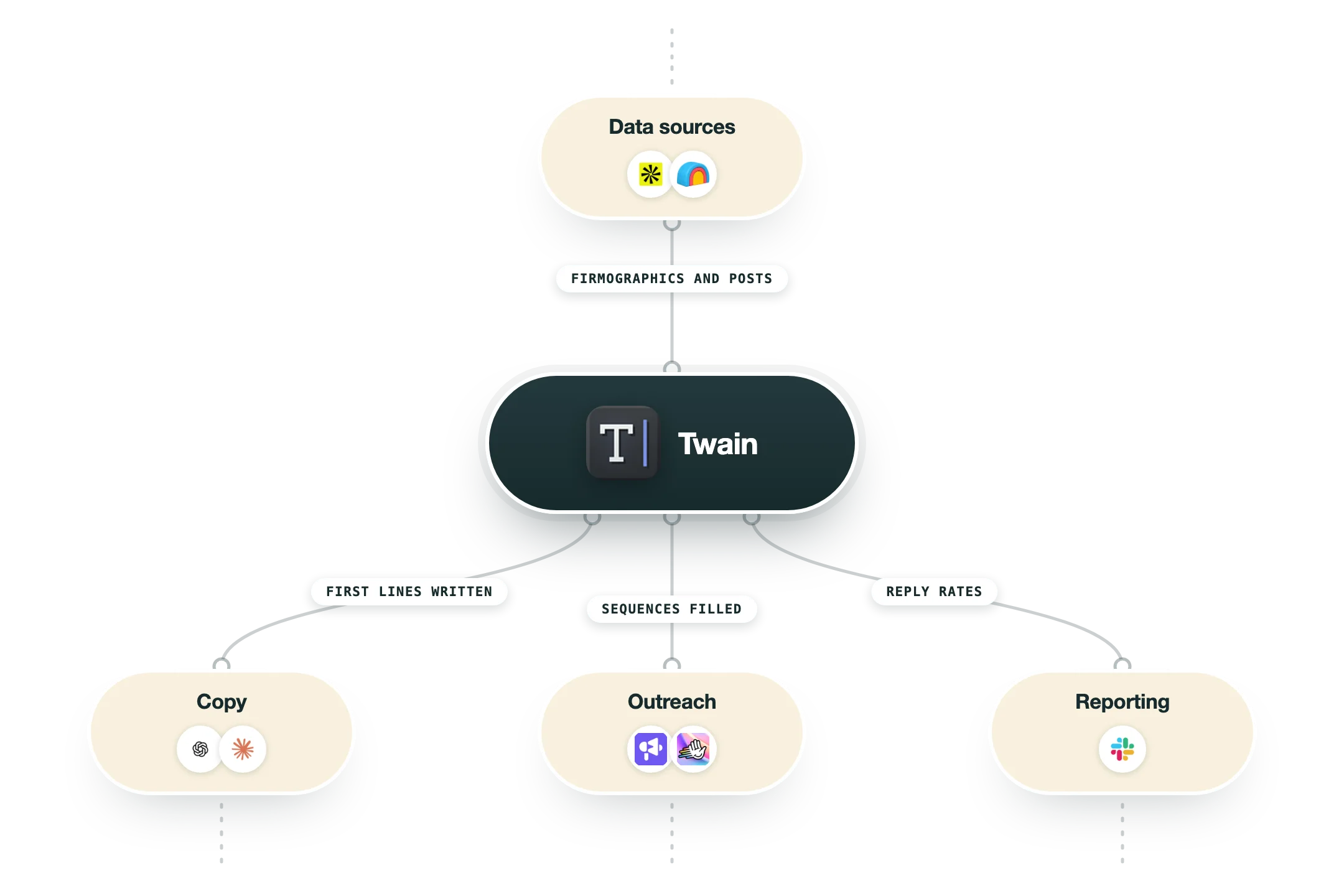
Twain is built to be called rather than logged into, so the integration list is mostly about where the leads come from and where the finished copy goes. It never sends a message itself, which means a sending tool is a requirement rather than an optional extra.
Clay | Two native actions, Generate outreach with deep research with Twain and Write Sales Emails with Twain, both callable from a column and billable either against Clay credits or your own Twain key. This is the cleanest route if your list already lives in a Clay table. |
Instantly, Smartlead, lemlist and La Growth Machine | The email side of the handoff. Twain writes the sequence and exports it with the personalisation carried as custom variables, then the sender does the mailbox rotation, throttling and reply handling that Twain has no part in. |
HeyReach | For LinkedIn you build the campaign in HeyReach with an empty lead list and blank message steps, export the personalised leads from Twain using a HeyReach API key, then map the Twain variables into the steps and set fallbacks. Leads land in the list automatically. |
HubSpot and Salesforce | Both work as a lead source and a destination. You pull contacts from a list or segment, and on the HubSpot side Twain can also read conversation history for context and write the researched output back onto the record after generation. |
Outreach, Apollo and Amplemarket | Prospects are selected by tag or list in the source tool and pulled into a Twain campaign, either once at campaign creation or on a polling workflow that keeps picking up newly tagged people. Re-imports deduplicate on the source record ID. |
Public API | A REST API at public.api.twain.ai/v2 authenticated with an x-api-key header, available to every registered account. Generate Sequence and Generate Expanded Research cost a credit each, Add Contact To Workflow costs one or two, and everything else is free. Rate limits are 500 requests a minute on the workflow endpoint and 100 elsewhere. |
MCP server | An OAuth-backed MCP endpoint at mcp.api.twain.ai works with Claude Code, Claude Desktop, Cursor and Gemini CLI. Listing workspaces, agents, campaigns and credits is free, while generate_lead and add_lead_to_workflow spend credits, and the client asks before it spends. |
n8n | Twain publishes ready-made n8n workflows that wire a signal webhook through dedupe and LinkedIn lookup into a Twain generation step, then out to Slack for review and optionally on to HeyReach. Useful as a reference build even if you rewire the middle. |
What is missing | No sending, no inbox warmup and no domain infrastructure, so budget a sender alongside it. There is also no contact data of its own, meaning Twain works on a list you already have. The old compose-window coaching now only exists in the free Rewrite by Twain Chrome extension, which sits outside the paid platform entirely. |
Pro’s
One credit covers both the research and the message for a lead, and regenerating costs nothing, so reworking an angle does not bill you twice the way a second enrichment call would.
Every insight in the research profile carries a link back to where it came from, so a rep can check the claim before it goes out rather than trusting a sentence a model produced.
Seats are free and the whole team draws on one credit pool, which suits an agency or a three-person outbound crew far better than the per-seat pricing that dominates this category.
The Clay actions, the public API and the MCP server at mcp.api.twain.ai all reach the same agents, so you can drive it from a table, a script or Claude Code without committing to one route up front.
In the published n8n workflow a lead goes from webhook to researched LinkedIn sequence in about 20 seconds, against the 15 to 20 minutes a rep spends doing that reading by hand.
The Kiln puts Twain in the AI copywriting slot of its public GTM tool stack, so this is a tool other build-focused agencies have already been willing to put in front of clients.
Cons
Twain sends nothing of its own, so it is an extra line on the invoice sitting on top of Instantly, Smartlead or HeyReach rather than replacing any of them.
Most of the public record is stale. Review sites and directories still describe the free writing coach with its 5 messages a day, and that product stopped being the main one some time ago.
The entry rate of $0.198 a lead stacks on top of your data spend, so a 5,000-lead month runs $900 in Twain alone before you have paid for a single email or phone number.
Reviewers report thin output in niche and technical categories, where the research turns up little about the account and the copy falls back to something generic.
The accuracy claim on the homepage rests on a blind test Twain says Clay ran, with no published methodology, and fewer than ten G2 reviews sit behind it for a buyer trying to sanity check the number.
Pricing
Subscription 500 leads
$99/month Billed monthly in USD, works out at $0.198 a lead
500 credits a month for research or bespoke messages
Credits roll over for 2 months while the subscription is active
Unlimited teammates on one shared credit pool
Native integrations, public API and MCP access
Regenerating a message costs no extra credit
Subscription 1K to 2K leads
$198 to $396/month Still $0.198 a lead, 1,000 leads at $198 and 2,000 at $396
Everything in the 500-lead tier
Inbound, outbound and event-based agents
No cap on agents, campaigns or workflows
Signal-led, ABM, closed-lost and competitor campaign templates
Subscription 5K to 10K leads
$900 to $1,600/month Volume rate drops to $0.18 a lead, then $0.16 at the top tier
5,000 leads at $900 and 7,000 at $1,260
10,000 leads at $1,600
Custom onboarding to deploy the agents
Weekly health checks and agent audits
Pay as you go
$29.70 for 100 credits One-time credit packs with no subscription attached
100, 250 and 500 credits at $0.297 each
750 and 1,000 credits at $0.27 each
2,000 credits at $480, or $0.24 each
5,000 credits at $1,150, or $0.23 each
Custom
Quote from sales The slider stops at 10,000 leads a month and hands you to sales above that
Negotiated volume rate
Custom onboarding and ongoing agent audits
Direct support during deployment
How it fits your stack
Alternatives


At a glance
Deep research per lead with cited sources
Writes email, LinkedIn and cold call copy
Qualification at account and contact level
Two native Clay actions plus a public REST API
MCP server for Claude Code, Cursor and Gemini CLI
Pushes to Instantly, Smartlead, HeyReach, lemlist, Apollo
Imports from HubSpot, Salesforce, Outreach, Amplemarket
Ten languages including German, French, Dutch, Polish
Read some of our client stories





GTM Workflows
Learn how to use GTM tools in workflows
Guides and tutorials to get the most from your workflows










Ready to get started?




By clicking Sign Up you're confirming that you agree with our Terms and Conditions.








