
Why the Best Outbound Sales Agency in 2026 Doesn’t Sell Outbound as a Service


In this post:
A few years ago, being the best outbound sales agency meant you were the agency sending the most campaigns, sending the most volume, booking the most meetings on a retainer.
We believe it should point at something that’s closer to the contrary now. Not that the best agency shouldn’t send campaigns, do volume, or book meetings.
Our argument is against the idea of selling volume outbound campaigns on a retainer as an outbound sales agency and offering JUST THAT.
If you are curious enough to open Claude Code on your computer, ask it the right questions and let it walk you through the process, try Clay and chain it with the right platforms and tools, you can do the same and practically achieve the same results.
With what AI can do today and all the amazing tools you can chain together, for us, the best outbound sales agency is the one that builds you a smart, automated outbound system that goes after your prospect with pin point accuracy, not the one that does outbound for you as a service.
Your outbound sales partner needs to ensure that no one in your revenue or sales team has to do any manual research, be copy-pasting data between tools, carrying CSV files around, manually sorting through leads, or worrying about your top of funnel (ToFU) prospecting.
We are sure you can take a pretty good guest at the pattern that drove this shift, because you have lived it. You hire an outbound agency to fix your pipeline.
Three months in, meetings start hitting the calendar. Six months in, they dry up or quality collapses, you churn the agency, hire a new one, and the cycle restarts.
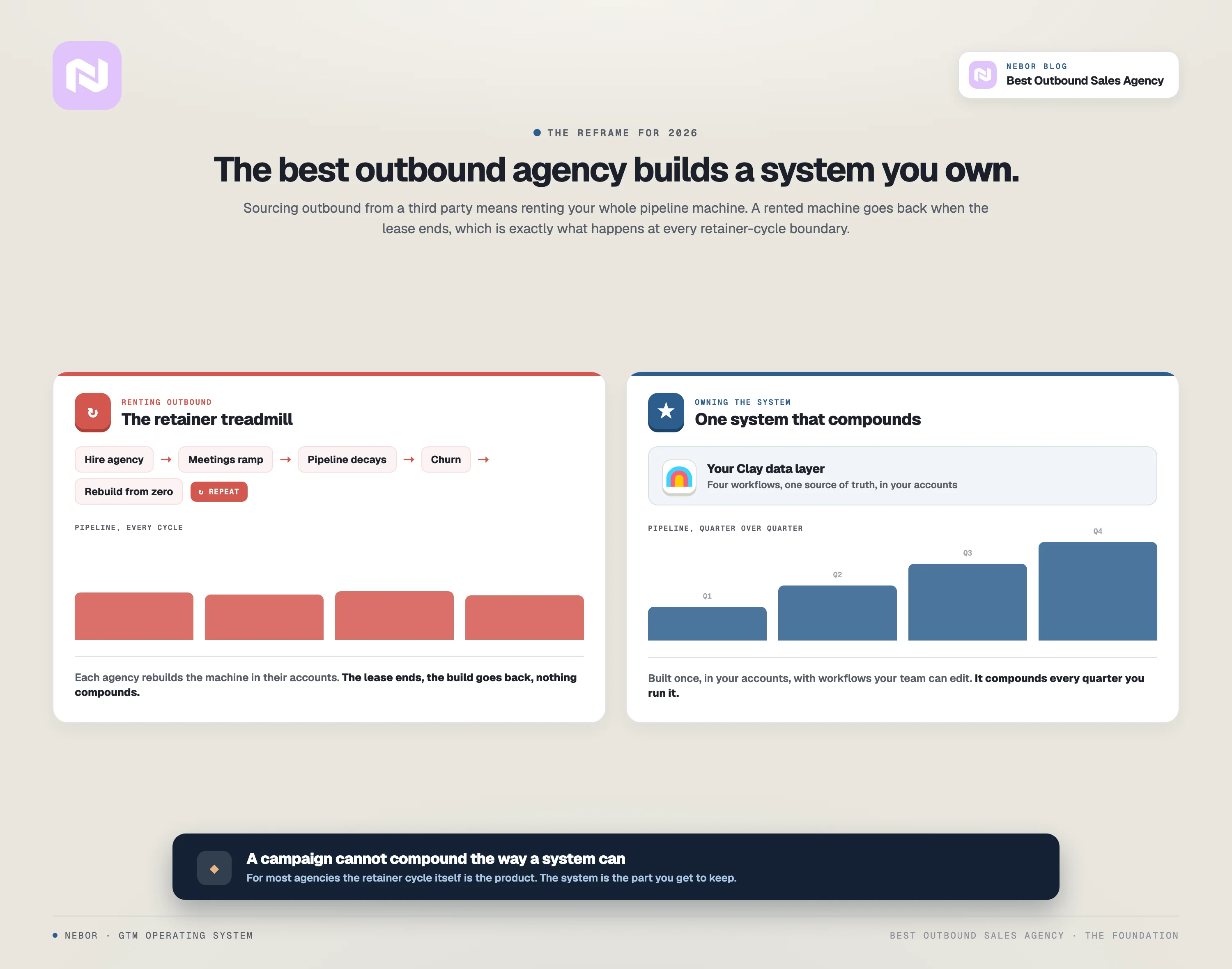
Pipeline never compounds because each agency rebuilds the entire pipeline machine from scratch inside their own environment.
The domains, the sequences, the Clay tables, the dashboards, the routing logic. The next agency in line starts from zero, builds the same thing again, and dismantles it the day the contract closes.
The cycle itself is the product the agency is selling. Three rebuilds in a row produce nothing that compounds, no matter how good each agency was at execution.
Sourcing your outbound from a third party means renting your entire pipeline machine. A rented machine goes back when the lease ends, which is exactly what happens at every retainer-cycle boundary.
In this post, we discuss what being the best should actually mean for an outbound sales agency, what bad outbound buying still looks like, and what the four-workflow system we build actually does.
Let’s get started.
Note: Struggling with reps who spend more of the week preparing to sell than selling?
Building lists, hunting contact details, working out whether a company is worth a call, updating records afterwards. None of it is why you hired them, and hiring an agency usually moves that work onto someone else's payroll at your expense rather than removing it.
At Nebor, we take that work off your team completely. We build you automation workflows that do the list building, the research, the outreach and the routing, so a live reply lands with the right rep and the context already attached.
Book a 15-minute call to discuss your unique business needs and discover our flexible packages.
TL,DR
You get a connected workflow system that automates your entire top of the funnel and prospecting hassles and also aligns your entire organization around the same workflows to make your revenue and marketing teams’ lives easier and their work more efficient.
4 things broken about how most businesses buy outbound
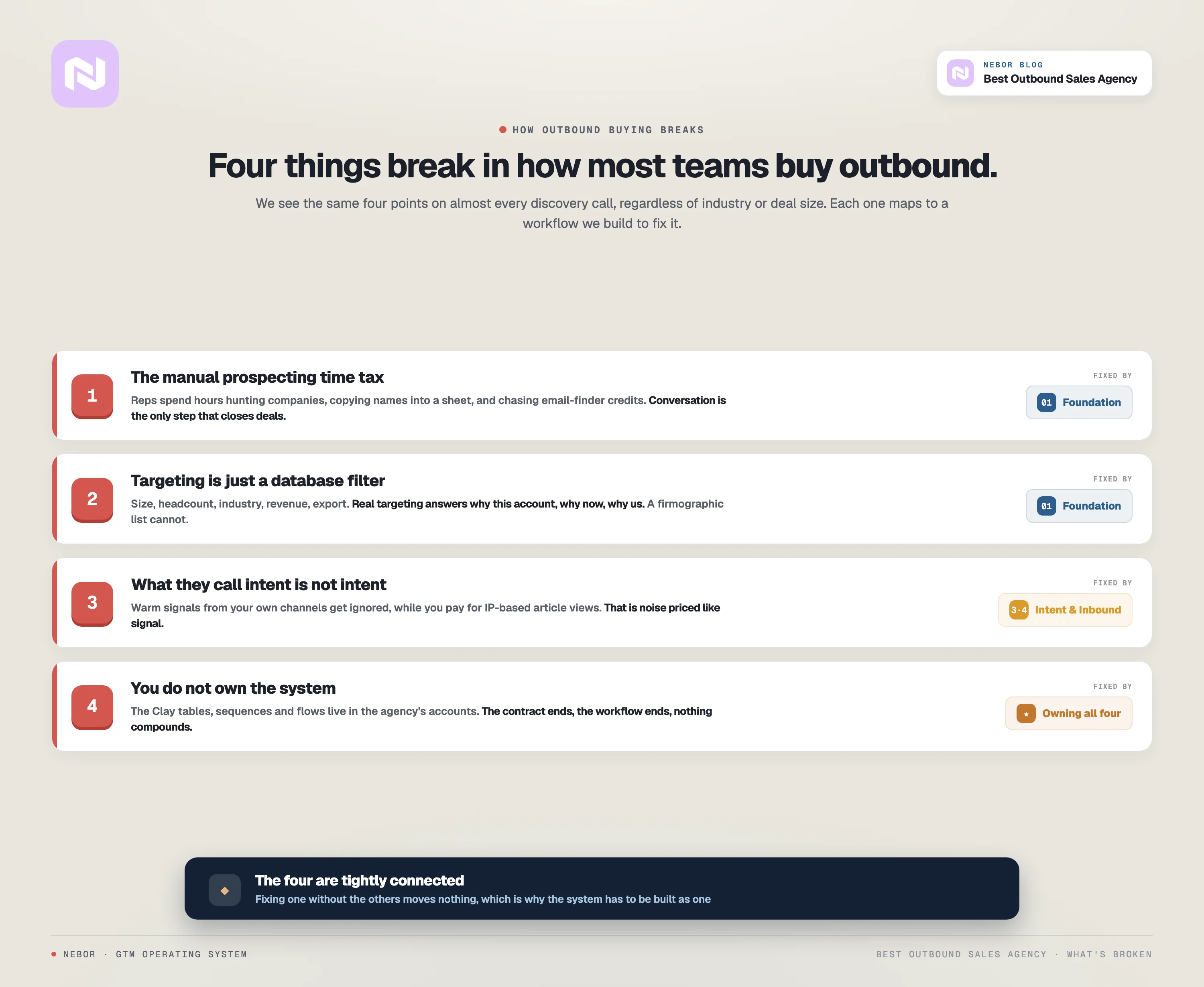
The way most companies buy outbound today fails in four predictable places. We see the same four points show up on almost every discovery call we take, regardless of industry or deal size. The four are tightly connected, and fixing one without the others moves nothing.
The first is the manual prospecting time tax on your reps.
Your sales reps still spend hours every week opening LinkedIn, searching for companies that match a description, opening company pages, copying names into a prospect sheet, then chasing email-finder credits to figure out who is even reachable.
That work used to be the entry-level rep’s job, and in 2026 it is the work that automation should have eaten by now. Hours your reps spend hunting prospects are hours they are not spending in conversation, and conversation is the only step that closes deals.
The second is how targeting actually gets done.
Most teams (and most of the agencies they hire) build outbound on top of a list pulled from a database without much real ICP or TAM work behind it.
They filter on company size, headcount, industry, and revenue, hit export, drop the list into a sequencer, and call that targeting.
Calling that work targeting is generous at best. Real targeting is the answer to: why this account? why now? why us? A list filtered on firmographics can never answer that and those are different problems.
The third is the question of intent, and what most teams call intent isn’t really intent data. Most outbound ignores the warm signals already coming through your existing channels.
Your website is getting visits from people you would pay to talk to. Your team’s LinkedIn posts get engagement from companies that match your ICP exactly. Your inbound forms keep filling with names that fit your profile. None of that data feeds your outbound list, because your outbound list is a CSV from Apollo.
Meanwhile, the intent data you are paying ZoomInfo or Cognism for is mostly IP-based article views from companies that read one tangential blog post. That is not intent, that is noise priced like signal.
The fourth is who owns the system that produced the meetings.
The stack your agency builds for you does not live in your accounts.
The Clay tables, the sequences, the deliverability infrastructure, the Apify monitors, the n8n flows, the HubSpot mappings, all of it lives in the agency’s accounts and they recycle the same workflows to push volume for all their clients.
When the contract ends, the workflow ends, and nothing compounds. You start over with the next agency, who builds the same machine again from scratch, in their environment, and bills you for the privilege.
These four problems explain why most outbound retainers feel like a treadmill, and why churn between agencies stays so high. The execution work itself is usually fine when an agency does it. The unit of service is the issue, because a campaign cannot compound the way a system can.
Here is what we built to fix all four at once.
How we build the four-workflow outbound sales system that makes us the best outbound sales agency (step by step)
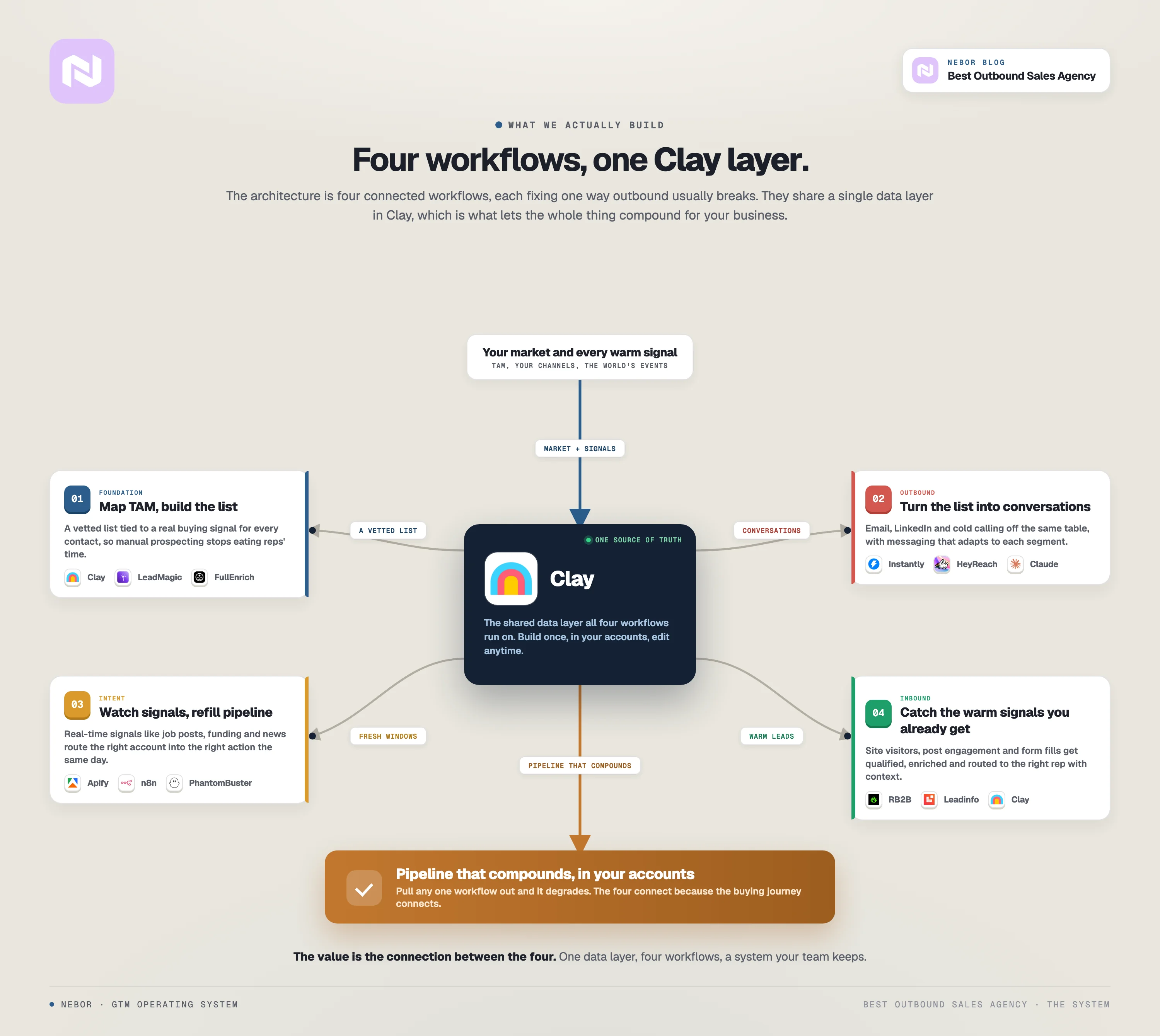
The architecture is four connected workflows, each one addressing one of the four breakages from the section above.
They share a single data layer in Clay, which is what lets them compound for your business and help you achieve more beyond outbound.
The foundation workflow handles the data, the TAM, the ICP, and the target list, so manual prospecting stops eating your reps’ calendars.
The outbound workflow turns those targets into multi-channel conversations across email, LinkedIn, and cold calling.
The intent workflow keeps going in the background, watching real-time signals like job posts, RSS feeds, funding announcements, and customer job changes, and routing the right accounts into the right action.
And the inbound workflow catches every warm signal and demand already coming through your site, your team’s LinkedIn posts, and your inbound forms, qualifies them, enriches them, and hands them to the right rep with full context.
Here is how we build each workflow, what it produces, and how the four fit together.
Step 1: We map your TAM, define your ICP, and build a target list off the signals that actually predict a conversation
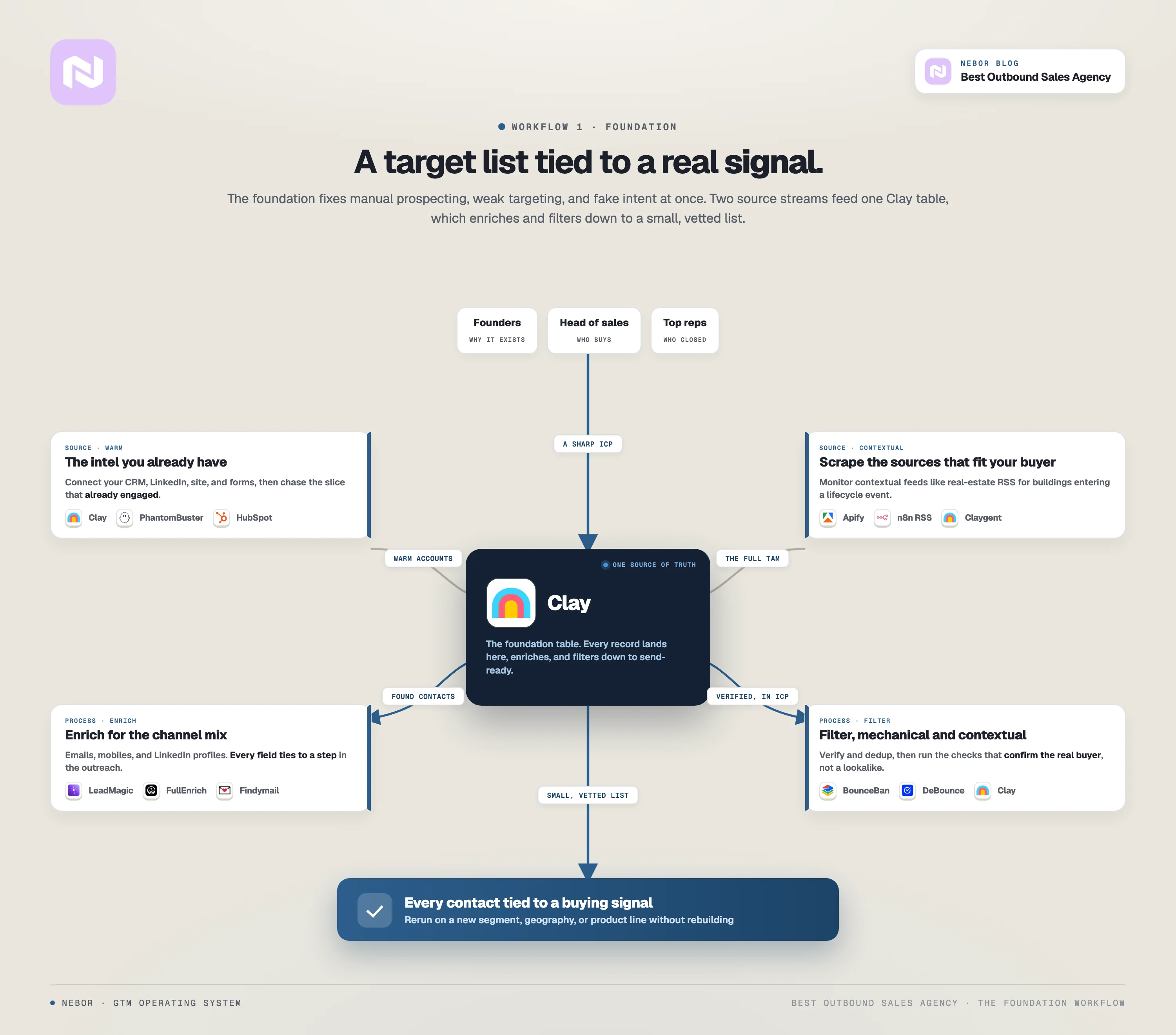
The foundation workflow exists because the first three breakages are all symptoms of skipping it. When the TAM is not mapped, reps default to manual prospecting because there is nothing else to default to.
When the ICP work is shallow, the database filter becomes the targeting, which is why most outbound lists are firmographics with extra steps. And when intent is whatever your dashboard reports, you end up paying for IP-based article views and calling it signal.
The foundation fixes all three at the same time because they share the same missing piece.
What we deliver with this workflow is a working Clay table connected to your CRM, your enrichment stack, and your scraping sources, with documented filter logic that produces a vetted list of accounts and contacts every week.
Once it is in place, your team can apply the same workflow again to a new segment, a new geography, or a new product line without rebuilding from scratch.
Here is how each piece of the foundation gets built.
We start by interviewing your stakeholders
Most of the agencies we replace skip this step. They take the brief at face value, pull a list, and start sending cold emails.
We do not, because most teams cannot define their ICP cleanly without help, and an outbound system built on a wrong ICP produces wrong meetings.
So we talk to the people from your team who actually understand your buyer. That usually means founders, the head of sales, the CMO if marketing is mature enough, and one or two reps who have closed the most deals recently.
We ask why your company exists, what pain points make your customers buy, who the customers are that stayed the longest, who are decision-makers inside the buying committee, and what their lives looked like before your product.
We are looking for the answer to: why this account, why now, why us? When the answers are sharp, the rest of the foundation falls out cleanly. So, we make the work at this step the most important.
We pull intel from the data your team already has
Outbound is rarely as cold as it looks on paper. Almost every company we work with is holding warm intelligence already, and most of it is invisible to the outbound workflow because nobody connected it.
We connect your CRM, your LinkedIn, your website, and any inbound forms to Clay. PhantomBuster handles the LinkedIn scraping (followers, post engagers, group members) and pushes the data into the same Clay table.
The result is a single source of truth that knows which accounts have engaged with you, in which channel, when, and how often.
That is the data we build the target list against. We chase the slice of your ICP that has already shown signs of engagement, not the whole ICP at once, because the cold-to-warm ratio determines reply rate more than any other variable.
We find the right data sources to scrape for the rest
When the warm pool is too small, which is almost always the case for net-new pipeline, we build out a scraping layer to find the rest of your TAM, but only against contextual sources that fit your specific buyer.
We work with a workplace-technology company whose 30-person sales team targets office buildings above 5,000 square meters that are renovating or moving locations. Do you see how specific that ICP was?
Their ICP is not a job title at a company, it is a building entering a specific lifecycle event. Apollo cannot find that, and neither can ZoomInfo.
So we built a scraping layer that pulls real-estate news from the same RSS feeds the company’s reps were already reading manually, plus a manual-input flow so reps can drop a building they spotted into the system and have the enrichment go to work on it.
New building announcements, renovations, and relocations all push into Clay, the article gets parsed for the project name, the developer, and the contact person through a few Claygents and the lead pipeline fills with leads tied to a specific real-world event the rep can reference in the first message.
The point is that the data source has to be contextual to the buyer, not a generic database, which is why this company’s workflow works off real-estate-event news.
The same Clay backbone takes completely different scraping inputs for clients in cybersecurity (funding-round announcements), AI-powered furnishings (property-development RSS feeds), or tax incentives (Fortune 500 quarterly profit jumps). The pattern is consistent, the data sources are not.
We enrich every record with the contact details you'll need
Once we have the target list, we push it through the enrichment stack to populate the contact details your reps need to actually reach those accounts.
We use Clay’s API integrations with LeadMagic, FullEnrich, LeadsFacotry.io, and Findymail to find emails, mobile numbers, LinkedIn profiles, and company domains.
Which fields we populate depends entirely on the channel mix. An email-only campaign needs verified emails and one decision-maker per account.
LinkedIn-led campaigns require LinkedIn URLs, mutual connections, and recent post engagement on top of the contact data.
Cold-calling adds mobile numbers checked through multiple providers, because the right number is the difference between a connect and a wasted call.
We never enrich a record without a downstream purpose for the data, and every field we populate ties to a specific step in the outreach workflow.
We filter out the contacts that will not move the deal
The last step in the foundation is filtering, and it is the step that matters most for reply rates. A list of 5,000 enriched contacts is worthless if 4,000 of them should never have been on the list.
The first layer of filtering is mechanical and rules-based. We verify domains, check that your team has not already reached the contact, clean against your do-not-contact list, and pass every email through BounceBan, DeBounce, or ZeroBounce to drop the catch-all and invalid addresses.
The second filter is contextual, and this is the part most agencies skip entirely. Going back to that example, after we have the building, we do more contextual checks.
We confirm the building actually fits the size threshold and that the company on the lease is the buyer we want, not a sublet or co-working operator.
We verify the renovation is a real estate development project rather than a paint job, and we can even pull the floor plan to confirm the layout supports their product.
Most of that detective work happens automatically against the Clay table once we have set up the filter logic.
By the end of Step 1, the target list is small, vetted, and tied to a specific buying signal for every contact. That is the only kind of list outbound should work against.
Note: Struggling with reps who spend more of the week preparing to sell than selling?
Building lists, hunting contact details, working out whether a company is worth a call, updating records afterwards. None of it is why you hired them, and hiring an agency usually moves that work onto someone else's payroll at your expense rather than removing it.
At Nebor, we take that work off your team completely. We build you automation workflows that do the list building, the research, the outreach and the routing, so a live reply lands with the right rep and the context already attached.
Book a 15-minute call to discuss your unique business needs and discover our flexible packages.
Step 2: We design the multi-channel outreach that turns those targets into conversations
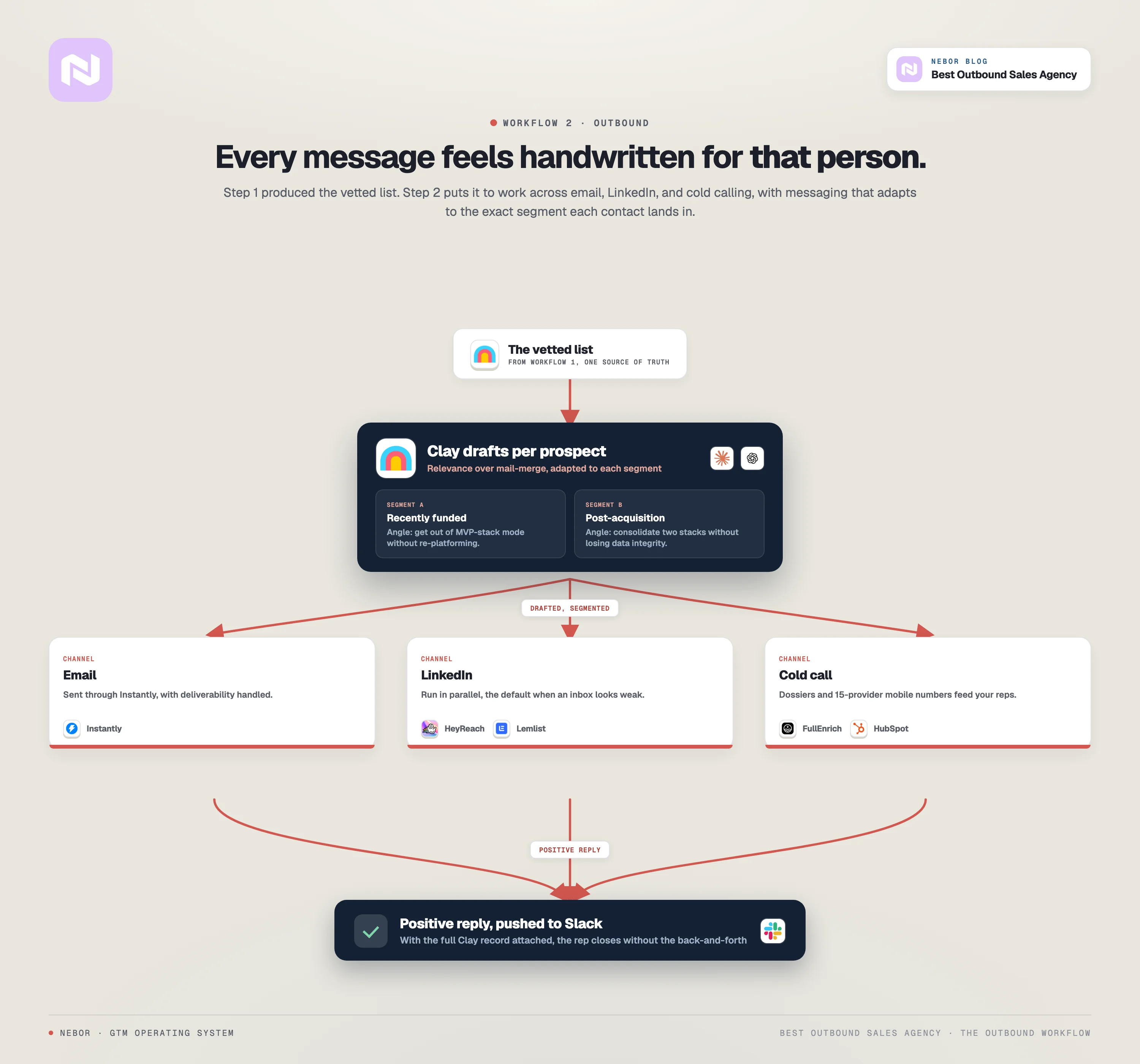
Once Step 1 has produced the vetted list, Step 2 is where we put it to work. We design an automated outreach sequence across email, LinkedIn, and (where it fits the buyer) cold calling, with messaging that adapts to the segment a contact lands in.
What we mean by automated deserves a moment of precision, because most agencies use the word to cover for spray-and-pray, set-and-forget templates blasted across a 5,000-row list. What we build is the opposite of that.
We built an AI-assisted outreach system personalized at the prospect level, fed by the data Step 1 produced, that makes every message feel like one we wrote by hand for that one person.
Personalization, by the way, is not as much personalization as it is relevance. If you think of personalization as inserting first names, company names, and job titles into a template, what you are describing is mail-merge, not personalization.
For us, real personalization is when the prospect actually fits your ICP (which Step 1 already verified), the offer fits their specific situation, and the message references something about them that makes opening it feel easy.
We send email and LinkedIn outreach side by side, off the same Clay table
The first job in this layer is generating the message itself.
We use Clay's native integrations with ChatGPT and Claude.ai to generate AI-drafted messages based on the data each prospect carries in the Clay table, including their company, their role, their recent LinkedIn activity, their company's recent news, and any contextual signals we have pulled from the scraping layer.
We do not lock the LLM choice in. Each model has tasks it does better, and that ranking shifts month over month. Today Claude could be the right one for company research summaries, next month a new OpenAI model can pull ahead.
We swap models when the ranking changes, and because the system lives in your Clay environment, swapping is a configuration change rather than a re-platform.
Also, what an AI-drafted message looks like in practice is a message that takes the segment a contact is in (which Step 1’s filter logic assigned), drops them into the right copy template for that segment, and adapts the framing to that prospect’s specific situation.
Let’s create a scenario. If we are working with a B2B SaaS client whose ICP splits into two segments.
One segment is recently-funded startups, typically Series A or B, less than 18 months from the round. The other segment being mid-market companies post-acquisition that need to consolidate two tool stacks into one.
It is the same product and broadly the same ICP, but the message angle has to be completely different for each segment.
The recently-funded startups segment will get an angle about how to get out of MVP-stack mode without re-platforming. And the post-acquisition companies will get an angle about how to consolidate two stacks without losing data integrity.
Two pitches, one Clay table, and the routing happens automatically based on the segment field.
So, once we get the messaging right, we push the email side of the campaign into Instantly and the LinkedIn side into HeyReach or Lemlist.
We test the campaigns, monitor them daily, and adapt sequences based on what is working for which segment. Again, everything works against the same Clay table, which means the data your reps see in the CRM stays one source of truth from list-building through reply.
We also segment campaigns by inbox providers on the prospect’s side. If a contact is on Outlook, we know that inbox is going to perform worse than a Google-hosted inbox right now, so the workflow defaults that contact to a LinkedIn-first sequence instead of an email-first one.
It’s all a game of conditional logic in Clay. The system knows when to switch channels without anyone touching it.
When a positive reply comes in, the system pulls the conversation into your Slack (wherever your team lives) with the prospect’s full Clay record attached, the rep gets a notification with everything they need to close the deal or book the meeting without the back-and-forth dance.
If you want the deeper version of how that handoff works, we wrote a separate post on building an inbound meeting workflow that catches the buying committee.
We feed your cold callers data instead of replacing them with bots
For deals where cold calling is part of the motion, we build the outbound system to feed your callers.
The Clay table pushes call openers, conversation starters, and the most relevant context for each prospect directly into your CRM as a custom field, so the rep opens HubSpot, sees the talking points, and starts dialing.
FullEnrich allows us to get mobile numbers checked against 15 different providers. When your rep dials, the number is the most likely-correct one available across the data ecosystem.
Your reps stop wasting cycles on dead numbers, and start having more of the conversations they should have been having.
What you end up with at the close of Step 2 is a single automation that hits your ICP across three channels, picks the order that fits the prospect, and adapts the messaging to whichever segment they fall into.
The reps who used to do prospecting now spend that time in conversation, which is the only step that ever closes a deal.
Step 3: We monitor real-time intent signals continuously, so pipeline keeps producing after the initial campaign exhausts the list
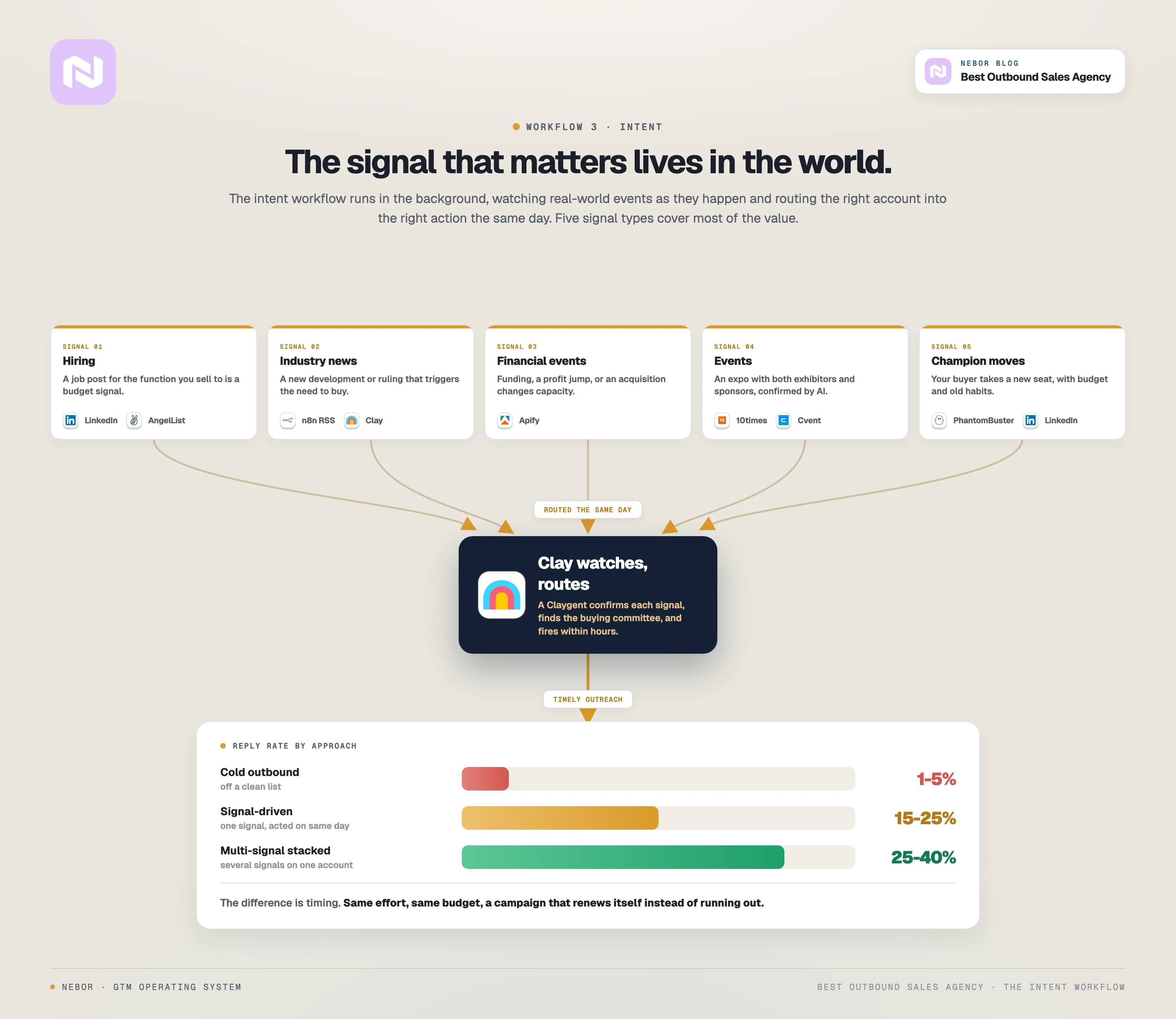
The first two steps build the engine and launch the first campaign. The intent workflow keeps the engine producing after the initial list is exhausted, by watching the world for buying signals as they happen and routing the right account into the right action automatically.
In plain terms, a signal is an event in the world (a hire, a funding round, a news article, a job change) that tells you a specific company has just stepped into a buying window for your product.
If you reach out the same day, the conversation feels timely and you have a much better chance at winning them over.
We have seen signal-driven campaigns hit 15 to 25% reply rates on their own, and 25 to 40% when we stack multiple signals on the same account. Cold outbound off a clean list usually lands at 1 to 5%. The difference is timing, not effort or budget.
It is also why the dashboards you are paying ZoomInfo and Cognism for are not the answer. This is the layer that separates a system from a campaign. A campaign exhausts itself, an intent layer renews itself.
Here are five of the signal types we wire in for almost every client, with the buyer profile each one fits.
Signal type 1: Hiring signals
The idea behind hiring signals is that every public job post is a small piece of public information about where a company is investing right now.
If the role is in the function you sell to, that company has just told the world they are about to spend money in your category.
This works for any product where the buyer scales a function. The specific roles change with the product (SDR and BDR postings for sales tools, HR-leadership openings for HR tech, security-engineer and CISO postings for cybersecurity), but the logic is the same.
A company hiring two of something has decided that something is part of the plan, and they have not finished onboarding the first hire yet.
Here is how we do it for Nebor itself.
Every morning at 9 AM, our system scrapes new LinkedIn job posts for SDR, BDR, and Sales Development Manager roles in markets we sell into.
The post lands in Clay, the system identifies the hiring manager and the department head, enriches contact details with LeadMagic and Findymail, drafts a message that references the specific job posting, and pushes the account into a three-step sequence in Instantly that same day.
This one campaign produces a meaningful chunk of Nebor’s own client base. The signal is public, the timing is precise (the day the post goes live), and the message references something real about that specific company.
Signal type 2: Industry news and announcements
The idea here is that some industries publish their own buying signals every day, in trade publications, press releases, and local news feeds. Understand that the buyer profile here is narrower than for hiring signals.
If your product gets or can be bought because of a specific event about your buyer in their industry news, RSS monitoring is one of the cleanest signal sources you can build.
It works when the news event about your buyer (a new property development, a regulatory ruling, a product launch, a market entry, a tender announcement) is the same event that triggers their need to buy your product.
We work with a client that sells AI-powered furnishing solutions to large property developers, mostly multi-family and commercial projects.
Their buyer profile is a project director or head of procurement at a developer, and their signal is the announcement of a new development project.
Once a new project is announced, the developer is going to spend money on design, procurement, and furnishings inside the next 12 to 18 months. If we reach out the week the article drops, we are in the room before any of their competitors notice the project exists.
We built an n8n + Clay RSS workflow that monitors publications like Multi-Housing News, Chicago YIMBY, and Property Week.
So, when a new article lands on the sites we monitor with keywords like “new development”, “mixed-use project”, or “ground-breaking”, we set up a Claygent that extracts the project details (the developer, the project name, the units or square footage, the location, the completion date, the architect), pushes everything into Clay.
There, the workflow from the previous steps kick in. It classifies the lead by ICP fit, and routes the right contacts (VP of Design, Director of Procurement, Head of Development) into a sequence that opens with the project they just announced.
Signal type 3: Financial events
So, the idea behind financial signals is that money moving is one of the most reliable leading indicators of new spending.
Funding rounds, big earnings reports, acquisitions, IPOs, and layoffs all change a company’s capacity to buy and their priorities for the next few quarters.
This works for any product where the buying decision tracks (or can track) with a financial event in the buyer’s business.
The most common version is funding rounds, because a Series A or B usually means the company is about to hire, switch tools, or expand a function.
But it also works for products bought in less obvious financial moments, like a major profit swing, a public listing, or a budget reset at the start of a new fiscal year.
We work with a client whose product helps Fortune 500 companies optimize their tax position.
Their buyer profile falls on the CFO or VP of Tax, and the signal that matters is a quarterly earnings report showing a major profit-margin jump, because that profit jump translates into a real tax bill that needs managing.
In the weeks right after the earnings call, the CFO and the VP of Tax are actively looking for tax-optimization solutions, and that is the window we want to be in.
We built an Apify-based monitor that watches Fortune 500 earnings releases.
When a company posts (or relevant industry sites report) a significant profit jump, the workflow pulls the company into Clay.
We set up a Claygent to analyze and make sense of the information, if the check comes out true, the workflow kicks to find the CFO, VP of Tax, and Head of Tax Strategy, enrich their contacts, and send a short two-email sequence that opens with the specific earnings event.
The sequence here is typically short and light on pressure, because executive buyers at this level do not respond to high-volume outreach.
The same pattern works with funding rounds for clients selling into growth-stage companies.
We had a cybersecurity client whose ICP was IT companies that had just raised a Series A or B, because the team expansion that follows a raise usually means more cybersecurity tooling on the way.
Same signal logic as the tax-optimization client, just a different financial event triggering it.
Signal type 4: Event and conference signals
Some buyers publish their needs by hosting, attending, or sponsoring events. If your product is used at events, supports event production, or sells to companies that produce events, public event calendars are one of the easiest places to find clean signals.
This works for companies whose ICP either hosts events, exhibits at events, or services event organizers. If your buyer is not in the events ecosystem, skip this one entirely.
We worked with ExpoGenie, a company that sells sponsor and exhibitor management software to event organizers. Not every event organizer is a fit for them.
ExpoGenie needs organizers holding events with both exhibitors and sponsors, because that combination is when the product becomes essential.
Before we built the system, ExpoGenie’s three-person team was sending around 30 emails a day manually, picked off whatever event listings they could find.
We built an Apify workflow that scrapes 10times.com, Cvent, and niche event directories for upcoming events that match the ICP.
The system relies on a Clay AI (claygent) to analyze and confirm that the event actually has both exhibitors and sponsors, and even pulls the event floor plan to identify whether a competitor is already in the deal (an interactive digital floor plan usually means a competitor is installed, a PDF or static floor plan means the seat is open).
Qualified events get routed into a sequence targeting the Event Director, Head of Sponsorships, and VP of Events.
Within 90 days of going live, the system generated 55 unique clients for ExpoGenie and now produces 30% of their total inbound lead flow, fully automated.
Signal type 5: Job changes and champion movements
The idea behind champion-movement signals is that the buyer-side relationships you have already built do not vanish when a person changes jobs, even though most companies act as if they do.
The champion who bought from you, replied warmly, or attended your event is now in a new seat at a new company, with new budget authority and old habits. That’s what matters for your business: budget authority and old habits.
This one works for almost every B2B product. The new role likely needs the same kind of tooling the champion used to use, the relationship is already there, and the cost of the next conversation is essentially zero.
There is a real number behind this one. Research on the “new VP window” consistently shows that the first 30 to 90 days after a leader starts a new role is one of the highest-converting moments in B2B sales.
The new leader is reviewing the stack, evaluating what to keep, and looking for tools they trusted at their previous company.
We build this against your customer database, your historical CRM contacts, and any past warm replies. PhantomBuster watches LinkedIn for job changes inside that list weekly.
When a change shows up, the system pulls the new company, enriches its data, finds the right additional buying-committee contacts (because the original contact alone is rarely enough to move a deal), and queues a soft outreach that opens with the relationship.
We have a B2B client in supply-chain software who uses this against every former champion across their full historical book of business. It produces a steady stream of warm second-deal opportunities with almost zero rep effort, because the work was done years ago when the relationship was built.
That is the five signal types most teams get the most out of. There are more we wire in depending on the product (competitor acquisitions, new-leadership hires, regulatory changes, technographic shifts, customer-success milestones at adjacent vendors), but those five cover the majority of the value.
The principle behind all of them is the same. The best intent data lives in the world, not in a database. A vendor cannot pre-package the signal that matters most to your specific buyer, because the signal is specific to your business.
The system has to be flexible enough to watch the sources that matter for your motion, and it has to react in the same day. That is what the intent layer of the system actually builds.
If you want the longer walk-through of each of these five with the full workflow details, we wrote a separate post on signal-based outbound campaigns.
Step 4: We turn the inbound signals already hitting your channels into qualified outbound action
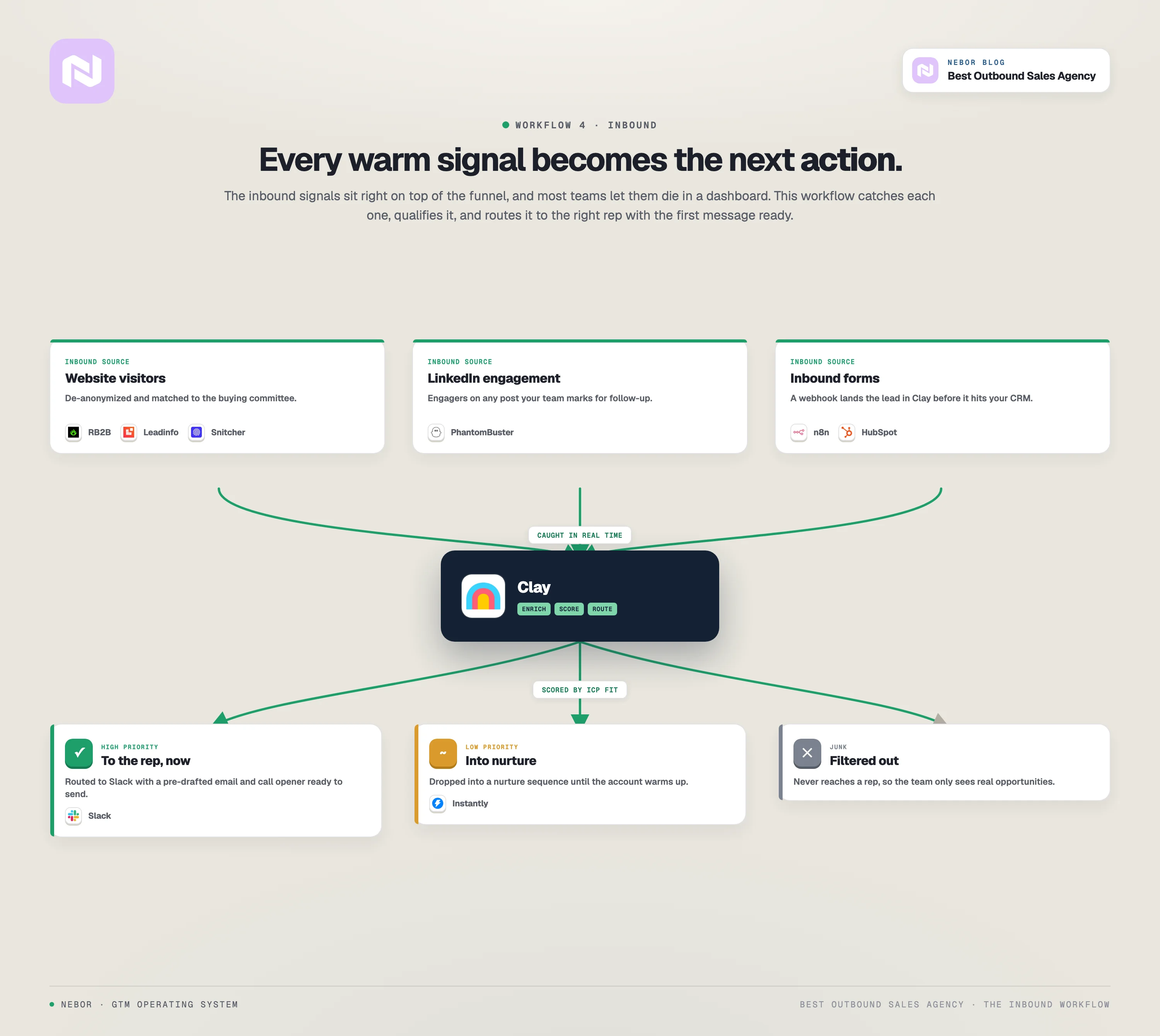
The fourth workflow is the one most teams either ignore entirely or drown in. The inbound signals are right there, on top of the funnel.
A website visitor who came from an ad campaign you’re paying for and spent a few minutes on your key pages and left, a LinkedIn post that pulled five ICP executives into the comments, a contact form that filled with a name nobody followed up with.
Each one is a buying window opening, and each one gets ignored because no system exists to turn the signal into the next action.
Step 4 is the system that turns those signals into the next action automatically.
The stack at this layer is Clay, n8n, RB2B, Leadinfo, and PhantomBuster, with the same routing logic the outbound workflow uses, just working off inbound triggers instead of cold lists.
Once it is live, you get a single automated pipeline that catches every inbound signal, qualifies it, enriches it, scores it, and routes it to the right rep with the right first message attached.
Here are the three sub-channels we build at this layer.
We de-anonymize your website visitors and route the qualified ones into outbound
However you business collect innbound data, the data just stays there, your sales team logs in once a week, scrolls through, and moves on. That is where most of the value of the data dies.
Or, someone has to loose an entire day manually sorting through it and miss the interest window of the data.
With our workflow here combining Clay with with website visitor tracking and de-anonymization tools like RB2B, Leadinfo, Snitcher, we close that loop with the rest of the system.
The visitor-tracking tool feeds Clay every account that lands on your site, and the website-visitor workflow we build pulls in the firmographic data, finds the right buying-committee contacts at the visiting account, enriches their contact details, scores them against your ICP filter, and pushes the qualified ones into either an outbound sequence or a Slack alert for your AE on we define for such accounts.
This company is one of the clearer examples to point at here. Their next layer on top of the Step 1 foundation is the website-visitor workflow.
When someone with a real-estate developer or similar position or a facilities-management company hits their site, the workflow picks it up and checks whether the visitor or their company fits their product ICP.
If true, it then finds the right contact, and either drops them into the AE’s queue with full context or routes them into a tailored sequence.
In this particular instance, our client had the visitor tool and the dashboard before we got there. The piece that did not exist was the workflow that takes the visit and turns it into a conversation, which is the piece Step 4 actually builds.
We have built variations on this workflow for clients with completely different products, with the routing logic adapted to whatever the buyer’s signal looks like.
We turn LinkedIn-post engagement into an outbound list
LinkedIn engagement is the most under-used buying signal in B2B today. For most companies, it’s just analytics. We argue that it can be so much more.
Your team writes posts, decision-makers comment and like, and almost none of those engagements ever turn into a sales action. We see this as a workflow failure and not a content problem.
The fix is one of the simpler workflows we build. We call on PhantomBuster to scrape the engagers from any post the team marks for follow-up. The full engager list lands in Clay automatically from a PhantomBuster push.
From there, the workflow filters for ICP fit (company size, industry, role), enriches contact details, builds a 360-view of each engager (recent activity, mutual connections, what other content they have engaged with), and either drops the qualified engagers into the right sales rep’s queue with an opening line that references the post they engaged with, or queues a softer LinkedIn outreach that turns the comment into a conversation.
You wrote the post in the first place, and the engagement is real. Our Step 4 here, turns that engagement into pipeline instead of letting it die as a vanity metric on a content dashboard.
We enrich and route every inbound form so the right rep gets the right lead with full context
The inbound-form layer is where the most dollars get wasted, because your generic “thanks for filling out the form” auto-responder loses the buying window before the lead is ever called.
We create a webhook between your form or lead capture tool and Clay. Thus, when a form fills, the lead lands in Clay before it lands in your CRM.
We enrich the email and company against the data layer (firmographic info, recent funding, technographic profile, headcount), score against your ICP, and route the qualified leads to the right rep with full context attached.
What happens next depends on how the lead scored. High-priority leads route to the rep on Slack with pre-drafted email and call openers ready to use. Low-priority leads drop into a nurture sequence in Instantly until they warm up, and junk never makes it to the rep at all.
The same pattern plays out across every inbound channel we wire in. A demo request fills, the lead lands in Clay before HubSpot, the workflow enriches and qualifies, the right rep gets a Slack ping with the pre-drafted opener, and the meeting books before the prospect leaves their browser tab.
Across all three sub-channels, what Step 4 produces is the missing layer between marketing-generated demand and sales-generated action.
Your reps stop drowning in unqualified leads, and they get the high-priority ones with full context. The buying windows that used to close before anyone noticed them now turn into meetings, automatically.
What the four-workflow system produces once it is live, and how to get one built for your team
The value of the four workflows is in the connection between them. You can build them on the same workflow.
The foundation produces a vetted target list, the outbound layer turns that list into conversations, the intent layer keeps producing after the initial list is exhausted, and the inbound layer catches the warm signals already coming through your channels and routes them back into outbound action.
Pull any one of the four out, and your pipeline eventually degrades. The four connect because the buying journey connects, and the system has to match the journey end to end.
If what you have read here matches the way you think about outbound, we should talk. The system we build for each client is shaped to that client’s buyer, their motion, and the stack they are already using, so there is no template version of what we do.
The right next step is a conversation about whether the work fits your situation, not a discovery call dressed up as one. Book a meeting with us we can talk through what your four-workflow system would look like.
Note: Struggling with reps who spend more of the week preparing to sell than selling?
Building lists, hunting contact details, working out whether a company is worth a call, updating records afterwards. None of it is why you hired them, and hiring an agency usually moves that work onto someone else's payroll at your expense rather than removing it.
At Nebor, we take that work off your team completely. We build you automation workflows that do the list building, the research, the outreach and the routing, so a live reply lands with the right rep and the context already attached.
Book a 15-minute call to discuss your unique business needs and discover our flexible packages.


Related Articles


By clicking Sign Up you're confirming that you agree with our Terms and Conditions.