
Clay + HubSpot + LeadsFactory.io: How to Build a Manual Input Flow that Automatically Researches Every Lead for your Sales Team

by
In this post:
Sales reps are not paid to be researchers. Most of them spend half their week being researchers anyway.
A rep spots a promising company. Maybe it came from a trade show, a referral, or a news article they happened to read.
The real work begins there. They open the website, scan the LinkedIn company page, count the headcount, hunt for decision-makers, search for emails, look for recent context worth using in the first message.
Fifteen minutes of work if they’re lucky. An hour if they’re thorough.
Multiply that by twenty leads a week and your sales team has just spent five to ten hours on work that has nothing to do with selling.
We see this across most teams we audit at Nebor. Reps know they should research before reaching out, but the research itself is the bottleneck that slows the pipeline more than anything else.
The fix is to take the research off your reps. This post walks through the manual input workflow we build for clients on top of Clay, HubSpot, and LeadsFactory.io.
The rep adds a company name and a city. Within seconds, the lead record fills with verified firmographics, decision-makers, contact details, and the specific buying signals the client cares about. The rep does nothing else.
Below is how the workflow operates end to end, what the integration layer is doing in the background, and what changes for the sales team that works off it.
Let’s get started.
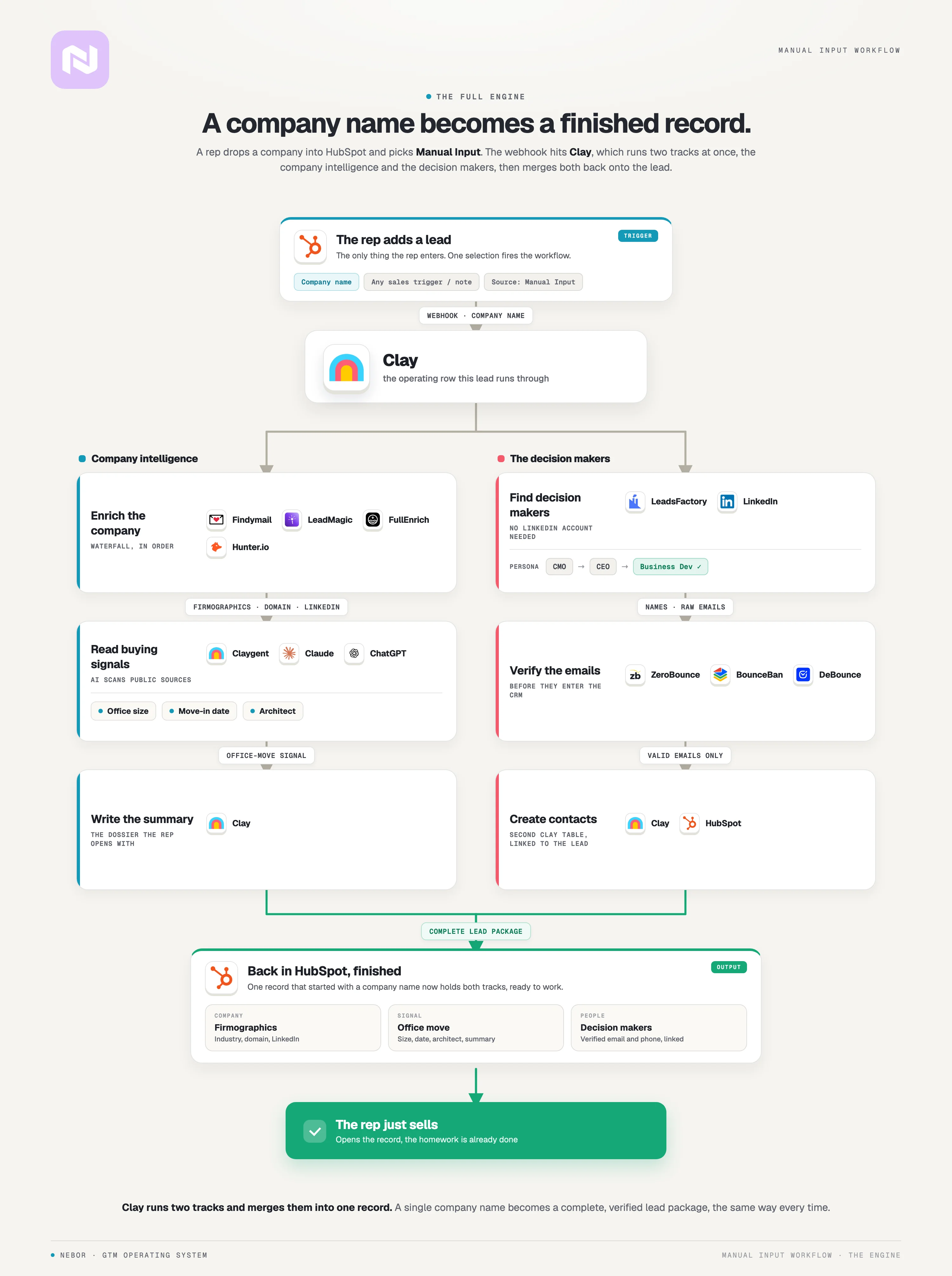
TL,DR: the full manual input workflow
Understand that workflow always changes based on the company we’re working with. This is just a representation of what the workflow might look like. A few things always change as we get you unique context and build your workflow customized.
Why manual lead research drains your sales team’s time and slows your pipeline
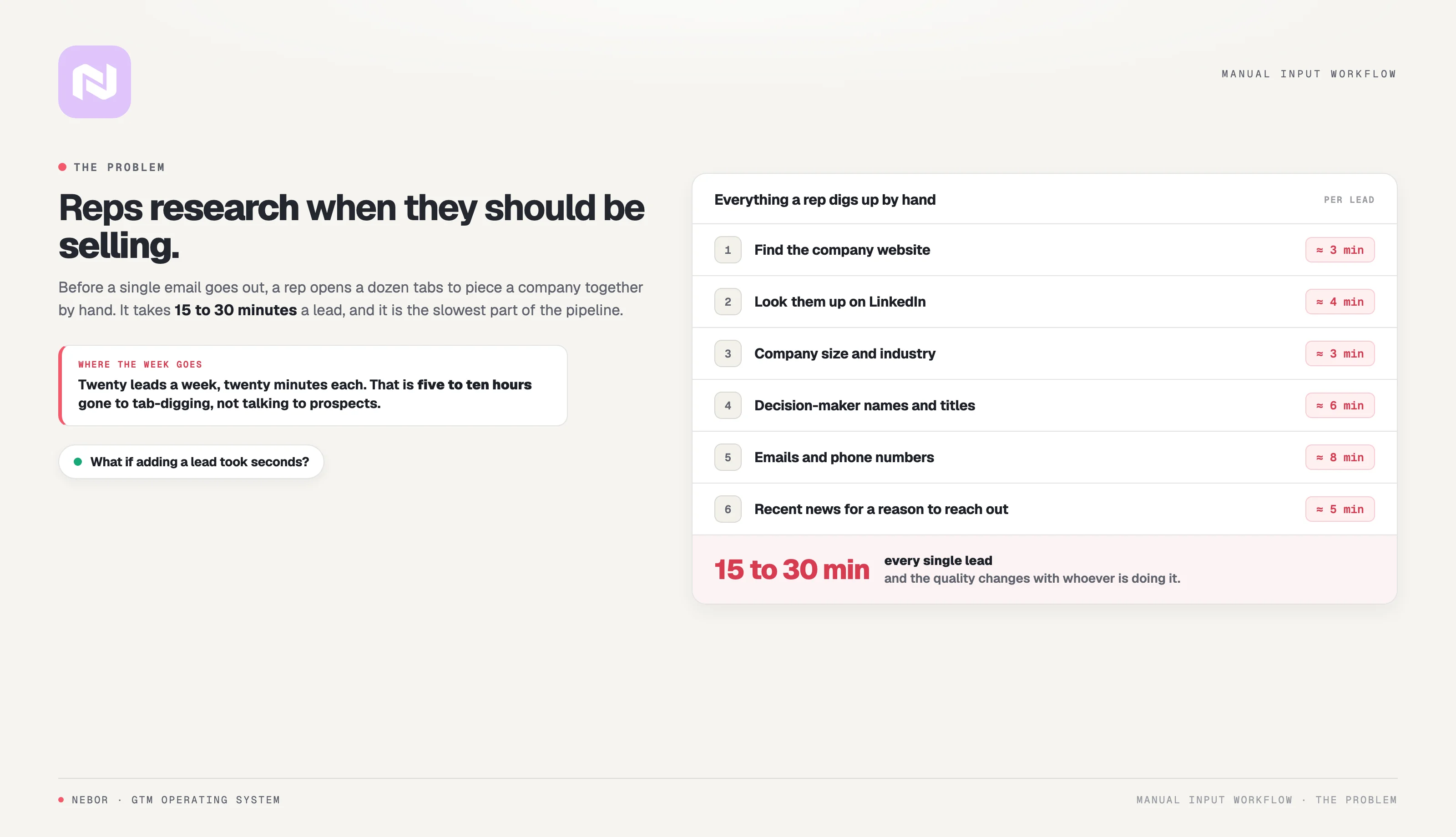
Before a rep can reach out, they need to gather a handful of things about the company.
They need the basic firmographics like industry, location, and headcount. They need to understand what the company does and whether it fits the ICP you’ve been targeting.
As well, they need decision-makers with titles and verified contact details. And if they want the first message to land, they need recent context about what is happening at that company right now.
Walk through what that looks like in practice. Your rep finds a company that looks like a fit. Then they start from scratch.
Search for the company website.
Look the company up on LinkedIn.
Figure out company size and industry.
Hunt for decision-maker names and titles.
Search for email addresses and phone numbers.
Look for recent news that might give them something relevant to mention in the first line of the email.
That process takes anywhere from 15 minutes to an hour per lead, depending on how thorough the rep wants to be and how easy the information is to find.
Multiply by dozens of leads a week and your sales team is spending a real chunk of their time on research instead of selling.
Manual research produces dirty data, which makes it more expensive than it looks
You hear and see this all the time. Manual research is full of small errors that compound over time. Names get misspelled in HubSpot, and the email address you painstakingly tracked down often turns out to belong to someone who already left for a competitor in Q3.
That kind of error costs the rep thirty minutes of upfront research plus the time it takes to figure out the email bounced.
Research quality also varies across the team and across the day. Thorough reps work the same way on every lead, while reps short on time take shortcuts and skip steps. Your outreach quality swings depending on who happened to do the research on any given afternoon.
And then there is the motivation problem nobody talks about openly. We say this as people who came up through sales ourselves at Nebor. Nobody became a sales rep because they wanted to spend their day inside Google and LinkedIn search results.
The research phase is tedious. It pulls reps away from the part of the job they're good at, which is the conversation. When reps dread the research, they either rush through it or skip prospecting altogether.
Why this manual input flow between HubSpot (your CRM) and Clay matters for your sales team
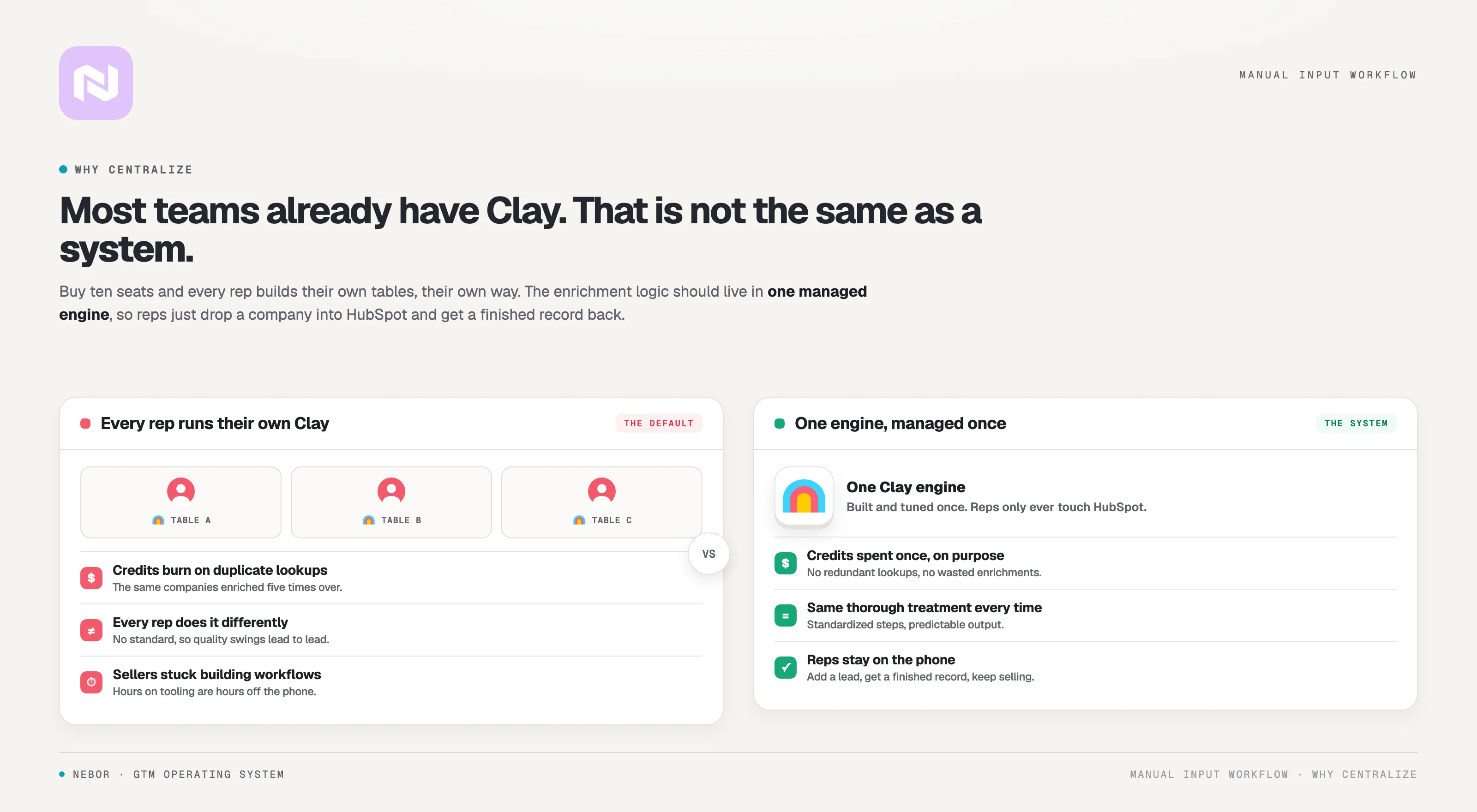
Plenty of sales teams already use Clay alongside HubSpot or any other CRM and the combination isn’t new. Reps know what Clay does. A fair number of them have built tables of their own to speed up research.
If that’s where your team is, this workflow still matters.
Used right, your reps can go into Clay when a specific deal needs deeper investigation. The point is that you don’t want every rep building their own Clay process from scratch, paying their own credits, and inventing their own enrichment standard each time they add a lead.
Three things keep breaking at scale across most teams that try this on their own.
The cost piles up faster than you’d expect. Clay charges per credit, and credits get consumed every time someone triggers an enrichment.
When five or ten reps each build their own tables, look up their own leads, and experiment with their own columns, the consumption stacks fast.
You pay for duplicated work, wasted lookups on leads that never become opportunities, and enrichments a centralized workflow could have done in half the credits.
You lose any standardization across the team. Every rep does it their own way. One enriches with three data providers. Another uses five. One looks for office moves and renovation signals. Another skips signals entirely.
Your team’s outreach starts looking like it came from five different companies, because in a small way it did. That's a problem if you want a predictable sales motion that scales.
You’re paying salespeople to sell, not to build workflows. Your reps weren’t hired to debug enrichment tables or learn the difference between three contact-finding tools.
Every hour a rep spends inside Clay is an hour they’re not on calls or in follow-ups. That’s an expensive use of someone you hired to close deals.
The manual input workflow takes care of all three at once.
The enrichment logic lives in one place, owned by the people who know how to optimize it. Reps interact with HubSpot, which is the interface they already use every day. They add a lead, tag Manual Input as the source, and move on. The system handles the rest.
Clay credits get used efficiently because the workflow is built to gather exactly what’s needed without redundant lookups.
Every lead gets the same thorough treatment because the enrichment steps are the same every time. Your reps stay on selling because the research happens automatically in the background.
This is what we mean when we talk about building systems your team uses. The best automation disappears into the workflow. Your reps don’t need to think about Clay, enrichment, or data providers.
They add leads to HubSpot, and the complete, usable information shows up on the record.
How we build a Clay + HubSpot + LeadsFactory.io workflow that enriches leads on autopilot
The system takes the manual research phase out of your reps’ day entirely.
A rep adds a lead to HubSpot. The system enriches that lead with everything the rep would have had to dig up by hand. By the time the rep opens the record, the work is already done.
We didn’t stop at automating the research, though. We also built the incentive structure that gets reps to use it.
The best automation in the world is worthless if the team avoids it, and most of them avoid the ones that create extra work. This one rewards reps for adding leads, because adding a lead is now the moment the research happens for them.
Here is how the workflow operates end to end.
Step 1. The rep adds the company to HubSpot and tags Manual Input as the data source
The workflow starts the moment a rep identifies a company worth pursuing. The lead might come from an RSS feed monitor the rep owns, an industry event, a partner referral, or a company they spotted in the news.
The source doesn’t matter much for what comes next. What matters is the rep has a company they want to investigate.
In the old process, this is where the manual research started, with the rep opening five tabs and starting to dig.
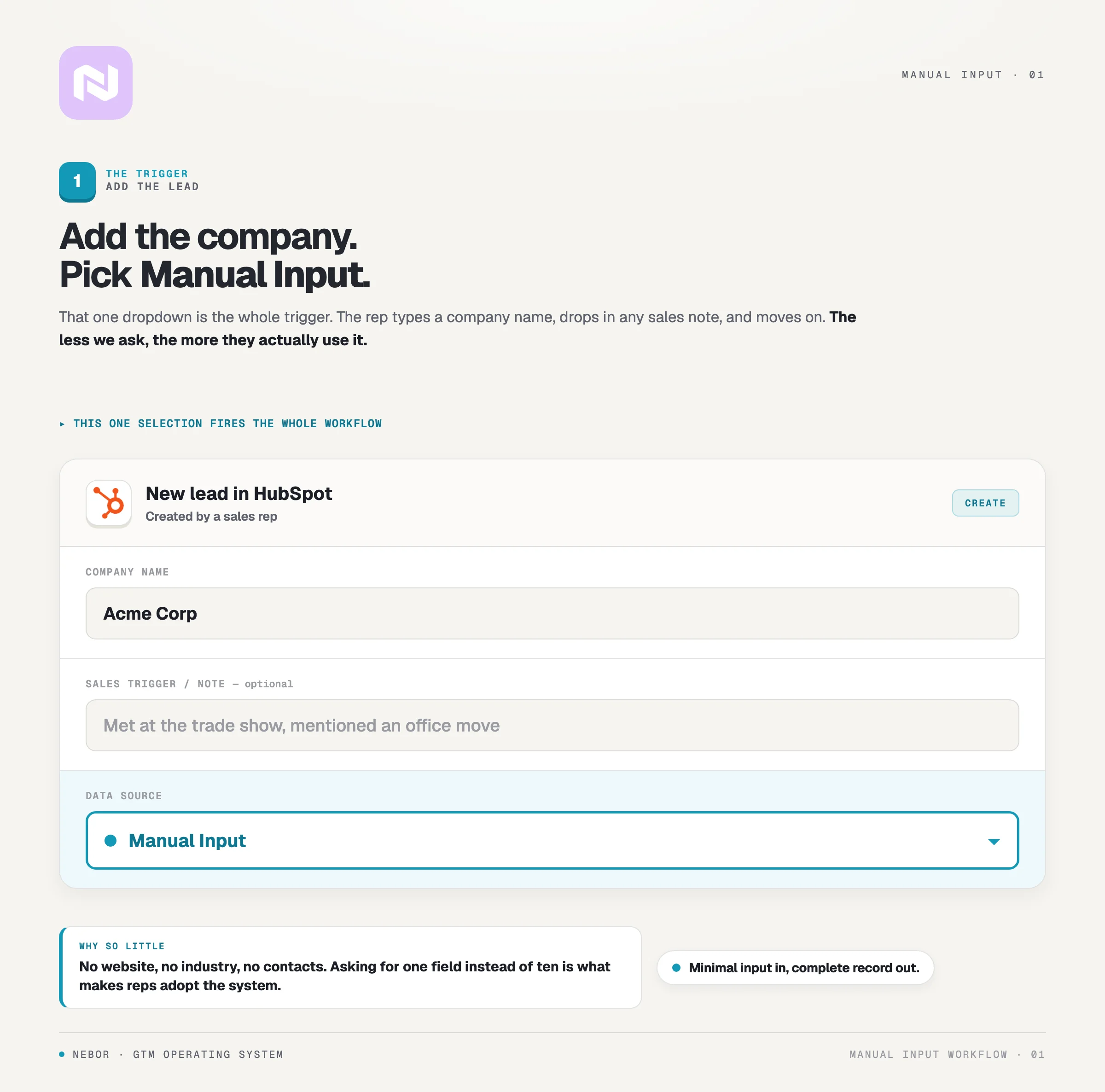
In the new process, the rep adds the company to HubSpot and tags Manual Input on the data source field. That single tag is what starts the workflow. HubSpot sees Manual Input on a new lead, and that’s the trigger that hands the lead to Clay.
The only fields the rep needs to fill are the company name and the city. They can also drop any sales trigger they want captured on the record, but nothing past that is mandatory.
The rep doesn’t supply the domain, the industry, the headcount, or the contact list. Anything past company and city is the system’s job. We designed it that way deliberately, because the less work it takes to start the automation, the more likely reps are to use it.
Step 2. HubSpot sends a webhook to Clay the moment the lead is tagged Manual Input
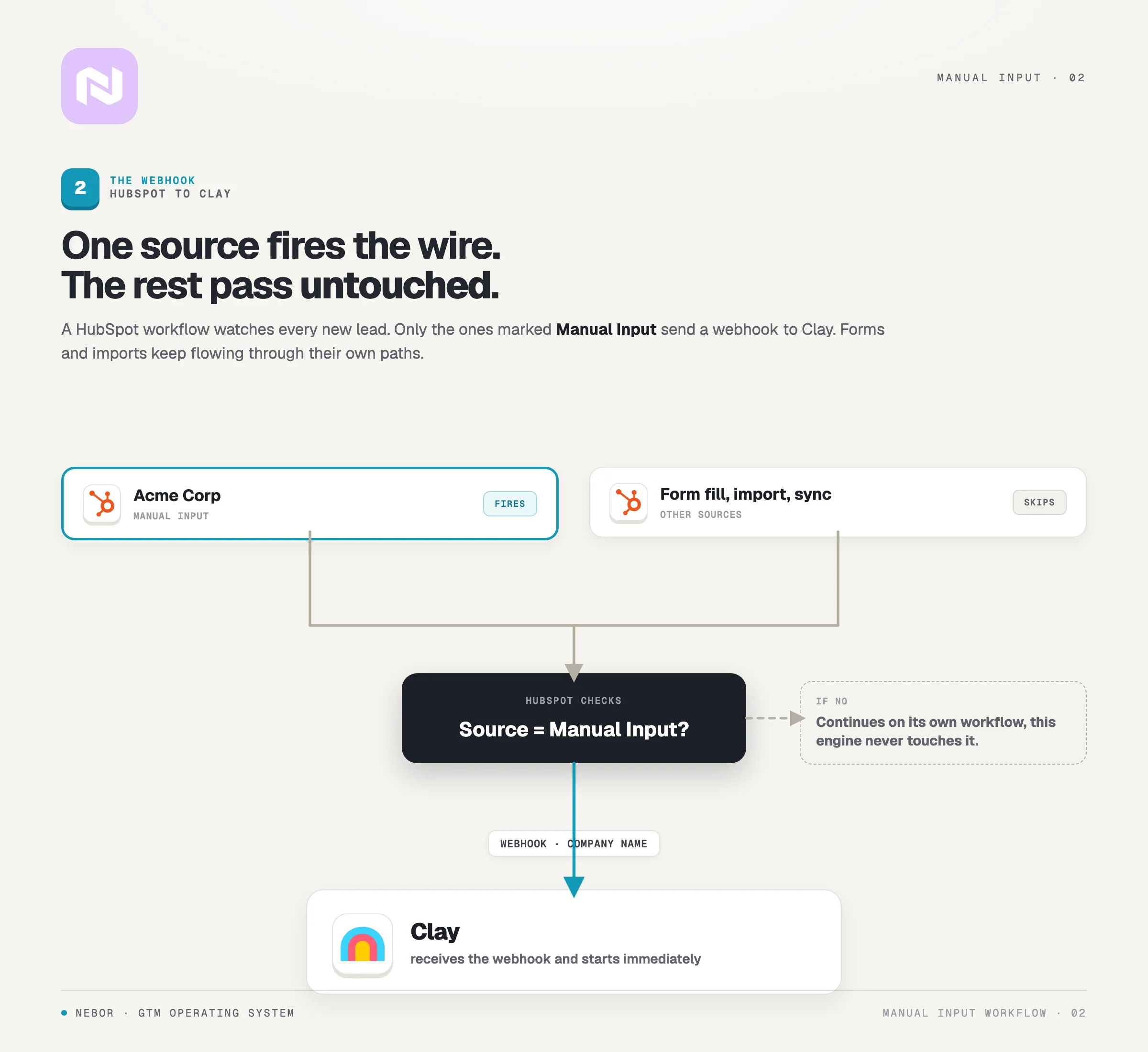
The HubSpot workflow we set up listens for one thing. A new lead with Manual Input on the data source field. The moment that combination shows up, HubSpot sends a webhook to Clay carrying the company name and the city.
Clay picks up the webhook and starts processing the same second. No human intervention, no waiting. The handoff between the two systems takes milliseconds.
We narrow the trigger deliberately. The HubSpot workflow only triggers on Manual Input leads, which means your form submissions, imports, list uploads, and any other inbound channel continue to behave the way they always have.
If you want different enrichment for different lead sources, you set up different workflows, but the manual input trigger only handles what its name implies.
Step 3. Clay parses the input and enriches the company record using a waterfall of data providers
Clay's first job when the webhook lands is to parse it. The company name and the city arrive as a combined input, and Clay separates them into clean fields it can search against.
That parsing matters more than it sounds. Company names sometimes include commas. City names sometimes include multiple words. Reps type with whatever shorthand they happen to be using that day. If the parsing is off, the whole enrichment chain produces noise.
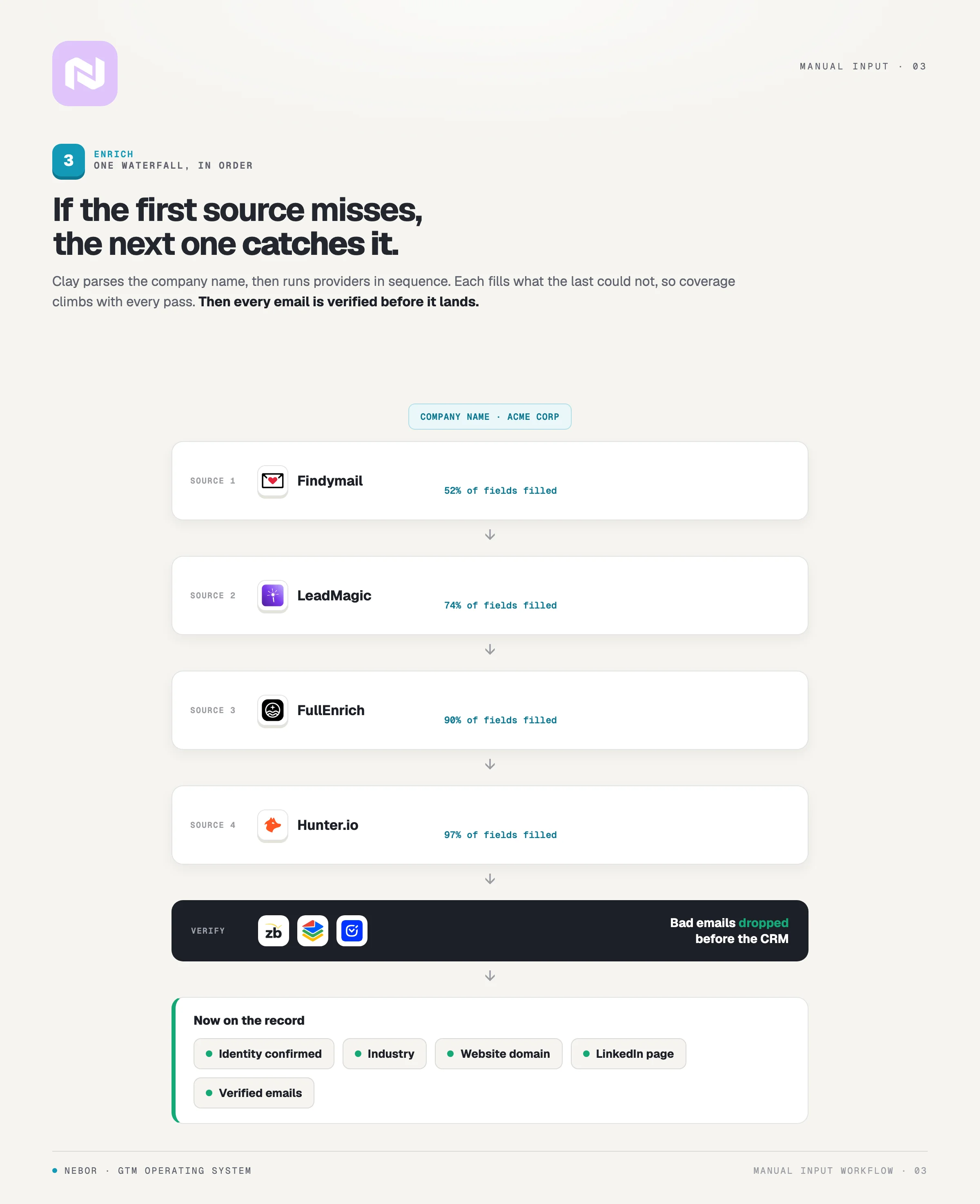
Once the fields are clean, the enrichment chain begins. Clay hits provider after provider in a waterfall, layering each result on top of the last. If the first provider doesn't have the company domain, the second one might.
If the second has outdated contact data, the third one tends to have something fresher.
That waterfall is the standard approach across data enrichment workflows and we lean on it constantly. Each layer adds verification, and verification is what keeps your CRM clean enough to trust.
The waterfall confirms the company name maps to a real entity, which catches typos that would otherwise rot inside your database.
It pulls the ISO code and country from the city, which matters if you target companies with international offices.
It tags the industry classification so the rep knows the business context before opening the record. And it finds the company's domain and LinkedIn page, both of which feed the later enrichment steps.
All of this happens in seconds. Work that would take a rep 15 to 30 minutes finishes before the rep has refreshed the page.
Clay isn't doing this on its own. The waterfall is only as strong as the data sources you wire into it, and the right sources depend on your ICP.
For most B2B SaaS clients we lean on Snov.io, LeadMagic.io, and FullEnrich for company and contact data, then pass email verification through ZeroBounce, BounceBan, or DeBounce before anything reaches HubSpot.
Step 4. Clay pushes AI prompts through Claygent to pull the specific buying signals the client cares about
This is where the workflow earns its keep. Basic enrichment gives you company information. AI-driven signal extraction gives you a reason to reach out.
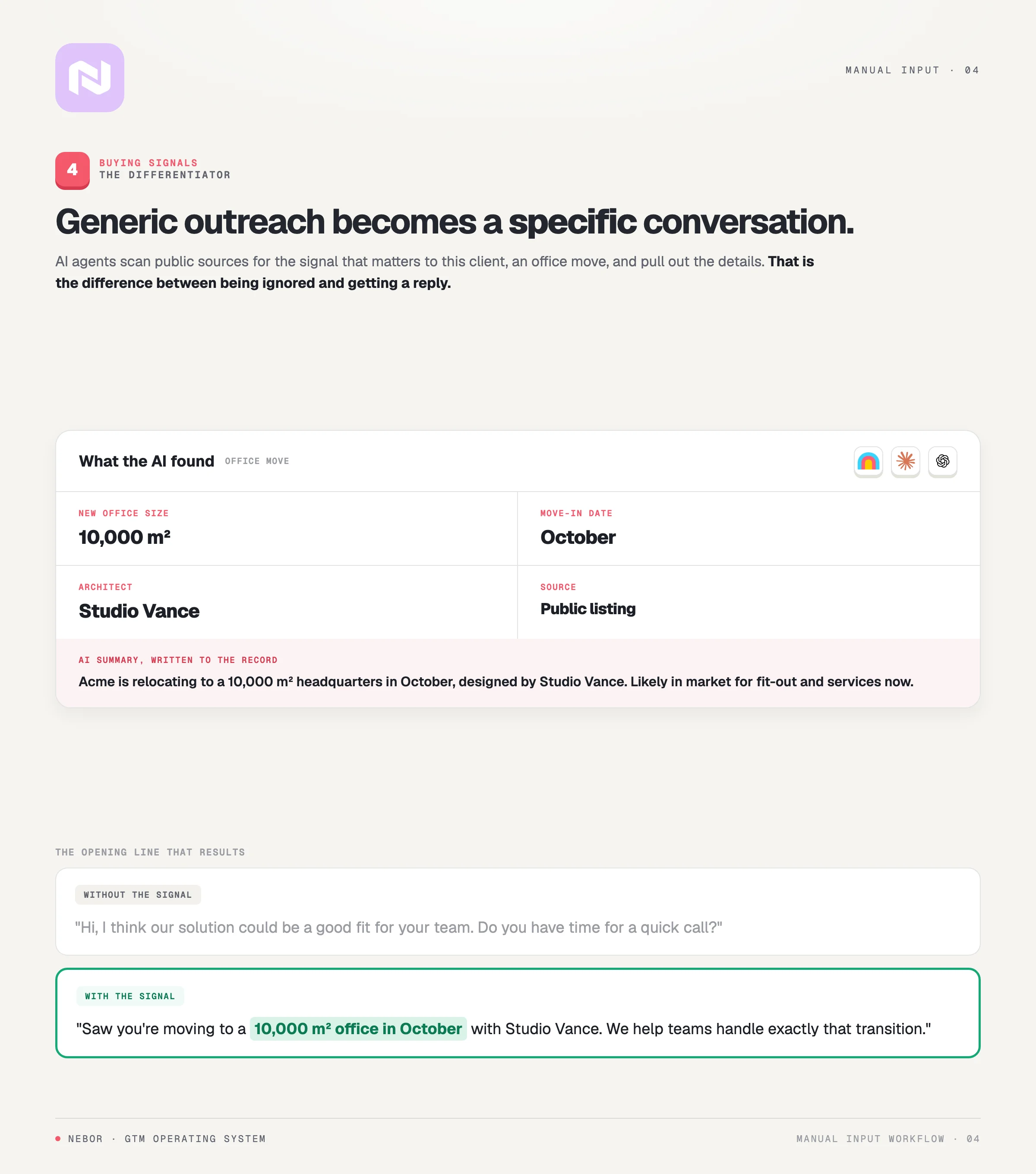
For the client we built this for, the signal that mattered most was whether a company was in the middle of an office move or renovation. Companies in that window need their offering. A company already settled into its space won't, no matter how clean the firmographics look.
We engineered prompts that Clay sends through Claygent, with ChatGPT and Claude available as fallbacks where they perform better. The prompts crawl public sources looking for evidence the company is moving, expanding, or breaking ground on something new.
When the AI finds something, it pulls out the details a salesperson would use in the first message.
The square meters of the new office.
The planned move-in date.
The architect or designer attached to the project.
Any other public detail worth mentioning in an opener.
That detail is what changes the email. A generic opener that says your solution might interest them gets ignored. An opener that references a 10,000 square meter office move in October gets read. The prospect immediately knows you did the work.
Clay also writes a short summary of the situation and pushes it onto the lead record. By the time the rep opens the record in HubSpot, the context they would have spent thirty minutes gathering is already there in three lines.
Step 5. Clay pushes the enriched record back into HubSpot, and the rep finds it ready
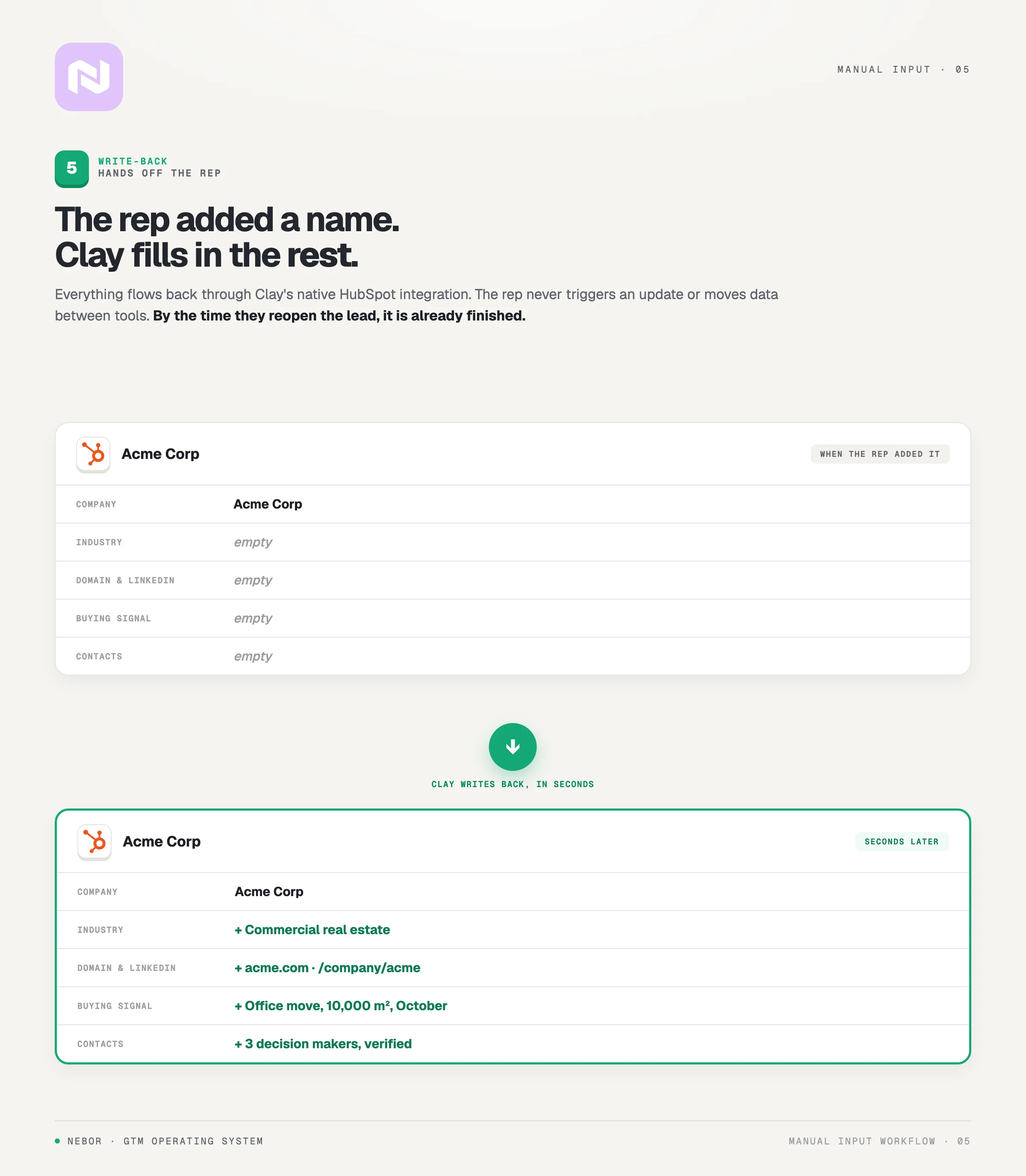
Once Clay finishes the enrichment and signal extraction, the data flows back into HubSpot through Clay’s native integration.
The lead record that started life with two fields, the company name and the city, now carries the full firmographic profile, the industry tag, the website and LinkedIn URLs, and the buying-signal summary the AI just pulled together.
The rep doesn’t trigger this update. They added the lead and walked away. By the time they open the record again, everything is already there waiting.
This is how we build every workflow at Nebor. The value lands automatically, with no extra ritual the rep has to remember.
Workflows that ask the rep to manually kick off enrichment, watch a status field, or copy data between two tools quietly fall out of use. Reps already have enough to track. Anything that adds to their list rarely survives a busy quarter.
The most resilient automation we ship is the kind that works without asking anything more from your team.
Step 6. Clay uses LeadsFactory.io to find the right decision-makers and creates contact records in HubSpot
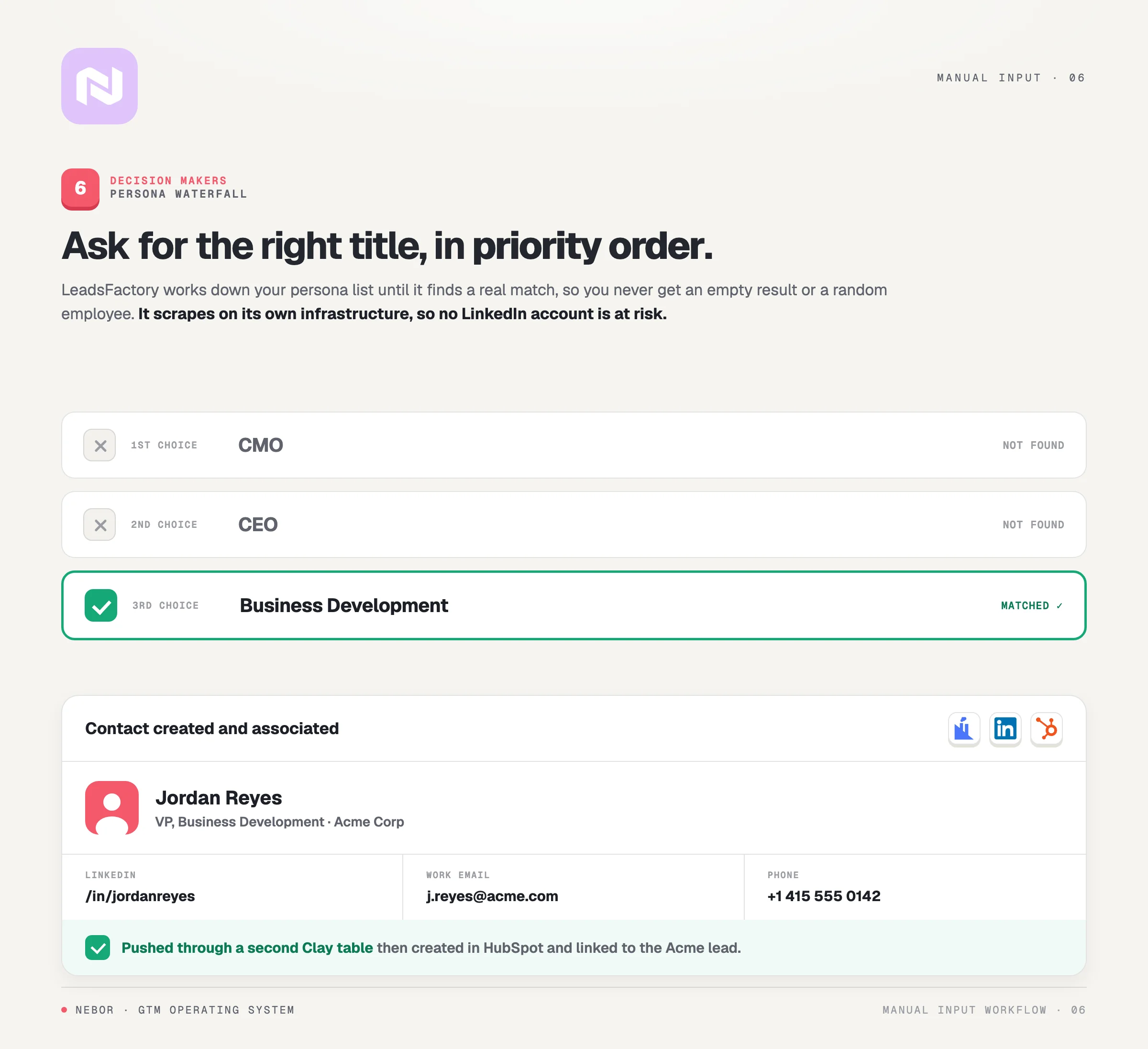
Company data is useful, but the rep needs people to email. The final piece of the workflow calls LeadsFactory against the enriched company to find the decision-makers worth contacting and pushes them into HubSpot as proper contact records.
LeadsFactory scrapes LinkedIn Sales Navigator and a handful of other live sources to find people at a specific company. The piece that makes it valuable inside this workflow is the persona waterfall.
You define the personas you want in priority order. CMO first, CEO second, Head of Business Development third. LeadsFactory tries each persona in turn until it finds one.
If your first choice isn’t on the headcount at that company, it falls through to the next persona without you having to chase it.
That waterfall is what stops the workflow from returning empty results on real companies. It also stops it from dumping every employee into your CRM, which a lot of contact-finding tools quietly do.
The output is people who match the targeting you defined, returned with LinkedIn profiles, verified email addresses, and phone numbers where they exist.
When LeadsFactory returns the contacts, Clay picks them up in a secondary table, processes them, and creates them in HubSpot as contact records associated with the lead.
The rep opens the lead and sees everything in one place. The company, the signal context, and the named decision-makers are all on one record.
One detail worth knowing about LeadsFactory before you wire this up. It works on its own infrastructure and doesn't ask you to connect your personal LinkedIn account.
That matters because some contact tools route their scraping through your account, which is exactly how reps end up getting their LinkedIn restricted.
LeadsFactory keeps your account out of the loop, which is one of the reasons we use it across most clients.
How webhooks and APIs hold the integration layer together
The individual tools are useful on their own, but the workflow’s value comes from how they connect. Webhooks and APIs pass data between HubSpot, Clay, and LeadsFactory without anyone touching a button.
The flow itself is straightforward when you map it out. HubSpot creates a Manual Input lead and sends a webhook to Clay.
Clay finishes the enrichment and calls HubSpot's API to update the record. Clay calls LeadsFactory's API for the decision-makers. LeadsFactory returns the contacts, Clay processes them, and pushes them back into HubSpot.
After the initial setup, none of that requires a human.
Building integrations that hold up over time is harder than it looks. Each API has its own quirks, and each tool has different error states across the edge cases.
The handoffs need to fail gracefully when a provider returns nothing, when a webhook arrives twice, or when the data shape shifts because a vendor updated its API without telling anyone.
Integrations that don’t account for those edges break constantly, reps stop trusting the workflow, and the whole sales tech stack gets quietly abandoned.
Integrations built with the edge cases in mind last for months without maintenance, and that's the bar we hold ours to.
What changes for your sales team once this workflow is live
Automation for its own sake isn’t worth the build cost. What matters is whether the workflow shifts the things you care about, the time your reps spend on calls, the quality of the data they reach out on, the consistency of your outbound across the team.
Across the clients we’ve built this for, four things shift in the same direction.
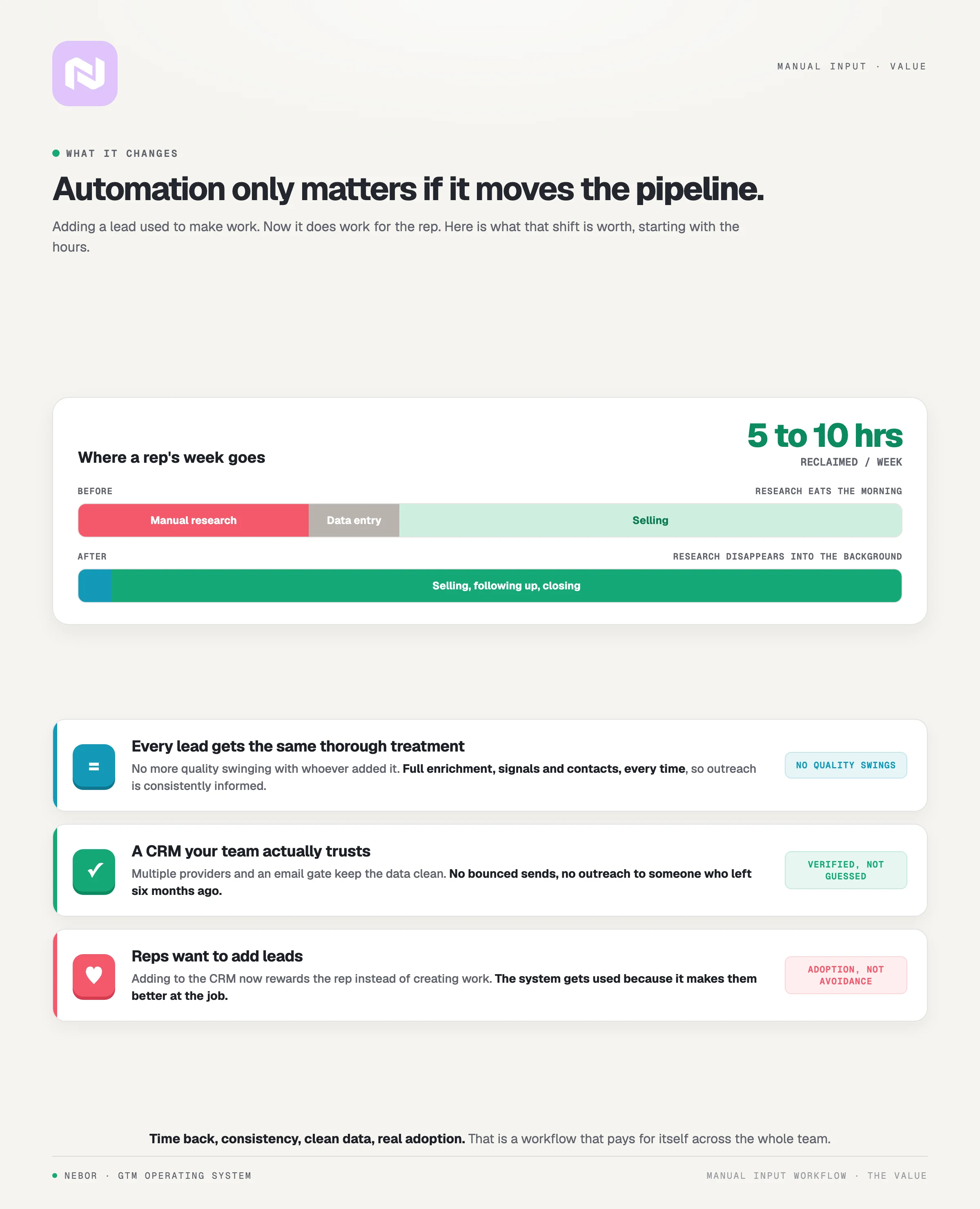
Your reps get hours back every week to spend on calls instead of research
The most immediate change shows up in the time your reps don't spend on research anymore. Every lead that would have taken 15 to 30 minutes by hand now lands in HubSpot in seconds.
A rep who processes 20 leads a week saves five to ten hours. Across a quarter, that's a working week and a half they get back per rep, on a single workflow.
The hours back are only half of what changes. The other half is what those hours start filling up with.
Reps spend more of the week on prospects who are already aware they need help, and more on warm follow-ups that close faster because they have the time to work them properly.
The actual selling motion the rep was hired for finally gets the bulk of the calendar.
Every lead gets the same thorough treatment regardless of who added it or when
Manual research quality changes by the rep and by the day. Some reps are thorough every time, and others take shortcuts when they're short on time. Some leads get a full background scan before the rep reaches out, and others get a quick Google search and a hope the email lands.
The automated workflow treats every lead the same. Firmographic enrichment, signal extraction, and contact discovery happen on every record identically. There’s no variation based on who added the lead or how full their calendar happened to be that day.
That consistency matters for the team and for the brand. When every email lands with the same level of context, the prospect can't tell which rep sent it. The whole motion looks like it came from one company instead of five different desks.
Your CRM stays clean with verified data your team can trust
This is the part most clients say lands hardest after we ship the workflow.
Manual research produces dirty data more often than anyone wants to admit, and the dirty data is what burns the reputation of your outbound. An email bounces because the verification was skipped. A pitch lands on the desk of someone who left the company in Q2.
The person who finally replies has a different title than the one your rep prepared for. Each error costs the rep time and the brand a little credibility.
The automated workflow passes every record through verification before it enters HubSpot.
Email verification passes through ZeroBounce, BounceBan, or DeBounce before any address makes it onto a contact record.
Firmographics come from a waterfall of providers, not a single stale database that hasn't been refreshed in a year.
Decision-maker contacts come from LinkedIn live at the moment of enrichment, not from a list someone bought twelve months ago.
Clean data is what makes the CRM trustworthy. When every record has been verified before it lands, the team starts working from the CRM instead of routing around it.
A CRM full of dead emails and wrong titles is a place reps stop opening. The workflow keeps that from happening because every record going in has been verified, and the team learns to trust what's there.
Your reps want to add leads because the system pays them back instead of creating more work
The most overlooked piece of this workflow is the incentive structure layered on top of the tech. The technology delivers the enriched data, and the incentive layer is what makes reps use the tool that delivers it.
In the old version of this job, adding a lead to the CRM created more work for the rep. They added the lead, then did all the research themselves. The CRM became a place to log activity, not a tool that earned its place in their day.
In the new version, adding a lead to the CRM is the moment the research happens. The rep wins by adding leads, because every lead they add comes back to them enriched, signal-flagged, and with named contacts already attached.
The CRM becomes a tool that gives them more time, not one that asks for more.
Speaking as people who’ve sat in the rep seat ourselves, this is the variable that decides adoption. Sales tools that create work for the rep tend to get avoided, while the ones that give the rep time back tend to get used. The manual input flow falls into the second group.
Why we’d suggest having Nebor build this workflow with you
The build is doable on your own from a pure tooling standpoint. The tools are available, the APIs are documented, and a technically capable person with a quarter to burn could put the pieces together.
What's harder is the implementation detail, which is where the workflow either lasts for years or breaks at the first edge case.
Across the dozens of these we’ve shipped, the gap between a system that quietly produces and a system that quietly dies usually lives in those details.
We’re salespeople first and automation experts second
The Nebor team came up selling before we ever shipped a workflow to a client. Yannick spent over a decade in corporate SaaS sales seats. Andrew built and did outbound before turning the playbook into Clay-based automation clients now buy from us.
We’ve been the reps who lost mornings to manual research and had to clean other people’s CRM data before reaching out. We've pushed back against managers who sent us bad lists. We remember the frustration, and it shapes how we design these workflows now.
That’s why we think first about what reps will actually do every day, not what an org chart says they should do. The workflow has to win the rep's trust on the first lead they put through it. Otherwise the rep stops using it by week two.
Owned GTM. Systems you keep, not services you rent
When you work with us, the workflow belongs to you. We call this Owned GTM. Every system we build lives in your accounts under your credentials, never on ours.
That includes the Clay tables, the HubSpot automation, the LeadsFactory configuration, and the prompts we wrote for the AI signal extraction. We’re not a managed service that hands you a login and charges a monthly fee for the right to keep using it.
There are several practical reasons that ownership matters here.
You can change the workflow yourself when your ICP shifts, your signals change, or you swap one provider for another.
You can bring the system fully in-house when your team is ready to operate it without us.
You can end the engagement and the automation keeps going, because nothing depends on us.
We document and design for maintainability from the start. What you receive at handover is the working system plus the operating manual you'd need to maintain it without us.
We think in systems, not single workflows
The manual input flow is one workflow in a wider GTM system. Most teams doing B2B outbound need three or four others alongside it.
Inbound qualification on form submissions and demo requests.
Buyer intent signal monitoring across your TAM.
CRM enrichment for the existing accounts list.
Outbound campaign automation for cold accounts.
When we work with a client, we map how the workflows connect before we build any of them. The output is a stack where data flows cleanly between processes and where leads don't fall through the cracks between systems.
That systems view is the difference between a collection of individual automations and a sales engine that holds together at scale.
We know where the problems hide before you hit them
Every workflow looks simple until you try to build it, and then the edge cases come for you fast.
A few real ones we've hit across clients.
A company name with special characters that breaks the API parsing on the way out of HubSpot.
A misspelled city that stops Clay from resolving the country code, which then breaks every downstream lookup that depended on country.
A LeadsFactory return where five contacts come back at a company but only two have verified emails.
An AI prompt that misreads a renovation announcement as an unrelated press release.
We’ve seen each of those failure modes before, across clients in different industries. We know where the gotchas live in this stack, and we know how to design around them.
Knowing where to design around them means the implementation moves faster and the workflow holds up the first time it sees real volume.
Hire Nebor to build your manual input flow and take research off your sales team
If your reps are spending real time on manual lead research, that time is costing you money. Every hour spent Googling companies and hunting for emails is an hour the rep isn't on a call that moves a deal forward.
The workflow we walked through takes that research burden off entirely. The rep adds the company name and the city, and the system handles the rest. By the time the rep opens the lead again, it's enriched, signal-flagged, and routed to the right decision-makers.
We ship these systems for companies like yours regularly, and the best place to start is a 15-minute conversation about your specific motion. We'll ask about your current process and where the bottlenecks are, then tell you whether this kind of workflow fits what you're trying to build. If it doesn't fit, we'll tell you that directly.
No pressure and no automated follow-up sequence after the call. Just a straight conversation about whether this fits.
If that sounds useful, book a 15-minute call with us. Or if you’d rather start by reading how we think about the wider stack, our post on hiring a growth agency walks through what to look for and the red flags most companies miss.


Related Articles

By clicking Sign Up you're confirming that you agree with our Terms and Conditions.