
Top 10 Sales Automation Workflows To Boost Your Sales And Revenue Ops Without Adding Headcount

In this post:
Every morning, your reps wake up to a mountain of manual work. Hunting for prospects on LinkedIn, writing emails one by one, copying notes from meetings into the CRM, chasing follow-ups that fell off… you know the list.
If you spend more time managing your sales process than selling inside it, your sales process is the problem.
Most startups never have the bandwidth to handle a full sales motion by hand, and most established companies with a real sales team have no idea how much efficiency they leak in a normal week.
Most businesses depend on a chaotic process where your best prospects get inconsistent experiences and your team burns its energy on work that should not need a human at all.
Workflow automation cuts that work, gives your team the time back, and lets your reps focus on the part of the job that actually moves pipeline.
If you are reading this, you already suspect that the heavy lifting belongs to a system, and that your team should be doing something else with their time.
The question is which parts of the process to automate first, in what order, and how to put it all together without breaking the parts that already work.
We at Nebor build GTM systems and we build the same kind of automation we are going to describe below.
In this post, we walk through 10 of the sales automation workflows we build most often, why we build them in this order, and what each one is worth once it is live.
But there’s a process to it. Here’s what you need to do or understand first before you get started.
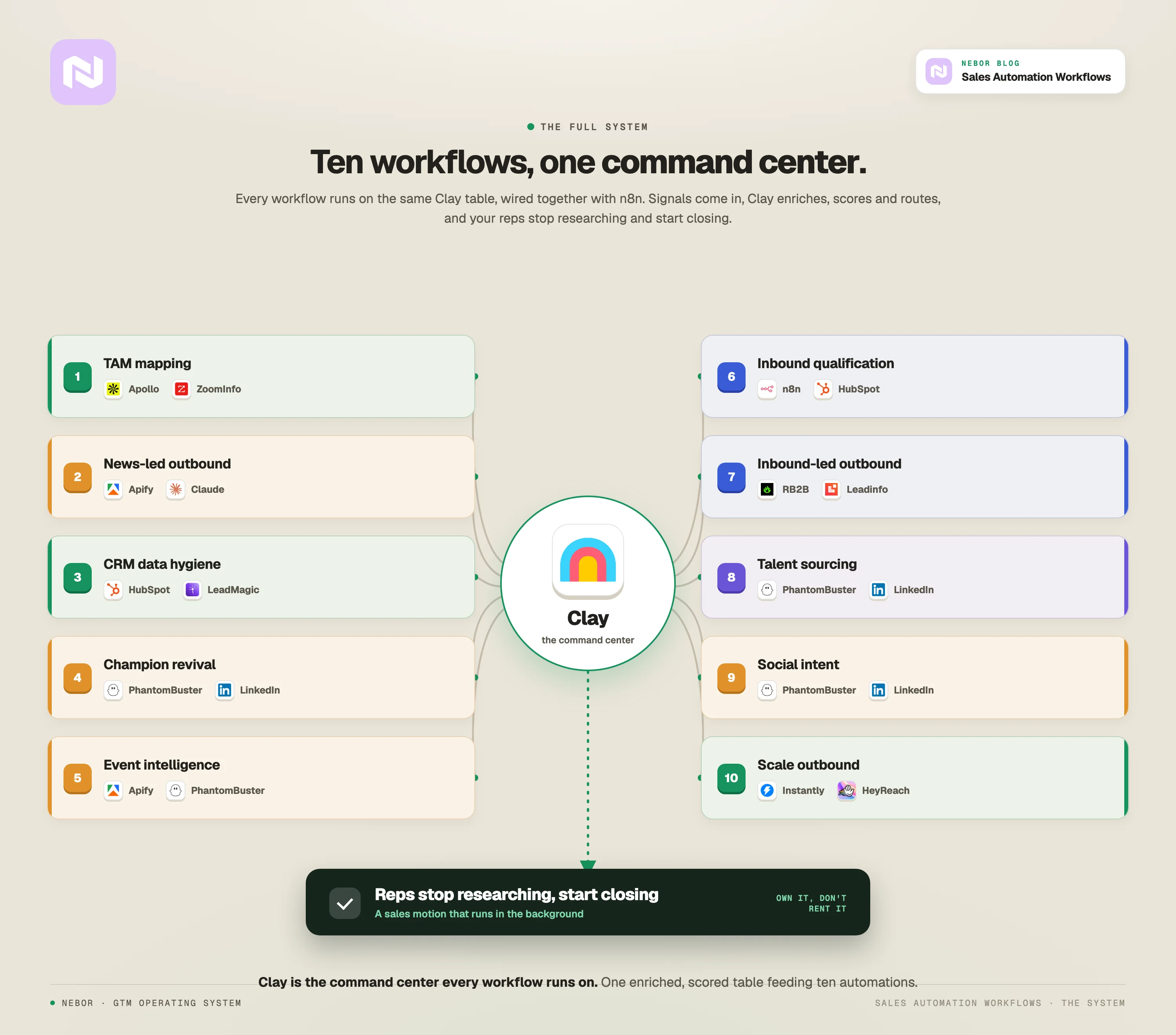
TL,DR: the 10 sales automation workflows all built and integrated around clay
First things first, identify your biggest sales bottlenecks (before you automate anything)
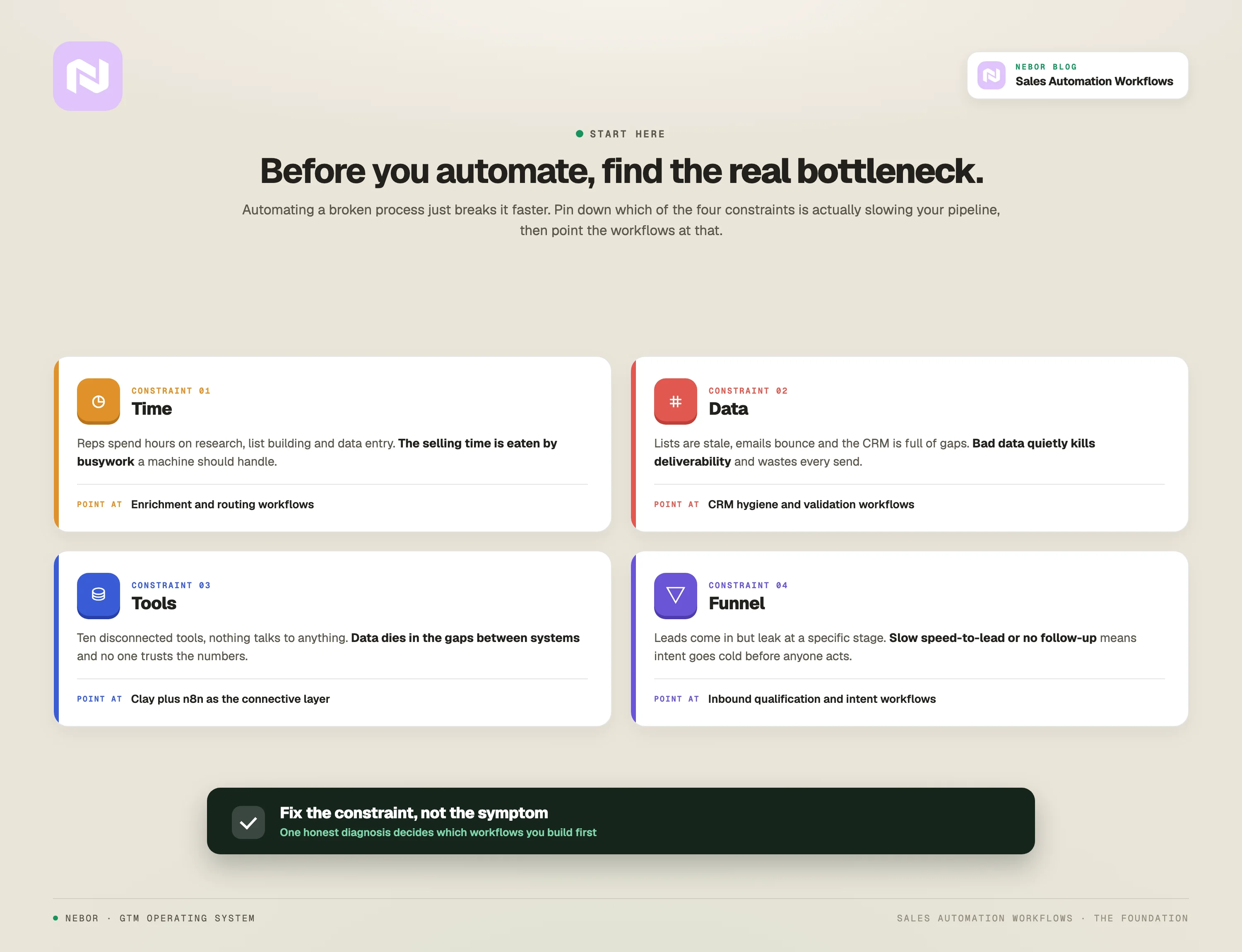
Sales automation is not a magic fix. It is a way of solving real bottlenecks with engineered workflows, and it only pays off when you know exactly which bottleneck you are solving.
So, before you automate, audit. Map out your entire sales process from lead generation to closed deal.
Look for the points where speed drops and leads disappear. Most of the work that drags a sales team is repetitive, low-value, and a clean automation candidate. Those are the points where a workflow buys you the most time back.
We at Nebor diagnose it the same way every time, and the audit always starts in the same place. Here are the questions we ask through this:
Where is your team wasting the most time?
Start with the obvious. The obvious is the daily activity your reps handle inside a bigger sales function.
Let’s look at a few examples, starting with the outbound sales function. Prospect research (aka sales prospecting) is a daily activity that lives inside outbound. Pipeline hygiene is a daily activity that lives inside RevOps. Follow-up is a daily activity that lives inside both.
Audit your current sales activities for one week and track how much time your team spends on the work below.
Prospecting and lead research. How long does it take to find a qualified prospect's contact information, understand their business situation, and craft a relevant message?
Data entry and CRM updates. How much time do your reps spend logging activities, updating contact information, and maintaining deal records?
Follow-up management. How often do promising conversations die because a follow-up fell through the cracks?
Meeting preparation. How long does it take a rep to research a prospect before a call and pull together relevant talking points?
Lead handoffs. How much time gets lost when leads move between marketing and sales, or between SDRs and account executives?
Most of those tasks are repetitive enough that a workflow can do them faster, cheaper, and with fewer mistakes than a person can.
Look at what your team does on a normal day and ask which parts could happen on a system instead.
The usual candidates include finding new leads, writing the first round of outreach, updating the CRM, handing leads from SDR to AE, reporting, qualifying inbound leads, sending the next follow-up, alerting the right rep, prepping for calls, and re-engaging old marketing leads.
Repetitive, time-consuming work is the entry point for every automation we build.
Where is your data being wasted?
Most companies are holding a goldmine of customer data that could feed their sales motion, and nobody on the team is connecting the dots. You are probably no different.
Ask yourself a few questions and answer them honestly.
What do you already know about your existing customers that could help you find lookalike prospects?
Who is visiting your website, what are they reading, and how do you turn that engagement into a sales conversation?
Which accounts are engaging with your LinkedIn content, and how are you capturing that interest?
What external events (funding, hiring, industry news) say a prospect probably needs your solution right now?
When we audit a sales team, the same pattern shows up almost every time. We see things like website visitor data that never reaches the sales team. There’s more.
Customer history scattered across three different sales tools. Social engagement that is a buying signal in disguise that nobody is set up to act on. Former champions who changed jobs and could become new opportunities, buried unnoticed inside the CRM.
A real sales automation process starts with finding those untapped sources and building workflows that capture and act on them with little manual input.
Not every lead is ready to buy, so part of the work is also scoring what you find and routing the genuinely qualified ones to the people who can close them. It’s part of making your entire organization more efficient.
How are your tools connected, or not connected?
You also need to understand the sales tech stack you already have before you bolt on anything new.
Most teams use some combination of HubSpot, Apollo, Salesforce, Clay, LinkedIn, Slack, Notion, and a marketing automation platform. The problem is rarely the tools themselves. The problem is that they do not talk to each other. Marketing uses one set, sales uses another, and leads fall through the cracks every time something hands off.
The point of an automated sales workflow is to knit the stack together, so a signal from one tool turns into an action in another without a person in between.
Map your current stack and answer the same questions for each piece.
CRM. Where do you store customer and prospect information (HubSpot, Salesforce, Microsoft Dynamics, Pipedrive)?
Email platform. How do you send outbound campaigns and track responses, and does that data flow back into the CRM, or do reps copy and paste?
Social selling tools. How do you handle LinkedIn outreach, and is that connected to the CRM or buried inside a spreadsheet nobody opens?
Marketing automation. How do leads flow from marketing activity into sales follow-up, and do they actually flow at all?
Data sources. Where do you currently find prospect information, and how does it land inside your sales process?
The goal is not to rip everything out and start from scratch. The goal is to find every spot where information gets stuck, duplicated, lost between systems, moved manually, and to wire those spots up.
What does your current sales funnel look like?
You cannot automate randomly without breaking something downstream. Map your sales funnel and pick the workflows with the highest combination of four things.
The first is time savings. Tasks that swallow hours today and could finish in minutes inside a workflow.
The second is revenue impact. Activities that directly change your ability to find, engage, and close qualified prospects.
The third is consistency. Steps where human error or oversight creates missed opportunities every week.
The fourth is scale. Workflows that get more valuable as the business grows, instead of more painful.
When you map your funnel, look for the moments where automation can trigger an action the second a lead changes stage.
Think things like a new inbound fills out a form and the rep gets a Slack ping with a full enrichment in under a minute. A deal moves to closed-won and the customer success team gets a brief with the relevant context.
Those are the moments where a workflow earns its keep.
Do not just look at sales. Look at the full revenue motion, marketing into SDR, SDR into AE, AE into CS. Where do leads get lost? Where does speed drop? Where does context disappear in the handoff?
Those are the spots where a workflow buys back the most time, and where the ten below earn out.
The 10 sales automation workflows we build most often
The next ten workflows are some of the ones we build at Nebor for our clients again and again. Each one targets a specific bottleneck.
Each section is a quick walk-through of what the workflow does, what it produces, and why it works. There is more under the hood of each one than this post can cover. So, keep that in mind.
1. Total addressable market mapping workflow
In most sales teams, including yours, sales reps prospect whoever they can find on LinkedIn Sales Navigator or Apollo and hope something sticks.
There is no system for understanding the real market, no logic for prioritizing the best-fit accounts, and no shared list anyone trusts.
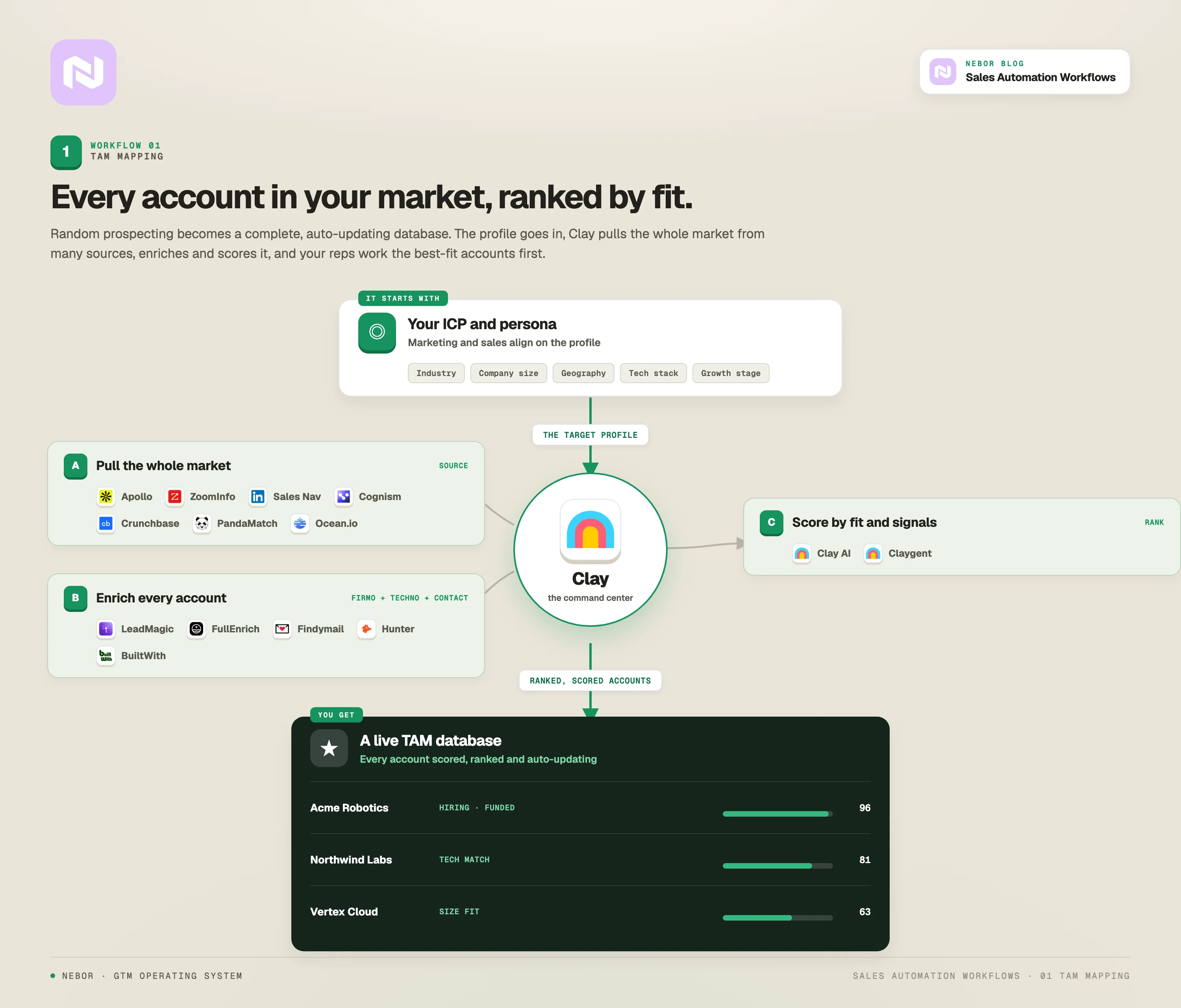
Our TAM mapping workflow replaces that. Instead of random prospecting, your team works against a complete, constantly updated database of every company in your total addressable market, ranked by fit and likelihood to buy.
We’ve written more about how to build your TAM in detail in another post, but the short version belongs inside this workflow.
The build starts with a deep ICP and buyer-persona session with both your marketing and sales teams. Then we move into Clay, which becomes the command center for the whole system.
We connect Clay to specialized data sources, not just the obvious ones like Apollo or ZoomInfo, but niche tools that match your specific ICP and surface accounts the generalist databases miss.
Clay then enriches every prospect with firmographic and technographic data from multiple sources, and scores each company on fit and buying signals. The whole list updates automatically, so you always know who to talk to next.
Your sales effort goes from spread thin to laser-focused. Instead of 100 calls to get 2 qualified conversations, your team makes 100 calls and lands 10. Conversion rates climb because the people on the other end of the line actually fit the profile.
2. Automated news-led outbound workflow
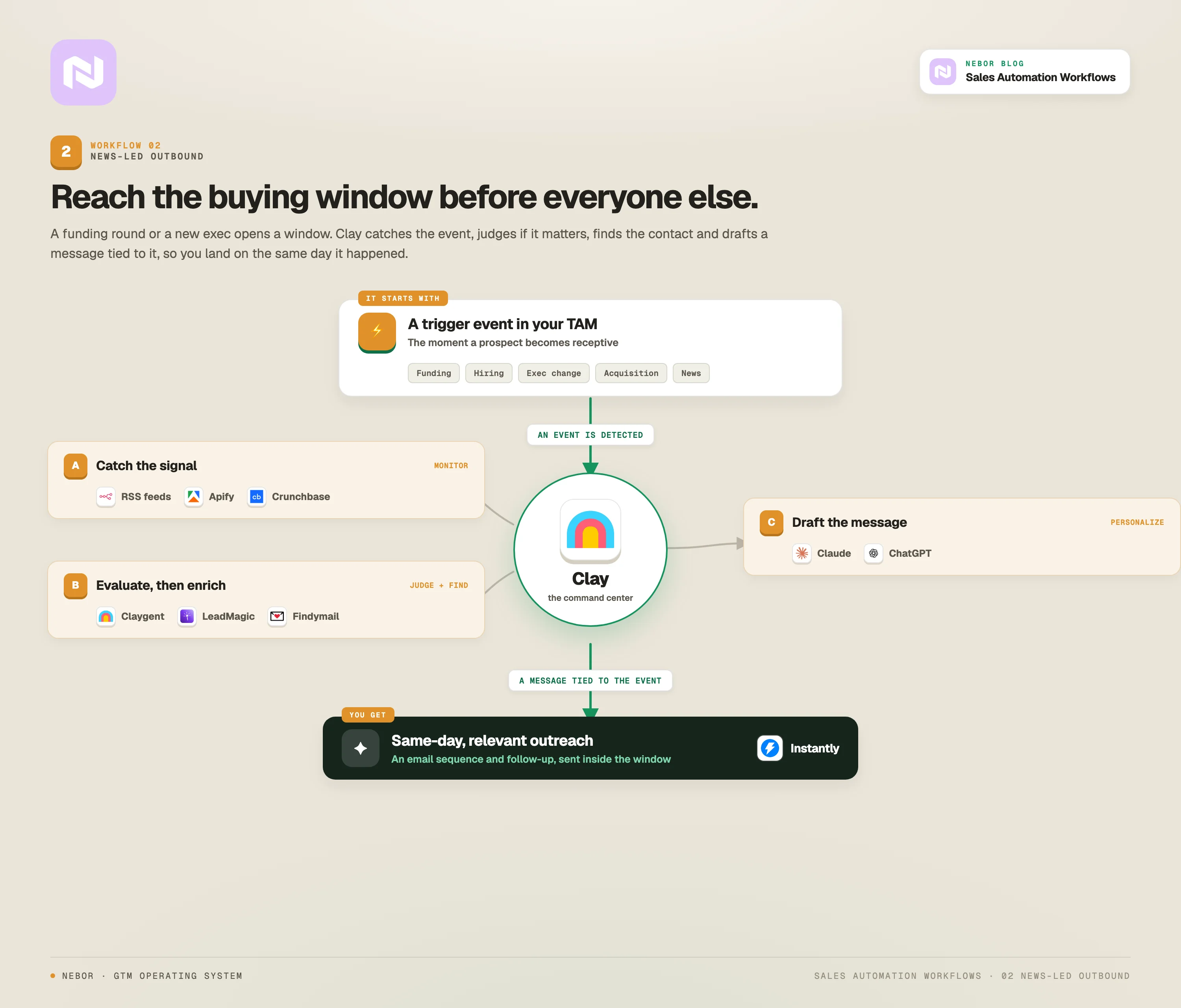
Every inbox is full of "I noticed you work at [company]" messages that read like they came from a script. The reason most reps cannot personalize beyond that is that researching real events affecting each prospect takes hours per person.
The fix is a workflow that watches for news mentions, funding rounds, executive changes, and other relevant events affecting your prospects, and triggers personalized outreach with messaging tied to the specific event.
We have written a longer guide on the RSS feeds monitoring workflow that powers a lot of this, and the same logic carries here.
When someone got promoted, raised a funding round, made an acquisition, or got named in a story about a real industry challenge, it opens a buying window and they become far more receptive to a sales message. The trick is reaching out to them inside the window.
By the time you spot the news manually, the buying window has already skipped you by or every other vendor in the space with better systems is already in their inbox.
We set monitoring up using Clay’s integrations with news feeds, RSS readers, and tools like Apify to track specific triggers on specific sites for each client.
When a company in your TAM gets mentioned in the news, raises a round, ships a new product, or changes leadership, (or whatever news or insights about the company), Clay catches it and we have a Claygent prompt set up to make sense of the event.
The Claygent prompt serves to evaluate if the news has business potential or lack thereof for your business. If it does, it triggers an enrichment workflow where it finds more information about the company, the point of contact and their contact addresses.
Next, ChatGPT or Claude (working natively inside Clay) drafts a personalized message that references the actual event.
From there, a workflow of automated email sequences and follow-up goes out for each prospect at the right moment.
You’ll get better response rates because the message reaches people on the same day the event matters to them.
3. CRM data hygiene and enrichment workflow
The painful truth about most CRMs is that they become graveyards of bad data.
Outdated phone numbers, dead email addresses, duplicate records, missing fields, and a sales team that spends more time cleaning data than selling. Reporting becomes useless because the underlying data is rotten.
When a sales team trusts the data in the CRM, they act on it. When they do not, they double-check everything, or worse, skip the follow-up entirely.
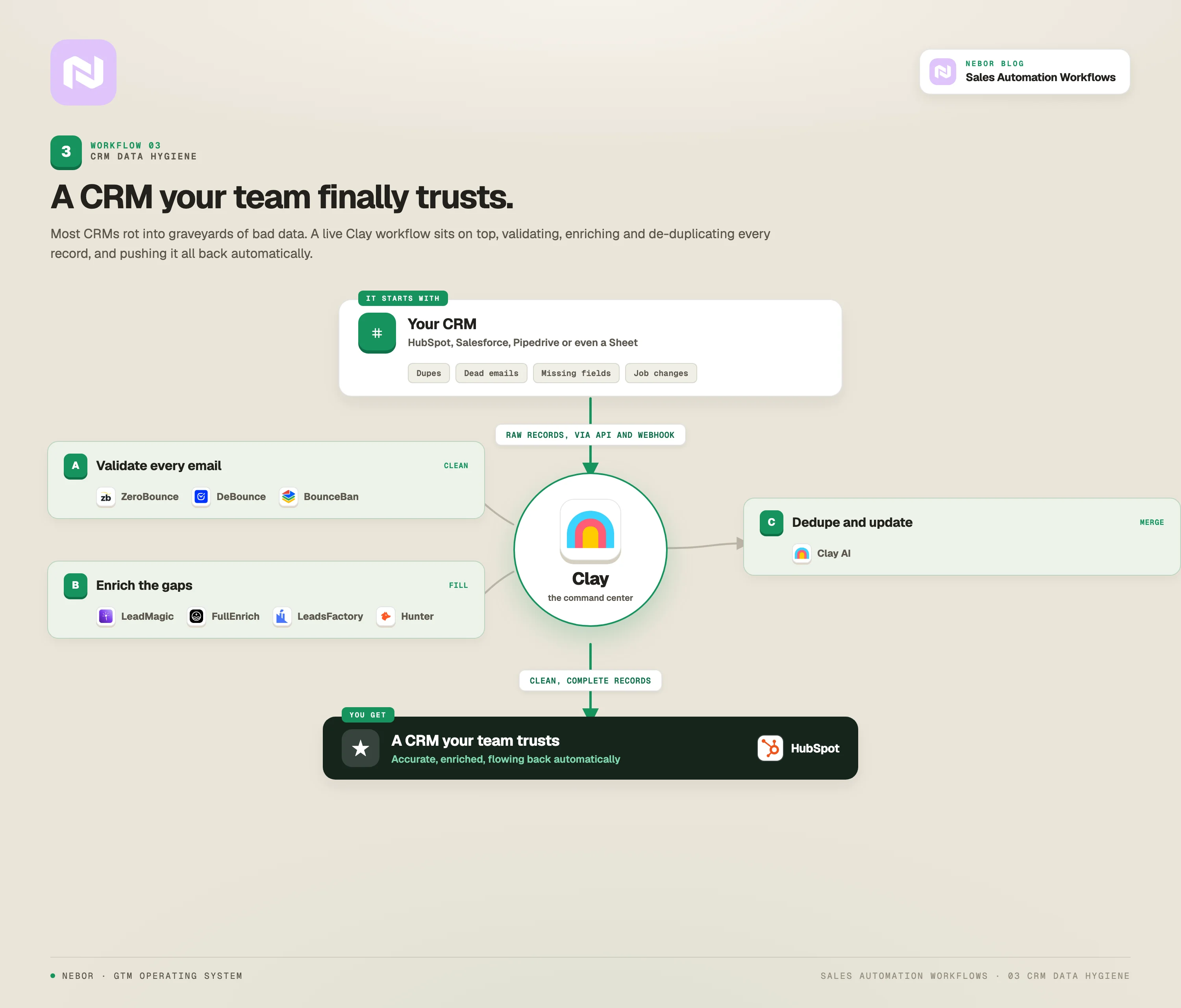
Clean, enriched data turns the CRM from a liability into something the team actually uses. We build Clay workflows that integrate directly into your CRM, whether you use HubSpot, Salesforce, Pipedrive, or even a Google Sheet, and continuously clean and enrich the data inside it.
It’s all a game of knowing where you should get your data from, API calls, and webhooks. The idea is to keep the live data in a Clay workflow that’s live and constantly updates itself. That workflow will then connect to your CRM to keep it updated and clean.
The workflow finds duplicate records, validates emails through multiple services, fills in missing fields with fresh data, and flags records that need human attention.
It can also handle support tickets and downstream customer-success processes, which most teams forget about until the data is already broken.
The workflow can pull in new contacts from form submissions or other tools, so the CRM stays current without anyone touching it.
When someone in your CRM changes jobs, Clay updates their record automatically and creates a new opportunity at the new company. When a phone number bounces, it gets flagged. When an email goes invalid, the workflow looks for a working alternative.
We use LeadMagic, FullEnrich, LeadsFactory, and Hunter for enrichment, and ZeroBounce, DeBounce, and BounceBan for verification. Everything flows back into the CRM automatically, and the team finally has accurate, complete information when they need it.
With this, your sales reps stop wasting time on dead contacts. Reporting actually matches reality. Most importantly, the team starts trusting and using the CRM, which fixes a problem most companies have learned to live with.
Even better, we build unique, contextual workflows like a Manual Input Flow that lets your team members simply add a company name into your CRM and it automatically populates all the missing fields with information including the point of contact and their contact info about said company.
4. Champion revival workflow
Your strongest champion at a client company leaves for a new role. In most sales orgs, that relationship just disappears. Maybe someone sees it tells themselves to remember or note to reach out, but it never happens.
That is one of the biggest wasted opportunities we see. Your former champions already know your value. They have seen your solution work and understand the ROI you can promise because they helped deliver it.
When they move to a new company, they often have decision-making authority, and they are some of the highest-probability prospects you will ever find. Almost no one in B2B pursues them as a systematic motion, which is exactly why it works.
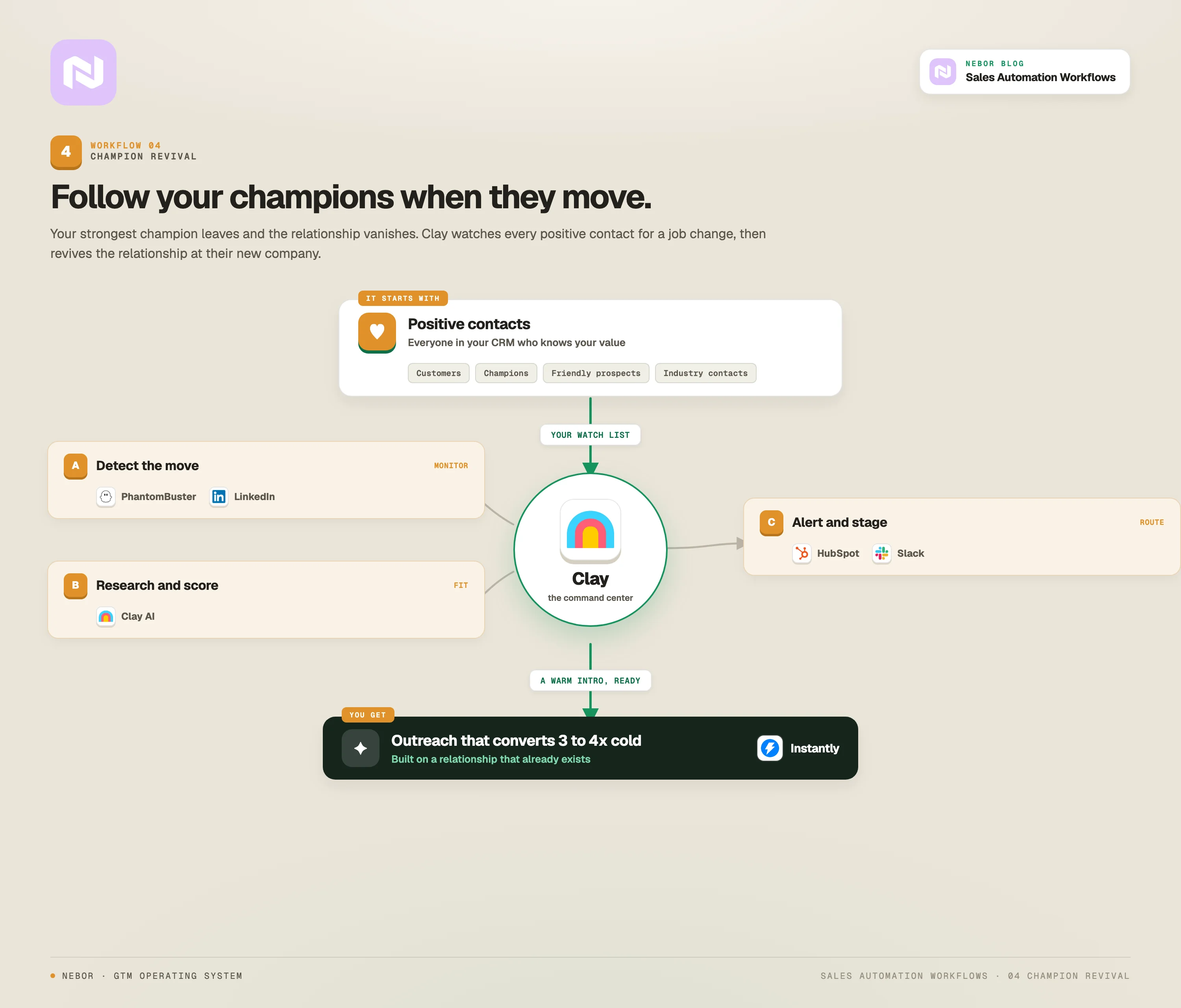
We use Clay to monitor job changes for everyone in your CRM tagged as a positive contact, whether they are customers, former champions, friendly prospects, industry contacts, or anyone who knows what you do.
The system connects to LinkedIn through PhantomBuster, plus enrichment databases and news sources, and detects when someone moves.
When the system catches a job change, Clay automatically researches the new company, scores it against your ICP, and either kicks off a personalized outreach sequence or alerts the rep with the talking points already lined up.
The contact also moves into the right stage in the sales pipeline, so nothing slips.
The outreach references the previous relationship and positions your solution as something that already worked for them.
Your sales manager can track those revived opportunities on a dashboard, watch follow-up cadence, and see conversion rates from the workflow specifically.
You are reaching people who already trust you, at companies that fit your profile, with a relationship foundation already in place. Those conversations convert at three to four times the rate of cold outreach because the trust is already there.
5. Conference and event intelligence workflow
Industry conferences are full of qualified prospects, but tracking attendees, speakers, and sponsors by hand is brutal. Most companies either skip the work entirely or do it so inefficiently that the ROI is not there.
When someone attends an industry conference, speaks at an event, or sponsors a webinar, they are actively engaged in solving problems in that space.
They are also in the rare mindset where they are looking for new solutions and new connections. That is the right moment to land a relevant message.
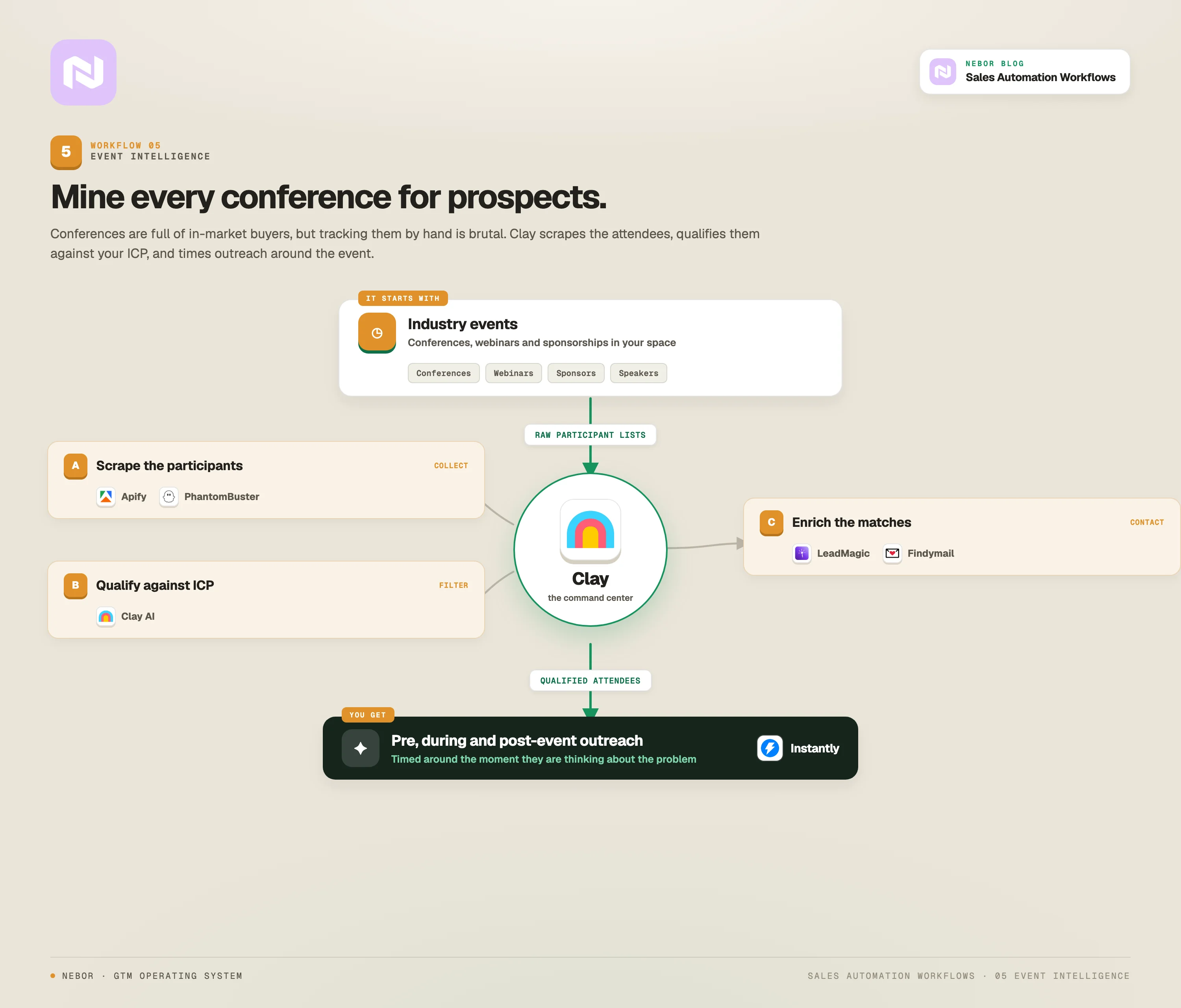
We use Clay combined with web-scraping tools like Apify and PhantomBuster to monitor industry event sites, pull attendee lists, and cross-reference them with your ICP.
We can also fold in data from Google Ads campaigns to surface companies that have shown intent on similar topics.
The workflow finds relevant conferences and webinars in your industry, scrapes participant information, qualifies each attendee against client-specific criteria, and enriches the matches with contact data and company information.
From there it triggers pre-event, during-event, and post-event outreach. This becomes one of the cleanest ways to start a conversation when the prospect is not actively in-market.
You catch them while they are thinking about the problem, not after they have already moved on.
6. Inbound qualification and routing (the qualification agent)
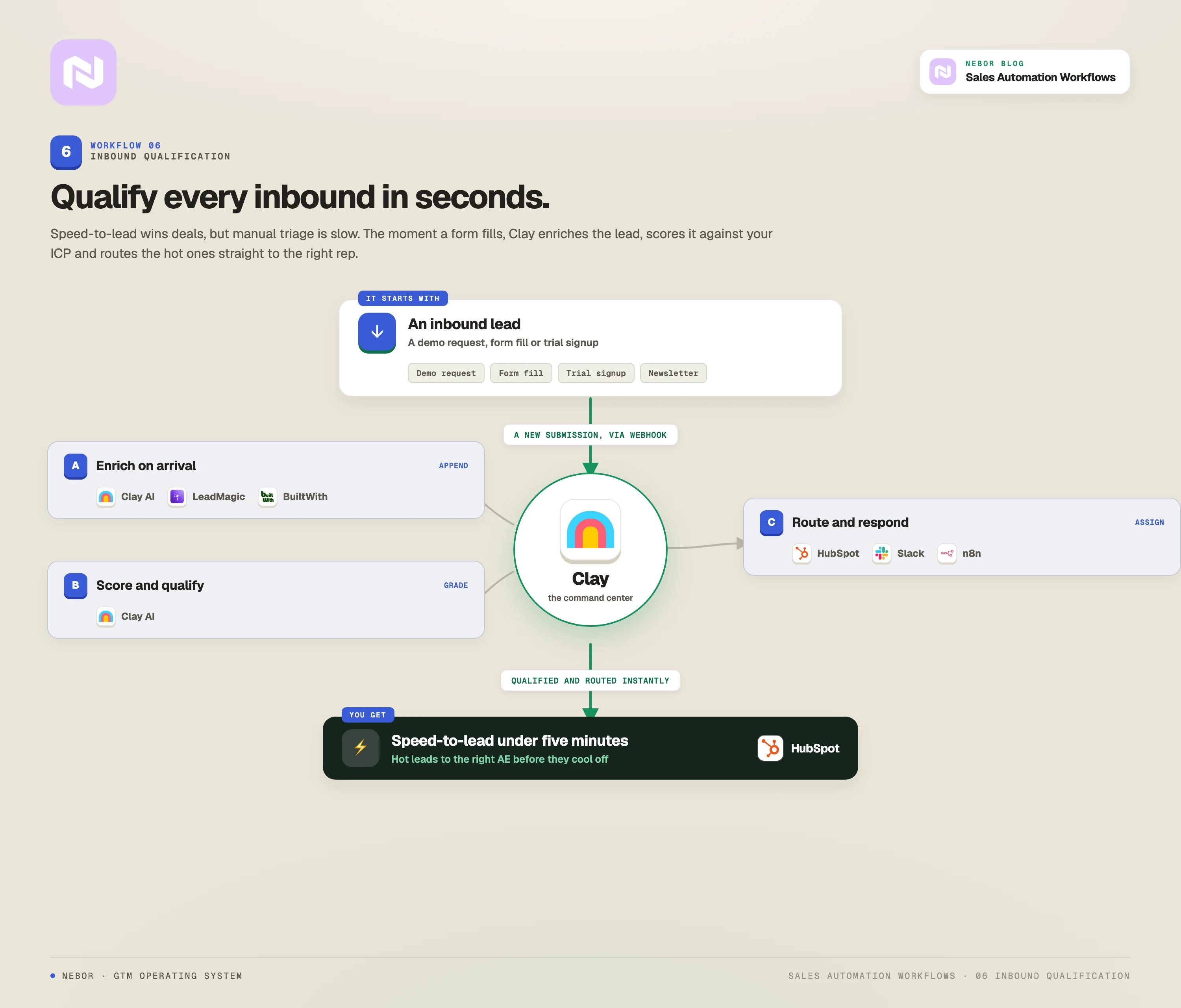
You probably generate leads through content, ads, or referrals. Then those leads wait in a queue for someone to qualify them (manually). In most cases, by the time one of your reps sorts through them and calls, the lead has gone cold or signed with someone else.
That is untapped business and you do not need us to tell you that.
Inbound leads are hot the moment they engage, and they cool fast. Research from Credofy shows that the odds of qualifying a lead drop by 80% if you wait more than five minutes to respond. You also cannot blast back a generic message, because you need context about the prospect to have a useful conversation.
We wrote a longer build guide on the inbound meeting workflow that lives inside this one. Here is the short version of how the qualification agent works.
When someone fills out a form, downloads content, or requests a demo, they hit Clay through a webhook, Apify, or n8n. Clay enriches the profile, identifies the decision-makers, scores the lead against your qualification criteria, and routes it to the right rep with full context attached.
The system pulls company size, tech stack, recent news, and key contacts from multiple sources. It also generates suggested talking points based on the content the lead engaged with and the challenges their company likely faces.
Your reps reach new leads while they are hot, with relevant context already pulled. With that, your conversion rates climb because the call is informed instead of a blank-slate discovery.
Even better, your sales and marketing teams also stop arguing about what counts as a qualified lead, because every lead passes through the same scoring system.
Nothing falls through the cracks because the cracks are gone.
7. Inbound-led outbound workflow
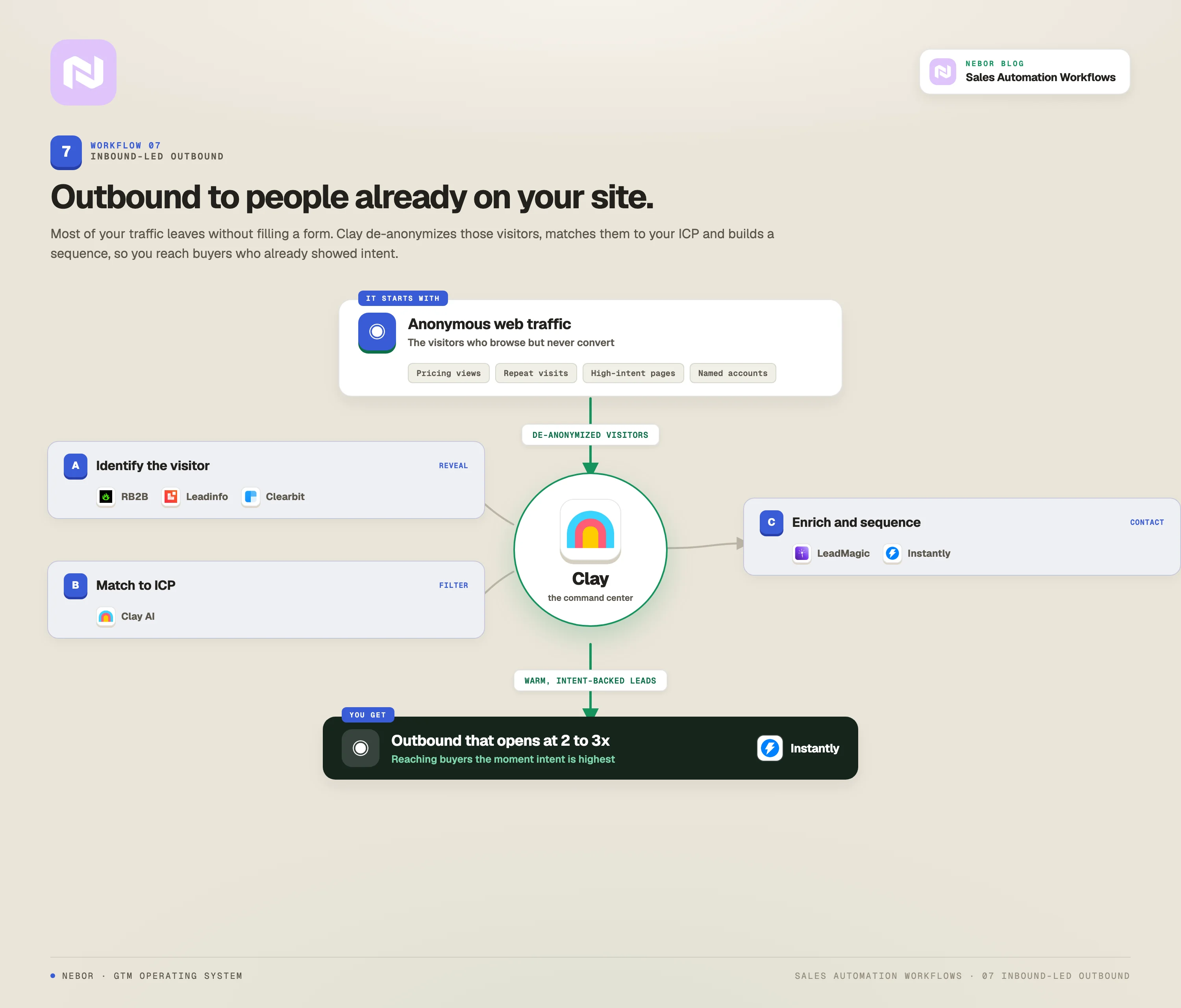
If someone is reading your blog or staring at your pricing page, you should know about it.
Thousands of people visit your website every month, look at your solutions, check your pricing, and leave without converting.
Most companies treat that as normal traffic and move on. Those visitors showed real interest, especially those who spend time on your sales or your pricing pages. They are not cold prospects, they are warm leads who did not convert on the first visit.
The trick is catching the visit or engagement event and following up in a way that references their actual interest.
Our workflow, here, uses RB2B or Leadinfo to identify the companies behind anonymous traffic. We set them up on your key pages to identify who comes on those pages and check them against your ICP.
It works even better when you have the TAM workflow going in tandem with it because we set things up so that we watch the companies from your TAM. That’s far more valuable and precise.
So, basically after passing the visitor identification level through RB2B, Leadinfo or Snitcher, the data flows into Clay, which enriches the visitor record and scores it based on pages viewed, time on site, and company fit (ICP).
We have written about the website visitor tracking workflow in more depth, and the routing logic carries directly into this one.
For high-scoring visitors, the workflow triggers personalized outreach that references the specific pages they read. The message lands as natural follow-up to demonstrated interest, not as cold outreach.
With this in place, most sales reps handle more leads efficiently and engage faster, which lifts overall output.
You convert website interest into sales conversations. Instead of one-and-done website visits, you build a system that turns browsers into buyers.
A quick clarifier. The qualification agent in workflow six and the inbound-led outbound workflow seem similar because both deal with inbound activity, and they solve different problems at different points in the buyer journey.
The qualification agent kicks in when someone actively raises their hand by filling out a form or requesting a demo, and its job is to enrich, score, and route the lead before the moment cools.
The inbound-led outbound workflow goes after people who visited your site and never filled out anything. It identifies the company, enriches the data, finds the right contact, and sends proactive outreach based on browsing behavior. One responds to hand-raisers.
The other goes after the silent visitors who showed intent and walked away.
8. Talent acquisition outreach workflow
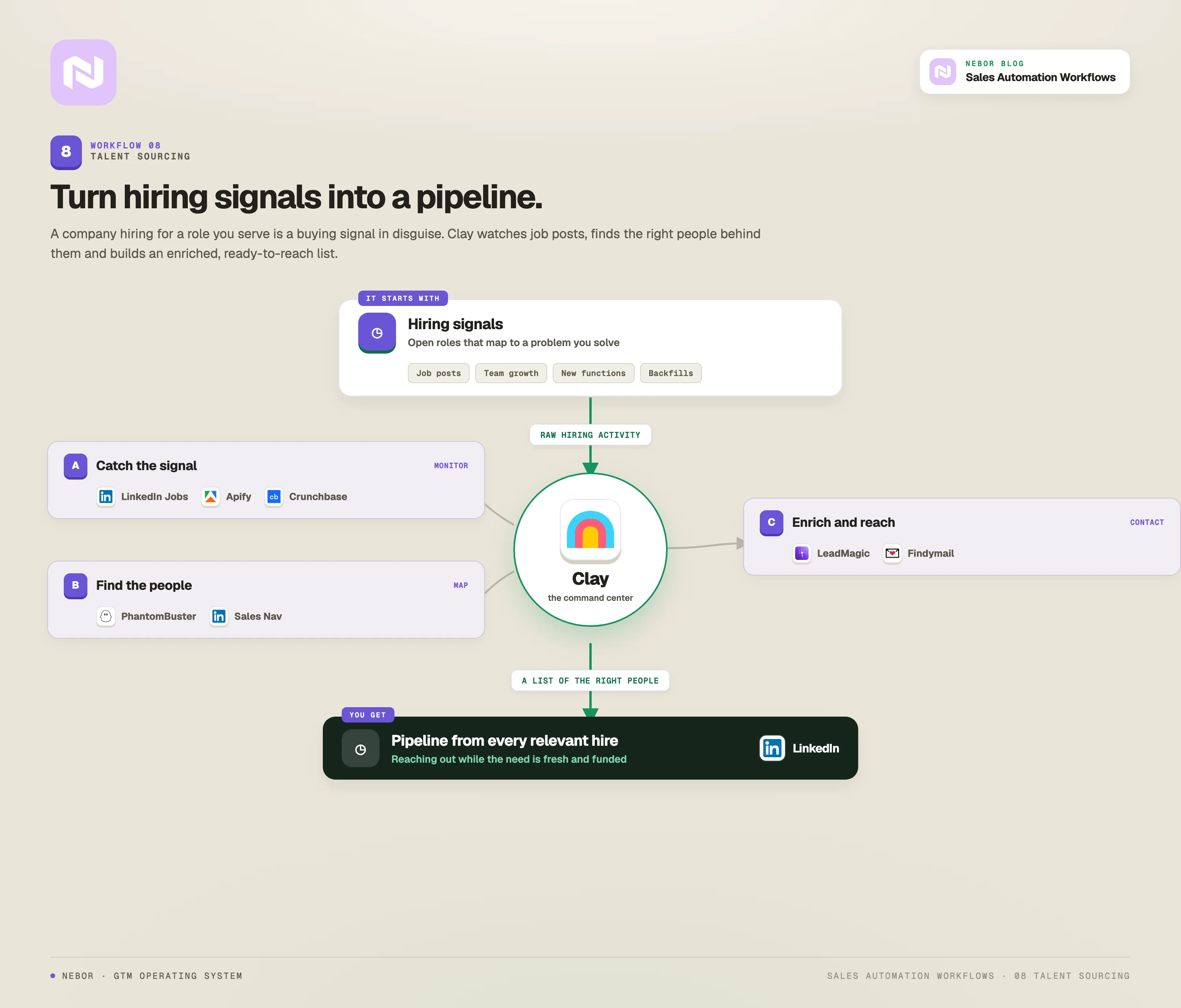
Most companies still hire by posting jobs and hoping the right candidates apply, or by letting recruiters spend hours sourcing on LinkedIn by hand.
We’ve helped a good deal of companies do this. And that’s why we can tell you that the best talent is rarely actively looking, so they never see your job posting in the first place.
The best candidates are passive. They are not browsing job boards, but they will consider the right opportunity if it finds them.
You should treat hiring like a sales motion. Each step (sourcing, outreach, follow-up) is a task a workflow can handle, and skipping any of them costs you the candidate.
We use Clay combined with PhantomBuster to identify candidates based on specific skill sets, experience levels, and company backgrounds.
Clay scores each candidate against your criteria, then triggers personalized outreach sequences. The messaging focuses on the opportunity and what your company actually offers, instead of pushing for an application up front.
With this, you skip the noise of inbound applicants and go directly to the people you actually want. Hiring becomes proactive instead of reactive, and the same Clay backbone that finds your prospects also finds your next senior hire.
9. Social signal intent detection
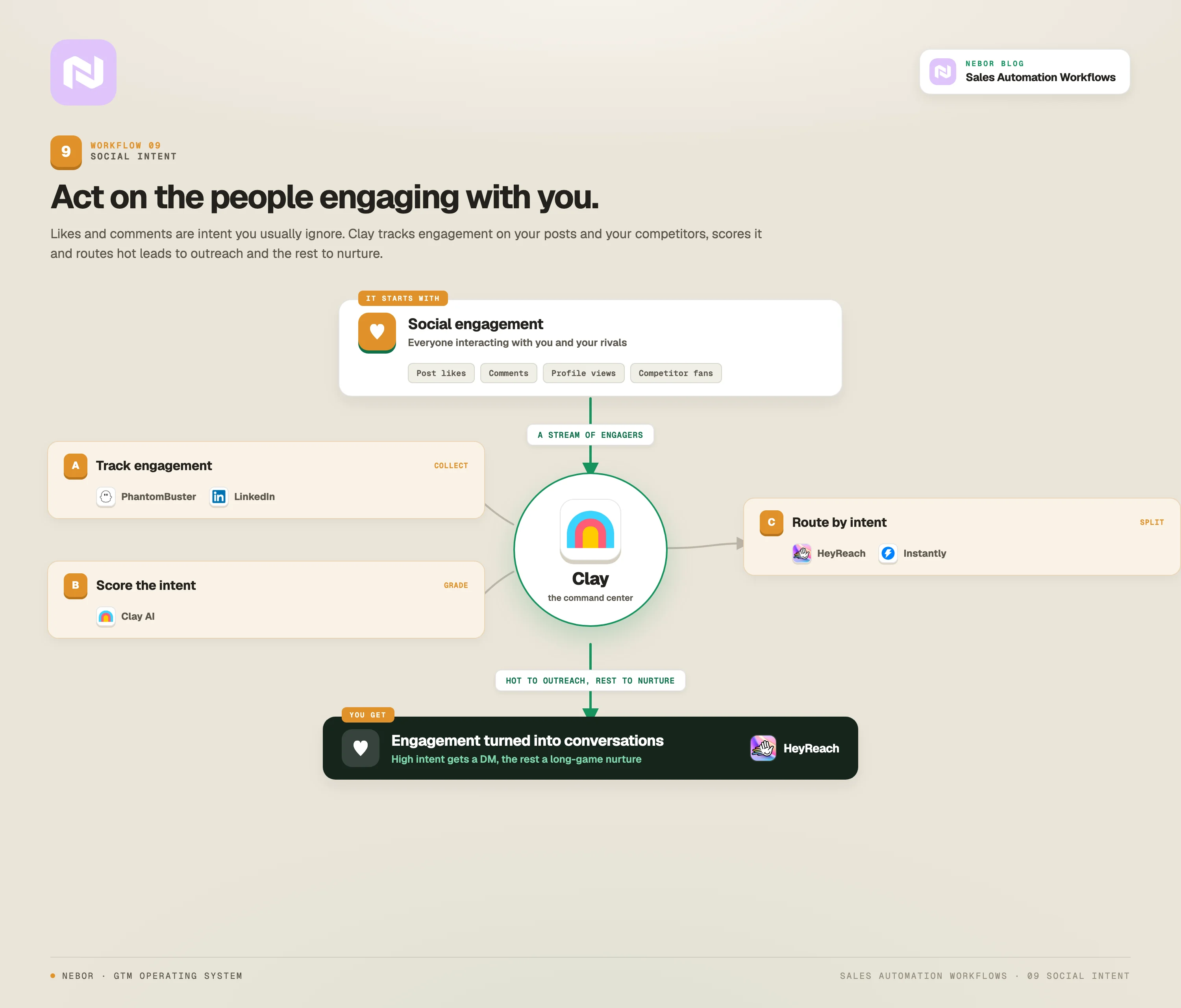
On LinkedIn every day, prospects like your posts, comment on your content, share your articles, and engage with your company updates. Most companies see those notifications, think it is nice, and never turn the engagement into a conversation.
Social engagement is a buying signal hiding in plain sight. When someone consistently engages with your content, they are signaling interest in your space. When they share what you wrote, they are essentially endorsing it to their network.
When they comment with substance, they are showing you both knowledge and a likely need. We have written a separate piece on what intent data actually is and how to use it that picks this thread up in more depth.
So, for the workflow, we use PhantomBuster to track who engages with your LinkedIn posts, comments, and shares. The engagement data flows into Clay, which we set up to enrich the profile and score intent based on the engagement pattern and company fit.
For high-intent prospects, the workflow triggers personalized LinkedIn outreach that references the specific social activity. The lower-intent ones move into a nurture email sequence where we educate them and warm them up for a real conversation later.
The outreach feels natural because it builds on a conversation the prospect already started. You turn social engagement into a qualified pipeline, and the people on the other end are far more open because they already showed interest in your perspective.
10. The full scale outbound workflow
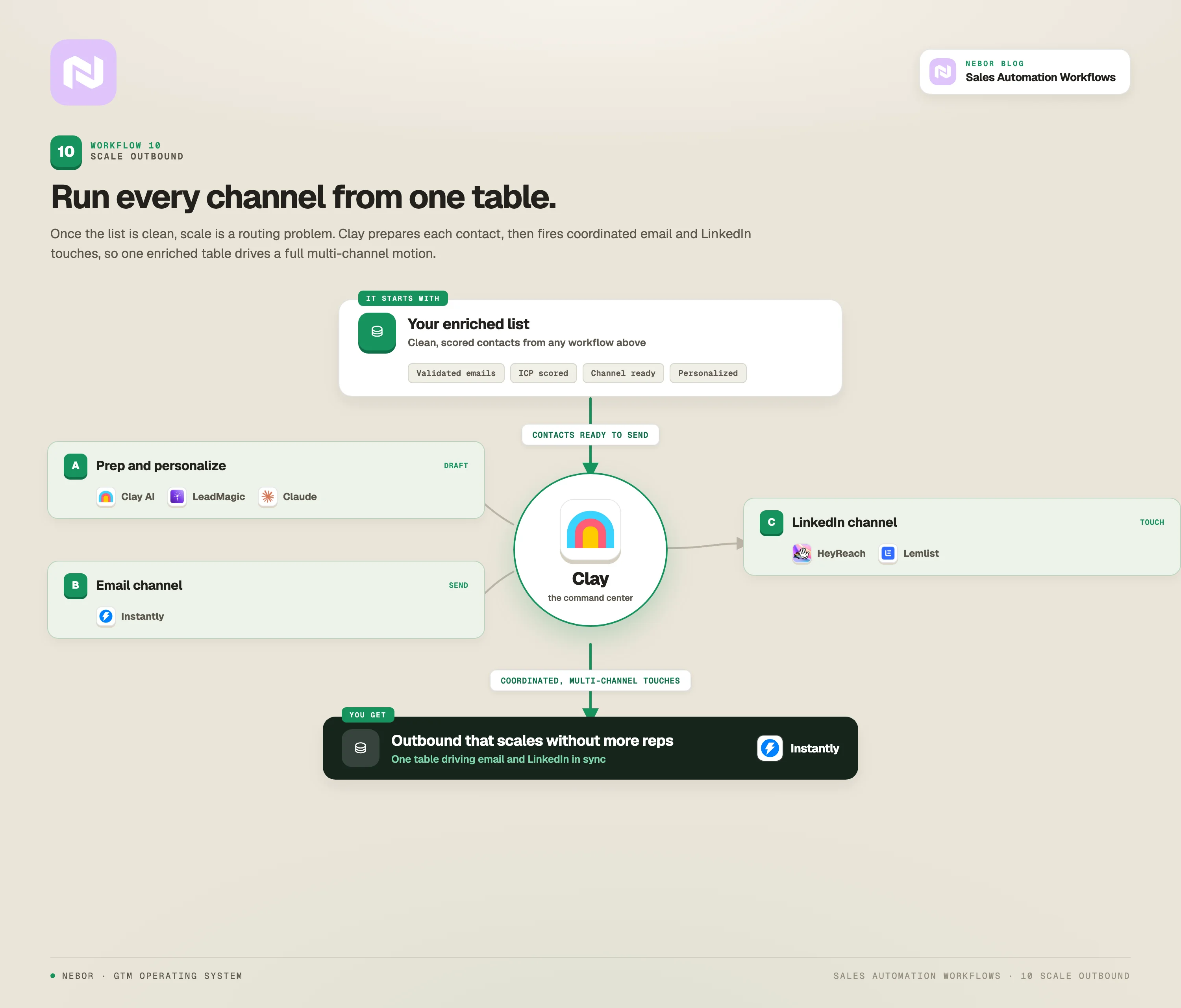
This is the one that ties the others together. With this workflow, you map your TAM, enrich your data, write personalized messages, send outreach campaigns, and generate qualified pipeline, all on autopilot.
We at Nebor specialize in orchestrating GTM systems that work with minimal human input and generate high reply rates.
Your TAM holds thousands or tens of thousands of potential prospects. Reaching all of them with manual, personalized outreach is impossible. Reaching all of them with generic mass outreach gets you ignored or marked as spam.
What you need is a system that personalizes and sends outreach across the whole TAM while protecting message quality and deliverability.
The point is not to send more emails. The point is to send the right email to the right person at the right time, then do that at the scale your market deserves.
We segment your full TAM in Clay against criteria like industry, role, company size, and tech stack, and we build tailored sequences for each segment. For email, we use Instantly. For LinkedIn, we use HeyReach or Lemlist. The whole orchestration lives inside Clay and n8n.
Multi-channel orchestration is where this workflow earns its keep. With AI in the middle, we teach the system to pick the best channel for each prospect, personalize the message against their specific data points, and manage the sequence across multiple touchpoints without anyone babysitting it.
You work through your full market opportunity without burning out the team. Your random prospecting becomes comprehensive coverage with personalized messaging at scale, and the team gets back the hours they used to spend hunting.
How to roll this out without breaking what already works
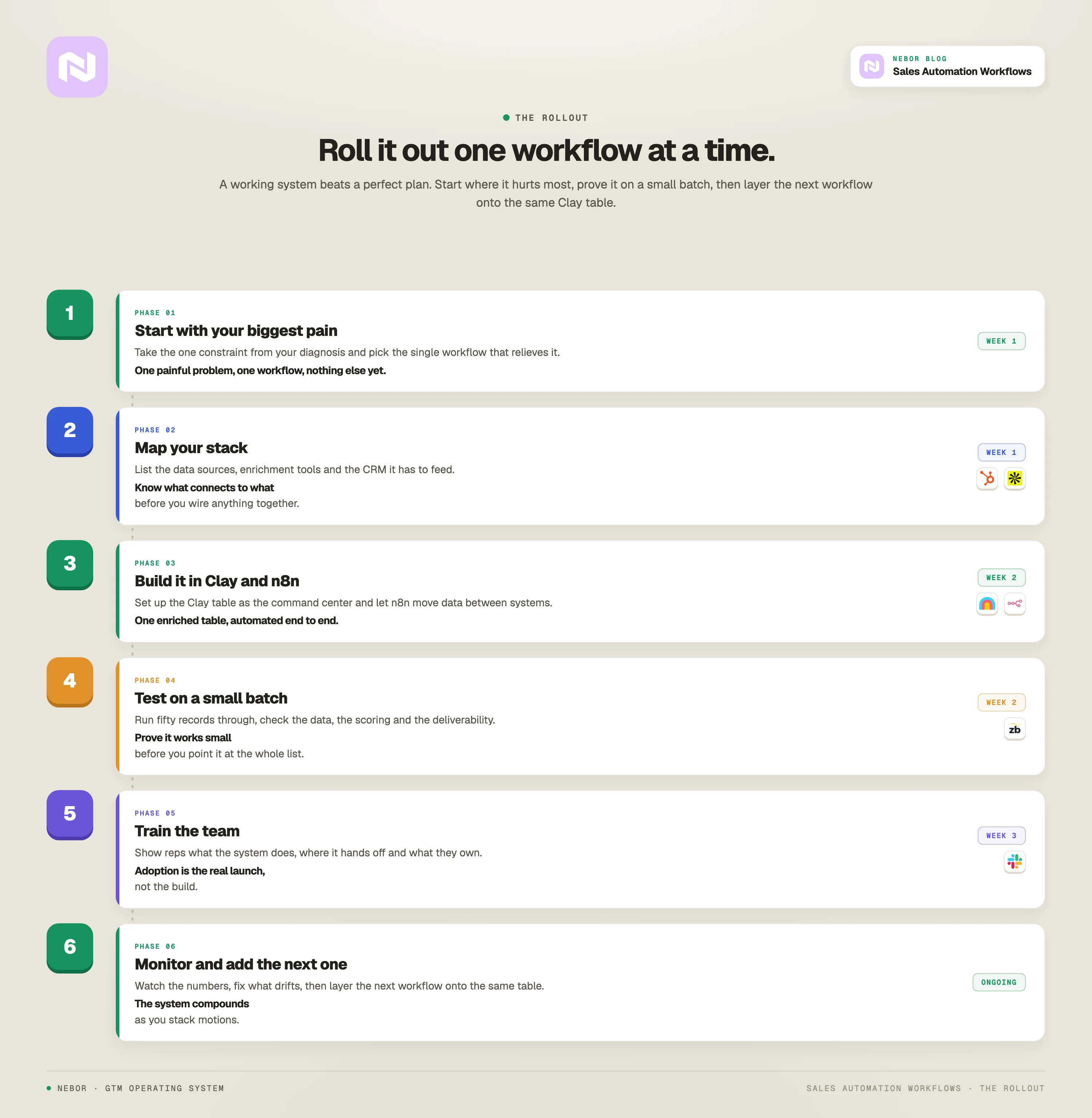
Great workflows mean nothing if the rollout creates more chaos than it solves. Lead management and workflow automation are tied together, and the rollout has to handle both. Here is how we do it with our clients.
Start with your biggest pain point
Do not try to automate everything at once. Pick the single workflow that produces the biggest immediate gain on team productivity or revenue.
Look at your bottleneck audit. Which workflow attacks your most expensive time sink, or your biggest missed opportunity? Start there.
Going after the most repetitive work first (manual data entry, routine follow-up) frees the team to focus on the higher-value pieces of the job.
We have written about how to think about the cost of building this kind of system in more depth, and the order matters more than the speed.
Map how your tech stack already connects
Before you build new automation, understand exactly how your current tools connect, or do not connect. Document where data flows between the CRM, email platform, marketing automation, and other tools.
Note the spots where reps still type things in by hand. Find the systems with APIs you can plug into. Flag the data quality issues that already exist, because they will only get amplified.
Pick tools that actually play together
This is why we put Clay and n8n at the core of nearly every system we build at Nebor.
The biggest automation failures we see come from companies that picked individual tools that do not integrate. Pick platforms with strong APIs and native integrations into your existing stack.
Start with a CRM that integrates well with the rest of your sales tech, so the CRM does not become the next data graveyard.
Build testing and quality control into every workflow
Automation amplifies mistakes the same way it amplifies wins. Build testing phases into every workflow before it goes to full volume.
Confirm that automated enrichment is accurate before it feeds outreach. Test personalization on a small group before scaling to the full segment.
Watch email deliverability and engagement so the automation is not torching your sender reputation. Do the same for negative replies and unsubscribe patterns as they tell you when your sequence needs a rewrite.
Train the team for the new shape of the job
Both the business process and the rep's day-to-day will look different once these workflows are live.
Instead of spending the day on research and data entry, your reps focus on qualifying prospects, taking discovery calls, and closing.
With automation in place, most reps spend far less time on admin work because the routine sales tasks happen on the system.
Train the team on how to read and act on the enriched data the workflows hand them, how to add a personal layer to automated outreach when it makes sense, how to prioritize leads coming from different sources, and how to feed back what is working and what is not so the workflows keep getting better.
Monitor and tune as you go
Sales automation is never a set-it-and-forget-it system. The teams that get the most out of it monitor and tune continuously.
Track how each workflow moves the needle on lead quality, conversion rates, time to close, and lead scoring. Audit data accuracy on a regular cadence.
Where the budget allows, use more than one tool for the critical enrichment and verification steps, so a single failure does not break the whole flow. Watch response rates across sequences and let your sales manager use rep feedback to refine the system.
How we at Nebor turn this into a system you own
A list of automation workflows does not help your business unless the workflows are built right, integrated well, and tuned for your actual situation.
We at Nebor build these systems for B2B teams every day. We design and ship the full stack inside the client’s own accounts, hand it over with documentation, and the workflows keep going after the engagement ends.
If you are serious about turning your sales motion from a manual time sink into a system that works in the background, the team you bring in needs to have done this before.
We have built the same workflows for B2B clients across Europe, and we wrote a separate piece on why the lead-gen agency model is the wrong shape for what most teams actually need if that is the lens you are coming from.
If you want to talk through what these workflows would look like inside your specific motion, book a 15-minute call. We will audit your current sales process, find the workflows worth building first, and design the system that fits your team.


Related Articles
By clicking Sign Up you're confirming that you agree with our Terms and Conditions.