
How Much Sales Automation Costs When You Build The Full Engine

In this post:
Most pricing pages for sales automation quote you a CRM subscription. That is not what sales automation costs in reality.
A real automated sales engine costs anywhere from $5,000 to the high tens of thousands of dollars per month, depending on your industry, your target market, and the team building it for you.
We at Nebor build these systems every day, and the price spread is wider than most companies expect because the surface-level CRM view of sales automation is just shortsighted.
When people hear sales automation, most picture a few sales tools pushing out cold emails in the background. Some picture a big CRM with a long feature list.
Search “sales automation cost” and the results confirm that, since CRM pricing pages dominate the first page. Even agencies that create dedicated posts on the costs of CRM automation only talk about CRM tooling costs.
Real sales automation involves much more than that. It is the orchestration of an entire GTM system that finds the right prospects, generates personalized messages, reaches out at the right time, and makes sure your sales team only talks to qualified leads.
We build these systems every day with Clay at the core. In this post, we walk through the workflows, the tools involved, what it actually costs to build a fully automated sales function, and what you get in return.
We will not throw a list of CRM prices at you. Instead, we show you how the system works and what kind of value it brings, from better pipeline quality and faster sales cycles to lower overhead and almost no manual work.
We break it down across three workflows that work together.
Outbound sales prospecting and multi-channel outreach automation
Intent data and buying-signal monitoring with real-time outreach
Inbound lead qualification and sales handoff automation
TL,DR
Real, true sales automation is not a CRM subscription. It is one connected engine built around Clay that drives your growth workflows together: outbound prospecting, intent and buying-signal monitoring, and inbound qualification.
The tools land around 1,200 dollars a month for outbound, plus another 150 to 400 for intent and 100 to 300 for inbound, and a Clay expert or agency to wire it all together costs 3,000 to 16,000 a month.
Add it up and a serious setup lands in the low to high thousands per month. That looks steep until you put it next to one extra SDR at 4,000 to 6,000 a month in salary alone, with no system to show for it.
The engine reaches the right people at the right moment, lowers your cost per lead over time, and at the end of the engagement you own it. Here’s what it looks like:
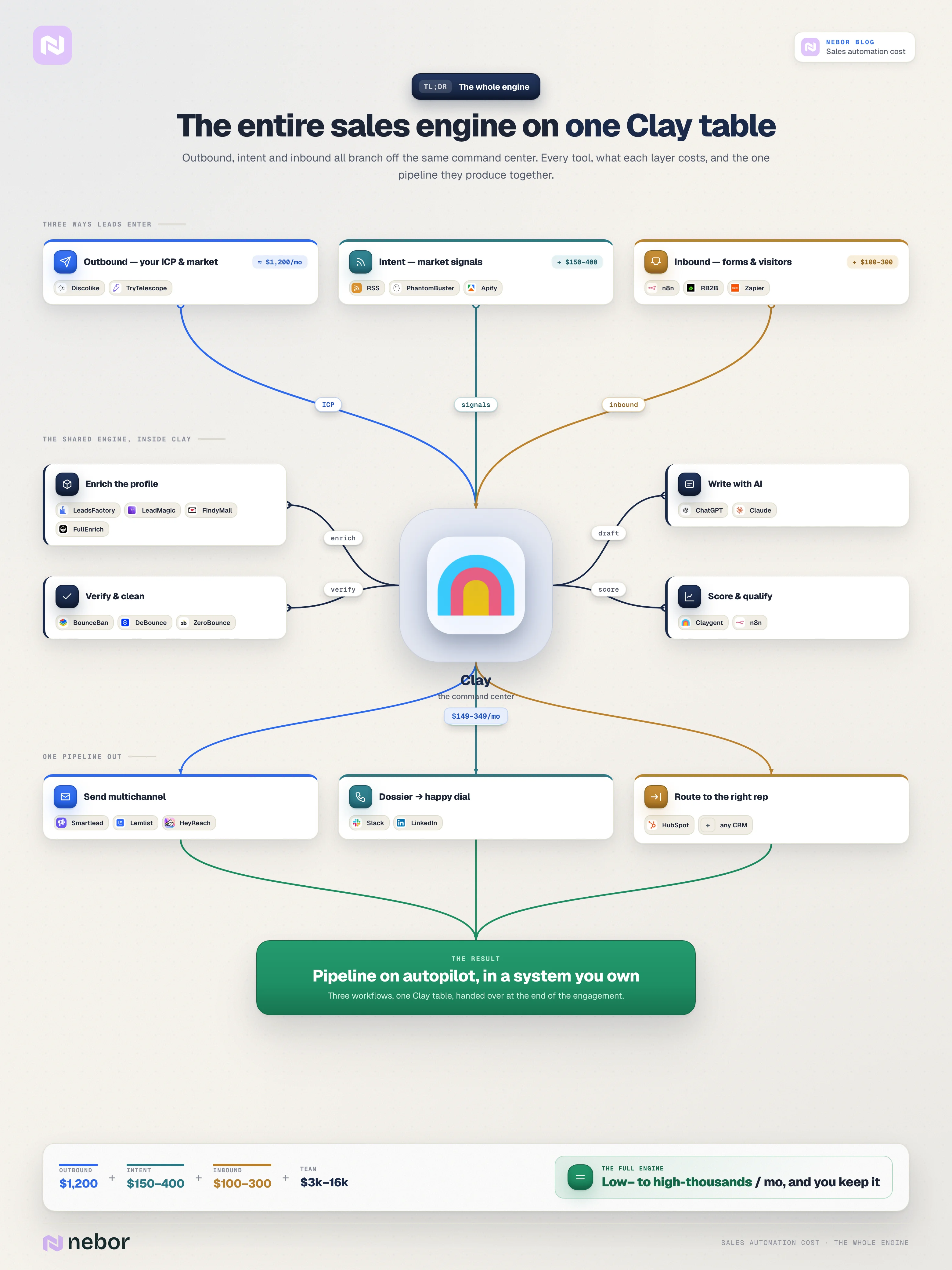
How much each part of your sales automation costs to build
Now we go through each workflow, looking at the tools involved, what each tool does, and what value they bring your sales team. The idea is to walk through the workflow first, so the tools and pricing make sense in context.
1. Outbound sales prospecting and outreach automation
Outbound prospecting is the first thing most sales teams want to automate, and rightly so. It is where teams burn out fastest.
In most cases, businesses either pay a team of SDRs to manually build lead lists, which costs a lot, or they rely on low-quality data that pushes the whole effort in the wrong direction, which costs more.
What we build for clients at Nebor is a precision-targeted outbound engine inside and around Clay. These are smart tables enriched with high-quality data. They carry personalized messages and campaign logic across email, LinkedIn, and phone.
We break down each piece of this engine and what each one costs. Here’s the overview:
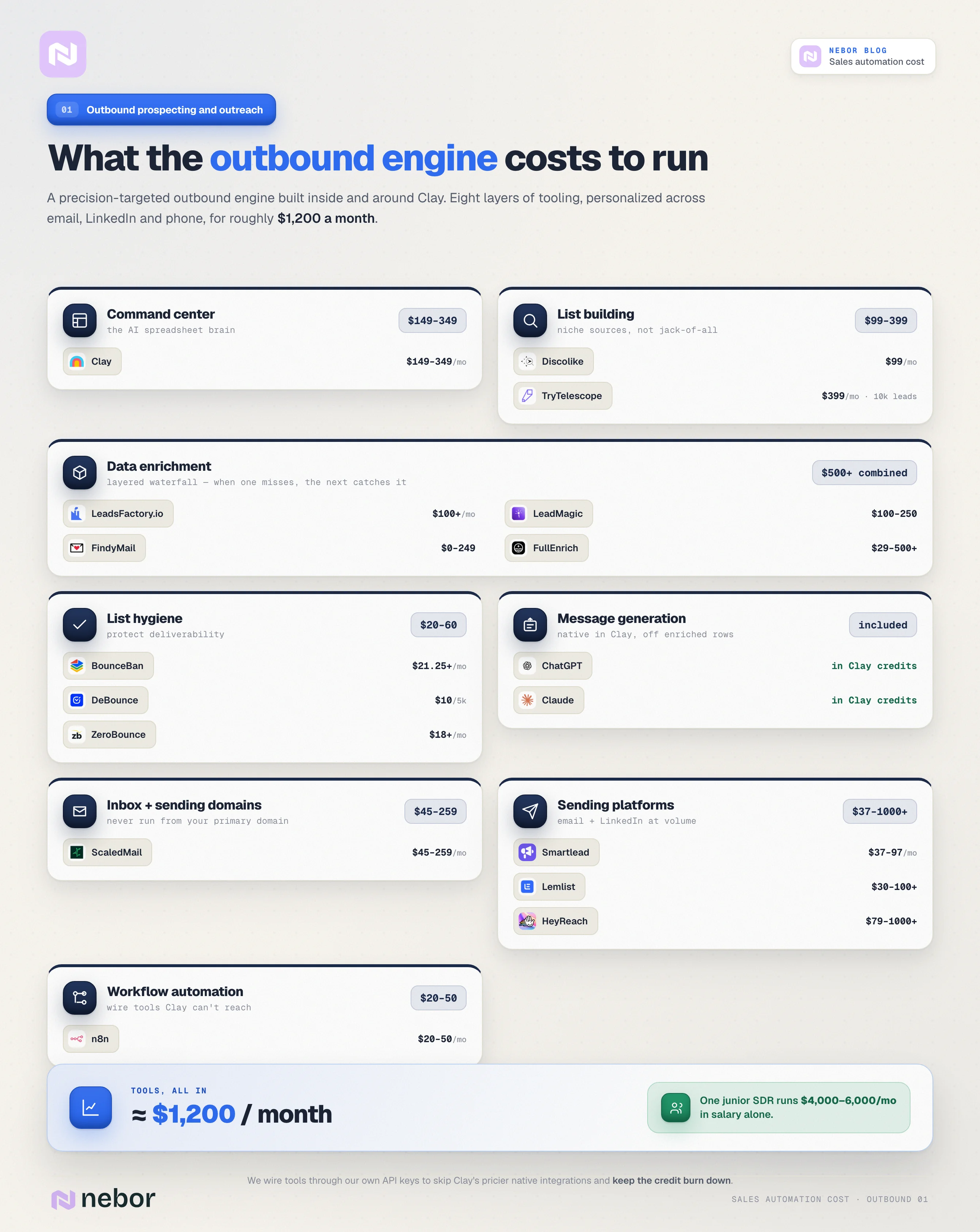
Command center for the entire workflow (Clay)
Clay provides a no-code AI-powered spreadsheet UI that handles data enrichment, list-building, automated messaging, and logic-based action triggers in one place.
Clay works on a credit-based pricing model across all of its plans. The Explorer plan costs about $349 per month (or $314 per month on the annual rate) for 10,000 credits. The cheapest Starter plan is around $149 per month for 2,000 credits, and higher plans give more credits per dollar.
Clay is not cheap, and it gets more expensive when you rely on its native integrations with the third-party tools you want to plug in.
For example, one of the tools we like to plug into Clay is LeadMagic. LeadMagic enriches our lead lists with contact information and firmographics. If we use Clay's native integration for it, that burns more credits per row than if we wire LeadMagic to Clay through our own API key.
So we use API keys whenever we want to skip Clay's built-in (and more expensive) integration, or whenever Clay does not support a tool natively.
The point is to keep costs down for businesses that have a budget. We work this way at Nebor because it lets us offer cheaper packages to our clients.
It is also why we do not chase the Clay Expert Certification, which requires you to spend a certain amount in monthly Clay credits to keep your name on the list. We would rather design systems that cost less and do the same work.
List-building tools
You need at least one data provider to feed lead data into Clay. We like layering multiple data enrichment and prospect list-building sources because each one adds an accuracy layer. There is no single right tool, and the right combination depends on your industry and ICP.
Most marketers default to popular options like Apollo.io, ZoomInfo, and Lusha. The problem is that these tools are jacks of all trades and masters of none.
Our experience is that they are less accurate than niche-specific sources, and there are pieces of data they simply will not find.
For a starting point, we recommend two tools.
The first is Discolike, which finds look-alike companies. You feed it your best customers, narrow down the criteria that defines them, and Discolike returns other companies that look the same. Discolike starts at about $99 per month on the entry plan.
The second is TryTelescope, an AI lead-gen tool starting at $399 per month for around 10,000 leads.
Think of Telescope like ChatGPT for finding leads you would not surface with the popular tools. We use it because it digs deep enough to find leads for ICPs as specific as “trucking companies in the Netherlands with more than 20 trucks”.
Data enrichment tools
After you build your list, you enrich each contact’s information so you can build a profile inside Clay.
We use a combination of LeadsFactory.io, LeadMagic, FindyMail, and FullEnrich. Together they help you build accurate lists of email, phone, LinkedIn profile, and firmographics. There are often more tools.
When one tool fails on a contact, another usually picks it up. You can also use Clay itself to enrich technographic and firmographic data on top.
LeadsFactory offers a freemium version and custom pricing for premium. But if you’re building serious GTM workflows, expect to pay north of $100.
All the other three are credit-based and sell bulk credits, for example 10,000 credits for $99.99, and every search counts toward that balance.
Combined, expect these to cost several hundred dollars a month, often $500 or more, especially FullEnrich for phone contacts.
Here is what the three enrichment tools cost.
LeadsF actory.io $100
FullEnrich costs from $29 to more than $500 depending on your needs.
FindyMail costs from $0 to $249 based on volume.
LeadMagic costs $100 to $250.
List hygiene and deliverability
We layer tools here too, and all of it happens inside Clay through integrations. That matters because otherwise you would be dragging CSV files around and copy-pasting information across systems by hand.
Our usual workflow combines BounceBan (our favorite) with DeBounce, and sometimes ZeroBounce.
Together these tools clean your list by checking against blocked emails, do-not-contact lists, and similar sources. That protects deliverability and keeps your outreach on the right side of inbox providers.
BounceBan offers unlimited free single email verifications in Free Mode. For bulk or API usage, pricing starts at $21.25 and charges apply to successful verifications.
Their Sync feature, which we use, continuously checks emails held in CRMs, Clay, or lists, and works on a monthly credit-based model based on how many unique emails you process.
DeBounce uses a pay-as-you-go model starting at $10 for 5,000 emails ($0.002 each), with bulk discounts down to $0.0003 per verification at high volumes.
They give you 100 free credits on signup and offer optional data enrichment for one extra credit per hit.
ZeroBounce charges $20 for 2,000 validations ($0.01 each), or offers subscription plans starting at $18 per month with rollover credits and up to 18% savings.
Automated message generation
By this point you have a clean list and you are ready to send campaigns.
We use ChatGPT and Claude through their native integrations in Clay to generate messages for each prospect. These are not random messages.
The message generation pulls from the enriched data held in your Clay tables, which lets each message reference something specific to that lead and make a relevant offer.
Inbox and sending domain tools
We use ScaledMail for buying inboxes and sending domains. It lets you buy sending domains for both Google and Microsoft. ScaledMail costs anywhere from $45 to $259 based on your needs.
A common and expensive mistake here is skipping sending domains and inboxes and sending campaigns from your primary email instead.
That is risky. It hurts your main domain reputation, your sender score, and even your SEO. Our email deliverability guide goes deeper on this.
Outreach automation
For email, we use Instantly, which automates sending and warming and works directly from Clay through their integration.
The Growth plan costs about $37 per month and lets you send around 5,000 emails a month, and the Hypergrowth plan is around $97 per month for up to 100,000 emails.
Other outreach platforms like Woodpecker and Lemlist land in a similar $30 to $100+ per month range.
For LinkedIn, we use either Lemlist, or HeyReach.io which is priced anywhere from $79 to $1000+ based on your needs.
Not all tools directly integrate with Clay, so you need a workflow automation tool to wire them together, which brings us to the next category.
Workflow automation
Tools like n8n and Zapier tie tools together when you cannot connect them natively or through APIs. We are fans of n8n for this kind of work.
n8n’s cloud plans start around $20 to $50 per month for small teams, with the Starter at $20 per month and Pro at $50 per month. This handles tasks like moving leads from Clay to your CRM or your email tool.
A $1,200 per month bill looks heavy until you compare it to a junior SDR at $4,000 to $6,000 per month, plus management time, training, and burnout risk.
We also broke the cost down by business tier.
This is more than a cold-email setup. The system handles five things in parallel for you.
Finds prospects who match your ideal customer profile.
Enriches their info with verified emails, company details, and insights.
Generates personalized messaging using AI.
Reaches out across channels and tracks every engagement in one place.
Notifies your team when it is time to step in and close the deal.
The business outcome is more meetings booked with the right people, less manual grunt work, and a lower cost per lead over time.
You stop chasing cold, unqualified leads, and the system prioritizes the best prospects and gets you in front of them faster than your competitors. Here’s what the workflow should look like:
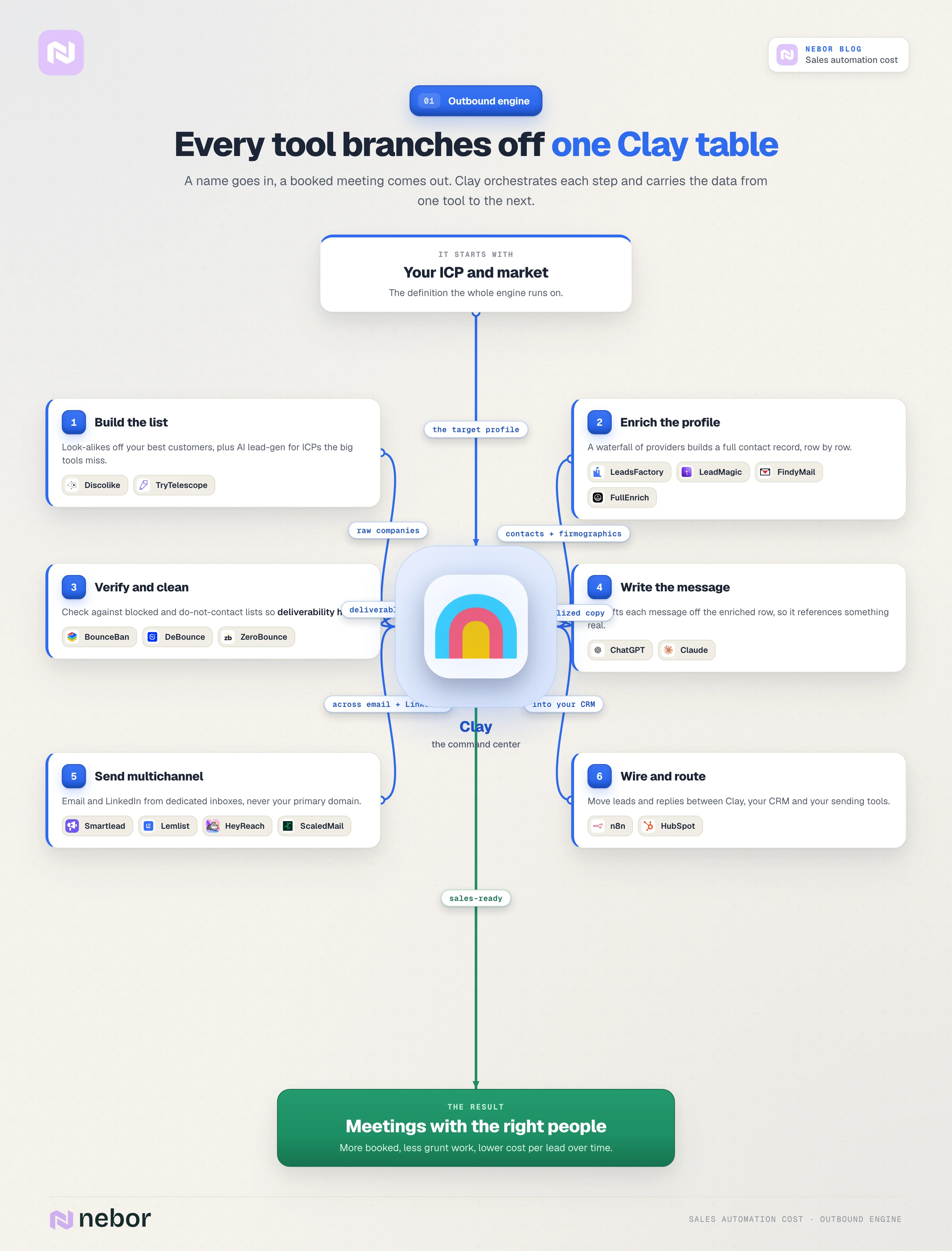
Keep in mind you may need other subscriptions on top of this, like CRM seats, warm-up servers, or LinkedIn accounts.
Compared to hiring extra SDRs at around $50,000 to $60,000 per year per rep with all the management risk that comes with it, the software cost is modest.
2. Sales intent data and buying-signal automation
This second workflow is where things start to get interesting. By this point you have a solid outbound system live in Clay, and there is more to sales than that.
The AI surge has opened up new ways to surface sales data and find opportunities to beat competitors in your industry, and you need to be there. So you also need an intent data and buying-signal layer.
Our working definition of intent data is this. Instead of going out and trying to convince people to care, intent data finds the people who already care but have not entered your buying cycle or contacted you yet.
These are companies showing signs they need your product, growing toward needing it, or making business decisions that point to a purchase like yours.
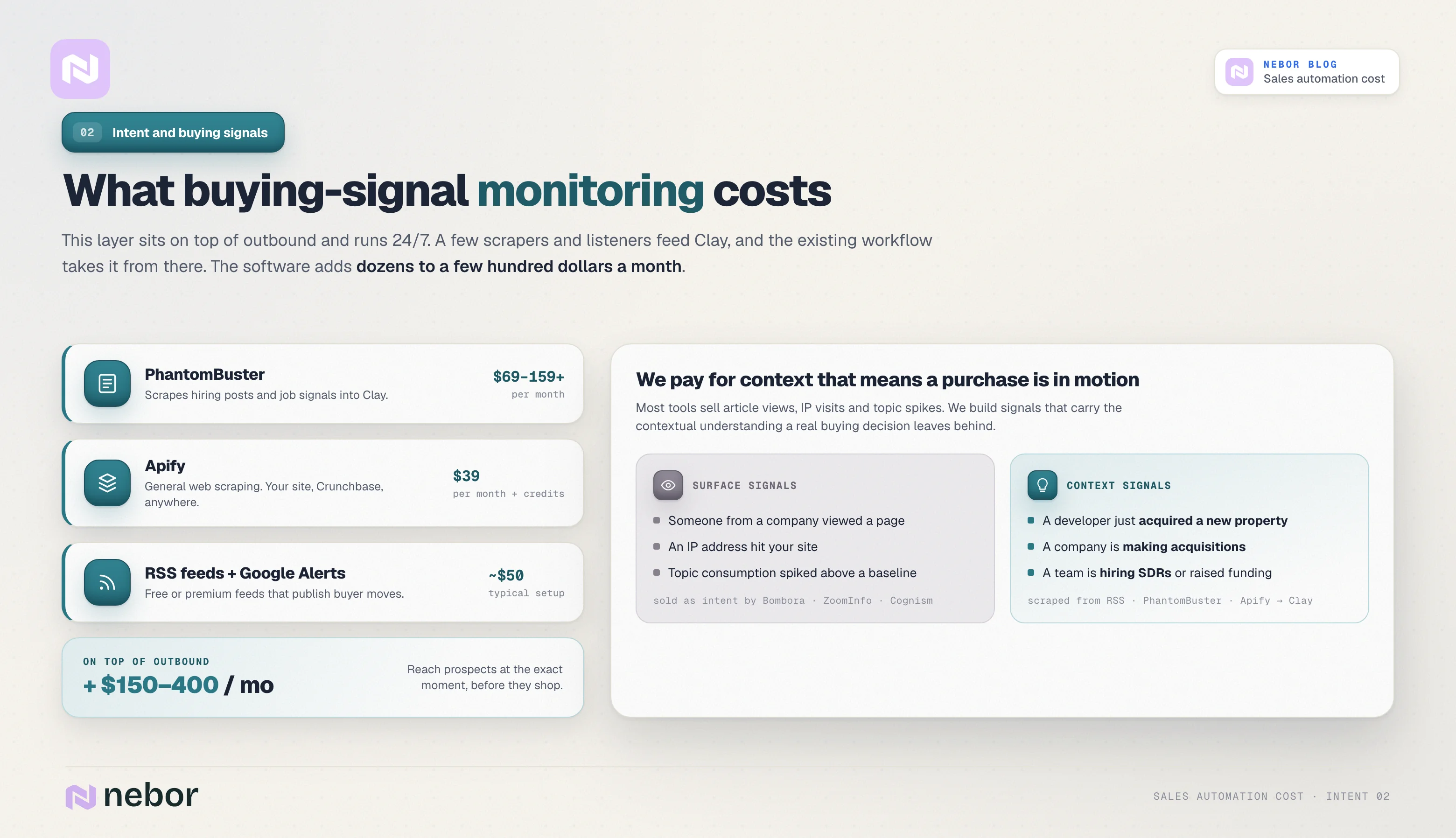
At Nebor, we build automated intent-signal workflows in Clay using tools like Apify and PhantomBuster. These workflows watch 24/7 and ping you whenever someone in your market shows a buying signal.
The best part is that this layer builds on top of the outbound prospecting and multi-channel outreach system you already have in place. All you need is a system that finds, scrapes, and pushes the data into Clay, and the existing workflow takes it from there.
Why we do not trust standalone intent data sources
When you read intent data and buying signals, you probably thought of Bombora, ZoomInfo, Cognism, and the other big names the industry sells as intent data sources. We do not use them and we do not believe in them.
If you have been reading our blog for a while, you know we take intent tracking seriously.
For us, intent data is about quality, accuracy, and timing. Most of these big tools sell simplistic data, like article views or IP-address visits.
That is not real intent data. Those are surface-level signals that only tell you someone from a certain company looked at your page.
Bombora goes a step further by establishing a baseline of normal content consumption for a company, then flagging “intent” when consumption around a topic spikes outside that baseline.
We do not buy that as intent either. With these tools you never get the contextual understanding that suggests an actual buying decision is in motion. So we build a different system, and we recommend you do the same.
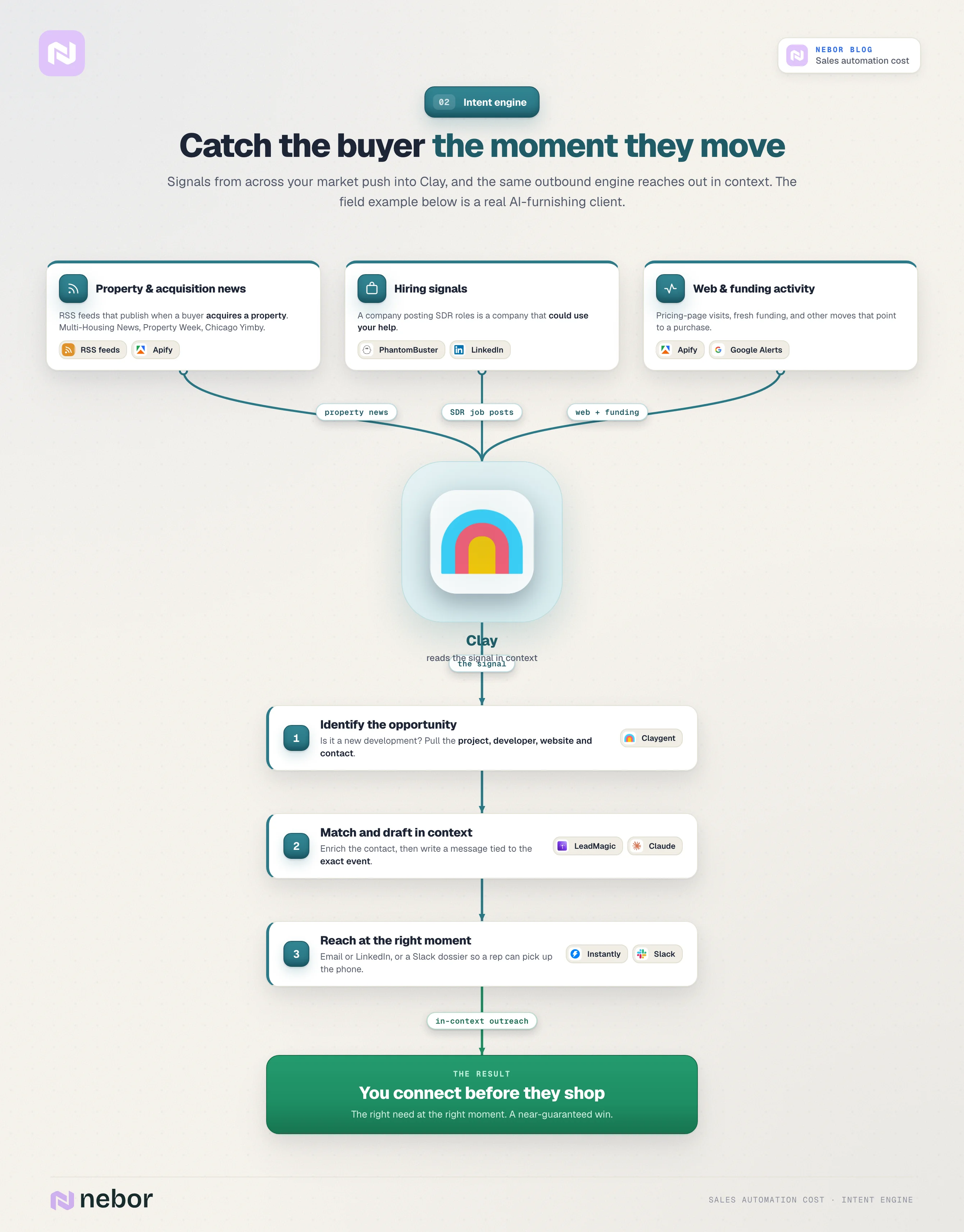
Here is what we mean by a real intent system. For a client offering AI-powered furnishing solutions, we monitor and scrape RSS feeds from sites like Multi-Housing News, Chicago Yimby, and Property Week, plus other topically and contextually relevant sites.
These are the sites that publish whenever a buyer acquires a new property or whenever a company is making acquisitions.
Every time a new article goes up, our system pushes it into Clay.
We identify whether the article is announcing a new property development project, and if so, what the project name is, who the developer is, and where to find their website and contact person inside the same workflow, all automatically.
That is where our outbound Clay workflow comes back into play. Inside the same system, we automatically enrich the contact details, generate an email or LinkedIn message based on the captured intent data, and send it to the right person.
You end up with a specialized monitoring system that catches opportunities at the exact moment a developer is planning furnishing for a new property. That is a perfect alignment of timing and need, and we are almost guaranteed to win the deal.
This is the kind of intelligent, logic-driven setup we believe you should design for intent data and buying-signal tracking, not the surface-level alternatives.
Intent data and buying-signal scanning tools
Back to the system. To catch buying signals, you use scrapers and listening tools, and our default combination is PhantomBuster and Apify.
PhantomBuster automates social and LinkedIn triggers like likes, comments, follows, and new-job notifications. We use PhantomBuster to scrape SDR job postings on LinkedIn, since a company hiring SDRs is one signal that they could use our help.
PhantomBuster pushes that data into Clay, the workflow takes over, and we reach out automatically. Its Starter plan is around $69 per month for 20 hours of processing time and limited "phantoms." Pro plans cost $159 and up.
Apify handles general web scraping and data extraction. That can mean scraping your own website, or scraping industry-specific sources like Crunchbase. Apify's Starter plan is $39 per month with $39 in platform credits.
We also pull triggers from free or premium RSS feeds and Google Alerts. Those tools are usually cheap, around $50 in the typical setup. Here is the full pricing for this signal-tracking stack.
These signal tools add anywhere from dozens to hundreds of dollars per month in software cost. In return, they let you reach prospects at exactly the right moment and surface far more leads than manual research ever would.
Instead of waiting and hoping leads show up, you actively watch your market for real signals of intent. When a signal appears, the system takes three steps in sequence.
The system scrapes the data and pushes it into Clay automatically.
Clay enriches the lead and identifies the right contact person.
The system generates a tailored message and sends it through LinkedIn or email, or your reps get a Slack notification with a prospect dossier and pick up the phone for a happy dial.
You connect with leads before they start actively shopping, which gives you a serious first-mover advantage.
When the system is set up well, the result is shorter sales cycles, higher response rates, better close rates, and larger deal sizes, since you are solving an urgent problem at the right moment. Here’s what it looks like:
3. Inbound sales automation, from lead qualification to sales handoff
The third workflow we recommend automating is inbound lead qualification and sales handoff. This is a pain point for a lot of businesses for a few reasons.
Most companies let inbound leads rot in a spreadsheet for weeks or pass them to reps with no context. Sales reps then waste time manually sorting, qualifying, and reaching out (often too early or too late) with little to show for it. Automation closes the gap.
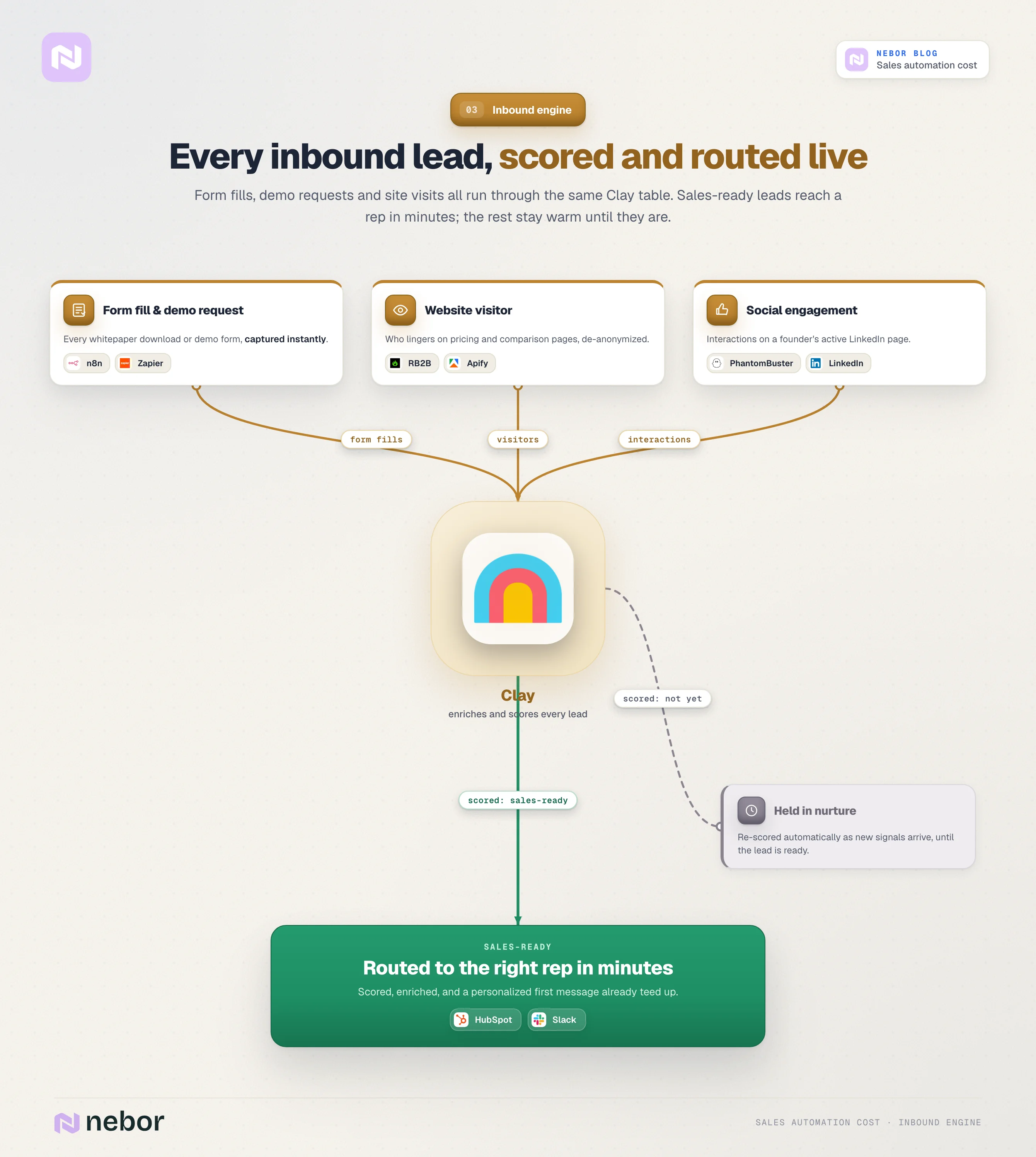
Unlike most sales automation or outbound lead generation agencies, we believe you should extend the automation engine into your inbound meeting workflow. Every form fill, demo request, or social interaction should pass through five steps.
Captured instantly.
Enriched with company and contact data.
Qualified with a custom scoring model.
Routed to the right rep in real time.
Followed up with a relevant message immediately.
Here are the tools that make this work.
Qualification workflow
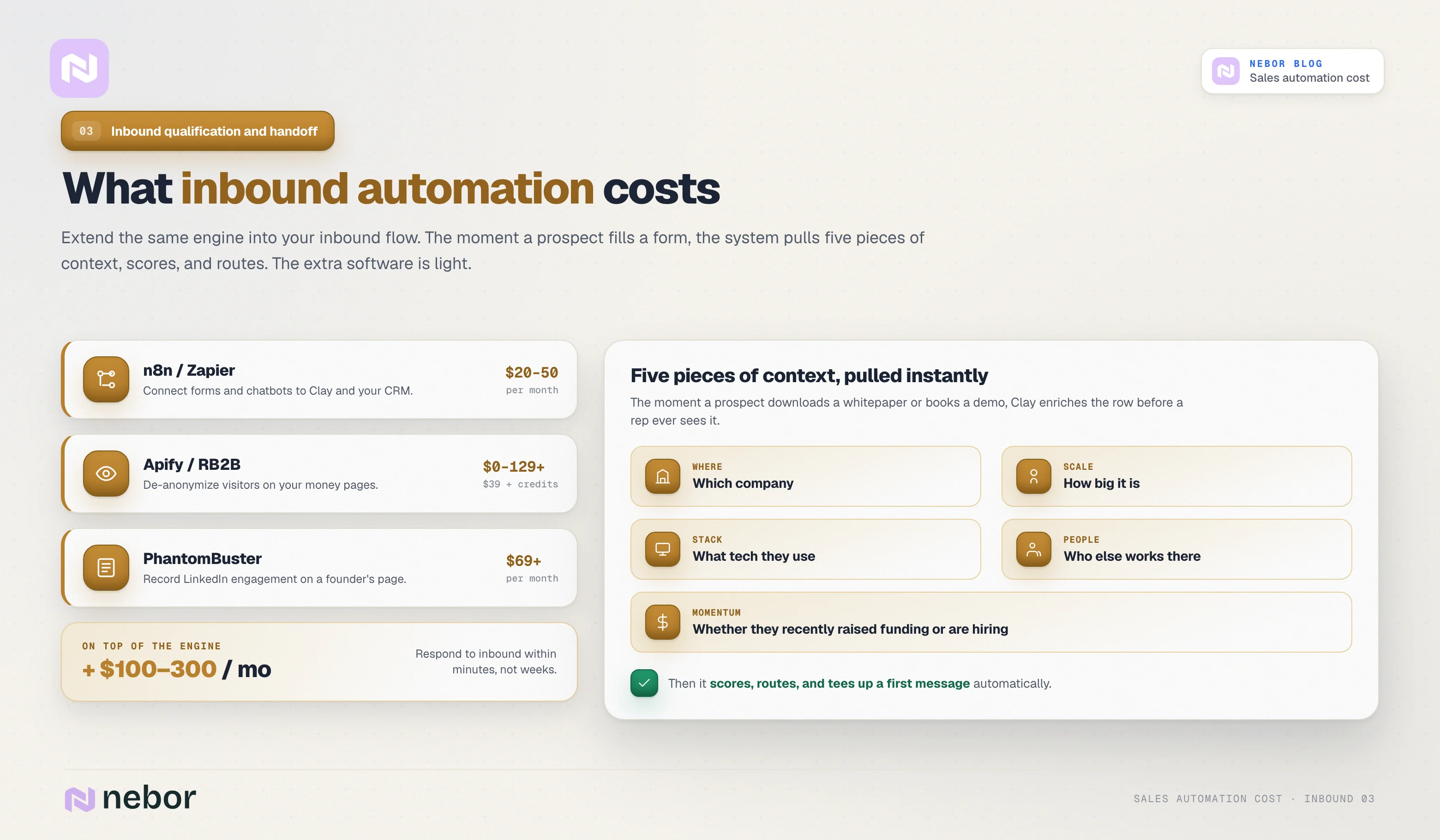
You can use n8n or Zapier ($20 to $50 per month) to connect your web forms and chatbots to Clay and your CRM. That way Clay routes and scores your inbound leads (form fills, demo requests, chat inquiries, inbound calls) instantly.
If you want to scrape additional intent data, for example by setting up a scraper on your money pages to capture which visitors spend time on your pricing pages, comparison pages, and service pages, we recommend Apify or RB2B.
Apify uses the same $39+ plan we mentioned earlier. RB2B costs anywhere from $0 to $129 and up depending on your needs.
RB2B lets you see who is visiting your website, what page they hit, and build a complete profile of them. The catch is that RB2B only works for US-based companies and audiences.
If your company or one of your founders keeps an active LinkedIn page that pulls real engagement, we also recommend PhantomBuster to record those interactions and push them into Clay.
So again, you collect all of this data and push it into Clay. Clay enriches the incoming contact info (email domain, profile, firmographics), and from there you define and assign scores or tags to qualify leads quickly.
Clay then routes qualified leads to your reps, or sends them personalized messages through the same system we described earlier.
Here is what the inbound stack costs at a glance.
This automation cuts lead response time and saves your reps from filtering junk or copy-pasting data. The moment a prospect downloads your whitepaper or fills out a demo form, the system goes to work and pulls five pieces of context on the prospect.
Which company they work at.
How big the company is.
What tech they use.
Who else works there.
Whether they recently raised funding or are hiring.
Then the system scores the lead automatically, notifies the right rep in real time, and tees up a personalized first message. Your sales team focuses on sales-ready leads.
The endless filtering of junk leads, the manual data entry, and the “let me Google this person real quick” loop disappear. See what it looks like when all connected:
You respond to inbound leads within minutes, your lead-to-meeting conversion rate climbs, and your reps stay focused on closing instead of admin.
What a sales automation expert or agency will cost you
So far we have only walked through tools and their pricing. The expertise needed to bring all of these workflows into one orchestrated system that produces a consistent pipeline is a separate cost. Often it is the bigger one.
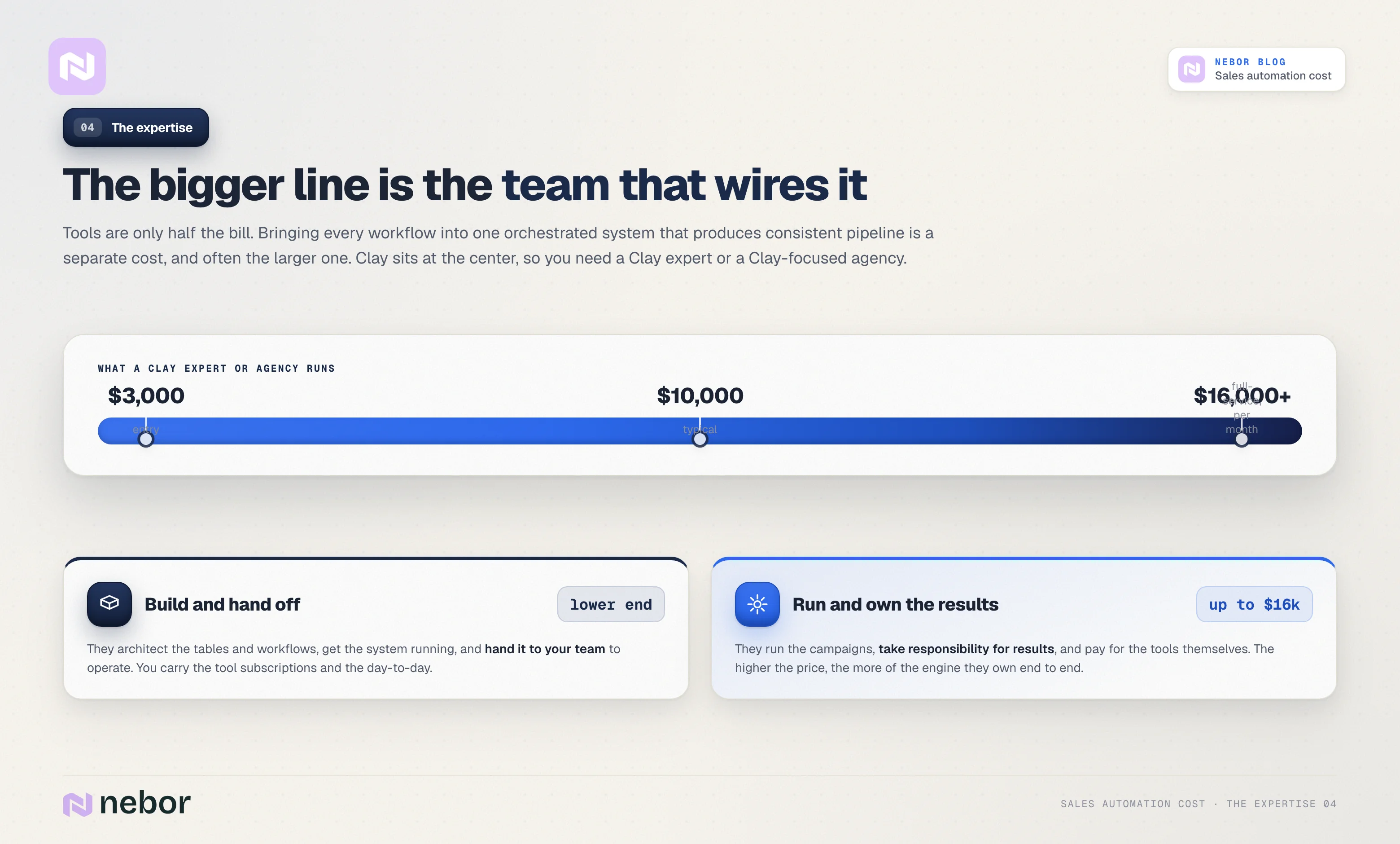
Clay is the center, so you need a Clay expert or aClay-focused agency to help you make sense of the system, the value to your business, and how to actually build it.
Clay experts and agencies typically charge from $3,000 north of $10,000, and even up to $16,000 a month.
That range covers companies and experts who deliver campaigns, take responsibility for results, and pay for the tools themselves, as well as those who only come in to build the systems and then move on.
Hire Nebor to build the systems your sales team will own
That is the full picture.
Building a sales engine from outbound to intent signals to inbound follow-up takes a stack of paid tools and an experienced team to wire them together. Expect to invest somewhere in the low- to high-thousands per month for a serious setup.
It looks expensive on paper, until you compare it to the cost of one extra sales rep at $4,000 to $5,000 per month in salary alone, and the math shifts. Automation saves labor cost and measurably improves conversion by reaching prospects at the right time. The ROI of a leaner, faster-moving sales engine, all built on data-driven workflows, usually outweighs the price tag.
We at Nebor build and maintain these systems for our clients, and we hand over systems they own at the end of the engagement. We are a team of salespeople first and automation experts second, and we engineer GTM systems that generate pipeline on autopilot.
If you want to walk through what this would look like for your setup, find us on LinkedIn or book a call. We can map the workflow, the tools, and the cost together.


Related Articles

By clicking Sign Up you're confirming that you agree with our Terms and Conditions.