How to Automate Lead Generation with Clay in 2026 (Our Workflow for B2B Pipeline on Autopilot)


In this post:
You have tried to automate lead generation before, or at least thought about it.
Maybe you bought Clay, subscribed to two or three other prospecting tools, watched a few YouTube videos, and plugged things together. Somewhere in the wiring it stopped feeling clean.
The data turned out to be off in ways you couldn’t see at first. The cold emails didn’t land where they should have. Replies stopped, and instead of saving time you ended up buried inside a stack of tools that would not talk to each other in a way that produced meetings.
We have this conversation with sales and RevOps leaders every week. They know outbound is one of the biggest controllable inputs to new pipeline. They know the tools have improved enough to do real work.
They have already paid for most of them. What they cannot solve is the wiring that makes the parts add up to a working system.
At Nebor, we build and build this exact stack for B2B teams. The pattern we keep seeing is consistent. Most stacks fail at the wiring.
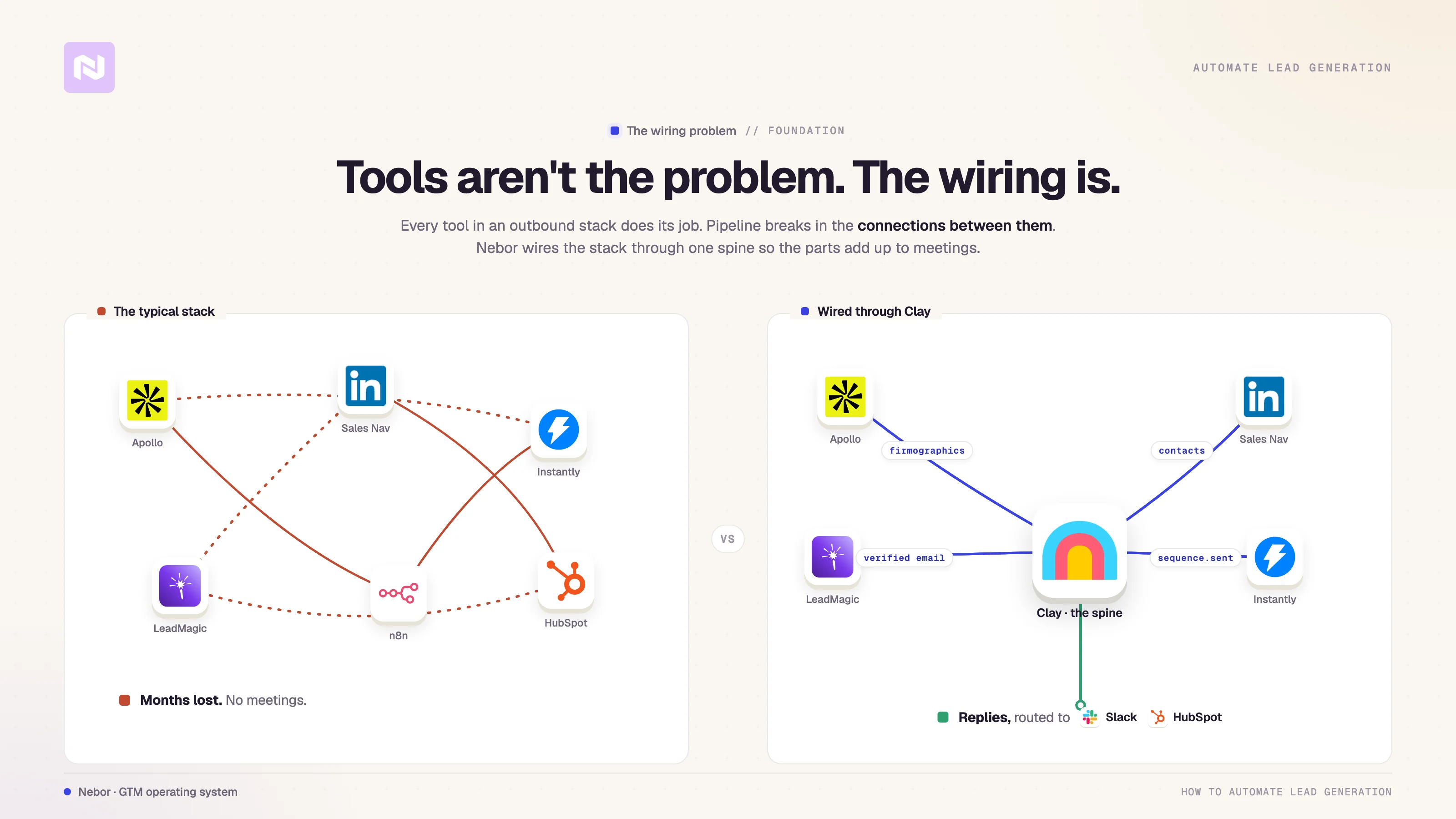
Clay does what it says. Apollo and LinkedIn Sales Navigator both pull usable data. Instantly, Lemlist, and HeyReach all send mail and connection requests at scale.
The breakdown lives in how teams connect the pieces to each other, and that is where most teams lose months. We have already written about why most Clay implementations fail. This piece is the constructive version, the system you wire when you do it right.
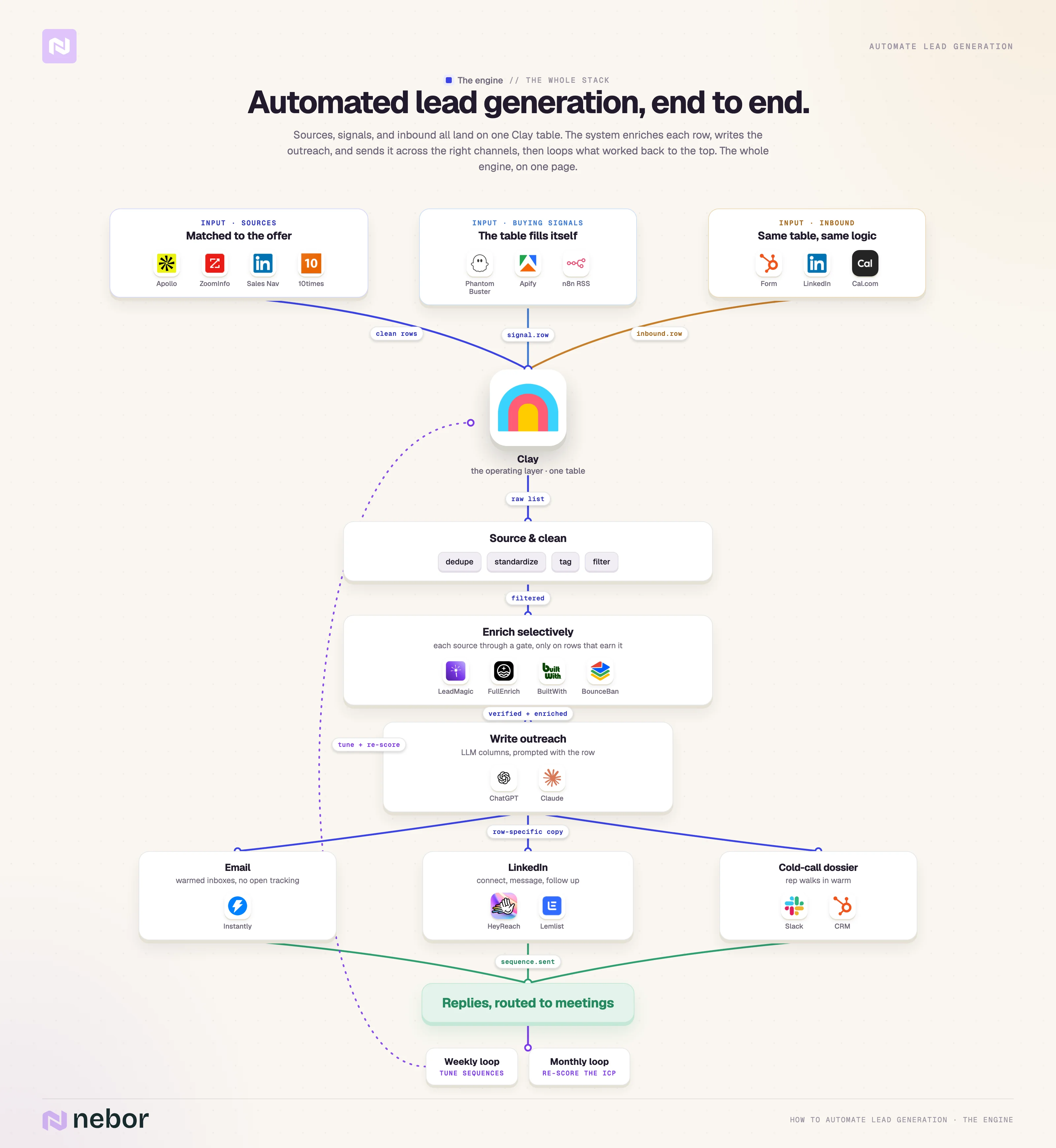
This post walks through the whole flow end to end. We cover sourcing, enrichment, personalization, multi-channel send, signal-driven triggers, inbound triage, and the weekly performance review that keeps the system alive.
Clay sits in the middle as the spine, and we connect everything else through APIs. There is one definition worth pushing back on before we get into the steps.
Let’s get started.
TL,DR: the B2B lead generation automation workflow top to bottom
So, here’s what the lead generation workflow should look like. If someone is trying to sell you on a single tool that does it all. They’re lying to you. There are too many jobs and processes involved in lead generation automation for it to be a single tool.
Or at least we haven't seen it yet.

What automating lead generation actually means
The phrase “automated lead generation” is loose enough that two people in the same meeting can be picturing entirely different things when they say it.
Most of the time, when someone says they have automated their lead gen, they mean something like this. They scraped a list of emails off Apollo or Lusha, plugged the list into a sender like Lemlist or Smartlead, wrote one or two follow-ups, and hit go.
If they have been at it longer, there might be a few Zapier or n8n flows in the middle and a generative line at the top of the email. That is the entire stack most teams mean when they call lead generation “automated”.
That is automation in the dictionary sense. It is also the fastest way we know to burn a domain, train a sender reputation into the spam folder, and lose every shot at hearing back from leads who would have been worth talking to.
We have rebuilt enough of these for clients after the fact to be comfortable saying it plainly. Volume without targeting is a destruction project. It has nothing worthy of a growth project.
When we say we automate lead generation, we mean something narrower and more disciplined.
The system is designed to do the one thing the manual version always struggles with, repeating itself reliably without losing the judgment that a real sales rep would apply.
We codify the parts of the work that are pattern-matchable. We leave the parts that need a human read of a conversation with the human. That split is what the whole engine turns on.
In practice, the system needs to handle six jobs well.
Identify the companies and people who actually fit the offer, with reasons that hold up under questioning
Find them through buying signals rather than static lists
Enrich them with the few data points that change the outreach, and skip the rest
Write outreach that sounds like the salesperson would have written it manually if they had infinite time
Send across the channels each prospect actually responds on, in the order that builds trust rather than fatigue
Sort and make sense the replies, route the qualified ones, and feed everything that worked or didn’t back into the system the following week
If those six jobs are handled cleanly, you have an outbound engine. If even two of them are handled poorly, the engine is mostly noise.
There is also an assumption underneath all of this we should put on the table. We think about lead generation automation in two layers.
The strategic layer answers who you are reaching, why now, and what they need to hear.
The technical layer answers how the data flows, how the messages get assembled, and how the parts stay in sync without someone copy-pasting between tools every Friday.
Most stacks we get called in to fix have decent technical layers and broken strategic layers, or vice versa. The two have to click together for the system to do real work.
How to automate lead generation (step by step) from prospecting to positive replies
This is the part where we move from definitions into the actual build. The next ten steps are the same ones we walk through with clients when we set up an outbound system from scratch.
Before any of them make sense, you have to understand why Clay sits in the middle of the whole stack, so we are starting there.
Why Clay belongs in the middle of your tech stack
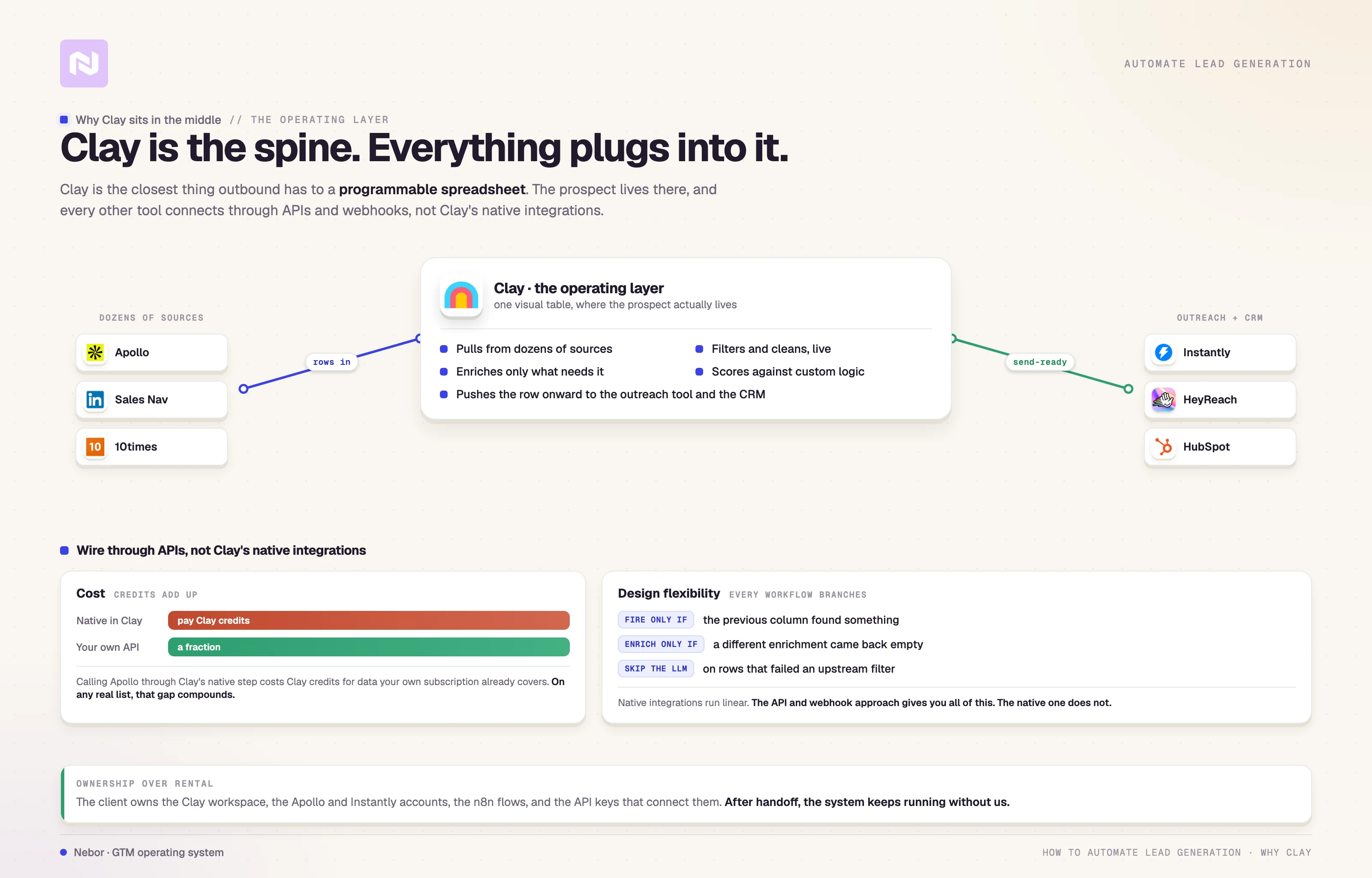
Clay is the closest thing the outbound world has to a programmable spreadsheet.

It pulls data in from dozens of sources, filters and cleans the data in real time, enriches the parts that need enriching, scores leads against custom logic, and pushes everything onward to the outreach tool and the CRM.
None of those jobs are unique to Clay. What is unique is that they all live in one place, visually, where you can see the flow and rebuild any step without breaking the others.
We use Clay as the operating layer behind every system we build. Apollo, Smartlead, Lemlist, HeyReach, HubSpot, Salesforce, and the various LLMs we hook in for messaging all connect to Clay through APIs, webhooks, or native integrations.
Clay is the place where the prospect actually lives, where we enrich the row, score it, and write the personalized message before handing it to whichever channel is going to send it. Everything else in the stack is a tool that Clay calls when needed.
There is one thing about this we want to flag because most teams miss it. We almost never use Clay’s default integrations.
The native integrations are convenient, but they are also where Clay credits disappear fastest, and they constrain how the workflow can be designed. We connect through API keys and webhooks instead, for two reasons.
The first reason is cost. If you call Apollo through Clay’s native integration, you pay Clay credits for data that Apollo would give you on your own subscription for a fraction of the price. On a list of any real size, that gap compounds into hundreds of euros a month.
The second reason is design flexibility. The native integrations work fine when the workflow is linear, but every interesting outbound workflow has branches.
We need a column to fire only when the previous column found something. We need an enrichment to happen only if a different enrichment came back empty. We need to skip the LLM call entirely on rows that do not pass an upstream filter.
The API and webhook approach gives us all of that. The native approach does not.
The system we hand off to clients is built this way intentionally. The client owns the Apollo account, the Instantly account, the Clay workspace, the n8n flows, and the API keys that connect them.
That is what we mean when we talk about ownership over rental. After we hand it off, the system keeps running without us.
With that cleared up, on to the first step.
Step 1: Map out your workflow before you touch a tool
Most lead gen builds break before they start because nobody sketched the system first. The pattern is consistent.
Someone buys Clay, watches a few tutorials, and starts pulling in lists. Then the question of “what happens next” gets answered one column at a time, in the order columns occur to whoever is building.
By column thirty, the table has duplicate enrichments, branching logic that contradicts itself, and no clear handoff to whatever sends the email.
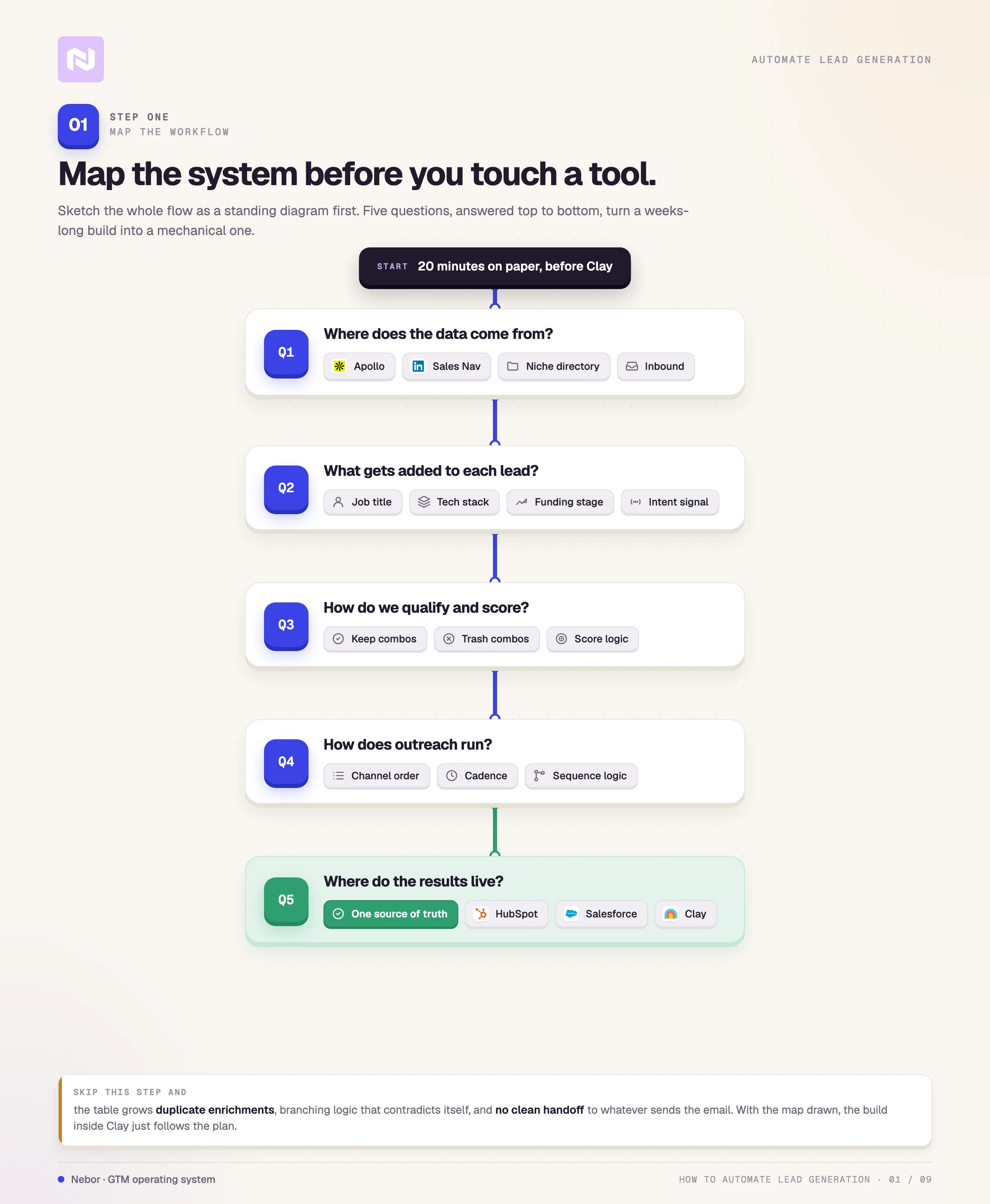
The fix is twenty minutes of mapping before you open Clay. Sketch the flow on a whiteboard, in a doc, or in a Clay table itself. The shape only has to answer five questions cleanly.
Where the lead data will come from. Apollo, LinkedIn Sales Navigator, a niche directory, a scrape of an industry website, an inbound form, or an enrichment off your own customer list.
What gets added to each lead. Job titles, tech stack, funding stage, intent signals, or anything else that will change how you write the email.
How qualification and scoring will work. Which combinations of fields keep a lead in the table, and which combinations send it to the trash. Get this wrong and you enrich rows you should never have touched.
How the outreach will actually run. Which channel hits first, what the cadence looks like, what logic decides which prospect lands in which sequence.
Where the results will live. HubSpot, Salesforce, Airtable, or back into a Clay table that feeds reporting. Pick one source of truth and stick with it.
Once those five answers exist on paper, the build inside Clay is mechanical. Without them, the build turns into a guessing game that takes weeks instead of days.
Step 2: Define who you are targeting and why
Most lead generation problems do not start with bad emails or poor deliverability. They start earlier, with targeting that is vague enough to let the wrong people through.
If the list is full of people who are defined as “close to” your ICP, the best tech and the most carefully written emails will not rescue the campaign. The targeting has to be narrow before any of the next steps work.
That is the part where most automated builds quietly lose the plot. Teams pull a broad Apollo list, drop it into Clay, and trust the filters and the enrichments downstream to clean it up.
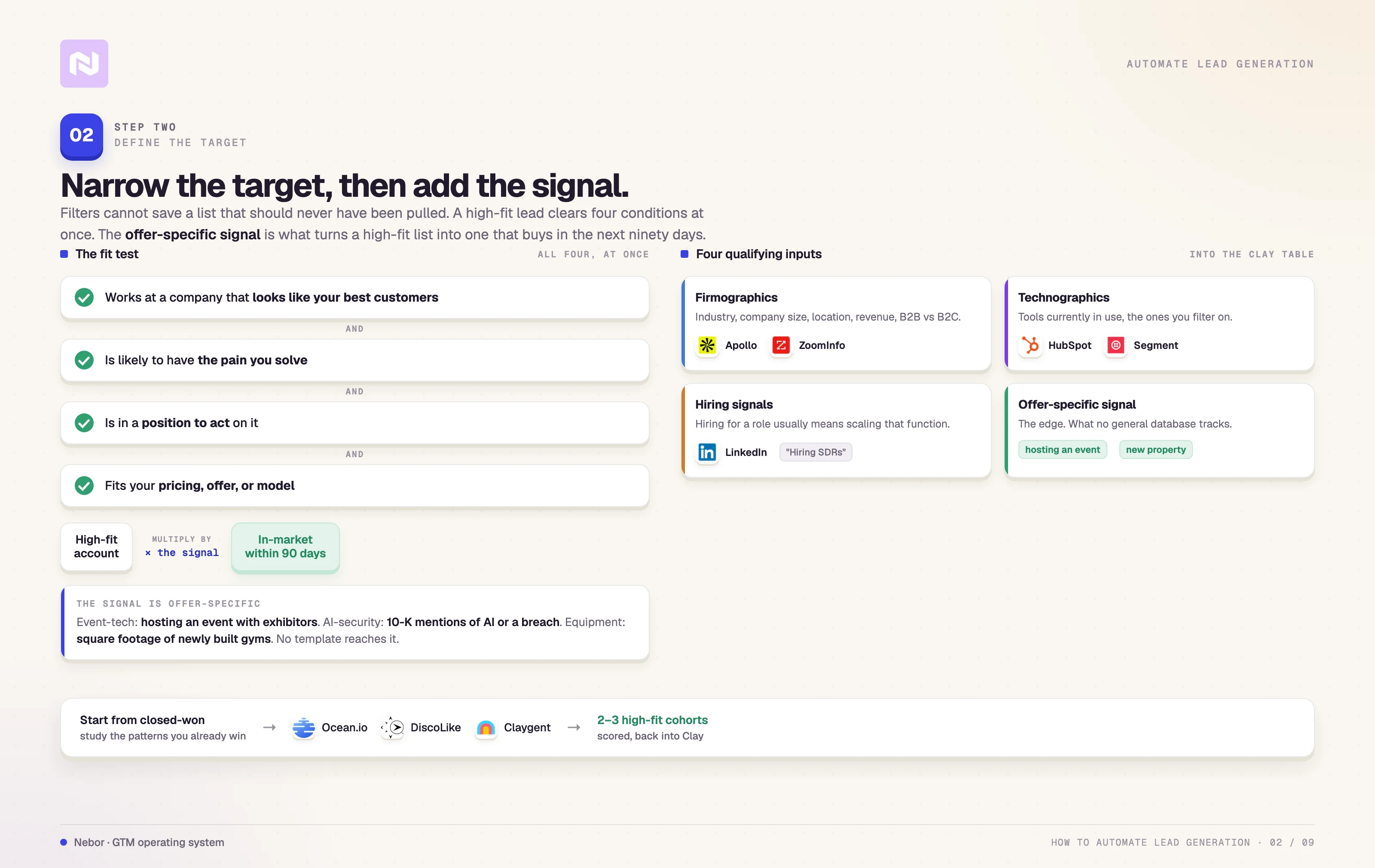
The filters cannot save a list that should never have been pulled. We start every Nebor build with the same posture, narrow targeting first, everything else second.
Understand the ICP beyond the title
Titles like “Marketing managers at SaaS companies” is a placeholder for a real ICP, not the ICP itself.
A high-fit lead is someone who works at a company that looks like your best customers, who is likely to have the pain you solve, who is in a position to act on it, and whose company fits your pricing, offer, or business model.
All four conditions have to be true at once for the prospect to be worth the cost of enrichment and outreach.
The ICP definition is the start. The other half of the targeting work is finding the right signal, the specific situation that makes the outreach timely and relevant.
The signal is what turns a list of high-fit companies into a list of high-fit companies that are likely to buy in the next ninety days.
Here is what the signal looks like for one of our clients. We have a Nebor client that sells event tech software to companies hosting trade events.
The ICP is well-defined, but the ICP alone is not enough to make the outreach land. The signal that completes the picture is whether the company is currently planning an event with a meaningful number of exhibitors.
If they are, the offer is timely. If they are not, the same email reads like noise. We cannot run the outbound system without that signal in the table.
Other Nebor clients have signals that look completely different. For one, we pull data out of 10-K filings to flag mentions of AI initiatives or data breaches, because the offer is about securing AI workloads.
For another, we monitor the square footage of newly built gyms, because the offer is sold to operators with a specific facility size. For a third, we scrape industry awards lists, because winning a category award correlates with the ICP entering a buying window.
The signal is always specific to the offer, and no generic template gets you there.
The qualifying inputs that go into the table fall into four buckets we use across builds.
Firmographics. Industry, company size, location, revenue, B2B versus B2C.
Technographics. Tools in use, with HubSpot, Segment, and Salesforce being the ones we filter on most often.
Hiring signals. Currently hiring for a specific role, which usually indicates the team is scaling that function.
Offer-specific signals. Whatever the equivalent of "currently hosting an event with exhibitors" is for your business.
Most of these can pull into Clay automatically through the same enrichment flow we cover in Step 4. The hard part is not the pulling. The hard part is naming the right signal in the first place, because the signal is offer-specific and there is no template that reaches it.
Start from the customers you already have
The fastest way to define a real ICP and the total addressable market underneath it is to study the customers you have already won. If you do not know where to begin, begin with the closed-won list.
The questions we ask of that list are direct. We look at firmographic patterns across the closed-won set, the overlap in their tech stacks, the language they use on their own websites to describe what they do, the channel each one came in through, and whether ten or twenty more lookalikes exist on the same patterns.
The answers usually point to two or three high-fit cohorts that the rest of the targeting work will rebuild from.
The lookalike question is the one that turns past wins into a repeatable targeting strategy. We use Ocean.io or DiscoLike when we want a fast lookalike pass off a customer list, and we use Claygents directly inside Clay when the lookalike logic is more unique.
Either path feeds back into Clay where the rest of the workflow takes over.
Here is a practical way to run the lookalike exercise inside Clay.
Start a Clay table with company names from your current best customers, pulled from the CRM, Apollo, or LinkedIn.
Add Clay columns that pull tech stack, headcount, industry, and a tag column for things like "Looks like Customer X" or "ICP Tier 1."
Filter out companies that fall outside the firmographic range you already know works.
Save segmented views for each top-fit cohort so you can rerun the workflow against fresh data later.
Add a scoring column that ranks each row by how close the company looks to your closed-won profile.
Targeting decides whether outbound works at all. The downstream tools amplify whatever quality the targeting produced, in either direction. Everything from here forward assumes you got this part right.
Step 3: Source and clean your prospect data
You have mapped the workflow and defined who you are after. The next step is to feed Clay with raw data.
This is where most automated builds fail. The reason is that the data going in is weak in most cases.
Scraping thousands of contacts feels productive until you realize half of them are irrelevant, half of those are outdated, and the cleaner half is still aimed at the wrong segment. At that point you are not running automation. You are running noise at scale, on autopilot.
The choice of data source has to map to the offer. The popular databases most teams default to, Apollo, ZoomInfo, LinkedIn Sales Navigator, and Lusha, are useful for what they are.
They are general-purpose contact databases. They sometimes mis-categorize companies in ways that look subtle until the email lands wrong, and there are entire ICPs that do not surface cleanly through any of them.
Take the event-tech client we keep coming back to. Their TAM does not exist inside Apollo or ZoomInfo in any usable form.
The signal we care about, “is this company hosting an event with exhibitors right now”, is not a queryable field anywhere in those databases.
We had to go to 10times an industry-specific platform that aggregates company-level event activity, to find the actual TAM for the offer.
Without 10times, the entire build would have run against the wrong list of “B2B Event Managers”.
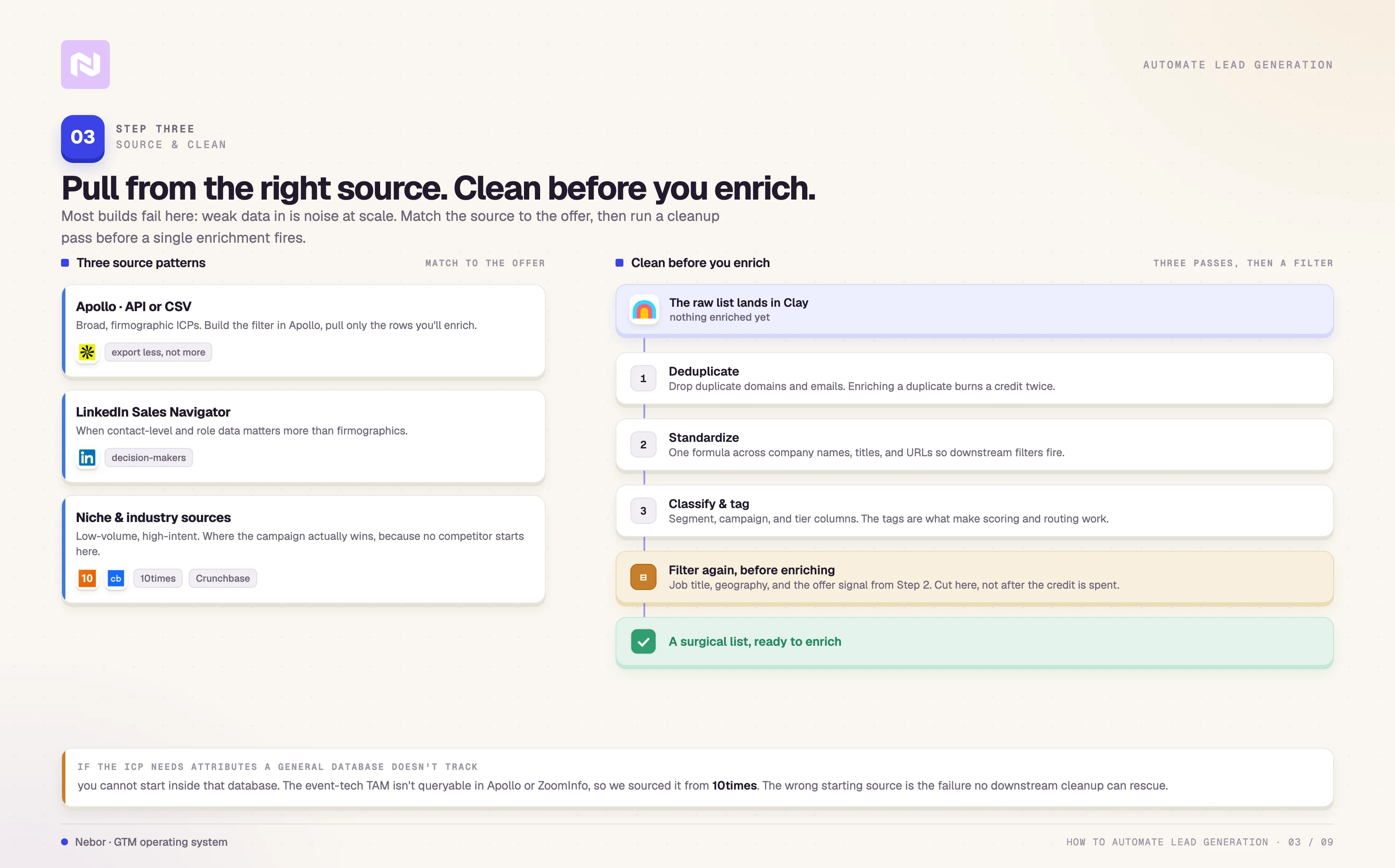
There is a general rule sitting under all of this. If your ICP is defined by attributes a general database does not track, you cannot start the workflow inside that database.
You have to find the niche source first. The wrong starting source is the failure that no amount of downstream cleanup will rescue.
We approach sourcing the same way every time, regardless of which source we end up on.
Only pull from the source that actually contains the right ICP, not the source that is easiest to log into.
Clean and classify every row before any enrichment runs.
Enrich only what is worth enriching, and only if the enrichment changes how we will treat the prospect.
The order matters more than most teams realize. Pulling first and cleaning later is what turns Clay credits into compost.
Pull from the right source, in the right way
Clay connects to dozens of tools, but we still recommend sourcing through APIs and CSVs rather than Clay’s native integrations, for the cost and design reasons we covered earlier. There are three source patterns we run most often.
Apollo through API or CSV
Apollo is the right starting point when the ICP is broad and firmographic, like growth-stage SaaS in the US between eleven and one hundred employees with HubSpot installed.
Build the filter set inside Apollo, export the filtered list, and pull it into Clay through CSV or the Apollo API.
The instinct most teams have is to export everything that matches and clean later. That instinct costs you in this workflow.
Only export the rows you actually intend to enrich, because every extra row exported is an extra Clay credit later.
LinkedIn Sales Navigator
Sales Navigator is the right source when the contact-level data matters more than the firmographic-level data, when the ICP is defined by specific roles, or when the goal is to find decision-makers across mid-market and enterprise accounts.
We feed Sales Navigator searches into Clay either through integration, where company URLs or profiles flow in automatically, or by exporting saved lead lists and dropping them into a Clay table.
The integration path is faster for ongoing campaigns. The export path is cleaner for one-off pulls.
We have written separately about the decision-maker workflow we run with Sales Navigator and Clay. You should read it to further understand how we do this.
Niche and industry sources
Anything specific to the offer goes here. Crunchbase for funding-related triggers, TechCrunch for product-launch coverage, 10times for events, scraped trade-association directories for vertical-specific ICPs, and so on.
These pulls are usually low-volume and high-intent. They are also where the campaign actually wins, because no competitor is starting from the same source.
Clean the list before anything else runs
Once the raw list lands in Clay, the temptation is to start enriching immediately. We pause first and run a cleanup pass, because every enrichment that fires against a row that should not have been there is a credit thrown away.
The cleanup pass we run has three distinct parts.
The first part is deduplication, which we run with Clay’s built-in dedupe to drop duplicate domains and emails.
Pulling the same prospect twice through three different sources is common, and enriching the duplicates is one of the fastest ways to bleed credits.
The second part is standardizing the fields themselves. Run a formula across company names, job titles, and URLs so the data is consistent enough for downstream filters to actually fire.
The third part is classification and tagging, where we add columns like segment (ecommerce, SaaS, agency), campaign (ICP 1, ICP 2), and tier (Tier 1, Tier 2, Tier 3). The tags are what make scoring and routing work later in the flow.
Filter again before you enrich
After cleanup, filter the list further before any enrichment runs. The reason is the same one that drives the “do not enrich early” instinct in Step 4.
Every enrichment is a credit, and credits spent on a row that gets cut later are wasted credits.
Pre-filter on the fields you already have inside the table. Job-title filters, geography filters, and the offer-specific signal you defined in Step 2 all belong at this stage. Filtering after enrichment means you have already spent the credit.
The event-tech client is a clean example here. The 10times pull included both companies hosting events and companies that were not, all in the same scrape.
Filtering down to the hosts before enrichment cut the list by more than half, which kept the enrichment budget targeted on rows that were actually going to receive outreach.
If you get this part right, you stop running mass scraping and start running surgical prospecting. Everything downstream gets cheaper and sharper at the same time.
Step 4: Enrich your leads with contextual data
The list is sourced and clean. The next move is to turn that Clay spreadsheet of names and job titles into something useful enough to write personalized outreach against. That is what enrichment is for, and that is also where Clay credits go to die if you are not careful.
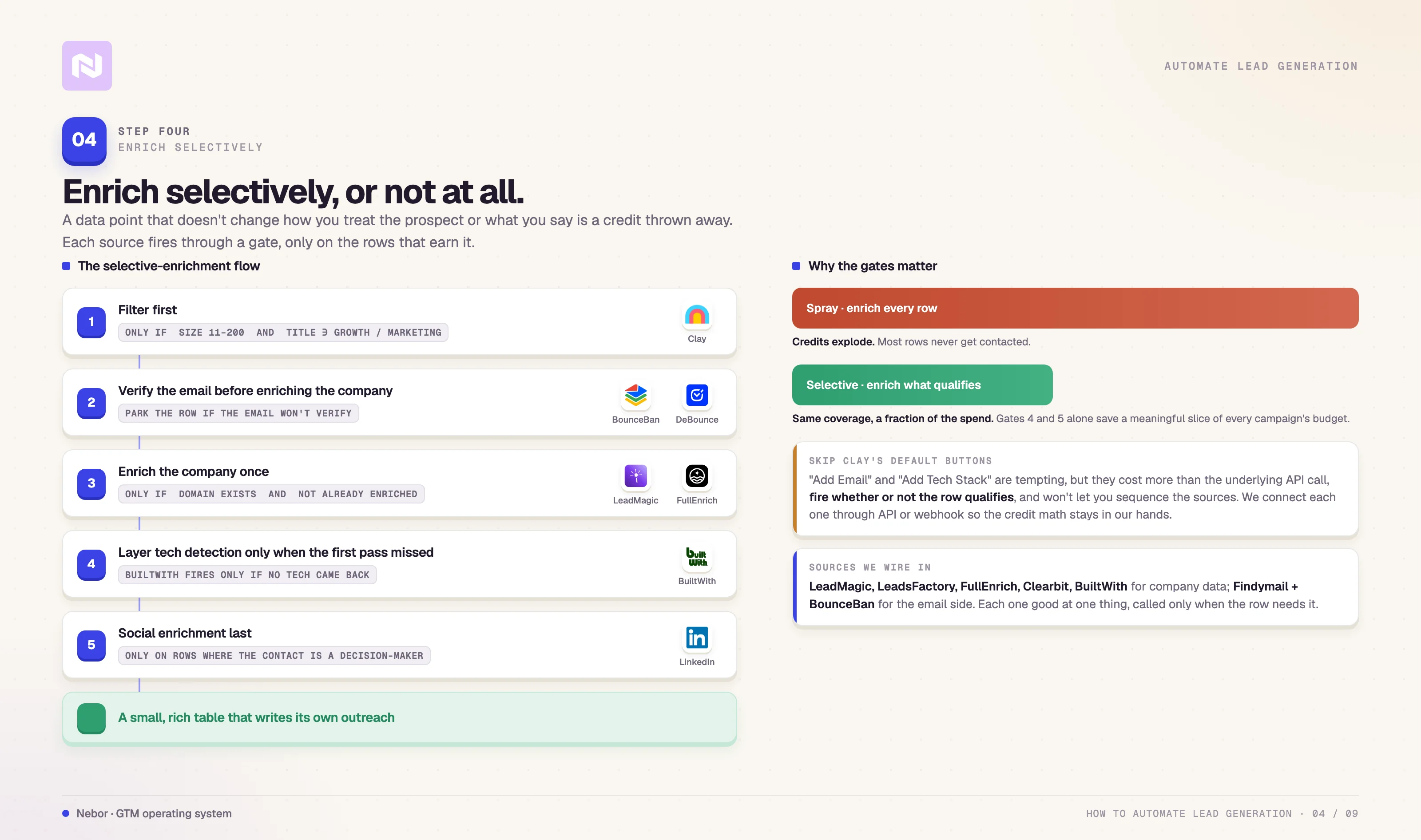
The rule that decides everything in this step is selectivity. Enrichment costs a credit per data point per row, and a data point that does not change how you treat the prospect or what you say in the email is a credit thrown away.
We enrich selectively or we do not enrich at all.
We do not need a primer on what enrichment is. The data points we typically reach for are tech stack, funding stage and date, headcount, the company LinkedIn page, decision-maker role and recent activity, verified email, and a phone number when the offer benefits from cold-call follow-up.
Some builds also need website traffic estimates from Similarweb. Others need product-page detection or scraped pricing-page content. The set is offer-specific and decided in Step 1.
The reason Clay works as the hub for this step is the same reason it works as the hub for the whole stack. We can call multiple enrichment sources from one row, layer them with conditional logic, and only run the calls that the row actually qualifies for.
Common sources we connect through API are LeadMagic, LeadsFactory.io, FullEnrich, Apollo, BuiltWith, and Clearbit, with Findymail and BounceBan handling email-side work.
Each one is good at something specific, and the cost goes up fast if you call all of them on every row.
A representative selective-enrichment flow we run looks like this.
Filter first. A row only progresses if the company is between eleven and two hundred employees and the job title contains “Growth” or “Marketing”. Anything outside that gets cut from the enrichment loop entirely.
Verify the email before enriching the company. BounceBan and DeBounce APIs check deliverability. We park rows with unverifiable emails instead of enriching them, because there is no point spending company-data credits on a prospect we cannot mail.
Enrich the company once, not twice. Clearbit pulls tech stack, funding, and LinkedIn at the company level, but only when the company domain exists and we have not already enriched it in a prior run.
Layer tech detection only when the first pass missed. BuiltWith fires only on rows where Clearbit returns no tech-stack data. Skipping it on rows where Clearbit succeeded saves a meaningful percentage of the credit budget on every campaign.
Run social enrichment last and only on the right rows. Clay’s built-in enrichments grab LinkedIn profiles and other social handles, but only on rows where the contact is a decision-maker. Adding social context to a junior contact who is never going to be the buyer is a credit thrown away.
One thing we want to repeat from earlier in the post, because it shows up again here. Clay’s default enrichment buttons (Add Email, Add Tech Stack) are tempting because they require zero setup, but they cost more in Clay credits than the underlying API calls would on your own subscriptions, they fire whether or not the row qualifies, and they do not let you sequence the sources the way the workflow needs.
We connect each enrichment source through API or webhook so the credit math, the conditional logic, and the source priority all stay in our hands.
When the enrichment is done right, the table you end up with is small and rich enough that the messaging in Step 5 can write itself off the columns.
That’s part of what we mean when we talk about automating sales prospecting end to end. The data structure does the heavy lifting that copywriting used to do.
Step 5: Write outreach at scale that still reads like a person wrote it
This is where most automated lead gen builds collapse. You have probably both sent and received the version that fails, which looks something like this.
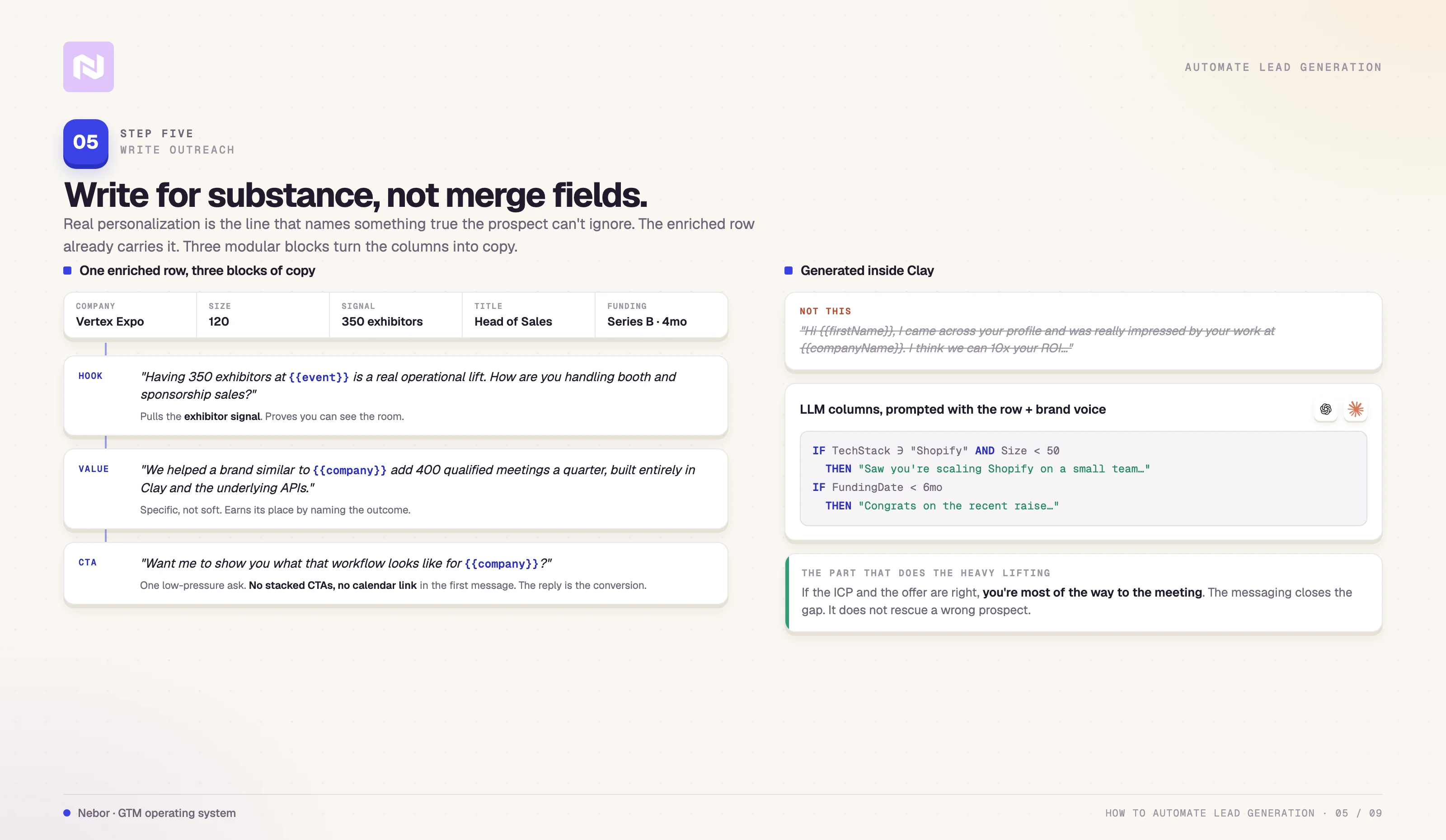
“Hi {{firstName}}, I came across your profile and was really impressed by your work at {{companyName}}. I think we can 10x your ROI…”
What that email is doing is not personalization. It’s mail merge dressed up to look personal, and it is the single fastest way to teach a prospect to ignore your domain forever.
Personalization that works has nothing to do with merge fields. It lives in the substance of the line, in what the message names that the prospect cannot ignore is true.
We help clients write outreach that reads like the salesperson would have written it manually if they had infinite time. The mechanism is straightforward.
Real context comes from the enriched data already sitting in the Clay table. A modular message structure handles the rest.
Two ingredients carry most of the weight in this step. The first is real context drawn from the row itself. The second is a structure the writer can pour that context into without rewriting from scratch on every row.
Use the enriched data to do the writing
Useful context is the columns the row already carries after Step 4.
Company size and industry.
Tech the team is running, including meaningful overlaps like Shopify plus Klaviyo for DTC, or HubSpot plus Salesforce for mid-market B2B.
Recent funding, hiring, or growth signals at the company.
Title and department of the person you are writing to.
The language the company uses on its own blog, careers page, or newsletter to describe what it does.
Social activity from the buyer or their team in the last fortnight.
That context, used correctly, is the difference between a row that gets ignored and a row that gets a reply. What lands here is visibility, the line that shows you can see what is happening inside the prospect's world and that they cannot deny is true.
A reminder before we get into the structure. If the ICP and the offer are right, you are already most of the way to a meeting.
The messaging closes the gap between “right prospect” and “right prospect who is willing to take the call”. It does not compensate for a wrong prospect or a weak offer.
Build a modular message structure
We do not always use a rigid template and neither should you. When the offer is sharp and the row is rich, we write directly from the enriched columns and the offer itself.
When the offer is more general, or the campaign needs to fan out across several ICP segments, the modular structure pays for itself.
It also makes it much easier to prompt an LLM (Claude.ai or ChatGPT) to do the first draft inside Clay without turning every row into a custom one-off generation.
The structure we use has three working blocks of copy.
Block 1, the hook. The hook is the line that proves the message is not random. It pulls something specific from the enriched data and frames it as relevant to the person reading.
Two examples for the event-tech client. “With Sally leaving your sales team, I can imagine you are looking for someone to replace her”. “Having 350 exhibitors at {{event name}} is a real operational lift. How are you handling booth and sponsorship sales?”
The point is not cleverness. The point is showing the prospect that you can see the room.
Block 2, the value. The value block is one or two sentences explaining why you are reaching out and why now. It earns its place by being specific to the company you are writing to.
Two examples we use. “We build outbound systems on Clay for B2B teams that need pipeline without hiring more SDRs”. “We helped a brand similar to {{companyName}} add 400 qualified meetings a quarter using a workflow we built entirely inside Clay and the underlying APIs”.
This block is where most cold emails go vague. Resist that and stay specific even when the impulse is to soften.
Block 3, the CTA. The CTA block is a single short, low-pressure ask. “Open to a fifteen-minute call next week?” is fine. So is “Want me to show you what that workflow looks like for {{company name}}?”
Avoid stacked CTAs and avoid hard calendar links in the first message. The reply itself is the conversion event we are optimizing for here.
Generate the variations inside Clay
Once the structure exists, the variations write themselves inside Clay using conditional logic and a few well-prompted LLM columns. A column we set up often is a hook_line column that fires a different language depending on what the enriched row already shows.
IF TechStack includes “Shopify” AND CompanySize < 50
THEN “Saw you are running Shopify and look like you are scaling on a small team”.
IF FundingDate within 6 months
THEN “Congrats on the recent raise, sounds like growth mode at {{companyName}}”.
The logic above is illustrative, and the real version sits in a Clay formula or in a prompt to ChatGPT, Claude, or Gemini that we feed the row’s enriched data plus the brand voice we want the output written in.
We run the same approach on the CTA, the subject line, the PS, and the first follow-up so every block has its own row-specific variant by the time the message goes out.
The result is a table where every row already has its own hook, value paragraph, and CTA, written off the data the row carries. The salesperson sees a personalized message at every line of the table without having spent personalized writing time per row.
That is what we mean when we talk about building sales systems instead of headcount. The system absorbs the work that used to scale linearly with the salesperson’s typing speed.
Step 6: Set up your outreach system

By this point you have done the hard parts of the build.
The workflow is mapped on paper, the targeting is narrow enough to pass the cost-of-enrichment test, the data is sourced and cleaned, the enrichment is selective, and every row already has its row-specific copy written off the columns.
What is left is the sending layer of the system.
Now the system has to actually send across the right channels at the right time, without burning the domain in the process. The two ways teams usually fail this step are familiar.
Either they rush the deliverability setup and watch the reply rate bottom out, or they over-engineer the tech stack until nobody on the team can keep it running.
We avoid both by being deliberate about which channels run, in what order, and what each channel is responsible for.
A note on email deliverability before the channels. Deliverability is its own discipline, and there is more to it than we can fit inside this post.
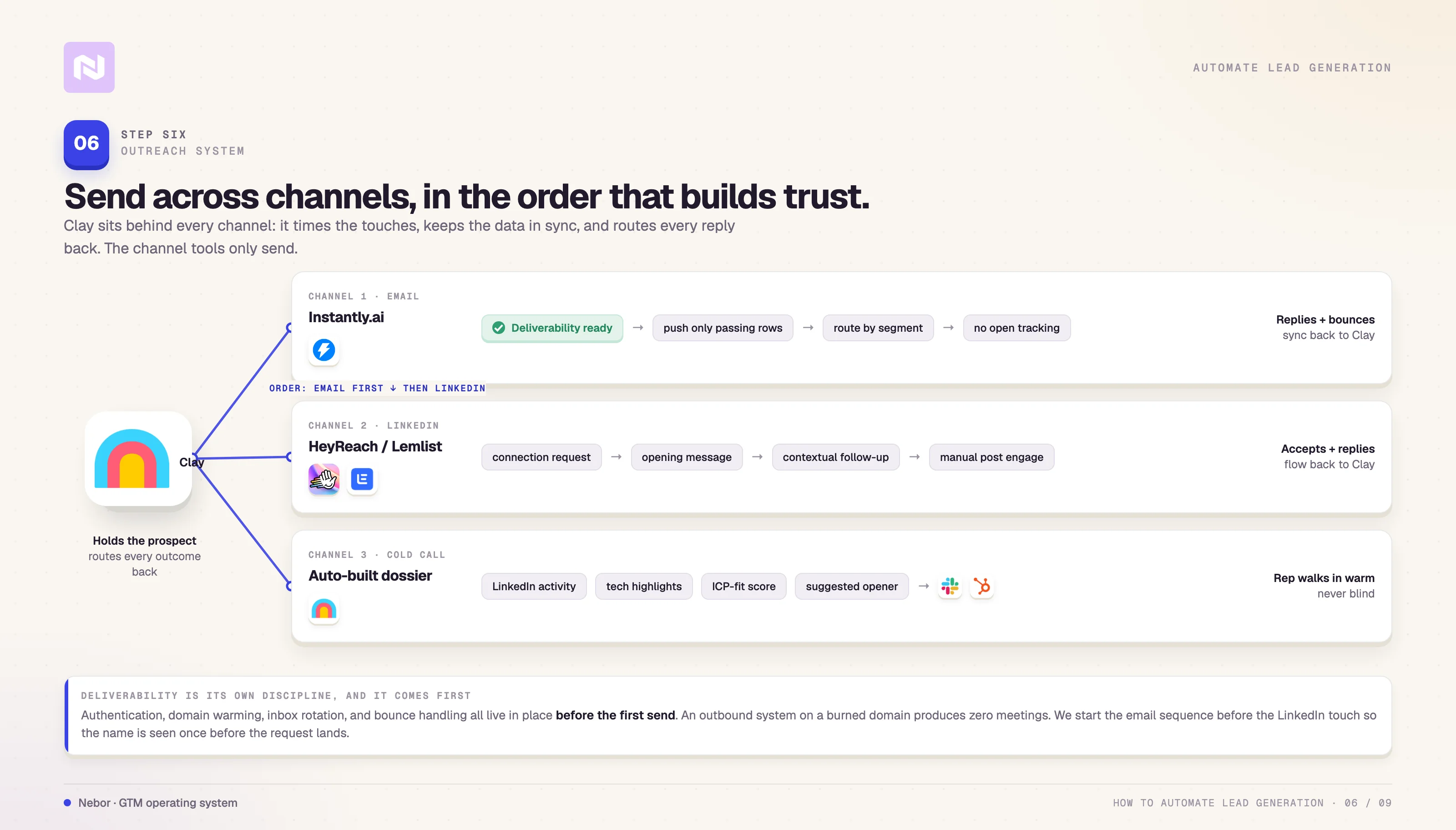
Authentication, domain warming, inbox rotation, content filtering, and bounce handling all have to live in place before the first send.
So, we’ve also covered how to build a modern deliverability infrastructure. You should read it to understand the deliverability work that needs to be done before your campaign.
The short version is that you do not get to skip this layer. An outbound system on a domain with bad reputation produces zero meetings and a smaller domain footprint than when it started.
We do not believe in single-channel outbound for the kind of work most B2B teams need. The system we run for clients hits across email, LinkedIn, and cold-call follow-up sometimes, with Clay sitting behind every channel to time the touches, keep the data in sync, and route replies.
We have written separately about how inbound and outbound stop being separate disciplines once the channels feed each other. The same logic applies inside outbound itself, between channels. Email and LinkedIn working in sync produce more replies than either does alone.
Cold email through Instantly.ai
We run cold email through Instantly.ai because it pairs cleanly with Clay through API, and because it scales across multiple inboxes without us managing each one by hand. The reason it works in this stack is the way it connects to Clay, not the tool itself.
The flow we run inside that connection is straightforward. Clay holds the leads, runs the qualification, and writes the row-specific message blocks (hook, value, CTA) using the LLM columns from Step 5.
Clay pushes only rows that pass the final filter into Instantly through the API, and routes them into the right sequence based on segment, tech stack, or whatever other column controls campaign assignment.
Replies, bounces, and unsubscribes flow back into Clay so the table reflects the campaign state, and we use those signals to refine targeting and message language for the next batch.
We do not track opens, because open tracking actively hurts deliverability and the data it produces is unreliable enough to be worse than nothing.
LinkedIn outreach through Lemlist or HeyReach
Email by itself is not enough for most ICPs. For founders, marketers, and revenue leaders especially, LinkedIn is where the prospect actually decides whether to take you seriously.
We layer LinkedIn touchpoints on top of email using Lemlist or HeyReach.io, depending on the client’s existing stack.
The LinkedIn setup mirrors the email side closely. The Clay workflow enriches each row with the prospect’s LinkedIn URL during Step 4 and pushes the row into the LinkedIn tool through API along with the row-specific copy.
From there, the sequence runs across a connection request, an opening message, a contextual follow-up, and an optional manual task for the salesperson to engage with the prospect's recent posts in a non-automated way.
Connection acceptances, replies, and ignored requests all flow back into Clay so the table stays the source of truth.
The order in which the touches go out matters more than people think. We almost always wait until the email sequence has started before triggering the LinkedIn touch, so the prospect has seen the name once before the connection request lands.
The reverse order produces fewer accepts and reads as cold. The right order reads as a coordinated outbound program by a team that knows what it is doing.
Cold-call support with auto-built dossiers
We do not believe in cold calling everyone. When the offer and the ICP benefit from a phone touch, we still do not send reps in blind.
After Step 4, Clay assembles a prospect dossier for every lead the rep is going to call. The dossier carries the key LinkedIn activity, the tech-stack highlights, the email and LinkedIn engagement history with the rep's company so far, the ICP-fit score, and a suggested opener line that reads off the row's unique data.
The dossier lands in Slack, Notion, or the CRM automatically, depending on where the team prefers to work. The rep walks into every call already understanding who they are talking to and why.
The pattern across all three channels is the same. Clay always holds the prospect and the surrounding context.
The channel tools (Instantly, Lemlist or HeyReach, the dialer) handle the send. The reply, the connection accept, or the conversation comes back into Clay so the next decision runs on data the system already trusts.
Nothing about the way the system runs is one-off. Every channel learns from the previous round of replies.
Step 7: Trigger outreach off valuable intent data and buying signals
Most agencies stop at Step 6, which is where most teams’ systems also stop being interesting. A static campaign hitting a static list eventually loses its edge as the market refreshes around it.
New companies enter the ICP all the time. Existing companies hire new buyers, raise rounds, and change priorities in ways that turn them from “not now” to “actively shopping”.
If the system cannot see those changes and react to them, the campaign degrades quietly while you are watching the wrong dashboard.
The intent-data framework we run sits on top of the campaign that is already up rather than replacing anything in it.
It feeds new rows into the same Clay table the rest of the workflow runs on, and the existing qualification, enrichment, and outreach machinery picks them up automatically.
We built the original system to be extensible exactly because this is the layer that compounds the longest.
A clarification on what we mean by intent data, because the term gets stretched. We are not interested in the standard intent data most B2B tools sell, which is anonymous content views and IP-resolved web visits scraped off vendor pixels.
Bombora, Cognism, and the others in that category will tell you that someone at Acme Co read three articles about your category this month. That is correlation at best, and most of the time it is noise.
What we look for instead are real changes in a company’s behavior or circumstance, the kind a human prospector would notice and act on if they had unlimited time to read the news. You can read our post on signal-based outbound campaigns to see how we run this.
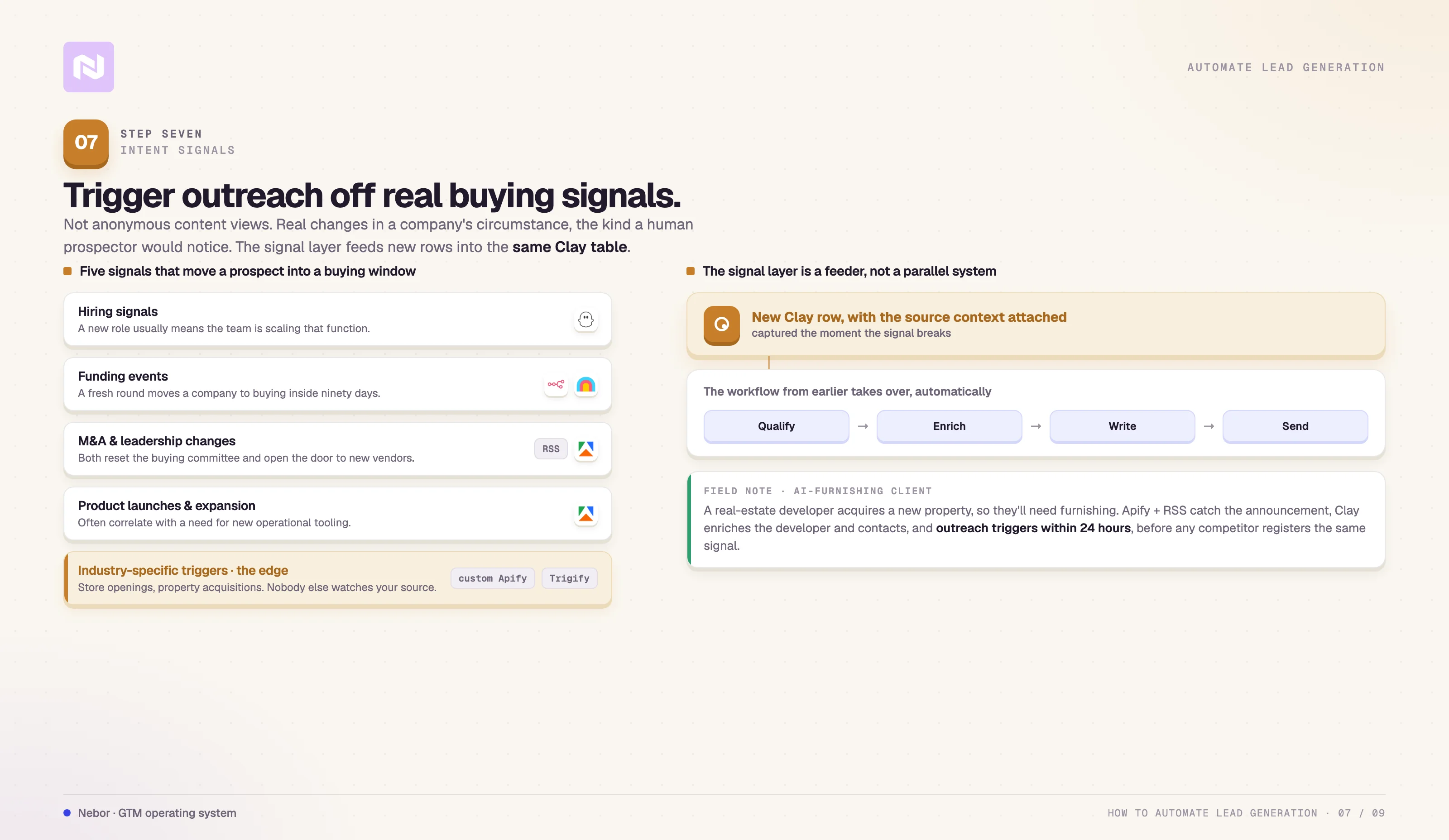
The five categories that drive the majority of our triggered outreach are familiar.
Hiring signals, especially job posts that imply the buyer is now in seat, or that the team is scaling a function we sell into.
Funding events, where a fresh round usually moves a company from “considering” to “buying” inside ninety days.
M&A announcements and leadership changes, both of which reset the buying committee and create openings for new vendors.
Product launches and market expansions, which often correlate with a need for the kind of operational tooling we help with.
Industry-specific triggers, like new store openings for a retail-focused offer, or new property acquisitions for a real-estate-adjacent offer.
The first four are universal enough that we set them up in most builds. The fifth is where the real edge lives, because nobody else is watching the same source you are.
The signal collection runs on a defined cadence using Apify or PhantomBuster with the choice of tool depending on whether the source is a website to scrape, a social platform to monitor, or a structured feed to subscribe to.
LinkedIn job postings can flow in through PhantomBuster on a daily run. Funding and news content can flow in through Clay or n8n.io’s RSS readers connected to Clay. Industry-specific sources flow in through custom Apify actors we build.
Every signal lands as a new row in the same Clay table with the originating context attached, and the workflow from earlier in the post takes over from there.
Here is what that looks like inside a Nebor build. We have a client offering AI-powered home and office furnishing.
The signal that matters for this client is when a real estate developer acquires a new property, because the new property is the moment the developer needs a furnishing partner.
We monitor industry publications that report on real-estate transactions through Apify and RSS feed readers.
The moment a transaction is announced, the data flows into Clay, we enrich the developer's company and decision-maker contacts, and the outreach sequence triggers within twenty-four hours of the news breaking.
The client lands in front of the developer at the moment the developer is starting the buying conversation, before any competitor has registered the same signal.
The business effect of this layer is straightforward. Most of the outbound game is timing, and most teams play timing badly because they do not have a system that watches for the moments when timing matters.
The signal layer fixes that, but only if the signals chosen are the right ones for the offer. What we are after is the kind of signal a human prospector who knew the industry intimately would notice on their own. Generic intent feeds will not surface those signals.
A practical setup loop for the signal layer.
Pick three to five event triggers that move a prospect into a buying window for your offer. Hiring, funding, M&A, leadership changes, and one industry-specific trigger is a strong starting set.
Decide which tool will collect each kind of signal in the set. Apify for scrapes, PhantomBuster for LinkedIn-side activity, Trigify for the layered alternative, RSS for syndicated content.
Pipe every signal into Clay as a new row with the source and the context attached.
Let the existing qualification, enrichment, and outreach workflow handle the row from there. The signal layer is the new feeder, not a parallel system.
The compounding effect shows up after two or three months. The campaign no longer relies on the static list it started with.
The list refreshes itself as the market moves, and the outreach lands in front of the prospect on the day the offer became relevant rather than the month an SDR finally got to that name on the list.
Step 8: Automate inbound qualification and the handoff to sales
Outbound is one half of the system we build. Inbound is the other half, and most teams run it as a separate, manual track even though the data and the workflow could be the same.
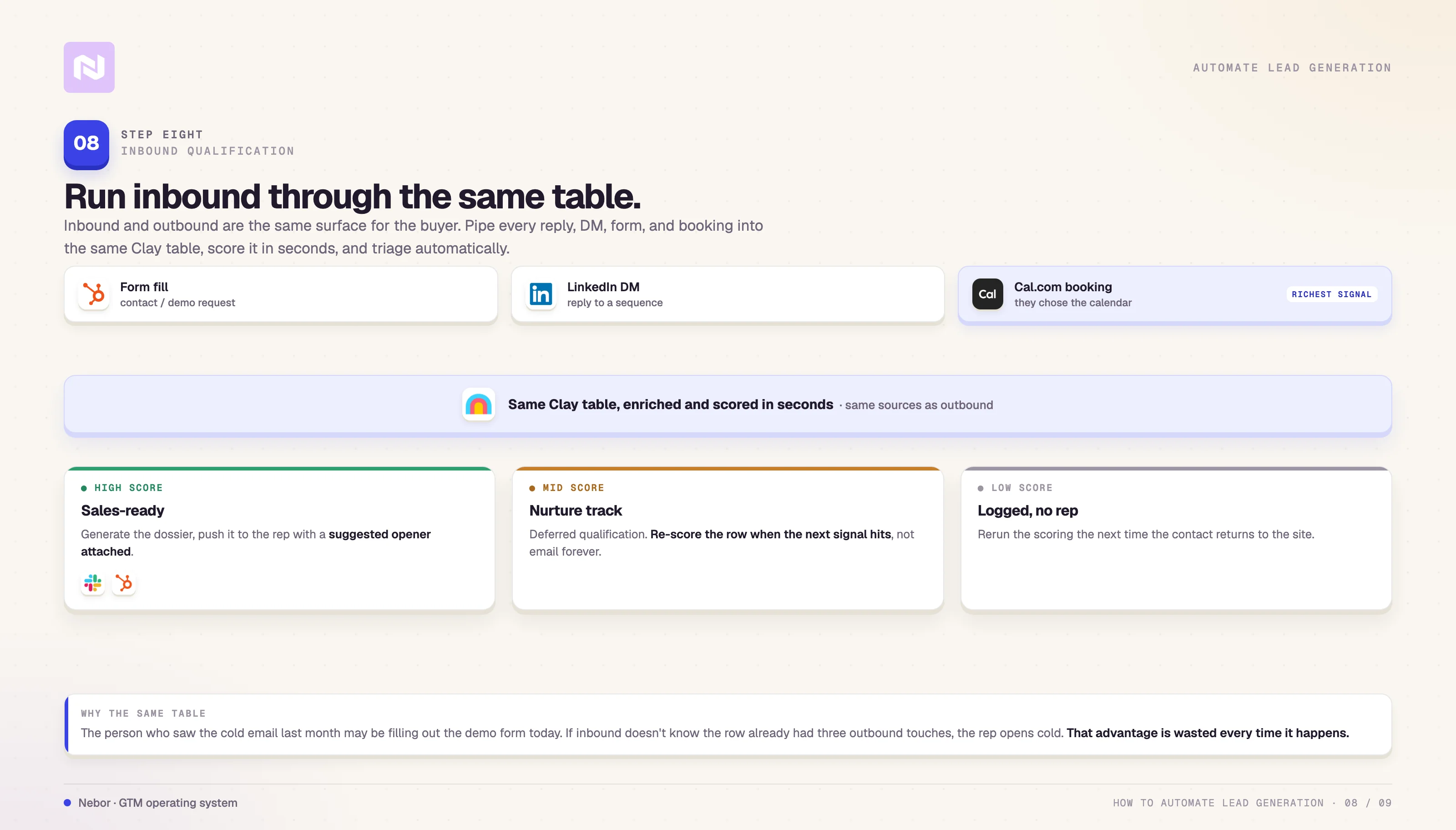
Email replies, LinkedIn DMs, demo requests, contact-form submissions, and the people who book directly off your site are all inbound rows that deserve the same enrichment and scoring discipline you applied to the cold list.
We pipe them into the same Clay table and run the same logic.
We know that not every inbound lead is worth a rep’s time. Some are low-fit, some are early-stage curious, and some are the kind of fit that should be on a sales call within the day.
If the team treats all three the same way, the rep burns hours on the wrong conversations and the few high-fit inbound rows go cold while they wait in a queue. The triage has to be automatic and fast.
Here is the flow we run on inbound. The moment someone fills out a form, books on the Cal.com (or whatever meeting platform you use) inbound meeting link, or replies to a sequence, the row enters Clay with whatever context the channel captured.
Clay enriches the row in seconds against the same sources we use for outbound, scores it against the ICP, and decides one of three outcomes.
If the row scores high, the system flags it as sales-ready, generates a dossier (the same dossier shape we build for cold-call follow-up in Step 6), and pushes it to the rep through Slack or the CRM with the suggested opening line attached.
A row that scores in the middle goes into a nurture sequence we run as a deferred-qualification track. The goal is to re-score the row when the next signal hits, not to email them forever.
Low-scoring rows do not get a rep at all. We log them and let the system rerun the scoring the next time the contact returns to the site.
The Cal.com piece deserves a paragraph of its own because most teams under-use it.
We have written separately about the inbound meeting workflow we run with Cal, Clay, HeyReach, and Instantly, and the short version is that the booking event itself is the richest signal in the entire inbound stack.
The buyer chose to put themselves on the calendar. The system should treat that as the strongest possible intent signal and run a real qualification, enrichment, and pre-meeting prep pass before the rep ever joins the call.
The reason we route inbound and outbound through the same Clay table is that the two surfaces are the same surface for the buyer. The same person who saw the cold email last month might be the one filling out the demo form today.
If the inbound system does not know that the row already had three outbound touches, the rep walks into the conversation as if it is a cold open. That is a wasted advantage every single time it happens.
The two channels share the table, the enrichment flow, and the scoring model. We get full visibility across both channels in return.
The triage layer also has a quiet effect we do not see written about often enough. It changes which conversations the rep is in, which changes the rep's calibration.
When the rep spends sixty percent of their meetings on high-fit rows because the system filtered the rest out, the close rate on those meetings climbs without anyone running a sales-coaching workshop. Pipeline quality compounds the same way outbound list quality does in Step 7.
Step 9: Run a real review cadence so the system keeps learning
Once everything is running, the worst thing you can do is let it run unwatched. The system from Steps 1 through 8 will degrade if you treat it as a launch-and-forget project.
Sequences hit fatigue, inboxes drift on deliverability, and ICPs that worked last quarter shift as the market shifts.
A signal source that produced strong rows in month one returns less interesting rows by month four because everyone in the easy part of the list is already in the table.
The fix is a real review cadence with a clear owner. We set the cadence during the build and document it before handoff, so the client's team can run it without us. The cadence below is the version we hand over by default.
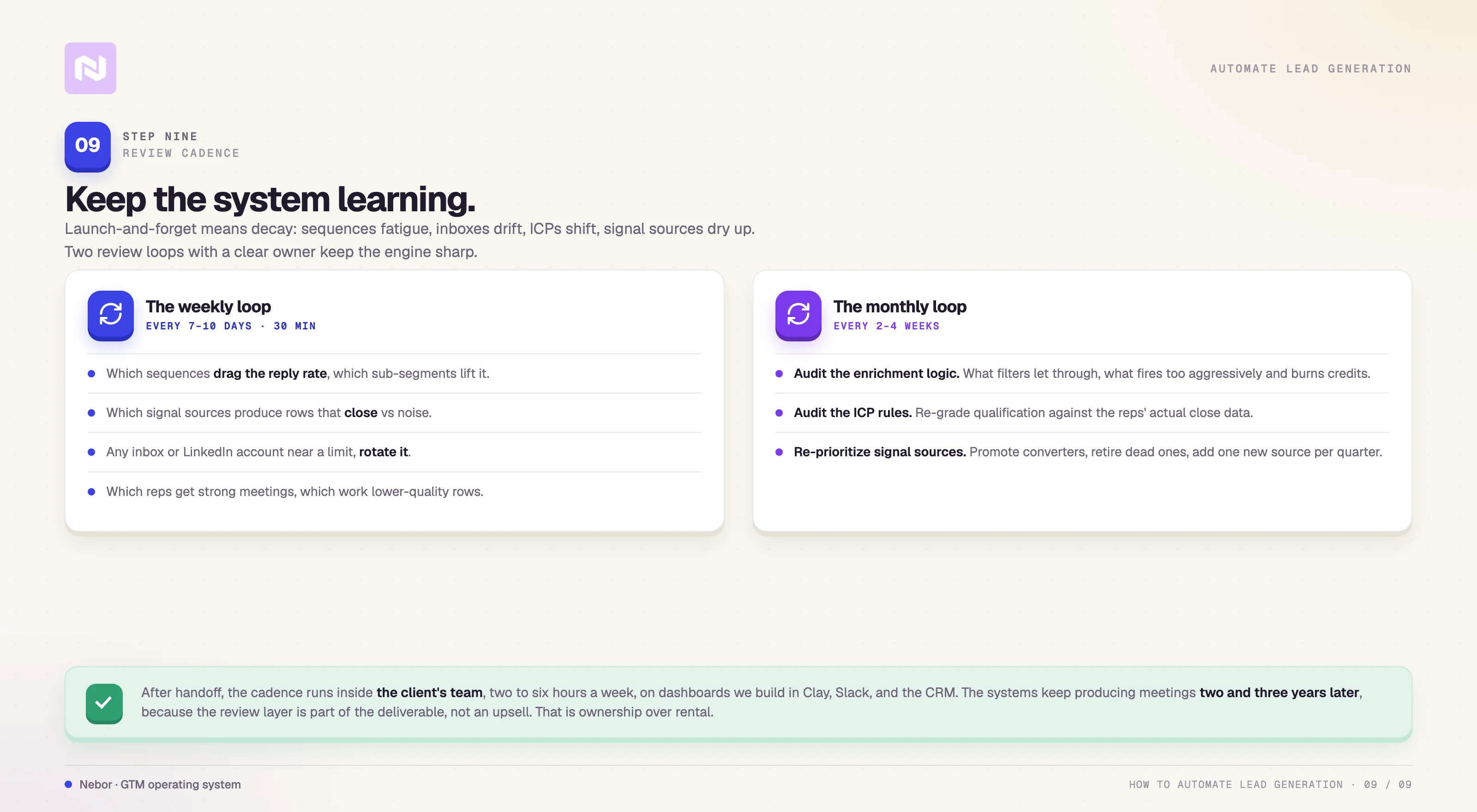
What to look at every seven to ten days
The short cadence runs weekly or every other week and stays focused on the live campaign. The questions are concrete enough to answer in thirty minutes if the dashboards are set up right.
Which sequences are dragging the reply rate down, and which sub-segments are driving it up.
Which signal sources are producing rows that close, and which are producing noise.
Whether any inbox or LinkedIn account is approaching a deliverability or platform limit and needs rotation.
Which reps are getting strong meetings, and which are working through lower-quality rows the system did not catch.
Each of those questions has a column or filter inside Clay that answers it in seconds. The work is reading the answers, not rebuilding the dashboards every time.
What to look at every two to four weeks
The longer cadence is the one most teams skip, and it is the one that decides whether the system stays sharp. Once a month, the team running the system does three things.
Audits the enrichment logic. We look at which rows the filters are letting through that the team should have caught earlier, and which enrichment conditions are firing too aggressively and burning credits.
Audits the ICP qualification rules. The criteria that defined a high-fit row in month one are not always the same criteria that produce closed deals in month four. Re-grade the qualification logic against the reps' actual close data.
Re-prioritizes the signal sources. Move the ones that are converting up the priority list. Retire any source that has stopped producing usable rows. Add one new source per quarter, because the edge in the signal layer erodes constantly as other teams catch on to the same sources.
Who runs it after we leave
This is the part where the build-and-hand-off model differs from the agency norm. After we ship a system, the cadence above runs inside the client's team, not ours.
Most of our clients run it through whoever already owns RevOps or the outbound function, and the time investment lands somewhere between two and six hours a week depending on the size of the campaign.
We design the dashboards in Clay, Slack, and the CRM so a single operator can run the review without needing to dig through raw data.
We document the rules, the dashboards, and the review questions before we leave so the system does not lose its edge when we walk out the door. The point of the engagement is to leave the team with something they can run, refine, and extend on their own.
That is what ownership over rental means at this stage of the build.
The systems we hand off keep producing meetings two and three years after the original handoff, because the review layer is part of the deliverable and not an upsell.
Step 10: Hire Nebor to build the system in your stack and hand it off
You have read this far, which means you have a clear enough picture of the system to start sketching it for your own setup. Here’s what your build should look like.

Knowing the shape of the system and building the system are two different jobs. Most of the teams who reach out to us have read versions of this post, or written their own internally, and still cannot get the build over the line.
The reason is almost never about technical skill or capacity to learn the tools. The people who would do the work are the same people closing deals, running pipeline reviews, and trying to hit a quarterly number, and the build itself needs about three hundred hours of focused systems work that nobody on the revenue side has the calendar for.
That is where we typically get the call. We are Nebor, and we build GTM systems on Clay for B2B teams that need pipeline without hiring more SDRs.
The thing that makes the engagement different from most agencies is that the system we build lives in the client's accounts, not ours. The Clay workspace, the Apollo account, the Instantly inboxes, the n8n flows, the API keys are all in the client's name.
After two to four weeks of build time, we hand the system over with documentation, dashboards, and the review cadence from Step 9. The system keeps running whether or not we stay in the picture, and most of our clients keep running it for years after the engagement ends.
We have written about why we are not a lead-gen agency in the way most teams use that phrase.
The difference shows up most clearly at the moment the contract ends, when one team takes the assets with them and the other walks away with nothing but a few months of reports.
If you want a fuller picture of that distinction, the GTM agency versus lead generation agency piece lays it out.
How a Nebor engagement actually goes
We audit the current state. The existing tools, the targeting logic, the messaging, the deliverability setup, the inbound flow, and the data hygiene. The audit usually surfaces two or three structural issues we need to address before any new system gets layered on.
We design the workflow against your ICP, your offer, and your existing stack. We document the design in plain English before any tool gets touched, so the client team understands what we are building and why.
We build the system inside the client's own accounts. We set up Clay, Apollo, Instantly, Lemlist or HeyReach, n8n, and the signal-collection tools in the client's name, with the integrations and conditional logic from the steps above.
We hand it off with documentation, dashboards, and live training for the team who is going to run it. Most builds go live inside two to four weeks of kickoff. After that, the system runs without us in the picture.
If outbound is broken at your company because the system has never been built right, or because you have been told by other agencies that the answer is more SDRs, or because the previous Clay setup never made it past column thirty, the conversation is worth having.
Related Articles
By clicking Sign Up you're confirming that you agree with our Terms and Conditions.