

De werkruimte waar taken, documenten en dashboards samenkomen. Het is de tool waarin we het klantwerk van Nebor zelf beheren, en een van de plekken waar de bibliotheek of het playbook van een workflow kan landen.
Wat is
ClickUp
ClickUp is een teamwerkplek die projecttaken, documenten, doelen en dashboards in één product samenbrengt. Lijsten en borden bevatten het werk, documenten staan naast de taken die ze beschrijven, en automatiseringen zetten dingen in beweging zonder dat iemand kaartjes hoeft te verslepen. We kunnen het uit eigen ervaring beschrijven, want Nebor beheert zijn eigen klantwerk in ClickUp: elke build, elke reviewronde en elke oplevering staat daar als taken en documenten. Daarom duikt het ook op in onze workflowschema's, als thuisbasis voor de output van een build. In die builds doet de workflow het schrijfwerk. Een voice-of-customer-bibliotheek, een playbook, een wekelijkse briefing: alles landt via de API of een kant-en-klare automatisering in de werkruimte die het team elke ochtend toch al opent. Zo hoeft niemand een nieuwe tool te leren om te lezen wat de machine heeft gevonden. De eerlijke kanttekening is onderhoud. ClickUp slikt elk proces dat je erin stopt, ook een rommelig proces. De teams die er het meest uit halen, leggen hun structuur daarom één keer vast en snoeien af en toe. Zo ingericht is het de goedkoopste manier die we kennen om al het werk van een bureau op één plek zichtbaar te houden.
Integraties en de moderne GTM-stack
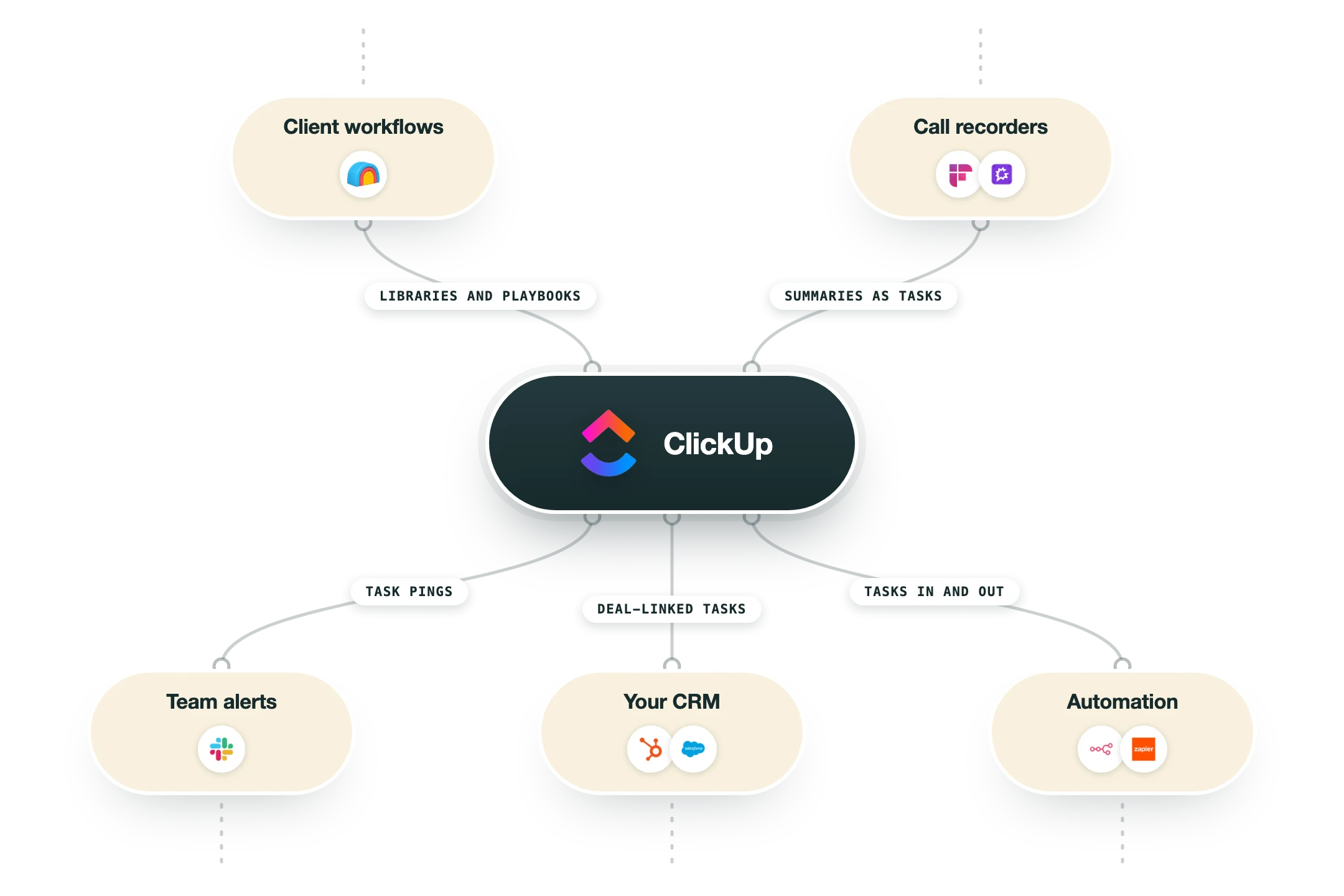
ClickUp koppelt in twee richtingen met een GTM-stack:
Publieke API en webhooks | Alles wat een workflow nodig heeft: taken aanmaken en bijwerken, lijsten uitlezen en meteen horen wanneer er iets verandert. |
Slack | Taakmeldingen komen binnen in de kanalen die het team toch al leest, en een bericht kan een taak worden zonder Slack te verlaten. |
HubSpot | Taken die aan een deal gekoppeld zijn, houden het opleveringswerk vast aan de omzet waar het voor is. |
n8n en Zapier | Kant-en-klare nodes voor de stappen waar koppelen beter werkt dan coderen: een gewonnen deal opent een onboardinglijst, een afgeronde taak werkt het CRM bij. |
Inkomende e-mail | Elke lijst heeft een eigen e-mailadres, dus een doorgestuurde thread wordt een taak met de context erbij. |
Voordelen
Eén werkruimte vervangt een projecttool, een documententool en een doelentracker, zodat het werk en wat erover geschreven wordt op dezelfde plek blijven.
Het gratis plan is echt bruikbaar, en de betaalde plannen blijven goedkoop genoeg dat niemand op seats hoeft te beknibbelen.
Eigen velden en weergaven buigen het naar bijna elk proces, van een sprintbord tot de opleveringspipeline van een bureau.
Door automatiseringen en de API kan een workflow taken aanmaken en bijwerken zonder dat iemand iets hoeft over te kopiëren.
Documenten die aan taken hangen, houden een voice-of-customer-bibliotheek op één klik afstand van het dealwerk dat ze voedt.
Nadelen
De flexibiliteit heeft een prijs. Een werkruimte die niemand onderhoudt, groeit vol met weergaven en velden tot dingen vinden zelf werk wordt.
Het kan traag aanvoelen in heel grote werkruimtes, en power users merken de vertraging als eerste.
De AI-functies zijn een betaalde add-on bovenop de prijs per seat.
Meldingen moet je op dag één temmen, anders leert het team ze te negeren.
Prijzen
Free Forever
Gratis
Onbeperkt taken en leden
60 MB opslag, kanban, kalender
Genoeg om het echte product uit te proberen
Unlimited
$7 per gebruiker per maand bij jaarlijkse facturatie, $10 bij maandelijkse facturatie
Onbeperkte opslag en integraties
Gantt, doelen, portfolio's
Ingebouwde tijdregistratie
Business
$12 per gebruiker per maand bij jaarlijkse facturatie, $19 bij maandelijkse facturatie
Uitgebreide dashboards
Automatiseringen op schaal
Mindmaps, exports op maat
Enterprise
Op maat neem contact op met sales
SSO en governance
Eigen rollen
250K automatiseringen per maand
Zo past het in je stack
Alternatieven


In het kort
Taken, documenten, doelen en chat op één plek
Free Forever-plan met onbeperkt taken
Dashboards over elke lijst of elk team
Automatiseringen zonder developer
Ingebouwde tijdregistratie
Documenten staan naast het werk dat ze beschrijven
AI-assistent voor taken en documenten
Publieke API en webhooks
Lees een paar van onze klantverhalen





GTM-workflows
Zo zet je GTM-tools in binnen workflows
Gidsen en tutorials om het meeste uit je workflows te halen





Klaar om te beginnen?




Door op Registreren te klikken bevestig je dat je akkoord gaat met onze Algemene Voorwaarden.








