

Algorithmic B2B email finder and verifier from France that keeps no contact database, cleans and deduplicates your CRM, and answers the question of where the data came from.
What is
Dropcontact
Four thousand verified emails for €79 a month works out to about two cents each, and none of them come out of a stored database. Dropcontact computes addresses with its own algorithms on French servers and verifies them live, so every row was worked out at the moment you asked. That one design choice decides everything else about the tool. There is no contact graph to browse, so you bring the names and companies you already have, and what comes back is a verified work email, a cleaned job title, a matched company domain, plus duplicates detected and merged inside Pipedrive, HubSpot or a Google Sheet. The compliance case is unusually strong for this category. France's CNIL audited Dropcontact with access to its source code and closed the investigation in November 2020. Its own 20,000 contact benchmark ranks it first at 54.9% effective enrichment, funded by Dropcontact itself, so read that as a vendor claim. Dropcontact earns a slot in your waterfall when your buyers are European and legal asks where an address came from, because there is no stored database to point at. It cannot return mobile numbers, so it works beside FullEnrich, LeadMagic and Findymail in our Clay builds rather than replacing them.
Integrations and the modern GTM stack
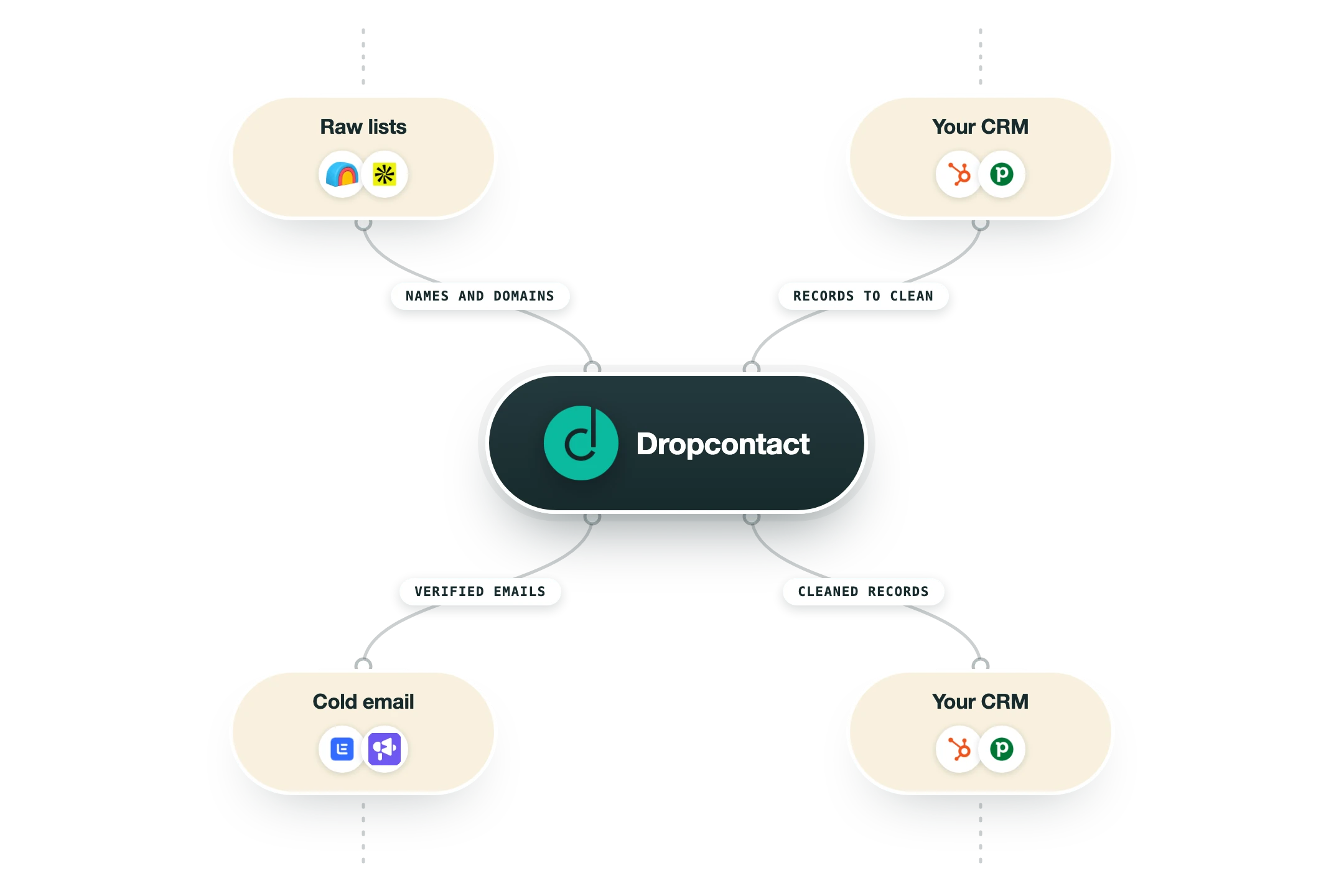
Dropcontact expects to be called from wherever your list already lives, so the integration list is heavy on CRMs, spreadsheets and automation tools, and light on anything that sends.
Clay | Listed as a data provider in Clay with a Find Work Email action that takes a company domain, phone or social URL. Clay bills it through its own managed account by default, and on a paid Clay plan you can plug in your own Dropcontact API key instead, which is the sane setup if you already hold credits. |
Pipedrive and HubSpot | These are the two mature native apps, and they carry the CRM hygiene story. Once installed, Dropcontact enriches and re-verifies every contact as it is created or updated, cleans job titles, resolves company names to domains and merges duplicate contacts and companies. Deployment is a settings screen rather than an engineering project. |
Salesforce | Marketed on the pricing page alongside the other two, but Dropcontact's own integrations page still labels it Coming Soon. Treat Salesforce as a roadmap item and ask for a live demo before you sign anything on the strength of it. |
Google Sheets | An official add-on that enriches a sheet in place, plus drag and drop enrichment of csv, xls and txt files in the app. This is how most teams do their first real test on a list of a few hundred rows. |
n8n, Zapier and Make | All three are named integrations, so you can enrich a row on a form fill, a new CRM record or a scrape without writing code. n8n gets its own documented integration page, which matters if you self-host your automation layer. |
API and MCP server | API access is included on every paid plan, including Starter, and Dropcontact publishes an MCP server so an AI agent can call enrichment directly. Being early on MCP is a real signal about where the product is headed. |
Scrapers and LinkedIn tools | PhantomBuster, Captain Data, Evaboot, Surfe, Waalaxy, LaGrowthMachine and TexAu all pass scraped rows through Dropcontact for emails. This is the classic European growth stack, and it is where the tool has the deepest partner coverage. |
Sequencers | QuickMail and SmartReach are the named cold email integrations, with Brevo marked as coming. Instantly, Smartlead, Lemlist, Outreach and Salesloft are absent, so if you sequence in one of those, enrichment has to happen upstream in Clay, a sheet or your CRM. |
The honest gap | No phone or mobile enrichment on the Email Finder plans, no intent or signal data, and no contact database to search, so Dropcontact cannot build a list from nothing. Email Finder credits also do not work against the CRM subscription, which is quoted separately, so a Pipedrive or HubSpot rollout is a second line item. |
Pro’s
Because nothing is pulled from a stored list, you can tell a data protection officer exactly how each address was produced, and Dropcontact has the CNIL audit paperwork to back that up.
Verification is built in and done on their own infrastructure, including catch-all domains that most finders drop, and those domains tend to be your largest targets.
The CRM side does real hygiene work: duplicate contacts and companies are merged automatically, job titles are cleaned, and company names resolve to domains.
You only pay for hits, since a lookup that returns nothing gets re-credited, and Growth plans carry unused credits into the next month.
Setup takes minutes rather than an engineering ticket, whether you go through the Pipedrive or HubSpot app, a Google Sheet, Clay, n8n or the API.
Cons
No mobile or direct dial numbers on the Email Finder plans, so any calling motion needs a second vendor next to it.
Coverage is built around European companies, and the fair reading of a 54.9% effective rate on a file that was half US contacts is that a US-heavy list will leave a lot of rows blank.
Computing and verifying an address in real time is slower than reading a row out of a warehouse, so large batches take time that database tools do not.
The headline benchmark that puts Dropcontact first was designed, carried out and paid for by Dropcontact, so it is marketing until someone independent repeats it.
Email Finder credits cannot be used for CRM enrichment, which is sold as a separate quoted subscription, so a full CRM rollout costs more than the public price list suggests.
Pricing
Free trial
€0 50 credits, no card required
Test the finder and verifier
File upload or single lookup
No commitment
Starter
€79/mo 4,000 credits, and the ladder goes €29 for 500, €59 for 1,500, €199 for 11,000
Pay on success
B2B email enrichment and native validation
Advanced catch-all verification
File enrichment, API and MCP access
Google Sheets add-on
Growth
€120/mo 4,000 credits, and the ladder goes €35 for 500, €72 for 1,500, €303 for 11,000
Everything in Starter
Credits carry over month to month
LinkedIn URL enrichment without login
AI job classification and job cleaning
Company change detection and domain matching
Enterprise
Custom From 200,000 credits per month
Volume pricing
Priority enrichment
Real-time enrichment notifications
Dedicated support
Native CRM Integration Suite
Quote only Separate subscription from Email Finder credits, sold per CRM contact volume and licence count
Pipedrive and HubSpot native apps
Advanced smart merge for duplicates
Job change detection on your database
Mobile numbers from email signature extraction
Free CRM database audit on the demo
How it fits your stack
Alternatives


At a glance
No contact database, addresses are computed
CNIL-audited GDPR position, EU servers
Email finding plus native verification
Advanced catch-all verification included
Duplicate detection and merge in CRM
Native Pipedrive and HubSpot integrations
API, MCP server, Google Sheets add-on
Credit refunded when no email is found
Read some of our client stories





GTM Workflows
Learn how to use GTM tools in workflows
Guides and tutorials to get the most from your workflows
No items
Ready to get started?




By clicking Sign Up you're confirming that you agree with our Terms and Conditions.








