

A private cold email sequencer built on your own dedicated IPs and ships fully white-labeled, built for agencies sending across many client workspaces.
What is
EmailBison
EmailBison sends cold email sequences for agencies that do outbound on behalf of other companies. What separates it from the rest of the category is that your sending shares infrastructure with nobody, because every customer gets a single tenant instance with dedicated VPCs, static egress and its own IP pools. That instance arrives white-labeled down to the details, carrying your domain, logo, colours, system emails, invites and tracking links with no EmailBison branding anywhere in the interface. Workspaces, teammates and stored leads are uncapped, so every client can live in an isolated space without a per seat or per client charge. Control is at the sender level, where every mailbox gets its own warmup schedule, daily cap and send speed. Warmup happens inside a vetted private pool instead of a public network, and the system pauses an account on a spike, cools it down and ramps it back under fresh caps. We would reach for EmailBison only for an agency already pushing serious volume with someone who owns deliverability full time. Nebor has not used it, though HeyReach built a native integration and OutboundSync carries its CRM sync. Under roughly 100,000 sends a month, Instantly and Smartlead do this job for a fraction of the money.
Integrations and the modern GTM stack
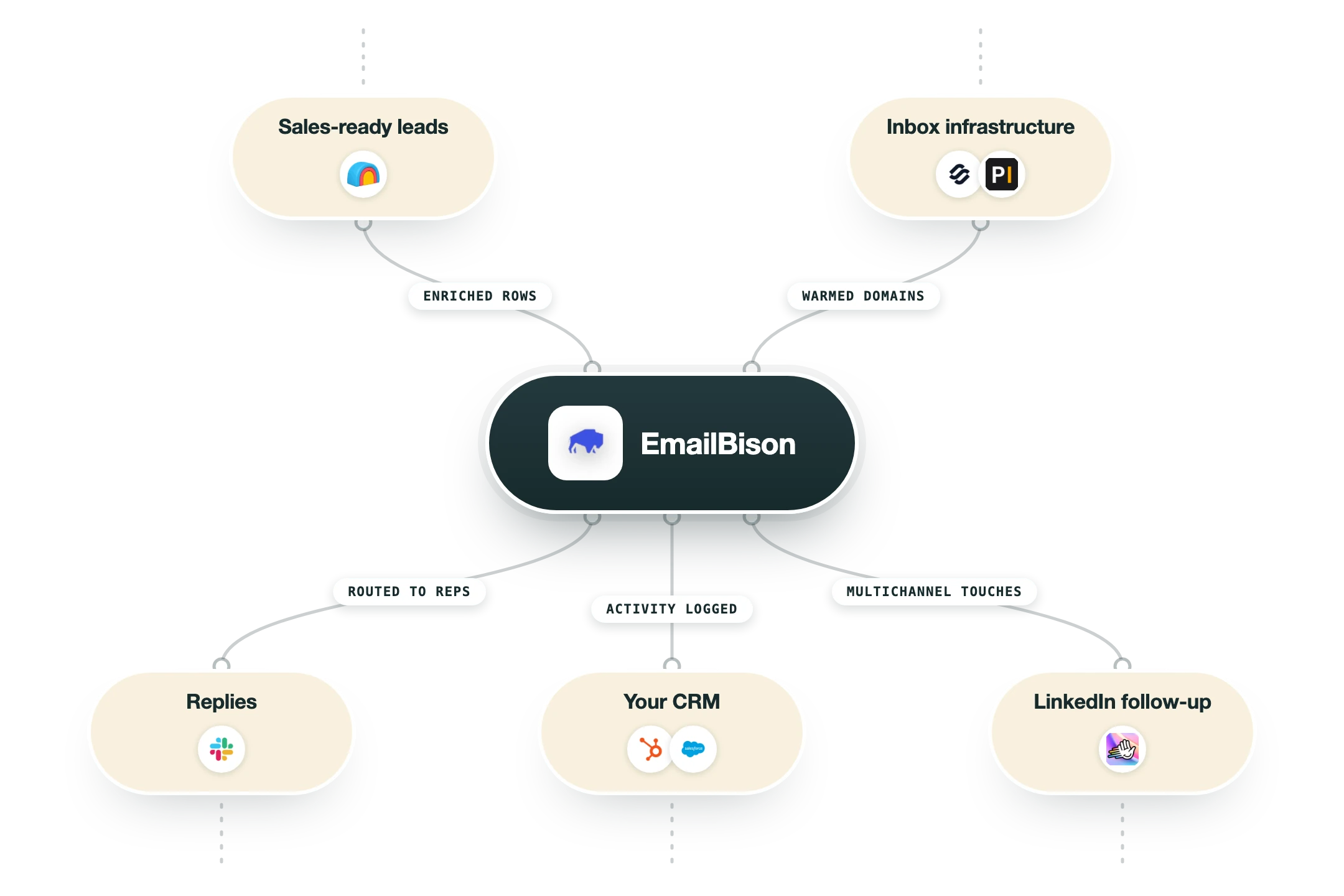
EmailBison assumes the rest of your stack already exists. It ships a full REST API, webhooks and a small set of native connections, then expects Clay to hold the data, a CRM to hold the record and a separate vendor to sell you domains and mailboxes.
Clay | A native integration you add from the enrichment menu after connecting an API token. The actions are create or update lead, find lead, import lead to campaign, and adding or removing an email or a domain from the blocklist, so a Clay table can qualify a record and drop it straight into a live sequence. |
HeyReach | A native two way link that HeyReach documents itself. LinkedIn leads who never reply get pushed into an EmailBison campaign, automatically about three days after the final LinkedIn step, and warm email replies can be pulled back into a HeyReach campaign. LinkedIn profile URL is a required field on the push and leads fail without it, the target campaign has to be active rather than draft, and the setup repeats per workspace. |
OutboundSync (HubSpot and Salesforce) | The route EmailBison itself points to for CRM sync. OutboundSync handles a two way sync of email activity, blocklist management and attribution into HubSpot and Salesforce as a native CRM app, and because it rides the webhook and API layer it works on every EmailBison plan. Budget from $99 a month on top, scaling with monthly message volume. |
EmailGuard | Inbox placement testing built in as a one click check on your real campaign copy before a send goes out. EmailGuard comes from the same founder as EmailBison, which explains why placement testing lives inside the sequencer here while most competitors leave you exporting copy into a separate seed list tool. |
n8n, Make and Zapier | No dedicated app on any of the three. EmailBison's developer page tells you to build with HTTP request nodes carrying an Authorization Bearer header and to register webhook listeners for the events you care about. Workable for anyone comfortable with raw API calls, and slower than the prebuilt Smartlead and Instantly nodes if you are not. |
API and webhooks | Endpoints cover leads, tags, campaigns, sequence steps, sender emails, replies and warmup enable or disable, with two token types. An api-user key is scoped to the workspace that created it and a super-admin key impersonates its creator, so most integrations should use api-user. Failed webhook deliveries retry up to five times across twenty four hours. |
Master Inbox and reply tooling | The native master inbox handles unified threads, labels, filters, attachments, one off sends and real time syncing, and it exposes the same data through the API. Third party reply managers such as Master Inbox also support EmailBison if you want one queue across EmailBison and a LinkedIn tool at the same time. |
What is missing | No lead database, no built in email verification and no LinkedIn or phone channel of its own, so the top of the workflow lives in Clay or Apollo and the multichannel steps live in HeyReach. Domains and mailboxes are not sold here either, though EmailBison keeps a partner network for buying them. Deep CRM sync only exists through OutboundSync, which is a paid third party rather than a native connector. |
Pro’s
Single tenant clusters with dedicated VPCs, static egress and your own IP pools mean the sender reputation you build is yours alone, and that is the one promise a shared sequencer can never make.
The white-label goes past a logo swap to cover your domain, colours, system emails, invites and tracking links, so a client logging in never learns which vendor is underneath.
Unlimited workspaces, teammates and stored leads on a flat fee removes the per client workspace charges that make Smartlead and Instantly creep upward as an agency adds accounts.
Warmup happens in a vetted private pool with per sender schedules and automatic pause and cool down on spikes, which beats a public pool that anyone can join with a burner domain.
The API reaches leads, campaigns, sequence steps, sender emails, replies and warmup toggles, with webhooks retried five times across twenty four hours, so Clay or n8n can drive the whole thing.
Support is a private Slack channel with real engineers plus 1:1 onboarding and migration help, and that is worth something when a client domain starts landing in spam on a Friday.
Cons
There is no free trial and no self serve signup, so you book a demo and pass a qualification call before you see the product, which rules out a cheap side by side test against your current sequencer.
$599 a month is the floor whatever you send, so a team pushing 20,000 emails a month pays around six times what Smartlead's Pro plan costs for the same sending job.
EmailBison has no listing on G2, Capterra or Trustpilot, a direct consequence of the invite only model, and it leaves you judging the tool on vendor testimonials and a handful of agency blog posts.
Reselling the sequencer is banned outright and EmailBison says it triggers an immediate ban, so an agency can only pass the cost through as a tech fee inside a retainer, despite the reseller framing you will read elsewhere.
It sends and warms and does nothing else, so lead data, verification and multichannel live in other tools, and having launched in 2024 it carries less public track record than the sequencers it prices above.
Pricing
Base Plan
$599/month One plan, demo required, no free trial and no self serve signup
500,000 emails per month
Isolated network with dedicated IPs and domain pools
Private warmup with bounce protection
Full REST API and webhooks
Unlimited workspaces, teammates and stored leads
Private Slack support with 1:1 onboarding and migration help
Additional volume
Custom Monthly buckets stacked on the base plan
Sends beyond the 500,000 a month included
Priced by negotiation with the EmailBison team
More dedicated IPs auto provisioned as volume climbs
White-labeled instance
Included No separate white-label fee on the base plan
Your domain, logo, colours and system emails
Your invites and tracking links with no EmailBison branding
Isolated data per workspace with roles and permissions
Reselling the instance is prohibited, tech fee pass through only
What's outside the plan
Separate Third party costs most buyers end up adding
Domains and mailboxes bought elsewhere
OutboundSync from $99/month for HubSpot and Salesforce sync
Lead data, verification and enrichment from Clay or similar
How it fits your stack
Alternatives



At a glance
Single tenant instance with dedicated IPs
White-labeled under your own domain and brand
Unlimited workspaces, teammates and stored leads
Private, vetted warmup pool
Native EmailGuard inbox placement tests
Native Clay integration and full REST API
500,000 emails a month on the base plan
SOC 2 Type II, GDPR and HIPAA
Read some of our client stories





GTM Workflows
Learn how to use GTM tools in workflows
Guides and tutorials to get the most from your workflows
No items
Ready to get started?




By clicking Sign Up you're confirming that you agree with our Terms and Conditions.








