

Cold email mailbox infrastructure: a dedicated mail server and IP with 150-plus pre-warmed mailboxes, one-click domains, automated DNS, and native Smartlead and Instantly integrations.
What is
Mailreef
Mailreef is cold email mailbox infrastructure. Instead of renting Google or Microsoft seats and hoping they survive volume, you get your own dedicated mail server with its own IP address and 150-plus mailboxes configured for outreach. It sells the sending layer itself: the servers, domains, and mailboxes your campaigns actually go out from. The mechanics are handled inside the platform. You buy domains in one click, Mailreef auto-creates the SPF, DKIM, and DMARC records, and servers, domains, and mailboxes arrive pre-warmed. Mailbox creation is one click too. From there, everything plugs into Smartlead or Instantly natively, and a developer API covers provisioning for teams doing this at agency scale. In a GTM stack, Mailreef goes underneath the sequencer. Your data layer decides who to contact, the sequencer decides what to say and when, and Mailreef is the pipe the email travels through. That layer is invisible when it works and fatal when it is not: a shared or misconfigured setup sinks everything above it. At Nebor, MailReef is one of the three providers we actually buy aged sending domains and warmed mailboxes from when we build client sending systems, alongside Zapmail and ScaledMail. We choose between the three per client, depending on volume, mailbox type, and budget. None of it matters, though, unless the rest of the infrastructure is set up right.
Integrations and the modern GTM stack
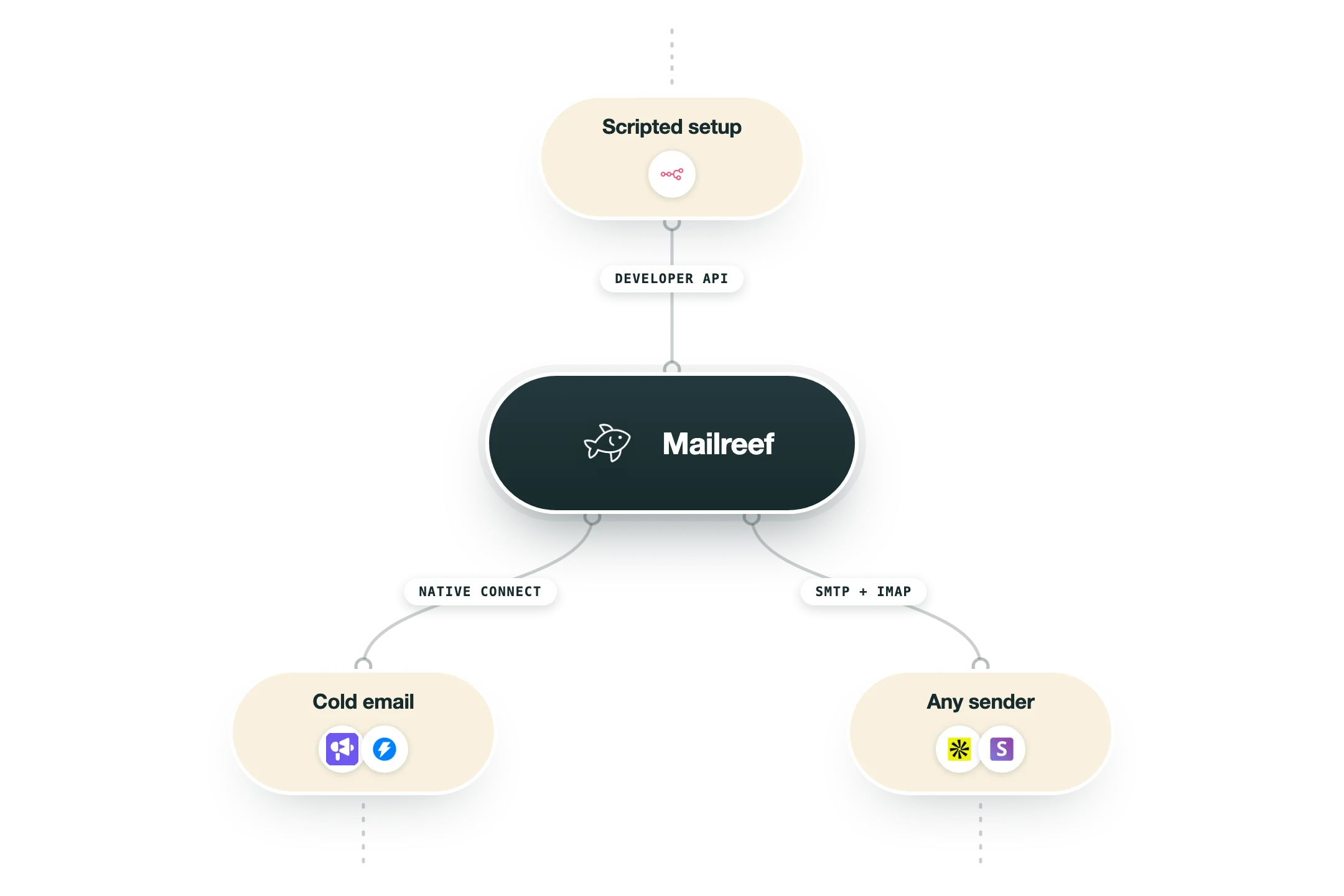
Mailreef is the sending layer, so its integrations are about getting mailboxes into your sequencer and letting you provision infrastructure programmatically.
Smartlead | Native integration listed on every Mailreef plan: mailboxes created on your dedicated server connect into Smartlead for sending and rotation. |
Instantly | Native integration listed on every Mailreef plan: Mailreef mailboxes plug into Instantly campaigns the same way. |
Other sequencers (via SMTP/IMAP) | Mailboxes live on Mailreef's own dedicated mail servers, so tools that accept custom SMTP and IMAP credentials can send through them, but only Smartlead and Instantly are supported as named, one-click integrations. |
Developer API | Every plan includes Developer API Access for provisioning; a docs portal exists at docs.mailreef.com but is behind a login, so public endpoint details are not verifiable. |
Domain registration and DNS | Domain purchase is built in: one-click domain buys with SPF, DKIM, and DMARC records auto-created, plus bring-your-own-domain support. |
What it does not have | No Zapier app, no MCP server, no CRM connectors (HubSpot, Salesforce), and no ongoing automated warmup integration; infrastructure ships pre-warmed but long-term warmup tooling is on you. |
Pro’s
A dedicated server and IP per customer means you never inherit a stranger's sending reputation.
Servers, domains, and mailboxes arrive pre-warmed, so campaigns can start without a weeks-long ramp.
DNS is done for you: SPF, DKIM, and DMARC records are auto-created when you buy a domain in one click.
Per-server pricing with 150-plus included mailboxes works out far cheaper per inbox than Google or Microsoft seats at volume.
Live delivery support and screening for spammers keep the ecosystem, and your IP, cleaner than most bulk-inbox shops.
Cons
There is no free trial or self-serve signup; you book a demo and commit to a paid plan before you can test anything.
The $0.001 per-send fee compounds quickly at exactly the volumes the platform is built for.
Only Smartlead and Instantly are natively integrated; any other sequencer means wiring up SMTP and IMAP yourself.
Ongoing automated warmup is not included after the initial pre-warm, so maintaining mailbox health stays your job.
The per-server model is overkill for small senders who cannot use a meaningful share of 150 mailboxes.
Pricing
Agency
$240/month 12-month commitment, plus $0.001 per email sent
Dedicated mail server and dedicated IP address
150+ mailboxes per server
One-click domain purchases with auto SPF, DKIM, DMARC
Smartlead and Instantly integration
Agency Flex
$249/month Month to month, cancel anytime, plus $0.001 per email sent
Same infrastructure as Agency with no annual commitment
Live technical support and delivery consulting
Developer API access
Server and mailbox monitoring
Enterprise
Custom Special pricing, request a quote
Customized infrastructure for larger sending operations
Multiple dedicated servers and IPs
Everything in the Agency plans
How it fits your stack
Alternatives


At a glance
Dedicated mail server per customer
Dedicated IP address
150+ mailboxes per server
One-click domain purchases
Auto SPF, DKIM, DMARC setup
Pre-warmed servers and mailboxes
Smartlead and Instantly integrations
Developer API access
Read some of our client stories





GTM Workflows
Learn how to use GTM tools in workflows
Guides and tutorials to get the most from your workflows






Ready to get started?




By clicking Sign Up you're confirming that you agree with our Terms and Conditions.








