

An AI SDR from the Prospect.io team that sources contacts from a 450 million record database, writes the email and the LinkedIn message, and runs both channels from one workspace.
What is
Overloop
Outbound usually breaks in the gaps between three tools, one that hands you a list, one that drafts the email, and one that sends it. Overloop does all three inside a single workspace, sourcing contacts from a 450 million record database, writing each message from the prospect's own site and profiles, then running email and LinkedIn steps. The company is Belgian, founded in Brussels in 2015 as a Chrome extension called Prospect.io, and it spent a decade as a sales engagement platform before rebuilding around an AI agent. Both products are still live, and the site's own navigation splits them into Overloop AI and Overloop Classic with separate logins and separate help centres. Plenty carried over, including the email finder, bulk verification, the Chrome extension that turns a LinkedIn profile into a contact, HubSpot, Pipedrive and Salesforce field mapping, and open, click and reply tracking. The deals, pipelines and tasks that made Classic a light CRM did not, so the AI product runs outbound and nothing else. Overloop suits a founder or a small team that wants one subscription instead of four, though what decides your reply rate here is the list and the offer far more than the agent writing the email. Nebor has not run it, and past 500 sourced contacts a seat we would rebuild the loop in Clay with Instantly sending.
Integrations and the modern GTM stack
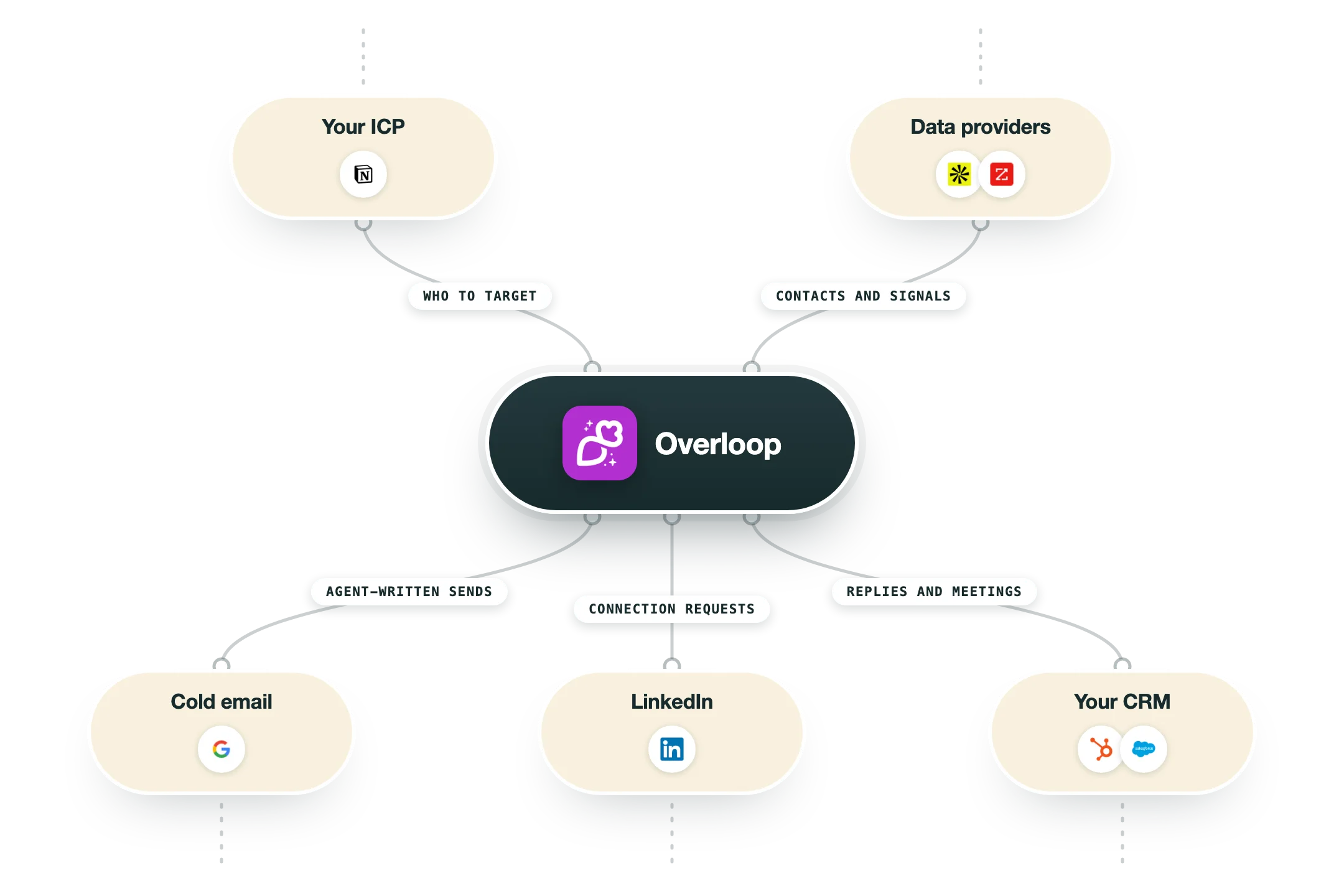
Overloop connects to the mailbox, to LinkedIn and to three CRMs, and the CRM half is gated by plan so the tier you pick decides whether your system of record ever sees the activity. The most interesting surface is the agent one, because Overloop ships a CLI and an MCP server alongside the web app.
Google Workspace, Gmail, Outlook and Microsoft 365 | Sending runs through your own mailbox, so messages land in your Sent folder and replies come back to your inbox. Starter allows one connected account per user, Growth allows three and Enterprise is unlimited, which is the practical cap on how much volume a seat can carry. |
Connection requests and messages run as campaign steps with Smart Limits capping actions per day, starting a fresh account at five of each type. The link depends on the Chrome extension and a live LinkedIn session, and Overloop's help centre documents reinstalling the extension and clearing LinkedIn cookies when it drops. | |
HubSpot and Pipedrive | Available from the Growth plan up. You map prospect fields, record types and owners, with email, first name and last name mapping automatically and everything else matched by hand. Sent emails log through the CRM BCC address, and Overloop states plainly that prospect replies cannot sync into HubSpot. |
Salesforce | Enterprise only, with the same field, record type and owner mapping plus optional BCC logging of sent email. Anything beyond that, including custom object or event flow, needs verifying in your own workspace before you commit, since Overloop describes the mapping rather than a full two-way sync. |
Chrome extension | Turns a LinkedIn profile or a Sales Navigator search into an Overloop prospect, finds and verifies the business email, and enrolls the person into a campaign without leaving the page. This is the fastest route from a manual list to a running sequence. |
Slack, Calendly and Zapier | Slack pushes real-time notifications when a prospect clicks or replies. Calendly handles the booking and can trigger a workflow when a meeting is booked. Zapier covers the long tail of more than 1,000 apps, and all three are on every plan including Starter. |
CLI, MCP server and REST API | Overloop publishes an agent-facing product at agent.overloop.ai, installed with npm install -g overloop-cli, with an MCP server for Claude and other MCP clients and a REST API at api.overloop.ai. Sourcings, campaigns, steps, enrollments, prospects and conversations are all addressable, and output comes back as JSON. REST API access starts on Growth. |
What is missing | There is no native Clay action, no n8n app, no dialer, no website visitor identification and no connection to Instantly, Smartlead or any other cold email infrastructure. If your engine already lives in Clay, the only route in is the REST API or Zapier, and at that point you are paying Overloop mostly for its database and its sending. |
Pro’s
Sourcing, writing and sending sit under one subscription, so a founder running outbound alone replaces a database seat, a writing tool and a sequencer with a single $69 line item.
Credits only burn when you source a prospect or find a valid email, and messages cost nothing to send, so your bill does not climb every time you add another follow-up step to a campaign.
The Chrome extension pulls a LinkedIn profile or a Sales Navigator search straight into a campaign with a verified address attached, which keeps list building inside the same tool your sequences run in.
Overloop publishes a CLI, an MCP server and a REST API at agent.overloop.ai, so an agent you build yourself can source, enroll and launch campaigns, and very few tools in this category expose that surface.
Smart Limits throttle LinkedIn actions and start a newly connected account at five actions of each type per day, a more cautious default than most LinkedIn automation ships with.
It is a Belgian company running EU data infrastructure with published DPA and GDPR documentation and CASA Tier 2 certification, which gives a European buyer less to argue about in procurement.
Cons
Starter includes 250 credits a seat each month, roughly twelve sourced contacts a business day, and testing a real outbound motion at that ceiling takes months rather than weeks.
Three active campaigns on Starter and ten on Growth caps how many segments you can run at once, and running segments against each other is the part of outbound that finds the winning angle.
The LinkedIn connection leans on the Chrome extension and a live LinkedIn session, and Overloop's own troubleshooting article walks you through reinstalling the extension and clearing LinkedIn cookies when it drops.
G2 reviewers keep landing on the same three complaints across 132 reviews, slow database search, AI copy that is hard to correct when it picks the wrong company or the wrong language, and email accounts that disconnect without an obvious warning.
Prospect replies cannot sync from Overloop into HubSpot, a limit Overloop states on its own FAQ, so your CRM gets the sent email through BCC logging and never sees the conversation that followed.
Pricing
Starter
$69/user/month For individuals, 14-day free trial, no card
250 credits per user per month
1 connected email account per user
3 active campaigns
AI campaigns, email writing and follow-ups
450M+ database and verified email addresses
Slack, Chrome extension and Zapier
Shared IP for secondary domains, CASA Tier 2
Growth
$99/user/month For growing teams, everything in Starter plus
500 credits per user per month
3 connected email accounts per user
10 active campaigns
HubSpot and Pipedrive integrations
REST API access
Self onboarding and chat support
Enterprise
Custom Quote only, everything in Growth plus
1,000 credits per user per month
Unlimited email accounts and campaigns
Salesforce integration
Dedicated IP for secondary domains
Admin, User and view-only roles
1:1 onboarding, deliverability checkup, dedicated CSM
Wire transfer and SEPA payment options
Overloop Classic
Not published The older sales engagement product, still live at app.overloop.com
Campaigns and workflows
Contacts and organizations
Deals, stages and pipelines
Tasks, notes and files
Email finder and LinkedIn outreach automation
Reachable only through its own login and help centre
How it fits your stack
Alternatives




At a glance
Sources from a 450M+ B2B contact database
AI writes cold emails and LinkedIn messages
Email and LinkedIn steps in one campaign
Built-in email finder and bulk verification
Conversations inbox and reply tracking
HubSpot, Pipedrive and Salesforce integrations
MCP server, CLI and REST API for agents
14-day free trial with no card required
Read some of our client stories





GTM Workflows
Learn how to use GTM tools in workflows
Guides and tutorials to get the most from your workflows











Ready to get started?




By clicking Sign Up you're confirming that you agree with our Terms and Conditions.








