

A cold email and LinkedIn sequencer with unlimited mailboxes, a unified Primebox inbox, Warmforge warmup bundled in, and an optional AI SDR called Agent Frank at $499 a month.
What is
Salesforge
Salesforge charges $40 a month for a workspace with unlimited mailboxes, and $499 a month for the AI agent that writes inside it. Underneath the agent it is a straightforward multichannel sequencer, sending cold email and LinkedIn steps across as many sending accounts as you care to connect, and no per-seat charge on the Growth plan. It's at the centre of the Forge family, taking mailboxes from Mailforge, Infraforge or Primeforge and warmup from Warmforge, so one vendor covers domains, sending and deliverability. Primebox collects every email and LinkedIn reply into a single inbox, tags each one by sentiment, and drafts replies for you. Agent Frank is the AI SDR sold on top of that. It pulls contacts from Leadsforge, a database of more than 500 million records, writes and sends in over twenty languages, handles follow-ups and books meetings. Co-pilot mode holds each message for human approval and auto-pilot lets it send unsupervised. Buying the whole Forge stack pays off when you want one bill and one API across domains, warmup, sending and replies, because that consolidation is the product. Feature for feature the sequencer lands within a few dollars of Instantly, and putting every deliverability layer with one vendor leaves you no independent read when placement slips.
Integrations and the modern GTM stack
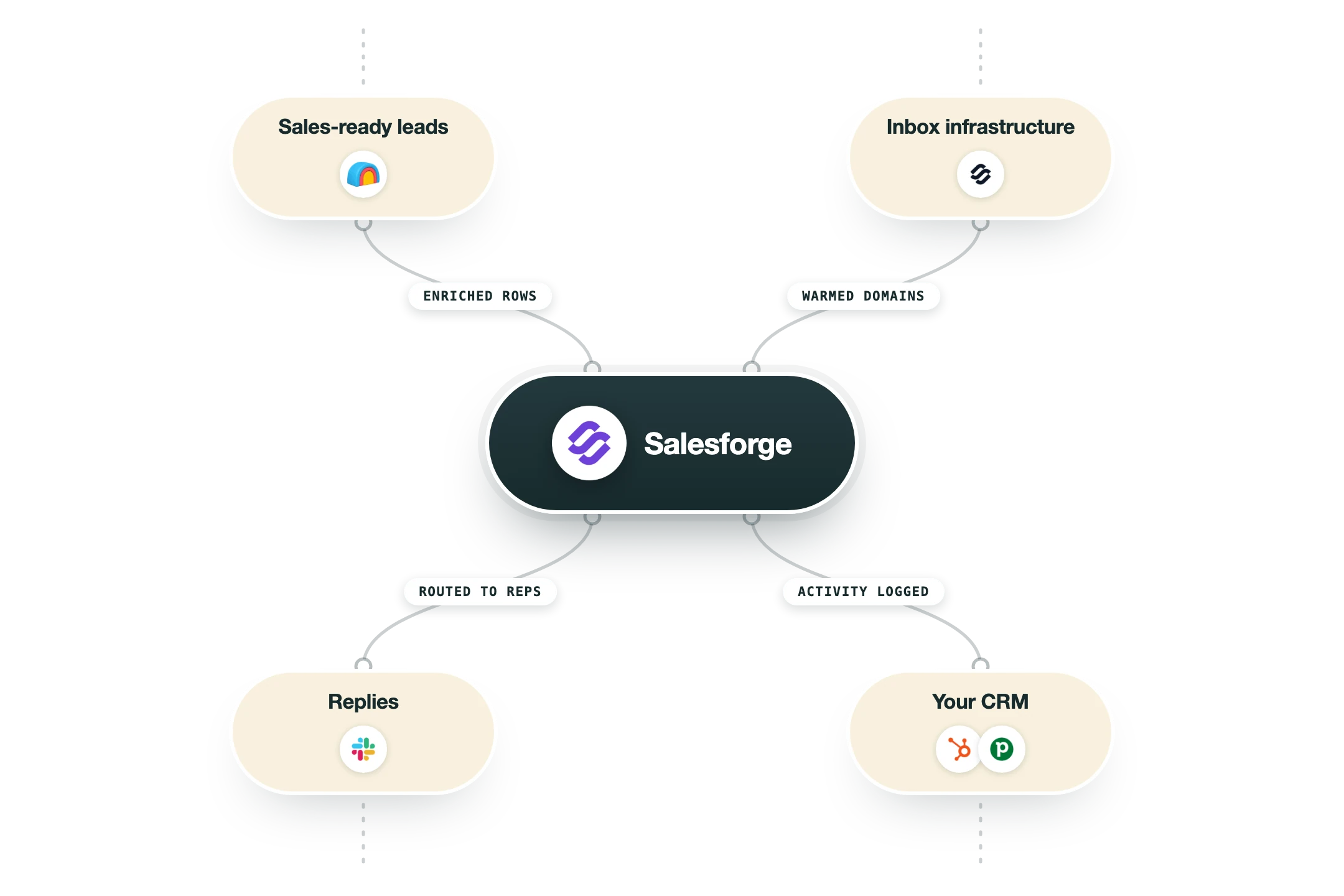
Salesforge connects outward to CRMs and automation tools, and downward to the rest of the Forge family for mailboxes and warmup. The infrastructure side is the deepest part, since Salesforge owns those products, and the CRM side is thinner than a sales engagement platform of the same price would give you.
Mailforge, Infraforge and Primeforge | The three sending-infrastructure products in the same family, connected from inside Salesforge without touching DNS again. Primeforge supplies real Google and Microsoft mailboxes, Mailforge spreads mailboxes across shared pools, and Infraforge puts them on private servers. Each is a separate subscription on top of the Salesforge plan. |
Warmforge | Warmup and inbox placement testing, bundled with every Salesforge subscription at unlimited slots. Bought on its own Warmforge costs $12 a mailbox a month, so the bundle is the single clearest reason to pay for the platform rather than assemble the pieces. |
Google Workspace, Microsoft 365 and SMTP | Mailboxes you already own connect directly, including any provider that speaks SMTP, so nothing forces you onto Forge infrastructure to send. Mailbox rotation and dynamic ESP matching work across whatever mix you connect. |
HubSpot, Salesforce, Pipedrive, Attio and folk | Native CRM connections that pull contacts into sequences and push engagement back. OutboundSync is listed as a custom integration for teams that want richer real-time activity written into the CRM, which suggests the native sync is shallower than a RevOps team will want. |
Clay | Clay enriches and scores a list, then pushes finished contacts into a Salesforge sequence. This is the route we would take, because Clay writes better copy against real research than a bundled personalization credit does, and it keeps the list logic outside the sender. |
Leadsforge | The in-house lead database of more than 500 million verified B2B contacts, and the only source Agent Frank prospects from. It is a separate subscription from about $49 a month, and single-source data is the weakest link in the AI SDR pitch. |
Zapier, Make and webhooks | Zapier reaches 3,000-plus apps, Make covers another 1,000-plus, and webhooks push real-time campaign events wherever you want them. This is how you reach anything without a native connector, including n8n. |
API, CLI and MCP server | A REST API documented at developer.salesforge.ai, a command line client, and an MCP server that exposes campaign and sequence actions to Claude and other assistants. API access is a Growth plan feature, so the $40 Pro tier cannot automate anything programmatically. |
What is missing | No native connection to Instantly or Smartlead, since those compete directly with the sequencer. Sendspark and Weezly cover video, and Slack covers notifications, but there is no native dialler, no meeting-recorder connection and no native n8n app. |
Pro’s
Unlimited mailboxes and unlimited users on the $80 Growth plan let an agency add a whole team and a fleet of senders without the seat arithmetic that Outreach and Salesloft force on you.
Warmforge warmup comes bundled with every subscription, so unlimited warming slots inside a $40 plan undercuts buying the same product on its own at $12 a mailbox a month.
Email and LinkedIn steps live in the same conditional sequence and every answer lands in Primebox, so a rep works one inbox rather than switching between a sequencer and LinkedIn all day.
Mailforge, Infraforge and Primeforge mailboxes connect natively, which means provisioning, warmup, sending and reply handling all arrive on one invoice with one support channel behind them.
API access, a CLI and an MCP server ship on the $80 Growth plan, so you can drive campaigns from Clay or n8n without signing an enterprise contract first.
Agent Frank has a co-pilot mode where a human approves each message before it sends, so you can judge the writing for a few weeks before handing over your domains.
Cons
Against Instantly the sequencer is close to a wash, because the $47 Growth plan there also carries unlimited mailboxes, free warmup, 5,000 emails and 1,000 active contacts a month.
Agent Frank is $499 a month billed quarterly, so the smallest way in is roughly $1,497 up front, and sending infrastructure is charged on top at about $33 a month for Infraforge or $69 for Megaforge.
Agent Frank prospects out of Leadsforge alone and reads no buying signals, so it cannot separate a company that just raised a round from one stuck in a hiring freeze.
Credits meter the features you came for, with 300 personalization and 300 social action credits a month on Pro, so LinkedIn activity and AI writing dry up long before the 5,000 email allowance does.
Putting domains, warmup, sending and reply handling with one vendor removes any independent read on deliverability, and Trustpilot reviewers report billing surprises and bugs that hit live campaigns.
Pricing
Pro
$40/month One user, near $33 a month on annual billing
1,000 active contacts in sequence
5,000 emails a month
Unlimited mailboxes and unlimited Warmforge warmup
300 validation, personalization and social action credits
One LinkedIn sender
Growth
$80/month Unlimited users, near $67 a month on annual billing
10,000 active contacts and 50,000 emails a month
1,000 credits of each type, expandable in the app
Unlimited LinkedIn senders
API access, A/B testing and multi-language sequences
Primebox AI, ESP matching and priority support
Agent Frank
$499/month Billed quarterly, about $1,497 up front, up to 1,000 active contacts
Autonomous prospecting, writing, follow-up and meeting booking
Co-pilot and auto-pilot modes
Leadsforge database and 20-plus languages
$0.25 per contact above 2,000 contacts a month
Dedicated account manager and shared Slack channel
Infrastructure add-ons
From $33/month Billed separately from any Salesforge plan
Infraforge from about $33 a month for 10 mailboxes
Megaforge from $69 a month for 20 mailboxes spread across several providers
Leadsforge lead database from about $49 a month
Free trial
$0 for 14 days Human plans only, Agent Frank starts with a demo
50 contacts and 100 emails
50 validation and 50 personalization credits
100 social action credits
Unlimited mailbox connections and warmup
How it fits your stack
Alternatives



At a glance
Unlimited mailboxes on every plan
Email and LinkedIn in one sequence
Primebox unified inbox with sentiment tags
Warmforge warmup included at no extra cost
Agent Frank AI SDR in 20-plus languages
Leadsforge database of 500M-plus contacts
API, CLI and MCP server access
14-day free trial on the human plans
Read some of our client stories





GTM Workflows
Learn how to use GTM tools in workflows
Guides and tutorials to get the most from your workflows
No items
Ready to get started?




By clicking Sign Up you're confirming that you agree with our Terms and Conditions.








