

AI workspace that turns voice notes, videos, and ideas into LinkedIn posts in your voice, with content strategy, scheduling, analytics, and team publishing built in.

What is
Scripe
Scripe is an AI workspace for LinkedIn personal branding. Its core job is turning voice notes, videos, and rough ideas into LinkedIn posts that sound like you. It learns tone from your posting history, so the output reads like the founder or exec behind the account rather than generic AI copy. Inside the workspace you get a personalized content strategy, a kanban style calendar with scheduling and post previews, and full historical LinkedIn analytics that show which posts actually pull. Team plans add shared calendars, approval workflows, company page publishing, and auto engagement across accounts, so a whole leadership bench can post consistently. In a GTM stack, Scripe belongs at the presence layer. Founder led content warms the same market your outbound touches: prospects see a face and a point of view before the first email lands, and tools that read LinkedIn engagement get more signal to work with. We do not use Scripe day to day at Nebor; content creation tools are not what we sell. But founder led LinkedIn content is real leverage in B2B, and Scripe is a credible way to keep it shipping every week. We would judge it on one thing: whether the posts still sound like you after month two.
Integrations and the modern GTM stack
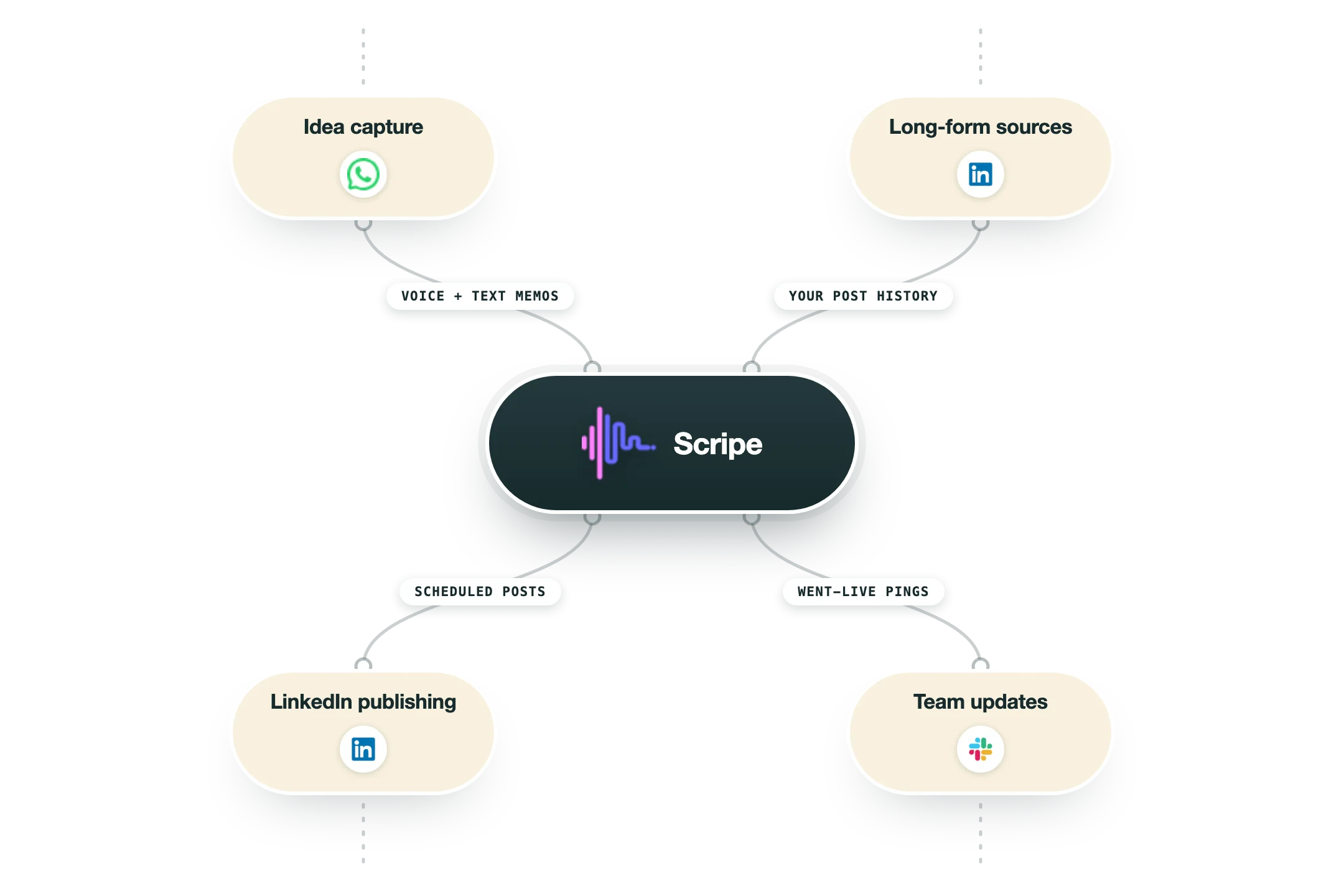
Scripe works close to LinkedIn itself, with capture channels feeding content in and notifications flowing out:
The core connection, and it goes through LinkedIn's official API as a listed partner rather than a browser extension: native scheduling, auto-publishing, and analytics without putting your account at risk. | |
Send a voice memo or a text to Scripe on WhatsApp and it lands as a post draft in your uploads, with a confirmation link back in the chat. Ideas get captured the moment they happen. | |
Slack | One-way updates: a channel message when a scheduled post goes live, and DMs when a draft needs your review. |
Podcasts, YouTube and video files | Upload any audio or video, a webinar, a podcast episode, a customer call, and Scripe generates posts from what was actually said. |
What it does not have | No CRM connections, no Zapier app, and no public API today, so Scripe stays a self-contained content workspace rather than a stack hub. |
Pro’s
Voice memo, video, and YouTube inputs mean a founder can turn a five minute ramble into a finished post without writing from scratch.
Tone of voice learning from your own post history keeps output closer to how you actually talk than generic AI writers.
Strategy, calendar, scheduling, and analytics live in one place, so you are not stitching a writer tool to a separate scheduler.
Team plans handle the real bottleneck at companies: shared calendars, approvals, and getting several execs posting consistently.
Historical analytics import your past LinkedIn posts, so you see what worked before Scripe and can recycle top performers.
Cons
It is LinkedIn only, so if your audience lives anywhere else you still need another tool.
There is no free tier; the 7 day trial requires a credit card and paid plans start at 55 euros per month billed yearly.
Extra LinkedIn accounts on Advanced cost 45 euros per month each, so pricing climbs fast for multi exec teams.
Reviewers note a learning curve of about an hour to find your workflow, plus occasional interface glitches.
Pricing
Solo
EUR 55/mo billed yearly 1 LinkedIn account, 1 user
Personalized content strategy and viral post database
Tone of voice customization
Scheduling, formatting, kanban management
Full historical LinkedIn analytics
Advanced
EUR 79/mo billed yearly Most popular; extra accounts EUR 45/mo each
Everything in Solo plus unlimited team members
Company page included
Shared calendar with approval workflows
Team analytics and auto engagement across accounts
Business
EUR 119/mo billed yearly Amplifier seats EUR 20/mo each
Multiple workspaces with workspace wide tone controls
Roles and permissions
Link tracking for revenue attribution
Campaigns, custom labels, 1:1 onboarding
How it fits your stack
Alternatives




At a glance
Voice notes become LinkedIn posts
Learns your tone of voice
Personalized content strategy
Kanban calendar with scheduling
Full historical LinkedIn analytics
Team approval workflows
Company page publishing
Read some of our client stories





GTM Workflows
Learn how to use GTM tools in workflows
Guides and tutorials to get the most from your workflows
No items
Ready to get started?




By clicking Sign Up you're confirming that you agree with our Terms and Conditions.








