

The professional network itself: the profile and company data behind most B2B prospecting, the channel outbound lands in, and the place buying signals show up first.
What is
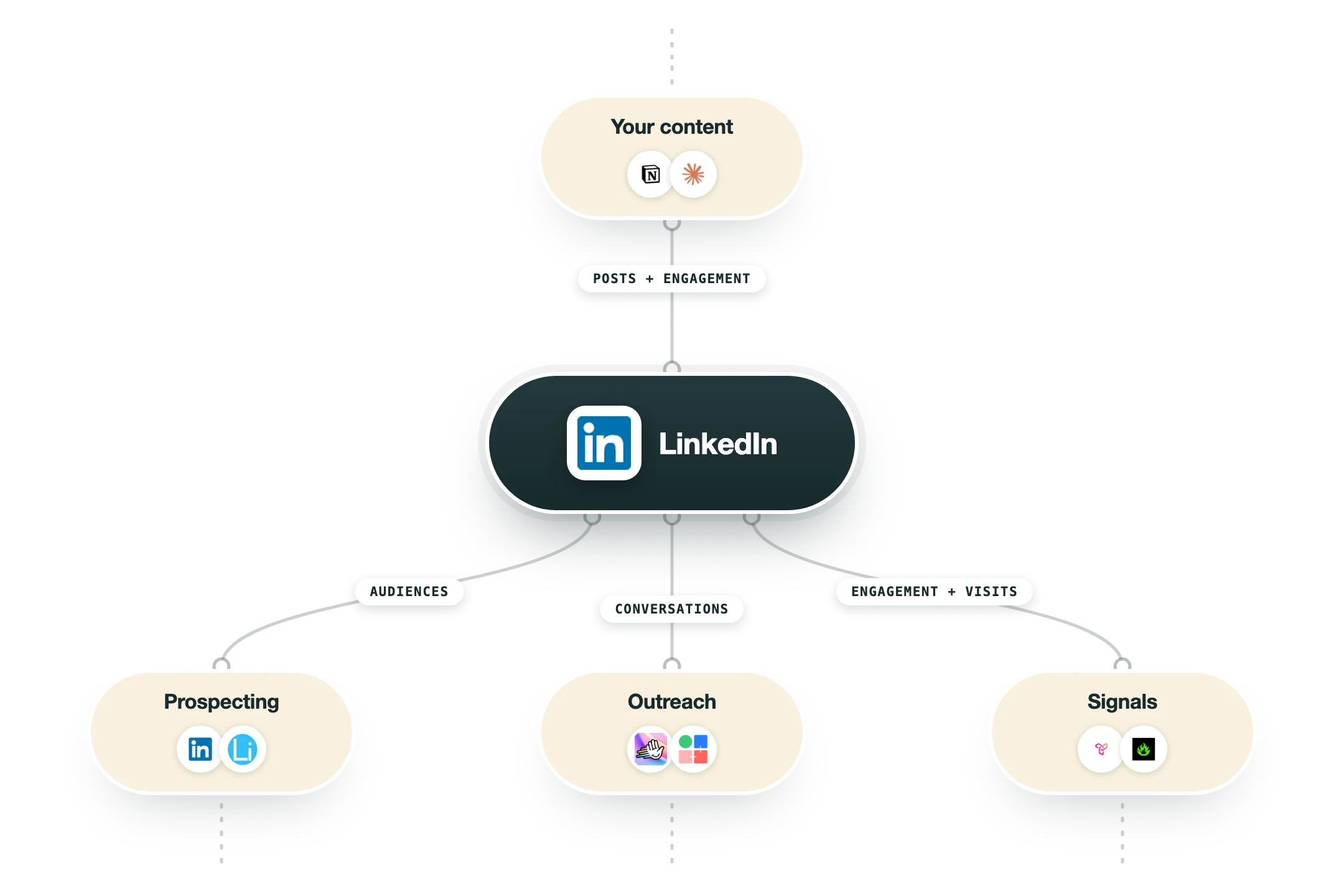
LinkedIn is the professional network most B2B buyers keep current, which makes it three things at once for a GTM team: a data source for company and people records, an outbound channel where messages land, and a signal source that tells you when something worth reaching out about just happened. Teams use the free network for research, connection requests, and posting, then add Sales Navigator when they need saved lead lists, advanced filters, and InMail at volume. Sales Navigator is the paid prospecting layer built on top; the platform underneath is where the profiles, posts, and job changes actually live. The two are complementary, not alternatives. In a GTM stack LinkedIn shows up at both ends. Scrapers and enrichment tools read it for firmographics, titles, and triggers, feed that into Clay for scoring and routing, and sending tools like HeyReach take the approved messages back out through connection requests and DMs. That loop works even before anyone pays for a seat. At Nebor, LinkedIn is where a lot of our signals come from and where a large share of our outbound lands: every morning our system scrapes SDR job posts in the Netherlands, and role changes trigger outreach. Honest caveat, it is a walled garden with rate limits and account-safety risk, so volume has to respect the platform.
Integrations and the modern GTM stack
LinkedIn itself offers no public API for outbound, so its real integrations are the official partner programs, and everything else is workaround:
Sales Navigator CRM sync | Salesforce, Dynamics and HubSpot get embedded profiles and activity sync, on the Advanced Plus tier. |
Marketing and Ads APIs | The approval-gated program behind every legitimate ads, audience and reporting tool. |
Lead Gen Forms | Form fills can deliver to your CRM in real time through the official Lead Sync program. |
Intent partners | Tools like G2 push audiences of in-market companies into your LinkedIn ad targeting. |
Everything else | The outreach automation tools the industry uses all work against LinkedIn's terms, not with them. That risk is carried by the tool and the account using it, which is worth weighing when you choose one. |
Pro’s
Almost every B2B buyer maintains a profile, so coverage of titles and companies is unmatched.
Job changes, hiring posts, and company updates are visible triggers you can build workflows on.
The free account already supports research, connection requests, posting, and inbound conversations.
Reply rates on well timed DMs usually beat cold email for senior roles.
It doubles as a distribution channel, so content and outbound compound on the same account.
A dense ecosystem of scrapers, enrichment tools, and senders plugs into it.
Cons
It is a walled garden with no open API for prospecting data, so most workflows rely on third party tools.
Rate limits and automation detection put your account at real risk if volume is careless.
Meaningful filtering, saved lists, and InMail are behind paid Sales Navigator seats.
Profile data is self reported, so titles and headcounts are often stale or inflated.
Inboxes on the platform are getting noisier every year as more teams pile in.
Pricing
Free (Basic)
$0 core network access
Search, profiles, and company pages
Connection requests and messaging
Posting, commenting, and engagement data
Premium Career
$29.99 per month, cheaper annually
Who viewed your profile
InMail credits
Aimed at job seekers, not sellers
Premium Business
$59.99 per month, cheaper annually
Unlimited people browsing
Business company insights
Monthly InMail credits
Premium All-in-One
$99 per month, bundle plan
Premium Business features
Added AI and learning access
Single seat bundle
Sales Navigator Core
$119.99 per month, billed annually
Advanced lead and account filters
Saved lists and alerts
Covered on its own page
How it fits your stack
Alternatives



At a glance
Profile and company data source
Free tier is genuinely usable
Job change and hiring signals
Connection requests and DMs
Company page updates and posts
Engagement data on your content
Feeds scrapers, Clay, and senders
Sales Navigator layers on top
Read some of our client stories





GTM Workflows
Learn how to use GTM tools in workflows
Guides and tutorials to get the most from your workflows





Ready to get started?




By clicking Sign Up you're confirming that you agree with our Terms and Conditions.








