
How to get Phone-Ready Leads for B2B sales and lead generation


In this post:
You're here because your cold calls aren't connecting. Your SDRs are burning hours dialing numbers that go to voicemails, switchboards, or worse, completely wrong people. Meanwhile your email campaigns are getting lost in crowded inboxes.
Phone outreach still works in B2B, often better than people give it credit for. The problem usually has nothing to do with the channel, your dialer, or whether your prospects would pick up. It's the data (bad data).
Most sales and revenue teams work with contact lists that are stale the moment they buy them. B2B contact data decays at roughly 2% per month, which means six months after you bought a list, more than 1 in 10 of those phone numbers won't connect.
When a rep is making 50+ dials a day, that translates into a lot of wasted hours and a lot of frustration on the call floor.
We've built and fixed enough outbound systems to know where this usually breaks.
This post walks through what makes a lead "phone-ready, how to find verified mobile numbers that connect, and the workflows we use to put usable data in front of sales reps.
Let’s get started.
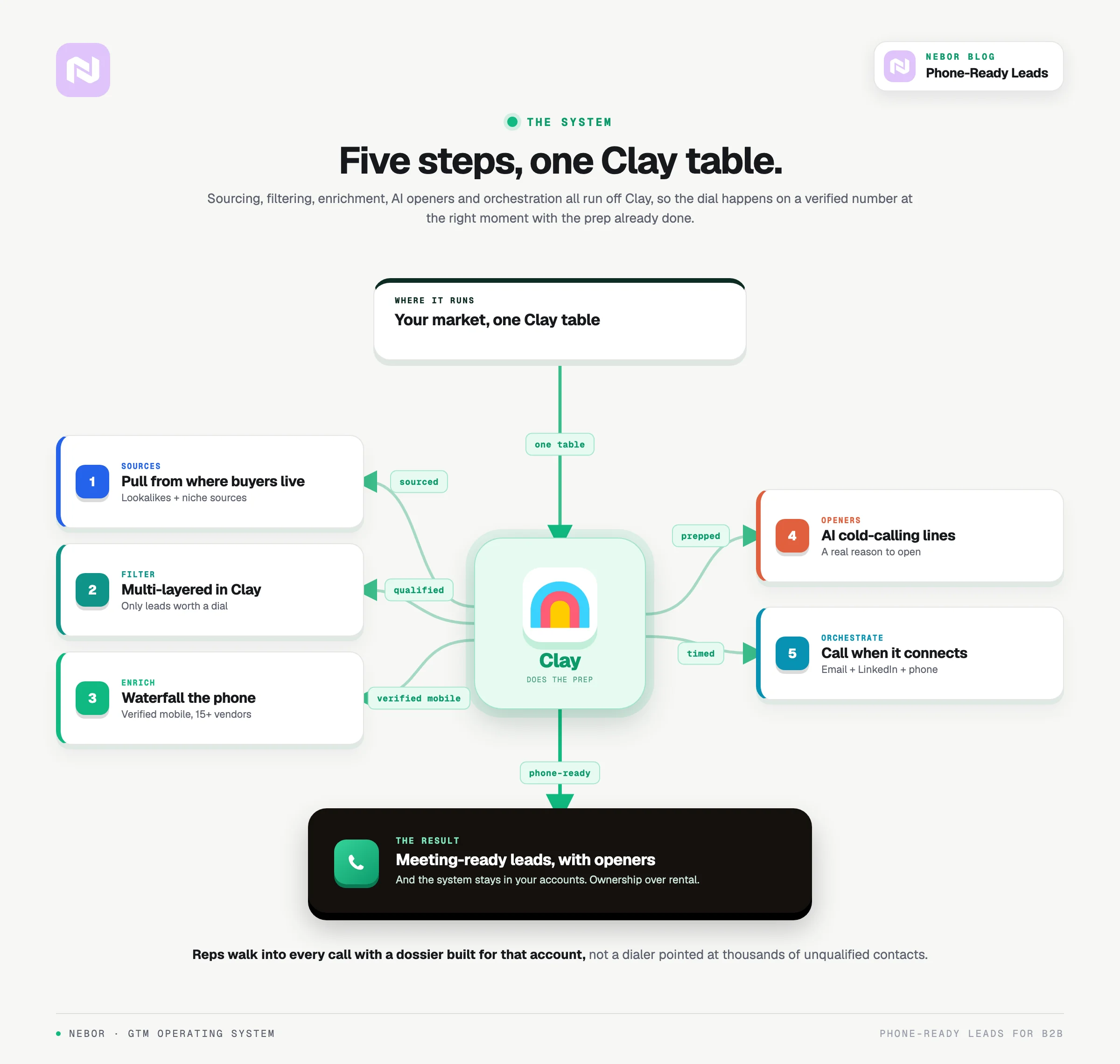
TL,DR: what your cold calling enablement workflow should look like
What makes a lead “phone-ready” anyway
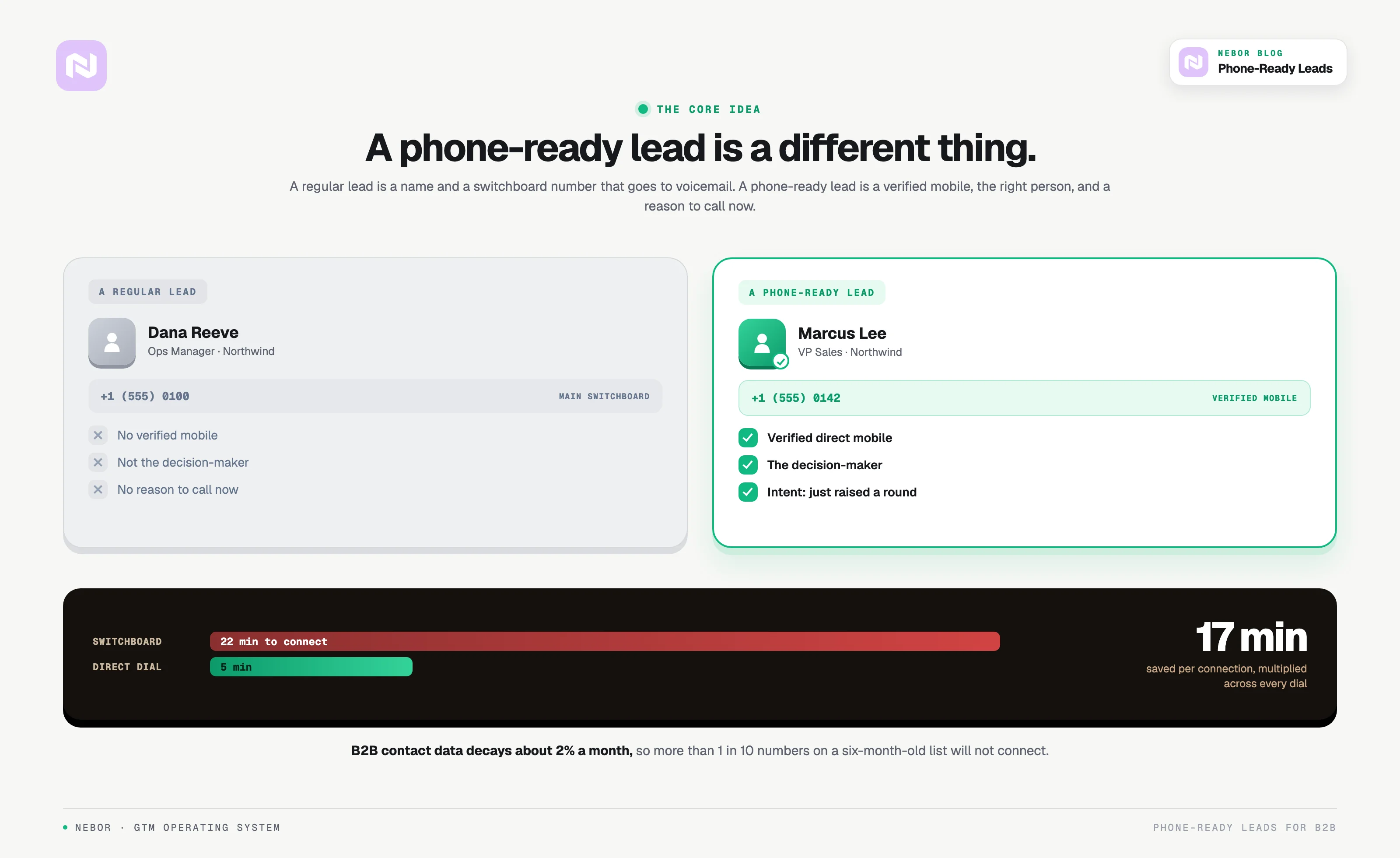
A regular lead is a name, company, and maybe an email address pulled from LinkedIn or a database somewhere. A phone-ready lead is a different artifact.
Three things separate a phone-ready lead from a regular one.
Verified direct-dial or mobile numbers, checked against a real provider, not a company switchboard or a generic office line. A number that puts you straight on the line with your prospect.
Decision-maker access. You're not calling someone who "might be able to transfer you." You're calling the person who can say yes.
Context and intent signals. You know why they might want to hear from you right now. Maybe they just raised funding. Maybe they're hiring SDRs. Maybe their competitor just got acquired. Whichever it is, the call has a reason.
The difference matters more than people think. Connecting through a switchboard takes an average of 22 minutes. A direct dial takes 5. That's 17 minutes saved per connection.
Multiply that across a sales team making hundreds of calls a week and you're looking at full workdays recovered.
The catch is that finding verified mobile numbers is hard. The contact data market is fragmented across dozens of providers and none of them have complete coverage.
ZoomInfo's US data is solid but EMEA is patchy. Lusha is cheaper but the database is small. Apollo packages everything in one tool, with the trade-off that phone numbers hit and miss.
That's why we use a different approach.
The waterfall enrichment approach (and why single-source data doesn't cut it)
If you're relying on a single data provider for phone numbers, you're leaving a lot of connects on the table. Every database has gaps.
Waterfall enrichment is the fix. The method queries multiple data sources in sequence until it finds verified contact information. A multi-source approach lifts both your accuracy and your connect rates, which means reps spend their time on people they can actually reach.
Think of it as asking fifteen different sources instead of one for the same number. The first source might not have it. The second might be outdated. By the fifth or sixth, you usually land on a verified, current line.
This is why we use FullEnrich for phone enrichment in our Clay workflows.
FullEnrich aggregates 15+ premium data vendors and checks them sequentially until it finds a verified mobile number.
The output also flags which numbers are accurate, which are mobile, and which are out of service. The mobile vs. landline distinction matters more than it used to, because most prospects work remotely and their office desk number is dead weight.
Our practical enrichment stack looks like this.
LeadMagic for firmographic data, including company size, funding stage, industry, and primary contact info
Findymail for professional email verification and discovery
FullEnrich for verified mobile phone numbers through a multi-provider waterfall
Triple email verification through ZeroBounce or DeBounce to eliminate bounces
No single tool does all of this well. Layered together, they hit enrichment rates a single source can't touch.
Intent signals that tell you when someone’s ready for a call
Most sales teams learn this the hard way. A phone number isn't enough on its own. You also need to know when to call.
The best cold calls don't feel cold. They land well-timed, on a prospect already thinking about the problem you solve, or on someone who has just made a move that signals they could be open to a conversation. Intent data is about identifying those moments.
First-party signals come from your own channels. A prospect hits your pricing page three times in a week, downloads a case study, or opens every email in a sequence.
These are clear buying signals that should trigger a call, and speed compounds quickly here. A lead contacted within 5 minutes of hitting a qualification threshold is roughly 9x more likely to convert than one contacted later.
Third-party signals come from monitoring the broader market. At Nebor, we set up custom intent monitoring for each client based on their ICP and offering. Two examples from inside our own work show how this looks in practice.
For an AI furnishing solutions client, we monitor real estate publications via RSS feeds. When an article announces a new property development, our workflow scrapes the article, identifies the developer and project name, enriches the contact, generates a personalized email, and sends it, all without a human touching it.
For our own outreach, we track companies posting SDR job listings on LinkedIn. A company hiring SDRs is investing in outbound capacity, which makes them a fit for the kind of GTM infrastructure work we do.
The signals that matter depend on what you're selling and who you're selling to.
Generic intent data from vendors like Bombora, who track website visits or content consumption, is fine for basic prioritization. The real advantage lives in custom intent monitoring tied to actual buying triggers.
Other intent signals worth monitoring.
Funding announcements (new money often means new initiatives)
Leadership changes (new executives bring new vendor relationships)
Hiring patterns in relevant departments
Competitor acquisitions or instability
Technology adoptions or platform migrations
Conference attendance or sponsorship activity
Here's what the workflow looks like.
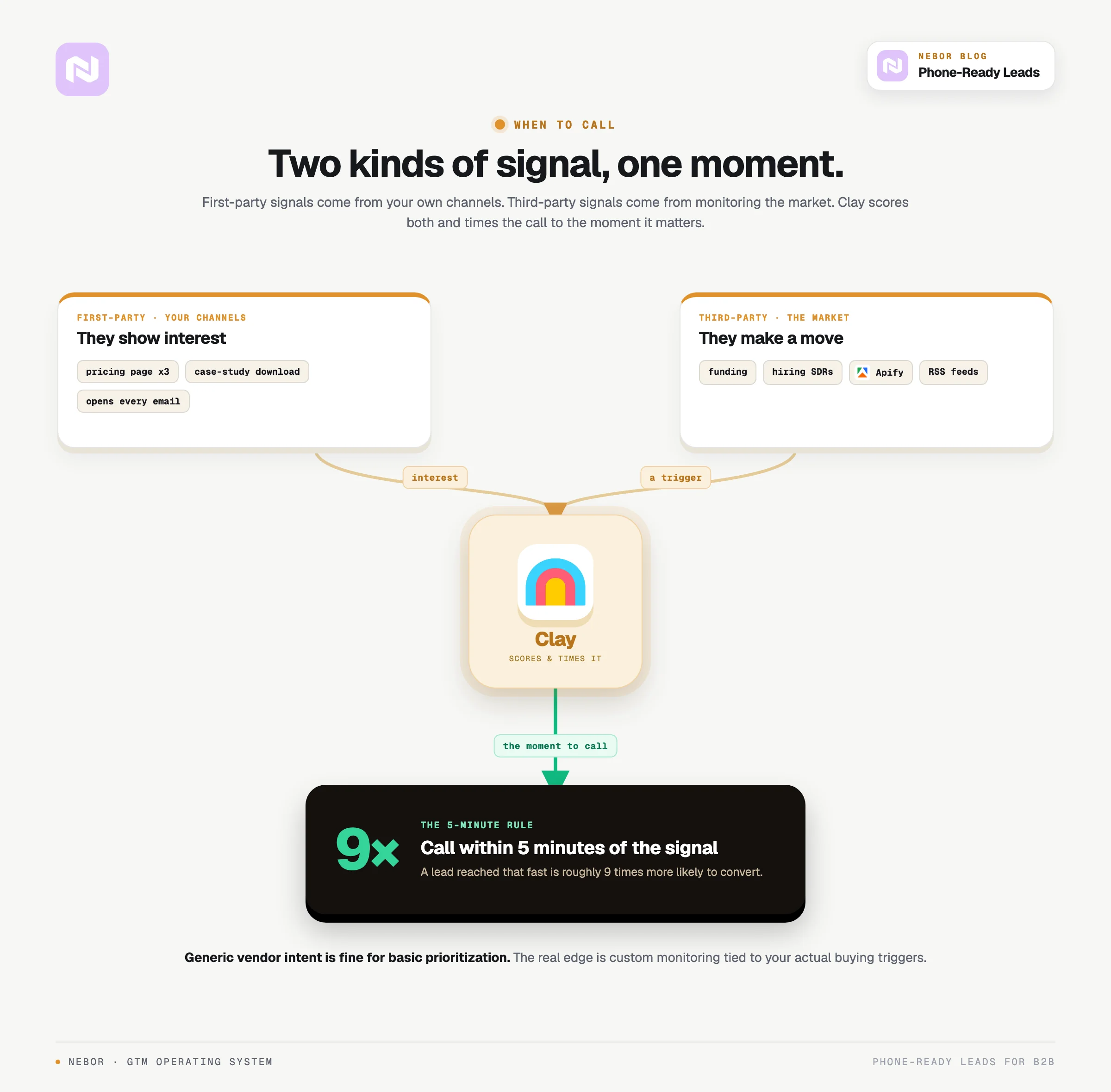
Combine verified phone data with active intent signals and the call stops feeling cold. You're reaching people who are already thinking about the problem you solve.
How we build phone-ready lead workflows
Here's how we set up these workflows for clients, step by step.
Step 1: Start with the right data sources
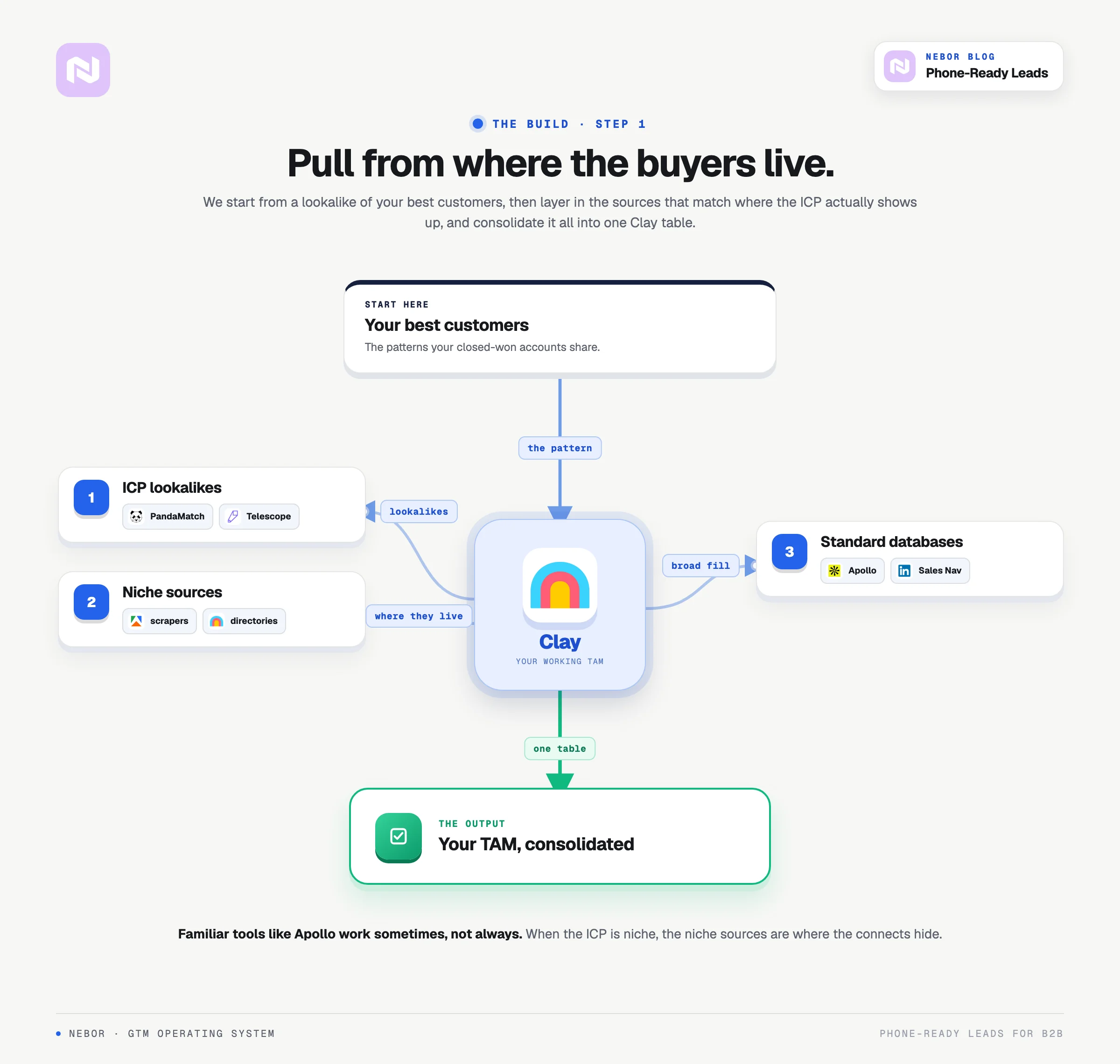
Most teams default to Apollo or LinkedIn Sales Navigator because they're familiar. That works sometimes, but not always. If your ICP is niche, you need niche sources.
We start with an ICP lookalike tool to find companies that resemble our client's current best customers. From there, we layer in data sources that match where the ICP actually shows up online.
Once the ICP is clear, we pull data from wherever those companies live and consolidate it inside a Clay workflow that becomes the working version of your total addressable market.
Step 2: Multi-layered filtering in Clay
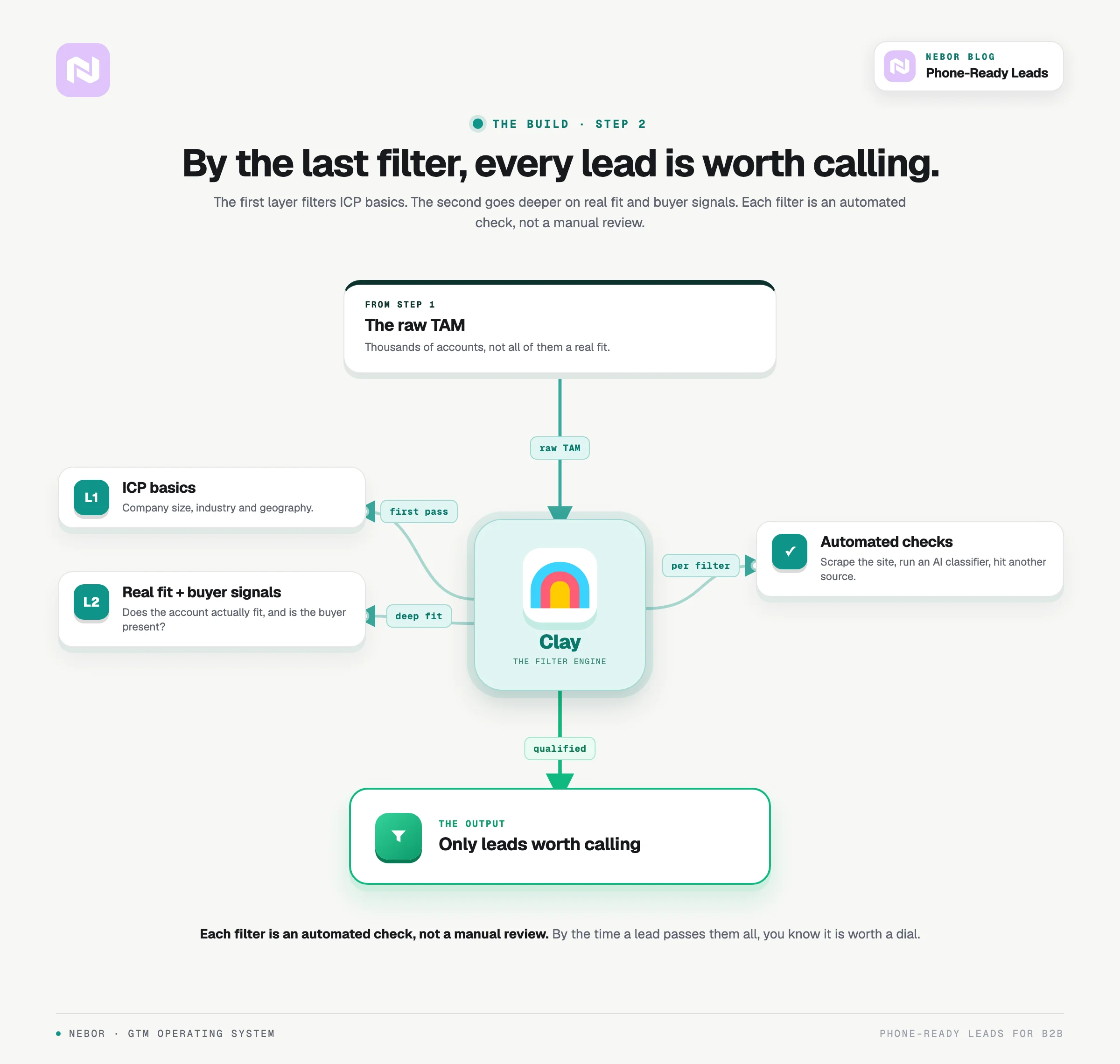
Clay is the central hub. We treat it like an operating system rather than a contact list.
The first layer filters for ICP basics, like company size, industry, and geography. The second layer goes deeper, checking whether the company actually fits, whether the right buyer signals are present, and whatever criteria matter for the specific business.
Each filter performs an automated check, whether that's scraping the company website, calling an AI classifier, or hitting another data source for confirmation.
By the time a lead passes through every filter, you know they're worth calling.
Step 3: Selective enrichment with multiple providers
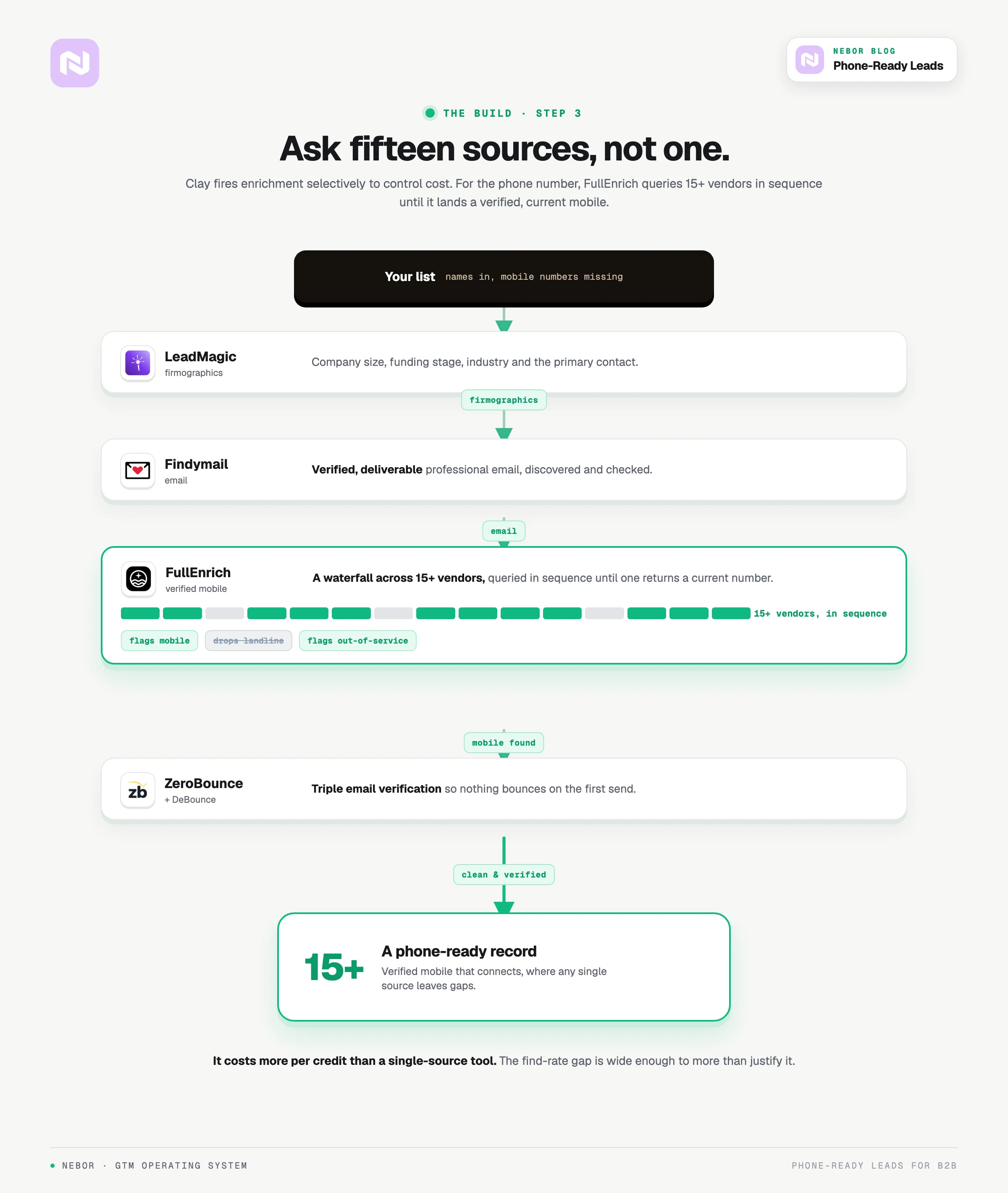
Enriching every contact with every data point is expensive and wasteful. We use Clay's formulas and conditions to control when enrichment happens.
For phone numbers specifically, we use FullEnrich because it checks 15+ providers before returning a result, which means higher find rates and better accuracy than any single-source alternative.
It costs more per credit than some single-source tools, but the find-rate gap is wide enough to justify the spend.
Step 4: AI-powered personalization
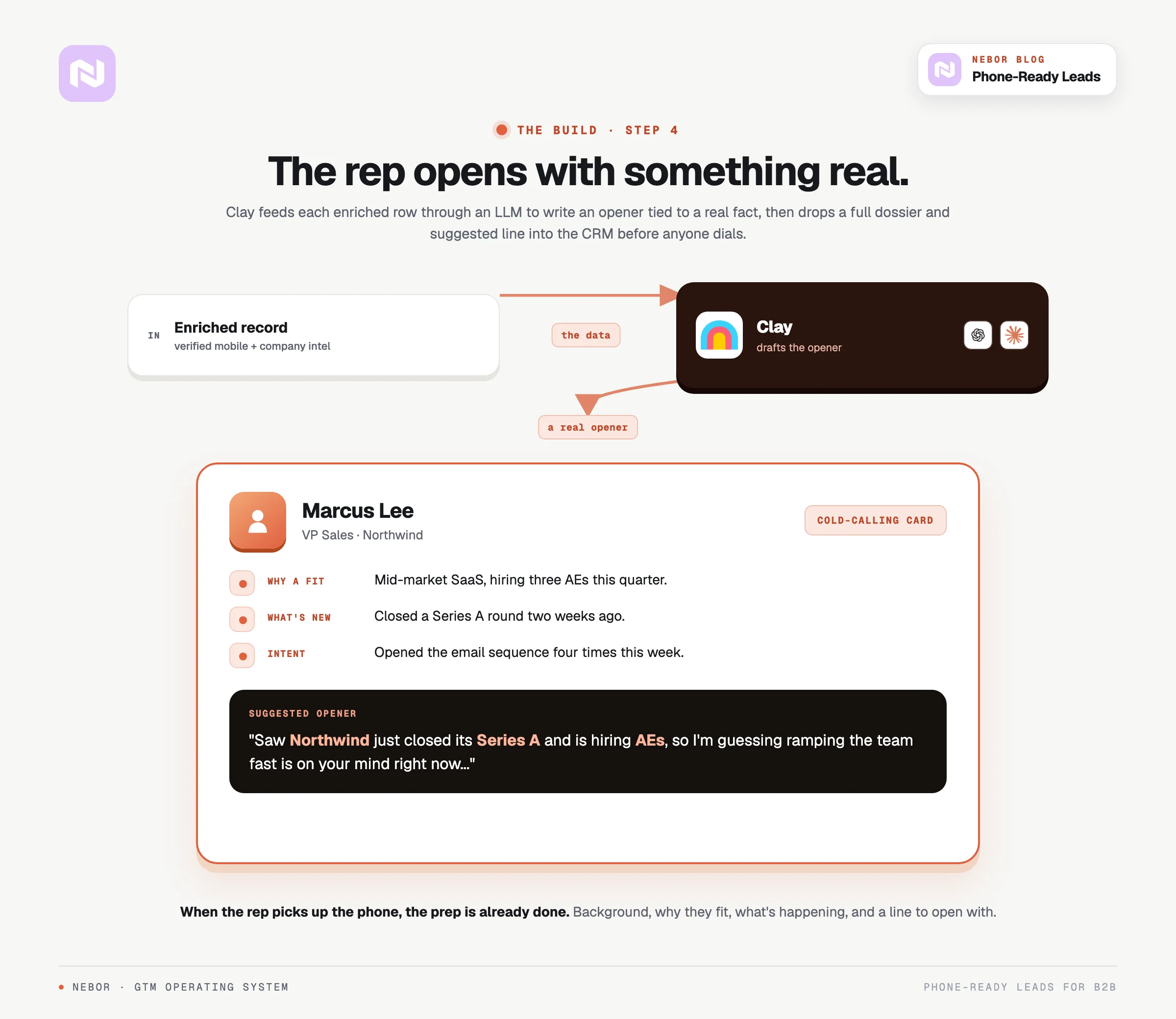
After enrichment, we feed each row through ChatGPT and Claude (both integrated natively in Clay) to generate personalized opening lines.
Each opener references something specific. A recent funding round, a hiring spike, a piece of news from their industry. So the call doesn't open as a script.
These openers flow directly into the CRM as cold calling openers. When a sales rep picks up the phone, they have the prospect's background, why they're a fit, what's happening at their company, and a suggested opening line, all automated.
Step 5: Multi-channel orchestration
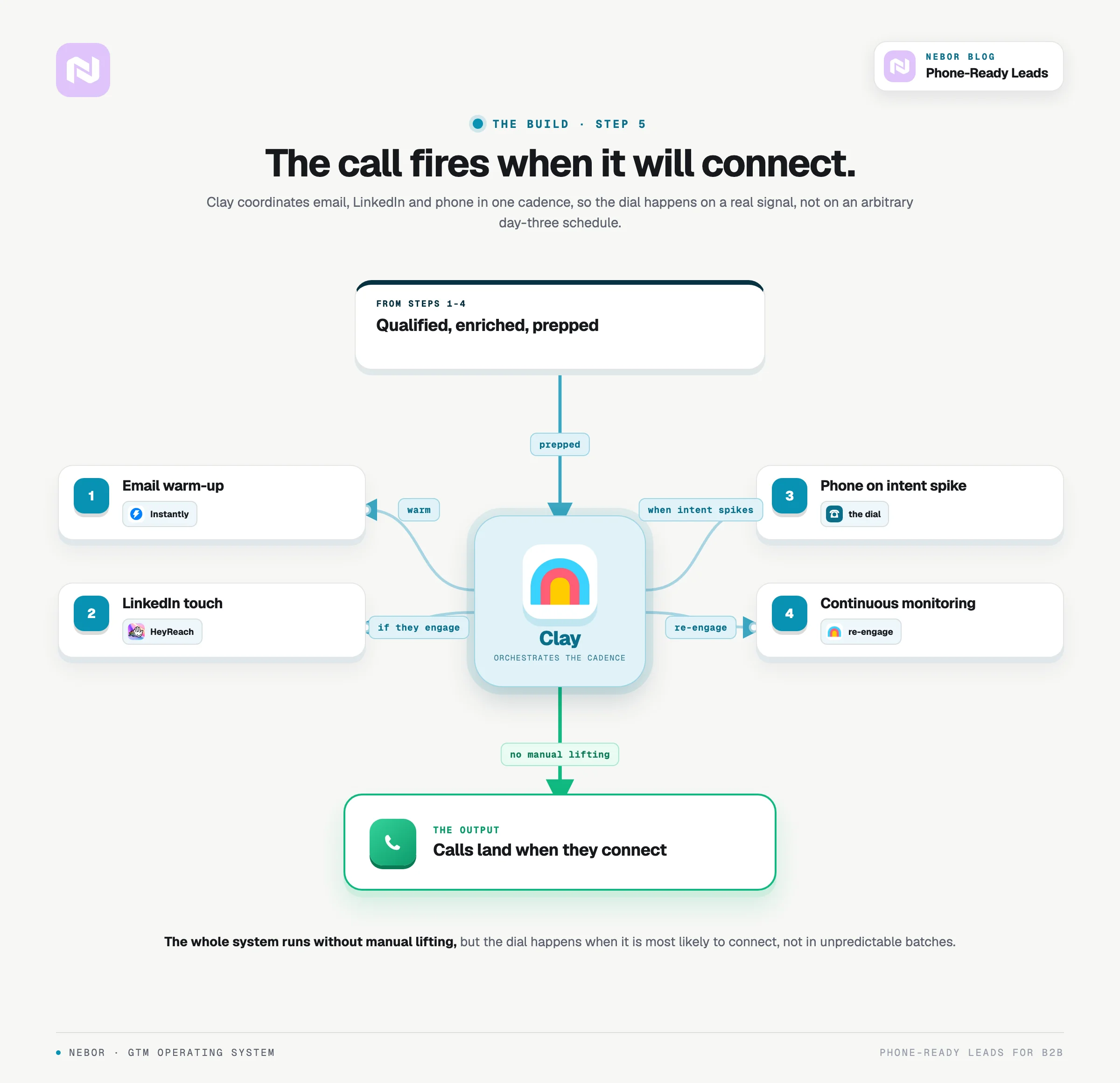
Phone is powerful, but it works best inside a coordinated outreach sequence. Our workflows combine email, LinkedIn, and phone in one cadence.
Initial email sequence to warm the prospect
LinkedIn touchpoint if they engage (or if email deliverability is poor)
Phone follow-up when intent signals spike
Continuous monitoring for re-engagement opportunities
The whole system works without manual lifting, but phone calls happen when they're most likely to connect instead of your team dialing on arbitrary cadences.
When phone outreach makes sense
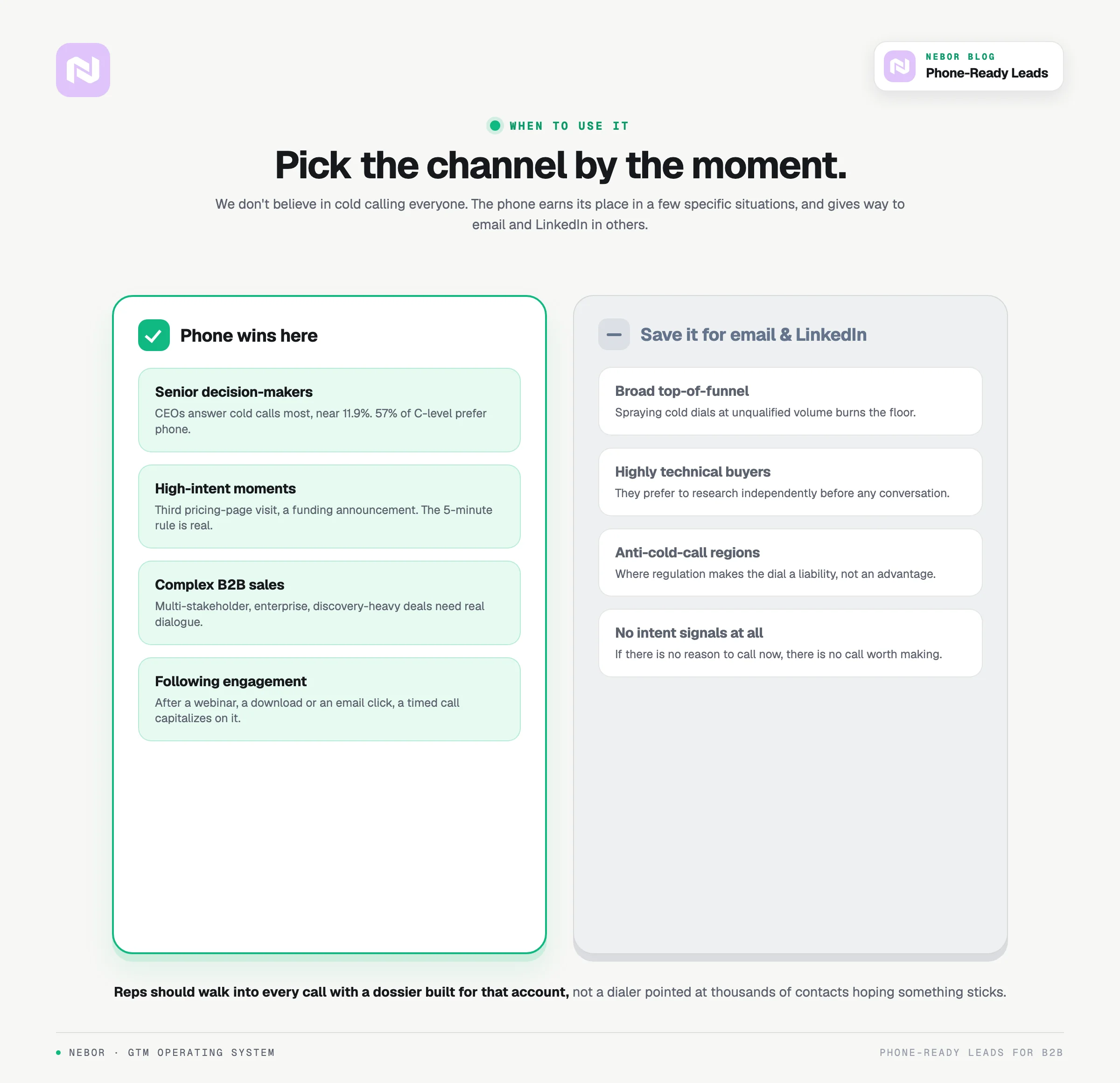
Phone isn't always the right channel. When it works, it pulls ahead of email and LinkedIn by a wide margin.
Phone works best in a few specific situations.
Targeting senior decision-makers. CEOs are the most likely group to pick up a cold call, with connect rates around 11.91%. Meanwhile, 57% of C-level and VP buyers say they prefer phone over email or social.
High-intent moments. When someone hits your pricing page for the third time, or when a company announces funding, that's the moment to call. The 5-minute response rule is real and worth taking seriously.
Complex B2B sales. Multi-stakeholder deals, enterprise accounts, and discovery-heavy solutions all benefit from real-time dialogue that email can't replicate.
Following up on engagement. After webinar attendance, content downloads, or email clicks, a well-timed call capitalizes on existing interest.
Phone doesn't work as well for these.
Broad top-of-funnel prospecting (save that for email and LinkedIn)
Highly technical buyers who prefer to research independently
Regions with strong anti-cold-calling regulations
Accounts where you have no intent signals whatsoever
We don't believe in cold calling everyone. Reps should walk into every call with automated prep and a dossier built for that specific account, not a dialer pointed at thousands of unqualified contacts hoping something sticks.
The ownership model vs. the agency rental model
Most companies approach phone outreach one of two ways.
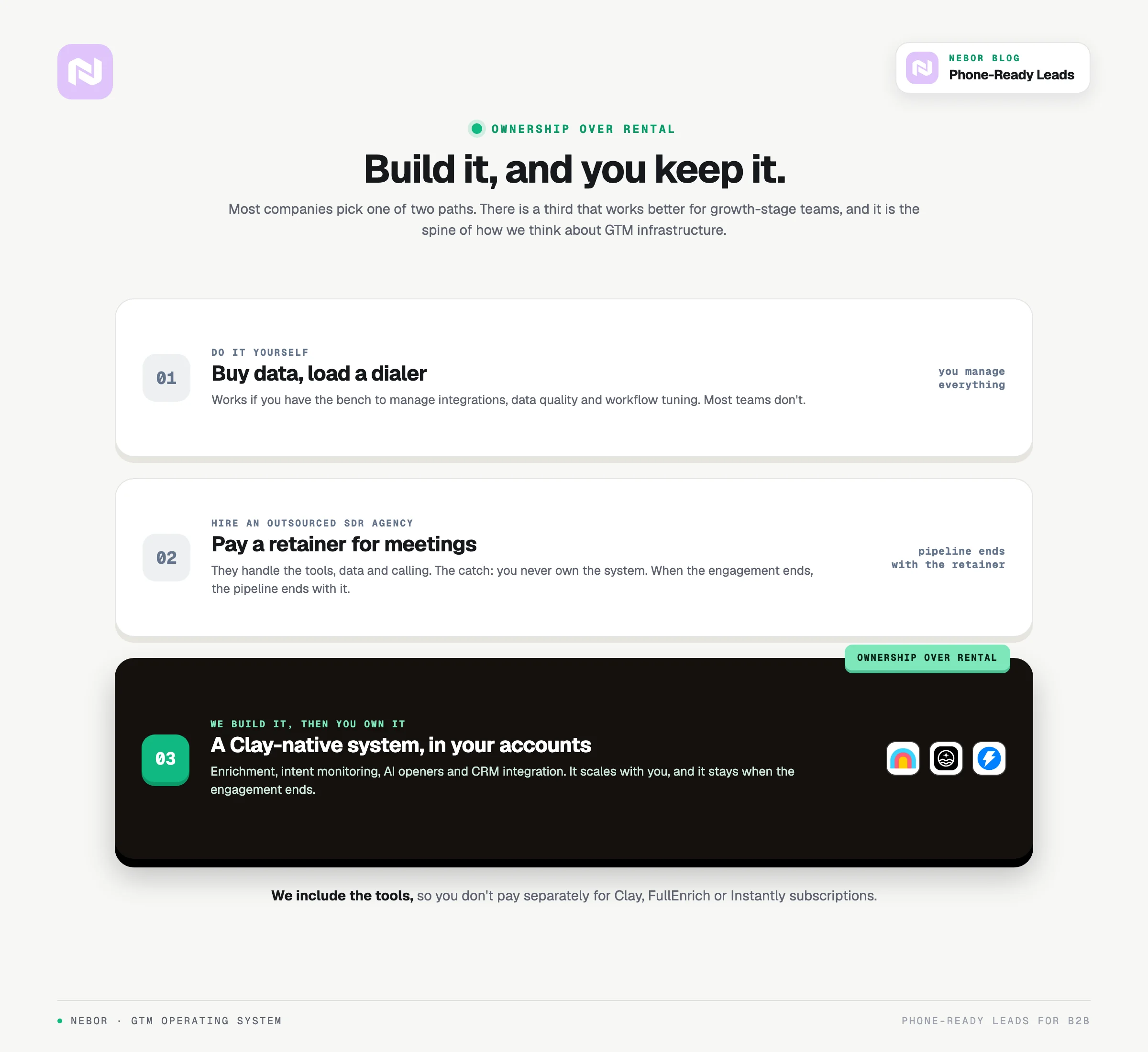
Option 1. Do it yourself. Buy data from ZoomInfo or Apollo, load it into a dialer, hand it to reps. Works if you have the technical bench to manage integrations, data quality, and workflow tuning. Most teams don't.
Option 2. Hire an outsourced SDR agency. Pay a retainer, get meetings on your calendar. The agency handles tools, data, and calling, and you pay for results. The downside is that you never own the system. When the engagement ends, the pipeline ends with it.
There's a third option that works better for most growth-stage companies.
Option 3. We build the system, then you own it.
This is what we do at Nebor. We build Clay-native GTM systems that combine enrichment, intent monitoring, AI personalization, and CRM integration. The system works in the background, and your internal team gets meeting-ready leads with cold calling openers tied back to real-time campaign intelligence.
The difference is ownership. When you scale, the system scales with you. When you want to adjust targeting or messaging, you can. You're not dependent on an agency to keep the pipeline flowing.
We include the tools, so you don't pay separately for Clay, FullEnrich, or Instantly subscriptions.
We call this approach ownership over rental, and it's the spine of how we think about GTM infrastructure.
That's the case for phone-ready leads. Verified mobile numbers from a multi-source waterfall, intent signals tied to a real buying moment, and a Clay-native system that does the prep before your reps pick up the phone.
Thanks for reading. If you want to walk through how this would look for your own setup, find us on LinkedIn or book a meeting with our team.


Related Articles


By clicking Sign Up you're confirming that you agree with our Terms and Conditions.