

Cloud browser infrastructure for developers and AI agents, running real Chromium sessions you drive with Playwright or Stagehand, billed by the browser hour with proxies and captcha solving on top.
What is
Browserbase
Browserbase is infrastructure, so if nobody on your team writes code it will do nothing for you. What it sells is a fleet of real Chromium browsers running in the cloud, which your program drives with Playwright, Puppeteer or Selenium exactly as it would drive a browser sitting on a laptop. The useful part is everything wrapped around that browser. Every session gets recording and replay, a live view you can watch or take over mid run, saved contexts that carry cookies and logins between jobs, proxy routing, captcha solving and file transfer in both directions. Stagehand, their MIT licensed framework, puts plain-English steps on top of Playwright through four calls, act, extract, observe and agent, in TypeScript or Python. Around it sit a Search API, a Fetch API that returns a page as markdown or JSON, and Director, a no-code surface that writes exportable Stagehand code. Browserbase reported 36.9 million unique browser sessions, 100,000 developers and 10,000 companies in March 2026, and it names Microsoft, Clay, Amplitude, Ramp and Lovable as customers. That customer list is the tell, since these are software companies embedding a browser in their own product. Buy Browserbase when you have an engineer losing days to headless Chrome on a server, because that is the exact job it takes off them. Nebor does not run it, and a GTM team without a developer will get more out of Clay and n8n. It may already run under a tool you pay for.
Integrations and the modern GTM stack
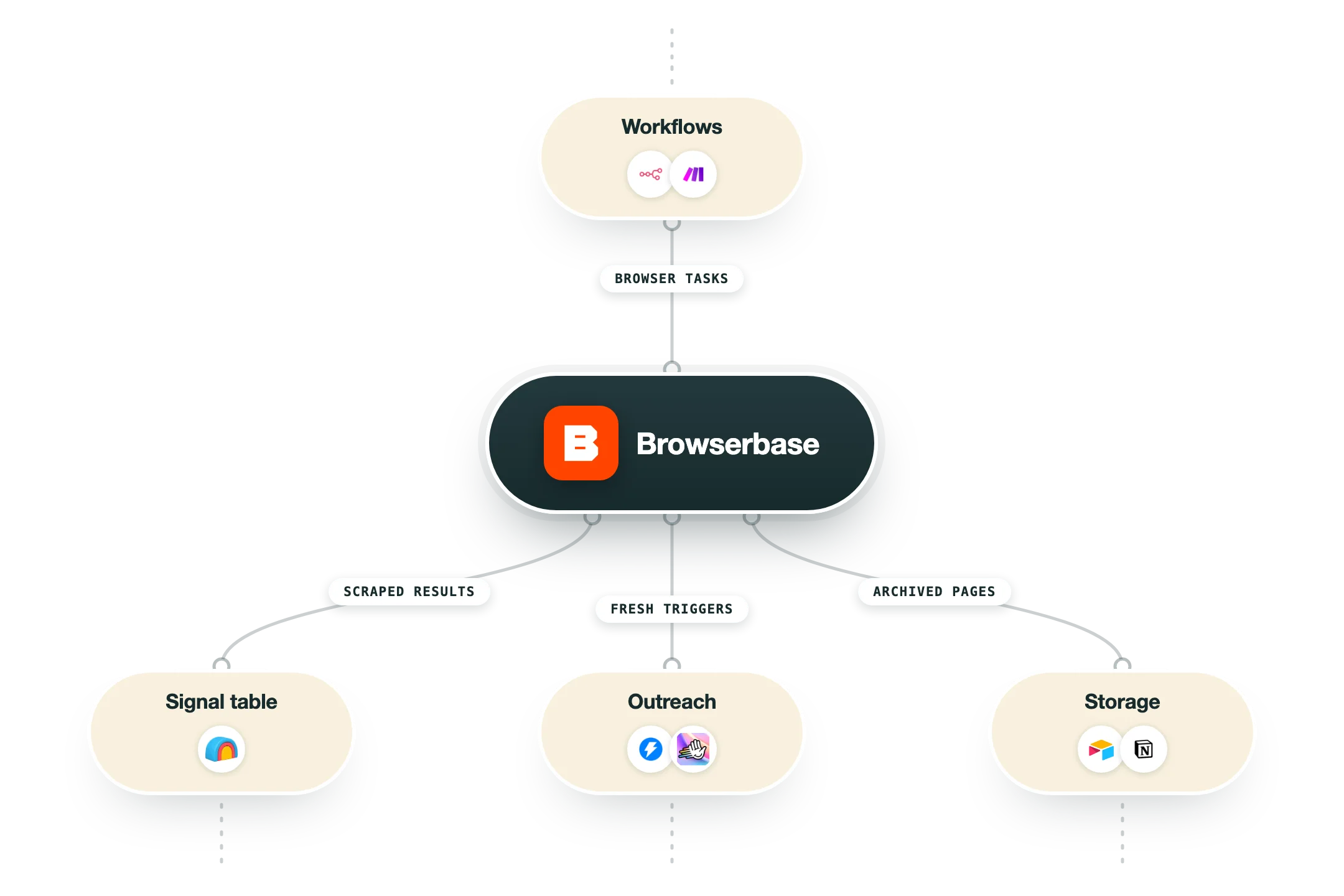
Browserbase does not integrate with your CRM or your sequencer, and it was never meant to. Its connections point at the developer stack, browser drivers underneath and agent frameworks on top, so read this list as what your engineer can plug it into rather than what your RevOps team can switch on.
Playwright, Puppeteer and Selenium | The base layer. You keep the automation library you already know and point its connection string at a Browserbase session over CDP instead of a local Chrome, which means existing scripts move across with a changed connect call rather than a rewrite. |
Stagehand | Browserbase's own MIT licensed SDK, built on Playwright, in TypeScript and Python. It exposes act, extract, observe and agent, so a step reads as a plain instruction and gets resolved by a model at runtime, which is what keeps scripts alive when a page gets redesigned. |
MCP server | There is an official server at mcp.browserbase.com/mcp plus a local package on npm, so Claude, Cursor and any other MCP client can open a cloud browser, navigate, screenshot and pull data. This is the fastest route to giving an assistant real web access. |
n8n | A Browserbase Agent node built and maintained by Browserbase, covering three operations, run an agent, fetch a page without spinning up a browser, and search. It returns a structured result with actions, status, usage and session details, and an instance owner has to set the credentials up once. |
Agent frameworks | Documented paths for LangChain, CrewAI, Mastra, Google ADK, the Vercel AI SDK, OpenAI CUA, Anthropic Managed Agents, Inngest, Temporal and Trigger.dev, among more than thirty listed. If your team has already picked an orchestration framework, the browser layer is unlikely to be the thing that blocks you. |
1Password | Used mainly by Director, so an agent can complete a login without the credentials ever sitting in a prompt or a script. Worth knowing about before anyone on your team pastes a shared password into an automation to get past a wall. |
Clay | Browserbase names Clay as a customer, so it may well sit under enrichment you already pay for. There is no Browserbase provider in Clay's own integration directory, and reaching it from a Clay table means an HTTP API call written by hand against Browserbase's REST endpoints. |
What is missing | No native Zapier or Make app, no HubSpot or Salesforce connection, and nothing that resembles a GTM integration. Everything that touches your revenue stack has to be built by an engineer or bridged through n8n, which is the clearest signal of who this product is sold to. |
Pro’s
Keeping a fleet of headless Chrome instances alive on your own servers eats engineering time every week, and Browserbase turns that whole problem into an API call and a line on an invoice.
Session replay and the live view let you watch a failed run back frame by frame, and that turns a broken scraper from a day of guessing into a ten minute fix.
Stagehand is MIT licensed and runs against any Chromium browser, so you can build locally and keep the code if you later decide to move off the platform.
Contexts hold cookies and session state between runs, so a login you fought through once does not have to be fought through again on every single job.
It meets the agent stack people already run, with an official MCP server, a partner-built n8n node, and documented paths for LangChain, CrewAI, Mastra and the Vercel AI SDK.
The free tier and the $20 Developer plan are cheap enough that an engineer can prove the thing works before anyone has a procurement conversation about it.
Cons
None of it works without someone writing code, so a sales or marketing team that buys this on its own ends up holding an API key and no way to use it.
The bill runs across five meters at once, browser hours, proxy gigabytes, search calls, fetch calls and model tokens, and forecasting a month of agent runs across all five takes real work.
Sessions carry a one minute billing minimum, so a job that finishes in eight seconds still costs a full minute, and across tens of thousands of short runs that gap becomes most of your bill.
Verified sessions, the real-fingerprint browser that gets you past serious anti-bot defences, are limited to the custom-priced Scale plan, so the hardest sites are the ones you cannot properly test on $99 a month.
Proxy bandwidth at $10 to $12 per gigabyte sits well above what a dedicated proxy vendor charges, and any job that pulls images or video will chew through the included allowance fast.
Pricing
Free
$0/month 1 browser hour, 15 minute session cap
3 concurrent browsers
$5 in model tokens included
Session recording and live view
7 day data retention
Stagehand, SDKs and MCP server access
Developer
$20/month 100 browser hours, then $0.12 per browser hour
25 concurrent browsers
1,000 Search calls, then $7 per 1,000
1,000 Fetch calls, then $1 per 1,000
1GB of proxies, then $12 per GB
Automatic captcha solving and Model Gateway
7 day data retention, 6 hour session cap
Startup
$99/month 500 browser hours, then $0.10 per browser hour
100 concurrent browsers
1,000 Search calls, then $7 per 1,000
10,000 Fetch calls, then $0.50 per 1,000
5GB of proxies, then $10 per GB
30 day data retention
Automatic captcha solving and Model Gateway
Scale
Custom Usage based, sales contact required
250+ concurrent browsers
Verified sessions and advanced stealth
SOC 2 Type II, HIPAA and DPA coverage
Zero data retention and bring your own storage
SSO and dedicated support
How it fits your stack
Alternatives


At a glance
Cloud Chromium via Playwright, Puppeteer, Selenium
Stagehand framework, MIT licensed, TypeScript and Python
Session recording, replay and live takeover
Contexts reuse cookies and logins across runs
Proxy routing and captcha solving built in
Billed per browser hour from $0.10
Official MCP server and n8n node
Free plan with 1 hour, 3 concurrent browsers
Read some of our client stories





GTM Workflows
Learn how to use GTM tools in workflows
Guides and tutorials to get the most from your workflows











Ready to get started?




By clicking Sign Up you're confirming that you agree with our Terms and Conditions.








