

An older multichannel sequencer that runs email, LinkedIn, calls, SMS and WhatsApp steps in one conditional cadence, with warmup, a Generect-powered contact database and the Jason AI SDR sold alongside it.
What is
Reply.io
Reply.io is a sales engagement platform that runs outbound sequences across email, LinkedIn, calls, SMS and WhatsApp from a single workspace. It has been selling that job since 2014, and the conditional sequence builder, where a reply or a click moves a contact down a different branch, is still the core of the product. Around it sit the parts you would otherwise buy from three vendors. Warmup runs through Mailtoaster.ai on every connected mailbox, inbox rotation and ESP matching spread the sending, and a live B2B database powered by Generect puts a claimed billion contacts behind sixteen search filters inside the app. Jason is the AI SDR sold as its own product line rather than a feature of the sequencer. It picks targets from that database, drafts the sequence, sends on email and LinkedIn, reads incoming replies for intent and books the meeting, running either on autopilot or in a copilot mode where a person approves each step. Reply.io fits a small team that wants email, LinkedIn and calling behind one login and will pay by the seat to get it. Our sending runs through Instantly, Smartlead and Lemlist, priced per inbox, so a seat at $89 with LinkedIn metered at $69 an account on top loses that comparison for us.
Integrations and the modern GTM stack
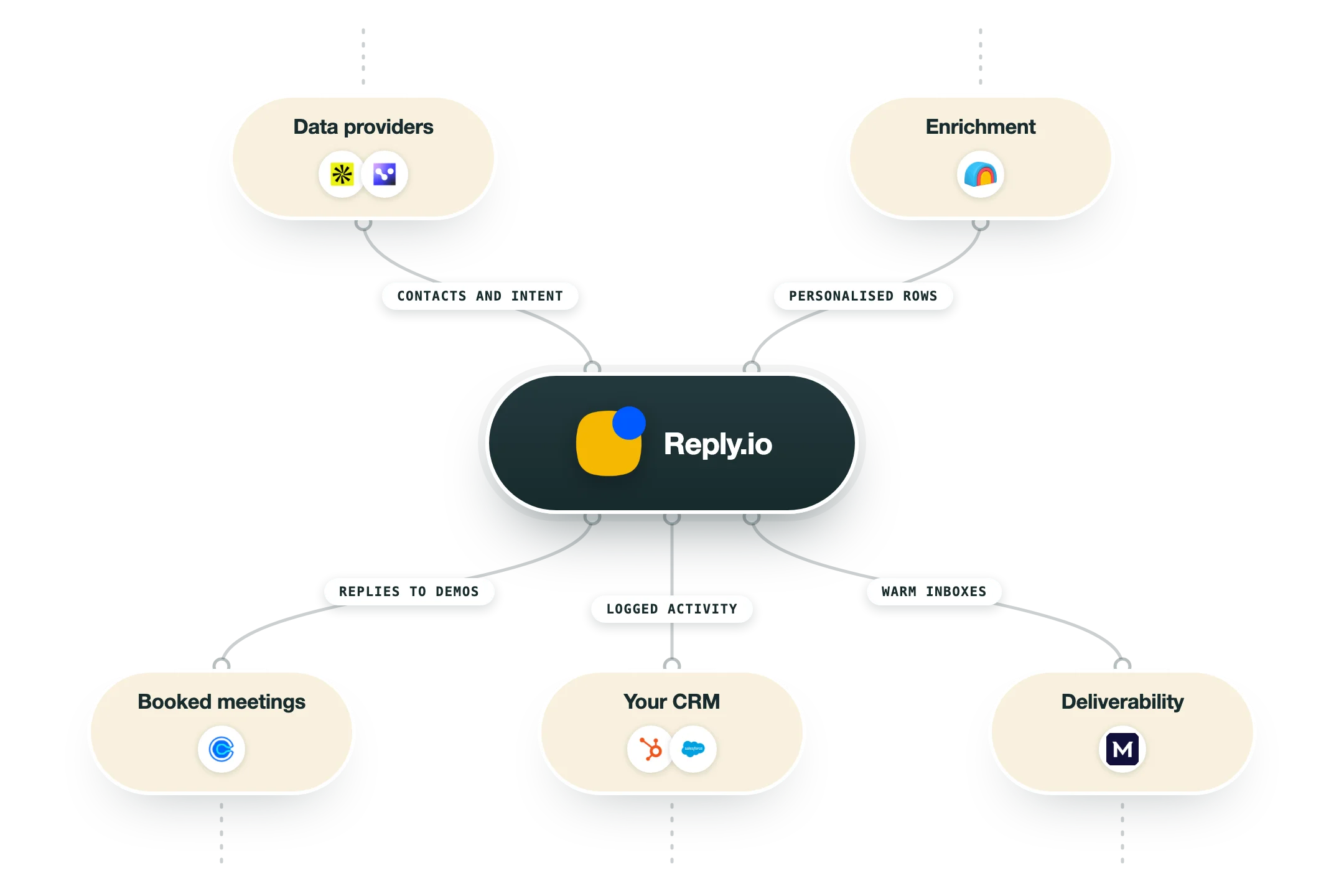
Reply.io has been around long enough to have built the connections most sequencers only promise, and almost all of them ship on every tier rather than behind an enterprise gate. The pieces worth checking are the ones Reply resells from someone else, since the database and the warmup both belong to other companies.
HubSpot, Salesforce and Pipedrive | Two-way sync covering contacts, accounts, calls, tasks, statuses and activities, available on every plan including the $49 Email Volume tier. Capterra reviewers flag the Salesforce side specifically, one writing that the contact to account relationship was not working adequately, so test the object mapping during the 14-day trial. |
Copper, Zendesk Sell and Close | Native CRM connections listed alongside the big three on all four plans. These are the smaller-CRM options that usually get pushed into Zapier by other sequencers, and having them native keeps a lightweight sales team off a middleware bill. |
Clay | Two native actions in the Clay action library, Create Contact and Push Contact to Campaign, both on bring-your-own-account. Clay cannot create the sequence, so it has to exist in Reply first, and a contact already active in another campaign will be skipped rather than moved. |
Reply MCP | An MCP endpoint you connect with your API key, giving an AI assistant the ability to list, start and pause sequences, add contacts, mark them replied and pull step-level stats. Reply publishes which calls burn API credits, with the reporting calls always charging and the sequence controls charging nothing. |
REST API v3 | Bearer token auth at docs.reply.io, rate limited to 100 requests a minute and 3,000 an hour per user, with tighter thresholds on reporting endpoints. Versions 1 and 2 still answer at apidocs.reply.io but are unsupported and marked for deprecation, so anything new should be built on v3. |
n8n, Zapier and Make | A dedicated n8n node plus Zapier and Make apps sit alongside webhooks and a high-volume API, all listed as included on every plan. For anyone running an orchestration layer outside the sequencer, this is the cheapest route into Reply without touching the API directly. |
Generect | The live B2B database inside Reply is Generect's real-time search wearing Reply's interface, sold as 50 credits a month with paid packages above that. Treat it as a data vendor you are buying through a reseller and price it against your own waterfall before leaning on it. |
Mailtoaster.ai | Warmup is outsourced to Mailtoaster, which issues one seat per connected Reply mailbox through a one-way sync of email accounts. Warmup on the Multichannel plan is bounded by the mailbox allowance rather than being unlimited, so the seat count decides your warmup capacity. |
Chrome extension and Gmail | The extension handles email lookup, task flows that open queued tasks one after another, direct calls and CRM sync from the browser. It is included on the outreach and AI SDR plans and sold as a paid add-on on the agency plan. |
What is missing | There is no connection to Instantly, Smartlead or any other cold email infrastructure, since Reply competes with them and names them on its own comparison tables. The SOC 2 report is also withheld from the Email Volume tier, so a security review pushes you onto Multichannel or higher. |
Pro’s
The deliverability set comes with the seat instead of arriving as an upsell, covering Mailtoaster warmup on every connected mailbox, inbox rotation, ESP matching, custom tracking domains and Google Postmaster data on the reports page.
Email, LinkedIn, calls and SMS run as steps inside one conditional sequence, so a rep works a single cadence rather than wiring a LinkedIn tool to a cold email tool and reconciling the two reports afterwards.
The API, an n8n node and an MCP endpoint are included on every tier at 100 requests a minute and 3,000 an hour, so an outside build can start, pause and read sequences without a plan upgrade.
Clay ships two native Reply.io actions, Create Contact and Push Contact to Campaign, so a list built in a Clay table enrols into a live sequence without a CSV passing through anyone's downloads folder.
The Email Volume tier prices on active contacts and hands you unlimited mailboxes and warmups under a fair usage policy, which is a sane shape for a high-volume email-only program that has no use for LinkedIn steps.
Reply's own site reports 4.6 out of 5 across 1,448 G2 reviews and Trustpilot shows the same 4.6 across 250, with support speed the single most praised item in both sets of reviews.
Cons
Pricing is per seat while the channels are metered on top, so a $49 Email Volume seat needs another $69 a month for one LinkedIn account and $29 for calls, and the LinkedIn add-on costs more than the seat it attaches to.
Five separate meters sit above the subscription, covering LinkedIn accounts, calling seats, live data credits, email validations and website visitor reveals, and Capterra reviewers feel the sprawl, one writing that "the number of features can be overwhelming" and another that "Bugs, server outages, website slowness" follow the pace of new releases.
The database is a resold Generect feed capped at 50 credits a month before you buy packages running from $39 for 200 credits to $599 for 10,000, and a one-star Trustpilot reviewer in April 2026 reported that the contact filters returned many off-target results on company size and title.
Jason is priced as a separate product line from $500 a month on annual billing up to $3,000 at 10,000 active contacts, and the same reviewer called its output "clear AI slop" that was dilutive to their sender reputation.
The pricing page contradicts itself, showing 10 mailboxes a user for Multichannel on the annual card against 5 on the monthly card and in the comparison table, and the agency plan at $210 in one place and $166 in another, while 11% of Trustpilot reviews are one star and cluster on refunds and renewals.
Pricing
Email Volume
$49/user/month Billed annually at 1,000 active contacts, $59 month to month
Priced by active contacts, $89 at 5,000 and $159 for unlimited users at 10,000
Unlimited mailboxes and warmups under a fair usage policy
Unlimited emails, unlimited sequences and unlimited contact storage
50 live data credits and up to 200 website visitor reveals a month
LinkedIn automation at $69 an account and calls with SMS at $29 extra
Multichannel
$89/user/month Billed annually, $99 month to month, marked best value for teams
LinkedIn automation and calling with SMS included per user
Unlimited active contacts and unlimited emails
5 mailboxes a user in the comparison table, 10 on the annual pricing card
WhatsApp and any Zapier channel available as manual sequence tasks
CSM onboarding, priority support and a SOC 2 report
AI SDR (Jason)
$500/month Billed annually at 1,000 active contacts, $800 month to month
Starter runs $500 to $1,000 across 1,000 to 3,000 active contacts
Growth runs $1,500 at 5,000 contacts and $3,000 at 10,000
2 to 25 LinkedIn accounts included depending on tier
Autopilot and copilot modes with AI reply handling and intent signals
Unlimited users, mailboxes, warmups and website visitor reveals
Agency Core
$210/month Billed annually, listed as $166 in the full comparison table
Multi-workspace structure with unlimited clients and users
Unlimited mailboxes and warmup with a consolidated email and LinkedIn inbox
Agency dashboard and role-based access control
LinkedIn automation optional at $69 a month per account
White label available as an option
Agency AI SDR
$500/month/client Billed annually, everything in Agency Core plus the AI agents
LinkedIn and email automation included in the price
AI agents for every client under one roof
Fully autonomous or approval mode
Custom AI playbooks and sequence templates
Real-time data and AI-trained re-engagement
How it fits your stack
Alternatives




At a glance
Email, LinkedIn, calls, SMS and WhatsApp steps
Conditional sequences with A/B testing
Jason AI SDR in autopilot or copilot mode
Live B2B database of a claimed billion contacts
Warmup, inbox rotation and ESP matching included
Unlimited mailboxes on the Email Volume plan
Two-way HubSpot, Salesforce and Pipedrive sync
API, n8n node and MCP endpoint on every plan
Read some of our client stories





GTM Workflows
Learn how to use GTM tools in workflows
Guides and tutorials to get the most from your workflows











Ready to get started?




By clicking Sign Up you're confirming that you agree with our Terms and Conditions.








