

A cheap LinkedIn ads layer that scores the companies your ads reached, sorts them into ABM stages, and pushes the engaged ones into HubSpot, Salesforce or Clay.
What is
ZenABM
The cheapest ZenABM plan costs $59 a month, set against the roughly $62,000 a year that enterprise ABM platforms take, and that gap explains why the tool exists. Connect a LinkedIn ad account and it names the companies your ads reached, how hard each one engaged, and which of them show up on deals. Every company picks up an engagement score of clicks doubled plus engagements over impressions, then falls into an ABM stage you define yourself from LinkedIn metrics, HubSpot lifecycle fields and deal stages. Intents tag which campaign theme a company clicked, so the reason behind the interest travels with the account. Stages, scores and intents write onto HubSpot company records, Salesforce feeds opportunities back in, and webhooks push the Interested list into Clay, Slack or a sequencer. There is also an exclusions screen that pushes company, job title and industry blocks straight back into your live ad sets. ZenABM is worth its $59 once LinkedIn spend is heavy enough that most target accounts clear three interactions in a reporting window, since LinkedIn withholds company engagement below that line. Nebor does not run it for clients, and under that floor the company engagement report inside Campaign Manager already tells you the same.
Integrations and the modern GTM stack
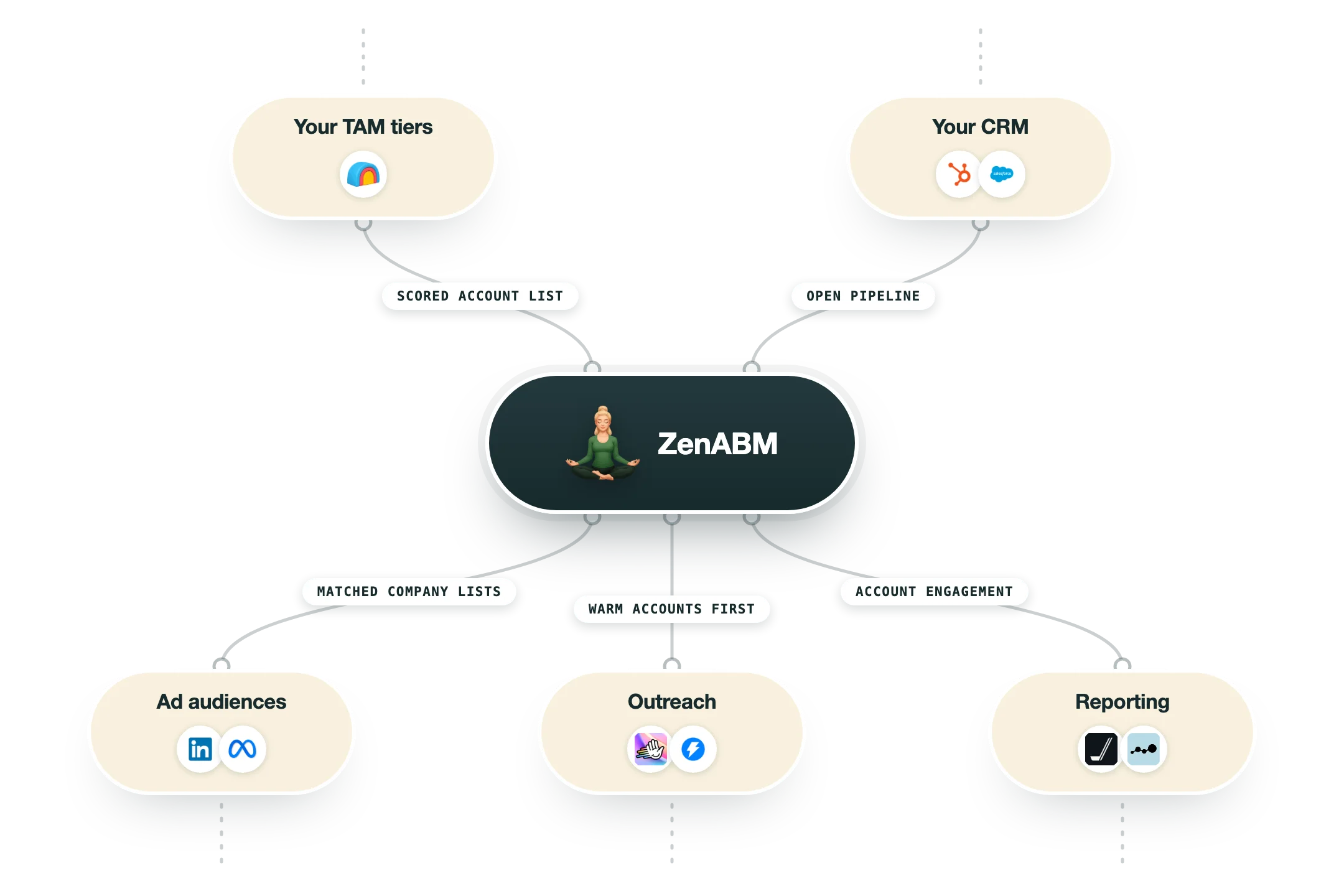
ZenABM has exactly one data source and everything else hangs off it. LinkedIn Ads is required, HubSpot is the only integration that reads and writes, and every other destination is reached through a webhook rather than a native app. Plan tier decides whether you get any of the outbound routes at all.
LinkedIn Ads | The connection the whole product runs on, authorised through OAuth with three scopes: r_ads_reporting, rw_ads and r_organization_social. It syncs campaigns, ad sets, creatives, spend, the companies your ads reached and audience detail like industry, seniority and company size. The first sync backfills 90 days, and after that data pulls weekly, every Monday at 00:00 GMT. The rw_ads scope is what lets ZenABM push exclusions back into your live ad sets. |
HubSpot | The deepest integration and the one that unlocks half the product. Inbound it pulls pipelines, deal stages and lifecycle data, which powers influenced revenue, ABM stage rules, and the Deals, Sources and Contacts screens. Deals and lifecycle data refresh daily. Outbound it writes a ZenABM LinkedIn Metrics property group onto the company object, covering ABM stage, active campaigns, intents, lifetime impressions, clicks, engagements, spend and engagement score, and that push runs once a week on Monday. Available on every tier including Starter. |
Salesforce | One directional. It pulls opportunities in so advertised accounts can be tied to pipeline and closed revenue, and deal signals become available inside ABM stage rules. There is no write back onto Salesforce accounts, so reps see the engagement data only if they open ZenABM. Company matching runs automatically with a dedicated page for fixing duplicates and misses. Salesforce is excluded from the $59 Starter tier and starts at Growth. |
Webhooks | The route to everything ZenABM does not integrate with directly. A filter builder scopes the data, for example companies sitting in the Interested stage, and a payload builder picks the fields. Delivery can be sequential, one company per request, or batched into a single array. Webhooks fire automatically after each Monday sync, and can be triggered by hand in between. Growth tier and above. |
Clay, Slack, Outreach and Salesloft | All of these are marketed as destinations for intent signals and all of them are reached over a webhook rather than a native connector. ZenABM's own docs name Clay as the common case and recommend sequential delivery because Clay wants one row per request. That works cleanly, though it inherits the weekly cadence, so a Clay table fed this way refreshes on Mondays instead of continuously. |
API and MCP server | A REST API at app.zenabm.com/api/v1 using bearer tokens, limited to 100 requests a minute, with endpoints for companies, ad sets, campaigns, ABM campaigns, deals, job titles, stages, contacts and a LinkedIn ad library. The MCP server at app.zenabm.com/api/mcp exposes 57 tools, of which 4 change live ad delivery and are flagged destructive, plus 15 prebuilt ABM workflows as slash commands. Both start at Growth. |
What is missing | No Zapier or n8n app, no Pipedrive or Attio connector, and no second ad platform as a real data source. The homepage promises multi channel attribution across Google Ads, Reddit Ads and organic, but the Sources screen that delivers it is built from your HubSpot contacts' last touch property history and requires HubSpot, so it re-reads what your CRM already recorded rather than identifying companies on those channels. There is also no impression capping, which LinkedIn has not opened to ZenABM. |
Pro’s
At $59 to $399 a month with no markup taken on your ad spend, a full year of it costs less than a single month of the enterprise ABM platforms sitting above it.
Setup is one OAuth into a LinkedIn ad account and the first sync backfills ninety days, so you see the engaged account list before any CRM work has been done.
The exclusions screen writes back into live ad sets, so current customers, competitors and wrong job titles can be blocked from your spend without leaving the tool.
Webhooks carry a filter builder and a payload builder and can send one company per request, which suits a Clay table waiting on the other end of it.
The REST API allows a hundred requests a minute and the MCP server exposes fifty seven tools with fifteen prebuilt ABM workflows, so the data reaches an agent without an export.
Its own documentation explains that LinkedIn approximates granular reporting and that ad set numbers will not add up to campaign numbers, and that is more candour than this category usually offers.
Cons
LinkedIn data pulls once a week on Monday morning, so a company that clicked on Tuesday reaches your reps six days later, and the webhooks routing hot accounts fire on that same weekly beat.
LinkedIn suppresses company engagement below three interactions in a period, so a small or short campaign returns a thin table, and the more granular the view you ask for the more of it disappears.
The contact level and multi channel promises both run through HubSpot rather than any identification of its own, since Sources reads your contacts' last touch history and Contacts lists people already in your CRM.
Starter at $59 carries one ABM campaign and no Salesforce, webhooks, API or MCP access, so the tier that turns this into a routing layer is Growth at $159.
The vendor is small and recent enough that its G2 and Capterra listings carry no reviews we could find, which leaves its own case studies as the only evidence of how it performs.
Pricing
Starter
$59/month Billed annually, $69 month to month
LinkedIn company insights with intent
Up to 1 ABM campaign
Default account scoring
HubSpot integration
Zena AI agent, 10 chats a day
Growth
$159/month Billed annually, $199 month to month
Up to 3 ABM campaigns with separate analytics
Customizable account scoring and company intent
Salesforce integration
Webhooks, API access and MCP server
Zena AI agent, 50 chats a day
Pro
$399/month Billed annually, $499 month to month
Unlimited ABM campaigns
Everything in Growth
Separate campaign performance per ABM campaign
Unlimited Zena chats
Positioned for in-house teams and agencies
Agency
$479/month Billed annually, $599 month to month, client accounts start at 3
Everything in Pro
Client accounts starting from three
Campaign performance split by ABM campaign and client
Unlimited Zena chats
Built for ABM, GTM and ad agencies
How it fits your stack
Alternatives


At a glance
Company level LinkedIn ad engagement and scoring
ABM stages built from LinkedIn and CRM rules
Intent tags from the campaigns a company clicked
Two way HubSpot sync, Salesforce opportunities
Webhooks into Clay, Slack, Outreach and Salesloft
Company, job title and industry ad exclusions
REST API, MCP server and the Zena chat agent
37 day free trial, from $59 a month
Read some of our client stories





GTM Workflows
Learn how to use GTM tools in workflows
Guides and tutorials to get the most from your workflows











Ready to get started?




By clicking Sign Up you're confirming that you agree with our Terms and Conditions.








