
How to Use AI for Sales Prospecting to Effectively Free Your Sales Reps of the ToFU Work

In this post:
The AI for sales prospecting trend we’re currently witnessing across LinkedIn and Twitter (or X if you will) is a strange thing to watch for us. We should probably prefix that with the fact that part of our job here at Nebor is talking to revenue teams and fixing their workflows.
Funny thing is, these are sharp companies with smart operators who did everything the AI-prospecting articles told them to do. They bought the AI tools, automated a few steps, and waited for the meetings to show up. The meetings did not show up.
What those articles leave out is that AI does not fix a broken prospecting motion. It makes that motion faster, which means it scales the weak targeting and the flat messaging right along with everything else.
IF you point a tireless machine at the wrong people, you’ll just reach the wrong people quicker than any human could.
So the real question is not which AI tool to buy. It is which jobs in your prospecting you can hand to AI, and how to chain those jobs into something that works on its own. That is a different conversation than the one most tool vendors want to have with you.
We come at this as salespeople first. We ran our own outbound for years, sent millions of emails, and did the mind-numbing top-of-funnel research by hand long before we automated a step of it.
Then we spent years building these systems for other companies, and we learned exactly where the machine earns its keep and where it falls on its face. This post is that map.
We’ll walk through what AI genuinely does in prospecting, what it still cannot do, the specific workflows that drive the top of the funnel, and how to build the same thing yourself if you would rather.
Let’s get started.
TL;DR
✎ Here is the whole engine on one page before we walk it stage by stage: one hub, a chain of AI agents each doing one job, and a rep stepping in only when a real reply lands.
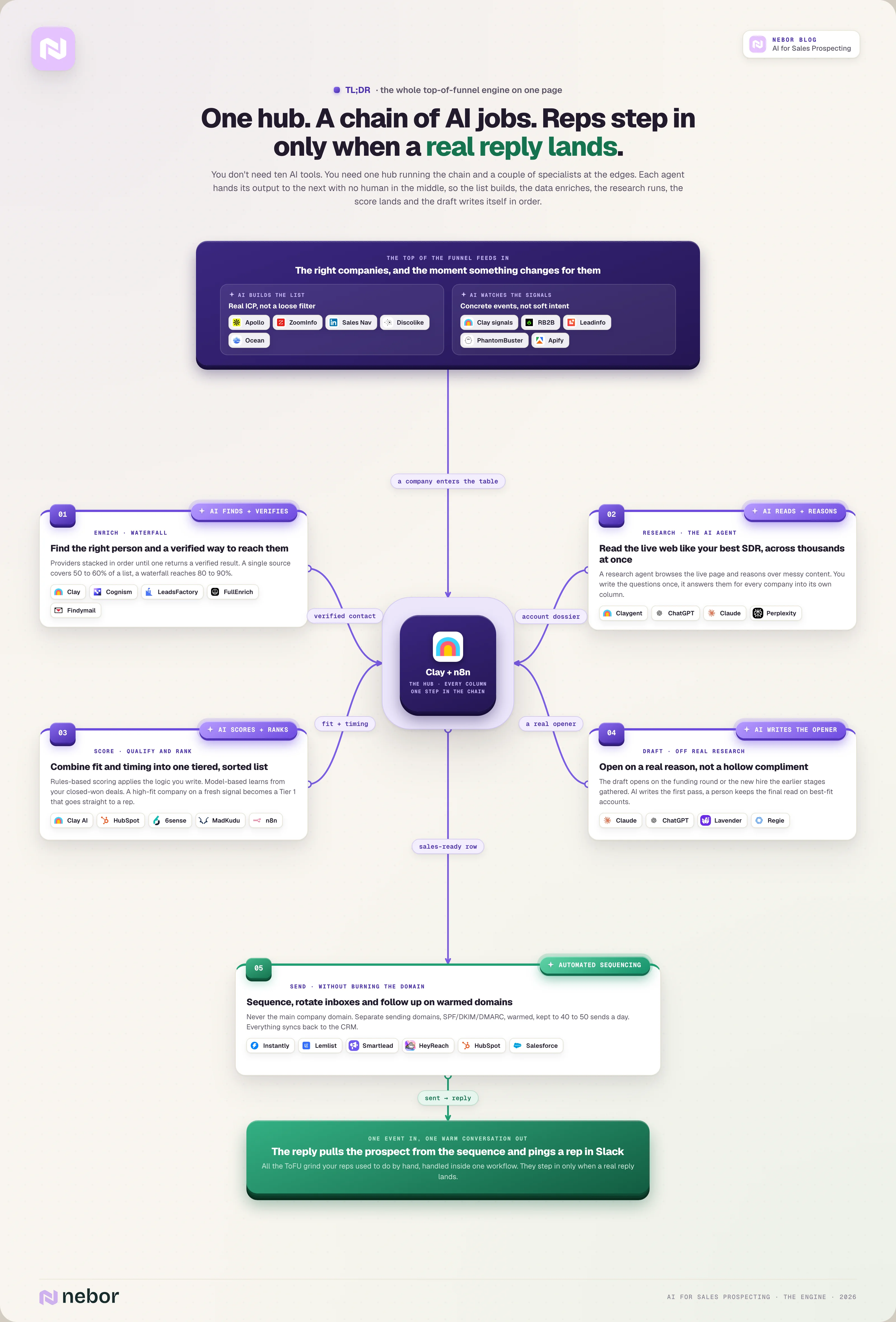
Ask most people how to use AI for sales prospecting and the answer is always about which tools to buy. Pick the best one for each task, wire them together, and wait for the meetings to roll in. They rarely do.
We think that is backward. The win is not the tools, it is chaining AI agents around one hub so the research, the qualifying, and the first outreach happen on their own, and your reps step in only when a real reply lands. That is the difference between renting a stack of logins and owning a prospecting engine you control.
Why most AI prospecting quietly fails long before it sends a single email
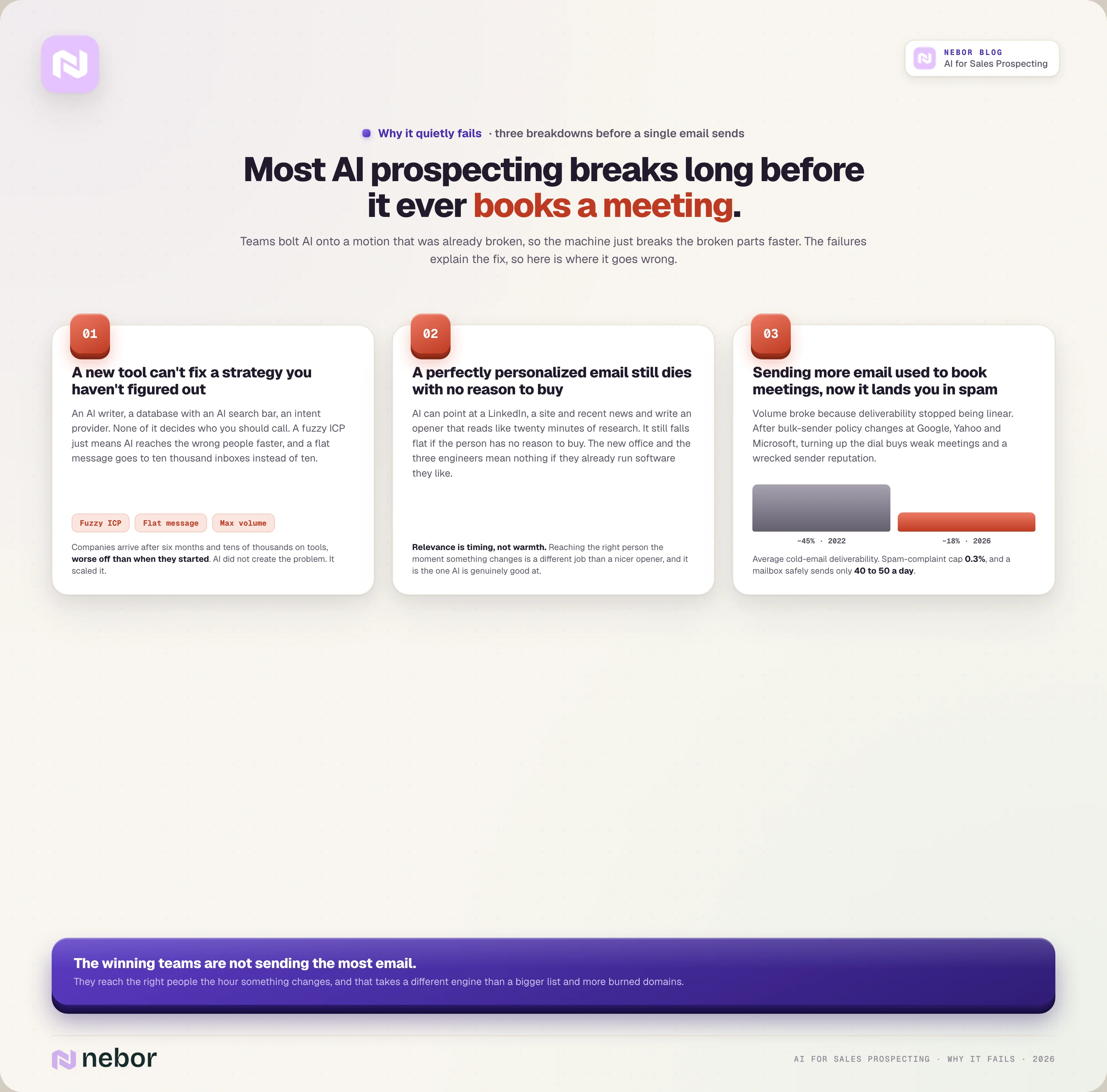
Most teams bolt AI onto a prospecting motion that was already broken. The AI moves faster, so the broken parts break faster too. Before we show you what works, here is where it goes wrong, because the failures explain the fix.
Buying another AI tool won't fix a sales strategy you haven't figured out yet
The usual first move is buying something. An AI email writer, a lead database with an AI search bar, an intent provider promising to name the accounts ready to buy this quarter.
None of that decides who you should call. If your ICP is fuzzy, AI helps you reach the wrong people faster. If your message lands flat, AI sends that flat message to ten thousand inboxes instead of ten.
We watch companies arrive after six months and tens of thousands of dollars on tools, in worse shape than when they started.
They have burned their domains, buried their reps in junk leads, and filled their pipeline with meetings that go nowhere. AI did not create those problems. It scaled them.
A perfectly personalized email still gets ignored when the person has no reason to buy
The pitch for AI personalization sounds great. Point a model at someone's LinkedIn, their site, and recent news, and it writes an email that reads like twenty minutes of research. AI does that well now, yet it still falls flat if the person has no reason to buy.
"Hey Sarah, I noticed your team just opened an office in Austin, congrats. I also saw you're hiring three engineers. Here's why you should buy our HR software…"
That reads personalized, and AI can write it in a second. It is also useless if Sarah's company already uses HR software they like.
Relevance means reaching the right person the moment something changes for them. That is a different job than writing a warmer opener, and it is the one AI is actually good at when you point it at the right signal.
Sending more email used to book more meetings, now it just lands you in spam
Volume used to work. Send more, book more. The math felt simple, and for a while it held.
It broke because deliverability stopped being linear. Average cold email deliverability has fallen from around 45% in 2022 to roughly 18% in 2026, after bulk-sender policy changes at Google, Yahoo, and Microsoft.
Google now asks bulk senders to keep their spam-complaint rate under 0.3%, and a single mailbox can safely send only 40 to 50 emails a day after warmup. The times you could send 500 are long gone.
So turning up the dial buys you more weak meetings and a wrecked sender reputation. The teams winning at outbound now are not sending the most email.
They reach the right people the hour something changes, and that takes a different engine than a bigger send list and more burned domains.
Stop thinking of AI as a tool and start treating it as a worker you hand a job to
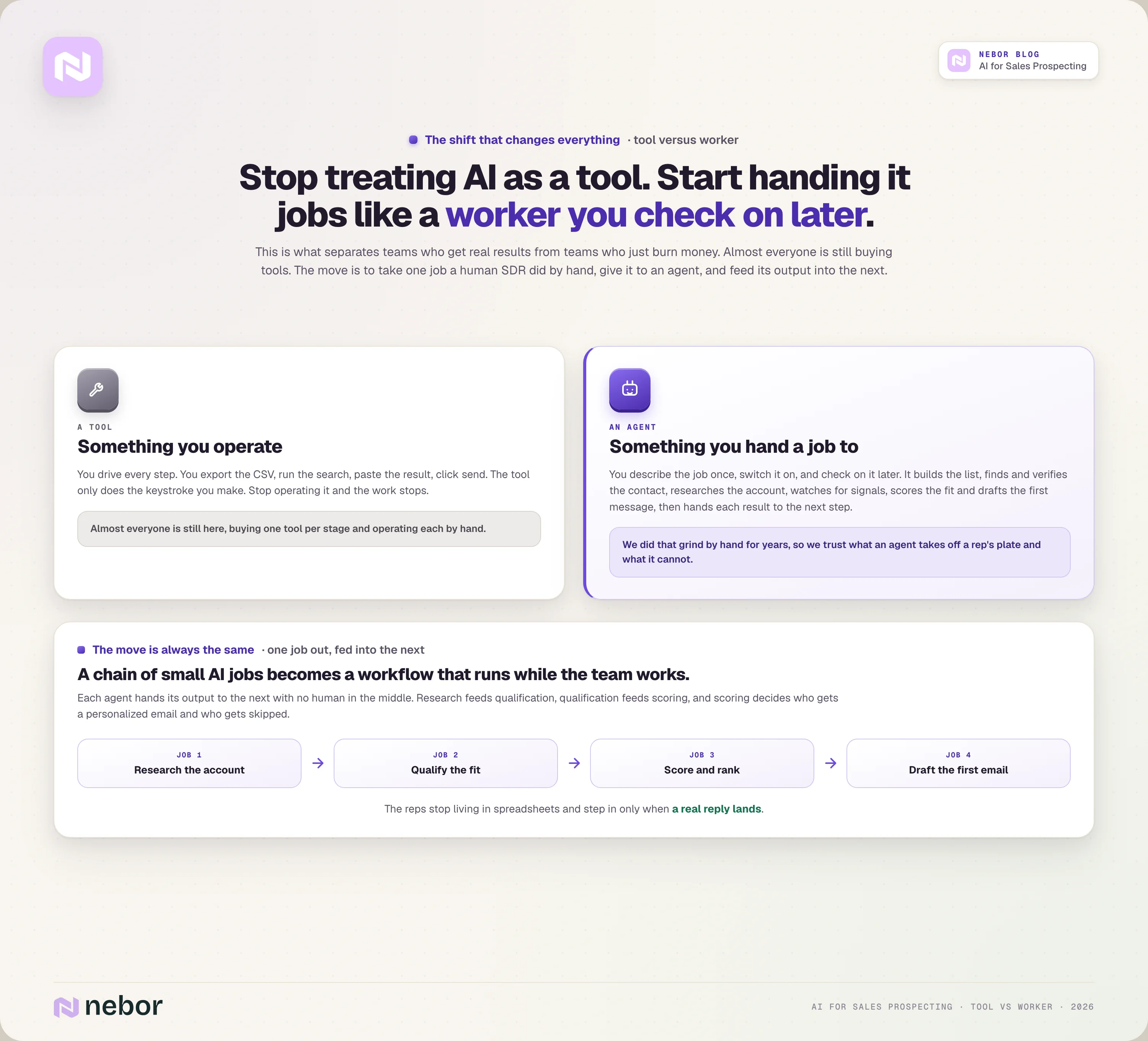
This is the shift that separates teams who get real results from AI prospecting and teams who just burn money on it.
A tool is something you operate, while an agent is something you hand a job to and check on later. Almost everyone is still buying tools.
We have done that top-of-funnel grind by hand, which is why we trust what an agent can take off a rep's plate and what it cannot.
So when we say AI does these jobs well, we have watched both the human version and the machine version up close, and we know which steps still need a person on them.
Strip away the hype and AI now does real work at almost every stage of prospecting. It builds the target list, finds and verifies contact data, researches each account, watches for buying signals, scores the ones that fit, and drafts the first message.
Then it hands each result to the next step with no human in the middle. No single tool does all of it perfectly, and that is the part most people miss.
The move is always the same. You take one job a human SDR used to do by hand, give it to an AI agent, then feed its output into the next one.
That means research feeds qualification, qualification feeds scoring, and scoring decides who gets a personalized email and who gets skipped. A chain of small AI jobs becomes a workflow that keeps going while the team focuses on something else.
Before you can chain those jobs, you need to see them clearly. Here is what AI does at each stage of prospecting, and the AI tools that handle each one.
What AI can actually do at each stage of sales prospecting
Prospecting is not one task but a chain of them, from finding companies to landing a reply, and AI now does real work at almost every link.
Here is the job broken into stages, what AI handles at each, and the tools that do it.
We want you to read it as a map of what you can hand off and not a list of things to buy, because the next section is about why buying one of each is the wrong move.
First, let AI build you a list of the right companies instead of every company
The first job in prospecting is deciding who is even worth contacting. Most teams rush it. They do one search in Apollo or ZoomInfo, export a few thousand vaguely matching companies, and start emailing, which is how you end up with a huge list and a tiny reply rate.
AI does this better when you feed it a real ICP instead of a loose filter. You describe the company you want in detail, like a B2B SaaS firm of 50 to 200 people using HubSpot, raised in the last 18 months, and is hiring sales roles, and the system queries several sources at once to assemble that list.
It pulls the firmographics, layers on the tech stack and recent events, and strips out the duplicates and obvious misses before a human ever looks.
It can also work backward from your best customers. Hand it twenty accounts you have already closed and it finds the lookalikes, the companies that share the traits your won deals have in common.
For look alike audiences, we prefer pointing at platforms like Discolike and Ocean. Apollo and ZoomInfo give you the broad databases, LinkedIn Sales Navigator is strongest for people-led search, and Clay is where you combine several sources into one clean list.
None of this saves you from a weak ICP. The tool will happily build a thousand rows of the wrong companies, which is why the total addressable market you map up front decides almost everything downstream.
Let waterfall enrichment find the verified emails a single database always misses
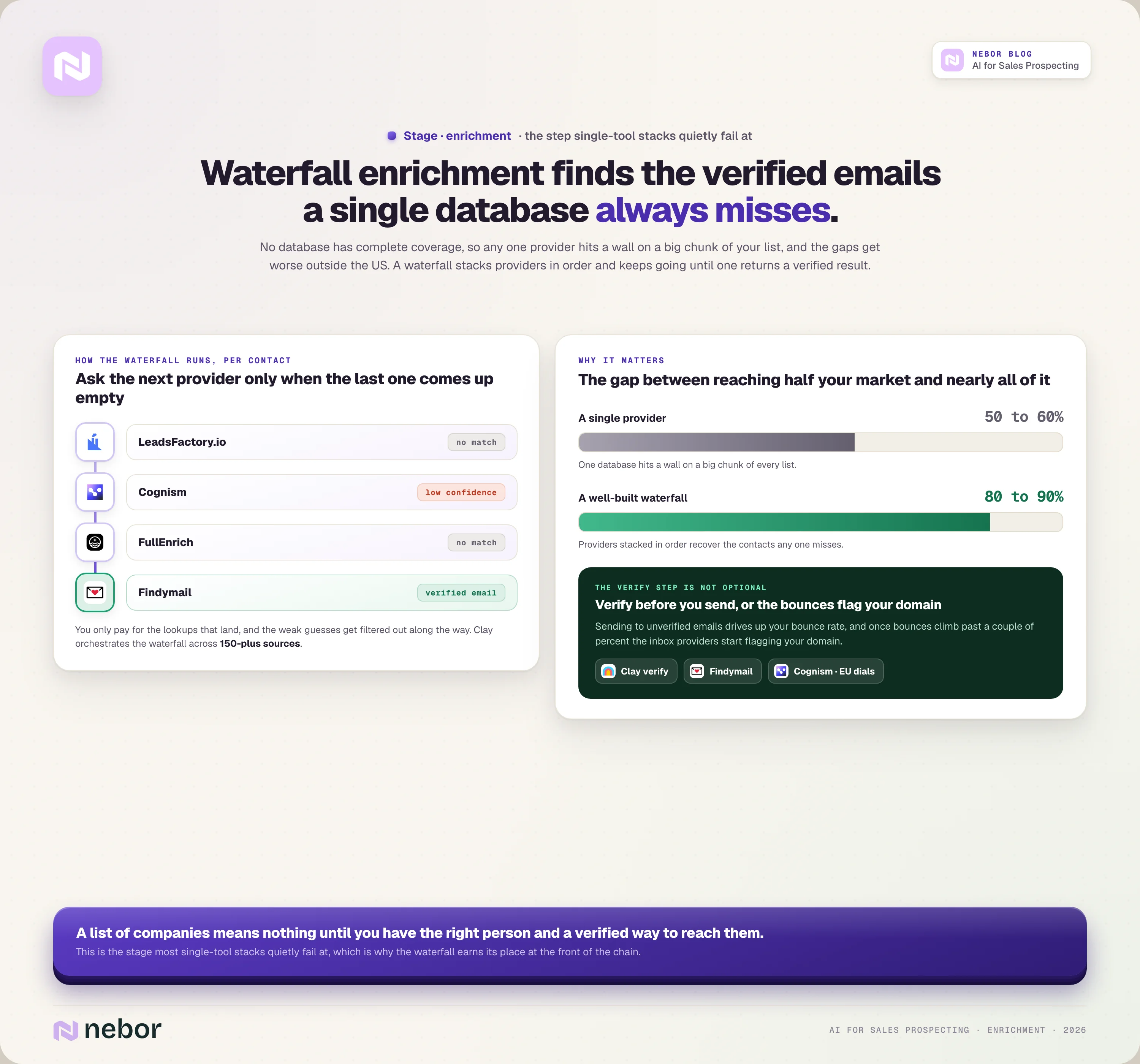
A list of companies means nothing until you have the right person and a verified way to reach them.
This is the stage most single-tool stacks quietly fail at. No database has complete or accurate coverage, so any one provider hits a wall on a big chunk of your list, and the gaps get worse outside the US.
Waterfall enrichment fixes that by stacking providers in order. The system asks the first provider (first tool in line) for a contact's work email, and if it comes back empty or low confidence, it asks the second, then the third, and keeps going until one returns a verified result.
You only pay for the lookups that land, and the weak guesses get filtered out along the way.
The difference shows up in the numbers. A single provider often covers only 50 to 60% of a list, while a well-built waterfall reaches 80 to 90%. That is the gap between reaching half your market and nearly all of it.
The verify step is not a nice-to-have. Sending to unverified emails drives up your bounce rate, and once bounces climb past a couple of percent the inbox providers start flagging your domain.
Clay orchestrates the waterfall across 150-plus sources, Cognism is strong for European data and direct dials, and LeadsFactory.io, FullEnrich and Findymail focus on finding and verifying contacts so you can reach a specific decision maker without bouncing.
Hand the account research to an AI agent that reads the web like your best SDR
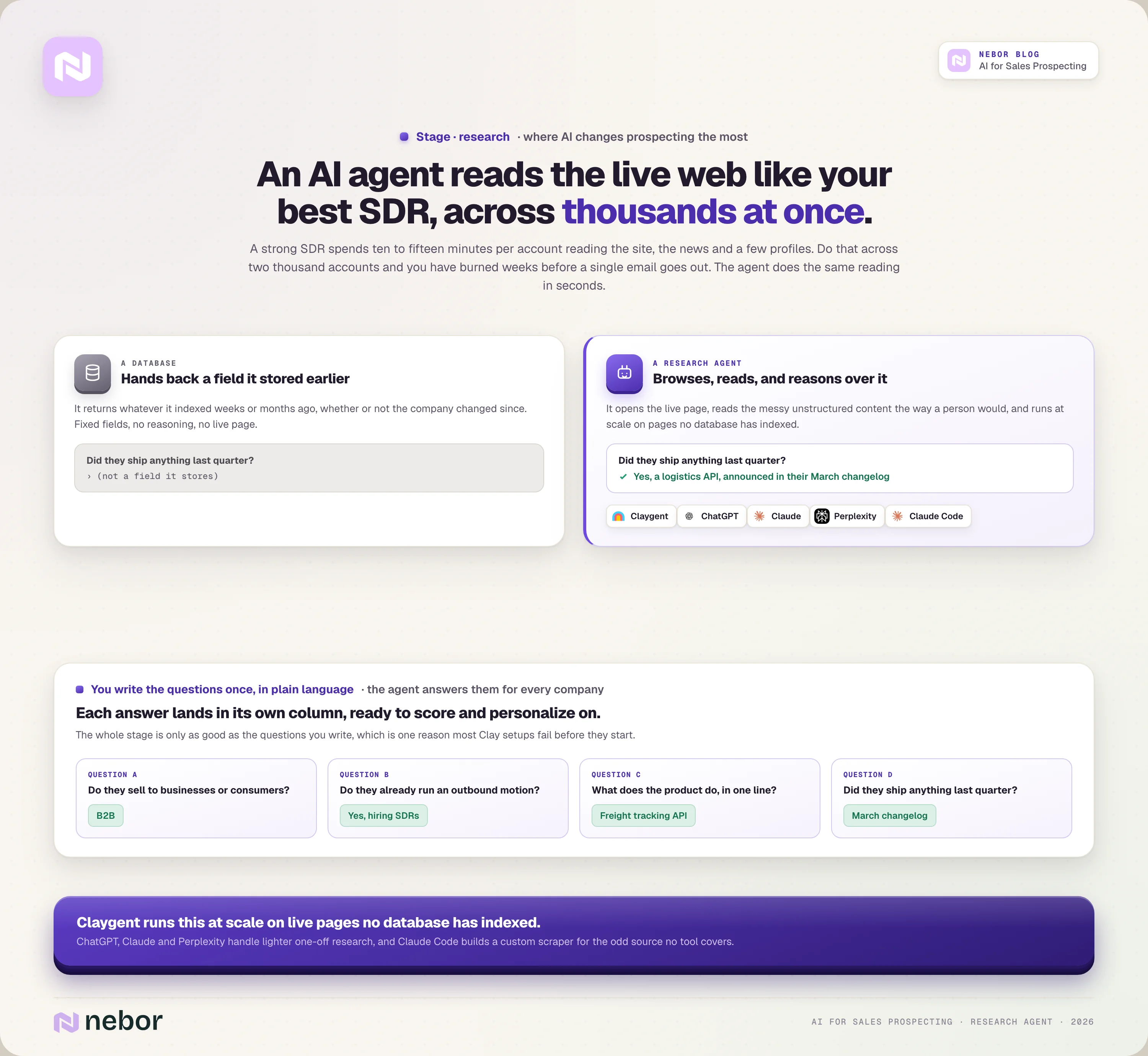
This is where AI changes prospecting the most. A strong SDR spends ten to fifteen minutes on each account, reading the website, the recent news, and a few LinkedIn profiles to judge fit and find a reason to reach out.
Do that across two thousand accounts and you have burned weeks before a single email goes out.
AI research agents do the same reading in seconds, across thousands of accounts at once. The important part is how they differ from a database.
A database hands back a fixed field it stored earlier, while a research agent actually browses, opens the live page, reads what it finds, and reasons over the messy, unstructured content the way a person would.
You write the questions once, in plain language, and the agent answers them for every company on the list.
Things like whether the company sells to other businesses or consumers, whether they already have an outbound motion, what their product does in one line, and whether they shipped anything last quarter.
Each answer lands in its own column, ready to score and personalize on.
Claygent in Clay is built for exactly this and does it at scale on live pages no database has indexed. ChatGPT, Claude, and Perplexity handle lighter, one-off research, and Claude Code lets you build a custom scraper for the odd site or source no tool covers.
The whole stage is only as good as the questions you write, which is one reason most Clay setups fail before they start.
Let AI watch for the buying signals that actually mean someone might be ready
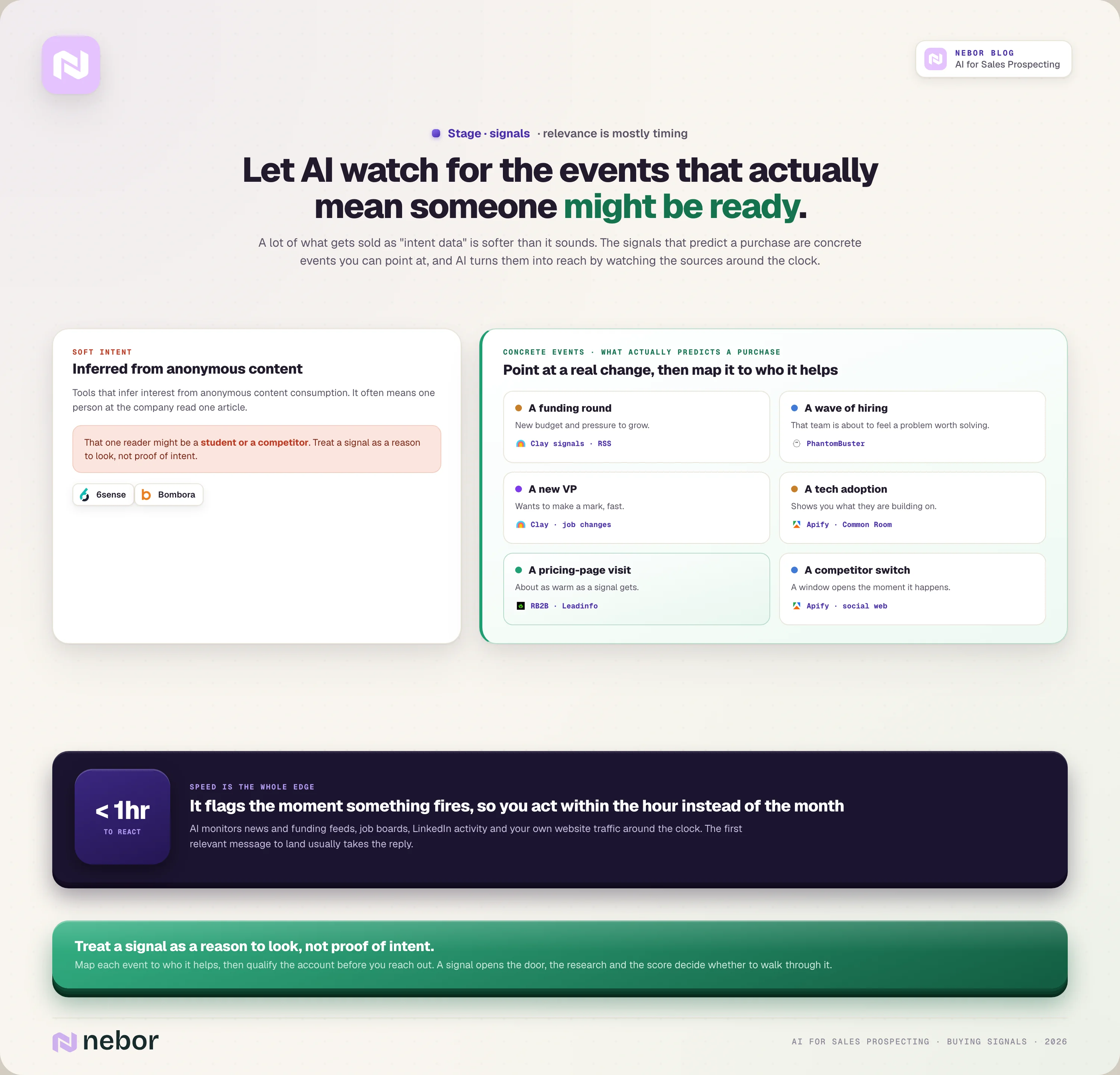
Relevance is mostly about timing, and timing comes from signals. The trouble is that a lot of what gets sold as "intent data" is softer than it sounds.
Tools like 6sense and Bombora infer interest from anonymous content consumption, which often means one person at the company read one article, maybe a student or a competitor.
The signals that actually predict a purchase are concrete events you can point at.
A funding round means new budget and pressure to grow.
A wave of hiring for a function means that team is about to feel a problem worth solving.
A new VP wants to make a mark, a tech adoption shows you what they are building on, and a visit to your pricing page is about as warm as a signal gets.
AI turns those events into reach by watching the sources around the clock. It monitors news and funding feeds, job boards, LinkedIn activity, and your own website traffic, then flags the moment something happens so you can act within the hour instead of the month.
Speed is the whole edge here, because the first relevant message to land usually takes the reply.
You map each signal to who it helps. Clay signals catch job changes and company events, RB2B and Leadinfo put a name to your website visitors, and Common Room, PhantomBuster and Apify can track community and LinkedIn activity, the same way an RSS monitor catches a press release the hour it goes live. Treat a signal as a reason to look, not proof of intent, and qualify the account before you reach out.
Let AI score and rank the leads so your reps only work the ones worth working
Once you have research and signals, qualifying is about combining them into one decision. AI scores each lead on two things, how well it fits your ICP and whether the timing is right, then ranks the list so reps work the best accounts first instead of going down it alphabetically.
There are two ways to score, and they are worth telling apart. Rules-based scoring applies the logic you write, like adding points for a B2B model, the right headcount, and a fresh funding signal.
Model-based scoring, which is what 6sense and MadKudu do, learns the pattern from your closed-won deals and predicts which new accounts look like past winners.
The output is a sorted, tiered list you can act on. A high-fit company showing a fresh signal becomes a Tier 1 that goes straight to a rep or a priority sequence, while a weak match drops out before it costs anyone a minute.
Clay AI and HubSpot handle rules-based scoring inside the workflow, 6sense and MadKudu bring the predictive models, and the AI agent node in n8n can reason over a lead and route it, one of the automation workflows that removes the most rep busywork.
Get AI to draft the outreach off real research instead of a fake compliment
Now the research pays off. AI drafts the first message from what the earlier stages gathered, so the email opens on a real reason for reaching out, the funding round, the new hire, the specific thing their product does, instead of a hollow compliment.
The quality of the draft tracks the context you give it, so rich research produces a sharp message and thin research produces mush.
There is a hard limit here that teams keep relearning. Fully automated copy reads as automated, and it pulls lower reply rates than a draft a human edited before it went out. People can feel when nothing human touched the message, and they delete it.
So the rule is simple. Let AI write the first pass and keep a person on the final read, especially on your best-fit accounts. ChatGPT and Claude draft well from a tight prompt and good context, while copilots like Lavender and Regie live inside the inbox and score or rewrite a line while the rep works.
Send, sequence, and follow up at scale without burning your sending domain
The last stage is delivery, and it is the one teams underestimate most. A perfect message still fails if it lands in spam, so this stage is half automation and half deliverability hygiene.
Sending platforms handle the multi-step sequences, rotate across your inboxes, send the follow-ups on schedule, and pull anyone who replies out of the sequence automatically.
The deliverability rules underneath are not optional in 2026. You never send cold email from your main company domain, because one rough campaign can poison the inbox your whole company depends on.
You buy separate sending domains, set up SPF, DKIM, and DMARC so the inbox providers trust them, and warm each one for a few weeks before any real volume.
Then you keep each mailbox to roughly 40 to 50 sends a day and watch your bounce and complaint rates, since crossing those thresholds is what trips the spam filters.
Instantly, Lemlist, and Smartlead are built for this and manage the warmup and inbox rotation for you, while HeyReach does the same kind of sequencing on LinkedIn. Everything should sync back to HubSpot or Salesforce so replies and handoffs live in one place.
There is also an all-in-one option worth naming. A new class of autonomous AI SDR tools, like 11x, Artisan, and AiSDR, promises to cover all seven stages inside a single platform.
They can work, but they are expensive and uneven, and they hide the logic where you cannot tune it.
For most teams the smarter path is to understand the stages first and keep control of them, which is also why you may not need an SDR agency doing the same thing by hand.
You don’t need ten AI tools, you need one hub and a chain of AI prospecting workflows
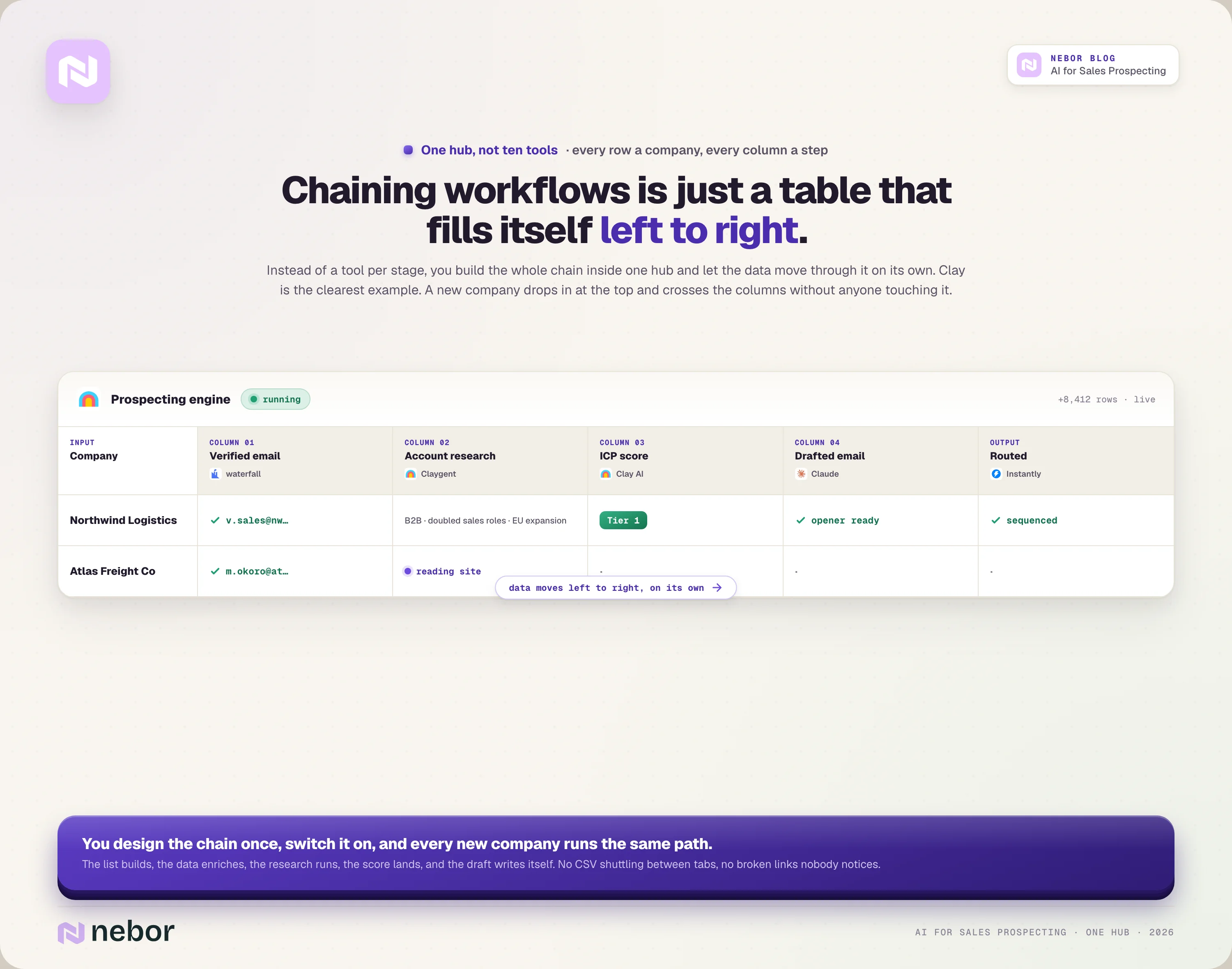
✎ This is what that single table looks like as it fills itself left to right, one company per row crossing one column per step.
If you read the stages above as a shopping list, you will end up where most teams end up. You buy a tool for list building, another for enrichment, a third for intent, a fourth for scoring, a fifth for sending.
Each one has its own login, its own bill, and its own slightly different idea of what a contact record should look like.
Now picture the actual workday. Someone exports a CSV from the list tool, uploads it to the enrichment tool, waits, downloads the result, pastes it into a research tool, then copies the good rows into the sender.
Half the job is shuttling data between tabs, and every time one vendor changes an export format or an API, a link in the chain quietly breaks and nobody notices until the leads stop showing up.
There is a calmer way to do this. Instead of a tool per stage, you build the whole chain inside one hub that already covers most of the stages, and you let the data move through it on its own.
Clay is the clearest example, a single table where every row is a company and every column is one step in the chain.
Picture that table for a second. The first column holds the company, the next works the waterfall and fills in the verified email, and the next sends Claygent off to research the account and write back what it found.
The column after that scores the row against your ICP, and the last one drafts the opening email. A new company drops in at the top and moves left to right across the columns without anyone touching it.
That left-to-right flow is what people mean by chaining AI prospecting workflows. Each column takes the output of the one before it and does the next job, so the list builds, the data enriches, the research happens, the score lands, and the draft writes itself in order.
You design the chain once, switch it on, and every new company follows the same path. That is the idea behind a modern sales tech stack built around workflows.
Done well, that single chain covers your entire top of the funnel. The list-building, the research, the data entry, the first-touch copy, the follow-up, all the ToFU grind your reps used to do by hand, now handled inside one workflow.
Your reps stop living in spreadsheets and step in only when a real reply lands. That is what a GTM system that works on autopilot looks like at the top of the funnel.
You will still bolt a few specialists onto the hub. A dedicated sending platform for deliverability, an automation layer like n8n when the logic outgrows a table, a bit of custom code in Claude Code for the one job no tool covers.
But the shape holds. One hub driving the chain, a couple of specialists at the edges, instead of ten vendors each charging you for a single slice.
Here is what one of these chained workflows actually looks like from start to finish
✎ Here is that fifteen minutes, minute by minute, from the press release at 9 a.m. to the reply that pings a rep.
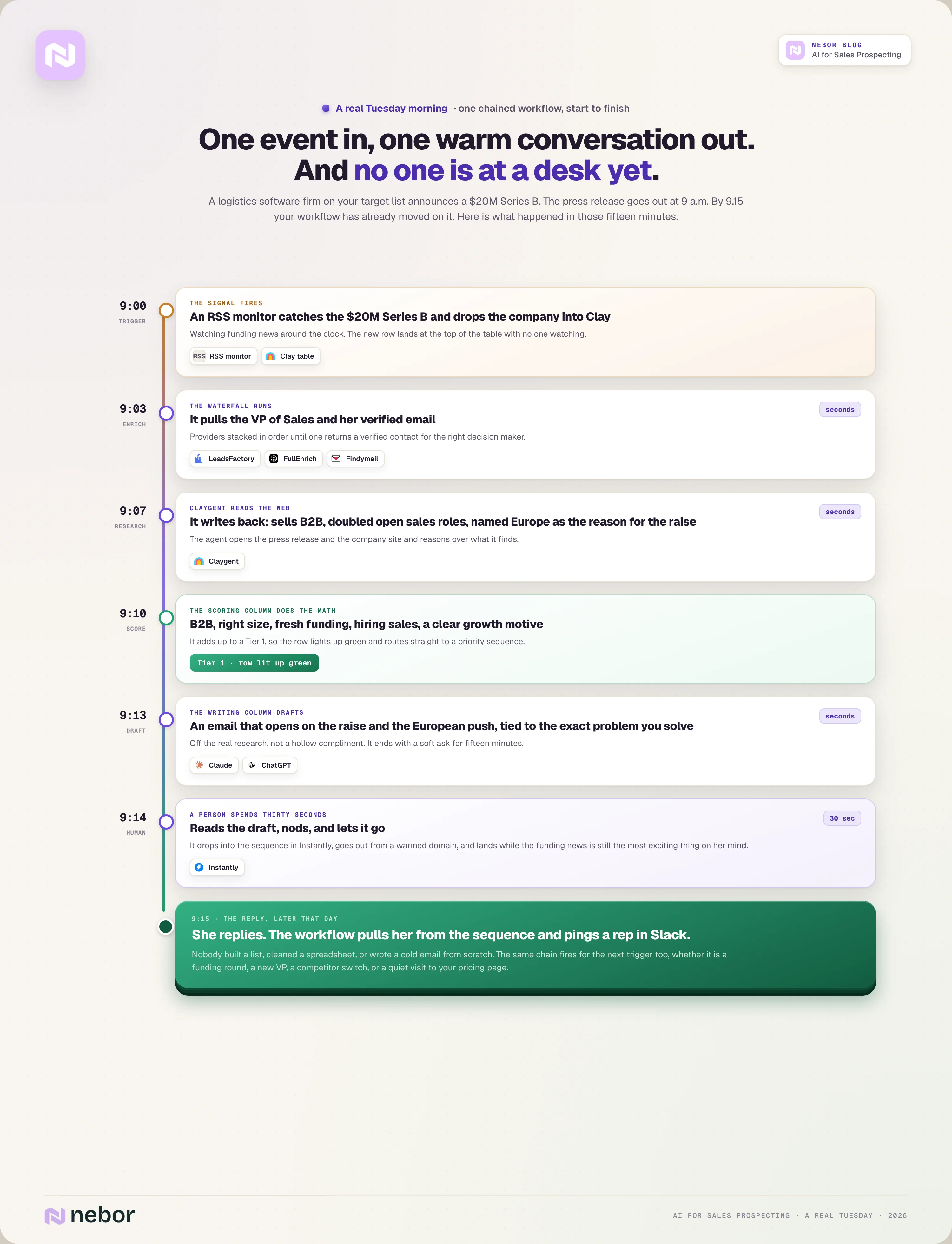
Picture a real Tuesday morning. A company on your target list, a logistics software firm, announces a $20 million Series B. The press release goes out at 9 a.m. By 9.15 your workflow has already moved on it, and no one is at a desk yet.
Here is what happened in those fifteen minutes.
An RSS monitor watching funding news caught the announcement and dropped the company into the top of your Clay table. The enrichment column ran the waterfall and pulled the VP of Sales and her verified email.
The research column sent Claygent to read the press release and the company site, and it wrote back that the firm sells B2B, just doubled its open sales roles, and named expansion into Europe as the reason for the raise.
The scoring column did the math. B2B, right size, fresh funding, hiring sales, and a clear growth motive add up to a Tier 1, so the row lit up green.
The writing column drafted an email that opens on the raise and the European push, ties it to the exact problem you solve for fast-scaling sales teams, and ends with a soft ask for fifteen minutes.
A human spends thirty seconds reading that draft, nods, and lets it go. It drops into the sequence in your Instantly, goes out from a warmed domain, and lands in the VP's inbox while the funding news is still the most exciting thing on her mind.
When she replies, the workflow pulls her out of the sequence and pings a rep in Slack to take the conversation.
One event in, one warm conversation out. Nobody built a list, cleaned a spreadsheet, or wrote a cold email from scratch. The same chain kicks in for the next trigger too, whether it is a funding round, a new VP, a competitor switch, or a quiet visit to your pricing page.
How to build this yourself (the order that actually works)
You can build all of this in-house, and plenty of teams should. The mistake is starting with the tools. Start with the thinking, in this order.
Define your ICP until a stranger could spot a good-fit company in under a minute.
Map your TAM so you know how many of those companies actually exist, which decides whether you go broad or surgical.
Pick two or three real intent signals you can detect automatically, like funding, hiring, or a competitor switch.
Set up waterfall enrichment so you can reliably find and verify contact details.
Build and warm your sending infrastructure before you send a single campaign.
Wire the steps together so one trigger flows into the next, and only then.
Start with one workflow and get it working reliably before you add a second. Complexity is what breaks automations, and an unreliable system is worse than no system at all.
We wrote the full step-by-step version of this build in a separate guide, so treat this as the map.
What AI still cannot do in prospecting, no matter how good the tools get
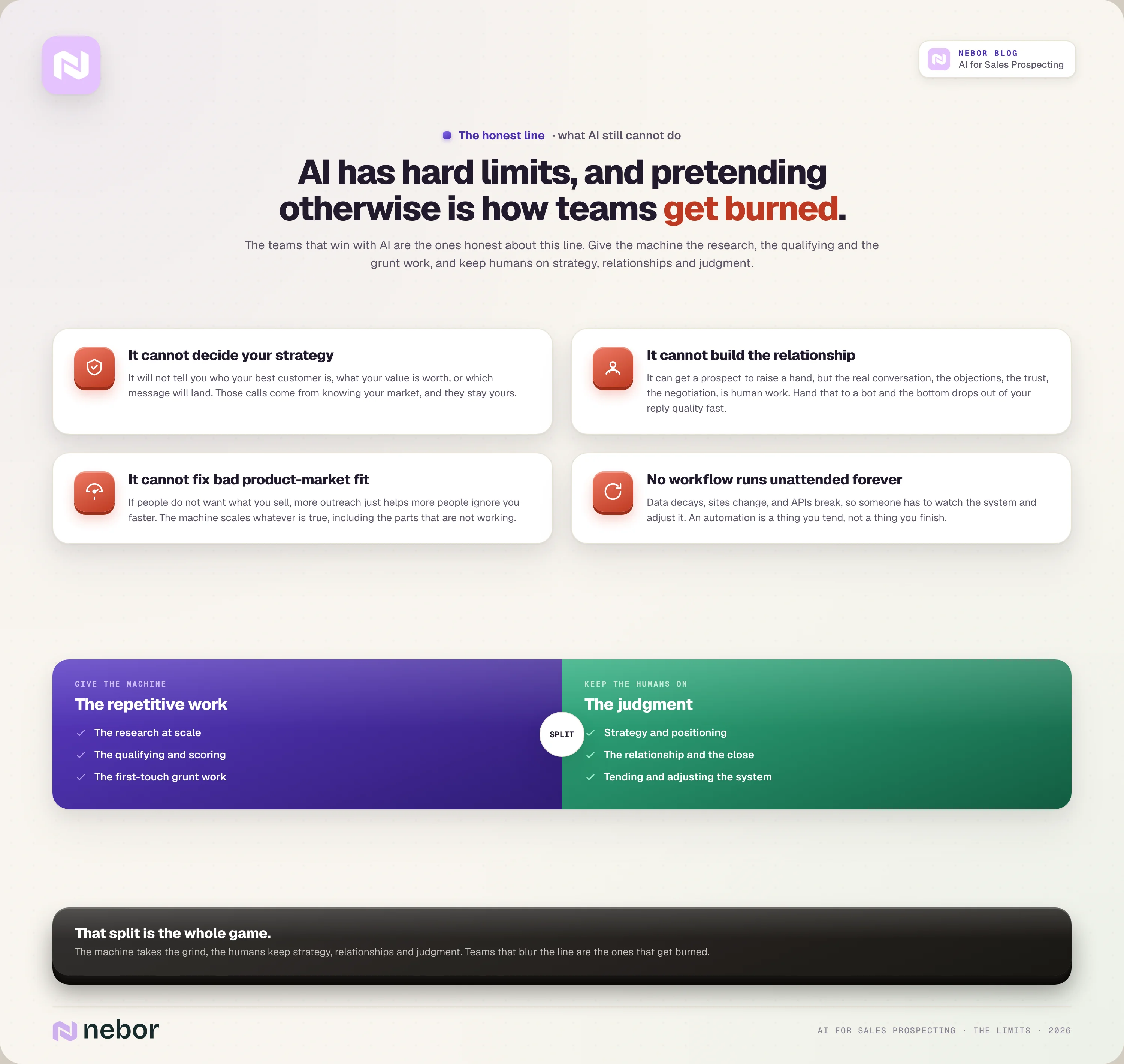
For all of that, AI has hard limits, and pretending otherwise is how teams get burned.
AI cannot decide your strategy for you, and it will not tell you who your best customer is, what your value is worth, or which message will land. Those calls come from knowing your market, and they stay yours.
AI also cannot build the relationship. It can get a prospect to raise a hand, but the real conversation, the objections, the trust, the negotiation, is human work and will be for a long time. Hand that to a bot and you feel the bottom drop out of your reply quality fast.
It cannot fix bad product-market fit either. If people do not want what you sell, more outreach just helps more people ignore you faster.
And no workflow survives unattended forever, because data decays, sites change, and APIs break, so someone has to watch the system and adjust it.
The teams that win with AI are the ones honest about this line. They give the machine the research, the qualifying, and the grunt work, and they keep humans on strategy, relationships, and judgment. That split is the whole game.
Where this leaves you, and where agencies like Nebor come in
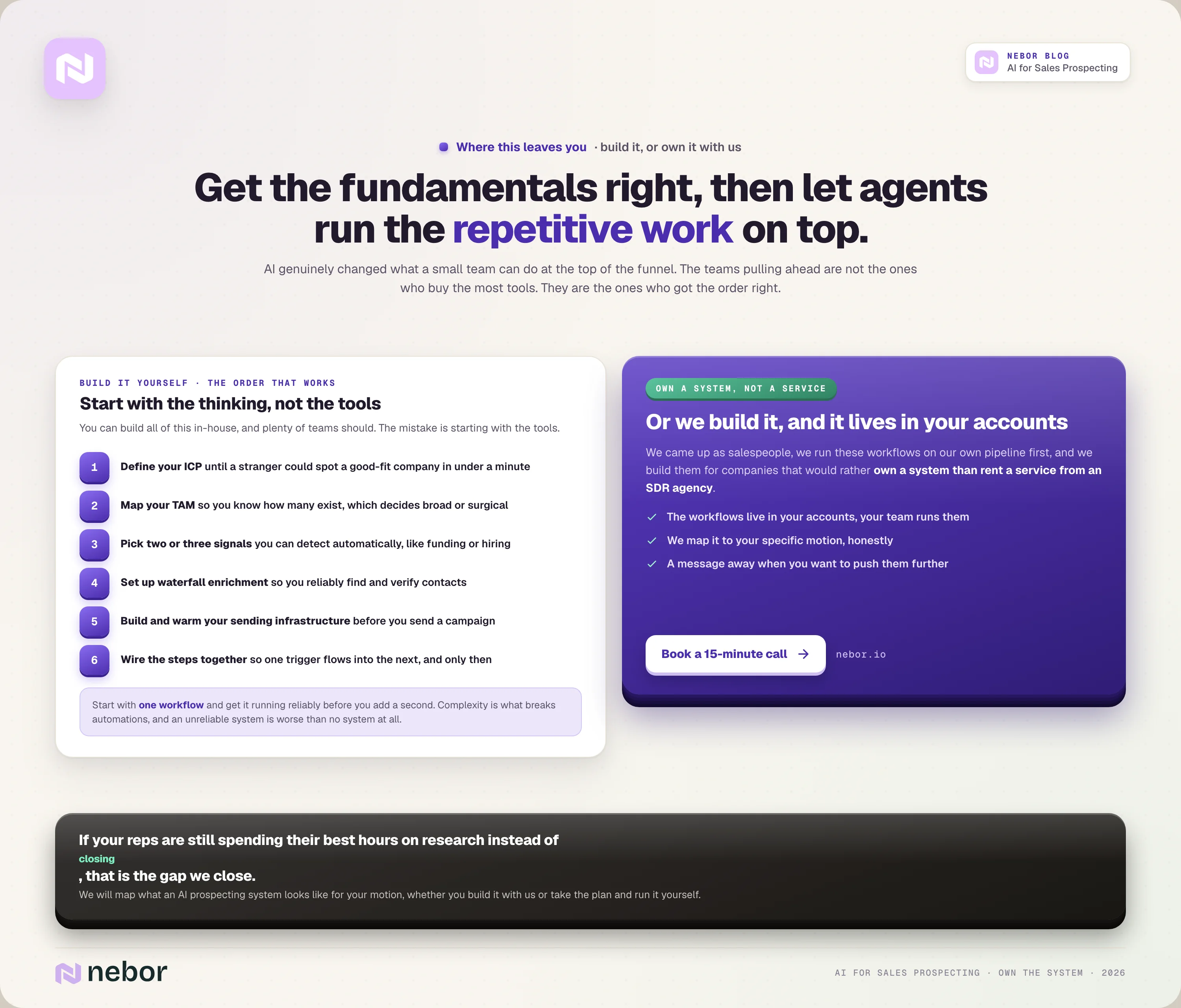
AI genuinely changed what a small team can do at the top of the funnel. You can find, research, and reach the right buyers at a scale that used to need a room full of SDRs.
Again, the teams pulling ahead are not the ones who buy the most tools. They are the ones who got the fundamentals right and then let agents take the repetitive work on top.
That is exactly the work we do. We came up as salespeople, we use these workflows on our own pipeline first, and we build them for companies that would rather own a system than rent a service from an SDR agency.
When we are done, the workflows live in your accounts and your team operates them, with us a message away when you want to push them further. That is also why we are not a lead generation agency.
If your reps are still spending their best hours on research instead of closing, that is the gap we close. We are happy to map what an AI prospecting system would look like for your specific motion, whether you build it with us or take the plan and build it yourself.
Book a 15-minute call and we will talk through your setup, honestly, including whether this is even the right move for you right now.


Related Articles


By clicking Sign Up you're confirming that you agree with our Terms and Conditions.