

De design-first websitebouwer waar nebor.ai op draait. In onze builds regelt het de formulieren, het visitor-ID-script en de tracking, en via de API schrijft een workflow direct in het CMS.
Wat is
Framer
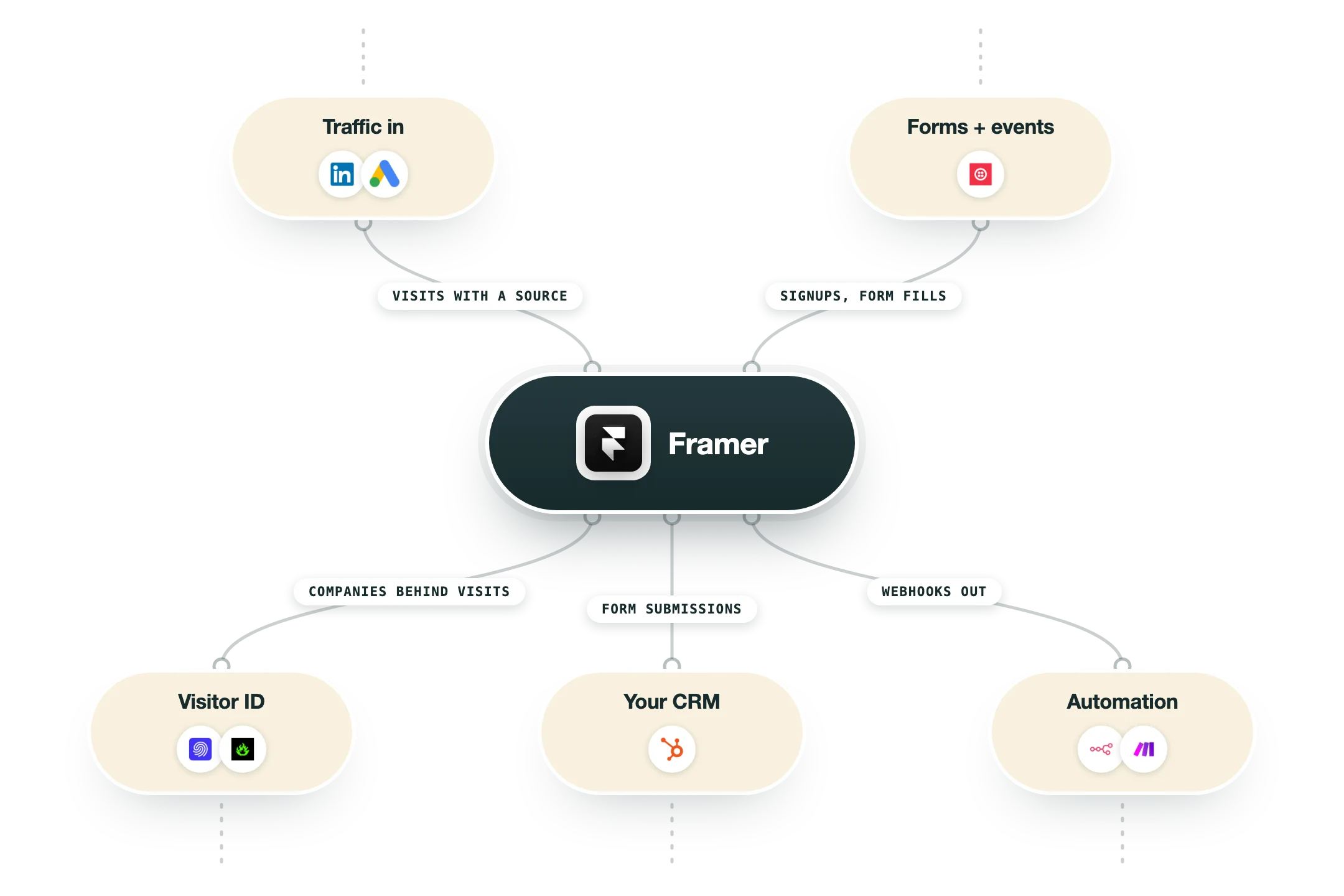
Framer is een websitebouwer die begint bij een designcanvas: wat je tekent, wordt gepubliceerd, met een CMS, hosting, staging en formulieren ingebouwd. Het is uitgegroeid van prototypingtool tot de standaard voor marketingsites waar design leidend is, en nebor.ai zelf is erop gebouwd. We spreken uit ervaring, want onze eigen workflow-, tool- en glossarypagina's staan in het CMS van Framer. Het grootste deel van die content zetten we er met scripts in via de Server API, en bijna niets wordt met de hand ingetypt. Dat is wat je moet weten voor een GTM-stack: het is een site waar je vanuit een workflow naar kunt schrijven en waar je signalen uit kunt halen. Aan de leeskant komt een ingevuld formulier via een webhook in je CRM terecht, met de pagina erbij. Een visitor-ID-script van RB2B of Snitcher in het custom code-slot maakt van anonieme bezoeken bedrijven met een naam. Aan de schrijfkant kan een workflow CMS-items aanmaken en bijwerken, en zo blijft een hele bibliotheek aan pagina's actueel zonder dat iemand iets hoeft aan te passen. Het nadeel is dat seats en limieten oplopen naarmate het team en de site groeien, en er zijn minder native integraties dan bij Webflow, dus je leunt op webhooks en n8n. Voor een snel bewegende marketingsite in handen van designers, met een stack erachter, kiezen we deze tool opnieuw.
Integraties en de moderne GTM-stack
Framer koppelt met een GTM-stack via:
Formulieren en webhooks | Inzendingen gaan naar je CRM, Slack of je automatisering, met de bronpagina erbij. |
Custom code | Visitor-ID-scripts (Snitcher, RB2B, Leadinfo), Segment, analytics en advertentietags in de head of body. |
Server API | CMS-items lezen en schrijven vanuit een script of een workflow. Zo krijgt onze eigen site zijn content. |
n8n, Make en Zapier | Ingevulde formulieren eruit, CMS-updates erin en meldingen naar het team. |
HubSpot | Formulieren en tracking via de embed en de webhookroute. |
Voordelen
Ontwerpen en publiceren gebeurt op één plek, dus een nieuwe landingspagina gaat in één middag van idee naar live.
Het CMS is genoeg voor de meeste marketingsites: collecties, referenties en pagina's op basis van templates, met een Server API om vanuit een workflow content te schrijven.
Formulieren en custom code maken er een bron van signalen van: visitor-ID-scripts, Segment en advertentietags zet je er zo in, en inzendingen komen via webhooks in je CRM.
Hosting, staging en branching zijn ingebouwd, dus een klein team zet een serieuze site live zonder eigen infrastructuur.
Onze eigen site is erop gebouwd, en we zetten er elke week met scripts CMS-content in.
Nadelen
Editor-seats worden bovenop het siteplan gefactureerd, en met een team van editors loopt dat op.
Limieten op pagina's en CMS-items in de lagere plannen remmen grote sites af, en de prijs voor extra gebruik overvalt mensen.
Minder native integraties dan Webflow, dus meer van de koppelingen loopt via webhooks en automatisering.
Complexe content met een diepe structuur is makkelijker in een traditioneel CMS.
Prijzen
Free
Gratis
Framer-subdomein
Genoeg pagina's om te bouwen en te testen
AI-credits inbegrepen
Basic
Vanaf $10 per maand bij jaarlijkse facturatie
Eigen domein
Eén CMS-collectie
Voor kleine sites
Pro
Vanaf $30 per maand bij jaarlijkse facturatie
Meer pagina's en CMS-collecties
Staging en branching
Het plan dat de meeste marketingsites nodig hebben
Enterprise
Op maat
SSO, SLA en limieten op maat
Onbeperkt aantal editors
Jaarcontract
Zo past het in je stack
Alternatieven


In het kort
Design-first websitebouwer met CMS en hosting
Sites gaan live vanaf het designcanvas, zonder exportstap
CMS-collecties, staging en branching op Pro
Native formulieren en een custom code-slot voor tags
AI-functies en paginageneratie op elk plan
Siteplannen plus editor-seats
De tool waar nebor.ai zelf op draait
Snel in te ontwerpen, snel te publiceren
Lees een paar van onze klantverhalen





GTM-workflows
Zo zet je GTM-tools in binnen workflows
Gidsen en tutorials om het meeste uit je workflows te halen





Klaar om te beginnen?




Door op Registreren te klikken bevestig je dat je akkoord gaat met onze Algemene Voorwaarden.








