

A cloud phone system that gives your team numbers in over 100 countries, routes calls through an IVR you configure yourself, and writes every call back to the right CRM record.
What is
Aircall
Aircall is a cloud phone system for sales and support teams. Your business numbers, call routing and voicemail live in Aircall's software rather than a PBX box in a server room, and reps make and take calls from a desktop app, a phone or a browser tab. Numbers are available in more than 100 countries, so a rep in Lisbon can dial from a Chicago area code, and the routing sits behind an IVR with teams, business hours and call queues an admin configures in a dashboard. Recording is standard, and transcription with summaries and sentiment comes through the AI Assist add-on. The CRM connection is what sales teams buy it for. A call logs itself against the right HubSpot contact, deal or ticket with duration, tags, outcome and a recording link, and Insight Cards put account context on the rep's screen before they answer. Aircall lists more than 200 integrations and a public REST API. Aircall is a good phone layer under a team that answers inbound and dials warm accounts, and a weak one under a cold-calling floor, since the Power Dialer works a list of up to 1,000 numbers one at a time. We have not run it at Nebor and would pair it with a parallel dialer for volume.
Integrations and the modern GTM stack
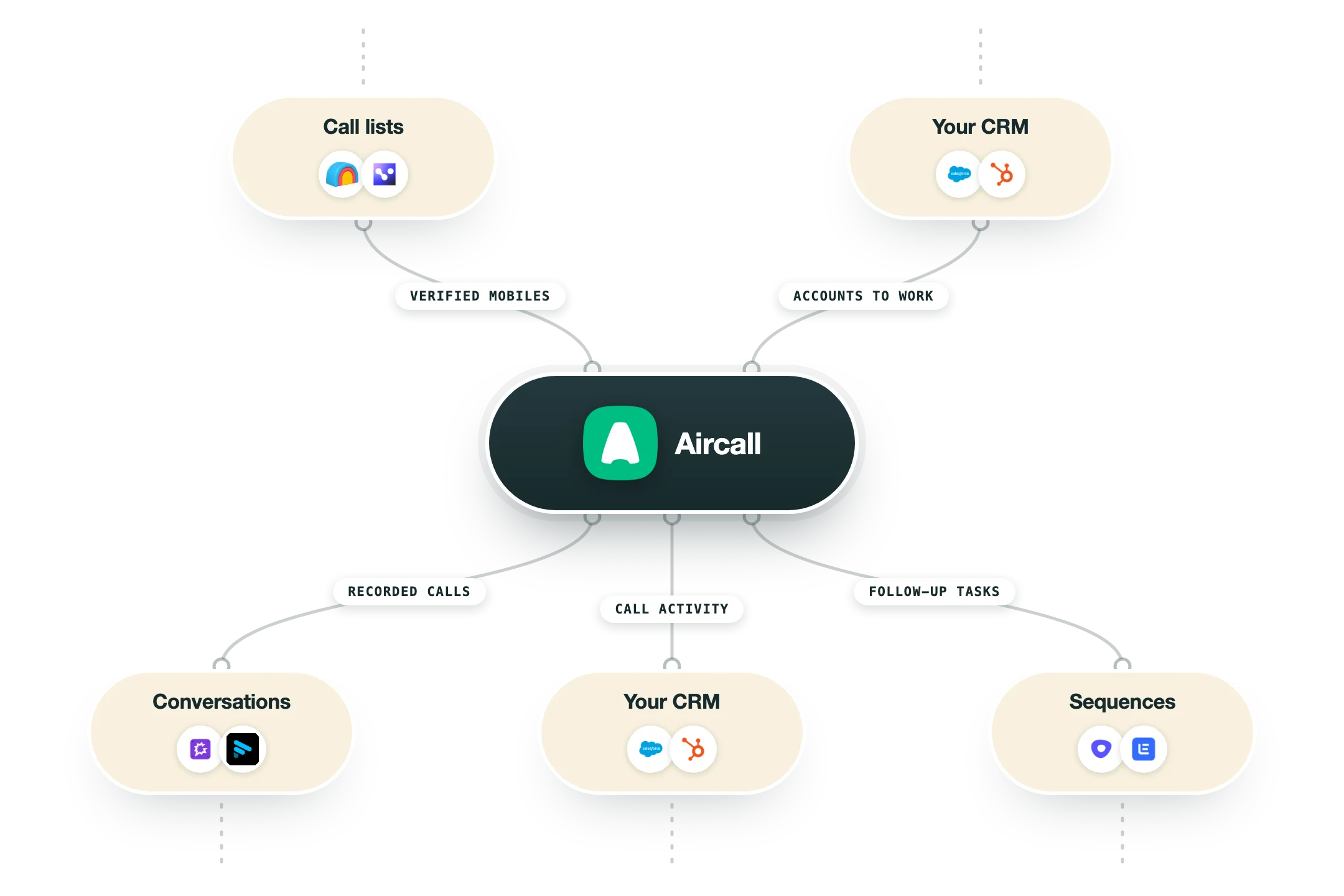
Aircall sells itself on the integration layer more than the telephony, and the marketplace runs past 200 apps across 16 categories. The important detail is that the two deepest connections behave very differently by plan, and one of them is locked behind Professional.
HubSpot | The closest fit for a sales team. Inbound and outbound calls log automatically against the contact, company, deal or ticket with duration, outcome, tags, notes and a link to the recording, and Insight Cards pull recent interactions and open deals into the Aircall panel before the rep answers. Available from Essentials. |
Salesforce | A full CTI inside Lightning and Classic across Sales Cloud and Service Cloud, with click-to-call, screen pops, automatic logging of comments and tags, and cases raised from missed calls and voicemails. It needs the Professional plan on the Aircall side and Enterprise or Unlimited on the Salesforce side, plus admin rights to install. |
Pipedrive, Zoho and Microsoft Dynamics | The same click-to-dial and automatic activity logging pattern for teams that run a lighter or non-Salesforce CRM. These are marketplace apps rather than a purpose-built CTI, so expect call logging and contact sync rather than the routing and case creation the Salesforce build offers. |
Zendesk, Intercom, Front and Freshdesk | Helpdesk connections that create or attach tickets from calls and surface ticket history in the Aircall panel. This is the reason a company can run one phone system across support and sales, and it is a genuine advantage over dialers built only for outbound. |
Gong, Avoma, Fireflies and Jiminny | Conversation intelligence tools pull Aircall recordings in for transcription, scoring and coaching. Worth knowing before you buy AI Assist Pro at $49 a license, since a team already running Gong is paying twice for the same call analysis. |
Zapier, Make and n8n | Aircall ships a Zapier app covering 9,000-plus destinations with triggers on calls, tags and transcription creation, and the same webhooks drive Make and n8n. This is the practical route for anything Aircall does not integrate with natively, including Clay tables and a warehouse. |
Public API and webhooks | A REST API covering calls, contacts, numbers, users, teams, tags, messages, analytics exports and conversation intelligence, with OAuth for partners and basic auth for customers. Webhook events cover call answered, transferred and ended, message events and transcription events. Note that the rate limit is quoted as 60 a minute in some docs and 120 in others, so confirm yours before building against it. |
What is missing | No parallel dialer and no native connection to a cold-email or sequencing stack such as Instantly, Smartlead or Lemlist, and no native Clay integration. If you want call attempts to fire off a Clay signal or a website visit, you are building it yourself on the webhooks. |
Pro’s
Every call writes itself back to the HubSpot or Salesforce record with duration, tags, outcome and a link to the recording, so your activity data stops depending on whether a rep remembers to log the call.
Numbers, IVR menus, teams and business hours are all configured in a dashboard, so a number for a new market goes live in an afternoon instead of sitting in a telecom provisioning queue.
Local numbers in more than 100 countries let a rep call a German prospect from a German number, and local presence still moves pickup rates in markets where foreign codes get screened.
The integration list runs past 200 apps across CRM, helpdesk, conversation intelligence and Zapier, and the public REST API with webhooks lets call events push into n8n or your own warehouse without waiting for a native app.
Live monitoring, smart routing and queue callback sit on the same Professional plan as the sales features, so support and sales can run on one phone system rather than two contracts.
Aircall publishes per-license prices on its own pricing page with a country selector and a license counter, and that transparency is rare among phone vendors who usually route every number through a sales call.
Cons
Pricing is per license with a three-license minimum, and the add-ons stack, since AI Assist at $9, Analytics+ at $15 and AI Assist Pro at $49 per license a month push a Professional seat well past its $50 headline.
Aircall's own help centre states that accounts above 10 seats need 30 days of written notice before renewal and that no refunds are given, and reviewers report being invoiced for a full extra year after a late cancellation.
Connection problems and call quality are the two largest complaint themes in Aircall's G2 pool, with reviewers describing dropped calls, echo and a lag of a couple of seconds on weaker networks.
The Power Dialer dials one number at a time from lists capped at 1,000, so a floor making 200 cold calls a day spends most of its hours listening to ring tone that a parallel dialer would skip.
AI Assist is verified in seven languages with another 17 supported on a best-effort basis, and live transcription covers only English, French, German and Spanish, so coaching a multilingual floor comes out uneven.
Pricing
Essentials
$30/license/month Billed annually, $40 month to month, minimum 3 licenses
250+ integrations and API access
Unlimited outbound calls in US and Canada
IVR, call recording and click-to-dial
SMS and MMS, softphone for desktop, iOS and Android
Up to 3 teams, 1 number included, 6 months of analytics
Professional
$50/license/month Billed annually, $70 month to month, minimum 3 licenses
Everything in Essentials plus Salesforce CTI
Power Dialer and Voicemail Drop
Advanced analytics and live monitoring
Smart routing and queue callback
Mandatory call tagging, unlimited teams, all AI Assist features
Custom
Custom pricing Quote only, minimum 25 licenses
Everything in Professional plus unlimited worldwide outbound
Custom onboarding and API developer support
Service-level agreement
Single sign-on
Unlimited analytics history via Analytics+
Add-ons
$9 to $49/license/month Priced on top of any plan, verified on the vendor pricing page
AI Assist $9 per license, included on Professional
AI Assist Pro $49 per license with live transcription and playbooks
Analytics+ $15 per license, WhatsApp $10 per license
AI Voice Agents from $0.49 a minute, bundles from $175
Extra phone numbers $6 each per month
How it fits your stack
Alternatives




At a glance
Numbers in more than 100 countries
Automatic call logging in HubSpot and Salesforce
IVR, smart routing and queue callback
Call recording on every plan
Power Dialer and Voicemail Drop on Professional
200+ integrations and a public REST API
Softphone for desktop, iOS and Android
Three-license minimum on every published plan
Read some of our client stories





GTM Workflows
Learn how to use GTM tools in workflows
Guides and tutorials to get the most from your workflows








Ready to get started?




By clicking Sign Up you're confirming that you agree with our Terms and Conditions.








