

A spreadsheet-style database with app screens, automations and an AI builder on top. General-purpose by design, so GTM data work needs another layer around it.
What is
Airtable
Airtable is a database that looks like a spreadsheet. You get tables with typed columns, links between tables, filtered views, forms, and a permission model, all edited in a browser by people who have never written SQL. Teams reach for it when a Google Sheet starts buckling under real relational work. On top of the data are Interfaces, which are drag-and-drop app screens for people who should never see the raw grid, and Automations that trigger on a record change to send Slack messages, call a webhook, or execute a script. Sync pulls records from Salesforce, Jira, Zendesk, Box and Google Drive into a table. Since June 2025 Airtable has rebuilt itself around Omni, an assistant that takes a plain description and produces the tables, interfaces and automations to match, then edits records and answers questions about the data. The company calls the shift AI-native, and the HyperDB layer is pitched at apps holding a hundred million records. Airtable is the wrong place to build a GTM motion, and we do not use it as one. It ships no enrichment, no waterfall and no email finding, so every provider arrives through the API or Clay. Where it earns a seat is the operational work around that engine, content calendars, partner lists, campaign trackers.
Integrations and the modern GTM stack
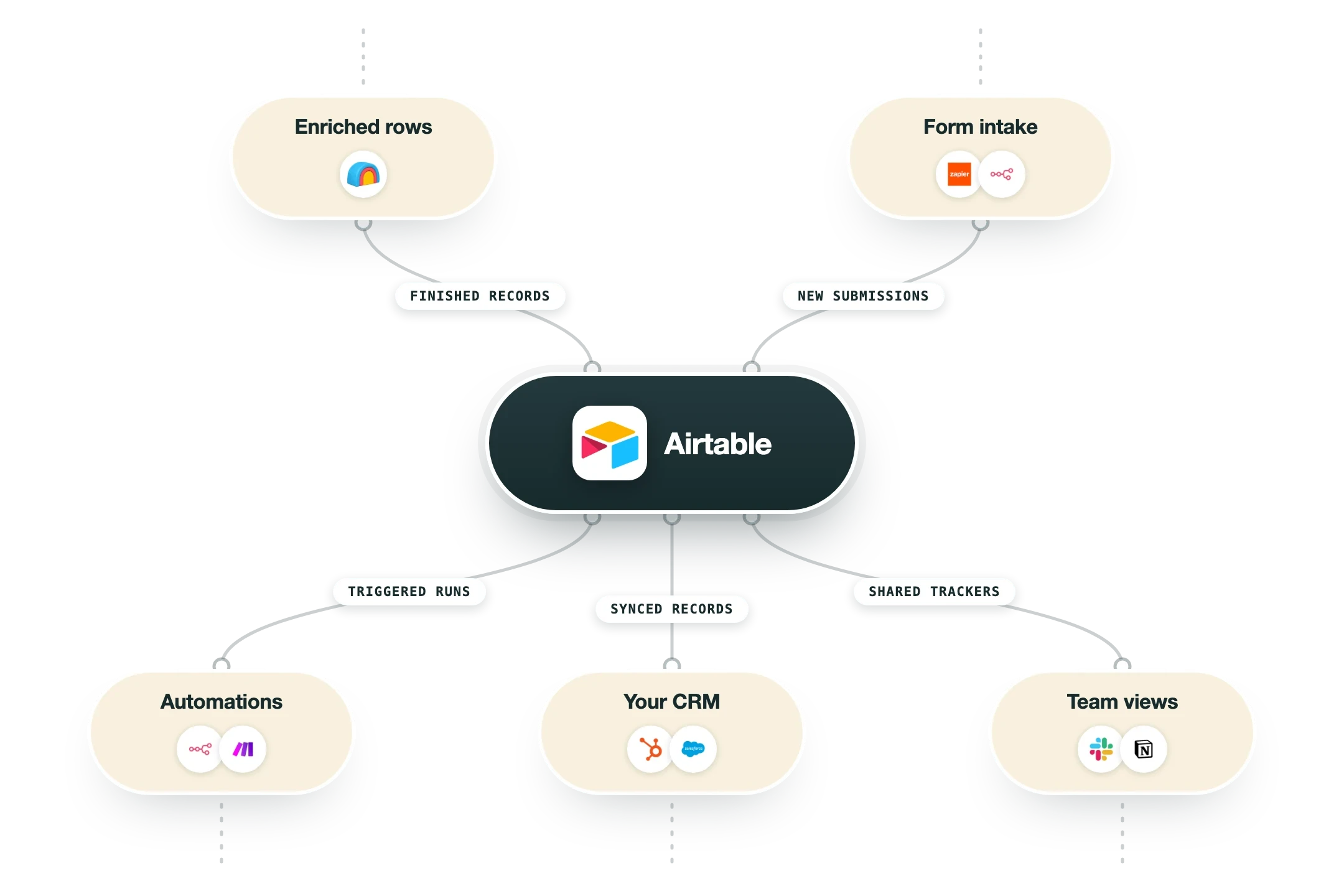
Airtable connects three ways: native sync that pulls records in from another system, automation actions that push events out, and a REST API most other software talks to. Which sync sources you can reach is decided by your plan, so check the tier before you design around one.
REST API and webhooks | The main door into a base. Airtable caps requests at 5 per second per base and 50 per second per personal access token, returning a 429 with a 30 second cooldown when you push past it. Change webhooks are free, with 50 per base and payloads that expire after 7 days. |
Clay | Clay ships a proper Airtable integration that creates a record, updates an existing one, creates or updates on a matching value, checks whether a record already exists, and pulls enriched rows back out. You connect the account in Clay settings and supply the base ID. This is the practical route for getting enriched GTM data into an Airtable base. |
Salesforce | Sync brings Salesforce objects into a table so a base can report on CRM data without an export, and automations can write back. Airtable lists Salesforce as the only CRM in its own integrations directory, and the sync itself is on the higher tiers rather than Team. |
Standard sync sources | Box, Google Drive, Google Calendar, Outlook Calendar, Miro, GitHub Issues and GitHub Pull Requests are the standard set, available from the Team plan up. Automatic syncing happens as often as every 5 minutes. Premium sources such as Jira Cloud need Business, and multi-source sync into one table needs Business or Enterprise Scale. |
Slack, Gmail and Outlook | Native automation actions, so a record hitting a status can post to a Slack channel or send an email without any middleware. This is the cheapest way to make a base notify a human, and it is where most teams start before reaching for n8n. |
n8n, Make and Zapier | All three ship first-class Airtable nodes covering create, update, search and delete, plus triggers on new or changed records. If you already have n8n or Make, that is usually a better home for branching logic than Airtable's own automations, which get awkward past a few steps. |
Snowflake, Databricks and Tableau Cloud | Warehouse and BI connections on the upper tiers, which matter if a base is feeding reporting rather than only powering an operational process. On-premises sync connectors are Enterprise Scale only. |
Claude and ChatGPT | Airtable lists connections that bring base data into Claude and ChatGPT, alongside its own Omni assistant working inside the product. Omni respects the permissions of whoever is asking, so it cannot read a base the user cannot. |
What is missing | No enrichment provider, no email finder, no verification, no sending, so anything GTM has to be bolted on through Clay, the API or an automation platform. There is also no native HubSpot sync in Airtable's own directory, which means HubSpot lands via n8n, Make, Zapier or a script. |
Pro’s
The learning curve is short enough that a marketer can build a working relational base in an afternoon, and that is the whole reason Airtable displaced so many Google Sheets.
Interfaces let you hand a filtered, read-only screen to someone who should never touch the underlying grid, and read-only viewers stay free on every plan.
Automations cover Slack, Gmail, webhooks and custom JavaScript, so a base can push work outward instead of just being a static record store.
Omni now builds tables, interfaces and automations from a plain description, and Airtable bundles AI credits into every tier including the free one.
The REST API and the change webhooks are well documented and stable, so Clay, n8n and Make can read and write records without a middleman.
Sync pulls live records out of Salesforce, Jira, Zendesk, Box and Google Drive, which keeps a reporting base current without anybody doing a nightly export.
Cons
Billing is per editor, so $20 a seat on Team and $45 on Business turns into real money the moment a dozen people need to change a record.
Record caps drive the upgrade rather than usage doing it, and 1,000 records on Free or 50,000 on Team fill up fast on anything resembling a lead list.
Airtable does no GTM work of its own, so enrichment, email finding and verification all have to come from somewhere else and be wired in by hand.
Reviewers on G2 report formula lag and slow loads once bases grow large and relations pile up, which is the usual ceiling on a browser-based database.
The controls that make it defensible in a bigger company, admin panel, SAML SSO, audit logs and DLP, are all on Business and Enterprise Scale.
Pricing
Free
$0 Up to 5 collaborators with editor or creator rights
1,000 records per base and 1 GB of attachments
100 automation runs a month
1,000 API calls per workspace per month
2 weeks of revision and snapshot history
500 AI credits per editor per month
Team
$20/user/month Billed annually, about $24 month to month
50,000 records per base and 20 GB of attachments
25,000 automation runs a month
100,000 API calls per workspace per month
1 year of revision and snapshot history
Standard sync integrations and 15,000 AI credits per collaborator
Business
$45/user/month Billed annually, about $54 month to month
125,000 records per base and 100 GB of attachments
100,000 automation runs a month and uncapped API calls
Premium sync integrations, two-way sync and multi-source sync
Admin panel, SAML SSO and granular permissions
20,000 AI credits per paid user per month
Enterprise Scale
Custom Quote from sales, annual contract
500,000 records per base and 1,000 GB of attachments
500,000 automation runs a month
HyperDB, app library and enterprise hub
Audit logs, DLP, custom revision history and enterprise API
On-premises sync and 25,000 AI credits per paid user at list price
How it fits your stack
Alternatives



At a glance
Relational tables with typed fields
Interfaces for non-technical users
Automations with scripts and webhooks
Omni AI app builder on every plan
Sync from Salesforce, Jira and Zendesk
REST API and change webhooks
1,000 records per base on Free
Free plan capped at 5 editors
Read some of our client stories





GTM Workflows
Learn how to use GTM tools in workflows
Guides and tutorials to get the most from your workflows








Ready to get started?




By clicking Sign Up you're confirming that you agree with our Terms and Conditions.








