

AI search visibility analytics. Tracks how ChatGPT, Perplexity, and Gemini describe and recommend your brand, and whether those AI answers send you buyers.

What is
Analyze
Analyze is an AI search analytics platform. It tracks whether and how your brand shows up when people ask ChatGPT, Perplexity, Gemini, Copilot, Grok, or Google AI Mode about your category. The team calls it your AI search console, a window into the queries your web analytics never see. You define the prompts your buyers actually type, and Analyze checks them daily across each engine. It scores visibility by topic, reads sentiment in the answers, maps which sources the models cite, and lines you up against competitors prompt by prompt. A GA4 integration then ties AI mentions to real sessions and conversions. In a GTM stack, this is the layer for understanding inbound traction in the AI world. A growing share of buyers never Google you anymore; they ask an assistant and act on whatever it says. Classic analytics are blind to that step. Analyze tells you whether the engines recommend you, describe you accurately, and actually send you buyers. An honest note from us: we do not use Analyze day to day. The problem it measures is real, though, and a tool like this is how a team starts measuring it. The category is young, so treat any vendor here as a pilot, and keep checking whether its tracked prompts match how your buyers actually ask.
Integrations and the modern GTM stack
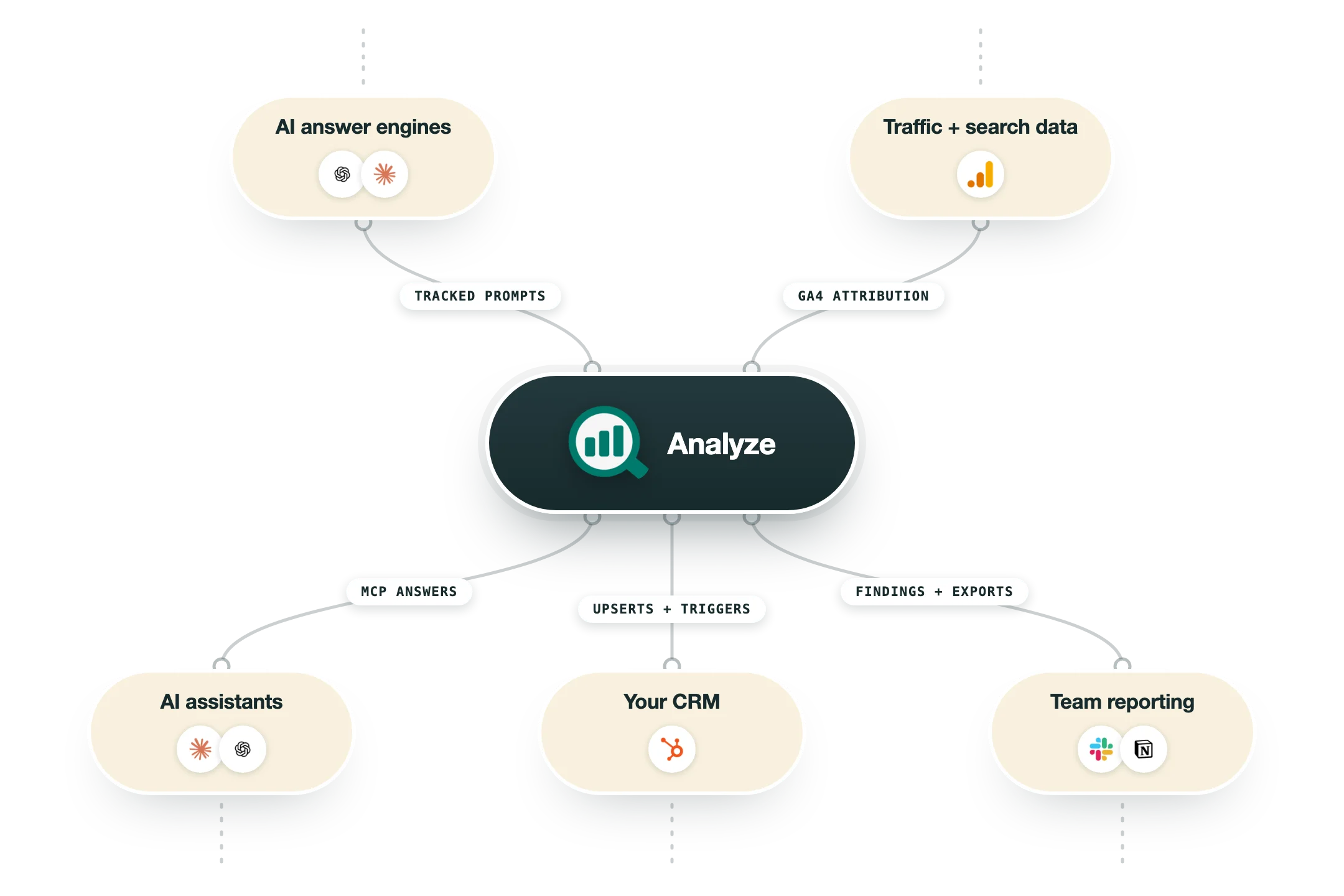
Analyze layers onto the analytics you already have and pushes what it finds to where your team works:
Google Analytics 4 | Connects to your existing GA4 property and layers AI-source attribution on top: sessions arriving from ChatGPT, Perplexity, Claude, or Gemini, the pages they land on, and the conversions they drive. Nothing new to install, and the attribution works retroactively. |
Google Search Console, Semrush, DataForSEO | Data sources inside the Agent Builder, so automated workflows can pull search and keyword data next to the AI-visibility numbers. |
HubSpot | Agent workflows read HubSpot records, upsert results back, and can be triggered by CRM events like a deal closing. |
Slack | Agents and the Sheets workspace post their findings to a channel, so weekly visibility reports arrive where the team already talks. |
WordPress and Notion | Content workflows read from and publish to both, closing the loop from a visibility gap to a shipped page. |
Exports | Anything the platform produces leaves as CSV, Excel, DOCX, or PDF for BI tools and stakeholder decks. |
MCP for Claude and ChatGPT | An MCP connection exposes Analyze to Claude and ChatGPT, so you can ask your AI assistant about your visibility numbers, tracked prompts, and competitor presence straight from a chat. |
What it does not have | No Zapier app is documented today; the Custom tier lists custom integrations, so heavier plumbing is a sales conversation. |
Pro’s
Ties AI visibility to GA4 sessions and conversions instead of stopping at mention screenshots.
Covers seven engines including ChatGPT, Perplexity, Gemini, Claude, Copilot, and Grok.
Unlimited seats and unlimited competitor tracking come standard on every plan.
Flat monthly pricing with no credit system keeps the bill predictable.
Content Writer and Optimizer workflows turn citation gaps into publishable fixes.
Cons
Young product with almost no independent G2 or Capterra review history yet.
The Growth plan caps you at 3 engines and 25 tracked prompts per day.
AI answers vary by user and session, so any tracker samples the landscape rather than seeing all of it.
You still have to validate that its tracked prompts match how your real buyers phrase questions.
Pricing
Growth
$99/mo Free trial, cancel anytime
3 engines: ChatGPT, Google AI Mode, Perplexity
25 tracked prompts daily, 50 ad hoc per month
Competitor tracking, GA4 integration, weekly recommendations
1 Content Writer and 1 Optimizer workflow
Pro
$250/mo Free trial, cancel anytime
4 engines, 35 tracked prompts daily
100 ad hoc prompts per month
AI Traffic Analytics on GA4
10 Content Writer and 5 Optimizer workflows
Custom
Custom Contact sales for a demo
All engines, custom prompt volumes
Unlimited ad hoc prompts and content workflows
Daily recommendations and dedicated account manager
Custom integrations and dedicated training
How it fits your stack
Alternatives


At a glance
Tracks 7 AI answer engines
Daily prompt tracking
Sentiment and citation analysis
Competitor share of voice
GA4 conversion attribution
Content briefs from citation gaps
Unlimited seats on every plan
Read some of our client stories





GTM Workflows
Learn how to use GTM tools in workflows
Guides and tutorials to get the most from your workflows





Ready to get started?




By clicking Sign Up you're confirming that you agree with our Terms and Conditions.








