

Leadinfo identifies the companies visiting your site, scores their intent, and pushes alerts and CRM records, with strong coverage of European traffic.
What is
Leadinfo
Leadinfo identifies the companies visiting your site, with a strong European footprint. It matches anonymous traffic to the business behind it, then shows which companies visited, what they read, and how engaged they were, so quiet traffic becomes a prioritized lead list instead of a number in analytics. You install a script, and visiting companies appear in a live dashboard with firmographics, pages viewed, and a lead score reflecting how serious the interest looks. Personas, triggers, and CRM sync turn that into routed alerts and tasks rather than a report nobody opens. It belongs at the inbound layer as an intent source, especially for EU heavy traffic where US person level tools fall short on coverage. Identified accounts feed into Clay for contact enrichment and into the CRM so the right rep follows up fast. Leadinfo is our default when a client's audience is European and account level identification matters more than US person level matches. RB2B carries the US side, and Leadinfo handles Europe, where its coverage holds up. We treat each identified company as a signal, not a finished lead. Only the on profile ones get routed into the outbound motion we build for the client, and from there we use LeadsFactory to find the rest of the buying committee at that account.
Integrations and the modern GTM stack
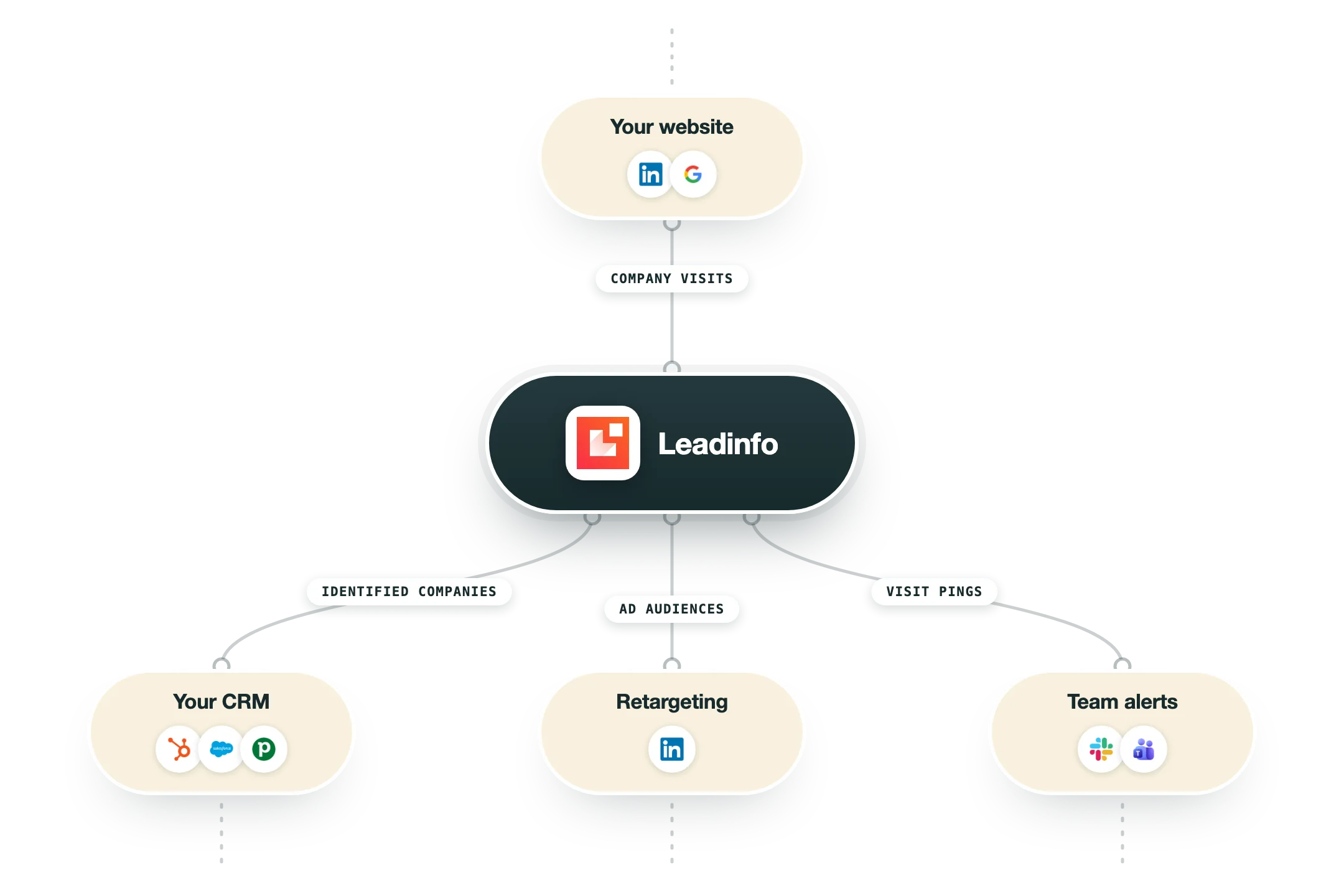
Leadinfo identifies the companies visiting your website, and pushes them into an unusually wide range of CRMs:
CRMs | Around 39 native connections, including HubSpot, Salesforce and Pipedrive alongside many European systems most tools ignore. Identified visitors become records without any middleware. |
LinkedIn Ads and Google Ads | Identified visitor companies become retargeting and lookalike audiences for your ad spend. |
Slack and Teams | Sales gets a ping the moment an interesting company hits the site. |
Clay | Identified companies flow into Clay when you want enrichment before action. |
Zapier and Make | The official route to everything else, including cold-email tools, which are not native. |
No public API | Worth knowing before you plan a custom build: Leadinfo itself says it has no public API, so the connectors above are the whole surface. |
Pro’s
Account-level identification is strong for European traffic where person-level tools struggle.
A live dashboard with firmographics and pages viewed makes intent easy to read at a glance.
Lead scoring and personas help reps prioritize the companies worth a touch.
Triggers and CRM sync route identified accounts automatically instead of into a static report.
Deep integrations to HubSpot, Salesforce, and LinkedIn Ads wire it into existing motions.
Cons
Identification is company-level, so you still need enrichment to find the right contacts.
Pricing scales by unique companies identified, so high-traffic sites jump tiers quickly.
Useful capabilities like autopilot and content are behind separately priced add-ons.
Pricing is set in euros, adding a conversion step for teams budgeting elsewhere.
Pricing
Starter
EUR 69 per month
Up to 50 companies identified
Real-time tracking and scoring
CRM integrations, 3 users
Scale
EUR 159 per month
Up to 250 companies identified
Screen recordings and personas
HubSpot and LinkedIn Ads, 10 users
Pro
EUR 359 per month
Up to 750 companies identified
Mobile phone numbers
Salesforce and Marketo, unlimited users
Custom
Custom contact sales
Higher company volumes
Tailored setup
Dedicated support
Add-ons and Credits
from EUR 39 billed separately
Autopilot from EUR 39 per seat
Leadbot Business from EUR 39
Liquid Content from EUR 39
How it fits your stack
Alternatives


At a glance
Company-level visitor identification
Strong European data coverage
Live dashboard with firmographics
Lead scoring and personas
Real-time triggers and alerts
HubSpot, Salesforce, LinkedIn Ads
Leadbot and content add-ons
Fourteen-day free trial
Read some of our client stories





GTM Workflows
Learn how to use GTM tools in workflows
Guides and tutorials to get the most from your workflows





Ready to get started?




By clicking Sign Up you're confirming that you agree with our Terms and Conditions.








