

A Sales Navigator exporter that cleans the name and company fields, rechecks every lead against your original search filters, and tells you which ones failed and why.
What is
Evaboot
Do a Sales Navigator search for heads of sales at companies of 11 to 50 people, and a chunk of what comes back does not fit the filters you set. Evaboot exports that search to a clean CSV and flags every lead that failed those filters before it reaches a sequence. Two things happen on the way out. Names, job titles and company names lose emojis, non-Latin characters and legal suffixes while capitalisation gets normalised, so Uber LTD lands in your CSV as Uber. A second pass rechecks profiles against your job title, headcount, experience and industry filters, then writes the failure reason into a No Match column. Evaboot puts the same engine behind an email finder that claims 60 to 80 percent discovery and a verifier that grades addresses valid, catch-all or bounce. Everything works live off your own Sales Navigator seat through a Chrome extension, capped at 2,500 leads a day, and the same four jobs are exposed as an API. Evaboot is the tool we would hand someone whose list building starts and ends in Sales Navigator, because nothing else marks the mismatches with a reason you can read. Nebor does its scraping through PhantomBuster, Apify and n8n into Clay, where that filter check is a Clay formula we own and can change.
Integrations and the modern GTM stack
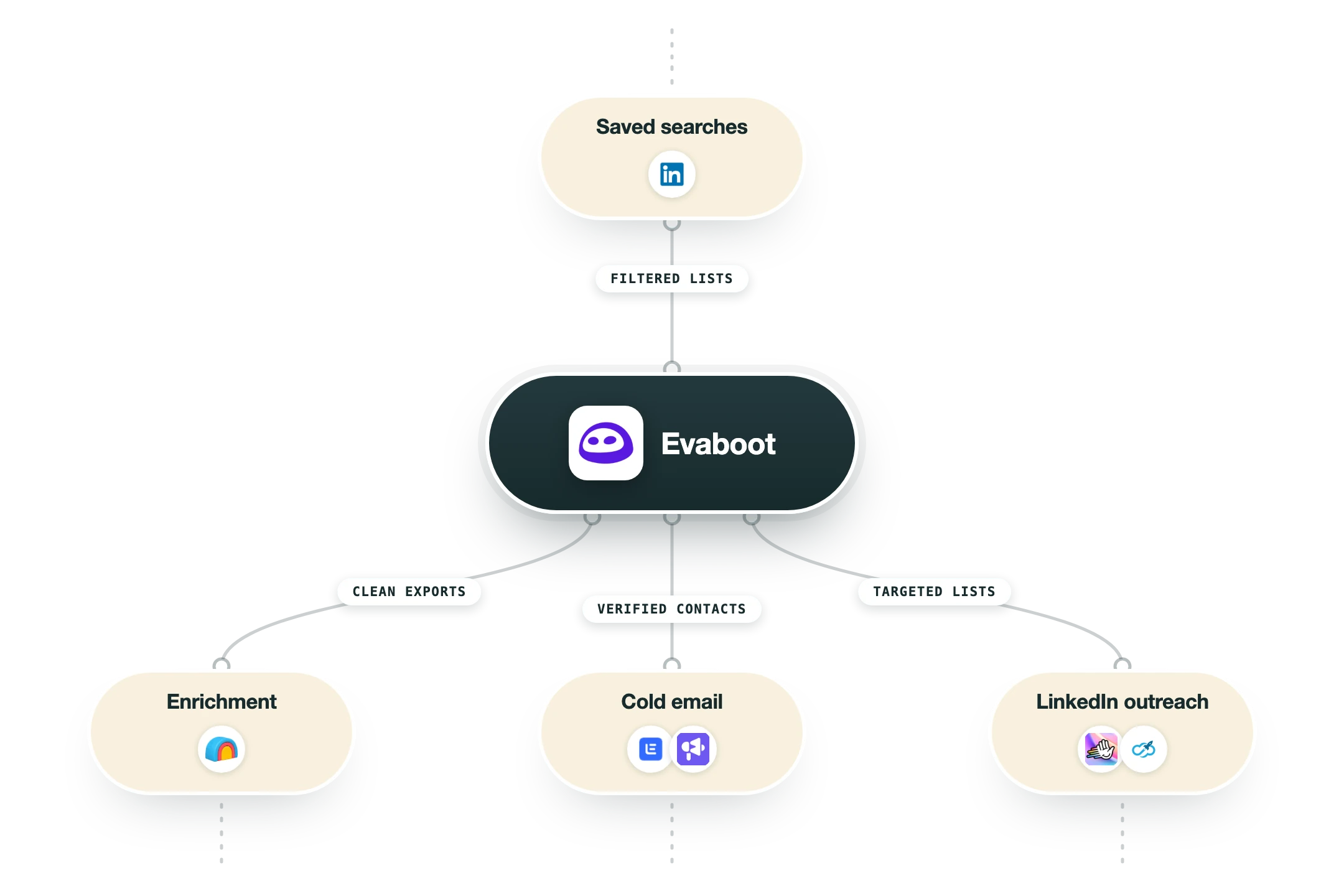
Evaboot has one hard dependency and a short list of places it can send the finished file. Everything starts inside a Sales Navigator session you are already logged into, and the connectors exist to stop the export ending its life as a CSV in your downloads folder.
LinkedIn Sales Navigator | The dependency the whole product rests on. Evaboot reads the search or list you are looking at, visits each profile live rather than trusting the search page, and refuses to work on free LinkedIn or on Recruiter. Exports are capped at 2,500 leads per 24 hours per Sales Navigator account. |
Chrome extension | The main surface. An Evaboot button appears on lead searches, account searches, saved searches and saved lists, and one click queues the export. You can connect several Sales Navigator accounts to one Evaboot account, which is the only supported way to move more than 2,500 leads in a day. |
Clay | You paste a Clay Monitor Webhook URL into Evaboot and pick automatic or manual delivery. On automatic, every finished export drops into the Clay table as rows the moment it is processed, and on manual you choose which completed jobs to send after reviewing them in the Evaboot dashboard. |
Zapier, n8n and Make | All three are live and take the finished list into a workflow, which covers most routing you would want without writing code. This is where Evaboot output usually gets deduplicated against a CRM or dropped into a sequencer, since Evaboot itself does no sending. |
HubSpot | The only native CRM connection at the moment, pushing leads from an export into HubSpot records. Pipedrive, Salesforce and Google Sheets are all listed on the integrations page as Coming Soon, so anything outside HubSpot goes through Zapier, Make or n8n today. |
REST API and webhooks | Four POST endpoints cover the whole product: extractions/url for a Sales Navigator search URL, extractions/profiles for a list of profile URLs, email-finder for name and domain pairs, and email-validation for a list of addresses. Each takes a webhook_url and returns a job id, so results are delivered rather than polled. |
What is missing | No phone numbers at any tier, so Kaspr, Lusha or a similar provider has to work alongside it. No LinkedIn messaging, connection requests or sequencing either, which keeps Evaboot out of the automation category that PhantomBuster and Aimfox occupy. There is also no CRM deduplication, so the same person will export twice across two searches. |
Pro’s
The No Match column gives a reason for every rejected lead, so you can see that a profile failed on industry or headcount instead of deleting rows on a hunch.
Evaboot's own help pages put the mismatch rate at 20 to 30 percent of a typical search, and that is a rare piece of honesty about how noisy Sales Navigator results really are.
Field cleaning happens before the export lands, so first names arrive without emojis and company names without their legal suffix, and your merge tags stop producing Hi Tom at Uber LTD.
Every plan carries unlimited seats and unlimited connected Sales Navigator accounts, so a three-person team buys credits once rather than a licence each.
Credits roll over while the subscription stays active, and at $99 for 4,000 credits a lead with a verified email works out around five cents.
The API covers all four jobs with webhook delivery and the Clay connector drops a finished export straight into a table, so this does not have to stay a manual CSV habit.
Cons
Nothing works without a Sales Navigator seat, and LinkedIn now lists Core at $119.99 a month, so your real entry cost is that plus whatever credit tier you pick.
You spend a credit per lead exported whether it matches or not, and a list unlocks all or nothing, so the 20 to 30 percent that fail the filter check are billed to you anyway.
The ceiling is 2,500 leads a day per Sales Navigator account, and Evaboot warns against using any other LinkedIn scraper on that account the same day, so volume means buying more seats.
There are no phone numbers anywhere in the product, so any multichannel play needs a second vendor such as Kaspr or Lusha layered on top of it.
Reviews on Capterra and complaint boards repeat the same two problems, which are recurring charges after what a buyer thought was a one-off export and slow replies when a refund is asked for.
Pricing
100 credits
$9/month $8 a month billed yearly, $90 for the year
100 leads or accounts exported
Or 50 leads with a verified email
Or 200 emails verified
Every feature, unlimited seats
500 credits
$29/month $24 a month billed yearly, $290 for the year
500 leads exported or 250 with verified emails
Data cleaning and lead filtering included
Email finder and verifier
Zapier, n8n, Make, Clay and HubSpot
1,500 credits
$49/month $41 a month billed yearly, $490 for the year
750 leads with verified emails
LinkedIn URL enrichment and bulk upload
API access with webhooks
Unlimited Sales Navigator accounts
4,000 credits
$99/month $83 a month billed yearly, $990 for the year
2,000 leads with verified emails
Works out near five cents a finished lead
Credits roll over on an active plan
Still capped at 2,500 exports a day per seat
8,000 to 20,000 credits
$149 to $299/month $124 and $249 a month billed yearly
4,000 to 10,000 leads with verified emails
Needs several Sales Navigator seats to work at speed
Same feature set as the entry tier
Yearly totals of $1,490 and $2,990
How it fits your stack
Alternatives


At a glance
Sales Navigator search and list export to CSV
No Match column with a reason per lead
Name, title and company field cleaning
Email finder at 60 to 80 percent discovery
Email verifier that grades catch-alls
Chrome extension plus a REST API with webhooks
Zapier, n8n, Make, Clay and HubSpot
Unlimited seats and Sales Navigator accounts
Read some of our client stories





GTM Workflows
Learn how to use GTM tools in workflows
Guides and tutorials to get the most from your workflows
No items
Ready to get started?




By clicking Sign Up you're confirming that you agree with our Terms and Conditions.








