

A relationship CRM that assembles contact records from your email, calendar and public web data, follows you into Gmail, Outlook and any browser tab, and adds a light engagement layer on top.
What is
Nimble
A consultant's contact list lives in four places at once, the Gmail thread, the LinkedIn connection, the phone address book and a spreadsheet nobody has opened since March. Nimble was built to collapse those into one record, assembling contact profiles out of your email, your calendar and whatever public profile data it can match to a name. The work happens where you already are. Nimble Prospector is a browser extension for Chrome, Firefox, Safari and Edge that hovers over any name on a page or a LinkedIn profile and builds a record from it, and separate add-ins put the same panel inside Gmail and Outlook. Around that core sits an engagement layer the company has been building since 2024, covering deal pipelines, Kanban workflow boards, group messages, email sequences that send from your own domain, web forms, and a Web Chat widget with an AI qualifier that shipped in May 2026. Nimble is the right shape for a solo operator or a small relationship-led team living in Outlook or Gmail, and the wrong shape for an outbound engine. Nebor does not run it, and every route from Nimble into a stack like ours passes through Zapier or Make, and that middle layer is where automated pipelines start to leak.
Integrations and the modern GTM stack
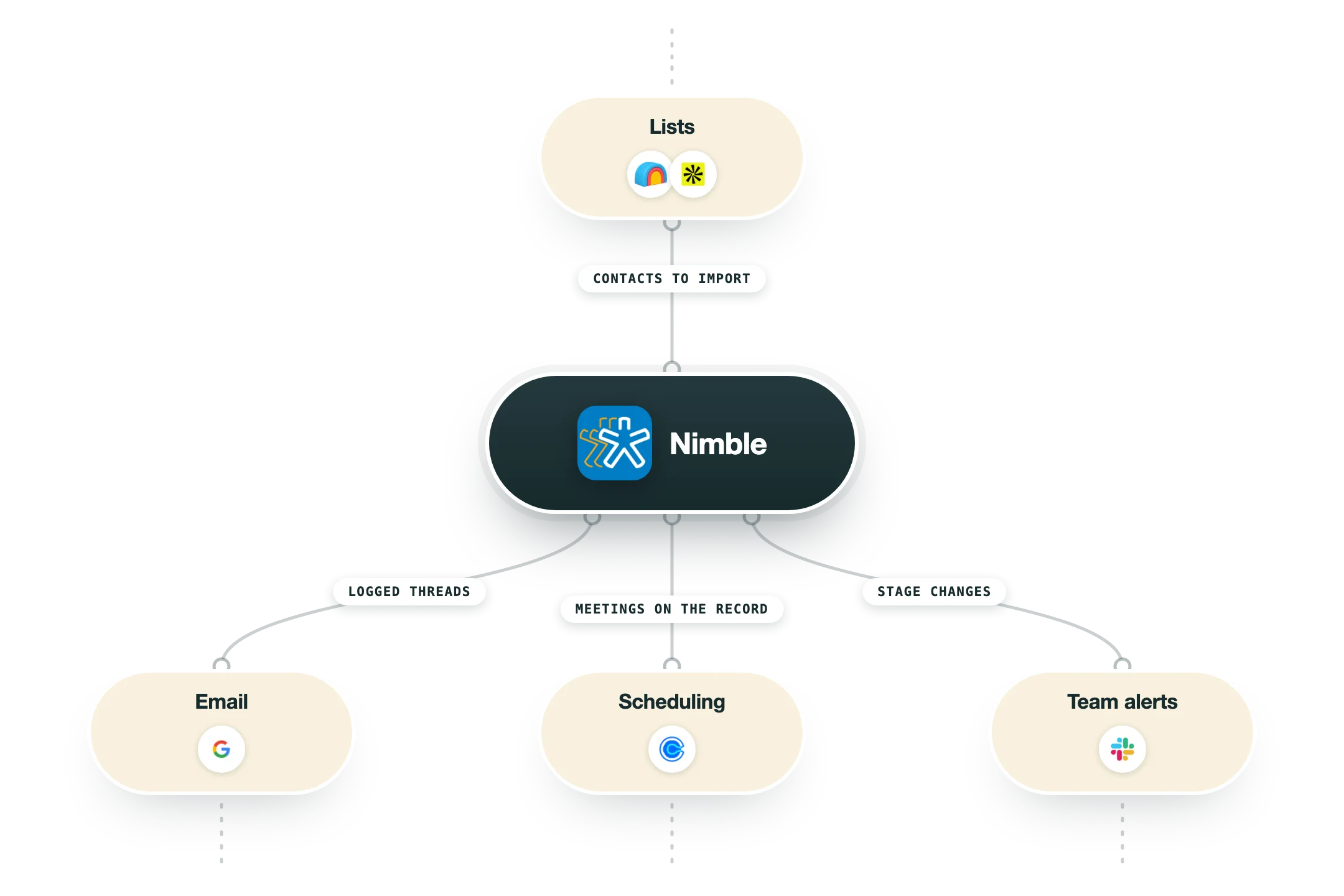
Nimble's real integration story is the inbox and the browser, since the product was designed to sit inside Microsoft 365, Google Workspace and whatever tab you happen to be reading. Everything past that runs on Zapier, Make or the REST API, so plan for a middle layer if you want data moving on its own.
Microsoft 365 and Outlook | The deepest connection in the product. Contacts and calendar sync in both directions on a daily, weekly or biweekly schedule with a manual force option, multiple mailboxes connect at once, and the add-in loads inside Outlook desktop, browser and the mobile app. OneDrive files attach to contacts and deals. |
Google Workspace and Gmail | Gmail sync, two-way calendar sync across multiple Google calendars, Google Drive attachments and a Gmail add-on for creating records and tracked emails from the inbox. Contact sync runs one way only, once or weekly, so anything you add in Nimble has to be pushed back into Google by hand. |
Nimble Prospector | The browser extension for Chrome, Firefox, Safari and Edge that most Nimble users treat as the product. Hover a name anywhere on the web or open a LinkedIn profile and it builds or updates a record, pulling email, phone, company, title and location against the 25 enrichment credits each seat gets monthly. |
PhoneBurner | The one outbound-calling integration Nimble built itself. It pulls a target list out of Nimble, power dials it, logs and records the calls, books follow-ups and advances contacts through Workflow stages automatically, which is the closest thing to a dialer motion inside Nimble. |
Zapier and Make | The default route to everything else. Nimble counts 120 plus app integrations and Zapier carries most of them, while Make has a documented connector in the help centre. Marketplace listings such as Skyvia, viaSocket and Bit Integrations are third-party sync tools rather than direct connections. |
HubSpot | A Nimble Data Sync app lives in the HubSpot marketplace for teams running Nimble alongside HubSpot marketing. It is a one-way data sync built by a partner rather than a native two-way object mapping, so treat it as a bridge instead of a real CRM merge. |
Nimble API | REST with OAuth 2.0 and admin-generated API keys, documented at nimble.com/developers/docs with an OpenAPI spec. Contacts, contact fields, deals, deal pipelines, tasks, activities, users and draft messages are covered. Nimble's own help article still lists related activities, related messages and contact merge as TBD. |
What is missing | No Clay integration, no n8n node, no native Salesforce connector, and no live LinkedIn or Facebook data since both platforms cut third-party API access. If your enrichment runs in Clay and your automation runs in n8n, every write into Nimble is a custom API call or a Zap you now maintain. |
Pro’s
One price buys the whole product, so a five-person consultancy pays $24.90 a seat and gets pipelines, workflows, sequences and reporting without a tier chart to decode first.
Nimble Prospector runs on any page in Chrome, Firefox, Safari or Edge, so a record gets created off a LinkedIn profile or a company site without anyone opening the CRM.
Microsoft 365 support is deeper than the price suggests, with two-way contact and calendar sync, a Teams add-in, OneDrive attachments and the panel inside Outlook desktop, browser and mobile.
Records assemble themselves from email, calendar and matched public profiles, and that removes most of the manual logging a relationship-led operator was never going to do anyway.
It holds a 4.5 on G2 across more than a thousand reviews after fifteen years on the market, and reviewers keep naming contact enrichment and the support team as the reasons.
The product still ships, with email sequences in 2024, an email marketing add-on in 2025 and Web Chat with an AI qualifier in May 2026, so this is no parked codebase.
Cons
The social premise is thinner than the name suggests, because Facebook and LinkedIn cut third-party API access years ago, so what remains is public profile matching plus pasting URLs onto records by hand.
Included allowances run out quickly, with 25 enrichment credits per user a month, 1,000 emails per licence and 25,000 contacts per account, and each one carries a $10 to $99 monthly upgrade behind it.
There is no free tier and nothing beyond a 14-day trial, and the add-ons stack on the seat price, so $15 email marketing, $12 web forms and chat and a $69 email package leave the $24.90 headline well behind.
The API covers contacts, deals, tasks and messages while Nimble's own docs still mark related activities, related messages and contact merge as unfinished, and there is no Clay connector and no n8n node.
Email handling and reporting stay basic, since the app shows only inbox and sent items with no access to your folders, and revenue teams wanting cohort or attribution views end up exporting the data.
Pricing
Business
$24.90/seat/mo billed annually, or $29.90 monthly, the only plan Nimble sells
25,000 contact records at account level
2 GB storage per seat
Unlimited deal pipelines, workflows and custom fields
Nimble Prospector with 25 enrichment credits per user a month
1,000 emails per licence a month across group messages and sequences
Microsoft 365 and Google Workspace integration
Email Marketing add-on
$15/company/mo company-wide upgrade, launched 2025
Drag-and-drop editor and pre-built templates
AI template generator
Campaign tracking for opens, clicks, bounces and unsubscribes
Pay-as-you-go sending above the included allowance
Web Forms and Web Chat
$12/company/mo up to 10 forms free for 30 days, Web Chat shipped May 2026
Web forms that create contacts directly
Live chat widget with AI Chat Helper
Post-submission automatic emails and webhooks
Enrolment straight into email sequences and workflows
Usage upgrades
from $10/mo bolted onto the Business plan as you outgrow the caps
10,000 extra contacts for $10 a month
10 GB extra storage for $10 a month
100 enrichment credits for $10 a month
Email packages at $15 for 2,000, $69 for 10,000 or $99 for 25,000 a month
How it fits your stack
Alternatives




At a glance
One plan at $24.90 per seat
Social profile matching and auto-enrichment
Nimble Prospector browser extension
Gmail and Outlook add-ins
Deal pipelines, workflows and reports
Email sequences and group messages
Web forms and Web Chat add-on
Two-way Microsoft 365 contact sync
Read some of our client stories





GTM Workflows
Learn how to use GTM tools in workflows
Guides and tutorials to get the most from your workflows











Ready to get started?




By clicking Sign Up you're confirming that you agree with our Terms and Conditions.








