

Proposal, quote and e-signature software with templates, approval workflows, CRM sync and CPQ, sitting at the very end of the funnel where deals get signed.
What is
PandaDoc
PandaDoc is the last tool a deal touches, and none of the work it does will put anything in your pipeline. It builds proposals, quotes and contracts in a drag and drop editor, sends them for legally binding e-signature, and reports back on who opened which section and for how long. Reps work from templates and a shared content library so the pricing table, the legal clauses and the case study stay consistent across a floor. Approval workflows route a discount past a manager before the buyer sees it, Rooms hold a whole deal behind one link, and Stripe or PayPal blocks collect payment on signature. The CRM connections are the reason it belongs in a go to market stack at all. Native integrations with Salesforce, HubSpot, Pipedrive, Dynamics and Zoho push deal and product data into the document and write the signed status back to the record, and CPQ adds rules based quoting on a product catalog. Buy PandaDoc when quotes and proposals are the bottleneck and your reps rebuild the same document every week. Skip it while your real shortage is deals reaching the proposal stage at all, because a faster closing tool does nothing about an empty pipeline. Nebor does not run it, and our work sits upstream of where it lives.
Integrations and the modern GTM stack
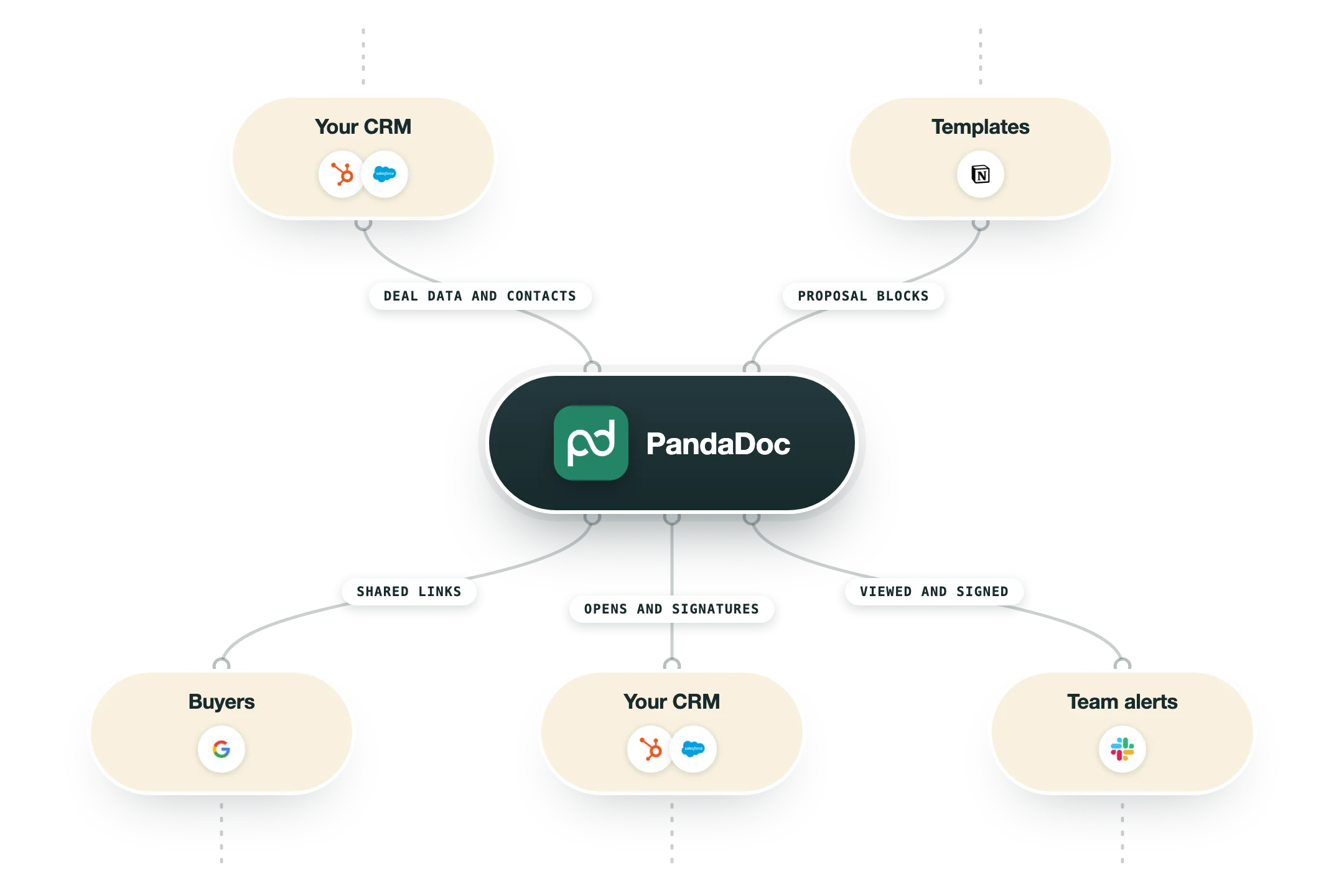
PandaDoc's integrations all point in one direction, which is pulling a CRM record into a document and pushing the signed result back out. The connections that make it worth more than a signing tool are gated by plan and several are billed as add-ons, so read the tier before you read the feature list.
HubSpot CRM | Available on Business and Enterprise. Variables move data both ways, products drop from HubSpot deals into pricing tables and the quote builder, and documents get created from Deals, Contacts or Companies with status tracked back in HubSpot. The external automations that change deal stage or update line items are a paid add-on at $39 a month per account on Business and are included on Enterprise. |
Salesforce | Restricted to Business Annual and Enterprise Annual and sold as a paid add-on on top of seats. It covers Opportunities, Leads, Contacts, Accounts and custom objects, and passes product data into pricing tables and the quote builder. Two-way sync needs Salesforce Enterprise edition, or Professional with the API Access add-on, otherwise documents create but never sync back. |
Pipedrive, Zoho, monday.com and Dynamics | Embedded integrations that let a rep generate and send a document without leaving the CRM, with a separate Pipedrive CPQ app for quoting rules and compliance checks. The longer tail covers Copper, SugarCRM, Nutshell, Insightly, Freshsales, Salesmate, Pipeliner, Nimble, Brevo and ActiveCampaign, which is unusually wide coverage for this category. |
Payments | Stripe, PayPal, Square, Authorize.Net and QuickBooks Payments embed a checkout inside the document so a buyer can pay at the moment they sign. QuickBooks Online and FreshBooks handle the invoice side afterwards, and both of those carry a Premium label in PandaDoc's own directory. |
Zapier, Make and the API | Zapier and Make cover the automations the native CRM apps miss, such as routing on deal value or writing to a system PandaDoc has never heard of. The API is listed on Enterprise on the main pricing page but sells separately too, with a free key good for 60 documents a year and a $40 a month Developer plan covering 40 documents a month. |
ChatGPT and Claude | PandaDoc ships apps for both assistants that create agreements, send them for signature and answer questions about any contract in the workspace. Both are free to connect and the ChatGPT app is available on all plans, which makes this the cheapest way to script document work without touching the API. |
Storage and productivity | Google Docs edits and submits a document for signature without leaving the doc, Dropbox and OneDrive handle storage, Google Sheets drives bulk sends, and Slack plus Microsoft Teams carry the status notifications. Canva handles brand assets. Google Sheets and OneDrive are both marked Premium in the directory. |
What is missing | Nothing here reaches the top of the funnel. There is no native connection to Clay, Instantly, Smartlead, Lemlist or any enrichment or sending layer, because PandaDoc only starts working once a CRM record with a real opportunity on it already exists. Anything upstream has to come through Zapier, Make or the API. |
Pro’s
The free tier sends 60 documents a year with unlimited storage and unlimited users, so a small team can run real signed contracts through it long before anyone raises a purchase order.
Deal and product data flows out of Salesforce, HubSpot, Pipedrive, Dynamics or Zoho into the document and the signed status writes back to the record, which spares a rep from updating two systems after every close.
A shared content library with locked sections stops a twenty rep floor from inventing its own pricing table, and approval workflows put a discount in front of a manager before the buyer ever sees the number.
Document analytics show which section a buyer read and how long they stayed there, so a rep can tell whether the deal stalled on the pricing page or the security page.
Payment blocks from Stripe, PayPal, Square, Authorize.Net and QuickBooks sit inside the document itself, which means a signature and a first invoice can land in the same sitting.
There is a free API key with 60 documents a year and a full sandbox, so a developer can build and test the integration before any budget conversation happens.
Cons
Pricing is per seat, so twenty reps on Business at $49 comes to $11,760 a year on annual billing before a single add-on, and if the company already pays DocuSign the e-signature line gets bought twice.
The Salesforce integration runs only on Business Annual and Enterprise Annual and is billed as a paid add-on on top of the seat cost, and HubSpot's external automations carry their own $39 a month per account fee on Business.
CPQ, workflow automation, SSO, notary, team workspaces and the API all sit on Enterprise, which carries no published price, so the features that separate PandaDoc from a plain signing tool need a sales call.
Trustpilot has PandaDoc at 2.3 out of 5 across 683 reviews and ranks it 83rd of 87 software vendors, with the complaints clustered on surprise renewals and slow support, which sits a long way from the 4.7 it shows on G2.
Starter caps you at five templates with no content library, no custom branding and no CRM integration, so proposal work in any serious sense only begins at the $49 tier.
Pricing
Free
$0/month 60 documents a year, no credit card
60 documents sent per year, unlimited storage
Up to 2 recipients per document and 5 templates
Drag and drop document editor
Real-time tracking and notifications
24/7 email and chat support
Starter
$19/seat/month Billed annually, $35 month to month
Unlimited document uploads and e-signatures
Rich media drag and drop editor
Templates still capped at 5
Real-time tracking and notifications
24/7 email and chat support
Business
$49/seat/month Billed annually, $65 month to month, demo required
Custom quotes and sales agreements
CRM integrations, Salesforce as a paid add-on
Custom branding and content library
Deal Rooms and approval workflows
Web forms and bulk send
Enterprise
Custom Per-seat or per-document pricing, sales call required
CPQ with product catalog and rules based quoting
Workflow automation and external automations included
Smart content and content locking
Single sign-on and team workspaces
Notary, API and data residency in US or EU
How it fits your stack
Alternatives




At a glance
Proposals, quotes and contracts from templates
Legally binding e-signature with audit trail
Free plan sends 60 documents a year
Starter from $19 per seat a month annually
Native Salesforce, HubSpot and Pipedrive sync
Approval workflows, deal Rooms and redlining
Pricing tables, product catalog and CPQ
Stripe, PayPal, Square and QuickBooks payments
Read some of our client stories





GTM Workflows
Learn how to use GTM tools in workflows
Guides and tutorials to get the most from your workflows








Ready to get started?




By clicking Sign Up you're confirming that you agree with our Terms and Conditions.








