

A B2B CRM that builds its own records from your inbox, calendar, email signatures and Android call history, aimed at small teams that resent data entry.
What is
Salesflare
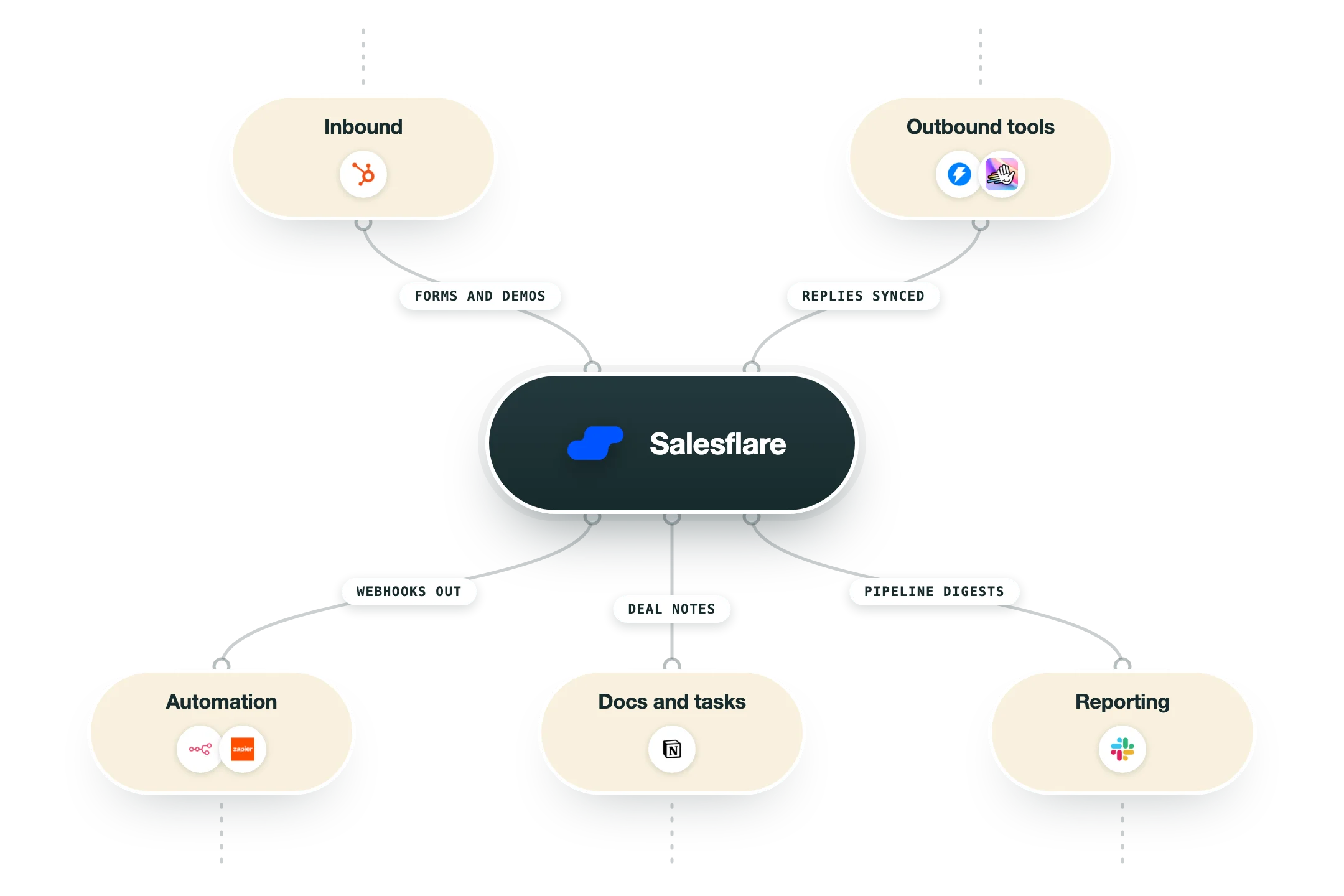
A CRM only tells the truth when every rep logs the call, the meeting and the email that went with it, and almost nobody does that on a Friday afternoon. Salesflare is a B2B CRM built in Antwerp to remove that chore, filling accounts and contacts from your inbox and calendar. It connects to Google Workspace, Microsoft 365 or an IMAP mailbox along with the calendar, then builds records out of what it finds there. Email signatures supply phone numbers and addresses, public profiles fill in company data, and the Android app logs calls from your phone's call history on its own. Around that capture layer sits a drag-and-drop pipeline, email and link tracking with a website script that shows which pages a prospect read, multi-step email workflows on the Pro plan, a Lead Finder priced in credits, and sidebars for Gmail, Outlook and LinkedIn. The mobile app carries every desktop feature, including a business card scanner. We would put a small B2B team on Salesflare over Pipedrive when the deals are relationship-led and the history already sits in the inbox. Nebor builds on HubSpot, Salesforce and Pipedrive, and Salesflare publishes no outbound webhooks and has no Clay or n8n connector, so an enrichment engine has to poll it.
Integrations and the modern GTM stack
Salesflare's most important integration is the one it never calls an integration, because the mailbox and calendar you connect on day one are what the product is made of. Everything past that is a marketplace of roughly 205 listings run on Apideck, and most of those entries are Zapier or Make connections wearing a Salesflare badge.
Google Workspace, Microsoft 365 and IMAP | The capture engine. Connect the mailbox and calendar and Salesflare reads them to build accounts and contacts, import email signatures, log meetings and suggest people you are in touch with. Other providers connect through the 'Other via IMAP' option, and Apple accounts need an app-specific password. |
Gmail, Outlook and LinkedIn sidebars | A Chrome extension puts Salesflare inside Gmail and LinkedIn, and a separate Outlook add-in covers Microsoft. The add-in does not work for IMAP or Gmail accounts that you happen to read inside Outlook, so check which client your reps actually open before you plan the rollout. |
Android call history | The Android app reads the phone's call history and logs calls against the matching contact without anyone tapping a button. There is no iOS equivalent, so an iPhone team gets meeting and email capture and then logs phone activity the old way. |
Zapier, Make and Blendr.io | The three brokers Salesflare points you at, and between them they carry most of the marketplace. Zapier reaches thousands of apps, Make handles the branching scenarios, and Blendr.io is offered for heavier enterprise work. Per-task pricing is the thing to watch once volume climbs. |
REST API | Documented at api.salesflare.com/docs with an OpenAPI file you can import into Postman. Bearer token auth from an API key made in settings, 46 endpoints covering accounts, contacts, opportunities, tasks, workflows, meetings, calls, messages, pipelines, stages and custom fields, and no outbound webhook subscriptions anywhere in the spec. |
Native partners | A small set of genuinely native builds sits inside the marketplace, including Leadinfo for visitor identification, Better Proposals, StoryChief, Emailable, Voxloud for cloud telephony and SyncPenguin for two-way syncing of Salesflare data. Listings show the developer name, so you can tell a native build from a Zapier one. |
Website tracking script | A snippet on your site ties page visits back to the contacts in your CRM and shows which pages they read, for how long, and when they came back. It pairs with the email tracking and feeds the lead scoring notifications rather than sitting in a separate analytics view. |
What is missing | No Salesforce listing, no Clay connector, no n8n node either official or community, and no MCP server that we could find. There is also no dialer, no marketing automation and no intent data in the product, so a Clay-driven enrichment stack talks to Salesflare through Zapier or raw HTTP calls against the API. |
Pro’s
The record fills itself from mail, calendar and email signatures, so a rep who barely opens the CRM still leaves a usable trail behind for the rest of the team.
Call logging pulls straight from the Android call history, and that captures the activity most CRMs lose because nobody wants to write up a call the moment it ends.
Every desktop feature is present in the mobile app rather than a cut-down version of it, which suits founders and field sellers working between meetings.
Reviewers put it at 4.8 on G2 across roughly 300 reviews and 4.7 on Capterra across 139, with ease of use and support quality named again and again.
Salesflare states there are no limits on contacts, users, tracked emails, custom fields, workflows, dashboards or pipelines, so the bill stays the seat count and the lead credits.
Customer data sits on Google Cloud servers in Belgium, so a European buyer gets EU residency and a signed DPA without negotiating an enterprise contract for it.
Cons
Reporting is the complaint that repeats across G2, Capterra and TrustRadius, and custom dashboards wait until the Pro plan while the chart types and filters underneath stay basic.
Automatic call logging only runs on Android, so an iPhone team logs calls by hand and loses a real slice of the capture that the whole product is sold on.
The data model stops at accounts, contacts and opportunities, since those are the only three object types that take custom fields and there are no custom objects to model anything else.
The public API runs to 46 endpoints on bearer keys with no outbound webhooks, so anything that needs to be real-time has to be polled by Zapier or Make instead of pushed.
The marketplace lists around 205 apps and most are brokered through Zapier or Make rather than built natively, with no Salesforce listing, no Clay connector and no n8n node at all.
Pricing
Growth
$29/user/mo billed annually, or $39 monthly, same figure in euros
Automated CRM data input from email, signatures and social profiles
Automatic meeting and phone call logging
Email, link and website visit tracking
LinkedIn sidebar, email sidebar and mobile app
Personalized email campaigns and 5 lead credits a month
Pro
$49/user/mo billed annually, or $64 monthly, marked most popular
Everything on Growth
Workflows of multiple follow-up emails
User permissions, pipeline access rules and view-only users
Custom dashboards and custom reports
100 lead credits a month
Enterprise
$99/user/mo billed annually, or $124 monthly, minimum 5 users
Everything on Pro
Full setup and tailor-made training
Data migration done for you
Dedicated account manager
250 lead credits a month
How it fits your stack
Alternatives



At a glance
Auto-fills records from inbox and calendar
Signature and public profile enrichment
Automatic call logging on Android
Gmail, Outlook and LinkedIn sidebars
Email, link and website visit tracking
Multi-step email workflows on Pro
Lead Finder with monthly credits
30-day trial, no credit card
Read some of our client stories





GTM Workflows
Learn how to use GTM tools in workflows
Guides and tutorials to get the most from your workflows











Ready to get started?




By clicking Sign Up you're confirming that you agree with our Terms and Conditions.








