

A CRM that renders as a spreadsheet inside the Gmail tab, with mail merge, email tracking and pipeline stages attached to the threads a small team already works.
What is
Streak
Seven hundred thousand people have installed Streak from the Chrome Web Store, and all of them run it in the same window. Streak is a CRM that lives inside Gmail as a browser extension, so a pipeline appears as a spreadsheet under the inbox and a deal is a labelled email thread. Stages, custom fields and magic fields that fill themselves from the mailbox with the last reply date and time in stage make up a pipeline. Automatic email sharing puts the whole team's correspondence on the deal, tasks sync to Google Calendar, and Thread Splitter breaks one long chain into separate records. An AI layer runs on credits and writes deal summaries, autofills fields from the thread or the open web, and answers questions about a deal with citations. Streak also publishes an MCP server at api.streak.com/mcp that is free on every plan, so Claude or ChatGPT can read and update the pipeline. Streak fits a small Gmail-native team whose deals really are won inside email threads, and it stops fitting the moment a machine is filling the pipeline. Clay writes to HubSpot, Salesforce, Pipedrive and Close with no Streak connector anywhere on the list, so our client builds land on those instead.
Integrations and the modern GTM stack
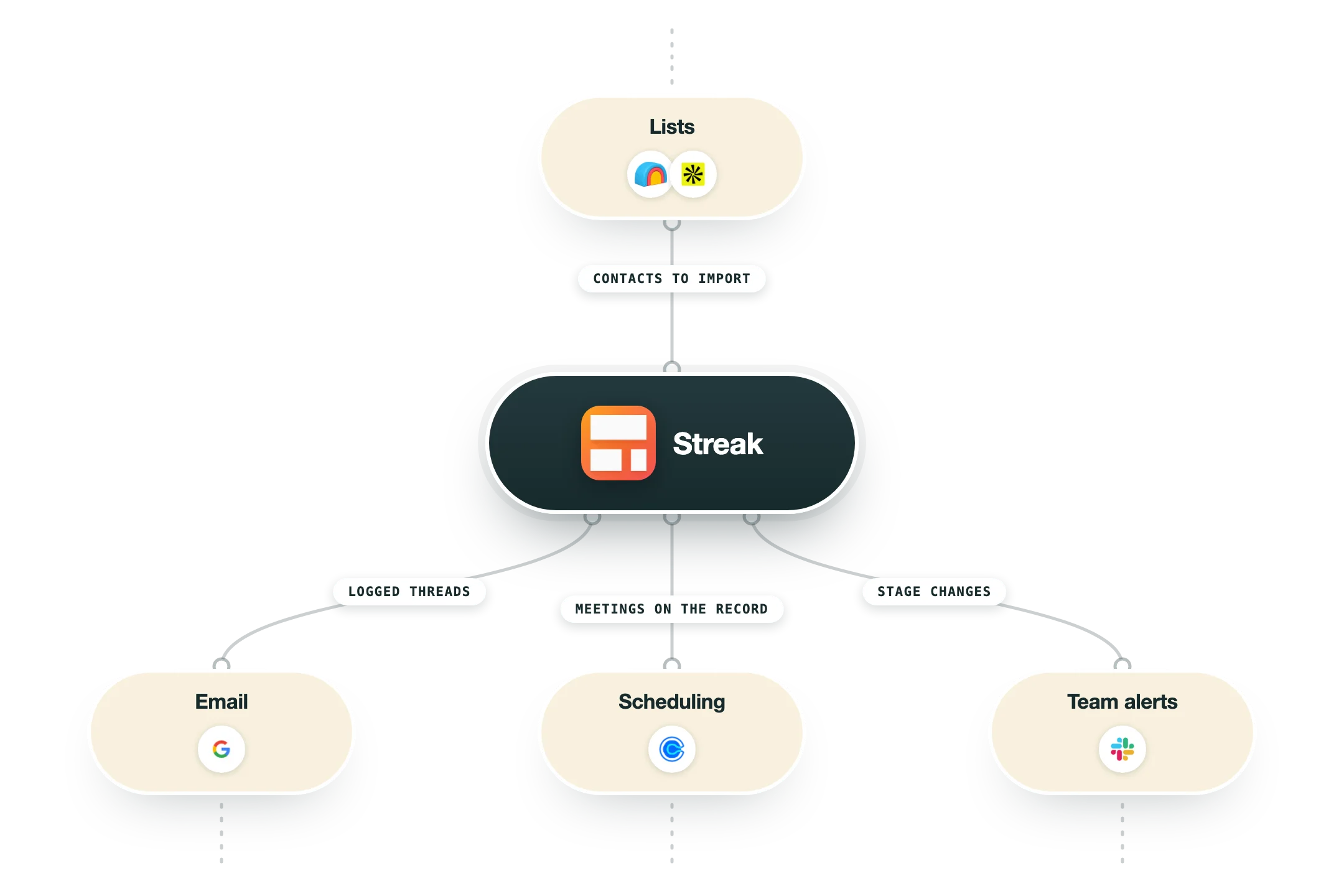
Streak's integration story is really two stories. Everything inside Google is native and deep because the product is a Gmail extension, and everything outside Google is either one of five direct connectors, a Zapier zap or a call you write yourself against the REST API.
Gmail and the browser extension | The product itself rather than an integration. Pipelines render under the inbox, a thread gets labelled into a deal, and the sidebar carries the record while you read the email. Installation is limited to Chrome, Safari and Edge, so Firefox is not supported at all. |
Google Workspace | Tasks sync out to Google Calendar and open back into the deal, attachments are auto-extracted from deal emails with manual adds from Drive, Sheets handles scheduled exports and imports, and a Streak bot in Google Chat searches pipelines and routes notifications. Included from Pro up. |
A profile page can be turned into a Streak lead without leaving LinkedIn, which covers the manual sourcing a founder or a single rep does by hand. Available from Pro. There is no LinkedIn automation or sequencing behind it. | |
Calendly, Typeform and Google Forms | The three native inbound capture connectors. A booking or a submission creates a box, adds contacts, drops a comment or a task, or adds someone to a mail merge. All three sit behind Pro+, which is the practical reason to move off Pro. |
Slack | A direct integration for pushing pipeline activity and notifications into channels, gated to Pro+ and Enterprise alongside the rest of the integrations menu. Deal conversation still lives in Gmail, so Slack here is an alerting surface rather than a place to work records. |
Allo phone system | The one native dialer. Calls start from a box, the sidebar or the contact list, and each one logs a recording, a full transcript, an AI summary, duration and direction, with SMS threaded onto the deal. Needs Streak Pro+ and an active Allo Business subscription. |
MCP server | Streak runs an MCP server at api.streak.com/mcp, free on every plan and authenticated over OAuth, so Claude, ChatGPT, Cursor and VS Code can search deals, create and edit boxes and fields, move stages and analyse pipeline health. It reaches CRM data only and leaves email content alone. |
Zapier, the REST API and webhooks | Zapier carries the 9,000-app long tail and is the route most teams end up using. The REST API is available from Pro, but native webhooks are held back to Pro+ and Enterprise, so event-driven work needs the more expensive seat. |
What is missing | Clay names HubSpot, Salesforce, Pipedrive, Close and Loxo as its CRM destinations and no Streak, n8n has Streak sitting as an open community feature request rather than a node, and there is no Outlook version and no native sync to Salesforce or HubSpot. An enrichment or signal engine reaches Streak through the API or a zap. |
Pro’s
The CRM renders where the work already happens, so a rep who lives in Gmail files a deal by labelling the thread instead of retyping the same conversation into a second system.
Magic fields keep last reply, time in stage and email activity current without anyone touching them, and that removes most of the data entry that kills CRM adoption on a small team.
The email power tools stay free forever, so tracking, snippets, Streak Share, Thread Splitter and 50 mail merges a day cost nothing even if you never buy a CRM seat.
Streak publishes an MCP server at api.streak.com/mcp free on every plan, so Claude, ChatGPT, Cursor and VS Code can query and update the pipeline over OAuth while most CRMs are still writing the roadmap slide.
Rewardly has run Streak since 2011, bought back roughly 60 percent of its investor equity and turned profitable before scaling headcount, so the vendor risk on a small tool is lower here than the category average.
The Chrome extension holds 4.5 stars across 700,000 users and G2 sits at 4.5 over roughly 260 reviews, so the core experience is liked by the people who spend all day in it.
Cons
Streak retired its free CRM tier and the $19 Solo plan, so the cheapest way into pipelines is now $49 a seat on annual billing, and every person on the team has to sit on the same plan with no cheaper view-only seat.
It only runs as an extension in Chrome, Safari and Edge, so Firefox users and anyone on Outlook are outside the product entirely, and reviewers report Gmail slowing down once a full CRM layer sits on an already heavy inbox.
The Android app rates 3.6 stars over 748 reviews with 201 of those at one star, and reviewers describe it as a stripped-down version of the iPhone app, so the mobile half of the promise is the weak half.
Integrations, automations, webhooks and Zapier all wait until Pro+ at $69 a seat, and the native list is short at Calendly, Typeform, Google Forms, Slack and the Allo dialer, so most connections you want route through Zapier and its own bill.
Clay lists HubSpot, Salesforce, Pipedrive, Close and Loxo as its CRM destinations with no Streak among them, and n8n still carries Streak as an open community feature request, so an enrichment-fed pipeline reaches Streak only through the REST API.
Pricing
Free email tools
$0 Free forever, no CRM included
Email and link tracking, unlimited
Email snippets, unlimited
Mail merge capped at 50 a day
Streak Share and Thread Splitter
No pipelines, contacts, tasks or mobile CRM
Pro
$49/user/mo billed annually, or $59 month to month
Unlimited records and shared pipelines
Custom and magic fields, formulas, pipeline filters
Automatic email sharing, tasks, contact enrichment
Mail merge to 1,500 a day and standard API access
20 AI credits per user a month and standard reports
Pro+
$69/user/mo billed annually, or $89 month to month, 14-day free trial
Everything in Pro plus advanced report dashboards
Native integrations with Calendly, Typeform, Google Forms and Slack
Automations for tasks, comments, notifications and emails
Zapier access and webhooks on the API
150 AI credits per user a month and archived users
Enterprise
$129/user/mo annual billing, 10 seat minimum, $159 month to month on the pricing table
Everything in Pro+ plus custom roles and permissions
Data validation rules on pipelines
500 AI credits per user a month
Dedicated support and a CEO line
Advanced implementation included, plus security questionnaires
How it fits your stack
Alternatives




At a glance
Full CRM inside the Gmail sidebar
Pipelines rendered as a spreadsheet
Magic fields that update themselves
Mail merge up to 1,500 a day
Email tracking and snippets free forever
AI summaries, autofill and deal Q&A
Free MCP server for Claude and ChatGPT
iOS, iPad and Android apps included
Read some of our client stories





GTM Workflows
Learn how to use GTM tools in workflows
Guides and tutorials to get the most from your workflows











Ready to get started?




By clicking Sign Up you're confirming that you agree with our Terms and Conditions.








