

A full business communications platform where the office phone system, the support contact centre and the sales calling product all run on one account, with Dialpad's own speech recognition transcribing every call as it happens.
What is
Dialpad
Most companies end up paying for three phone contracts at once, one for the office system, one for the support queue and one for whatever the sales floor dials with, and none of them share a record of what was said. Dialpad exists to collapse that into a single account. The platform ships as four products on one bill. Connect carries business numbers, team messaging and video meetings, Support runs the contact centre with queues and routing, Sell adds coaching and dialing for outbound reps, and AI Agents answer voice and chat without a human. Its coverage page lists numbers in 70 countries. Every call is transcribed live by speech recognition that Dialpad trained on its own data, which the company puts at more than 9 billion minutes of business conversations. On top of that sit sentiment scoring, AI Recaps that push a summary into the CRM, and assist cards that surface an objection answer mid-call. Buying Dialpad for a sales team means buying the phone system for the whole company, because the same platform runs the front desk, the support queue and IT's compliance requirements. We have not run it at Nebor. Aircall and CloudTalk scope smaller for a sales floor, and the Powerdialer only works inside Salesforce Lightning anyway.
Integrations and the modern GTM stack
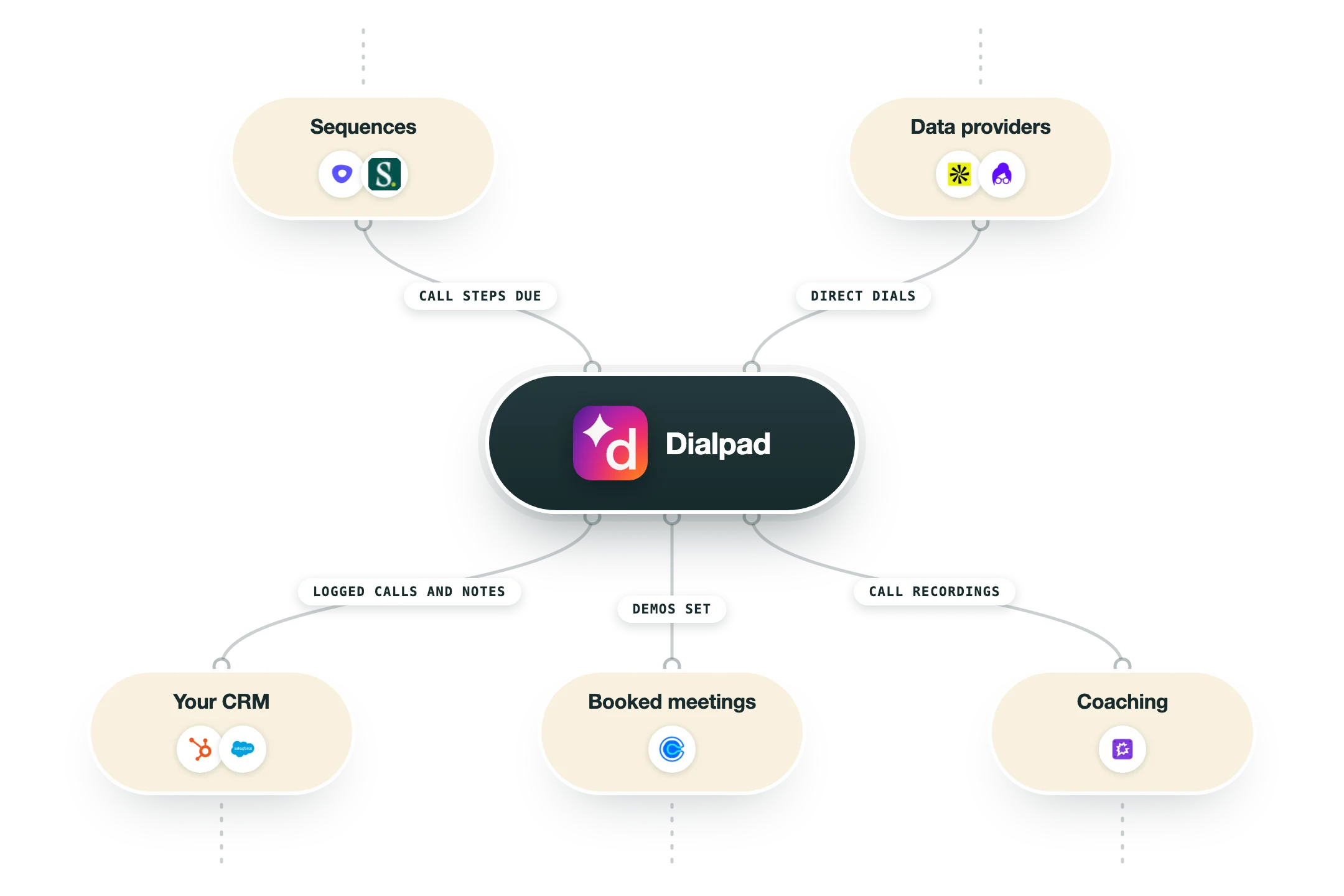
Dialpad's integrations split along its price line more than its product line. The $15 Standard tier connects to Google Workspace and nothing else, and every CRM, helpdesk and automation connector switches on at Connect Pro, so settle the tier before you plan any wiring.
Salesforce | The deepest connection of the set. A CTI panel lives in Salesforce Lightning, calls log as tasks with recording and transcript links, and the Powerdialer builds audiences from Leads, Contacts, Accounts or Opportunities. Custom objects are out of scope, records take around ten minutes to appear on a list, and a five-minute lock stops two reps dialing the same person. |
HubSpot | Click to dial from a record, automatic call logging with duration and recording, and contact matching on inbound so the rep sees who is calling. It sits on Connect Pro and above, and there is no HubSpot equivalent of the Salesforce Powerdialer, so HubSpot shops get logging without an auto-dialer. |
Microsoft Teams, Zendesk, ServiceNow and Slack | All four are native and all four start at Connect Pro. Teams carries Dialpad calling inside the Teams client, Zendesk and ServiceNow attach calls to tickets, and Slack surfaces call and voicemail activity in a channel. Dialpad marks Teams with a setup-fee asterisk on its own comparison table. |
Google Workspace | The only integration included on the Standard tier. Calendar scheduling for meetings, Gmail side panel, and contact syncing from Google Contacts. If you are pricing Dialpad at $15 a seat, this is the entire integration list you are buying. |
Zapier | Available from Connect Pro up, which is the low-code route to anything without a native app. Call and SMS events can trigger Zaps into a spreadsheet, a Slack alert or a CRM update, though for volume the direct webhook subscriptions are cheaper and faster than routing through Zapier tasks. |
API, webhooks and websockets | The strongest part of the stack for a systems team. Event subscriptions cover calls, SMS, contacts, agent status and the admin change log, delivered to a webhook or a websocket, and recording URLs need the recordings_export OAuth scope. Most endpoints allow 1,200 requests a minute, but reading a completed call is capped at 10 and initiating an outbound call at 5. |
App Marketplace | 101 apps listed at the time of writing, grouped by product and by category across CRM, collaboration, customer service, sales engagement, workflow automation, developer tools and security. The vertical entries are worth noting, since Epic and AthenaHealth sit alongside the usual Salesforce and Slack tiles. |
What is missing | No native Clay action, no n8n app, and nothing for Instantly, Smartlead or Lemlist. Powerdialer audiences can only be built from Salesforce, so a HubSpot or Attio team has to feed lists another way. Anything outside the marketplace reaches Dialpad through the REST API and event subscriptions, which is real work rather than a toggle. |
Pro’s
Live transcription, call summaries and AI Recaps come with the $15 Connect Standard seat, where Aircall sells the equivalent as a $9 per-license AI Assist add-on stacked on a $30 plan.
One account covers the front desk, the support queue and the sales floor, so a 60-person company runs a single admin portal and one set of numbers instead of stitching a phone vendor to a separate contact centre.
AI Live Coach and assist cards fire during the call based on what the prospect just said, so a new rep gets the objection answer on screen instead of hearing about it in a review next week.
The API is properly documented and pushes call, SMS, contact and agent-status events over webhooks or a websocket, so dispositions and recording links can reach n8n, Clay or your warehouse without waiting for a native connector.
Numbers are listed for 70 countries on the coverage page, and every Connect plan includes unlimited inbound and outbound calling inside your own country plus the US and Canada.
HIPAA and BAA compliance sits on every Connect tier including the cheapest one, so a healthcare or fintech team can get a signed agreement without being pushed onto an enterprise quote.
Cons
The $15 Standard seat has no CRM integration, no open API or webhooks, no Zapier, Slack or Zendesk, and a ceiling of one office and three ring groups, so a GTM team is really starting on Pro at $25 with a three-seat minimum.
Sell Essentials at $39 leaves local presence dialing, voicemail drop, the Salesforce Powerdialer and AI Live Coach as paid add-ons, so the tier that equips an outbound rep is Advanced at $95, and AI Playbooks and Scorecards wait until Premium at $150.
The Powerdialer runs only inside the Salesforce Lightning CTI and works one record at a time, so a HubSpot shop gets no auto-dialer at all and a cold-calling floor still needs a parallel dialer sitting beside it.
Dropped calls, long waits before a call connects and support that routes you through a chatbot are the recurring themes in the public review pools, across roughly 4,100 G2 reviews of Connect and 570 Capterra reviews of Sell.
Published prices exclude taxes, regulatory fees and surcharges, annual plans give no refund for unused time, and unused calling credits expire the day you cancel, with one Capterra reviewer describing a $540 quote landing nearly 40 percent higher.
Pricing
Connect Standard
$15/user/month Billed annually, $27 month to month, 1 user minimum
Unlimited calling in your country plus the US and Canada
One local number per user, three ring groups, one office
AI transcription, call summaries and AI Recaps
Video meetings for 150 people up to 5 hours
Google Workspace only, no CRM, API or Zapier
Connect Pro
$25/user/month Billed annually, $35 month to month, minimum 3 users
Everything in Standard plus Salesforce, HubSpot and Zendesk
Open APIs and webhooks, Zapier, Slack and Microsoft Teams
Hold queues, 25 ring groups and up to 10 offices
Additional local or international numbers per user
24/7 customer support
Connect Enterprise
Custom pricing Quote only, minimum 100 users
Everything in Pro plus SSO via Okta, Azure or OneLogin
Unlimited ring groups and office locations
Extensions and granular user access controls
99.9% uptime service level agreement
Priority support and named escalation path
Dialpad Sell
$39 to $150/user/month Essentials $39, Advanced $95, Premium $150, billed annually
Essentials: recording, transcription, coaching teams, monitor, whisper and barge
Advanced: local presence dial, voicemail drop, Salesforce Powerdialer, AI Live Coach
Premium: AI Playbooks, AI Scorecards, AI CSAT, inbound queue and routing
Monthly billing runs $49, $110 and $170 per user
Screen recording and in-queue callback are add-ons below Premium
Dialpad Support
$80 to $150/user/month Essentials $80, Advanced $115, Premium $150, billed annually
Essentials: routing, queuing, live agent status, recording and transcription
Advanced: AI Live Coach cards, custom moments, extra digital channels
Premium: AI Scorecards, AI CSAT, advanced analytics and reporting APIs
Monthly billing runs $95, $135 and $170 per user
Dialpad WFM stays an optional add-on on all three tiers
How it fits your stack
Alternatives




At a glance
Four products: Connect, Support, Sell and AI Agents
Numbers listed for 70 countries on the coverage page
Live transcription and AI Recaps on every tier
Salesforce, HubSpot and Zendesk from Connect Pro up
Powerdialer runs inside Salesforce Lightning CTI only
Open API with call, SMS and agent-status webhooks
101 apps in the Dialpad App Marketplace
14-day free trial on Dialpad Connect
Read some of our client stories





GTM Workflows
Learn how to use GTM tools in workflows
Guides and tutorials to get the most from your workflows











Ready to get started?




By clicking Sign Up you're confirming that you agree with our Terms and Conditions.








