Self-Learning GTM Loops: How We Build a GTM System That Gets Better Every Week

by

In this post:
A self-learning GTM loop is a way of setting up your sales and marketing system so it learns from its own results automatically. That means every time something happens, like a rep turning down a lead or a deal closing, that outcome goes back into the rules that decide what the system does next.
For instance, when a rep rejects a lead because the company is too small, that reason feeds into the lead score, so the next company of that size scores a little lower. Your ideal customer profile works the same way on a bigger scale, because it gets updated every quarter from the deals you won and the ones you lost.
Most GTM systems don't work like that. They're built once around what the team knew at launch, and then they keep following the same rules while the market changes around them.
That's why reps slowly stop trusting the leads the score calls hot. It's also why reply rates slip a little every month and nobody can point to the cause.
In this post, we'll show you how we build these and walk you through three self-learning GTM loop examples. For each one, we explain what it learns from, how a change gets proposed and approved, and how you test whether that change helped.
We're Nebor, a GTM and RevOps agency. If you'd like us to set these loops up in your own accounts, you can book a meeting.
TL;DR
A self-learning GTM loop takes a result, like a lost deal or a rejected lead, and uses it to change the next decision your system makes.
Every loop needs five parts, which are a result recorded the same way each time, one place where results collect, an owner with a fixed review rhythm, dated changes and a test against the previous version.
We walk through three examples step by step, for the leads your reps turn down, your lead score and your outbound messaging.
AI can read your results and suggest changes, but a person should approve every change before it goes live.
We build these loops in your own accounts and hand them over with documentation, and you can book a meeting to talk about it with our team.
What a self-learning GTM loop is, and how it differs from a dashboard
A self-learning GTM loop is a process where the results of your go-to-market work feed back into how that work gets done next time.
It always works in the same order. The system records what happened, someone proposes a change and a person approves it, and the next review compares the new version with the old one.

A dashboard is different, because it only shows you what happened. In most teams, that means the numbers get discussed in a meeting and the CRM stays exactly as it was.
So what separates the two is ownership. In a loop, every result has a place to go, a person who reviews it on a fixed day and a rule that changes when the evidence says it should.
Why most GTM systems stop improving a few months after they launch
When your GTM system goes live, the team that built it knows why every rule is there.
The score gives weight to demo requests and pricing page visits. The ideal customer profile names the industries you win in, and the outbound messaging talks about the pains you heard on calls.
Then the market changes around the system. A competitor drops its price, a segment that used to close starts stalling, or your best customers turn out to be a size you didn't plan for.
But the system keeps sending your reps the same kind of leads it did on day one.
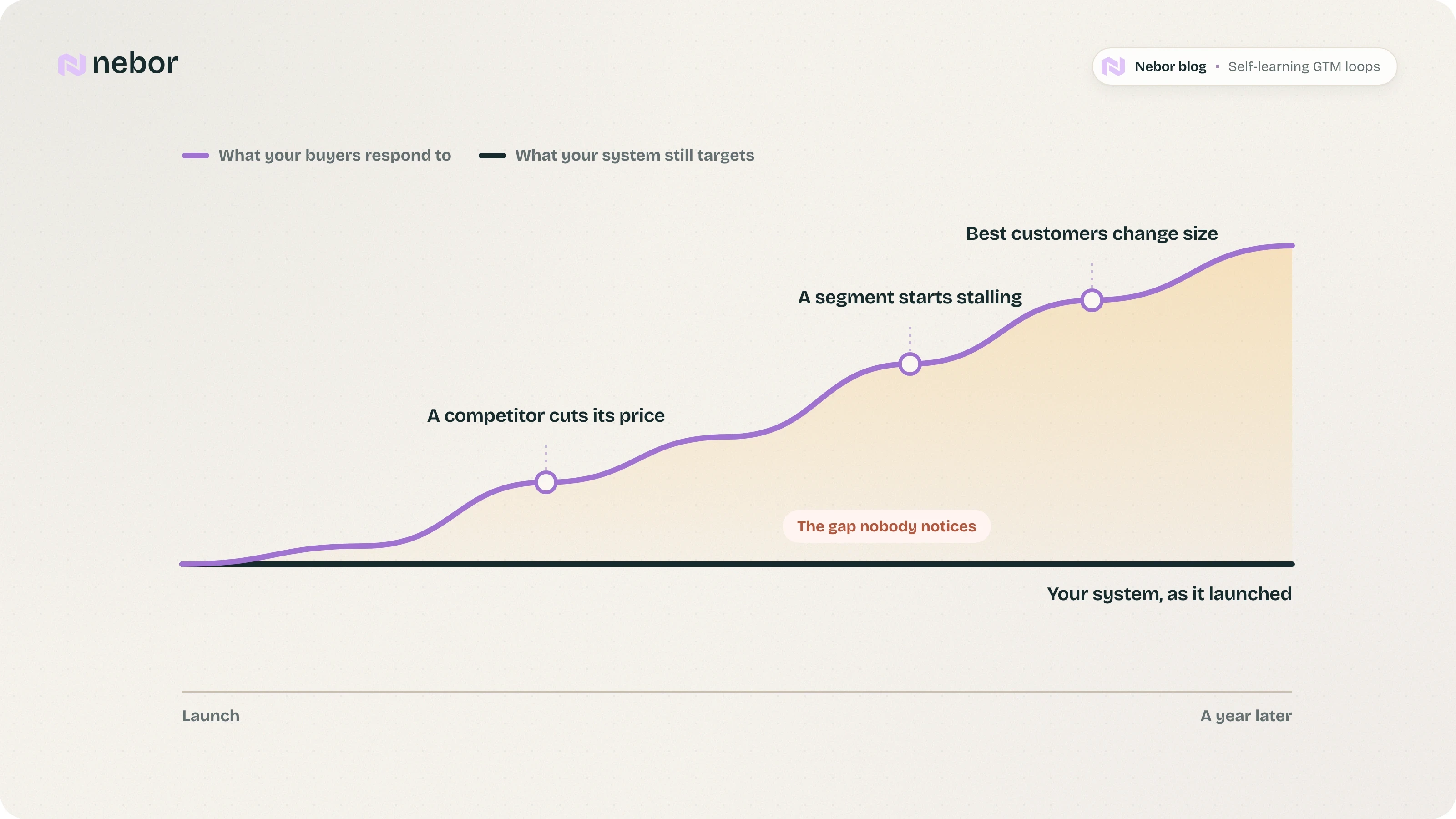
Your reps are usually the first to notice. They stop trusting the score and go back to working their own lists.
So the system you paid for is still switched on, but your team is working around it.
That's why we treat the loops as part of the build, because without them a GTM system slowly gets worse from the day it launches.
The five parts every self-learning GTM loop needs before it can learn
Every loop has the same five parts, whether it learns from sales calls or from the leads your reps turn down. If one of them is missing, the loop stops learning, even when all the data is still being collected.

A result recorded the same way every time
A loop can only learn from results it can compare. So when your rep turns a lead down, they pick a reason from a fixed list, like bad fit, wrong person, no budget or bad timing.

A place where the results collect
Results that live in Slack threads or someone's memory can't be reviewed. So we store them on the record in your CRM, where anyone on your team can pull them up and count them.
An owner and a fixed review rhythm
Each loop has one person who reviews it on a set schedule. Rejected leads need a look every month, but the lead score only makes sense once a quarter, because you need enough closed deals before the pattern means anything.
Small changes, written down with a date and a reason
When the review shows that something needs to change, change a few rules at a time and write down what you changed, when and why.
That record becomes your version history, and it's the only way to tell later which change helped and which one hurt.
A test against the version you had before
Before a change replaces the old version, it gets tested against it. You can score new leads with both versions in the background, or send a new message to half your prospects and the old one to the other half.
That way you compare the two under the same conditions, and the new version only stays when it wins.
3 examples of self-learning GTM loops, and how to build each one step by step
Here are three self-learning GTM loops that we believe most SaaS and B2B teams can set up with the CRM and tools they already have. Each one goes through the full cycle, including the step most teams skip, which is testing the change against the old version.
Loop | What it learns from | What it changes | How the change gets tested | How often it's reviewed |
|---|---|---|---|---|
Leads your reps turn down | The reason a rep picks for every rejected lead | Targeting and fit rules | Acceptance rate under the new rules against the old ones | Monthly |
Lead score against closed deals | The score each deal had when it was created, next to whether it was won or lost | Score weights | A second score in the background before reps see it | Quarterly |
Sales calls and lost deals | Pains and objections from recorded calls and lost-deal reasons | Outbound message angles | New angle against current messaging on a random split | Every few weeks |
Example 1: The leads your reps turn down teach your targeting and fit rules
Every lead a rep turns down tells you something about your targeting. But most CRMs save that lesson as a typed note, or don't save it at all, so it's gone as soon as the lead gets closed.
This loop turns those rejections into changes to your targeting and fit rules. It's the easiest loop to start with, because a new result comes in every time a rep says no.
The first thing you need is a fixed list of reasons. HubSpot's Leads object already has a Disqualification Reason property you can edit, and in any other CRM a dropdown can do the same job.
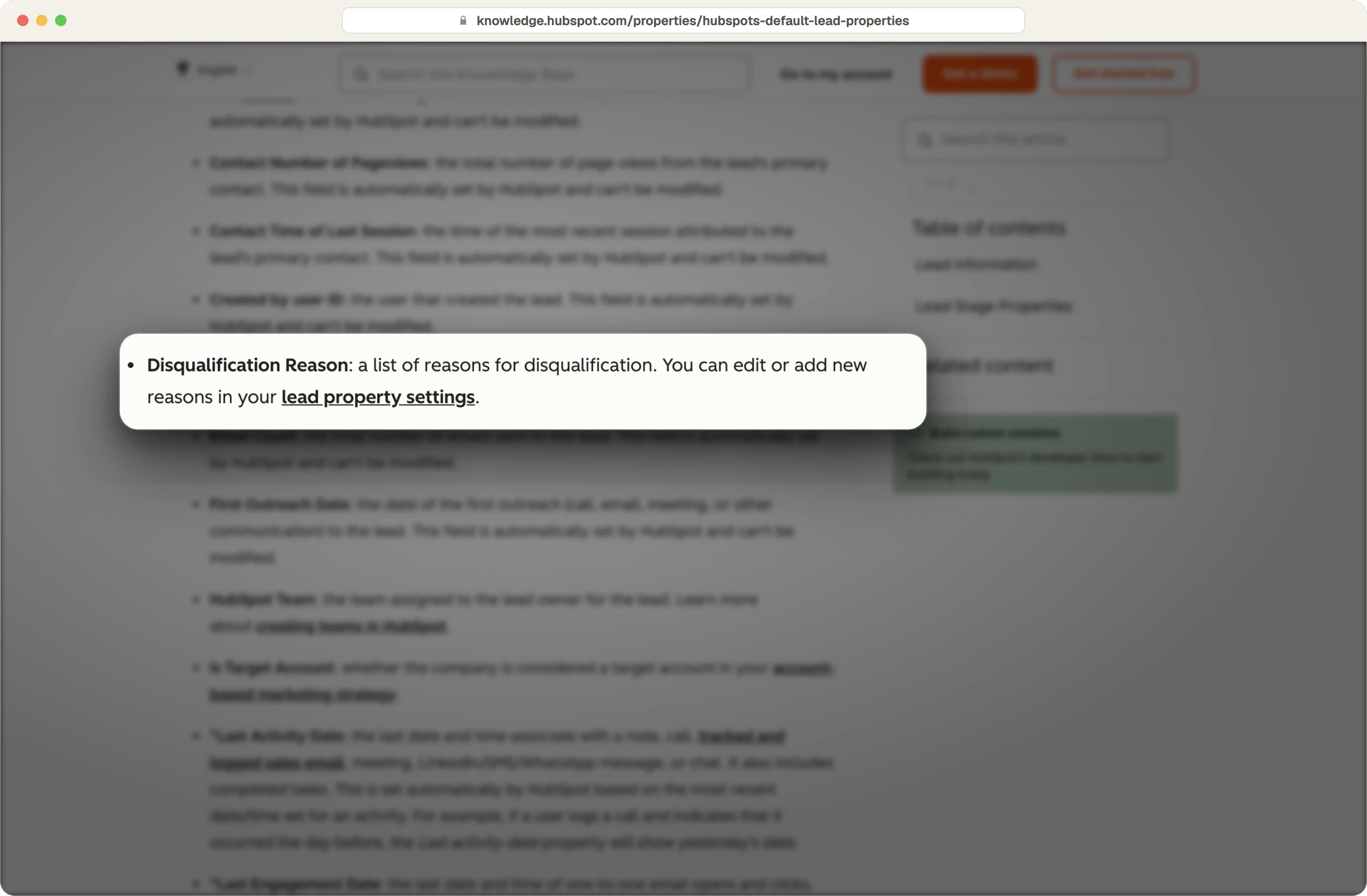
Source: HubSpot Knowledge Base
Here's how the rest of the loop works, step by step.
Make the reason a required field, so a rep can't close a lead as rejected without picking one.
Keep the list to five to eight options, like wrong person, company too small, no budget and bad timing, plus an "other" option with a short note that shows you which reason is missing.
Once a month, pull a report of rejected leads by reason, broken down by job title, company size, industry and lead source.
Let an AI tool read the report and draft a proposal, for example that most leads from very small companies get rejected for budget, so the minimum company size in your fit rules should go up.
The person who owns the rules, usually someone in RevOps, approves or rejects it. They check it against what they know, because a spike in "bad timing" at the end of a quarter can simply mean your reps are busy closing deals.
Save the approved change as a new version in a shared change log, with the date, what changed and why.
At the next monthly review, compare the acceptance rate under the new rules with the rate under the old ones, and keep the change only when more leads get accepted.

The mistake that breaks this loop is changing a rule because of one loud rep. A single rep who rejects everything from one industry can make a pattern look much bigger than it is, so check the reasons by rep before you approve anything.
Our guide to the marketing to sales handoff in HubSpot shows how a rejected lead goes back to marketing without getting lost.
Example 2: Your lead score gets checked against the deals you won and lost
Your lead score is a guess about which leads will buy. Your closed deals tell you, a few months later, whether that guess was right. So, here's what you need to do to turn this into self-learning GTM loop:
Save the score at the moment a lead turns into a deal, in a separate property that a workflow fills when the deal gets created and that doesn't update afterwards.
Once a quarter, group every deal that closed by its saved score tier. When the score works, most of your won deals come from the top tiers and most of your lost deals come from the lower ones.
When the split looks wrong, look at what the low-scoring won deals had in common, like a job title the score ignores or a type of company your ideal customer profile leaves out.
Write the change down as a proposal with the old weights, the new weights and the deals behind it. An AI tool can compare your won and lost deals field by field, but RevOps writes the final version and sales leadership signs off on it.
Test the new weights as a second score property in the background, so every new lead gets both scores while your reps keep working from the old one.
After a month or two, check which score did a better job of picking out the leads sales accepted and the ones that booked meetings. The winner stays, and the old weights go into your change log so you can roll back.

The mistake that breaks this loop is checking the score too early. A quarter with only a handful of closed deals won't show a real pattern, so wait until you have enough won and lost deals to compare.
Our guide to HubSpot lead scoring shows how to set up a score you can check this way.
Example 3: Your sales calls and lost deals teach your outbound messaging
Your outbound messaging is usually written once, from what the team believed buyers cared about. Your sales calls show what buyers say they care about, and those two drift apart faster than most teams expect.
This loop takes the pains and objections that keep coming up on your calls and turns them into new message angles, which you test against your current messaging. So:
Collect your call summaries and lost-deal reasons in one place. A call recording tool like AskElephant or Gong can summarize each call and tag the pains and objections buyers raise.
Every few weeks, an AI tool groups what buyers said into themes, like a pain your emails never mention, and links each theme to the calls it came from.
The person who owns your outbound picks one theme and writes one new angle around it, so you know which change made the difference.
Send the new angle to a random half of the next batch and keep your current messaging for the other half, with the same list, sending setup and follow-ups on both sides.
Judge the result on meetings booked, because an angle that provokes people can get more replies and still book fewer meetings.
The winning angle becomes your new standard version, the old one goes into your change log, and the next theme gets its turn.

The mistake that breaks this loop is calling a winner too early. With a small batch, a couple of lucky replies can make an angle look better than it is, so keep the test going until each half has booked a few meetings.
We go deeper on turning what you hear on calls into messaging in the measurement layer of our GTM strategy template.
Where AI agents fit in a self-learning GTM loop, and where a person stays in charge
AI is good at the reading part of a loop. It can summarize a month of call recordings, group hundreds of disqualification reasons into a handful of patterns or compare your won and lost deals field by field.
Where we keep a person in charge is the change itself. A loop learns from whatever signal you give it, and when that signal is wrong, it keeps getting worse without knowing it.
Say an AI tool notices that leads from one industry get rejected more often, and it lowers their score on its own. If most of those rejections came from one rep who doesn't like selling to that industry, the loop now hides good leads from the rest of your team.
And because nothing looks broken, you'd only find out months later, when the pipeline from that industry has dried up.
So in the systems we build, AI drafts the change, like a new scoring rule or a new opening line, and someone who knows your market signs off on it before it gets tested against the old version.

What has to be in place before your GTM system can start to learn
A loop can only learn from the data you give it. So a few things need to be in place before you build one.
Clean CRM data. When deals close without a won or lost reason, your loops learn from noise. So we clean the data first, the same way we would before a migration.
One owner for each loop. A loop that belongs to everyone ends up reviewed by no one, so each loop needs a name next to it and a day in the calendar.
Fields your team fills in. The fields have to be required at the right moment and short enough that your reps don't resent them.
Everything in your own accounts. The results, the rules and the version history live in your CRM, so the loops keep working if you change agencies or people leave.
Hire Nebor to build self-learning loops into your GTM system
We're a GTM and RevOps agency started by salespeople. So we build the loops around the decisions your reps and managers make every week, like which leads to call, what to say and which accounts to go after next.
We build the GTM system in your own accounts, and then we add the loops, each with an owner, a review rhythm and a test against the previous version.
When it's done, we hand it all over with documentation, so your team can keep improving it without us.
If your lead score, your ideal customer profile or your outbound messaging haven't changed since the day they launched, you can book a meeting and we'll look at where your first loop should go.
What teams ask before they add self-learning loops to their GTM
What is a self-learning GTM loop?
A self-learning GTM loop is a process that feeds the results of your go-to-market work back into your next decision. A rejected lead changes your targeting, a lost deal changes your score and an objection that keeps coming up on calls changes your messaging, and a person approves each change.
How often should you review a GTM loop?
It depends on how fast the results come in. Rejected leads are worth a review every month and new messaging can be tested every few weeks as call summaries come in, but the lead score needs a full quarter, because it takes that long to collect enough closed deals to show a real pattern.
What's the first loop to build?
We'd start with the reasons your sales team gives for turning leads down. It's cheap to set up, it shows within a month where your targeting and scoring are off, and it gets marketing and sales looking at the same data.
What data do you need to start a GTM loop?
You need results recorded in a way you can count, like won and lost reasons on every closed deal, a disqualification reason on every rejected lead and the score each lead had when it became a deal. Call recordings help a lot, because they show the pains and objections behind those reasons.
Can you build self-learning GTM loops in HubSpot?
Yes, most of the loops we build live in HubSpot. Properties hold the reasons, reports show the patterns and workflows act on the decisions. HubSpot's Leads object on Sales Hub Professional or Enterprise also comes with a Disqualification Reason property.
Who should own a GTM loop?
The person closest to the decision the loop changes should own it. Marketing and sales share the review of rejected leads, the lead score usually belongs to whoever owns your RevOps, and the messaging loop belongs to whoever owns your outbound. Even when several teams join the review, every loop needs one named person.


Related Articles

Template
Go-to-Market Strategy Template With Real Examples From Clay and Gong
An 11-layer GTM strategy template with fields to fill in and real examples from Clay and Gong, from team alignment to a tested ICP, channels and metrics.
Andrew van Rossenberg

RevOps
How to Set Up the Marketing to Sales Handoff in HubSpot in 2026
Your rep's first question is why they're getting this lead. Here's how to set up HubSpot so every handoff answers it, with fit, intent and outside signals, one routing workflow and a response clock.
Yannick Kok

RevOps
How to Set Up HubSpot Lead Scoring in 2026
A lead score only helps if your reps believe it. Here's how to set up fit and engagement scores in HubSpot, where the fuller model should live, and how to keep it honest against closed deals.
Yannick Kok
By clicking Sign Up you're confirming that you agree with our Terms and Conditions.