

In this post:
You write one email, and it arrives different for every person who receives it. One reader sees a line about their industry, another sees their company name and a relevant case study.
A third sees a different call to action entirely. None of them know the others got something else.
That's the promise of dynamic content in one scene. Instead of building thousands of versions of a message by hand, you build one with parts that change automatically based on who's receiving it, so each recipient gets something that feels written for them.
Dynamic content is content that changes automatically for each recipient based on their data, behavior, or context, using variables and conditional blocks rather than a single fixed message. It's how one piece of content adapts to many audiences.
Relevance drives response, and dynamic content is how you deliver relevance at scale. It lets you personalize across a large audience without writing each message individually, which is the only way to be both relevant and broad.
TL;DR
Dynamic content is content that adapts automatically for each recipient, swapping in variables and conditional blocks based on their data, so one message becomes many tailored versions.
Tailored content performs far better than generic, and dynamic content delivers that tailoring at scale without manually building each version.
It works through merge fields and conditional logic, pulling in recipient data to fill variables and show or hide blocks depending on who's receiving the message.
The dependency is that dynamic content is only as good as the data behind it and the relevance of the rules. Shallow merge tags fool no one, so real dynamic content depends on good data and meaningful logic.
What is dynamic content, and how does one message become many?
Dynamic content is content with parts that change based on the recipient. Rather than one fixed message everyone sees, it adapts automatically so different people see different versions.
It works through two mechanisms that pair up. Variables, or merge fields, pull in specific data like a name or company, and conditional blocks show or hide whole sections depending on rules about the recipient.
The change happens automatically at send time, because you set up the logic once, and the system fills in the variables and chooses the right blocks for each recipient, without manual work per person.
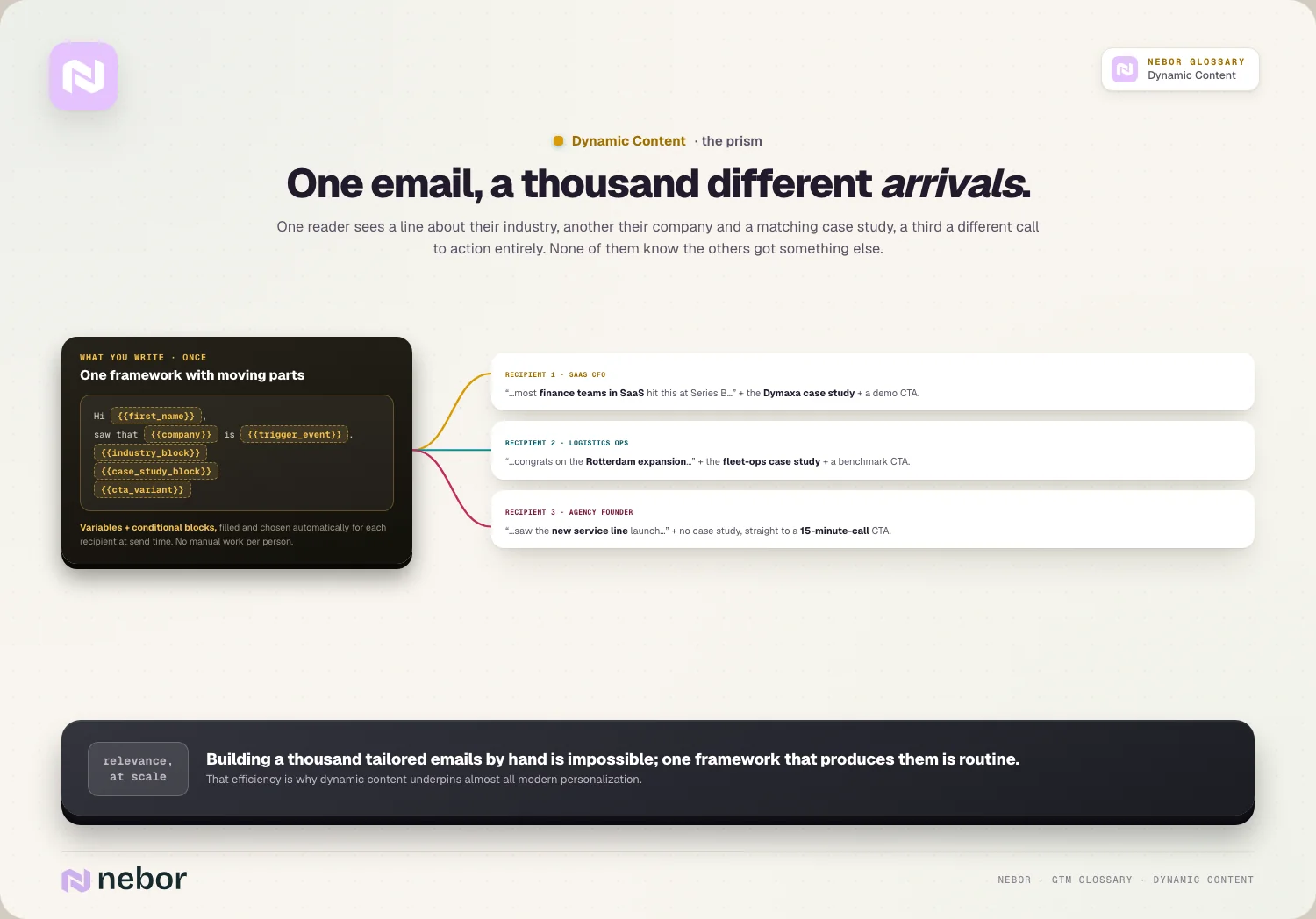
It's most common in email, but it's not limited to it. Dynamic content appears in emails, landing pages, ads, and anywhere else you want one asset to adapt itself to many different audiences.
So dynamic content is really about one-to-many personalization. It lets a single piece of content serve many audiences by changing itself to fit each one, and that adaptability is what makes relevance scalable.
The efficiency is the point, and it's the reason we lean on dynamic content in nearly every build, because producing a thousand tailored versions from one framework is routine while writing them by hand is impossible.
How is dynamic content different from a plain static message?
The cleanest way to understand dynamic content is against the static kind. They differ in whether the content adapts.
A static message is fixed for everyone, so each recipient sees exactly the same thing regardless of who they are, which is simple but generic.
Dynamic content adapts per recipient instead, with the same message showing different details, sections, or calls to action depending on the data about each person, so it feels more relevant.
The difference shows up straight in the results, because a static message has to work for everyone, so it speaks to no one in particular, while dynamic content speaks to each recipient's specifics.
So static is one message for all, and dynamic is one framework that becomes many messages. That framework is what lets you keep the efficiency of a single asset while gaining the relevance of many separate ones.
How does dynamic content actually work behind the send button?
Understanding the mechanics helps you use dynamic content well, and in our experience a few building blocks do the work.
Merge fields come first, working as placeholders that get filled with recipient data, so a field for company name becomes the actual company for each person at send time.
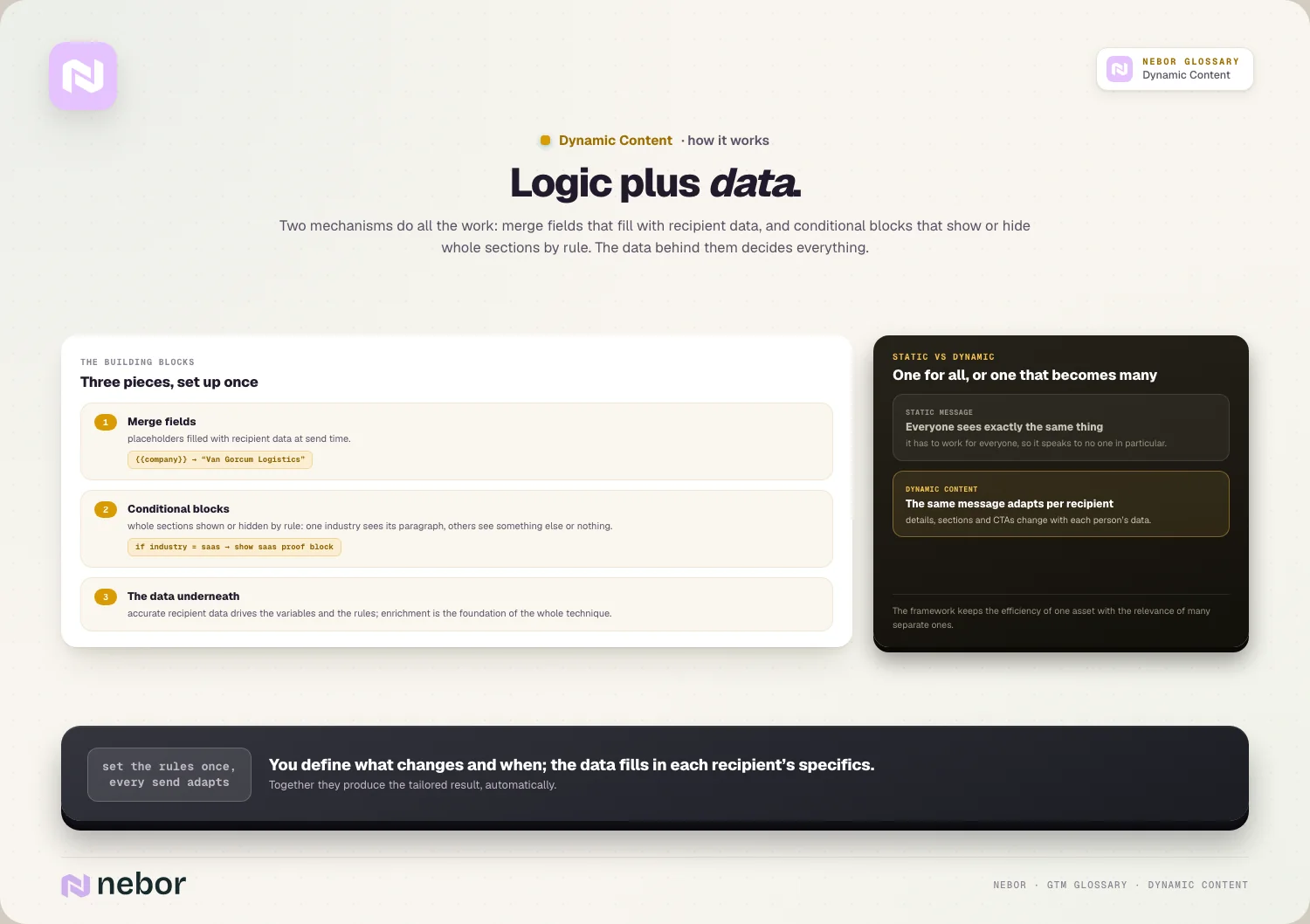
Conditional blocks add the next layer, showing or hiding sections based on rules, so a recipient in one industry sees an industry-specific paragraph while others see something else or nothing.
And the data underneath carries it all, because everything depends on having accurate recipient data to drive the variables and rules, which is why data enrichment is the foundation of good dynamic content.
So dynamic content is really just logic plus data. You define what changes and the rules for changing it, and your data fills in the specifics for each recipient, which together produce the tailored result.
Why does dynamic content drive better results than static sends?
The case for dynamic content rests on engagement, and the numbers back it up, because tailored content consistently outperforms generic content.
The lift is substantial, with dynamic campaigns showing around 61% higher click-through rates and a 14.5% increase in conversions compared to static ones.
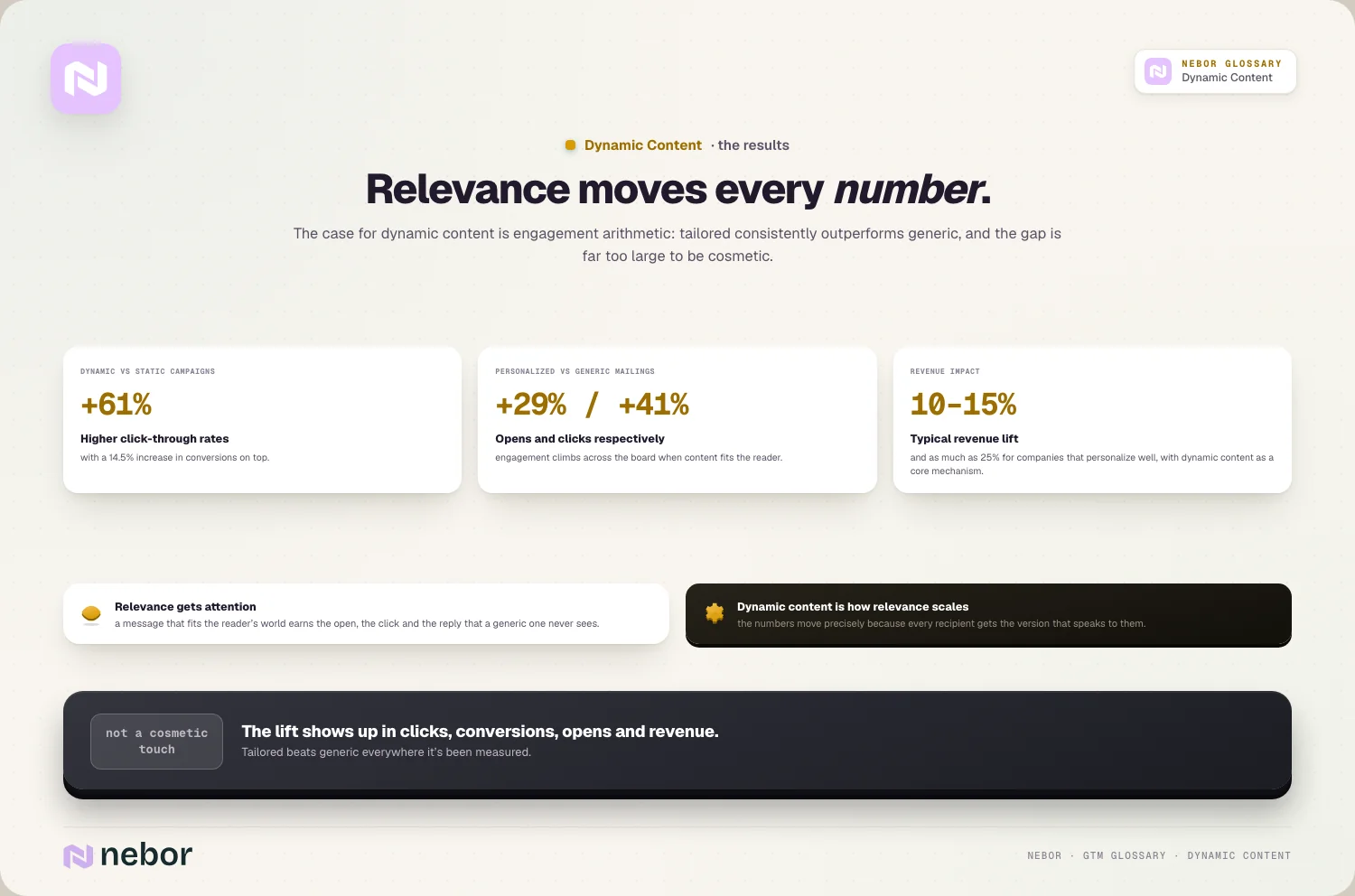
Personalization moves revenue too, commonly driving 10 to 15% revenue lift, and as much as 25% for companies that do it well, with dynamic content as a core mechanism.
And engagement climbs across the board, with personalized mailings seeing around 29% higher open rates and 41% higher click rates than generic ones.
So dynamic content isn't a cosmetic touch, it measurably improves results across the board. Relevance gets attention, and dynamic content is how you make content relevant at scale, so the numbers move for a reason.
How does dynamic content relate to personalizing at any scale?
Dynamic content and personalization at scale are closely linked, so it helps to connect them. One is a mechanism for the other.
Personalization at scale is the goal of making outreach relevant to each prospect across many at once. Dynamic content is one of the main ways you achieve it.
It works as the technical layer underneath, because where personalization at scale is the strategy, dynamic content is the tooling that delivers tailored messages without building each one by hand.
It supports deeper personalization too, since rich data plus dynamic content enables hyper-personalization, weaving specific, individual details into each message automatically and at scale.
So dynamic content is how personalization at scale happens in practice, day to day. The strategy says be relevant to everyone at once, and dynamic content is the machinery that makes that genuinely possible.
How is dynamic content different from AI copywriting and spintax?
Dynamic content gets confused with a couple of neighboring techniques, even though they solve different problems.
AI copywriting generates the words themselves, writing new copy from a prompt and context, whereas dynamic content assembles a message from predefined variables and blocks.
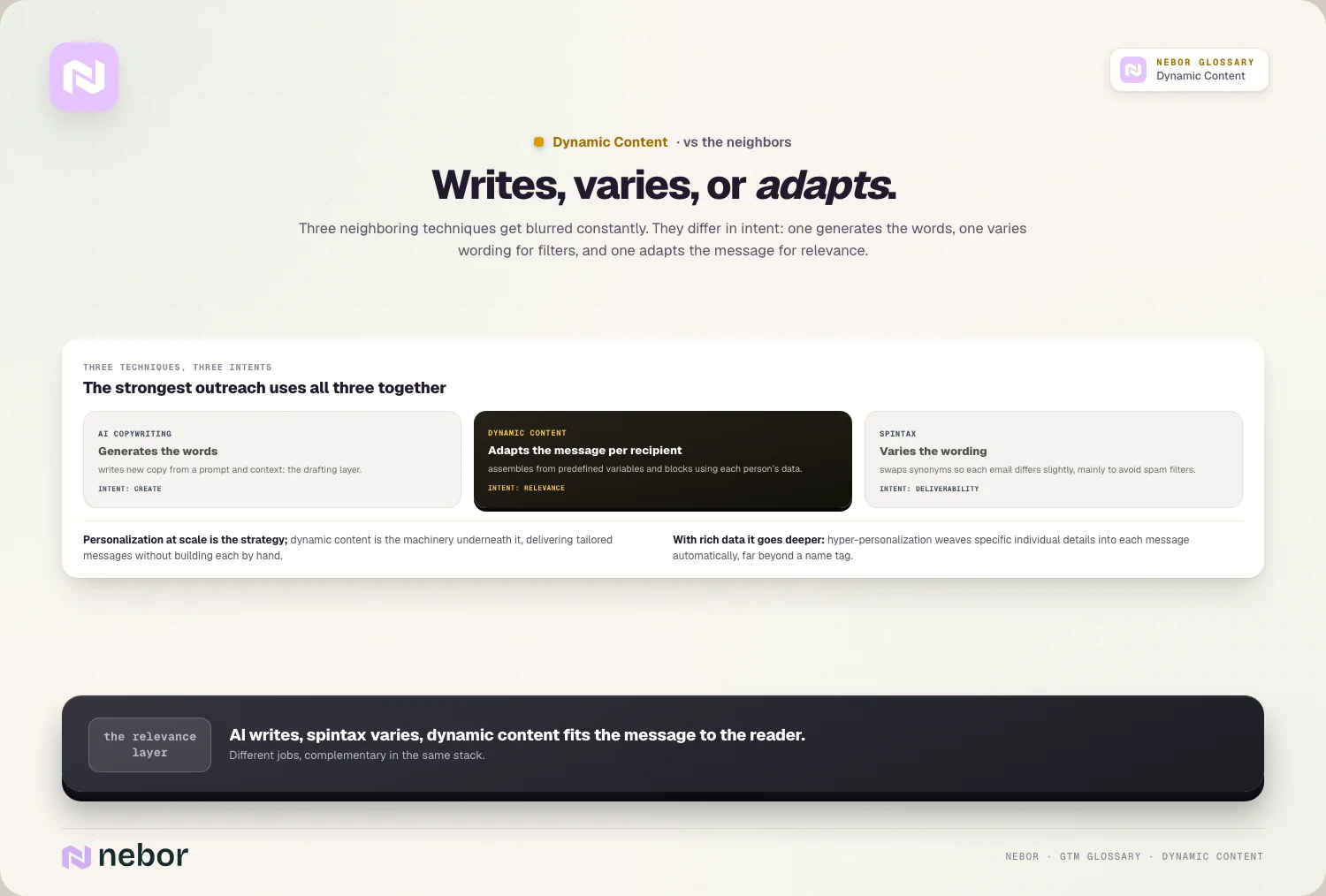
Spintax varies wording for deliverability, swapping in synonyms so each email is slightly different, mainly to avoid spam filters rather than to personalize for relevance.
Dynamic content adapts for relevance instead, because its purpose is to show each recipient content that fits them, using their data, without generating new copy or varying wording for filters.
So the three overlap but differ in intent. AI copywriting writes the words, spintax varies them for deliverability, and dynamic content adapts the message for relevance, and the strongest outreach often uses all three of them together.
Why does dynamic content depend so heavily on the data behind it?
The honest limit of dynamic content is that it's only as good as the data driving it. This is the part that separates real personalization from hollow merge tags.
Variables need accurate data first, because a merge field for company name is worthless if the data is wrong, and a personalized line built on bad data can actively backfire by getting the detail wrong.
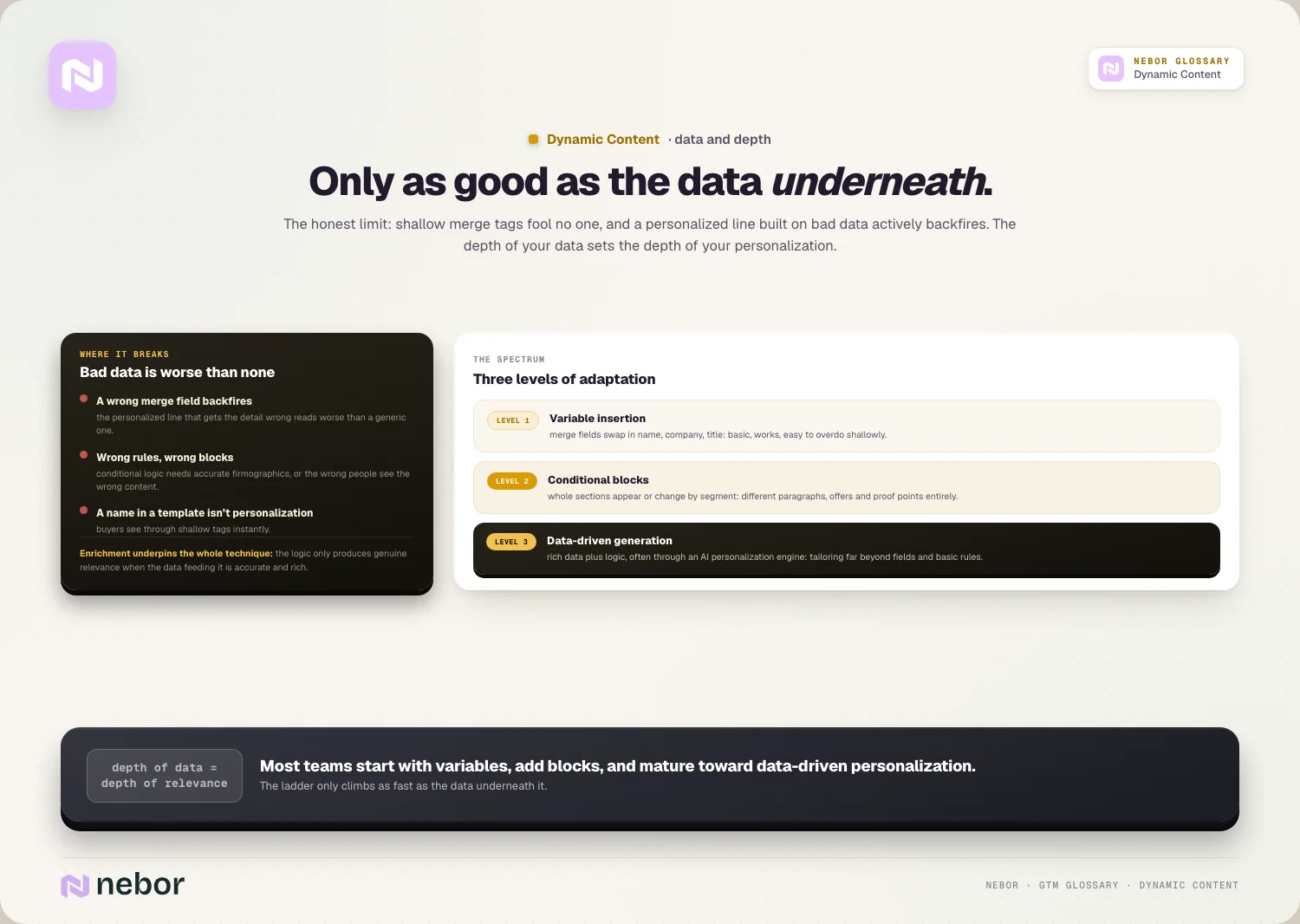
Conditional logic needs the right fields too, since showing the right block to the right person requires accurate data like firmographic data to drive the rules, or the wrong people see the wrong content.
And shallow tags fool no one, because inserting a name into a generic template isn't real dynamic content, and buyers see through it, so the depth of your data sets the depth of your personalization.
So good data is the real precondition for good dynamic content. The logic only produces genuine relevance if the data feeding it is accurate and rich, and that's the reason enrichment underpins the whole technique.
How does dynamic content fit into your wider outreach motion?
Dynamic content isn't a standalone feature, it threads through your whole outreach, working across channels and sequences.
It powers personalized email at scale first, because a cold email built with dynamic content reaches each prospect with relevant specifics, which lifts response without manual writing per person.
It carries across a whole sequence too, because each step in an email sequence can use it, so the cadence stays personalized well past the first touch.
And it extends beyond email, because the same logic personalizes landing pages and other channels, so a coordinated multi-channel outreach motion feels tailored everywhere.
So dynamic content is a layer across your whole motion instead of a single tactic. It's how personalization shows up consistently in every message and channel instead of just one place.
What kinds of dynamic content are there, from simple to deep?
Dynamic content spans a range from simple to sophisticated, and each level adds more adaptation.
Variable insertion is the simple end, with merge fields swapping in details like name, company, or title, which is basic personalization that works but is easy to overdo shallowly.
Conditional blocks take it a level up, where whole sections appear or change based on rules, so different segments see different paragraphs, offers, or proof points entirely.
And data-driven generation is the deep end, where rich data plus logic, often through an AI personalization engine, produces content tailored far beyond simple merge fields and basic rules.
So dynamic content works as a spectrum instead of one single thing. Most teams start with variables, add conditional blocks, and move toward data-driven personalization as their data and tooling steadily mature.
How do you build dynamic content that still feels human-written?
The risk with dynamic content is that it reads as obviously automated, and we hold every template to a few habits that keep it feeling personal instead of robotic.
The first is personalizing substance instead of labels. Tailoring the actual point to the recipient's situation lands far better than swapping in a name on a generic message.
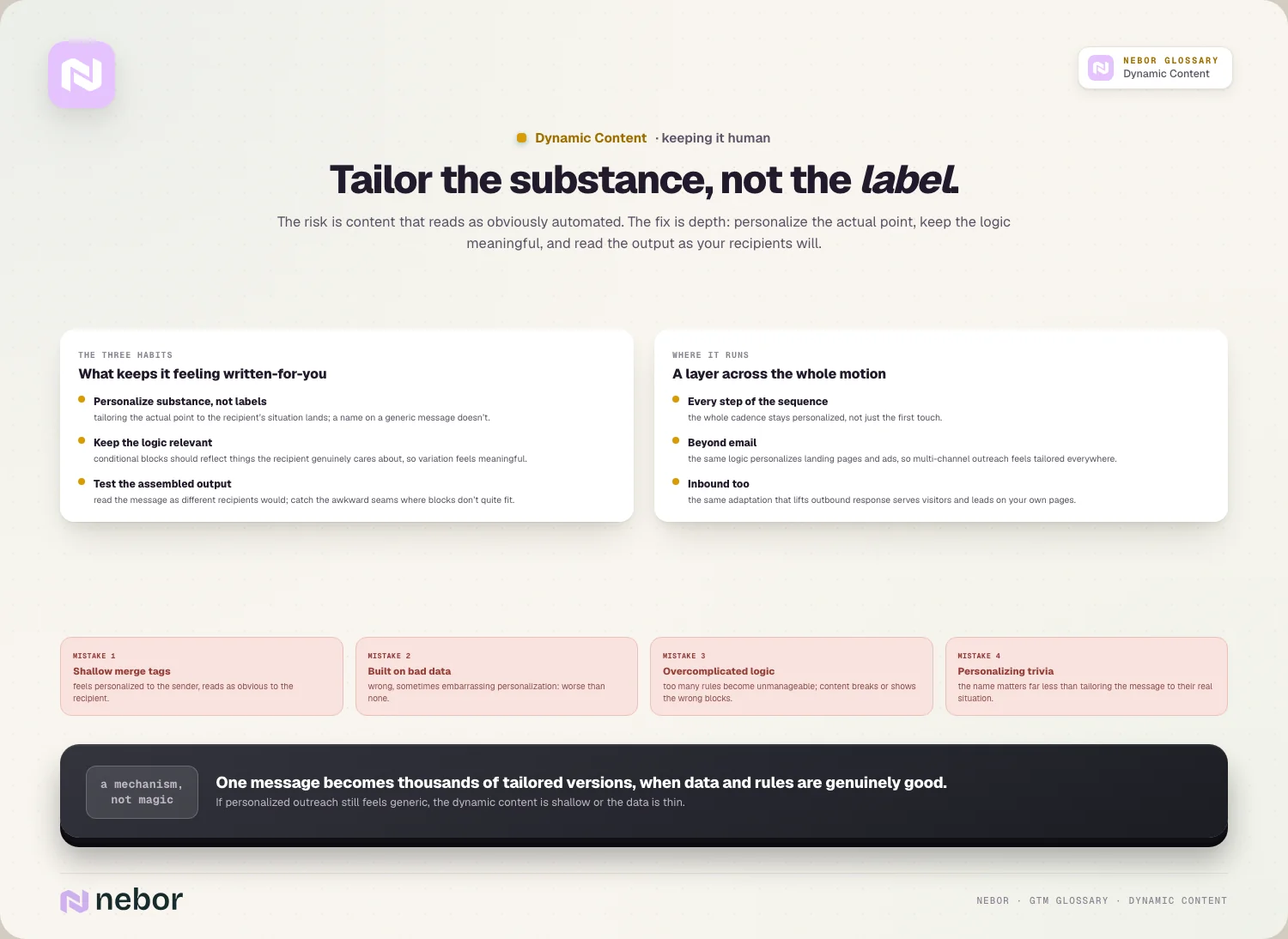
The second is keeping the logic relevant. Conditional blocks should reflect things the recipient really cares about, so the variation feels meaningful rather than mechanical.
The third is testing the assembled output, because reading the message as different recipients would catches awkward seams where the variables or blocks don't quite fit together naturally.
So human-feeling dynamic content is about depth more than mechanics. The goal is a message that reads as written for the person, which comes from meaningful personalization instead of a sprinkle of surface tags.
Does dynamic content work for inbound as well as it does outbound?
Dynamic content is often discussed for outbound email, but it serves inbound just as well. The same adaptation helps wherever you communicate.
On inbound, it tailors your nurture and follow-up, because emails to leads can adapt to what they did or who they are, so your warm communication feels as relevant as your best outbound.
It personalizes web experiences too, because landing pages can show different content to different visitors, so an inbound prospect sees messaging matched to their segment or behavior.
And it connects the two motions cleanly, because the same data that drives dynamic outbound can drive dynamic inbound, so a prospect gets a consistent, tailored experience across both sides.
So dynamic content is a whole-funnel tool instead of an outbound-only one. Whether someone arrives cold or raises their hand, it lets you meet them with content shaped to who they are.
What are the common dynamic content mistakes that read as robotic?
Dynamic content goes wrong in a few predictable ways. Avoiding them is what separates real personalization from the hollow kind.
Relying on shallow merge tags tops the list, because inserting a name and company into a generic template feels personalized to the sender but reads as obvious to the recipient.
Building on bad data comes next, because dynamic content driven by inaccurate data produces wrong, sometimes embarrassing personalization, which is worse than none.
Overcomplicating the logic is the technical one, because too many conditional rules become unmanageable and error-prone, so the content breaks or shows the wrong blocks to the wrong people.
And there's personalizing trivia instead of substance, because swapping in a name matters far less than tailoring the actual message to the recipient's real situation, which is where genuine relevance lives.
Why dynamic content only works as deep as the data beneath it
Dynamic content solves the core tension of personalization, which is being relevant to many people at once. It lets one message become thousands of tailored versions without writing each by hand.
The deeper point is that dynamic content is a mechanism instead of magic. It's the merge fields and conditional logic that deliver personalization at scale, and it works only when the data and the rules behind it are honestly good.
The honest reality is that shallow dynamic content fools no one anymore. A name dropped into a generic template isn't personalization, so the value depends entirely on the depth of your data and the relevance of your logic.
So if your personalized outreach still feels generic, the issue is usually shallow dynamic content built on thin data. Real dynamic content, driven by good data and meaningful rules, is how you make every message feel written for its recipient.
That relevance at scale is exactly what a modern go-to-market system is built to deliver. It matters even more as you automate sales prospecting across thousands of contacts, where manual personalization simply isn't possible.
Share this post
Personalization
Glossary
Related glossary items
Understanding the core GTM concepts




Ready to build your pipeline











