

In this post:
Your sending tool reports a 98% delivery rate, so you assume your emails are landing and your campaign is healthy. The uncomfortable reality is that many of those delivered emails could be stuck in the spam folder, counted as delivered but never seen, and that gap is how a great-looking number hides a broken campaign.
Inbox placement rate is the metric that tells you the truth delivery rate hides. Instead of asking whether an email reached the mail server, it asks whether it landed in the primary inbox where a human will see it, the only outcome that matters for a reply.
Inbox placement rate, or IPR, is the percentage of your delivered emails that reach the primary inbox instead of the spam folder, the promotions tab, or another filtered location. It measures whether your emails get seen at the other end, a stricter and far more meaningful test than delivery alone.
It matters so much because an email in the spam folder is worthless no matter how good it is. Delivery rate can look excellent while your real reach collapses underneath it, so inbox placement is the number that reveals whether your outbound is working or merely appearing to.
TL;DR
Inbox placement rate is the percentage of delivered emails that land in the primary inbox instead of spam, promotions, or another filtered folder, so it measures whether your emails end up seen.
It's a stricter and more honest metric than delivery rate, which counts an email as delivered even if it lands in spam, so a high delivery rate can hide a terrible placement rate.
A healthy inbox placement rate is around 90% or higher, while the average lands closer to 77%, so many senders are losing a large share of their emails to spam without knowing it.
You can't see it in your sending tool, so measuring it requires seed list testing, and improving it comes down to sender reputation, authentication, content, and engagement.
What inbox placement rate measures about the emails you send out
Inbox placement rate measures the destination of your emails once they've been accepted, going past whether they arrived. Of all the emails that were delivered, it asks what fraction reached the primary inbox, the only place most recipients ever look.
The key word is primary, because modern inboxes sort mail into more than one place. An email can be delivered and still land in a spam folder, a promotions tab, or another category the recipient rarely checks, and inbox placement rate counts only the emails that made it to the main inbox as genuine successes.
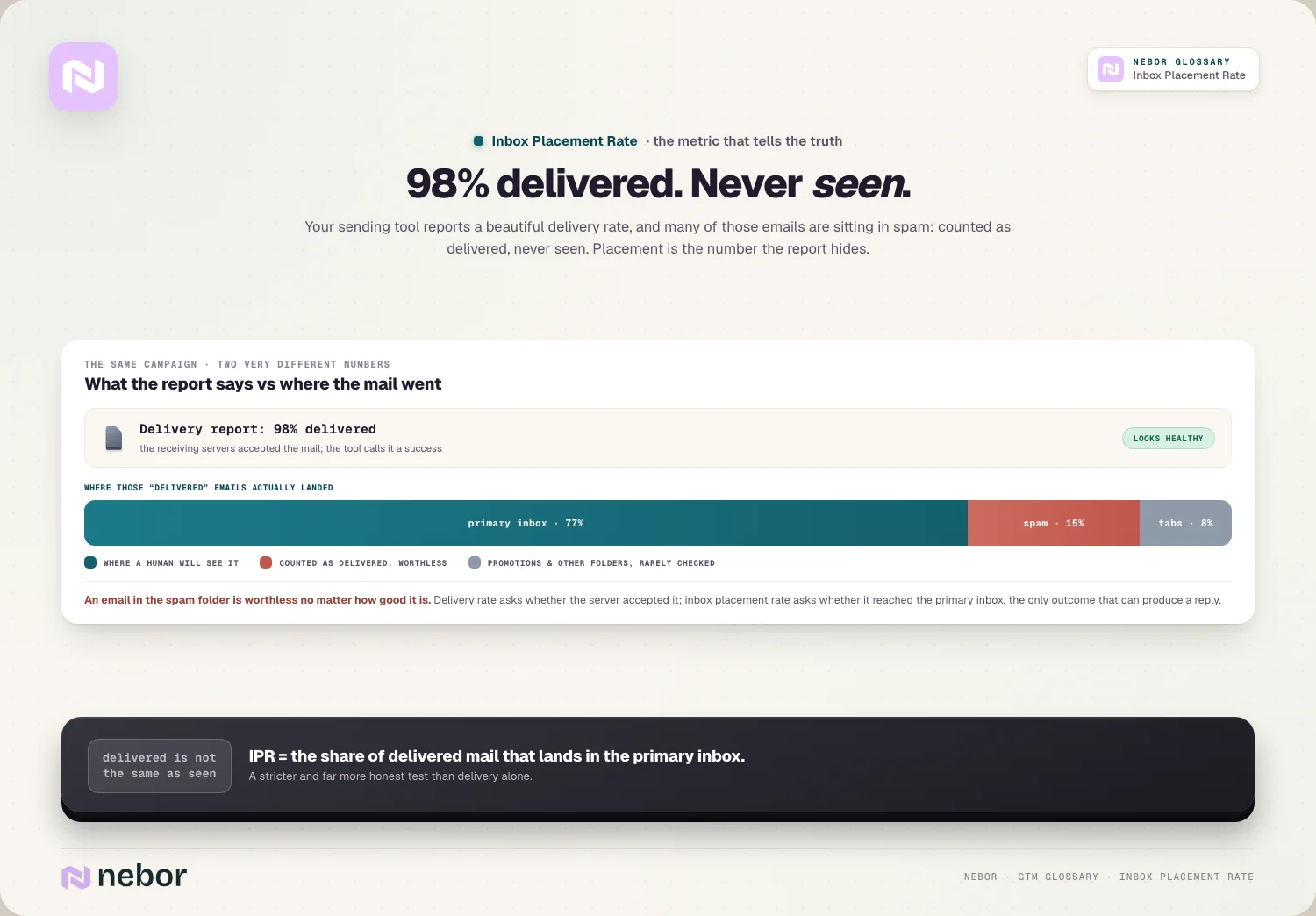
This makes IPR a measure of visibility instead of arrival. A delivered email that nobody sees produces nothing, so inbox placement rate is really tracking whether your message reached human attention, the outcome every other cold email metric depends on.
That distinction is easy to lose because both metrics are expressed as a percentage that looks similar at a glance. The difference is in what each one counts, and once you understand that placement is the far stricter of the two, a healthy-looking delivery number stops being reassuring on its own.
Why delivery rate is misleading and inbox placement is the real number
Delivery rate is the metric most tools show, and it misleads because it counts spam-foldered emails as successes. An email that lands in spam is still marked delivered, so a 98% delivery rate can mask a placement rate far worse, and that layering is exactly how senders fool themselves.
The problem is that delivery and placement answer different questions. Delivery rate tells you the receiving server accepted your email, while inbox placement tells you where that server then decided to file it, and only the second question determines whether your outreach has any chance of a reply.
This is why relying on delivery rate is one of the most common deliverability mistakes we find in the audits we do.
A sender watching a healthy delivery rate can feel confident while their real reach shrinks month after month, so the reassuring number is precisely the one that hides the failure, and the fix is to track email deliverability at the placement level.
Why a gap exists between delivery and inbox placement at all
The gap between the two metrics exists because acceptance and categorization are two separate decisions made by two different systems. When your email arrives, the receiving server first decides whether to accept it at all, a mostly binary, security-focused check on whether you're a legitimate, authenticated sender.
That acceptance decision is what delivery rate measures, and it's relatively easy to pass. As long as your authentication is valid and the address is real, the server accepts the email, explaining why delivery rates for a properly configured sender routinely land near the high nineties.
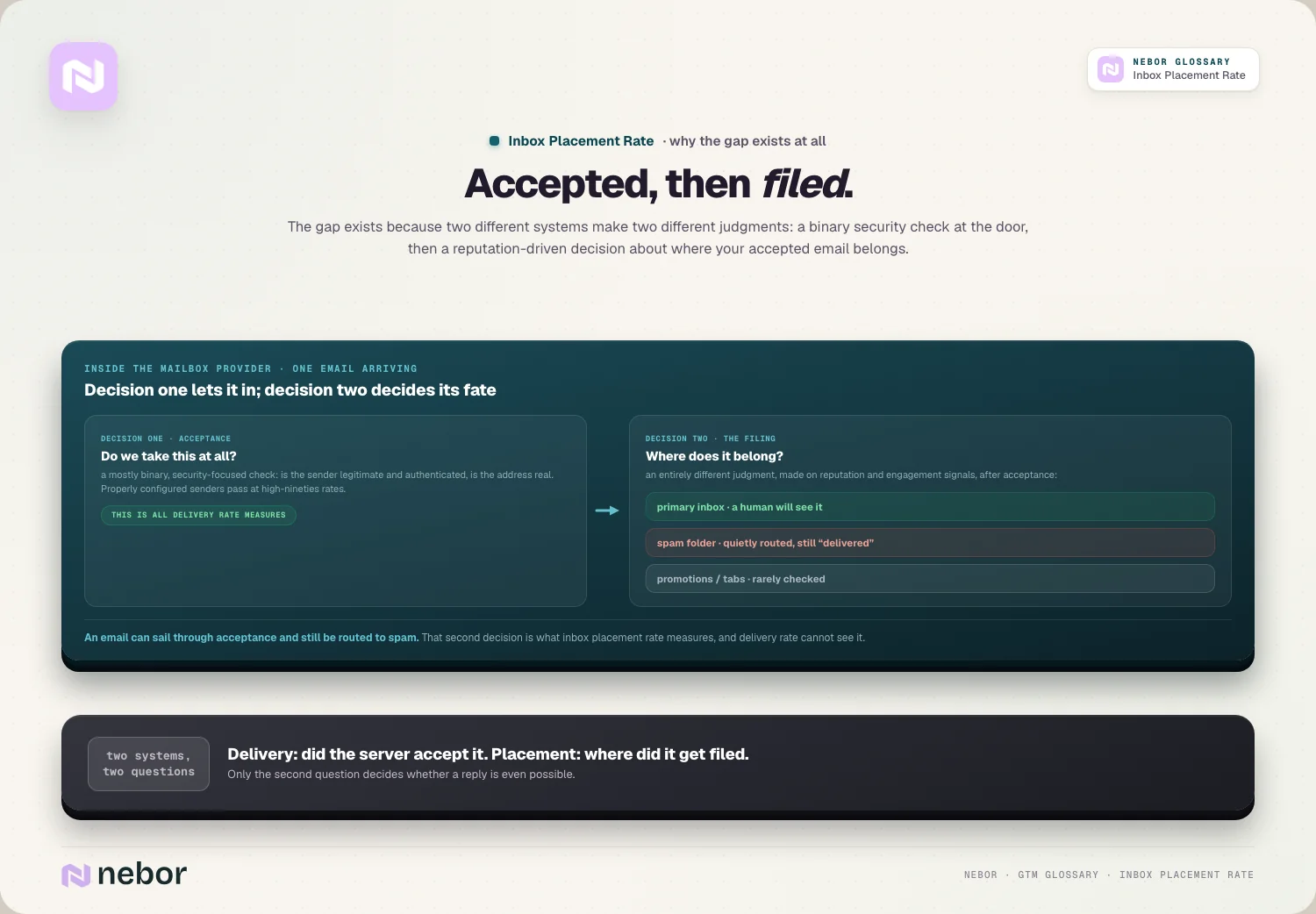
Placement is a second, entirely different judgment about where to file an accepted email. After accepting it, the provider decides whether it belongs in the inbox, the spam folder, or a tab, based on reputation and engagement signals, so an email can sail through acceptance and still get routed to spam a moment later.
What a good inbox placement rate looks like against the benchmarks
Because placement is stricter than delivery, the benchmarks look very different from the near-perfect delivery numbers senders are used to. A healthy inbox placement rate is around 90% or higher, which is a meaningfully harder bar to clear than a 98% delivery rate.
The averages reveal how many senders are struggling without realizing it. The typical inbox placement rate lands closer to 77%, which means a large share of the average sender's emails never reach the primary inbox, even though their delivery reports look fine.
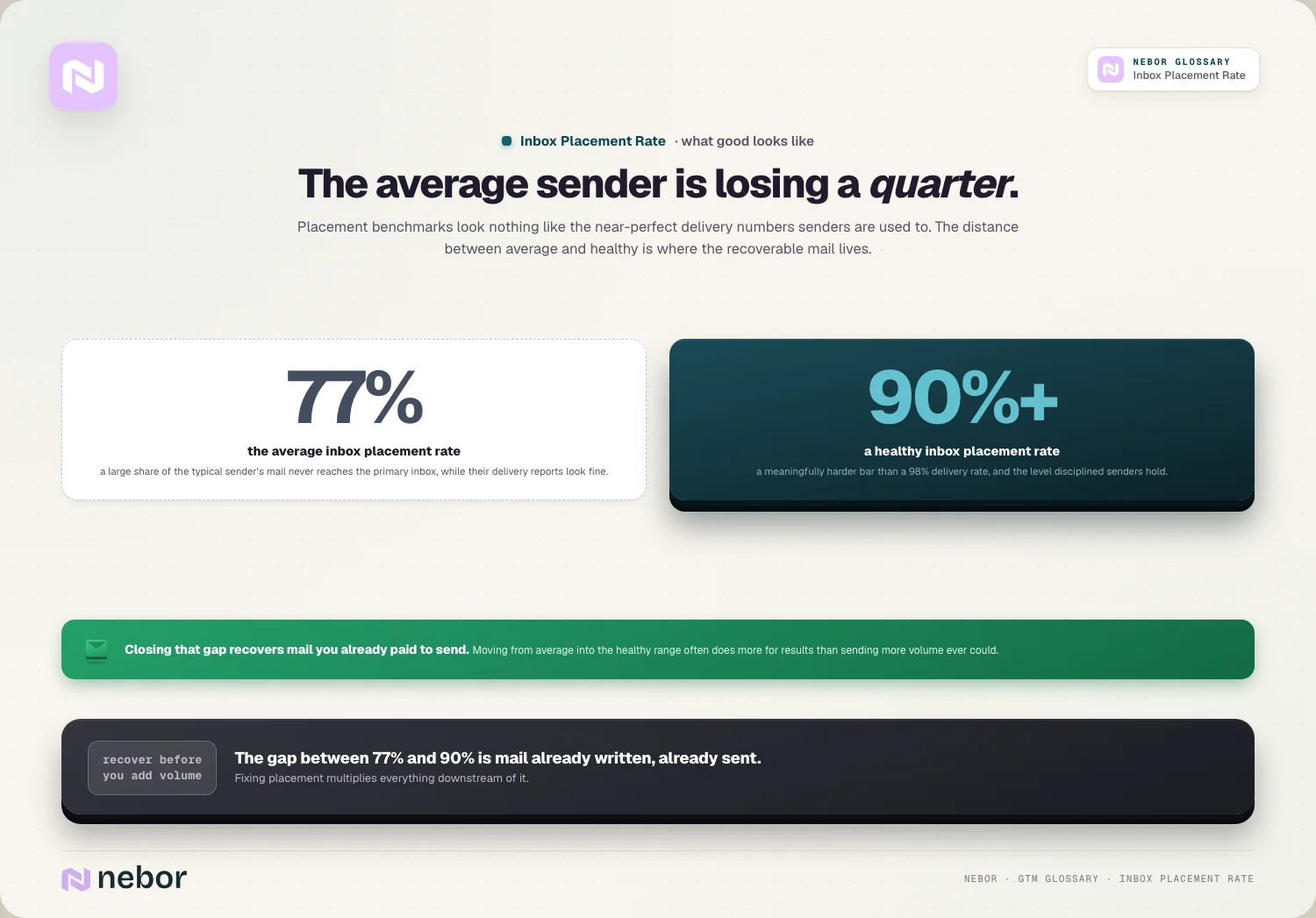
The gap between those two figures is where the opportunity lives. A sender moving from an average placement rate into the healthy range recovers a big fraction of emails that were previously lost to spam, which often does more for results than sending more volume ever could.
How to measure your inbox placement rate with seed tests and monitoring
The most important thing to understand about IPR is that your own sending tool can't show it to you. Your platform knows whether an email was accepted, but it has no visibility into which folder the provider filed it in, so measuring placement requires a separate method entirely.
That method is seed list testing, which uses a panel of real email accounts across every major provider. Tools like GlockApps, MailTester, and Litmus send your email to seed addresses on Gmail, Outlook, Yahoo, and others, then check each account to see whether the message landed in the inbox, spam, or promotions.
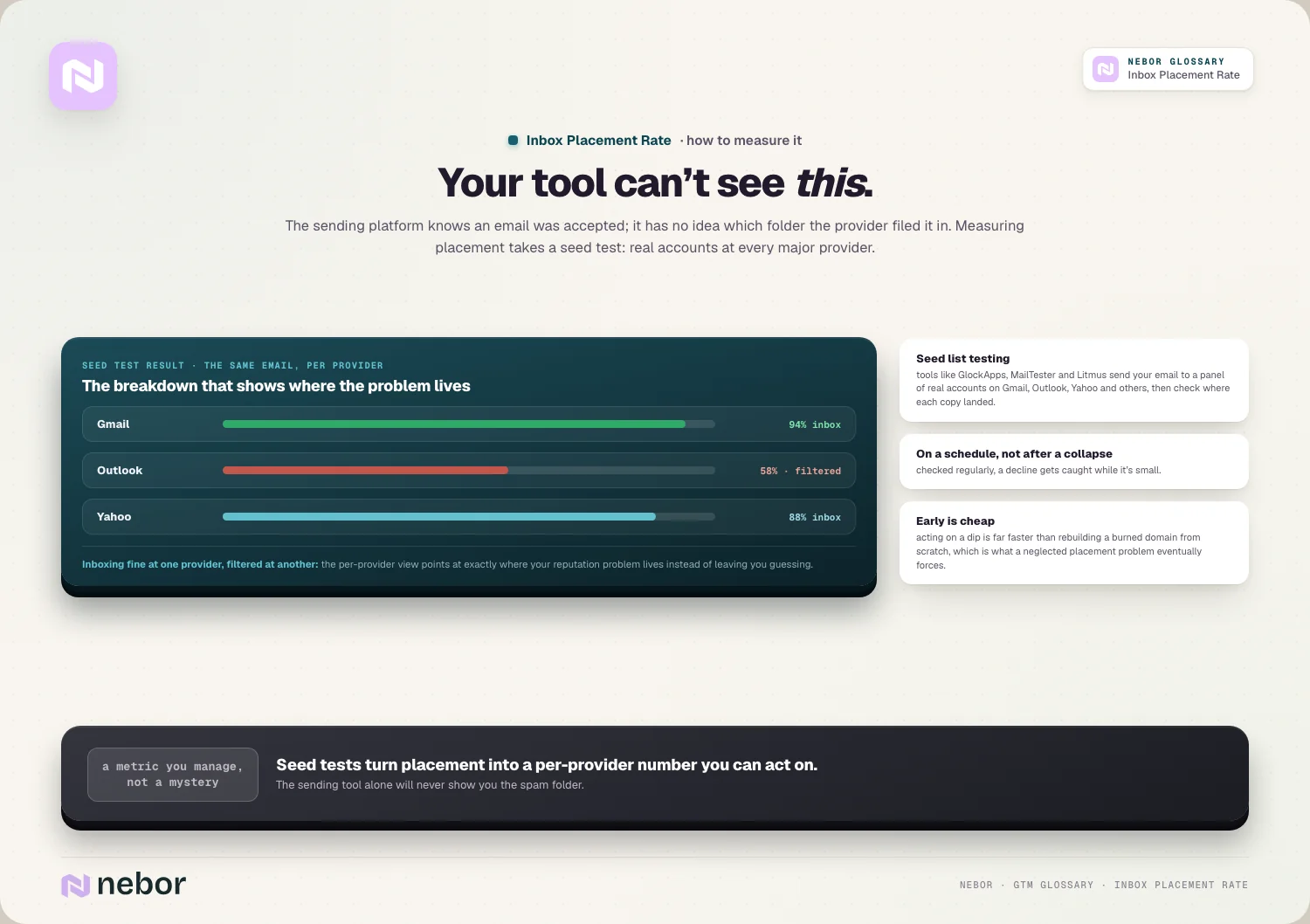
The result is a per-provider breakdown you can act on. Because a seed test shows placement at each mailbox provider separately, it can reveal that you're inboxing fine at one provider while getting filtered at another, which points you at exactly where your reputation problem lives instead of leaving you guessing.
Repeating these tests on a schedule turns placement from a mystery into a metric you manage. Checking it regularly, instead of only after results collapse, lets you catch a decline while it's small.
Acting early is far cheaper and faster than rebuilding a burned domain from scratch, which is what a neglected placement problem eventually forces you to do.
What drives your inbox placement up or down over the course of a quarter
Inbox placement is mostly a function of your sender reputation, which the providers build from how recipients treat your mail. Strong sender reputation, earned through consistent sending and positive engagement, is the single biggest driver of landing in the inbox instead of spam.
Authentication and infrastructure form the foundation beneath reputation. Properly configured SPF and DKIM records, a warmed-up domain, and clean sending infrastructure all signal legitimacy, so a sender who skips email warmup or misconfigures authentication tends to see placement collapse regardless of content.
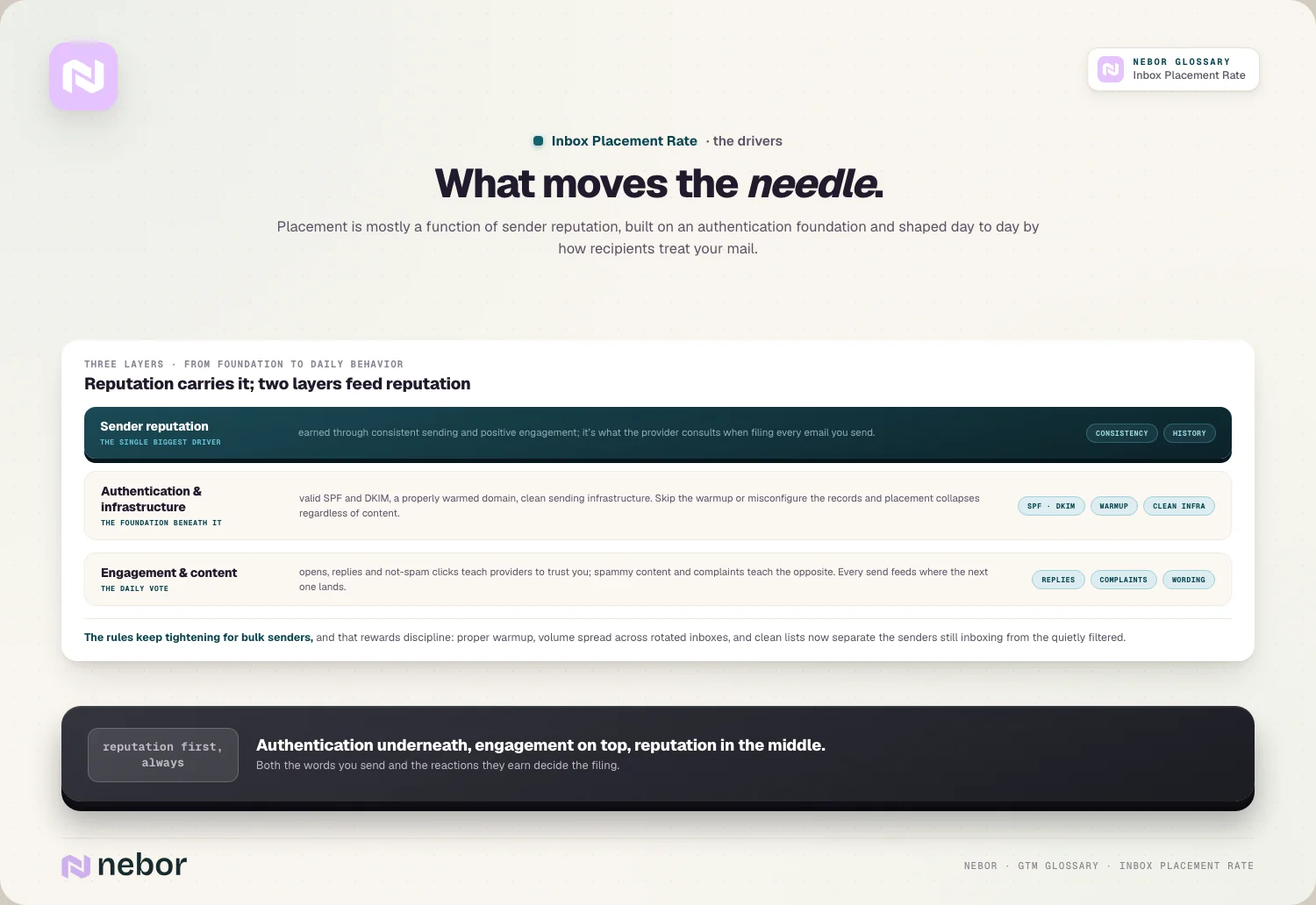
Engagement and content shape placement day to day. When recipients open, reply, and mark your emails as not spam, providers learn to trust you, while spammy content and high complaint rates teach them the opposite, so both the words you send and the reactions they earn feed into where the next email lands.
How inbox placement rate connects to the rest of your cold email results
Inbox placement is upstream of every other outbound metric, which makes it the quiet ceiling on your entire campaign. An email that never reaches the inbox can't be opened or answered, so a low placement rate caps your reply rate no matter how good your copy or targeting is.
This is why a sudden drop in results often traces back to placement instead of messaging. When replies fall off, your reps instinctively rewrite their emails, but the real cause is frequently that their placement declined out of sight and their messages started landing in spam, so the copy was never the problem.
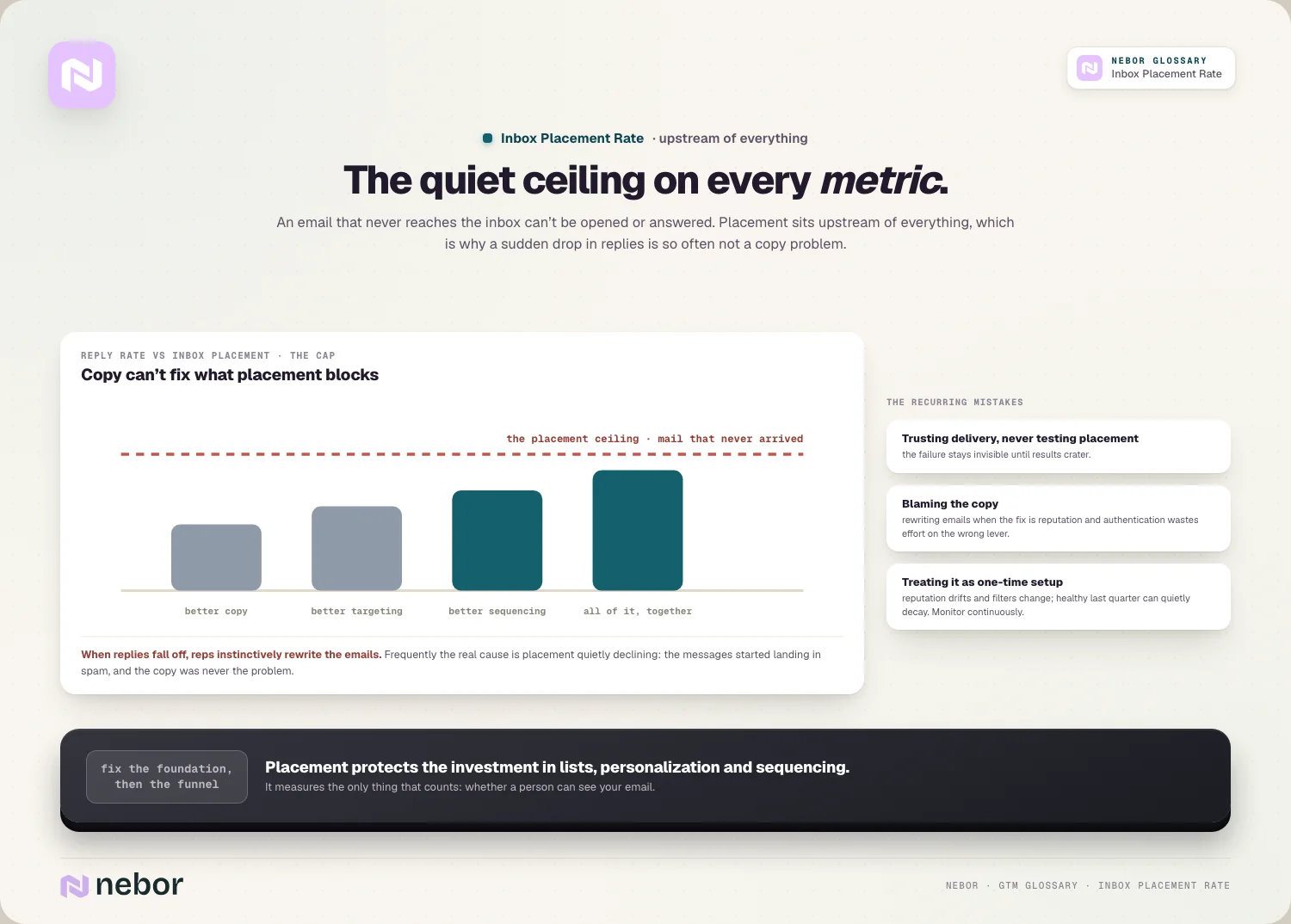
Watching placement therefore protects everything downstream, because it's the foundation the whole funnel rests on.
Keeping inbox placement healthy is what ensures the investment in list building, personalization, and sequencing reaches people in the first place, the thing solid cold email infrastructure is built to preserve.
Why inbox placement has gotten harder for cold senders year over year
Reaching the inbox is meaningfully harder than it used to be, because the major providers keep tightening the rules for bulk senders. Requirements around authentication, easy unsubscribe, and low complaint thresholds mean that senders who once coasted into the inbox now get filtered the moment they slip.
The tolerance for sloppy sending has fallen especially fast. Hitting a spam trap or drawing a spike in complaints damages placement more severely now, so the old approach of blasting large volumes from a single domain reliably lands in spam instead of the inbox.
This shift rewards disciplined senders, because warming domains properly, spreading volume through inbox rotation, and keeping lists clean are what separate the senders still reaching the inbox from those filtered out of sight. The tightening rules punish shortcuts while protecting anyone who sends carefully.
The common mistakes teams make when they manage inbox placement rate
The most common mistake, and clients ask us about this more than any other placement topic, is trusting delivery rate and never measuring placement in any form.
A team watching a healthy delivery number can be losing most of its emails to spam without any idea, so skipping seed tests means the real problem stays completely invisible until results crater.
Another is reacting to a placement problem by blaming the copy. Because low placement and weak messaging both show up as poor reply rates, teams often rewrite emails when the actual fix is repairing reputation and authentication, which wastes effort on the wrong lever entirely.
The subtler mistake is treating placement as a one-time setup instead of an ongoing metric.
Reputation drifts, providers change their filters, and infrastructure ages, so a placement rate healthy last quarter can decay before anyone checks it, and the best senders respond by monitoring continuously instead of assuming it holds.
Why inbox placement rate is the deliverability metric that tells the truth
The deepest reason inbox placement matters is that it measures the only thing that counts, whether a real person can see your email. Every other deliverability number is a proxy or a partial view, but placement is the direct answer to the question every sender ultimately cares about.
That honesty is what makes it uncomfortable and valuable at once, and in our experience the discomfort is exactly why teams avoid measuring it.
It often reveals that a campaign the reports called healthy was failing all along. Facing the real number is the first step to fixing it, because you can't repair a placement problem you refuse to measure or even acknowledge exists.
Within a modern go-to-market system, inbox placement is the foundation that determines whether outbound has any chance of working.
When the emails you automate sales prospecting to send reach the inbox, the rest of the motion has something to build on, and a healthy placement rate makes every other outbound effort worth the investment.
Share this post
Deliverability
Glossary
Related glossary items
Understanding the core GTM concepts



Ready to build your pipeline











