

In this post:
Without authentication, anyone can send an email that claims to be from your domain, and a receiving server has no way to know it's fake. That's the loophole spammers and phishers have exploited for decades.
It's exactly why mailbox providers now reject email they can't verify.
SPF is one of the checks that closes that loophole. It lets you publish a list of the servers allowed to send email for your domain, so a receiving server can confirm a message really came from a source you approved instead of an impostor.
SPF, or Sender Policy Framework, is a DNS record that specifies which mail servers and IP addresses are authorized to send email on behalf of your domain. Receiving servers check it against the sending server to verify the email is legitimate.
The stakes are higher than ever because authentication is now mandatory. Since major providers began requiring it, roughly 17% of cold emails never reach the inbox due to poor authentication and related issues, so getting SPF right is a baseline for deliverability.
TL;DR
SPF is a DNS record listing which servers are allowed to send email for your domain, so receiving servers can verify a message is legitimate.
It exists to stop spoofing, because without it anyone can send email pretending to be your domain, which is how phishing and impersonation work.
It's one of three authentication standards, working alongside DKIM and DMARC, and all three now have to pass for reliable delivery.
On its own it's not enough, because SPF checks the sending server without touching message integrity or the visible from address, so it needs the other two.
What SPF is and exactly where it lives inside your DNS settings
SPF is a record you publish in your domain's DNS that names your authorized senders. It's a line of text that tells the world which servers can legitimately send email for you.
It lives in your public DNS as a TXT record. SPF is a single TXT record in your domain's DNS settings, so it's public and any receiving server can look it up when checking your email.

It lists every sending source you've authorized. Anything outside that list looks suspect to receivers. The record specifies the IP addresses and servers allowed to send on your behalf, forming the approved list receivers check against.
It's set and updated by the domain owner. You control your own SPF record, so you decide which services and servers are authorized to send email using your domain.
So SPF works like a published guest list for your domain's email. It declares who's allowed to send as you, letting receivers spot anyone who isn't on the list.
How SPF works in the moment one of your emails gets received
The mechanics of SPF happen automatically every time your email arrives somewhere. Understanding the check clarifies what the record does.
The receiver reads the sending domain first. When an email arrives, the receiving server looks at the domain it claims to come from, specifically the return-path address.
It then looks up your SPF record. The server queries that domain's DNS for its SPF record, retrieving the list of authorized sending servers you published.
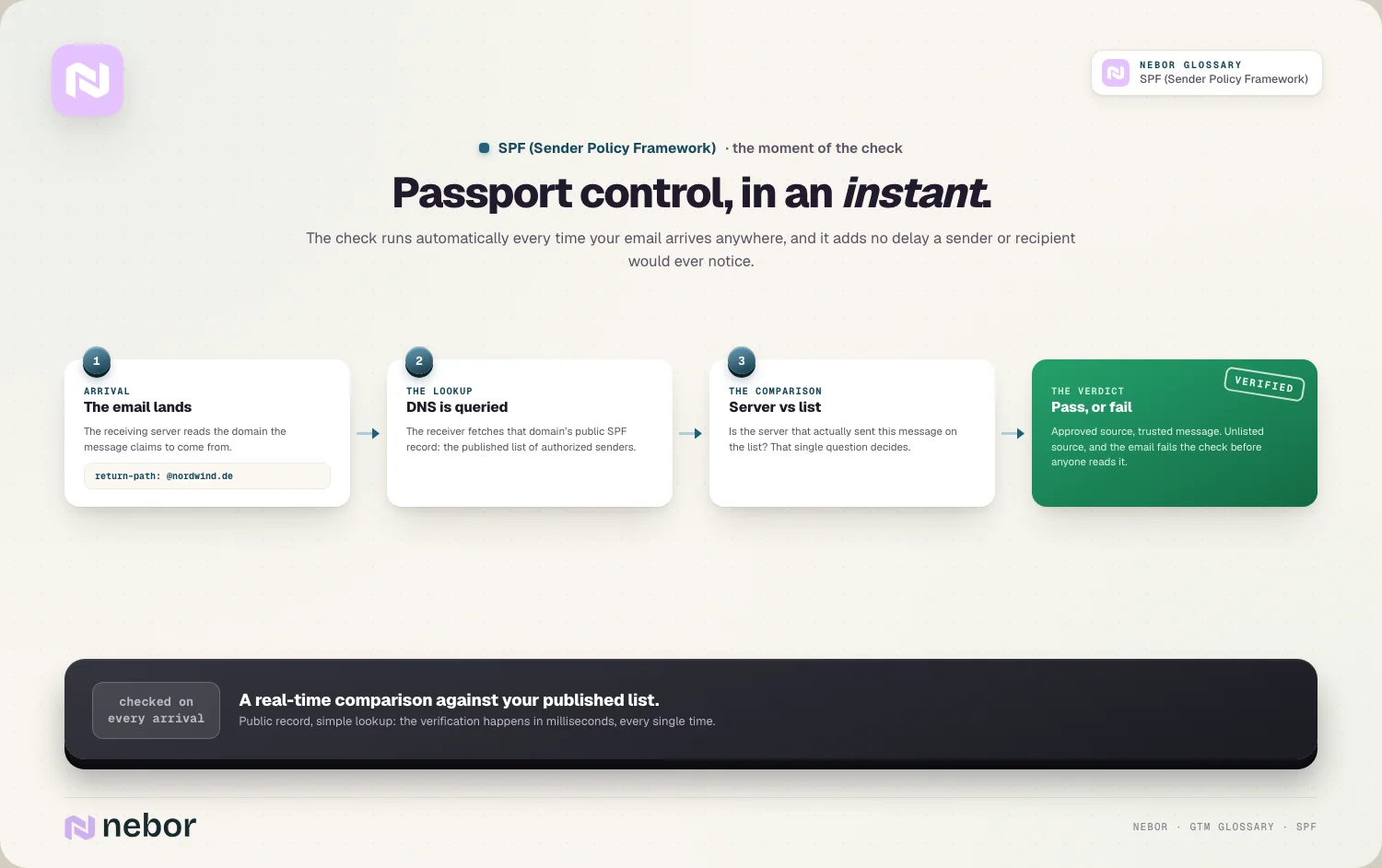
It compares the sending server to the list. The receiver checks whether the server that sent the email is on your authorized list, and passes or fails the message accordingly.
So SPF is a real-time check against your published list. Every receiving server verifies that your email came from an approved source before deciding whether to trust it.
The whole exchange happens in an instant. Because the record is public and the check is a simple lookup, this verification adds no delay a sender or recipient would ever notice.
Why SPF exists at all and what core problem it was built to solve
The whole reason SPF was created is a fundamental weakness in how email works. Without authentication, the from address is trivial to fake.
Email as a protocol is astonishingly easy to spoof. By default, anyone can send a message claiming to be from any domain, because the protocol never verified the sender, and that flaw is what SPF addresses to protect your cold email from impersonation.
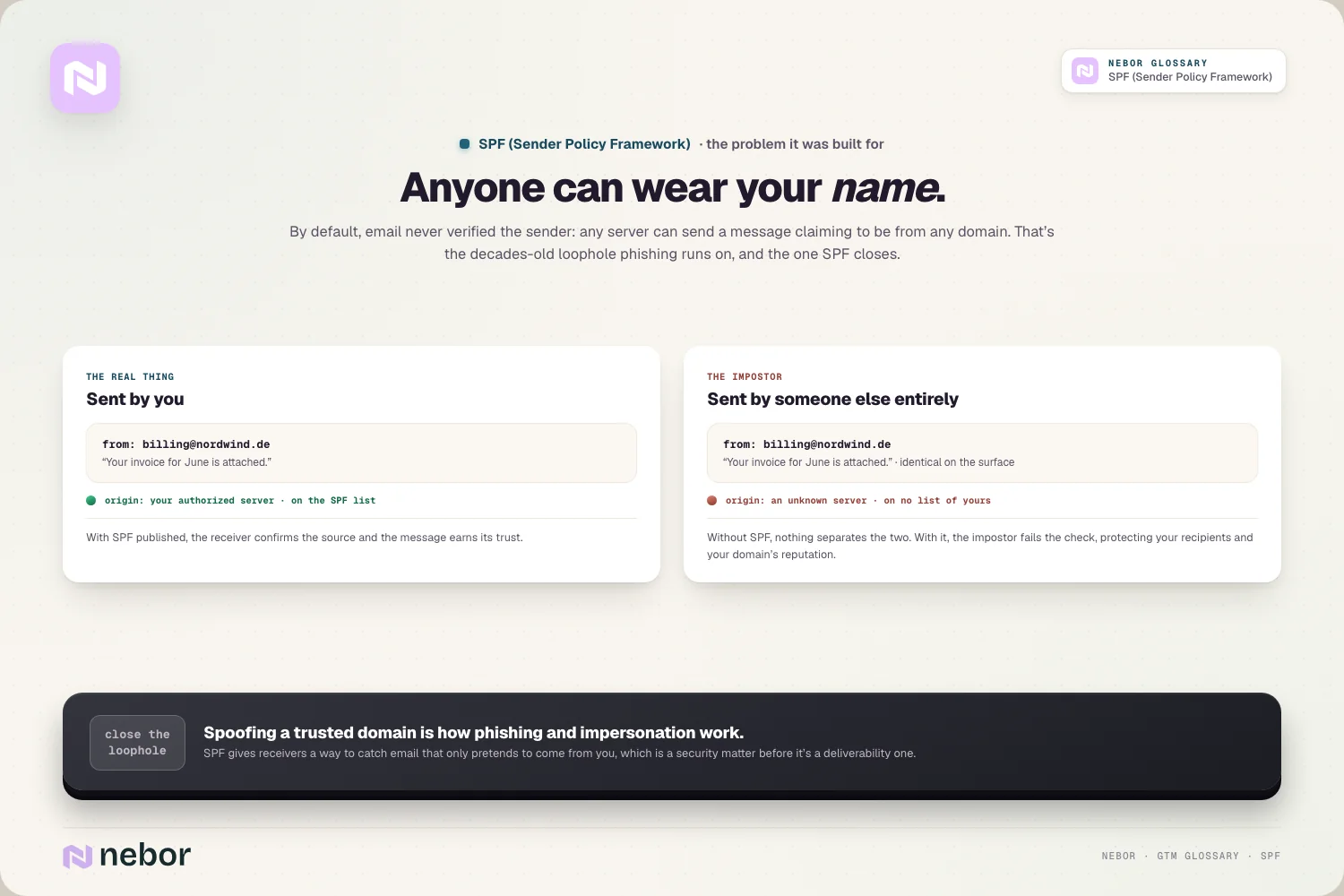
Spoofing enables real and often expensive harm. Faking a trusted domain is how phishing and impersonation attacks work, so unverified email is a real security threat well past a nuisance.
SPF adds the verification layer the protocol never had. By letting domains declare their authorized senders, SPF gives receivers a way to catch email that only pretends to come from you.
So SPF exists to make email trustworthy. It closes the spoofing loophole for your domain, which protects both your recipients and your domain's reputation from abuse.
How SPF differs from DKIM and what each of the two really checks
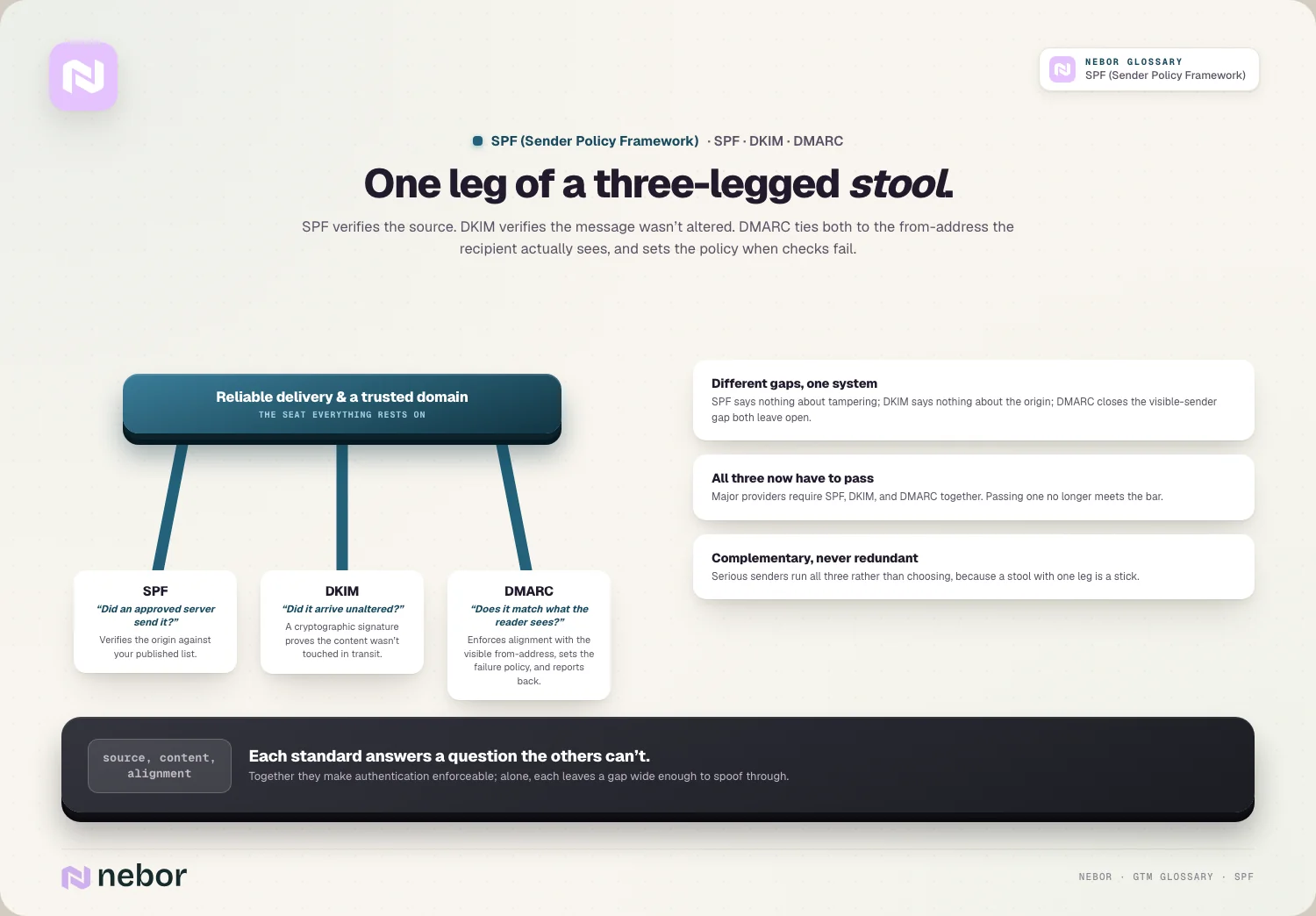
SPF is one of three authentication standards, and knowing how it differs from the others clarifies its limits. Each of the three protocols checks a different thing entirely.
SPF checks the identity of the sending server. It confirms the email came from an authorized IP, a question about where the message originated instead of the message itself.
DKIM checks the integrity of the message itself. It adds a cryptographic signature that proves the email wasn't altered in transit, which SPF says nothing about.
The two cover different gaps in the protocol. SPF verifies the source and DKIM verifies the content, so together they check more than either does alone.
So SPF and DKIM complement each other instead of overlapping. One confirms who sent the email and the other confirms it arrived unchanged, so serious senders use both together instead of choosing between them.
How DMARC ties SPF and DKIM together into one enforceable policy
The third standard is what turns SPF and DKIM into an enforceable system. DMARC layers on top and gives them teeth.
DMARC enforces the alignment between those two checks. It checks that the domain SPF or DKIM verified truly matches the from address the recipient sees, which closes a gap the other two leave open.
It sets a policy for what happens on failure. DMARC lets you tell receivers what to do with email that fails authentication, whether to reject it, mark it as spam, or let it through.
It also provides reporting back to you as the owner. DMARC also sends you reports on what's passing and failing, so you can see whether your authentication is working across the board.
So DMARC is the policy layer above SPF and DKIM. It ties the two checks to the visible sender and dictates how failures are handled, and that tie is what makes authentication enforceable in the first place.
Why SPF alone is no longer enough for reliable deliverability
A common mistake is treating SPF as a complete solution, but on its own it leaves real gaps. All three standards now have to work together.
SPF has blind spots of its own. It verifies the sending server but says nothing about message tampering or whether the visible from address matches, which are exactly what the other standards cover.
The major providers now require all three. Major mailbox providers require SPF, DKIM, and DMARC together, so passing only SPF no longer meets the bar for reliable delivery.
Enforcement from the providers has hardened year over year. Providers have moved toward rejecting non-compliant mail outright, so incomplete authentication increasingly means your email never arrives anywhere.
So SPF is necessary but not sufficient on its own. It's one leg of a three-legged stool, and modern deliverability depends on all three passing and aligning instead of any single one alone.
Why SPF has become mandatory instead of a merely optional extra
Authentication used to be a best practice, but that changed decisively. SPF and its companions are now effectively required.
The providers have set hard rules, and clients ask us about them more than any other deliverability topic. Since major providers began requiring authentication for bulk senders, unauthenticated email faces filtering or outright rejection instead of a gentle warning.

Enforcement keeps tightening with every year that passes. Providers have shifted toward permanent rejections for non-compliant mail, so the cost of missing authentication has gone from lower deliverability to no delivery.
The impact on your inbox placement is measurable. With authentication now decisive, a meaningful share of cold email fails to reach the inbox purely because of poor domain setup, which SPF is part of fixing.
So SPF has crossed from optional to mandatory. Treating it as something you can skip now means your email fails to arrive without warning, which makes it a baseline requirement for any serious sender today.
How SPF fits into your wider email sending infrastructure setup
SPF is one piece of the technical foundation that makes cold email deliverable. It works alongside the rest of your setup.
It's part of your wider authentication layer. SPF belongs within the broader DNS authentication that proves your email is legitimate, a foundation for reaching inboxes.
It underpins the whole of your sending infrastructure. A sound sending infrastructure depends on correct SPF across every domain you send from, so it's not a one-time task but part of the whole setup.
It protects the reputation you hold with providers. Proper authentication supports your sender reputation, because providers trust authenticated mail more, which feeds directly into deliverability.
So SPF is a foundational layer instead of a standalone fix. It works with the rest of your infrastructure to prove your email is legitimate, a prerequisite for everything else you do in outreach.
Why SPF matters even more when you keep a fleet of sending domains
Cold outreach at scale complicates SPF, because more domains mean more records to maintain. The multi-domain setups common in outbound raise the stakes.
Every domain in the fleet needs its own record. Sending outreach across a fleet of domains, as mailbox rotation requires, means each one needs correct SPF, so the work multiplies with your setup.
A single missing record hurts the whole operation. If one domain in your fleet lacks proper SPF, its email fails authentication and lands in spam, dragging down that part of your program.
Consistency across domains is the challenge, and in our experience it's where most setups slip. Keeping SPF correct across many domains takes discipline, because it's easy for one to be misconfigured and fail without any obvious warning.
So SPF at scale is about consistency across every domain. The more domains you send from, the more places SPF has to be right, which makes careful setup and ongoing monitoring genuinely essential.
Automation helps considerably with keeping that consistency intact. Managing SPF across a large fleet by hand invites errors, so senders with many domains lean on tooling to keep every record correct and current.
How SPF connects to your sender reputation and inbox placement
SPF doesn't work in isolation from the rest of your deliverability, it feeds directly into whether your email is trusted. The connection goes straight to the inbox.
Authentication is how you build trust with the receivers. Passing SPF, alongside its companions, tells providers your email is legitimate, which supports the domain reputation that decides how your mail is treated.
Failed SPF signals risk to every filter. Email that fails authentication looks suspicious, so it's far more likely to be filtered, which hurts your overall email deliverability.
It works alongside clean sending habits instead of replacing them. Authentication proves who you are, but you still need good list hygiene to avoid a spam trap and keep complaints low, because providers weigh both together.
So SPF is one input into how providers judge you. It proves legitimacy, which combines with your reputation and sending habits to determine whether your email reaches the inbox.
How to set up and then verify your SPF record the correct way
Getting SPF right is a concrete task, and a few steps keep it sound. The work is mostly about completeness and checking.
List every sending source you use, without exception. Your record has to include every service that sends email for you, from your mail provider to any tool that emails on your behalf, or those messages fail.
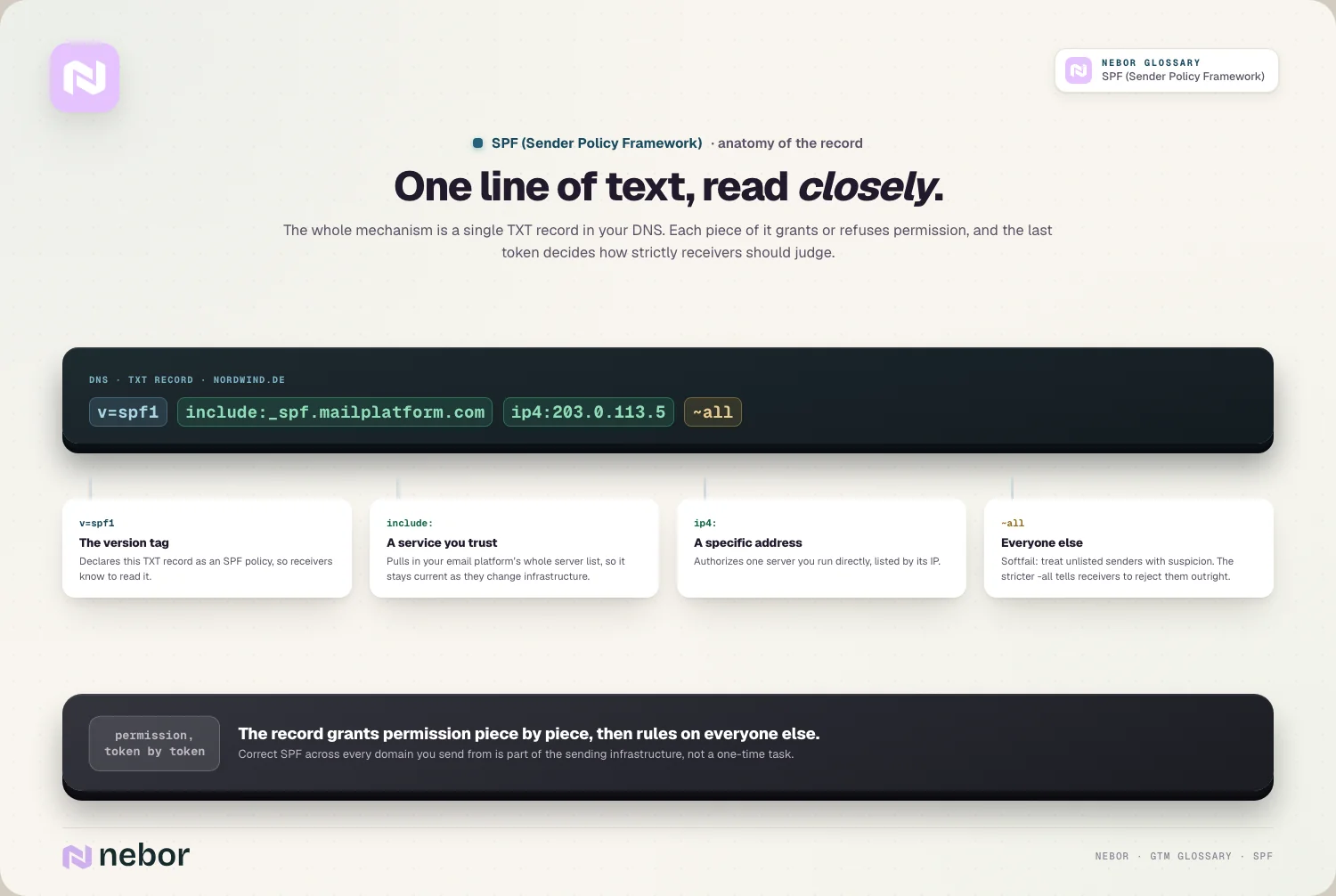
Keep the record within the lookup limits. SPF has a cap on how many DNS lookups it can trigger, so an overloaded record can break, which means you consolidate instead of pile on entries.
Verify the record after any change to your stack. Checking your SPF record with a testing tool after edits catches errors before they send your email to spam, so verification is part of the process.
So correct SPF setup is about completeness and ongoing checks. Listing every sender, staying within the lookup limit, and verifying changes are what keep the record actually working.
The common mistakes teams make when they set up their SPF record
SPF goes wrong in a few recognizable ways, and each can silently hurt deliverability. We keep seeing the same handful in the audits we do, and avoiding them is what keeps your authentication sound.
The biggest is not having it at all. Sending without an SPF record means your email fails a check providers now require, so it gets filtered or rejected.
Another is publishing a record that misses a source. Forgetting to authorize a sending service you use means legitimate email from it fails SPF, so you have to list every source.
A third is relying on SPF alone. Setting up SPF but skipping DKIM and DMARC leaves you short of what providers require, so partial authentication still fails.
The last is never checking the record again. Assuming SPF is fine without ever verifying it lets a broken or outdated record send your email to spam for weeks, so ongoing monitoring matters as much as the first setup.
Why SPF is a small setup step that carries outsized consequences
SPF is quick to configure, and that ease hides how much rides on it. A single DNS record stands between your email and the spam folder.
The setup itself is simple to get right. Publishing an SPF record is a small, largely one-time technical task, which makes it easy to overlook how essential it has become.
The consequences of skipping it are large. Getting it wrong, or skipping it, means your email fails authentication and never reaches inboxes, so a tiny record carries enormous weight.
It is fully within your own control. Unlike many deliverability factors that depend on recipients and providers, SPF is entirely something you set and maintain, so there's no excuse for getting this particular piece wrong.
Correct SPF, alongside DKIM and DMARC, is the price of admission for reaching inboxes in a modern go-to-market system. It's the foundational authentication that lets the outreach you automate sales prospecting around actually get delivered.
Share this post
Deliverability
Infrastructure
Glossary
Related glossary items
Understanding the core GTM concepts




Ready to build your pipeline











