

In this post:
The instinct with cold email is to send as much as possible, as fast as possible. Load the campaign, hit go, and blast a thousand emails in minutes. That instinct is exactly what gets your domain flagged as a spam bot.
Real people don't send a thousand emails in a burst. Mailbox providers know this, so a sudden flood from one sender is one of the clearest signals of automated spam, which is why slowing down often reaches more people than speeding up.
Email throttling is the practice of deliberately controlling the rate and volume of your sending, pacing emails out over time instead of sending them all at once, to protect deliverability. It's how you send like a human rather than a machine.
How fast you send is itself a deliverability signal, and that's the whole reason throttling exists. Throttling keeps your sending pattern natural, which protects your reputation and, paradoxically, gets more of your emails into inboxes than blasting would.
TL;DR
Email throttling means deliberately pacing your sending, limiting how many emails go out per hour or day and spacing them out, instead of sending everything at once.
Sudden spikes look like spam to mailbox providers, so throttling keeps your sending pattern natural, which protects deliverability and reputation.
Best practice for cold email is conservative, with limits per inbox per day and randomized delays between sends that mimic how a human emails.
The limit is that throttling alone isn't enough. It works alongside warmup, rotation, and clean lists, and overloading any single inbox still hurts no matter how you pace it.
What is email throttling, and what does the pacing really change?
Email throttling is controlling the pace and volume of your sending on purpose. Instead of sending every email the instant you can, you spread them out to match natural human behavior.
It operates on both rate and volume. You limit how many emails go out per hour and per day, and you add delays between individual sends, so the flow looks measured rather than explosive.
A simple example makes the idea concrete. Rather than pushing 500 emails at once, you might send small batches with gaps between them, spread across the day, so no single moment shows a suspicious spike.
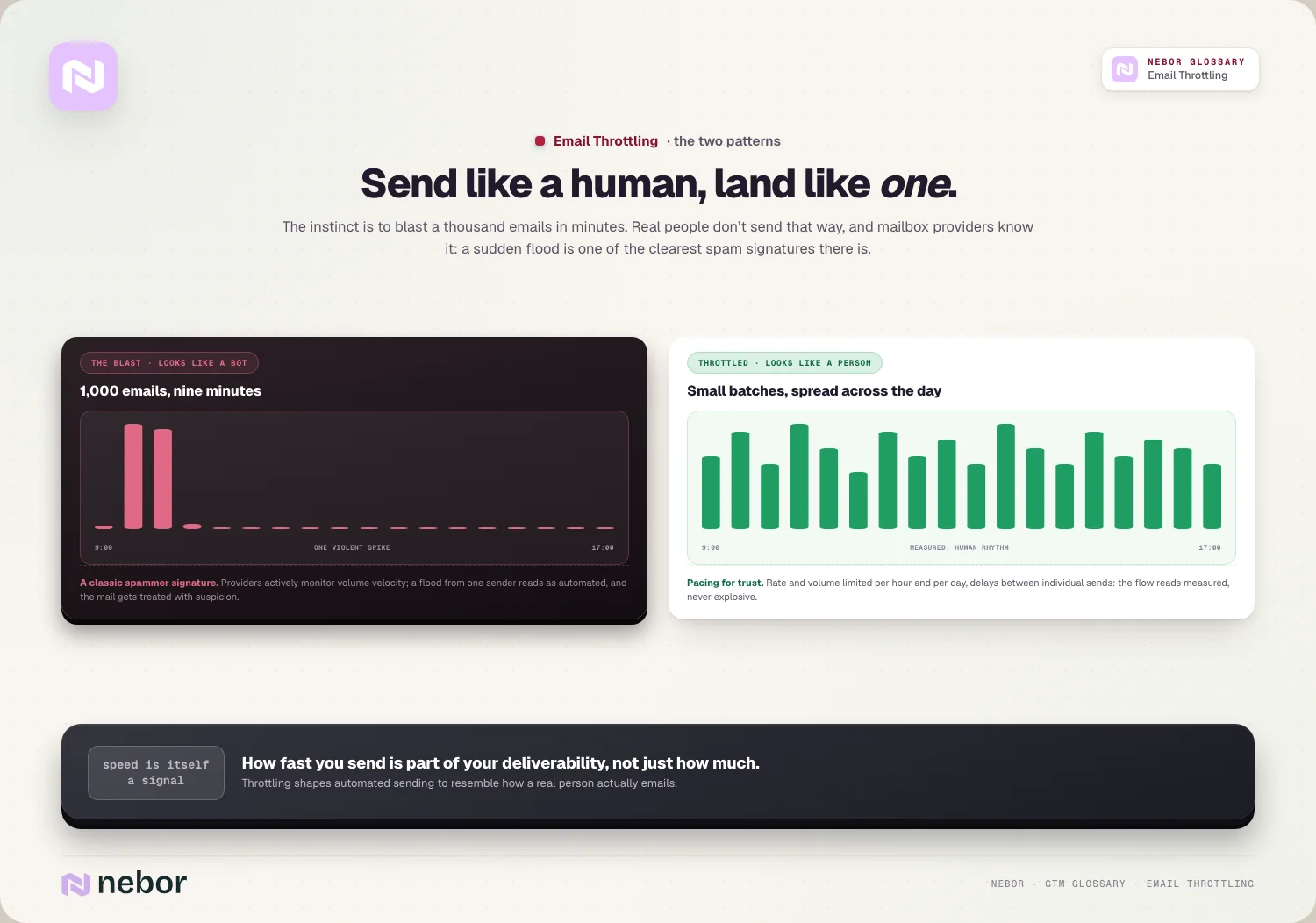
The goal is to look natural to the providers. A real person sends a handful of emails here and there throughout the day, so throttling shapes your automated sending to resemble that pattern.
This is partly about volume and partly about rhythm. It's not only how many emails you send, but the cadence between them, because a steady human-like flow reads very differently to a provider than a single automated burst.
So email throttling is essentially pacing for trust. It's how you keep your sending pattern from triggering the spam signals that a sudden, unnatural flood of mail would immediately set off.
Why does sending too fast hurt your deliverability so badly?
Speed itself being a problem isn't obvious, so let's trace what a burst of sending tells mailbox providers.
Providers watch sending patterns closely, because a sudden spike of identical or similar emails from one sender is a classic spammer signature, so volume velocity is something they actively monitor.
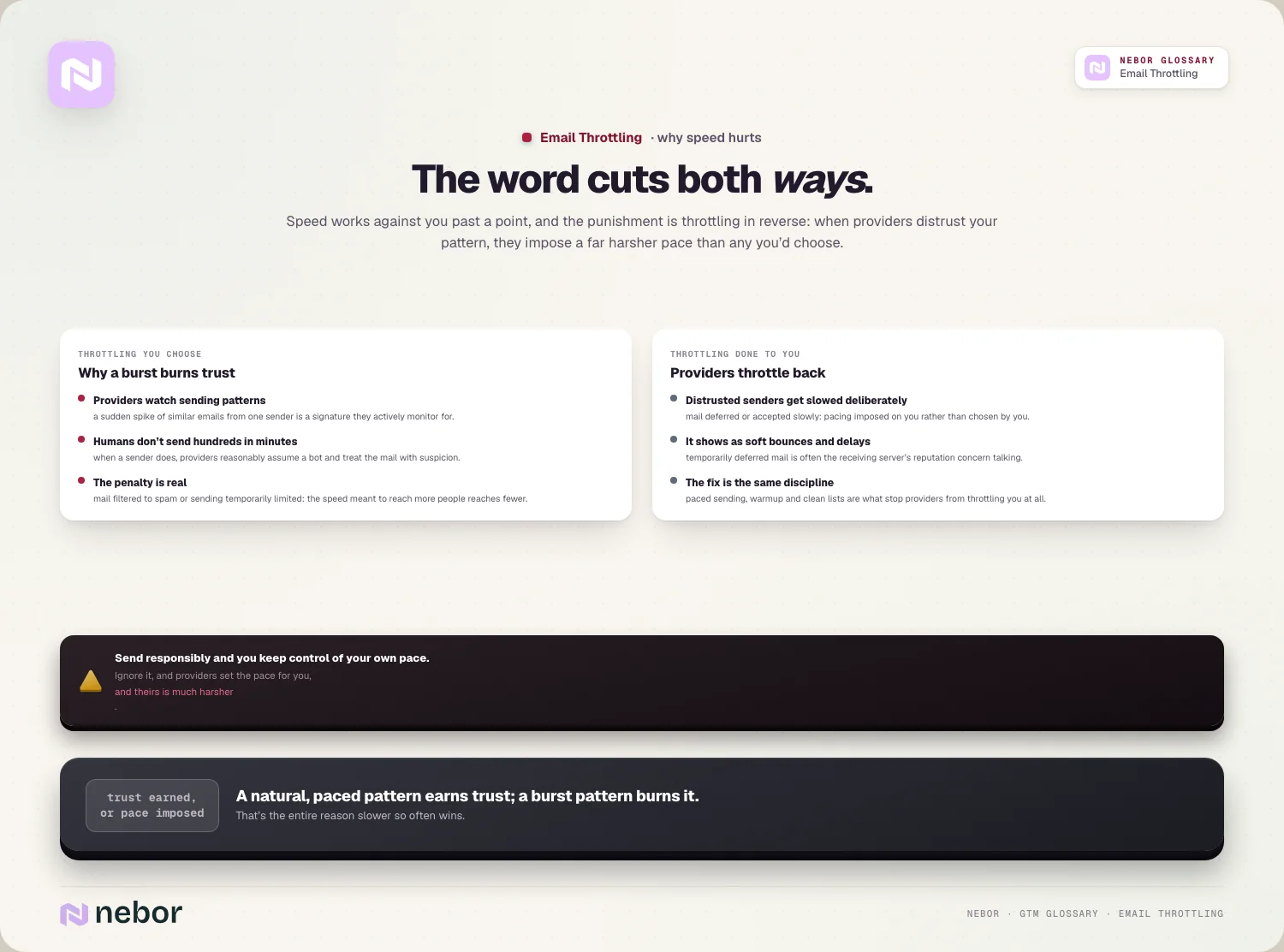
A flood looks automated on its face, because humans don't send hundreds of emails in a few minutes, so when a sender does, providers reasonably assume it's a bot and treat the mail with suspicion.
And the penalty is real, because sending too fast can get your emails filtered to spam or your sending temporarily limited, which means the very speed meant to reach more people reaches fewer.
So speed works against you past a point. Throttling exists because a natural, paced sending pattern earns trust, while a burst pattern burns it, so slower often wins.
What are the right sending limits for cold email in practice?
The practical heart of throttling is knowing the limits, and the numbers we hold clients to are conservative, because cold email rewards careful pacing.
Per-inbox daily limits should stay modest on every account you send from. Published guidance still puts cold outreach at around 20 to 50 emails per inbox per day on major providers, and the ceiling we work to now drops lower again at 10 to 20, because the providers have tightened since that advice was written.
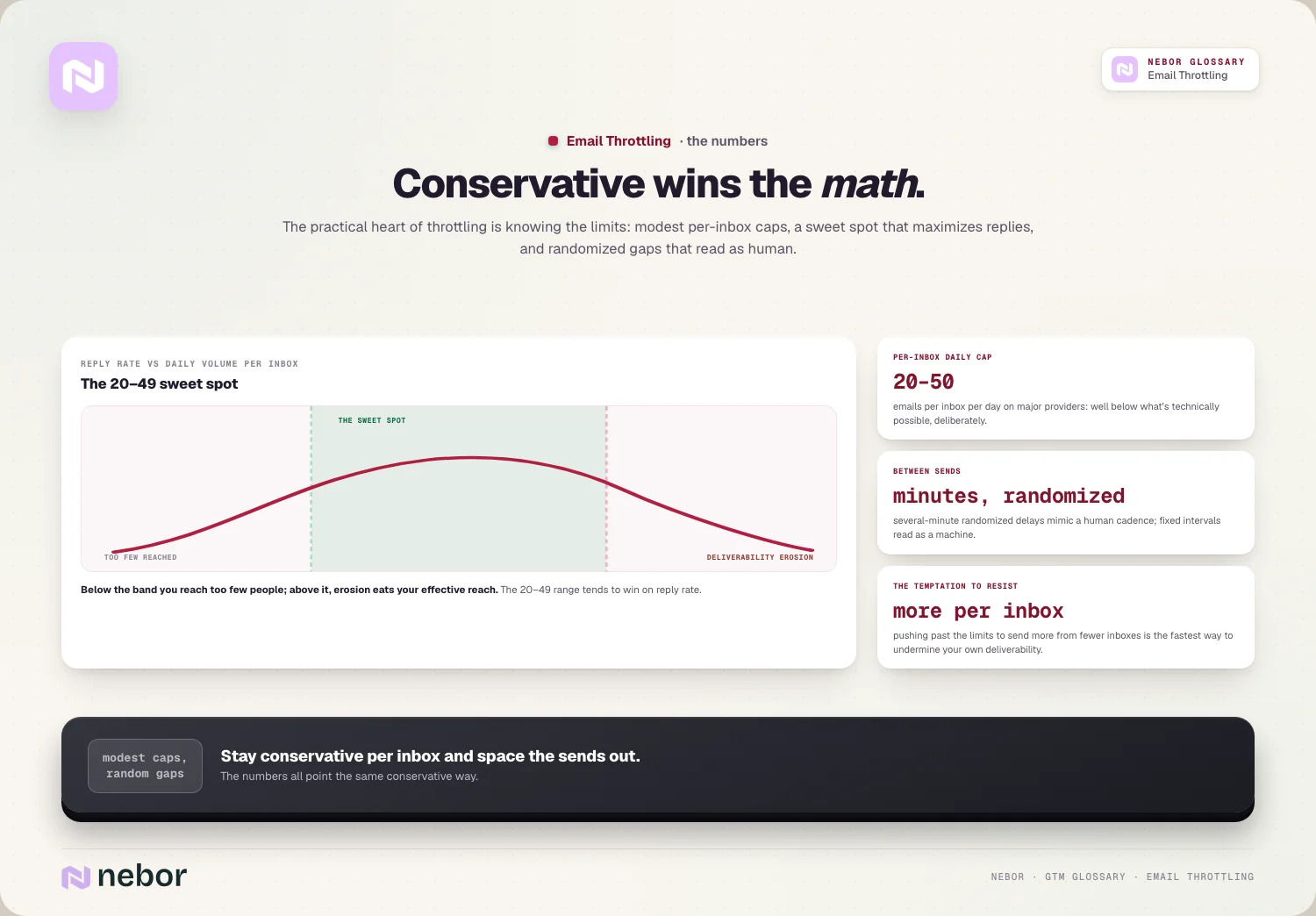
The same data set found the 20 to 49 range winning on reply rate, which held while those volumes were still comfortably safe. That band has drifted down since, though the shape of the finding survives, because too little volume reaches nobody and too much erodes the deliverability that made the sending work.
Delays between sends matter too, because adding randomized delays, often several minutes between sends, mimics how a human emails instead of sending on a fixed machine cadence.
So the numbers all point toward conservative per-inbox limits and spaced sends. Pushing past them to send more from fewer inboxes is the fastest way to undermine your own deliverability.
How is throttling different from the inbox rotation beside it?
These two tactics are often used together, even though they solve related but different problems.
Throttling controls the pace per inbox, limiting how fast and how much a single mailbox sends, keeping that one inbox's pattern natural.
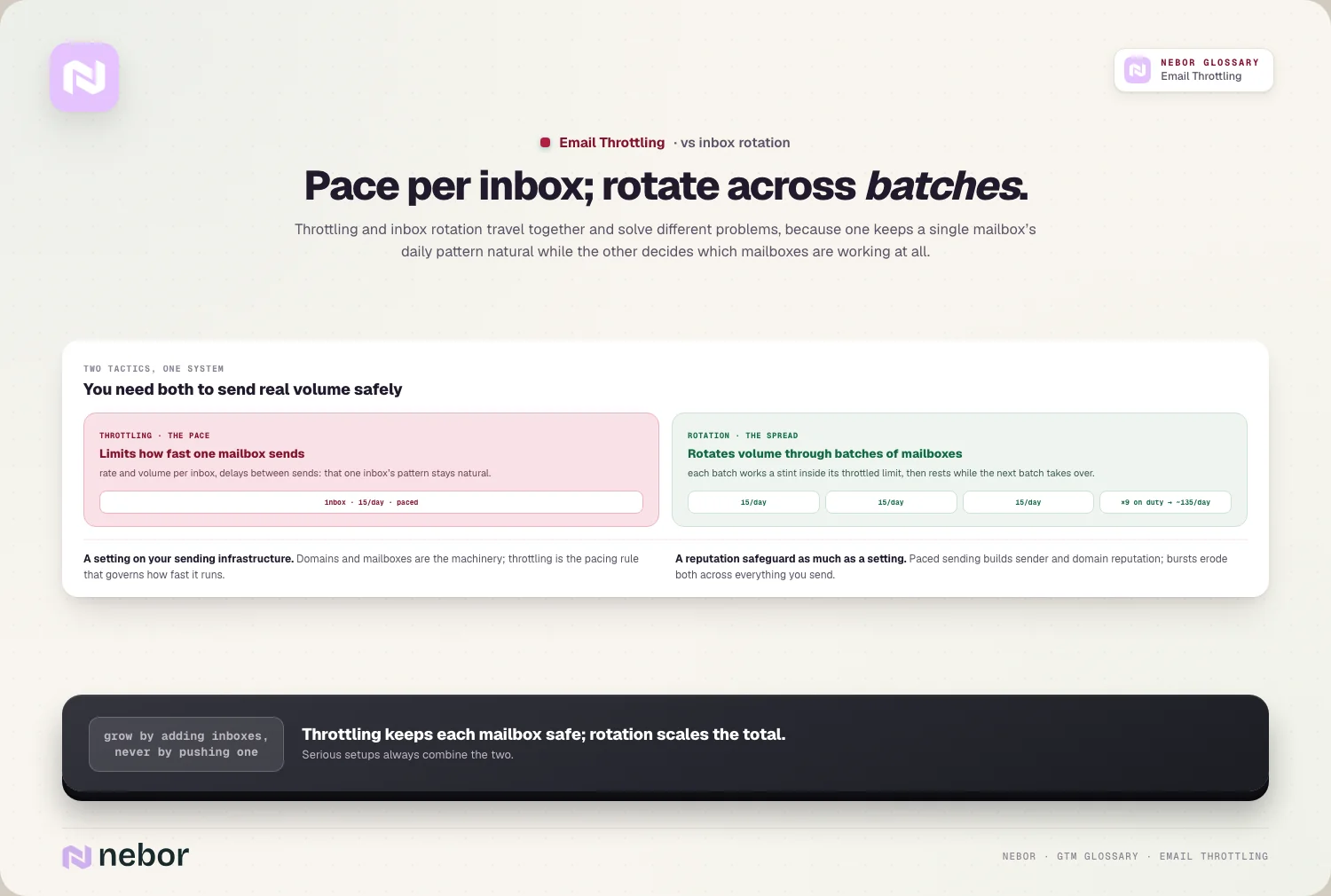
Inbox rotation spreads volume across many inboxes. It distributes your sending so each mailbox stays within its safe throttled limit while your total volume stays high.
The two work together by design, because throttling keeps each inbox safe, and rotation lets you scale total volume by adding more safely-throttled inboxes, so you grow without overloading any one.
So throttling is about pace per mailbox, and rotation is about spreading across mailboxes. You need both to send real volume safely, and that's the reason serious setups always combine the two.
How does throttling fit into the rest of your sending setup?
Throttling is one part of a larger system that keeps you reaching the inbox. It works alongside the rest of your setup.
It's a setting on your sending infrastructure. The domains and mailboxes are the machinery, and throttling is the pacing rule that governs how fast that machinery moves.
It protects your reputation too, because paced sending builds sender reputation by looking trustworthy, while bursts erode it, so throttling is a reputation safeguard as much as a sending setting.
And it supports your domains, because keeping volume measured protects domain reputation across all your sending, which is part of a clean cold email infrastructure.
So throttling isn't a standalone trick, it's a discipline within your wider infrastructure. It governs the pace, while the domains, mailboxes, and authentication handle the rest of the job of reaching the inbox.
Why does throttling matter most while a domain is still warming?
Throttling is always important, but it's critical when a domain or mailbox is new. The early period is when bursts do the most damage.
A new inbox has no trust to spend, so sending too fast from a fresh mailbox during email warmup signals spam immediately, with no reputation to cushion the spike.
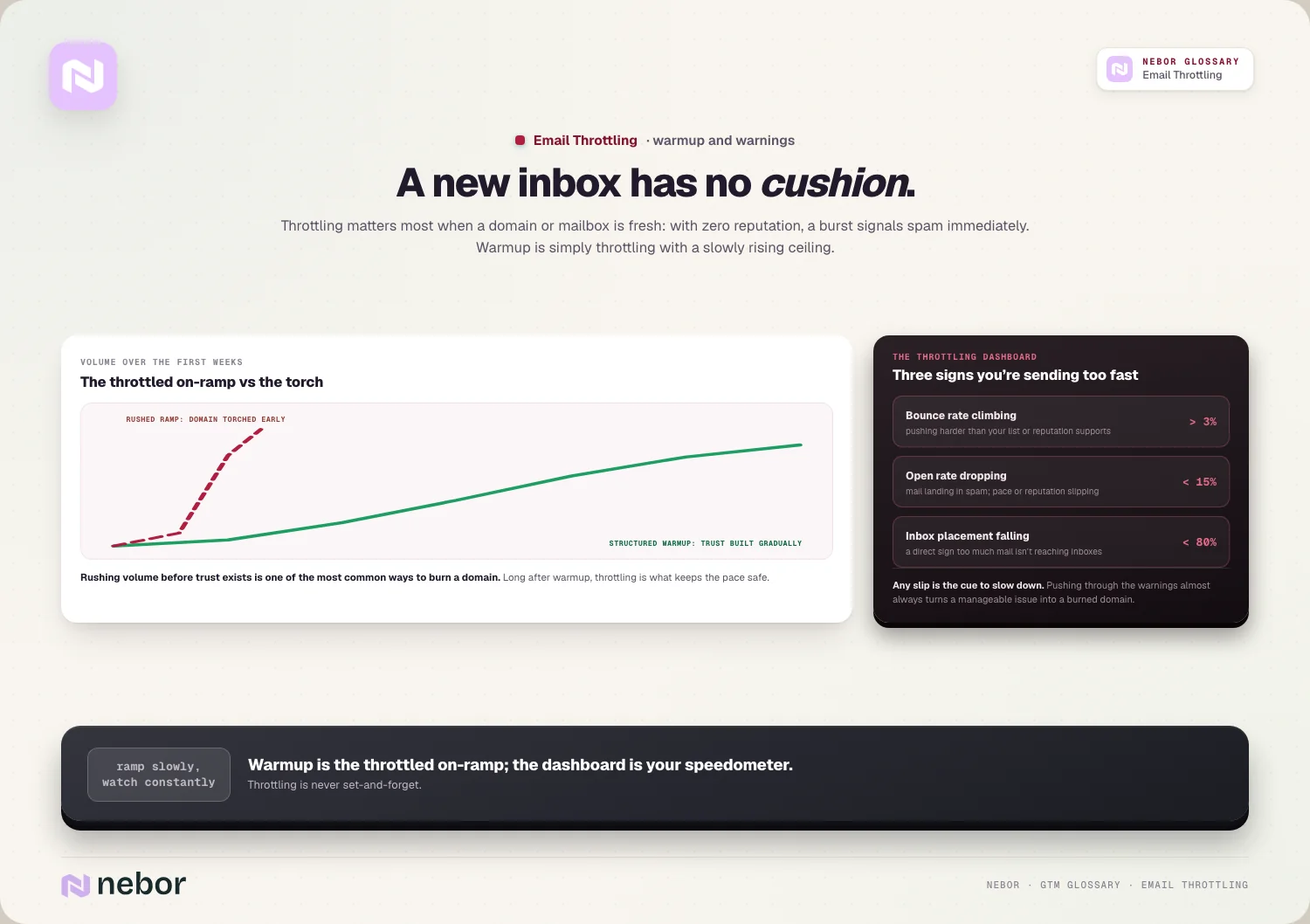
Warmup is really throttling applied to a ramp, because a structured warmup means starting at very low volume and increasing gradually, which is throttling with a slowly rising ceiling.
Rushing the ramp burns the domain outright, because pushing volume too fast before a new sender has earned trust is one of the most common ways to torch a domain early.
So throttling and warmup are deeply intertwined. Warmup is the throttled on-ramp that builds trust from zero, and throttling is what keeps the pace safe even long after the domain is established.
What signals tell you that you're sending faster than you should?
Throttling isn't a set-and-forget number, because you watch for signs that your pace is too aggressive, and a few metrics act as warnings.
Bounce rate is the first alarm, because a rate climbing above 3% often signals you're pushing volume harder than your list or reputation can support.
Open rate is the second, since rates dropping below 15% can indicate your mail is landing in spam, a sign your pace or reputation is slipping.
And inbox placement is the direct read, because placement falling below 80% means too much of your mail simply isn't reaching inboxes.
So these three signals are your throttling dashboard. When any of them slips, it's a clear cue to slow down, because pushing through the warning signs almost always deepens the damage.
How does throttling affect the results you can measure at the end?
Throttling can feel like it limits your output, but it usually improves real results, and the connection deserves tracing.
It protects your reach first, because keeping you in the inbox means the emails you do send arrive, so a smaller, paced volume can outperform a larger, blasted one.
It lifts reply quality too, because mail that reaches the inbox gets read, which protects your reply rate, given that replies only come from emails people actually see.
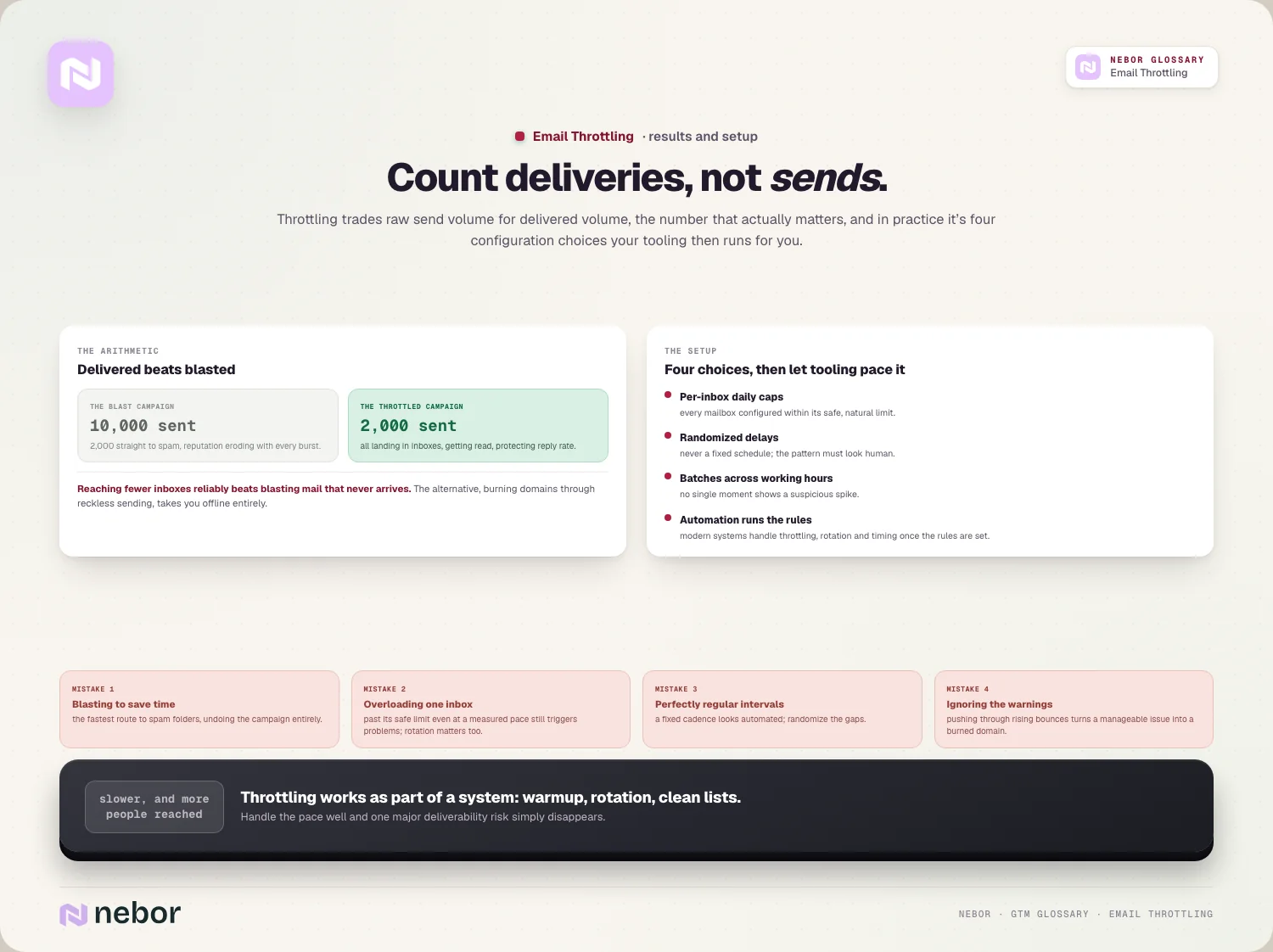
And it keeps you in the game over time, because the alternative, burning domains through reckless sending, takes you offline entirely, so throttling is what lets you sustain outreach for years.
So throttling trades raw send volume for delivered volume, which is the number that counts. Reaching fewer inboxes reliably beats blasting far more emails that never arrive at all.
The mistake is counting sends instead of deliveries. A campaign that sends ten thousand and lands two thousand in spam loses to one that sends two thousand and lands them all in inboxes, which is the whole logic behind throttling.
How do you set up throttling in practice without any guesswork?
Throttling is mostly a configuration task, and in our experience a few choices make it work. Modern tools handle the mechanics once you set the rules.
Per-inbox daily caps come first in the setup. You configure each mailbox to send within its safe limit, so no inbox ever exceeds a natural daily volume.
Spacing the sends comes next, because adding randomized delays between emails instead of sending them on a fixed schedule keeps the pattern looking human instead of mechanical.
Spreading sends across the day rounds out the pacing, with small batches through working hours avoiding the sudden spikes that trigger spam filters.
And the tooling can manage all of it, because systems that automate sales prospecting handle throttling, rotation, and timing automatically, so you set the rules once and the system paces every send.
How does throttling connect to your deliverability as a whole?
Throttling is one lever among several that decide whether you reach the inbox, so it helps to place it. It works alongside the other deliverability factors rather than replacing them.
It feeds your email deliverability directly, because paced sending is one of the inputs that keeps you landing in inboxes, alongside authentication, reputation, and list quality.
It interacts with your list quality too, because throttling a dirty list still produces bounces, so a rising bounce rate can signal a list problem that pacing alone won't fix.
It carries one part of the job and only that part, because perfect throttling won't save bad authentication or a burned domain, so it works only as part of the whole deliverability picture.
So throttling is the pacing layer of deliverability. When you handle it well, you remove one major risk, but you still need the rest of the foundation solid underneath it to reach inboxes.
Does provider-side throttling affect you too, from the other end?
There's a second meaning of throttling to know about, because the word cuts both ways. Providers throttle senders too, on top of senders throttling themselves.
Providers can throttle you directly, because when a mailbox provider distrusts your sending, it may deliberately slow or defer your mail, which is throttling imposed on you instead of chosen by you.
This usually shows as soft bounces or delays. Mail that's accepted slowly or temporarily deferred can be a sign the receiving server is throttling you due to reputation concerns.
The fix is the same discipline either way, because earning trust through paced sending, warmup, and clean lists is what stops providers from throttling you in the first place.
So throttling describes both what you do and what providers do to you in return. Sending responsibly is how you keep control of your own pace instead of having providers impose a much harsher one on you.
What are the common throttling mistakes that burn good domains?
Throttling goes wrong in a few predictable ways, and we've watched each of them burn real domains, so avoiding them keeps your sending safe.
Sending too fast to save time tops the list, because blasting volume to finish a campaign quickly is the fastest route to spam folders, undoing the campaign entirely.
Overloading single inboxes comes next, because pushing one mailbox past its safe limit, even at a measured pace, still triggers problems, and that's the reason rotation matters alongside throttling.
Fixed, robotic intervals are the subtle one, because sending on a perfectly regular cadence looks automated, so randomizing delays is what mimics human behavior.
And there's ignoring the warning signs entirely, because pushing through rising bounces or falling placement instead of slowing down turns a manageable issue into a fully burned domain.
Why the speed of your sending is a trust signal all by itself
How fast you send is itself a deliverability signal. A sudden flood looks like spam, so pacing your sending to resemble human behavior is what keeps you trusted and in the inbox.
The deeper point is counterintuitive: sending slower often reaches more people. By protecting your reputation and placement, throttling means more of your emails actually arrive, which beats blasting volume that lands in spam.
The honest reality is that throttling works as part of a system. It pairs with warmup, rotation, and clean lists, and overloading any single inbox still hurts no matter how carefully you pace the rest.
So if your outreach is sliding into spam despite good targeting and copy, your sending pace may be the culprit. Throttling deliberately, watching the warning signs, and pairing it with the rest of your infrastructure is what keeps your mail reaching real people.
That discipline is foundational in any go-to-market system built on email. It's one the top outbound experts never ignore, because all the targeting and copy in the world mean nothing if the mail never arrives.
Share this post
Deliverability
Glossary
Related glossary items
Understanding the core GTM concepts


Ready to build your pipeline











