
In this post:
Bounce rate is the share of the emails you send that come back undelivered, and it splits into hard bounces, which are permanent failures such as an address that doesn't exist, and soft bounces, which are temporary ones such as a full mailbox or a server asking you to try later. Send 1,000 emails, get 30 back, and your bounce rate is 3%.
The number matters for two reasons. Each bounce is a contact you didn't reach. And a pile of bounces tells mailbox providers you're mailing a list nobody checked, which drags down your sender reputation and with it the mail that did arrive.
Where teams slip is in trusting the label. Sending tools sort bounces into hard and soft by reading the code the receiving server sends back, and those codes are less tidy than the labels suggest. A "hard" bounce can mean your mail was refused on reputation grounds while the address is perfectly fine, and one code number means entirely different things at Google and at Microsoft.
TL;DR
The first digit of the status code decides the type. A 5 is permanent, a 4 is temporary, as set out in RFC 3463 and RFC 5321, and the detail after it (5.1.1, 4.2.2, 5.7.1) tells you why.
Address failures like 5.1.1 come off the list at once. Policy refusals like 5.7.1 and 5.7.26 are hard bounces too, but they point at your sending setup, so deleting the contact fixes nothing.
We retry soft bounces across separate sends and suppress an address after three in a row. A mailbox that stays full has often been abandoned.
Amazon SES recommends a bounce rate under 2% and reviews accounts at 5%. Our working line for cold email is about 3% hard bounces on any one inbox, at which point that inbox stops and the list gets checked.
Catch-all domains accept mail they may never deliver, so their bounces show up late or not at all. Send them in small, separate batches.
Bounce status belongs in the CRM, not only in the sequencer, so nobody re-enrolls a dead address and a hard bounce can trigger a search for the contact's new email.
Hard bounce or soft bounce: the first digit decides
Every failed delivery comes with a status code, usually in the form 5.1.1 or 4.2.2. RFC 3463, the standard that defines these enhanced status codes, gives the first digit one of three meanings. A 2 is success. A 4 is a "persistent transient failure", where the message was fine but some temporary condition got in the way, and sending again later may work. A 5 is a permanent failure, one that isn't likely to be resolved by resending the message in its current form.
That maps cleanly onto the two kinds of bounce. Codes starting with 5 are hard bounces, codes starting with 4 are soft bounces. The second and third numbers say what went wrong: x.1 codes are about the address, x.2 about the mailbox, x.4 about routing and delivery, x.7 about security and policy.

The SMTP standard, RFC 5321, adds the behavior. After a permanent rejection, the sending server should not repeat the exact same request, which is why your tool doesn't retry a hard bounce. It also covers a case people forget: if a server has already accepted your message and only later finds it can't deliver it, it must send a non-delivery notice back to the sender. So some bounces come back during the conversation between servers, within seconds, and others arrive hours later as an email in the sending mailbox. Both count, and the late ones are easy to miss if no one checks that mailbox.
The bounce codes you'll actually see
The standard gives the structure, and each provider writes its own text around it. These are the codes that turn up most often in a cold email bounce report, with the wording from Google's Gmail error list and Microsoft's Exchange Online NDR reference.
Code | What the receiving server is saying | Type | What we do with it |
|---|---|---|---|
550 5.1.1 | Gmail: the email account you tried to reach does not exist. Microsoft: bad destination mailbox address. | Hard | Suppress the address and flag the contact for a new email. |
550 5.4.1 | Microsoft 365: recipient address rejected, access denied, meaning the address doesn't exist in that company's tenant. | Hard | Same as 5.1.1. It looks like a block, but it's a dead address. |
553 5.1.2 | Gmail: the recipient domain couldn't be found. | Hard | Check for a typo, then suppress. If a whole domain fails, the company may have rebranded. |
452 4.2.2 | Gmail: the recipient's inbox is out of storage space. | Soft | Retry on a later send, and count it. |
552 5.2.2 | Gmail: the inbox is out of storage and inactive. Microsoft: you exceeded your own sending quota. | Hard | At Gmail, suppress the address. At Microsoft, stop that sending mailbox and find out why it hit its limit. |
550 5.7.1 | Gmail: likely unsolicited, or very low reputation of the sending domain or IP. Microsoft: delivery not authorized. | Hard | Keep the contact. Pause the sending domain and look at reputation and content. |
550 5.7.26 | Gmail: unauthenticated email isn't accepted because of the sending domain's DMARC policy. | Hard | Keep the contact. Fix SPF, DKIM and DMARC on the sending domain. |
4.4.7 | Microsoft: message expired after the sending server couldn't complete delivery in time. | Soft | Check whether the recipient's server is reachable, then retry later. |

Look at 5.2.2 in particular. RFC 3463 describes a full mailbox as a condition that should be treated as temporary, yet Gmail sends it with a 5 when the mailbox is both full and inactive. Microsoft uses the same 5.2.2 for something unrelated: the sender going over its own submission limit, which Microsoft notes can be a sign the account was compromised. A tool that reads only "5.2.2" can't tell these apart. The text after the code can.
A hard bounce doesn't always mean a bad address
Most sending tools treat every 5xx the same way: hard bounce, remove the contact, move on. For address failures that's right. For policy refusals it's wrong twice over. You throw away a valid contact, and you miss the fact that a provider has stopped accepting your mail.
The 5.7 family is the giveaway. When Gmail returns 5.7.1 with "very low reputation of the sending domain", the address is fine and your domain is the problem. HubSpot says as much in its own documentation, noting that a hard bounce usually means a permanent error but can also be caused by a strict email security filter. That filter is often a secure email gateway at a larger company, holding mail from senders it doesn't know.
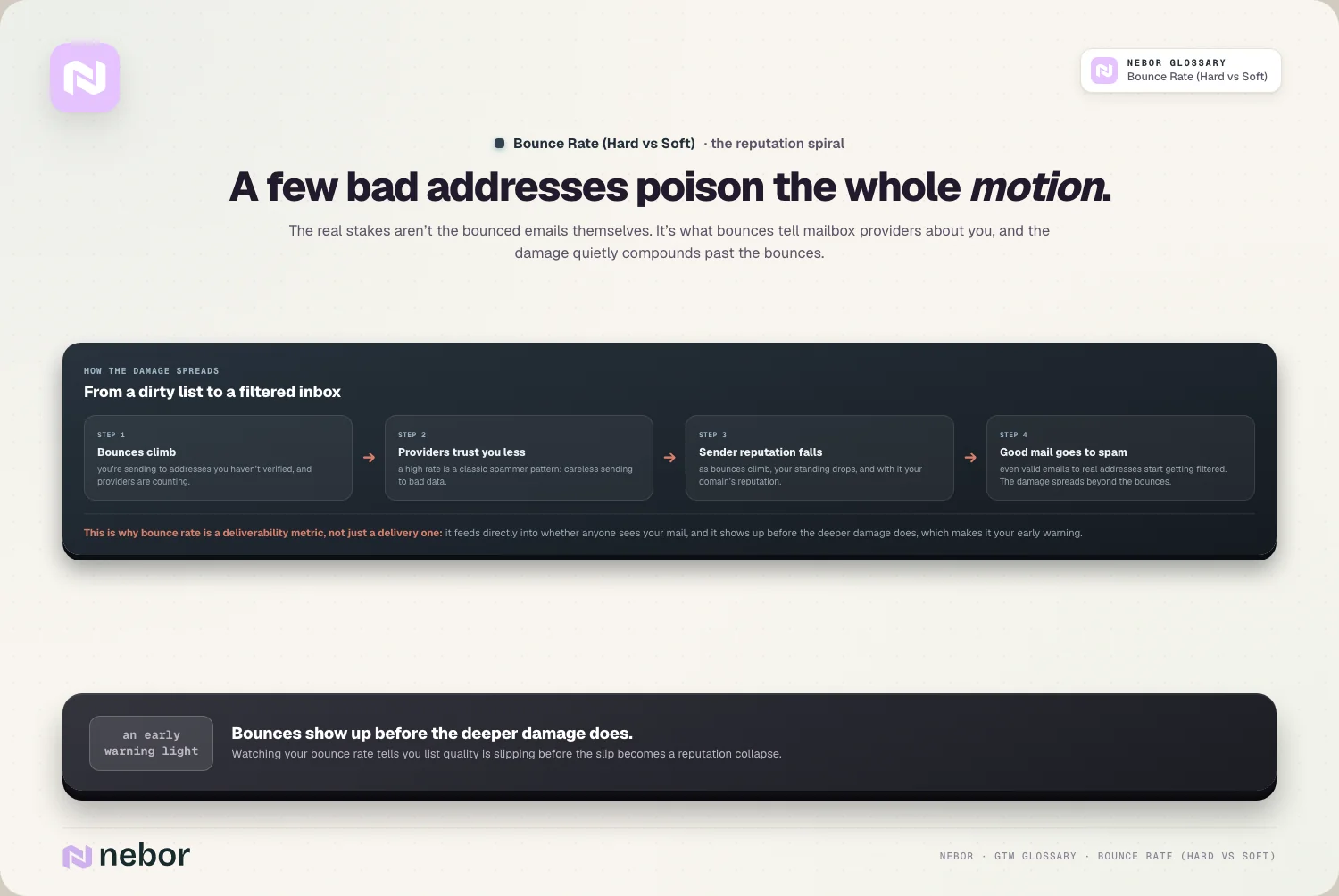
So split your hard bounces into two piles before acting. Address bounces (5.1.x, the 5.4.1 variant above) go to suppression. Policy bounces (5.7.x) go to whoever owns email deliverability, because they mean the domain reputation or the authentication behind that domain needs attention. A sudden run of policy bounces from one provider is one of the earliest signs a domain is in trouble, often days before reply rates show it.
How many soft bounces before an address is dead?
A single soft bounce tells you almost nothing. Servers go down, mailboxes fill up, and a deferral that turns into a soft bounce can be the receiving server rate limiting you, which is a pacing question covered under email throttling. Delete on the first soft bounce and you lose contacts that would have been reachable a day later.
Ignore soft bounces forever and you have the opposite problem. A mailbox that's full week after week usually belongs to someone who left, and the address is on its way to becoming a hard bounce. Amazon notes that spam traps can be made from addresses that were once valid but have been unused, and bouncing, for an extended period, so an abandoned mailbox you keep mailing can eventually turn into something worse than a bounce.
Our rule in sending tools: retry soft bounces on later steps of the sequence, and suppress the address after three soft bounces in a row on separate sends. Then treat it as a sign of data decay. The person may have changed jobs, and contact verification on the rest of that account is worth running before the next send.
Bounce rate benchmarks and the line we work to
The clearest published numbers come from sending platforms rather than mailbox providers. Amazon SES's sending review FAQ recommends keeping your bounce rate below 2%. It places an account under review at 5% and may pause sending at 10%. It counts only hard bounces toward that rate, not temporary failures like a full mailbox. Mailbox providers are vaguer. Google's sender guidelines give no figure, only advice to unsubscribe recipients who have multiple bounced messages, and Yahoo asks senders to monitor hard and soft bounces and remove invalid recipients promptly.

For cold email we work to three lines. A list that has just been through email validation should come in well under 2%, and if it doesn't, the validation or the source is suspect. Once a single inbox passes roughly 3% hard bounces, pause it: the list is almost always the cause, and slower sending won't fix a bad list. And 5% means something went badly wrong, usually an unverified list that slipped into a sequence.
The denominator matters as much as the threshold. A 1% bounce rate across ten inboxes can hide one inbox at 6% that's burning its domain. Measure per inbox, per sending domain and per list source, and the bad list shows up on the first day instead of the third week.
Catch-all domains and the bounces that never come back
Some company mail servers are set up as catch-all: they accept mail for any address at the domain, real or not, partly to stop outsiders from probing which addresses exist. Validation tools can't confirm these addresses and mark them as unknown or risky.
The trouble is what happens after the send. The server accepts the message, so there's no immediate bounce. Later it either sends a non-delivery notice, which shows up as a late bounce, or discards the message without a word, which shows up as nothing at all. A list that's heavy on catch-all domains can report a low bounce rate and still be reaching far fewer people than it seems.
We send catch-all addresses in small, separate batches after the verified ones, check the sending mailbox for late notices, and keep them off brand-new domains. A domain that's still in email warmup shouldn't carry anyone you can't verify.
Keeping bounces off the list in the first place
Almost every hard bounce is avoidable before it happens, and the work is mostly in the data. Sourcing matters most. Careful list building from sources you trust brings in far fewer dead addresses than a scraped or bought list, and an MX check catches domains that can't receive mail at all before you spend a validation credit on them.

Timing matters next. Validate as close to the send as you can, and re-validate any list that has sat unused for a couple of months, because people change jobs and their old addresses go with them. Cold lists carry more risk than opt-in lists because nobody on them typed in their own address, and a fresh sending domain inside a cold email infrastructure has no history to soften a bad batch.
When bounces climb anyway, an outbound deliverability audit usually finds one of three things: a list source that's gone stale, a validation step that got skipped for a rush campaign, or policy bounces being counted as bad addresses.
Bounces belong in the CRM, not just the sequencer
Most cold email tools suppress a hard-bounced address inside the tool and stop there. The CRM still shows the contact with a working email, so the next rep to build a list re-enrolls it, and the address bounces again from a different domain.
Marketing platforms handle part of this. HubSpot, for instance, drops contacts who hard bounce on a marketing email from future marketing sends, keeps soft-bounced contacts eligible, and marks an address as a global bounce once it hard bounces across three or more HubSpot accounts. But that covers HubSpot's own sends, not the sequencer running your cold outreach.

So we write the bounce back to the CRM record: the type, the code and the date. An address bounce marks the email as invalid and can kick off a waterfall enrichment run to find the person's new address, or their replacement at the account. A policy bounce leaves the contact alone and raises a flag on the sending domain instead. That way the next list starts cleaner than the last one.
In short
Bounce rate looks like a single percentage, but the useful information is in the codes underneath it. The first digit says whether to try again. The rest says whether the problem is the address, the mailbox or you. Treat address failures as data to clean up and policy failures as a warning about your sending setup, and the number starts telling you something you can act on.
Most of the work happens before the send: good sources, validation close to launch, careful handling of catch-all domains and bounce data that flows back to where lists get built. Get that routine right and bounces stay low enough to be boring. The top outbound experts treat clean lists as a fixed cost of outbound for that reason, and it's one of the plainer jobs in a GTM system that runs on email, and one of the easiest to neglect.
The bounce handling we set up runs in the client's own sequencer and CRM: suppression rules, the sync back to contact records, alerts per inbox and a short note on what each code means. Their team keeps running it, and changing it, long after the project ends.
Frequently asked questions
Is a bounced email the same as an email that went to spam?
No. A bounce means the receiving server refused the message or couldn't deliver it, and you get a notice back. An email filtered to spam was accepted and delivered, just not to the inbox, and you usually get no signal at all. That's why spam placement is harder to spot than bounces, and why seed tests and reply rates matter alongside the bounce report.
Why do cold email lists bounce more than newsletter lists?
Nobody on a cold list typed in their own address. The emails come from data providers, enrichment tools or guesses based on a company's naming pattern, and some are wrong or out of date from the start. People also change jobs often, and their old work addresses get shut down. A newsletter subscriber confirmed the address when signing up, so the starting quality is much higher.
Does an out-of-office reply count as a bounce?
No. An out-of-office reply is a normal email sent back by the recipient's mailbox after your message was delivered, so the delivery succeeded. Most sending tools file it as an automatic reply rather than a bounce. It can still be useful: some auto-replies say the person has left the company and name a replacement, which is worth capturing before the address starts bouncing for real.
Can an address that hard bounced ever become valid again?
Sometimes, if a company recreates a mailbox or a hard bounce was really a policy block rather than a missing address. But mailing a known hard bounce again is a poor bet, and providers notice repeated attempts at dead addresses. If you have a reason to think it's live again, run it through validation first and send to it from an established domain, never a fresh one still in warmup.
Does email verification guarantee zero bounces?
No. Validation can confirm many addresses and reject clearly dead ones, but it can't confirm addresses at catch-all domains, and an address that was valid last month may be closed today. A freshly validated list should bounce well under 2%, and small numbers of late bounces from catch-all domains are normal. Verification lowers the rate a lot. It doesn't remove the need to watch it.
How do you calculate bounce rate for a multi-step sequence?
Count bounces against first-step sends, not against every message in the sequence. A bad address bounces on step one and is then suppressed, so later steps go only to addresses that already worked. Dividing by all messages sent makes the rate look much lower than the list deserves. For judging a list, unique contacts who bounced divided by unique contacts emailed is the clearest number.
Do bounces hurt the sending domain or only the mailbox that sent them?
Both. The mailbox shows the bounce first, but providers also attach the pattern to the domain the mail claims to come from, so several inboxes on one domain all pay for a bad list sent through any of them. That's why we track bounce rate per inbox and per domain, and pause the inbox whose numbers turn before the damage spreads to the rest.
Why is my bounce rate low while replies keep falling?
A low bounce rate only says the addresses accepted your mail. It says nothing about whether the mail reached the inbox. Catch-all domains can accept and then drop messages, and a provider that has lost trust in your domain may deliver to spam without bouncing anything. If replies fall while bounces stay flat, check inbox placement with seed tests and look for policy bounces in the report.
Should you delete bounced contacts from the CRM?
Usually not. Deleting the contact loses the account history, the notes and the reason it was on the list. Mark the email as invalid, record the bounce type and date, and keep the record so a rep doesn't re-add the same address from another source. The contact often still works at the company with a different address, or has moved somewhere worth knowing about.
Share this post
Deliverability
Glossary
Related glossary items
Understanding the core GTM concepts

Automation
Email Validation
Email validation is checking whether an email address is correctly formatted, real and able to receive mail before you send to it, so bounces don't damage your sender reputation and deliverability.

Automation
Sender Reputation
Sender reputation is the trust score mailbox providers like Gmail and Outlook give your sending domain and IP, based on how you send and how recipients react. It decides whether your email reaches the inbox.

Automation
Contact Verification
Contact verification is the process of confirming that a contact's email address, phone number and role are valid and current before outreach, so you avoid bounces and dead ends.

Automation
Email Deliverability
Email deliverability is whether your emails reach the inbox instead of landing in spam or getting blocked. It depends on your authentication, sender reputation, list quality and how people engage with your mail.
Ready to build your pipeline