In this post:
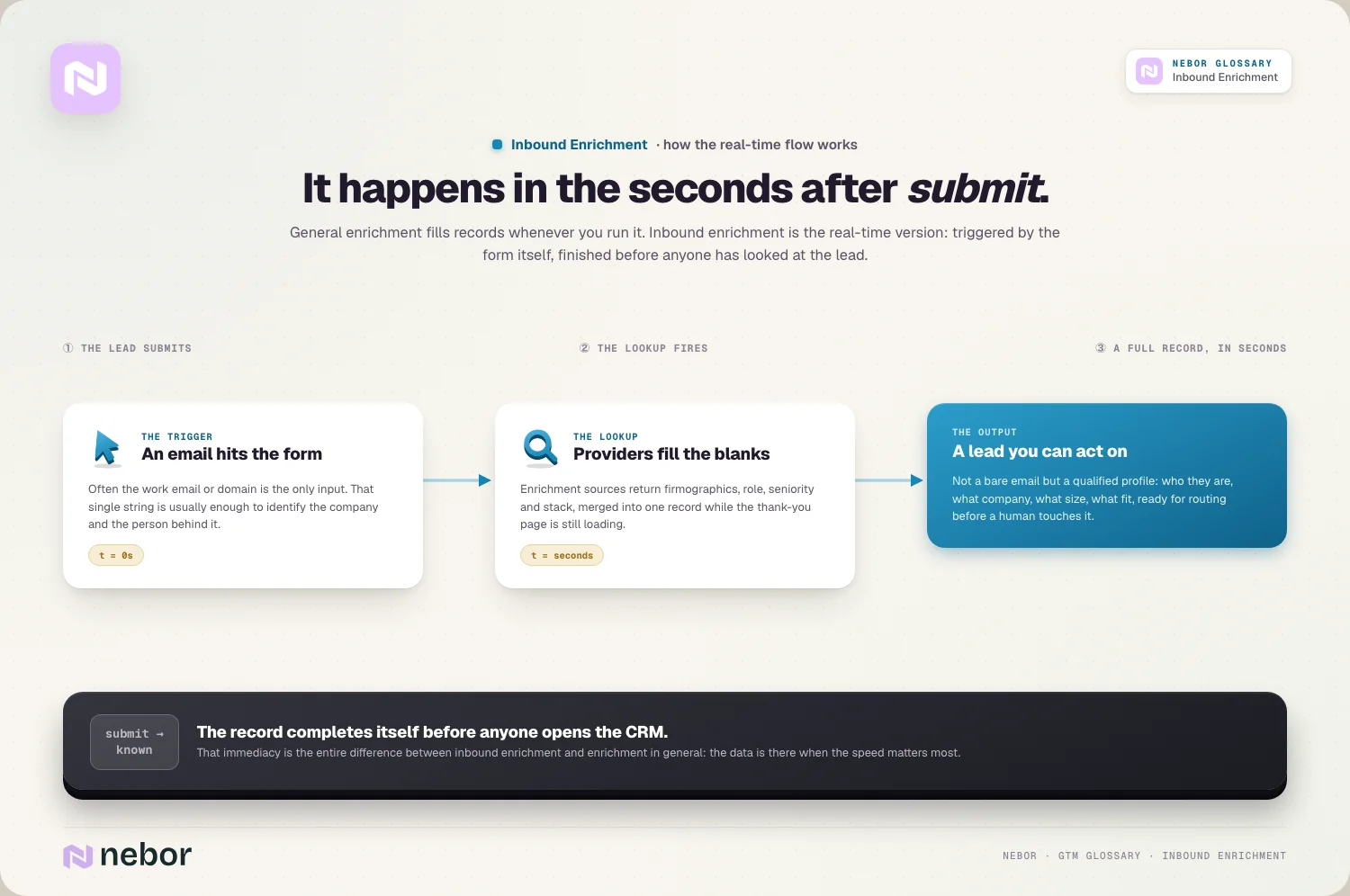
Inbound enrichment is the practice of automatically enriching inbound leads with firmographic and contact data in real time, the instant they fill out a form or sign up, using just the little they provide. A work email goes in, and a few seconds later the CRM record shows a company, a size band, a country, a job title and whatever else your routing and scoring need to read.
It exists to settle an old argument. Marketing wants a short form, because every extra field gives a visitor one more reason to close the tab. Sales wants to know who it's talking to before it picks up the phone. Enrichment lets you ask for very little and look up the rest, so both sides get what they asked for.
Where it breaks is the timing. Plenty of CRMs enrich every new contact, but the data lands a minute after the lead was assigned, so the routing rules ran on an empty record and the lead went to whoever was next in the rotation. Inbound enrichment only works when the data arrives before the first decision about the lead gets made.
TL;DR
It's data enrichment with a deadline. The form submission triggers the lookup, and it has to finish before routing, scoring or the first reply, so the lead is complete by the time anyone acts on it.
Ask for a work email plus the one thing no provider can tell you, usually what the person wants help with. HubSpot's form shortening hides the fields it can fill from enrichment and shows every field when it finds nothing.
Enrich in a fixed order: check the email, match it to an account you already hold, add the company fields routing reads, then the person. Tech stack and signal data can arrive after the lead has an owner.
Put a time limit on the part routing waits for. If the company fields haven't come back by then, route on what the form said and let the rest catch up.
Write a rule for each empty result: a personal email address, a small company no provider knows, and a match that contradicts the form. A lead should never sit waiting for data that isn't coming.
Under the GDPR, fields you add from a provider count as data not obtained from the person. Say so in the privacy notice linked from the form, and only add fields a later step actually uses.
Nebor builds inbound enrichment on the client's own CRM and form accounts, with Clay where a waterfall helps, connects it to routing and scoring, and hands over a map of which source fills which field and what happens when none of them does.
Inbound enrichment is data enrichment with a deadline
General data enrichment can run whenever it suits you: a nightly refresh, a list before a campaign, a cleanup before a migration. Nobody is waiting on the result. Inbound enrichment runs on one record at a time, it starts because someone just pressed submit, and its value depends almost entirely on whether it finishes before the next step starts.
The methods are the same. A waterfall enrichment that asks several providers in turn works just as well on a single inbound lead as on a list of ten thousand. What changes is the trade-off inside the cascade. Inbound volume is small and every record is valuable, so cost per lookup matters less than on a cold list, and time matters more, because each extra provider adds a wait before the lead gets an owner. For the inbound path, we put the provider with the best coverage of the client's market first, even when it isn't the cheapest.
How short can an inbound form get?
Shorter than most teams dare. Anything that describes the company (name, size, industry, country) and most of what describes the person (job title, seniority) can be looked up from a work email. What can't be looked up is the reason they came: what they want help with, how soon, and anything they're consenting to. Those stay on the form. So does a phone field, if your team calls inbound leads, because the number a visitor types is the one they expect to be called on.
Source data shouldn't be asked for either. UTM parameters and the page URL can go into hidden fields.
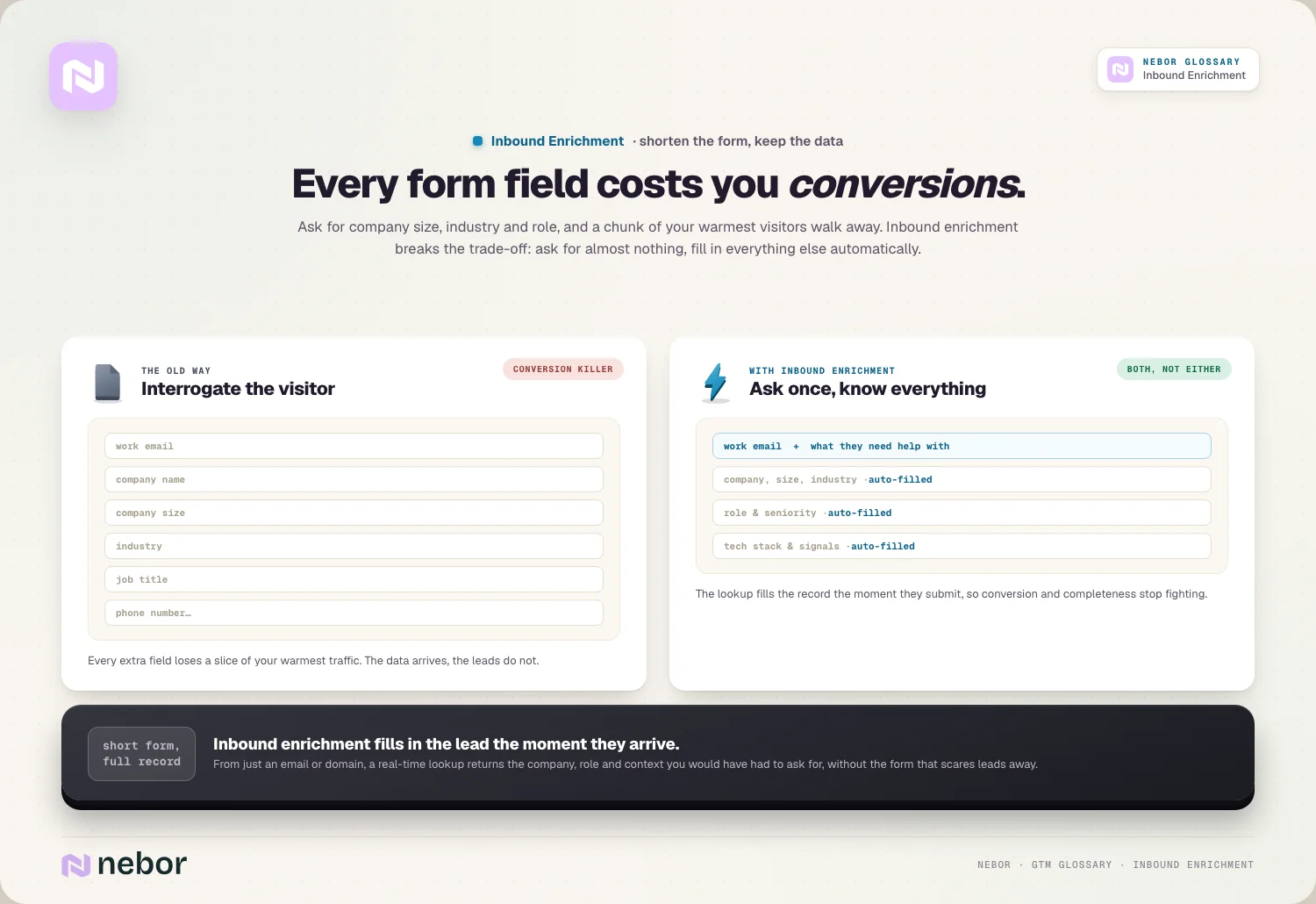
Some form tools now do the hiding for you. HubSpot's form shortening checks its enrichment data once the visitor enters an email address and hides the fields it can fill. If it has nothing on that person, every field is shown, so a visitor HubSpot can't identify gets the full form and you still collect the basics. Two details are easy to miss. It only works with forms built in HubSpot's updated form editor, and it won't hide a field that's already been set on the contact from another source, so a returning contact you know well can see a longer form than a stranger.
Personal email addresses are the next decision. HubSpot lets you block free email providers per form, and a blocked visitor is asked for a different address before the form will submit. That protects your enrichment, since a Gmail address tells a provider nothing about the company. It also turns away owners of small firms who run their business from a personal address. We usually leave free-mail open on demo and contact forms and give those leads their own route instead (more on that below), and only block it on gated content where the lead's value is low anyway.
What to enrich first, and in what order
The order matters because each step either feeds the next or decides who gets the lead. Here's the sequence we use for most B2B inbound flows.
Check the email itself. Syntax, a domain that accepts mail, and a list of disposable domains catch most typos and throwaway addresses before you pay for a lookup. Email validation is the cheapest step in the chain and protects every step after it.
Look inside your own CRM. If the domain belongs to an account you already hold, lead-to-account matching hands the lead that account's owner, industry and size for free, and that data is usually better than anything a provider returns. Inbound regularly includes people from companies you already know: customers, open deals, old opportunities.
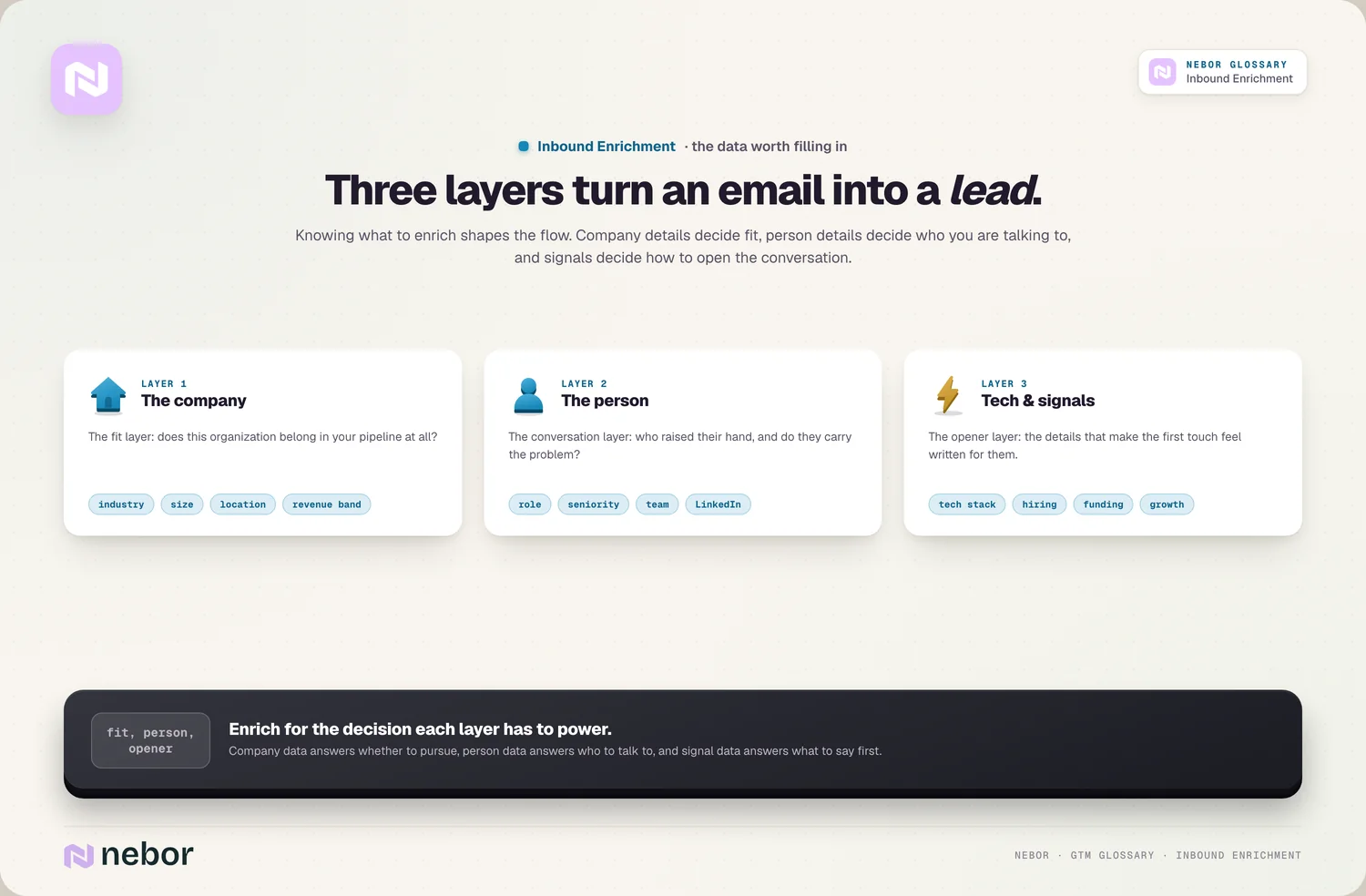
Add the company fields routing reads. Country, employee band and industry are the firmographic data that territory and segment rules depend on. These are the only fields that should hold up the owner decision.
Add the person. Job title, seniority and department help scoring and tell the rep who they're about to call, but they rarely change who owns the lead.
Leave the rest until after routing. Technographics, hiring, funding news and intent signals sharpen the first message and feed a predictive lead scoring model, but nothing needs them in the first minute.
A field that no step on the inbound path reads can be filled overnight with everything else. Then measure how often the routing fields actually come back filled. The share of inbound leads that leave step 3 with country, size and industry is your coverage rate for the inbound path, and it's the number that tells you whether a second provider is worth adding.
The time budget before routing fires
Steps 1 to 3 are synchronous: lead routing waits for them. Steps 4 and 5 are asynchronous: they can finish while the rep is already reading the record. Drawing that line explicitly is most of the design work, because it decides how long the lead sits before it has an owner.
A lookup on a single record normally comes back in seconds. The risk is the slow case: a provider that times out, a webhook queue that backs up during a campaign, a waterfall that has to try four sources before it finds a domain. So give the synchronous part a cut-off. If the company fields haven't arrived when it passes, the router assigns the lead on what it has (the country and company the form gave, or the free-mail route) and marks the record as partly enriched. The late data still lands, and the owner sees it when it does.

The reason for the cut-off is speed to lead. Someone who requested a demo is most reachable in the minutes after they did it, and a perfect record that reaches a rep half an hour later has cost more than it added.
Fewer hops help too. A common build sends the submission from HubSpot to a Clay table, runs the waterfall there and writes the fields back before the CRM workflow rotates the owner. Each handover adds time and a chance to fail silently, so keep the routing fields on the shortest path and push the rest to a second pass.
When the lookup comes back empty
Every inbound flow gets records where enrichment returns little or nothing. The question is what happens to them in the next minute, and the answer should never be "they wait".
A personal email address
A Gmail or Outlook address gives the provider no domain to work from. If the form tool shows the full form when enrichment fails, as HubSpot's form shortening does, you'll at least have the company name the visitor typed. Send these leads to a short queue that a person checks within the same window as any other lead, rather than into the general rotation, where they tend to land with whoever is least able to judge them.
A company no provider knows
Small firms, new companies and niche businesses often aren't in any database. Route on what you have (the country from the form and the domain) and flag the record, so the rep spends half a minute on the company's website before calling. That often tells them more than a provider would have.
A match that disagrees with the form
The visitor typed "50 employees" and the provider says 500. Or the domain belongs to a parent group while the person works at one of its subsidiaries. Store both values, let what the visitor typed drive routing, and treat the disagreement as information: a large gap is often a sign the lead sits inside a bigger organisation your account team should know about.
For all three cases, add an enrichment status property to each inbound record (complete, partial, free-mail, none). It tells reps how far to trust what they see, and reporting on it is usually how you notice a provider getting worse.
Where the enriched record goes next
Once the fields are in, several decisions can happen at the same moment instead of waiting on a person. The record is compared with your ideal customer profile. Lead scoring reads title, seniority and behaviour. Account scoring places the company in a tier, which can matter more than the individual: a junior employee at a top-tier account still deserves a fast reply. Then routing sends good fits to a rep and the rest into nurture, where content keeps the conversation open until fit or timing changes.

The same record then does a second job. The rep opens it already knowing the company, the role and the reason for the request, which is the starting point of a good inbound meeting workflow. And because the lead is now tied to a company, it can start inbound-led outbound: one person's demo request becomes a reason to reach the colleagues who'll sit in on the decision, with a message that refers to what their company just asked about.
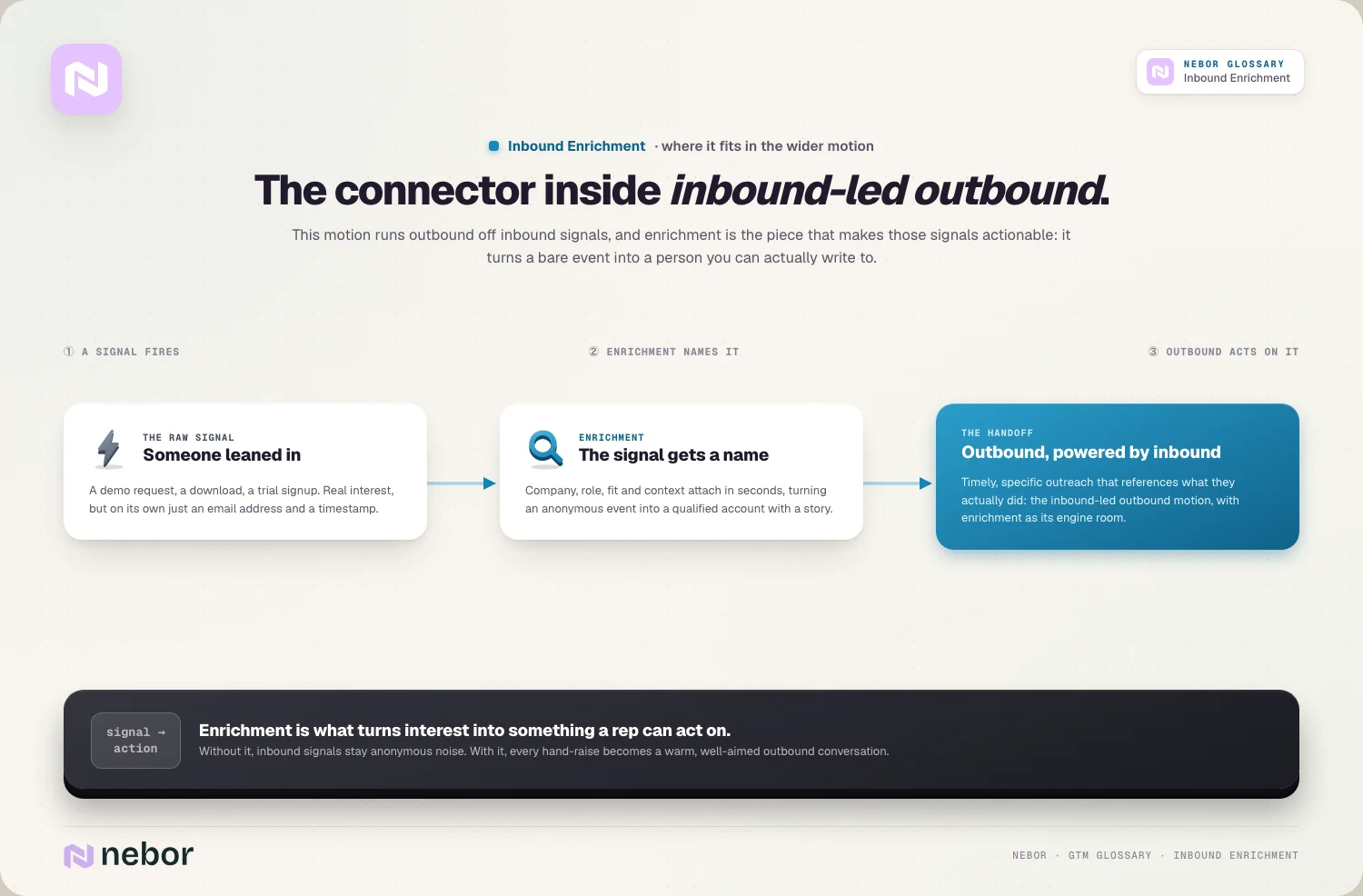
It's the same pattern that runs on the outbound side once you let automation take over the prospecting research: complete the record, read the fields, choose the next step. The difference on inbound is that the person is waiting for you.
What the GDPR asks of enriched form leads
A form fill gives you two kinds of personal data. What the visitor typed was collected from them. What enrichment adds (a job title, a seniority level, a LinkedIn profile) was not, and the GDPR treats that differently. Article 14 of the GDPR covers data that has "not been obtained from the data subject" and requires you to tell the person, among other things, which source the data came from. The deadline is a reasonable period, at the latest one month, or the first time you contact them if that comes sooner.
For inbound leads there's a simpler route than a separate notice. Article 14 doesn't apply where the person "already has the information", so a privacy notice linked from the form that explains what kinds of data you add and where they come from deals with it before the lead is even created. Most teams forget to update that notice when they switch enrichment on.
Three more provisions shape the build:
Lawful basis. Most B2B teams rely on legitimate interests under Article 6(1)(f), which only holds where the person's interests and rights don't override yours. That's a balancing test you should do and keep on file. Recital 47 says direct marketing "may be regarded as" a legitimate interest, which is a starting point, not a pass.
Data minimisation. Article 5(1)(c) says personal data must be limited to what's necessary for the purpose. A short list of fields, each one tied to a step that reads it, is good engineering and good compliance at the same time.
Objection. Under Article 21, a person can object to direct marketing at any time, and their data then can't be processed for that purpose any more. Your unsubscribe and opt-out handling has to reach the enriched fields too, not only the email list.
Facts about the company itself, such as its size or industry, aren't personal data, so the person part of the lookup is where the questions sit. Before the enrichment flow goes live, ask your data protection officer, or whoever handles GDPR questions if you don't have one, to sign off on the notice and the balancing test.
Recap
Inbound enrichment is a small piece of plumbing between a submit button and a CRM record, and most of what makes it work happens in the first minute. Ask the visitor for little, look up the rest in an order that puts the routing fields first, cap the wait, and give every empty result somewhere to go.
It works best when the form, the lookup and the routing are designed together rather than as three tools that happen to touch the same record. That also keeps the privacy side simple, because a flow that only fetches what it uses has less to explain.
It's usually one of the first pieces we connect when a client wants one set of customer records behind every team that sells. We build it on the client's own accounts (CRM, form tool and Clay), test it against a few weeks of their real form submissions, and leave behind a plain map of which source fills each field, so the next person to change a provider knows what depends on it.
Frequently asked questions
Can you enrich website visitors who never fill in a form?
Partly. Reverse IP lookup and visitor identification tools can often tell you which company a visit came from, especially from office networks, but rarely which person. That gives you an account-level signal rather than a lead. Treat it as a reason for a rep to look at the account or for outreach to start, and keep it apart from inbound enrichment, which works from an email the person chose to give you.
Does inbound enrichment work for trial sign-ups, webinar registrations and chat?
Yes. Anything that captures a work email can trigger the same lookup, whether it's a product sign-up, an event registration, a content download or a chat conversation where the visitor leaves an address. The difference is the urgency. A trial sign-up or a demo request needs the routing fields within seconds, while a webinar registration can usually be enriched in a batch later the same day.
Should inbound forms block free email addresses?
Usually not on demo or contact forms. Blocking Gmail and similar addresses protects enrichment, but it also turns away owners of small firms who use a personal address for business. A better default is to accept them, show the full set of fields when enrichment finds nothing, and send those leads to a queue a person checks quickly. Blocking makes more sense on gated content where each lead is worth less.
Does inbound enrichment slow down the form?
It shouldn't. In most setups the lookup runs after the visitor submits, on the server side, so the thank-you page loads as normal. The exception is tooling that shortens the form while the visitor types, which looks up the email before submission, and pages that show a booking calendar only to good-fit leads. Both depend on the lookup returning quickly, so test them on a slow connection before launch.
Which tools can run inbound enrichment?
CRMs increasingly do some of it natively. HubSpot enriches contacts and companies from its own dataset and can shorten forms with it. For more coverage, teams send each submission to a tool like Clay through a webhook, run a waterfall across several providers, and write the results back. The tool matters less than the order of lookups, the time limit and the rules for empty results.
What does inbound enrichment cost per lead?
It depends on the providers, how many fields you request and how far down a waterfall each record has to go, so there is no fair single number. Inbound volume is usually small compared with outbound lists, which makes the total modest. Keep cost down by checking your own CRM before calling any provider, stopping the cascade at the first good answer and leaving non-routing fields for a cheaper overnight pass.
Should a person check enriched data before a rep reaches out?
For most leads, no, because the delay costs more than the occasional wrong field. For the few that matter most, such as a large company in your top account tier, a quick look by the rep before the first touch is worth it. Providers sometimes match a person to the wrong company or an outdated title, and a rep who repeats that mistake on the first call loses credibility fast.
Do you need consent to enrich a lead who filled in your form?
Consent is one lawful basis under the GDPR, but most B2B teams rely on legitimate interests instead, which requires a written balancing test showing the person's rights don't outweigh your interest. Either way, the person has to be told that you add data from other sources and where it comes from. The simplest place to do that is the privacy notice linked from the form.
Is progressive profiling still useful once you enrich inbound leads?
Yes, for the things enrichment can't find. Progressive profiling swaps a known field for a new question each time a returning contact fills in a form, so over several visits you learn their timeline, budget or main problem without a long first form. Let enrichment handle the firmographic and job title fields, and use the progressive questions for intent and needs, which no provider holds.
What happens to enriched data when a lead objects to marketing?
Under Article 21 of the GDPR, a person can object to direct marketing at any time, and their data can then no longer be processed for that purpose. That covers the fields enrichment added, not only the email address. Make sure an opt-out removes the contact from marketing lists and sequences, and decide whether the enriched fields should be deleted or kept only for other lawful purposes.
Share this post
Enrichment
Inbound
Glossary
Related glossary items
Understanding the core GTM concepts

Automation
Data Enrichment
Data enrichment is the process of adding missing or updated details to contact and account records from outside sources, so a thin record with just an email or domain becomes a full, usable profile.

Automation
Lead Routing
Lead routing is the automated process of assigning each incoming lead to the right rep, team or queue based on rules you set, so someone can follow up while the lead's interest is still fresh.

Automation
Speed to Lead
Speed to lead is the time between a prospect showing interest, like filling out a form or requesting a demo, and your team making real contact. Faster responses connect with far more leads.

Automation
Waterfall Enrichment
Waterfall enrichment passes each record through several data providers in a set order, moving to the next only when the previous one finds nothing, so you fill gaps no single provider could cover.
Ready to build your pipeline